reset LINCOLN MKZ 2014 User Guide
[x] Cancel search | Manufacturer: LINCOLN, Model Year: 2014, Model line: MKZ, Model: LINCOLN MKZ 2014Pages: 468, PDF Size: 4.49 MB
Page 165 of 468
Note:Hold the handle of the fuel filler
nozzle higher while you insert the
nozzle for easier access.
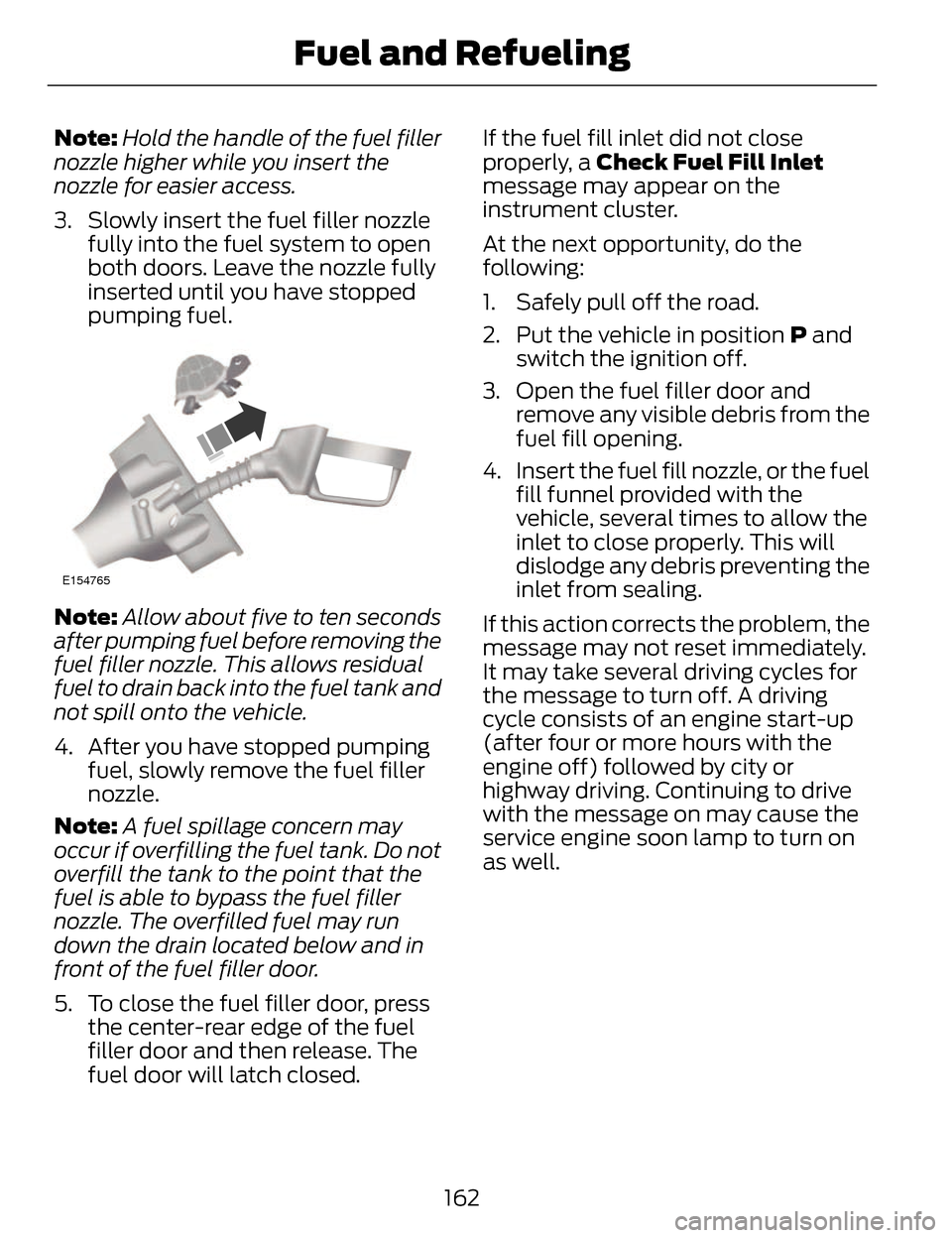
3. Slowly insert the fuel filler nozzle fully into the fuel system to open
both doors. Leave the nozzle fully
inserted until you have stopped
pumping fuel.
E154765
Note: Allow about five to ten seconds
after pumping fuel before removing the
fuel filler nozzle. This allows residual
fuel to drain back into the fuel tank and
not spill onto the vehicle.
4. After you have stopped pumping fuel, slowly remove the fuel filler
nozzle.
Note: A fuel spillage concern may
occur if overfilling the fuel tank. Do not
overfill the tank to the point that the
fuel is able to bypass the fuel filler
nozzle. The overfilled fuel may run
down the drain located below and in
front of the fuel filler door.
5. To close the fuel filler door, press the center-rear edge of the fuel
filler door and then release. The
fuel door will latch closed. If the fuel fill inlet did not close
properly, a Check Fuel Fill Inlet
message may appear on the
instrument cluster.
At the next opportunity, do the
following:
1. Safely pull off the road.
2. Put the vehicle in position
P and
switch the ignition off.
3. Open the fuel filler door and remove any visible debris from the
fuel fill opening.
4. Insert the fuel fill nozzle, or the fuel fill funnel provided with the
vehicle, several times to allow the
inlet to close properly. This will
dislodge any debris preventing the
inlet from sealing.
If this action corrects the problem, the
message may not reset immediately.
It may take several driving cycles for
the message to turn off. A driving
cycle consists of an engine start-up
(after four or more hours with the
engine off) followed by city or
highway driving. Continuing to drive
with the message on may cause the
service engine soon lamp to turn on
as well.
162
Fuel and Refueling
Page 199 of 468
Active guidelines are only shown with
fixed guidelines. To use active
guidelines, turn the steering wheel to
point the guidelines toward an
intended path. If the steering wheel
position is changed while reversing,
the vehicle might deviate from the
original intended path.
The fixed and active guidelines fade
in and out depending on the steering
wheel position. The active guidelines
are not shown when the steering
wheel position is straight.
Always use caution while reversing.
Objects in the red zone are closest to
your vehicle and objects in the green
zone are farther away. Objects are
getting closer to your vehicle as they
move from the green zone to the
yellow or red zones. Use the side view
mirrors and rear view mirror to get
better coverage on both sides and rear
of the vehicle.
Selectable settings for this feature are
ACTIVE + FIXED, FIXED and OFF.
Visual Park Aid Alert
Note: Visual park alert is only available
when the transmission is in R
(Reverse).
Note: The reverse sensing system is
not effective at speeds above 3 mph
(5 km/h) and may not detect certain
angular or moving objects. The system uses red, yellow and green
highlights which appear on top of the
video image when an object is
detected by the reverse sensing
system. The alert highlights the
closest object detected. The reverse
sensing alert can be disabled and if
visual park aid alert is enabled,
highlighted areas are still displayed.
Selectable settings for this feature are
ON and OFF.
Manual Zoom
WARNING
When manual zoom is on, the
full area behind the vehicle is not
shown. Be aware of your surroundings
when using the manual zoom feature.
Note: Manual zoom is only available
when the transmission is in R
(Reverse).
Note: When manual zoom is enabled,
only the centerline is shown.
This allows you to get a closer view of
an object behind the vehicle. The
zoomed image keeps the bumper in
the image to provide a reference. The
zoom is only active while the
transmission is in R (Reverse). When
the transmission is shifted out of R
(Reverse), the feature automatically
turns off and must be reset when it is
used again.
Selectable settings for this feature are
ON and OFF.
196
Parking Aids
Page 203 of 468
E164805
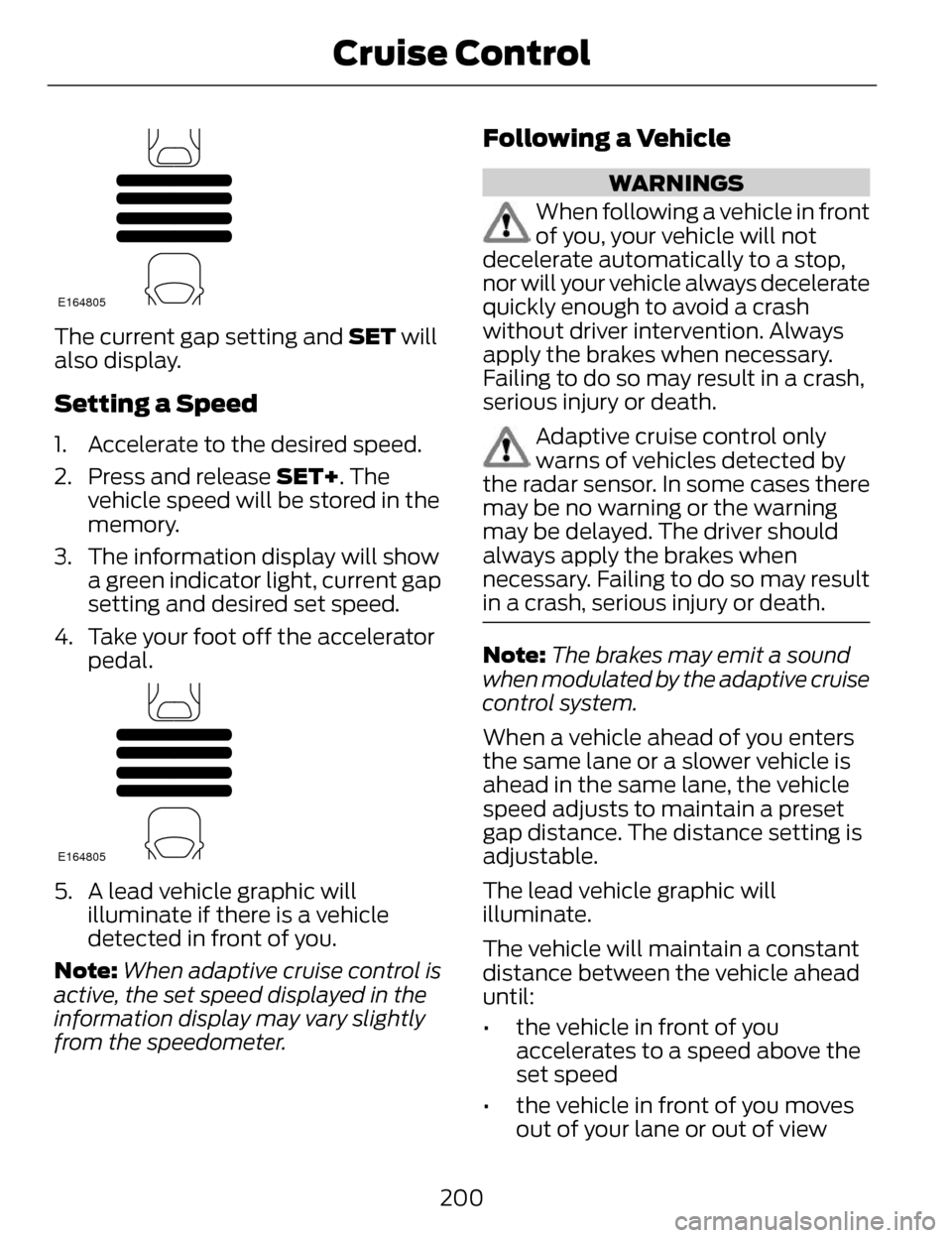
The current gap setting and SET will
also display.
Setting a Speed
1. Accelerate to the desired speed.
2. Press and release SET+. Thevehicle speed will be stored in the
memory.
3. The information display will show a green indicator light, current gap
setting and desired set speed.
4. Take your foot off the accelerator pedal.
E164805
5. A lead vehicle graphic willilluminate if there is a vehicle
detected in front of you.
Note: When adaptive cruise control is
active, the set speed displayed in the
information display may vary slightly
from the speedometer.
Following a Vehicle
WARNINGS
When following a vehicle in front
of you, your vehicle will not
decelerate automatically to a stop,
nor will your vehicle always decelerate
quickly enough to avoid a crash
without driver intervention. Always
apply the brakes when necessary.
Failing to do so may result in a crash,
serious injury or death.
Adaptive cruise control only
warns of vehicles detected by
the radar sensor. In some cases there
may be no warning or the warning
may be delayed. The driver should
always apply the brakes when
necessary. Failing to do so may result
in a crash, serious injury or death.
Note: The brakes may emit a sound
when modulated by the adaptive cruise
control system.
When a vehicle ahead of you enters
the same lane or a slower vehicle is
ahead in the same lane, the vehicle
speed adjusts to maintain a preset
gap distance. The distance setting is
adjustable.
The lead vehicle graphic will
illuminate.
The vehicle will maintain a constant
distance between the vehicle ahead
until:
• the vehicle in front of you accelerates to a speed above the
set speed
• the vehicle in front of you moves out of your lane or out of view
200
Cruise Control
Page 211 of 468

E131358
The current assessment of your
alertness is within a typical range.
E131359
The current assessment of your
alertness indicates that you should
rest as soon as safely possible.
The status bar will travel from left to
right as the calculated alertness level
decreases. As the rest icon is
approached the color turns from
green to yellow to red.
• Green - No rest required.
• Yellow - First warning is active.
• Red - Second warning is active.
Note:If you have recently received a
warning; you should consider resting,
even if the current assessment is with
the typical range.
Note: The alertness level will be
shown in grey for a short time if the
camera sensor cannot track the road
lane markings or if the vehicle speed
drops below approximately 40 mph
(64 km/h), after which the system
display will inform the driver that the
system is unavailable. Resetting the System
You can reset the system by either:
• Switching the ignition off and on.
• Stopping the vehicle and then
opening and closing the driver’s
door.
LANE KEEPING SYSTEM (IF
EQUIPPED)
WARNING
The system is designed to aid the
driver. It is not intended to
replace the driver’s attention and
judgment. The driver is still
responsible to drive with due care and
attention.
Note: The system works above 40
mph (64 km/h).
Note: The system works as long as one
lane marking can be detected by the
camera.
Note: If the camera is blocked or if the
windshield is damaged, the system
may not function.
Note: When Aid mode is on and the
system detects no driver steering
activity for a short continuous period
of time, the system alerts the driver to
put their hands on the steering wheel.
The system may detect a light
grip/touch on the steering wheel as
hands off driving.
208
Driving Aids
Page 219 of 468
Note:It is possible to get a blockage
warning with no blockage present; this
is rare and known as a false blockage
warning. A false blocked condition
either self-corrects or clears after a key
cycle.
E142443
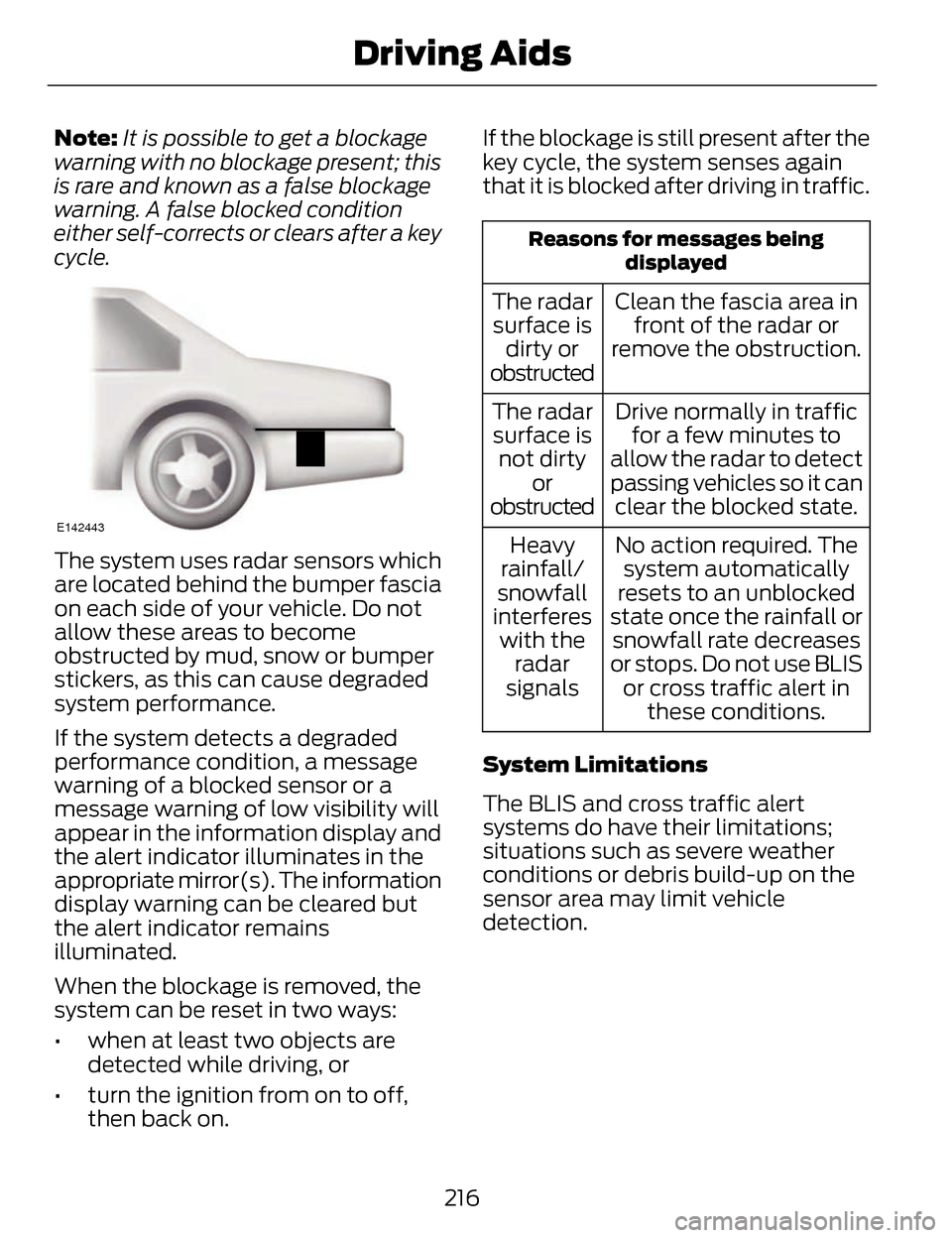
The system uses radar sensors which
are located behind the bumper fascia
on each side of your vehicle. Do not
allow these areas to become
obstructed by mud, snow or bumper
stickers, as this can cause degraded
system performance.
If the system detects a degraded
performance condition, a message
warning of a blocked sensor or a
message warning of low visibility will
appear in the information display and
the alert indicator illuminates in the
appropriate mirror(s). The information
display warning can be cleared but
the alert indicator remains
illuminated.
When the blockage is removed, the
system can be reset in two ways:
• when at least two objects are detected while driving, or
• turn the ignition from on to off, then back on. If the blockage is still present after the
key cycle, the system senses again
that it is blocked after driving in traffic.
Reasons for messages being
displayed
Clean the fascia area infront of the radar or
remove the obstruction.
The radar
surface is dirty or
obstructed
Drive normally in trafficfor a few minutes to
allow the radar to detect
passing vehicles so it can clear the blocked state.
The radar
surface is not dirty or
obstructed
No action required. Thesystem automatically
resets to an unblocked
state once the rainfall or snowfall rate decreases
or stops. Do not use BLIS or cross traffic alert in these conditions.
Heavy
rainfall/
snowfall
interferes with the radar
signals
System Limitations
The BLIS and cross traffic alert
systems do have their limitations;
situations such as severe weather
conditions or debris build-up on the
sensor area may limit vehicle
detection.
216
Driving Aids
Page 224 of 468
If the front end of the vehicle is hit or
damaged, the radar sensing zone may
be altered causing missed or false
collision warnings. See your
authorized dealer to have your
collision warning radar checked for
proper coverage and operation.
STEERING
Electric Power Steering
WARNINGS
The electric power steering
system has diagnostic checks
that continuously monitor the system
to ensure proper operation. When a
system error is detected a steering
message will appear in the
information display.
The electric power steering
system has diagnostic checks
that continuously monitor the system
to ensure proper operation of the
electronic system. When an electronic
error is detected, a message will be
displayed in the information display.
If this happens, stop the vehicle in a
safe place, and turn off the engine.
After at least 10 seconds, reset the
system by restarting the engine, and
watch the information display for a
steering message. If a steering
message returns, or returns while
driving, take the vehicle to your dealer
to have it checked.
WARNINGS
Obtain immediate service if a
system error is detected. You
may not notice any difference in the
feel of your steering, but a serious
condition may exist. Failure to do so
may result in loss of steering control.
Your vehicle is equipped with an
electric power-assisted steering
system. There is no fluid reservoir to
check or fill.
If your vehicle loses electrical power
while you are driving (or if the ignition
is turned off), you can steer the
vehicle manually, but it takes more
effort. Extreme continuous steering
may increase the effort it takes for you
to steer. This occurs to prevent
internal overheating and permanent
damage to your steering system. If this
should occur, you will neither lose the
ability to steer the vehicle manually
nor will it cause permanent damage.
Typical steering and driving
maneuvers will allow the system to
cool and steering assist will return to
normal.
Steering Tips
If the steering wanders or pulls, check
for:
• an improperly inflated tire
• uneven tire wear
• loose or worn suspension components
• loose or worn steering components
• improper vehicle alignment
221
Driving Aids
Page 225 of 468
A high crown in the road or high
crosswinds may also make the
steering seem to wander or pull.
Adaptive Learning
The EPS system adaptive learning
helps correct for road irregularities
and improves overall handling and
steering feel. It communicates with
the vehicle's brake system to help
operate advanced stability control
and accident avoidance systems.
Additionally, whenever the battery is
disconnected or a new battery
installed, the vehicle must be driven
a short distance before the strategy
is relearned and all systems are
reactivated.
DRIVE CONTROL
LINCOLN DRIVE CONTROL
Lincoln Drive Control delivers the
Lincoln driving experience through a
suite of sophisticated electronic
vehicle systems. These systems
continuously monitor both your driving
inputs and the road conditions to
optimize ride comfort, steering,
handling, powertrain response and
sound. You can preset your
preferences for these systems within
the information display. Lincoln Drive
Control will respond to your
preferences based on what gear
position you select. This provides a
single location to control multiple
systems performance settings.
Lincoln Drive Control consists of the
following systems:• Continuously Controlled Damping
dynamically adjusts the shock
absorbers stiffness in real time to
match the road surface and driver
inputs. Vehicle motion (roll, pitch,
bounce), suspension position,
vehicle loading, vehicle speed, road
conditions, and steering are
continuously monitored to adjust
the suspension damping for
optimal vehicle control.
• Electronically Power-Assisted Steering adjusts steering effort and
feel based on vehicle speed and
your inputs
• Active Noise Control utilizes vehicle electronics to enhance the
acoustic experience
• Electronic Stability Control and Traction Control maintain vehicle
control in adverse conditions or
high performance driving
• Electronic Throttle Control which enhances the powertrain response
to your inputs
These systems have a range of modes
which you can choose from in order
to customize your ideal driving
experience:
222
Driving Aids
Page 259 of 468
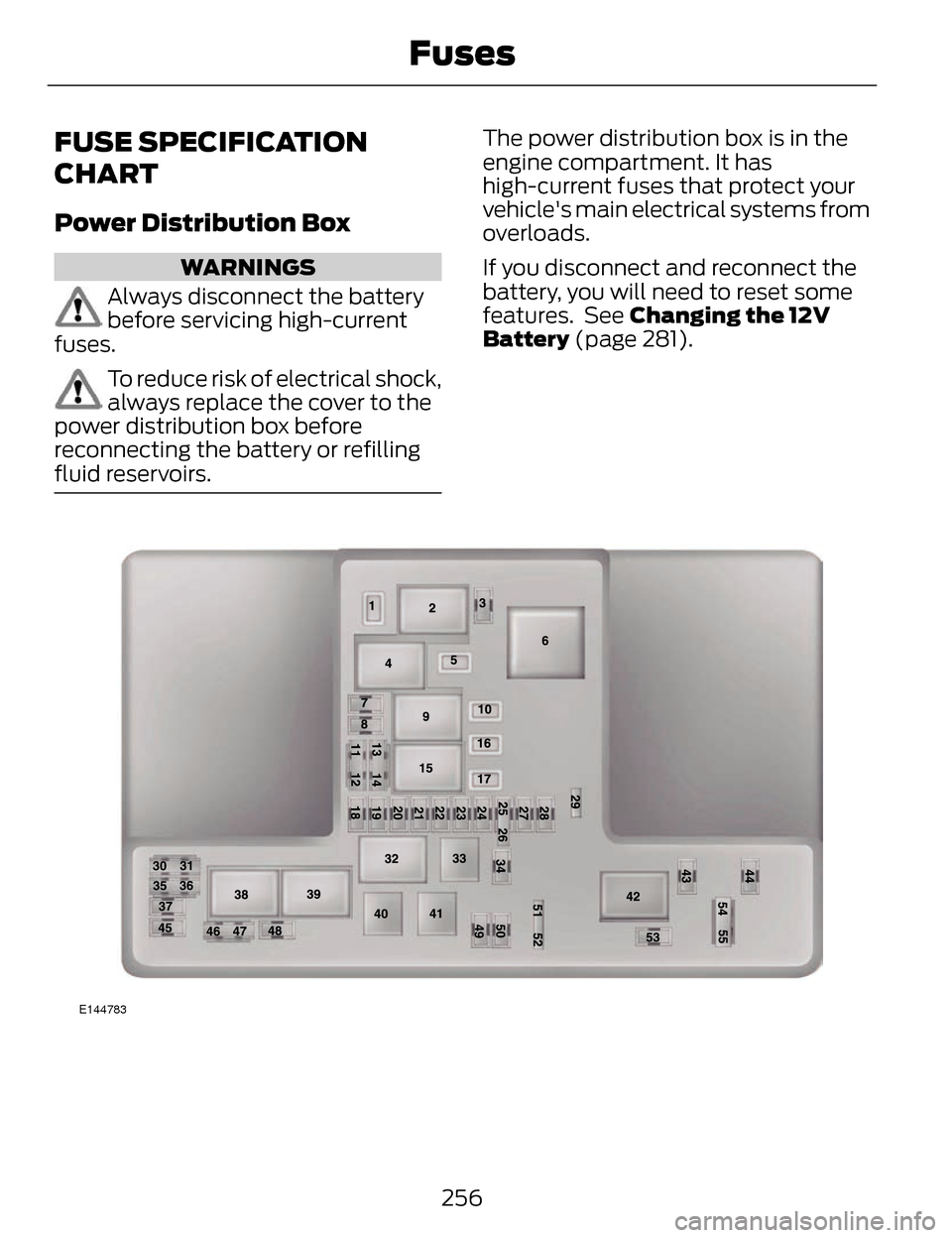
FUSE SPECIFICATION
CHART
Power Distribution Box
WARNINGS
Always disconnect the battery
before servicing high-current
fuses.
To reduce risk of electrical shock,
always replace the cover to the
power distribution box before
reconnecting the battery or refilling
fluid reservoirs.
The power distribution box is in the
engine compartment. It has
high-current fuses that protect your
vehicle's main electrical systems from
overloads.
If you disconnect and reconnect the
battery, you will need to reset some
features. See Changing the 12V
Battery (page 281).
E144783
256
Fuses
Page 275 of 468
Only use oils certified for gasoline
engines by the American Petroleum
Institute (API). An oil with this
trademark symbol conforms to the
current engine and emission system
protection standards and fuel
economy requirements of the
International Lubricants Specification
Advisory Council (ILSAC), comprised
of U.S. and Japanese automobile
manufacturers.
1. Remove the filler cap.
2. Add engine oil that meets the Fordspecifications. See Capacities
and Specifications (page 329).
3. Replace the filler cap. Turn it until you feel a strong resistance.
OIL CHANGE INDICATOR
RESET
To reset the oil monitoring system
after an oil change, See General
Information (page 101).
ENGINE COOLANT CHECK
Checking the Engine Coolant
When the engine is cold, check the
concentration and level of the engine
coolant at the intervals listed in the
scheduled maintenance information.
See Scheduled Maintenance (page
436).
Note: Make sure that the level is
between the MIN and MAX marks on
the coolant reservoir. Note:
Coolant expands when it is hot.
The level may extend beyond the MAX
mark
Note: If the level is at the MIN mark,
below the MIN mark, or empty, add
coolant immediately. See Adding
Engine Coolant in this chapter.
The coolant concentration should be
maintained within 48% to 50%,
which equates to a freeze point
between -30°F degrees (-34ºC) and
-34ºF (-37ºC).
Note: For best results, coolant
concentration should be tested with a
refractometer such as Rotunda tool
300-ROB75240 available from your
authorized dealer. Ford does not
recommend the use of hydrometers or
coolant test strips for measuring
coolant concentrations.
Note: Automotive fluids are not
interchangeable. Do not use engine
coolant or antifreeze or windshield
washer fluid outside of its specified
function and vehicle location.
Adding Engine Coolant
WARNINGS
Do not add engine coolant when
the engine is hot. Steam and
scalding liquids released from a hot
cooling system can burn you badly.
Also, you can be burned if you spill
coolant on hot engine parts.
272
Maintenance
Page 278 of 468
If the engine reaches a preset
over-temperature condition, the
engine will automatically switch to
alternating cylinder operation. Each
disabled cylinder acts as an air pump
and cools the engine.
When this occurs, the vehicle will still
operate. However:
• The engine power will be limited.
• The air conditioning system will bedisabled.
Continued operation will increase the
engine temperature and the engine
will completely shut down, causing
steering and braking effort to increase.
Once the engine temperature cools,
the engine can be re-started. Take
your vehicle to an authorized dealer
as soon as possible to minimize
engine damage.
When Fail-Safe Mode Is Activated
WARNINGS
Fail-safe mode is for use during
emergencies only. Operate the
vehicle in fail-safe mode only as long
as necessary to bring the vehicle to
rest in a safe location and seek
immediate repairs. When in fail-safe
mode, the vehicle will have limited
power, will not be able to maintain
high-speed operation, and may
completely shut down without
warning, potentially losing engine
power, power steering assist, and
power brake assist, which may
increase the possibility of a crash
resulting in serious injury.
WARNINGS
Never remove the coolant
reservoir cap while the engine is
running or hot.
You have limited engine power when
in the fail-safe mode, so drive the
vehicle with caution. The vehicle will
not be able to maintain high-speed
operation and the engine will run
rough. Remember that the engine is
capable of completely shutting down
automatically to prevent engine
damage, therefore:
1. Pull off the road as soon as safely possible and turn off the engine.
2. Arrange for the vehicle to be taken to an authorized dealer.
3. If this is not possible, wait a short period for the engine to cool.
4. Check the coolant level and replenish if low.
5. Re-start the engine and take your vehicle to an authorized dealer.
Note: Driving the vehicle without
repairing the engine problem increases
the chance of engine damage. Take
your vehicle to an authorized dealer as
soon as possible.
275
Maintenance