wheel LINCOLN MKZ 2015 Owners Manual
[x] Cancel search | Manufacturer: LINCOLN, Model Year: 2015, Model line: MKZ, Model: LINCOLN MKZ 2015Pages: 516, PDF Size: 4.48 MB
Page 435 of 516
speak with an operator when it has
difficulty matching your voice request.
The live operator can assist you by
searching for businesses by name or by
category, residential addresses by street
address or by name or specific street
intersections. Operator Assist is a feature
of your SYNC Services subscription. For
more information on Operator Assist, visit
www.SYNCMyRide.com/support.
2. Follow the voice prompts to select your Destination. After the route download is
finished, the phone call automatically
ends. If your vehicle is not equipped with
Navigation:
•
Turn-by-turn directions appear in the
information display, in the status bar of
your touchscreen system and on the
SYNC Services screen. You also receive
driving instructions from audible prompts.
• When on an active route, you can select
Route Summary or Route Status using
the touchscreen controls or voice
commands to view the
Route Summary
Turn List or the Route Status ETA. You
can also turn voice guidance on or off,
cancel the route or update the route. If you miss a turn, SYNC automatically asks
if you want the route updated. Just say, "Yes"
when prompted and the system delivers a
new route to your vehicle.
If your vehicle is equipped with Navigation,
SYNC Services downloads your requested
destination to the navigation system. The
navigation system then calculates the route
and provides driving instructions.
See
Navigation (page 444).
Disconnecting from SYNC Services
1. Press and hold the hang-up phone button
on the steering wheel.
2. Say "Good-bye" from the SYNC Services
main menu.
432
MKZ (), enUSA MyLincoln Touch™
Page 436 of 516
SYNC Services quick tips
You can personalize your Services feature to provide quicker access to your most used or favorite information.
You can save address points, such as work or home. You can also save favorite information like sports teams,
such as Detroit Lions, or a news category. You can learn more about personalization by logging onto
www.SYNCMyRide.com.
Personalizing
Press the voice button at any time (while connected to SYNC Services) to interrupt a voice prompt or an audio
clip (such as a sports report) and say your voice command.
Push to interrupt
Your subscription is associated with your Bluetooth-enabled cellular phon\
e number, not your VIN (Vehicle
Identification Number). You can pair and connect your phone to any vehicle equipped with SYNC Services and
continue enjoying your personalized services.
Portable
SYNC Services Voice Commands When a route has been
downloaded (non-navigation
systems), press the voice button
on the steering wheel controls. When
prompted, say any of the following
commands: "SERVICES"
"Cancel route"
"Navigation voice off " "Navigation voice on" "Next turn"
"Route status"
"Route summary" "SERVICES"
"Services"
"Update route" "Help"
433
MKZ (), enUSA MyLincoln Touch™E142599
Page 438 of 516
Ski Conditions
Touch this button to view ski conditions for
a specific area.
Sirius Travel Link Voice Commands
Press the voice button on the
steering wheel controls. When
prompted, say any of the following
commands: "SIRIUS TRAVEL LINK"
"5-day weather forecast" "Fuel prices"
"Movie listings"
"Sports headlines" *
"Sports schedules" *
"Sports scores" *
"Traffic"
"Weather" "SIRIUS TRAVEL LINK"
"Weather map" "Help"
* If you say "Sports headlines", "Sports
schedules" or "Sports scores", you can then
say any of the commands in the following
chart. Sports-related Commands
*
"Baseball"
"College basketball" "College football" "Golf "
"MLS"
"My teams" "NBA""NFL"
"NHL" Sports-related Commands
*
"WNBA" "Help"
* If you want to hear headlines, schedules or
scores from a particular sport, or your favorite
team(s), say the sport (or team), then
"headlines", "schedules" or "scores". Additional sports-related voice commands
"Baseball headlines""Baseball schedule" "Baseball scores"
"College basketball headlines" "College basketball schedule" "College basketball scores"
"College football headlines" "College football schedule" "College football scores"
435
MKZ (), enUSA MyLincoln Touch™E142599
Page 441 of 516
To make sure that 911 Assist works properly:
•
SYNC must be powered and working
properly at the time of the incident and
throughout feature activation and use.
• The 911 Assist feature must be set on
prior to the incident.
• You must pair and connect a
Bluetooth-enabled and compatible phone
to SYNC.
• A connected Bluetooth-enabled phone
must have the ability to make and
maintain an outgoing call at the time of
the incident.
• A connected Bluetooth-enabled phone
must have adequate network coverage,
battery power and signal strength.
• The vehicle must have battery power and
be located in the United States, Canada
or in a territory in which 911 is the
emergency number. In the Event of a Crash
Not all crashes deploy an airbag or activate
the fuel pump shut-off (which would trigger
911 Assist); however, SYNC tries to contact
emergency services if 911 Assist triggers. If
a connected phone sustains damage or loses
connection to SYNC, SYNC searches for, and
tries to connect to, any available previously
paired phone and tries to make the call to
911.
Before making the call:
•
SYNC provides a short window of time
(about 10 seconds) to cancel the call. If
you fail to cancel the call, SYNC attempts
to dial 911.
• SYNC says the following, or a similar
message: "SYNC will attempt to call 911,
to cancel the call, press Cancel on your
screen or press and hold the phone
button on your steering wheel." If you do not cancel the call, and SYNC
makes a successful call, a pre-recorded
message plays for the 911 operator, and then
the occupant(s) in your vehicle is able to talk
with the operator. Be prepared to provide
your name, phone number and location
immediately, because not all 911 systems are
capable of receiving this information
electronically.
911 Assist May Not Work If
•
Your cellular phone or 911 Assist
hardware sustains damage in a crash.
• The vehicle's battery or the SYNC system
has no power.
• The phones(s) previously paired or
connected to the system are thrown from
the vehicle.
911 Assist Privacy Notice
When you turn on 911 Assist, it may disclose
to emergency services that your vehicle has
been in a crash involving the deployment of
an airbag or activation of the fuel pump
shut-off. Certain versions or updates to 911
Assist may also be capable of electronically
438
MKZ (), enUSA MyLincoln Touch™
Page 443 of 516
To run a report by voice command,
press the voice button on the
steering wheel and, when
prompted, say "Vehicle health report".
Vehicle Health Report Privacy Notice
When you create a Vehicle Health Report,
Ford Motor Company may collect your
cellular phone number (to process your
report request) and diagnostic information
about your vehicle. Certain versions or
updates to Vehicle Health Report may also collect more vehicle information. Ford may
use your vehicle information it collects for
any purpose. If you do not want to disclose
your cellular phone number or vehicle
information, do not run the feature or set up
your Vehicle Health Report profile at
www.SYNCMyRide.com. See
www.SYNCMyRide.com (Vehicle Health
Report Terms and Conditions, and Privacy
Statement) for more information.
CLIMATE
Touch the lower right corner on the
touchscreen to access your climate control
features. Depending on your vehicle line and
option package, your climate screen may
look different from this screen.
Note:
You can switch temperature units
between Fahrenheit and Celsius. See
Settings (page 387).
440
MKZ (), enUSA MyLincoln Touch™E142599
Page 446 of 516

MAX Defrost: Touch the button to maximize defrosting. Outside air flows through the wi\
ndshield vents, fan automatically adjusts
to the highest speed and the temperature dial returns to the full heat p\
osition. You can use this setting to defog or clear a thin
covering of ice from the windshield. The heated rear window also automat\
ically turns on when you select MAX Defrost.
Note:
To prevent window fogging, you cannot select recirculated air when MAX De\
frost is on.
Driver settings:
J
Touch the
+ or – to increase or decrease the air temperature on the passenger side of th\
e vehicle.
Touch the heated seat icon to switch the heated seat off and on (if equi\
pped).
Touch the climate-controlled seat icon to switch the climate-controlled s\
eat off and on (if equipped).
Touch
MyTemp to select your preset temperature setpoint. Touch and hold MyTemp to save a new preset temperature setpoint.
Touch the heated steering wheel icon to switch the heated steering wheel \
on and off (if equipped).
Note: If your vehicle is equipped with a
wood-trimmed steering wheel, it does not
heat between the 10 o'clock and 2 o'clock
positions.
Climate Control Voice Commands Press the voice button on the
steering wheel controls. When
prompted, say any of the following
commands: Climate control commands
"Climate automatic"
"Climate my temperature" "Climate off ""Climate on"
"Climate temperature <15.5-29.5> degrees" "Climate temperature <60-85> degrees" "Help" There are additional climate control
commands but in order to access them, you
have to say "Climate" first. When the system
is ready to listen, you may say any of the
following commands:
"CLIMATE"
"A/C off ""A/C on"
"Automatic"
"Defrost off "
443
MKZ (), enUSA MyLincoln Touch™E142599
Page 455 of 516
View/Edit Route
Access these features when a route is active:
•
View Route
• Edit Destination/Waypoints
• Edit Turn List
• Detour
• Edit Route Preferences
• Edit Traffic Preferences
• Cancel Route.
Nokia is the digital map provider for the
navigation application. If you find map data
errors, you may report them directly to Nokia
by going to http://mapreporter.navteq.com.
Nokia evaluates all reported map errors and
responds with the result of their investigation
by e-mail. Navigation Map Updates
Annual navigation map updates are available
for purchase through your dealership, by
calling 1-866-4NAVTEQ (1-866-462-8837) (in
Mexico, call 01-800-557-5539) or going to
www.navigation.com/sync. You need to
specify the make and model of your vehicle
to determine if there is an update available.
Navigation Voice Commands When in navigation mode, press
the voice button on the steering
wheel controls. After the tone, say
any of the following commands: Navigation system voice commands
"Cancel next waypoint" 1
"Cancel route" 1
"Destination" 2
"Destination
"Destination
"Destination favorites""Destination home"
"Destination intersection"
"Destination nearest
"Destination play nametags" "Destination POI"
"Destination POI category"
"Destination previous destination" "Destination street address"
"Detour"1
"Navigation" 3
"Navigation voice volume decrease" "Navigation voice volume increase"
"Repeat instruction" 1
452
MKZ (), enUSA MyLincoln Touch™E142599
Page 458 of 516
For a complete listing of the accessories that
are available for your vehicle, please contact
an authorized dealer or visit our online store
at www.Accessories.Lincoln.com (United
States only).
Lincoln Custom Accessories are available
for your vehicle through an authorized
Lincoln dealer. Lincoln Motor Company will
repair or replace any properly authorized
dealer-installed Lincoln Genuine Accessory
found to be defective in factory-supplied
materials or workmanship during the
warranty period, as well as any component
damaged by the defective accessories.
Lincoln Motor Company will warrant your
Lincoln Genuine Accessory through the
warranty that provides the greatest benefit:
•
24 months, unlimited mileage.
• The remainder of your new vehicle
limited warranty.
Contact an authorized dealer for details and
a copy of the warranty. Exterior style
•
Side-window deflectors.
• Wheels.
• Bumper protectors.
Interior style
• All-weather floor mats.
• Rear seat entertainment*.
• Premium carpeted floor mats.
Lifestyle
• Ash cup (smoker's packages).
• Cargo area protector.
• Cargo net.
• Cargo organizer.
Peace of mind
• Car cover*.
• Wheel locks. *Lincoln Licensed Accessory. The accessory
manufacturer designs, develops and
therefore warrants Lincoln Licensed
Accessories, and does not design or test
these accessories to Lincoln Motor Company
engineering requirements. Contact an
authorized Lincoln dealer for the
manufacturer's limited warranty details and
request a copy of the Lincoln Licensed
Accessories product limited warranty from
the accessory manufacturer.
455
MKZ (), enUSA Accessories
Page 466 of 516
Read and follow instructions: Before using
your Windows Automotive- based system,
read and follow all instructions and safety
information provided in this end user manual
("User's Guide"). Not following precautions
found in this User's Guide can lead to an
accident or other serious consequences.
Keep User's Guide in vehicle: When kept in
the vehicle, the User's Guide will be a ready
reference for you and other users unfamiliar
with the Windows Automotive-based system.
Please make certain that before using the
system for the first time, all persons have
access to the User's Guide and read its
instructions and safety information carefully. WARNING
Operating certain parts of this system
while driving can distract your attention
away from the road, and possibly cause an
accident or other serious consequences. Do
not change system settings or enter data
non-verbally (using your hands) while driving.
Stop the vehicle in a safe and legal manner
before attempting these operations. This is
important since while setting up or changing
some functions you might be required to
distract your attention away from the road
and remove your hands from the wheel. General Operation
Voice Command Control:
Functions within
the Windows Automotive-based system may
be accomplished using only voice
commands. Using voice commands while
driving allows you to operate the system
without removing your hands from the wheel. Prolonged Views of Screen: Do not access
any function requiring a prolonged view of
the screen while you are driving. Pull over in
a safe and legal manner before attempting
to access a function of the system requiring
prolonged attention. Even occasional short
scans to the screen may be hazardous if your
attention has been diverted away from your
driving task at a critical time.
Volume Setting:
Do not raise the volume
excessively. Keep the volume at a level
where you can still hear outside traffic and
emergency signals while driving. Driving
while unable to hear these sounds could
cause an accident.
Use of Speech Recognition Functions:
Speech recognition software is inherently a
statistical process which is subject to errors.
It is your responsibility to monitor any speech
recognition functions included in the system
and address any errors.
463
MKZ (), enUSA Appendices
Page 487 of 516
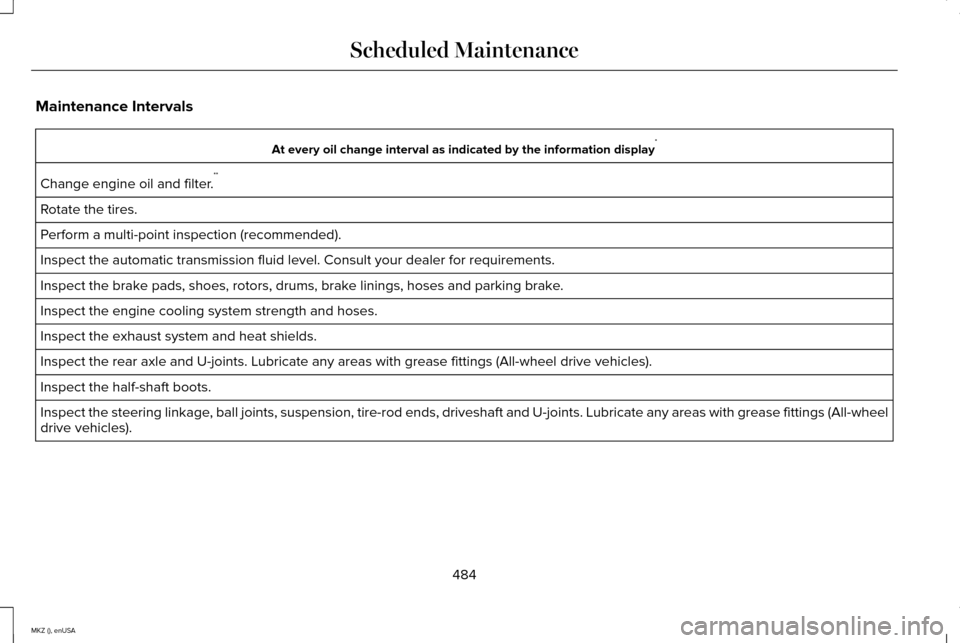
Maintenance Intervals
At every oil change interval as indicated by the information display
*
Change engine oil and filter. **
Rotate the tires.
Perform a multi-point inspection (recommended).
Inspect the automatic transmission fluid level. Consult your dealer for \
requirements.
Inspect the brake pads, shoes, rotors, drums, brake linings, hoses and parking brake.
Inspect the engine cooling system strength and hoses.
Inspect the exhaust system and heat shields.
Inspect the rear axle and U-joints. Lubricate any areas with grease fittings (All-wheel drive vehicles).
Inspect the half-shaft boots.
Inspect the steering linkage, ball joints, suspension, tire-rod ends, driveshaft and U-joints. Lubricate any areas with grease fittings (All-wheel
drive vehicles).
484
MKZ (), enUSA Scheduled Maintenance