ESP LINCOLN MKZ HYBRID 2013 Owner's Manual
[x] Cancel search | Manufacturer: LINCOLN, Model Year: 2013, Model line: MKZ HYBRID, Model: LINCOLN MKZ HYBRID 2013Pages: 475, PDF Size: 3.89 MB
Page 174 of 475
SAFETY PRECAUTIONS
WARNINGS
Do not overfill the fuel tank. The
pressure in an overfilled tank
may cause leakage and lead to fuel
spray and fire. The fuel system may be under
pressure. If you hear a hissing
sound near the fuel filler door (Easy
Fuel capless fuel system), do not
refuel until the sound stops.
Otherwise, fuel may spray out, which
could cause serious personal injury. Automotive fuels can cause
serious injury or death if misused
or mishandled. The flow of fuel through a fuel
pump nozzle can produce static
electricity, which can cause a fire if
fuel is pumped into an ungrounded
fuel container. Fuel ethanol and gasoline may
contain benzene, which is a
cancer-causing agent. When refueling always shut the
engine off and never allow
sparks or open flames near the filler
neck. Never smoke or use a cell phone
while refueling. Fuel vapor is
extremely hazardous under certain
conditions. Avoid inhaling excess
fumes. Observe the following guidelines
when handling automotive fuel: •
Extinguish all smoking materials
and any open flames before
refueling your vehicle.
• Always turn off the vehicle before
refueling.
• Automotive fuels can be harmful
or fatal if swallowed. Fuel such as
gasoline is highly toxic and if
swallowed can cause death or
permanent injury. If fuel is
swallowed, call a physician
immediately, even if no symptoms
are immediately apparent. The
toxic effects of fuel may not be
visible for hours.
• Avoid inhaling fuel vapors. Inhaling
too much fuel vapor of any kind
can lead to eye and respiratory
tract irritation. In severe cases,
excessive or prolonged breathing
of fuel vapor can cause serious
illness and permanent injury.
• Avoid getting fuel liquid in your
eyes. If fuel is splashed in the eyes,
remove contact lenses (if worn),
flush with water for 15 minutes and
seek medical attention. Failure to
seek proper medical attention
could lead to permanent injury.
172
MKZ (CC9) Fuel and Refueling
Page 181 of 475
EMISSION CONTROL
SYSTEM
WARNINGS
Do not park, idle, or drive your
vehicle in dry grass or other dry
ground cover. The emission system
heats up the engine compartment and
exhaust system, which can start a fire. Exhaust leaks may result in entry
of harmful and potentially lethal
fumes into the passenger
compartment. If you smell exhaust
fumes inside your vehicle, have your
dealer inspect your vehicle
immediately. Do not drive if you smell
exhaust fumes. Your vehicle is equipped with various
emission control components and a
catalytic converter that will enable
your vehicle to comply with applicable
exhaust emission standards. To make
sure that the catalytic converter and
other emission control components
continue to work properly:
To make sure that the catalytic
converter and other emission control
components continue to work
properly:
•
Use only the specified fuel listed.
• Avoid running out of fuel.
• Do not turn off the ignition while
your vehicle is moving, especially
at high speeds.
• Have the items listed in scheduled
maintenance information
performed according to the
specified schedule. The scheduled maintenance items
listed in scheduled maintenance
information are essential to the life
and performance of your vehicle and
to its emissions system.
If you use parts other than Ford,
Motorcraft or Ford-authorized parts
for maintenance replacements, or for
service of components affecting
emission control, such non-Ford parts
should be the equivalent to genuine
Ford Motor Company parts in
performance and durability.
Illumination of the service engine soon
indicator, charging system warning
light or the temperature warning light,
fluid leaks, strange odors, smoke or
loss of engine power could indicate
that the emission control system is
not working properly.
An improperly operating or damaged
exhaust system may allow exhaust to
enter the vehicle. Have a damaged or
improperly operating exhaust system
inspected and repaired immediately.
Do not make any unauthorized
changes to your vehicle or engine. By
law, vehicle owners and anyone who
manufactures, repairs, services, sells,
leases, trades vehicles, or supervises
a fleet of vehicles are not permitted
to intentionally remove an emission
control device or prevent it from
working. Information about your
vehicle
’s emission system is on the
Vehicle Emission Control Information
Decal located on or near the engine.
This decal also lists engine
displacement
179
MKZ (CC9) Fuel and Refueling
Page 191 of 475
5. Release the override button.
6.
The vehicle will remain in Stay in
Neutral mode for wrecker towing
purposes or can be shifted to the
desired gear and driven (if the
vehicle can be driven).
7. Release the parking brake.
If Your Vehicle Gets Stuck In
Mud or Snow
Note: Do not rock the vehicle if the
engine is not at normal operating
temperature or damage to the
transmission may occur.
Note: Do not rock the vehicle for more
than a minute or damage to the
transmission and tires may occur, or
the engine may overheat.
If your vehicle gets stuck in mud or
snow, it may be rocked out by shifting
between forward and reverse gears,
stopping between shifts in a steady
pattern. Press lightly on the
accelerator in each gear.
HILL START ASSIST WARNINGS
The system does not replace the
parking brake. When you leave
your vehicle, always apply the parking
brake and put the vehicle in P (Park). You must remain in your vehicle
once you have activated the
system. WARNINGS
During all times, you are
responsible for controlling your
vehicle, supervising the system and
intervening, if required. If the engine is revved
excessively, or if a malfunction
is detected, the system will be
deactivated. The system makes it easier to pull
away when your vehicle is on a slope
without the need to use the parking
brake.
When the system is active, your
vehicle will remain stationary on the
slope for two to three seconds after
you release the brake pedal. This
allows you time to move your foot
from the brake to the accelerator
pedal. The brakes are released
automatically once the engine has
developed sufficient drive to prevent
your vehicle from rolling down the
slope. This is an advantage when
pulling away on a slope, (for example
from a car park ramp, traffic lights or
when reversing uphill into a parking
space).
The system will activate
automatically on any slope that will
cause significant vehicle rollback.
Using Hill Start Assist
1.
Press the brake pedal to bring your
vehicle to a complete standstill.
Keep the brake pedal pressed.
189
MKZ (CC9) Transmission
Page 203 of 475
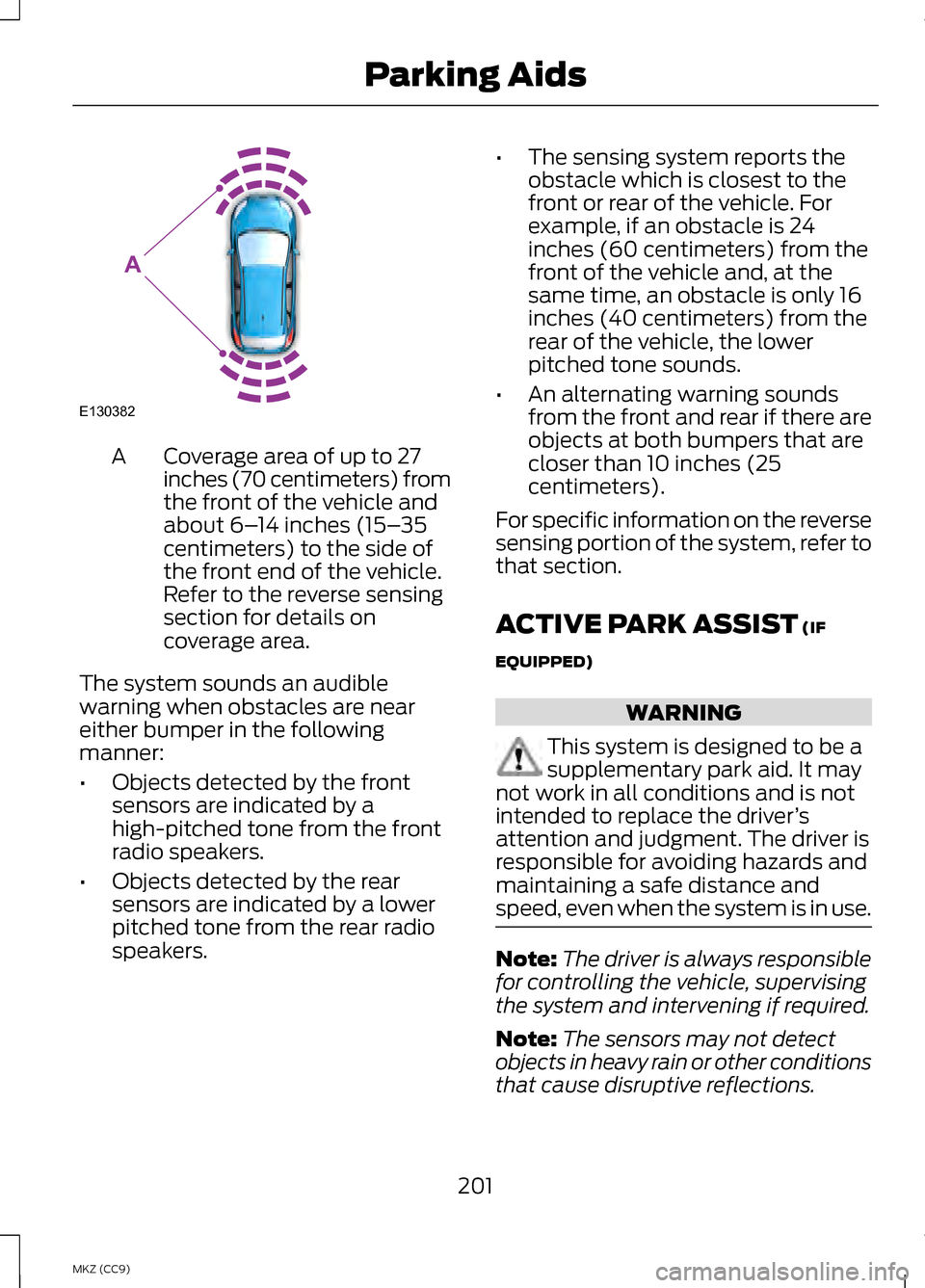
Coverage area of up to 27
inches (70 centimeters) from
the front of the vehicle and
about 6–
14 inches (15– 35
centimeters) to the side of
the front end of the vehicle.
Refer to the reverse sensing
section for details on
coverage area.
A
The system sounds an audible
warning when obstacles are near
either bumper in the following
manner:
• Objects detected by the front
sensors are indicated by a
high-pitched tone from the front
radio speakers.
• Objects detected by the rear
sensors are indicated by a lower
pitched tone from the rear radio
speakers. •
The sensing system reports the
obstacle which is closest to the
front or rear of the vehicle. For
example, if an obstacle is 24
inches (60 centimeters) from the
front of the vehicle and, at the
same time, an obstacle is only 16
inches (40 centimeters) from the
rear of the vehicle, the lower
pitched tone sounds.
• An alternating warning sounds
from the front and rear if there are
objects at both bumpers that are
closer than 10 inches (25
centimeters).
For specific information on the reverse
sensing portion of the system, refer to
that section.
ACTIVE PARK ASSIST (IF
EQUIPPED) WARNING
This system is designed to be a
supplementary park aid. It may
not work in all conditions and is not
intended to replace the driver ’s
attention and judgment. The driver is
responsible for avoiding hazards and
maintaining a safe distance and
speed, even when the system is in use. Note:
The driver is always responsible
for controlling the vehicle, supervising
the system and intervening if required.
Note: The sensors may not detect
objects in heavy rain or other conditions
that cause disruptive reflections.
201
MKZ (CC9) Parking AidsE130382
A
Page 204 of 475
Note:
The sensors may not detect
objects with surfaces that absorb
ultrasonic waves.
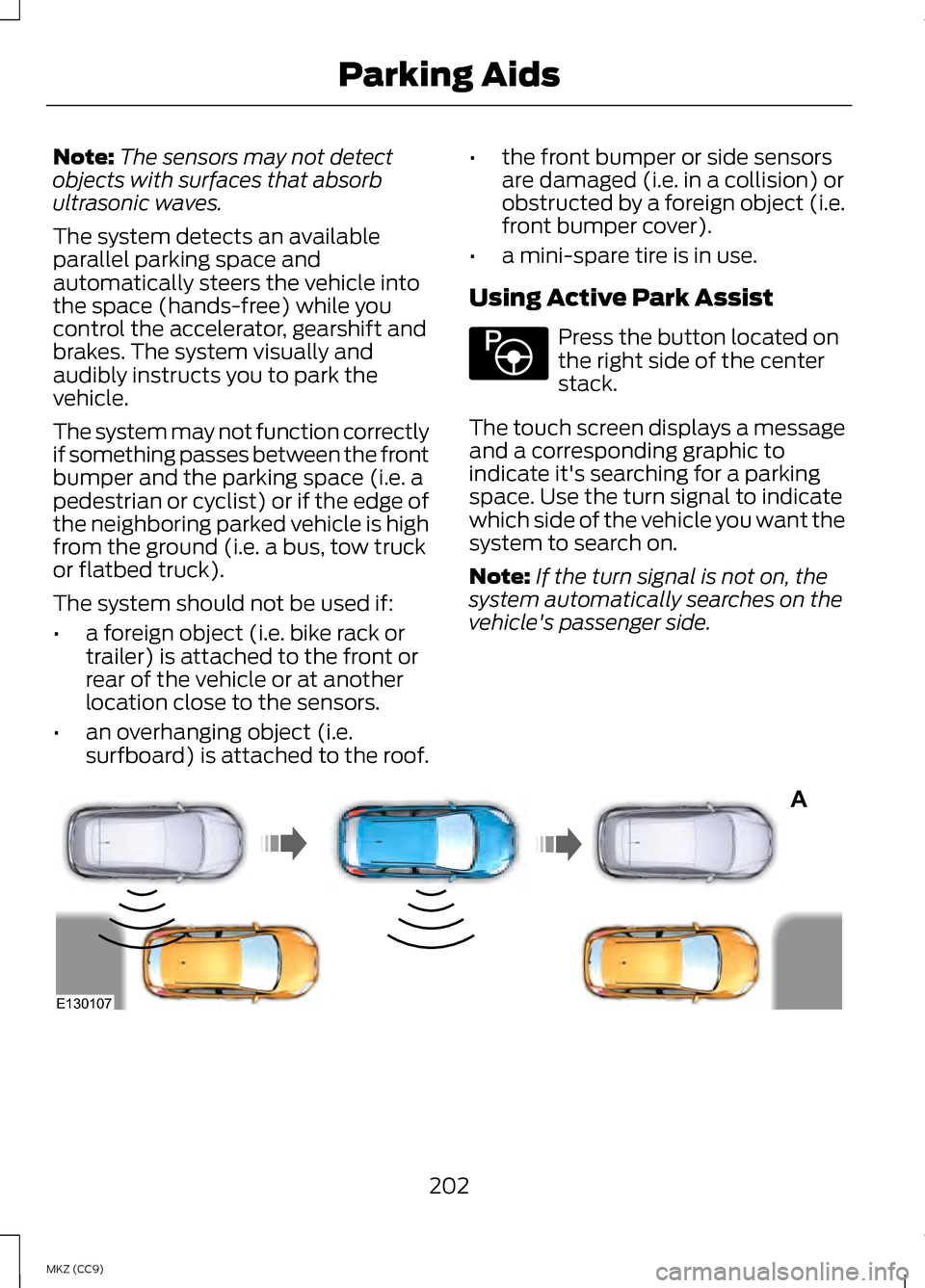
The system detects an available
parallel parking space and
automatically steers the vehicle into
the space (hands-free) while you
control the accelerator, gearshift and
brakes. The system visually and
audibly instructs you to park the
vehicle.
The system may not function correctly
if something passes between the front
bumper and the parking space (i.e. a
pedestrian or cyclist) or if the edge of
the neighboring parked vehicle is high
from the ground (i.e. a bus, tow truck
or flatbed truck).
The system should not be used if:
• a foreign object (i.e. bike rack or
trailer) is attached to the front or
rear of the vehicle or at another
location close to the sensors.
• an overhanging object (i.e.
surfboard) is attached to the roof. •
the front bumper or side sensors
are damaged (i.e. in a collision) or
obstructed by a foreign object (i.e.
front bumper cover).
• a mini-spare tire is in use.
Using Active Park Assist Press the button located on
the right side of the center
stack.
The touch screen displays a message
and a corresponding graphic to
indicate it's searching for a parking
space. Use the turn signal to indicate
which side of the vehicle you want the
system to search on.
Note: If the turn signal is not on, the
system automatically searches on the
vehicle's passenger side. 202
MKZ (CC9) Parking AidsE146186 A
E130107
Page 206 of 475
When automatic steering is finished,
the touch screen displays a message
and a chime sounds, indicating that
the active park assist process is done.
The driver is responsible for checking
the parking job and making any
necessary corrections before putting
the transmission in P (Park).
Deactivating the Park Assist
Feature
The system can be deactivated
manually by:
• pressing the active park assist
button
• grabbing the steering wheel
• driving above approximately 50
mph (80 km/h) for 30 seconds
during an active park search •
driving above 6 mph (10 km/h)
during automatic steering
• turning off the traction control
system.
Certain vehicle conditions can also
deactivate the system, such as:
• Traction control has activated on
a slippery or loose surface.
• There is an anti-lock brake system
activation or failure.
• Something touches the steering
wheel.
If a problem occurs with the system,
a warning message is displayed,
followed by a chime. Occasional
system messages may occur in
normal operation. For recurring or
frequent system faults, contact an
authorized dealer to have your vehicle
serviced.
Troubleshooting the System The system does not look for a space
The traction control system may be off
The transmission is in R (Reverse); the vehicle must be moving forward to
detect a parking space The system does not offer a particular space
Something may be contacting the front bumper or side sensors
There is not enough room on both sides of the vehicle in order to park
There is not enough space for the parking maneuver on the opposite side of
the parking space
204
MKZ (CC9) Parking Aids
Page 213 of 475
Switching Cruise Control Off
Note:
You will erase the set speed if
you switch the system off.
Press and release OFF or switch the
ignition off.
ECO Cruise Control
This feature saves vehicle energy by
relaxing acceleration compared to
standard cruise control. For example,
your vehicle may temporarily lose
speed when going uphill. ECO
will
appear in the information display
when ECO cruise control is activated.
It can be switched on or off in the
information display. See
General
Information (page 103).
USING ADAPTIVE CRUISE
CONTROL
(IF EQUIPPED) WARNINGS
Always pay close attention to
changing road conditions,
especially when using adaptive cruise
control. Adaptive cruise control
cannot replace attentive driving.
Failing to follow any of the warnings
below or failing to pay attention to the
road may result in a crash, serious
injury or death. Adaptive cruise control is not a
crash warning or avoidance
system. Adaptive cruise control will not
detect stationary or slow moving
vehicles below 6 mph (10 km/h). WARNINGS
Adaptive cruise control will not
detect pedestrians or objects in
the roadway. Adaptive cruise control will not
detect oncoming vehicles in the
same lane. Do not use the adaptive cruise
control when entering or leaving
a highway, in heavy traffic or on roads
that are winding, slippery or unpaved. Do not use in poor visibility,
specifically fog, rain, spray or
snow. Note:
It is your responsibility to stay
alert, drive safely and be in control of
the vehicle at all times.
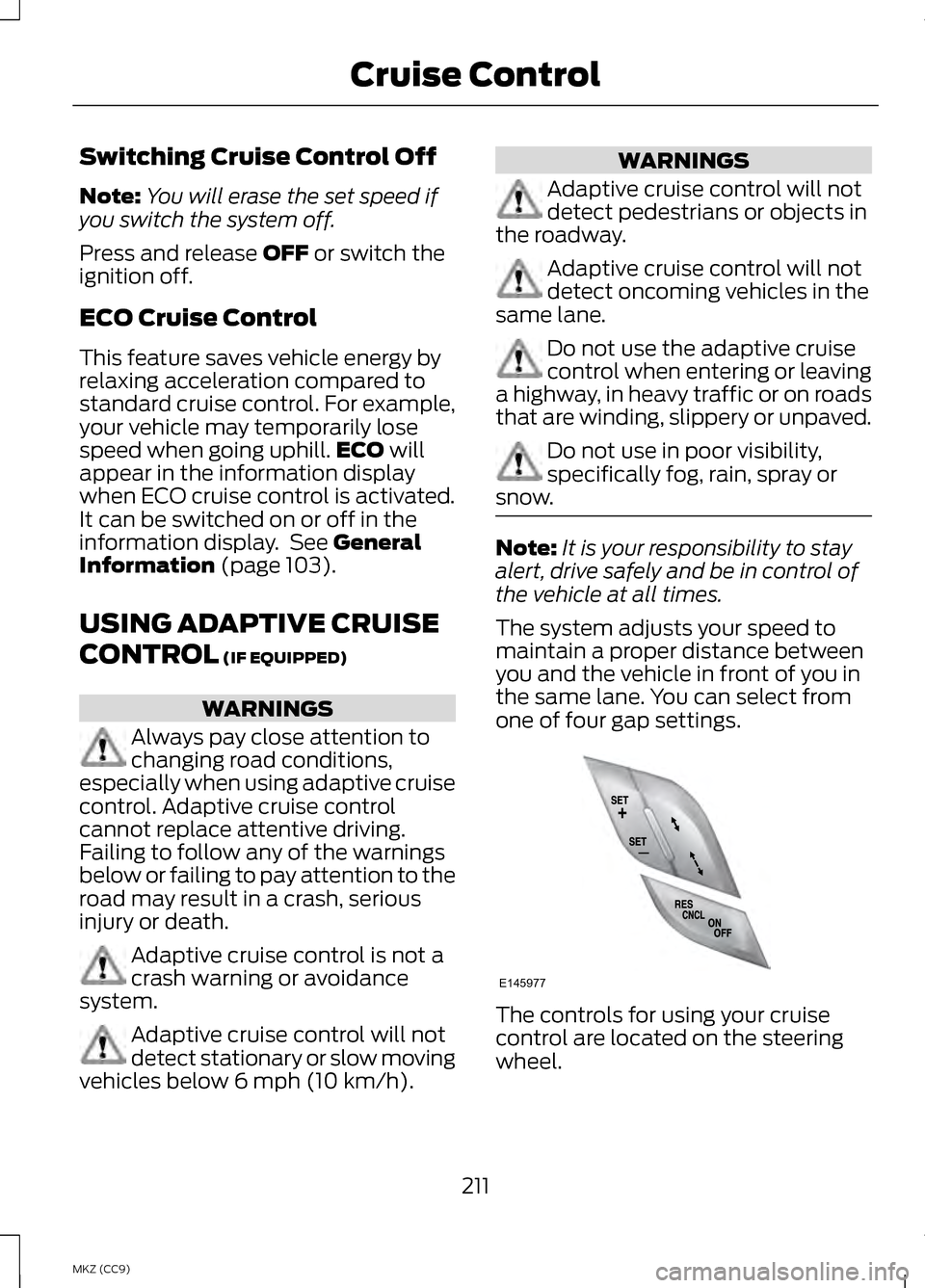
The system adjusts your speed to
maintain a proper distance between
you and the vehicle in front of you in
the same lane. You can select from
one of four gap settings. The controls for using your cruise
control are located on the steering
wheel.
211
MKZ (CC9) Cruise ControlE145977
Page 215 of 475
The vehicle will maintain a constant
distance between the vehicle ahead
until:
•
the vehicle in front of you
accelerates to a speed above the
set speed
• the vehicle in front of you moves
out of your lane or out of view
• the vehicle speed falls below 12
mph (20 km/h)
• a new gap distance is set.
The vehicle will apply the brakes to
slow the vehicle to maintain a safe
distance from the vehicle in front. The
maximum braking which the system
can apply is limited. You can override
the system by applying the brakes.
If the system predicts that its
maximum braking level will not be
sufficient, an audible warning will
sound while the system continues to
brake. This is accompanied by a
heads-up display; a red warning bar
illuminating on the windshield. You
should take immediate action.
Setting the Gap Distance
Note: It is your responsibility to select
a gap appropriate to the driving
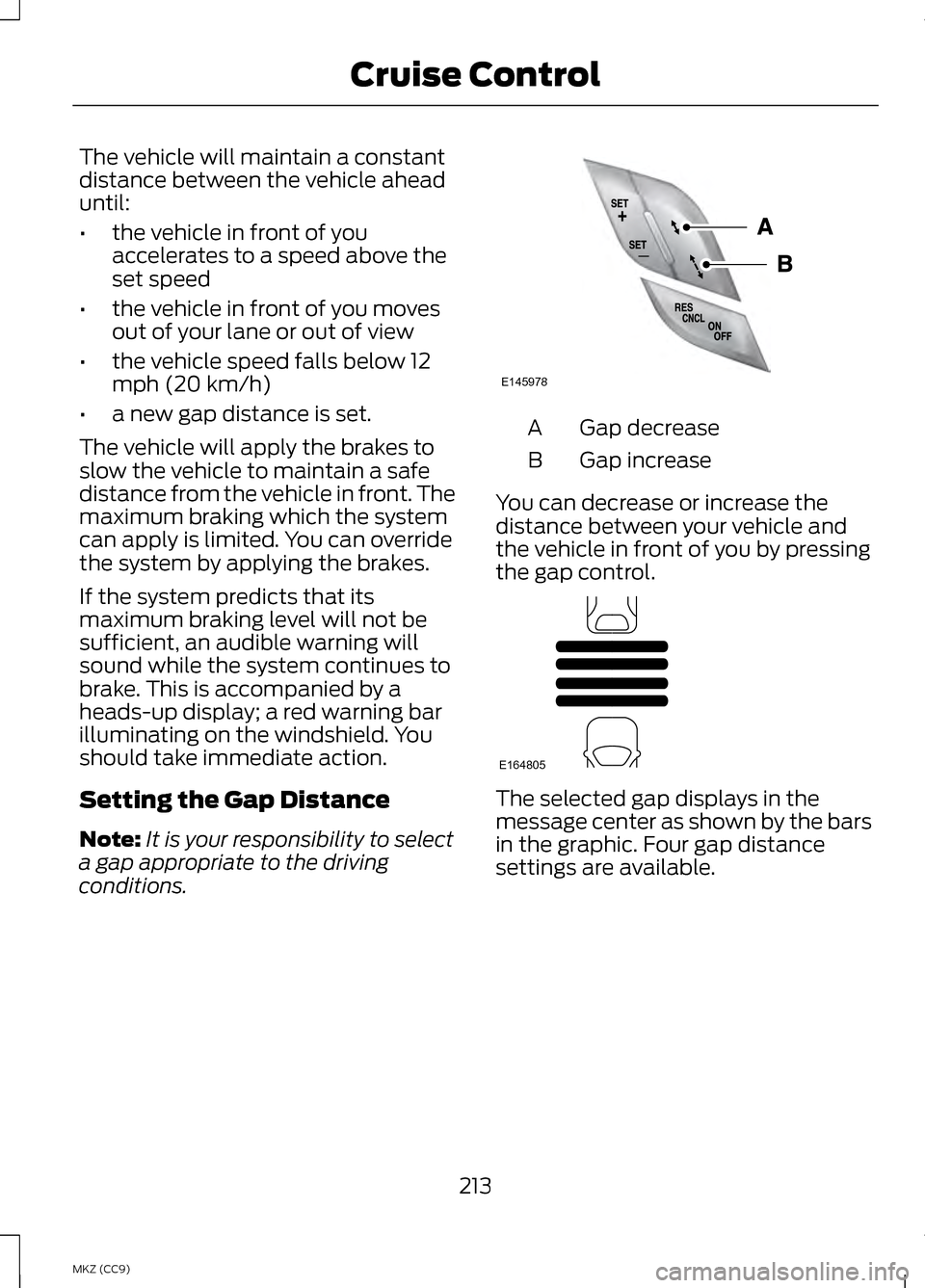
conditions. Gap decrease
A
Gap increase
B
You can decrease or increase the
distance between your vehicle and
the vehicle in front of you by pressing
the gap control. The selected gap displays in the
message center as shown by the bars
in the graphic. Four gap distance
settings are available.
213
MKZ (CC9) Cruise ControlE145978 E164805
Page 220 of 475
You can manually change from
adaptive cruise control to normal
cruise control through the information
display.
The cruise control indicator
light replaces the adaptive
cruise control indicator light
if you select normal cruise control. The
gap setting will not display, the
system will not automatically respond
to lead vehicles and automatic
braking will activate. The system
defaults to adaptive cruise control
when you start the vehicle.
ECO Cruise Control
This feature saves vehicle energy by
relaxing acceleration compared to
standard cruise control. For example,
your vehicle may temporarily lose
speed when going uphill. ECO will
appear in the information display
when you activate ECO cruise control.
It can be switched on or off in the
information display. See
General
Information (page 103).
218
MKZ (CC9) Cruise ControlE71340
Page 221 of 475
DRIVER ALERT (IF EQUIPPED)
WARNING
The driver alert system is
designed to aid you. It is not
intended to replace your attention and
judgment. You are still responsible to
drive with due care and attention. Note:
The system will store the on/off
setting in the information display menu
through ignition cycles.
Note: If enabled in the menu, the
system will be active at speeds above
40 mph (64 km/h). When below the
activation speed, the information
display will inform the driver that the
system is unavailable.
Note: The system works as long as one
lane marking can be detected by the
camera.
Note: If the camera is blocked or if the
windshield is damaged, the system
may not function.
Note: The system may not be
available in poor weather or other low
visibility conditions.
The system automatically monitors
your driving behavior using various
inputs including the front camera
sensor.
If the system detects that your driving
alertness is reduced below a certain
threshold, the system will alert you
using a chime and a message in the
information display. Using Driver Alert
Switching the system on and off
You may switch the system on or off
through the information display by
selecting Settings then Driver Assist
then Driver Alert in the menu. When
activated, the system will monitor
your alertness level based upon your
driving behavior in relation to the lane
markings, and other factors.
System Warnings
Note:
Note: The system will not issue
warnings below approximately 40 mph
(64 km/h).
The warning system is in two stages.
At first the system issues a temporary
warning that you need to take a rest.
This message will only appear for a
short time. If the system detects
further reduction in driving alertness,
another warning may be issued which
will remain in the information display
for a longer time. Press OK on the
steering wheel control to clear the
warning
System Display
When active the system will run
automatically in the background and
only issue a warning if required. You
can view the status at any time using
the information display. See General
Information
(page 103).
The alertness level is shown by six
steps in a colored bar.
219
MKZ (CC9) Driving Aids