ESP LINCOLN MKZ HYBRID 2013 User Guide
[x] Cancel search | Manufacturer: LINCOLN, Model Year: 2013, Model line: MKZ HYBRID, Model: LINCOLN MKZ HYBRID 2013Pages: 475, PDF Size: 3.89 MB
Page 100 of 475
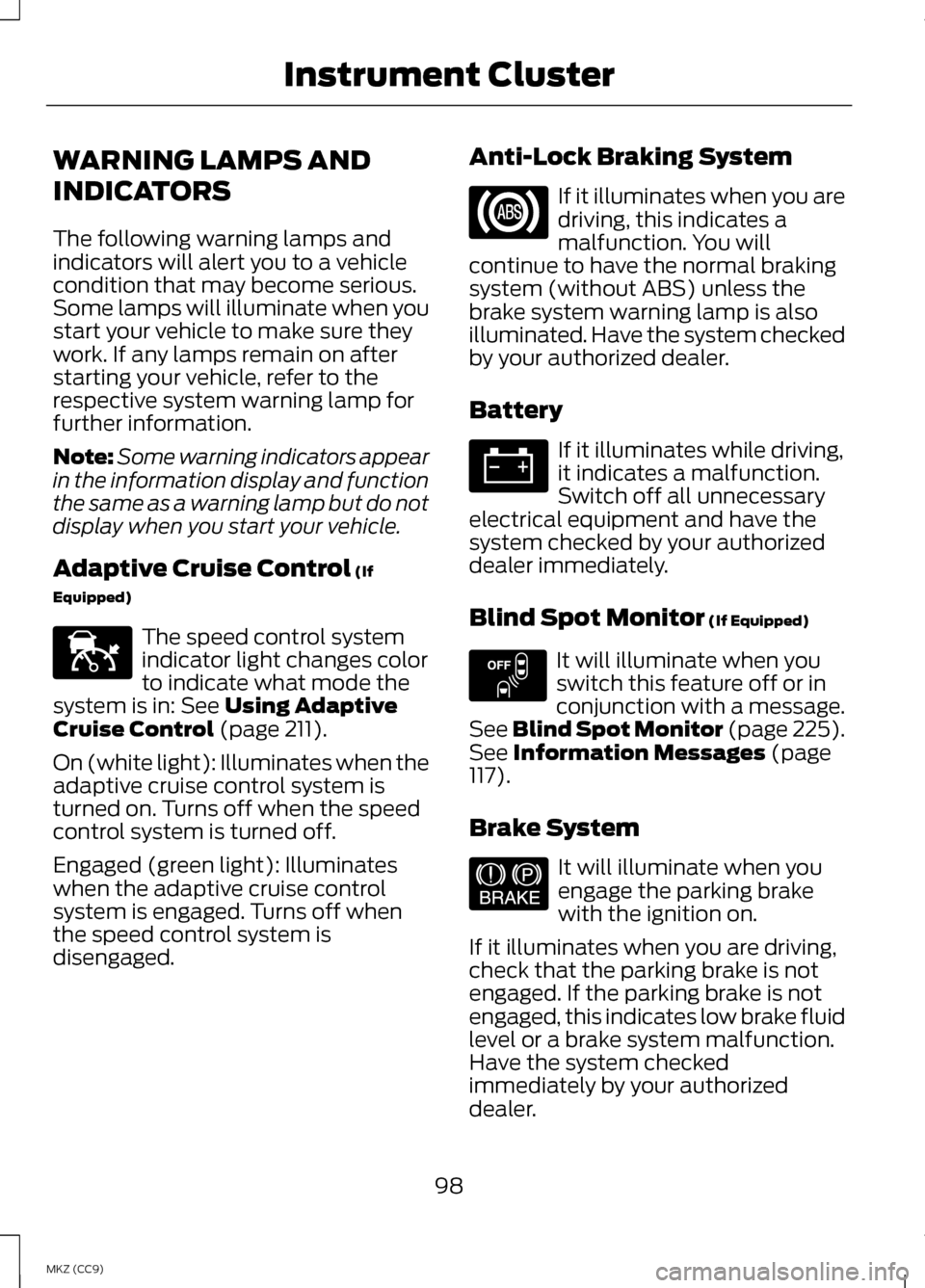
WARNING LAMPS AND
INDICATORS
The following warning lamps and
indicators will alert you to a vehicle
condition that may become serious.
Some lamps will illuminate when you
start your vehicle to make sure they
work. If any lamps remain on after
starting your vehicle, refer to the
respective system warning lamp for
further information.
Note:
Some warning indicators appear
in the information display and function
the same as a warning lamp but do not
display when you start your vehicle.
Adaptive Cruise Control (If
Equipped) The speed control system
indicator light changes color
to indicate what mode the
system is in:
See Using Adaptive
Cruise Control (page 211).
On (white light): Illuminates when the
adaptive cruise control system is
turned on. Turns off when the speed
control system is turned off.
Engaged (green light): Illuminates
when the adaptive cruise control
system is engaged. Turns off when
the speed control system is
disengaged. Anti-Lock Braking System If it illuminates when you are
driving, this indicates a
malfunction. You will
continue to have the normal braking
system (without ABS) unless the
brake system warning lamp is also
illuminated. Have the system checked
by your authorized dealer.
Battery If it illuminates while driving,
it indicates a malfunction.
Switch off all unnecessary
electrical equipment and have the
system checked by your authorized
dealer immediately.
Blind Spot Monitor
(If Equipped) It will illuminate when you
switch this feature off or in
conjunction with a message.
See Blind Spot Monitor (page 225).
See
Information Messages (page
117).
Brake System It will illuminate when you
engage the parking brake
with the ignition on.
If it illuminates when you are driving,
check that the parking brake is not
engaged. If the parking brake is not
engaged, this indicates low brake fluid
level or a brake system malfunction.
Have the system checked
immediately by your authorized
dealer.
98
MKZ (CC9) Instrument ClusterE144524 E151262 E144522
Page 101 of 475
WARNING
Driving your vehicle with the
warning lamp on is dangerous. A
significant decrease in braking
performance may occur. It will take
you longer to stop your vehicle. Have
your vehicle checked by your
authorized dealer immediately. Driving
extended distances with the parking
brake engaged can cause brake failure
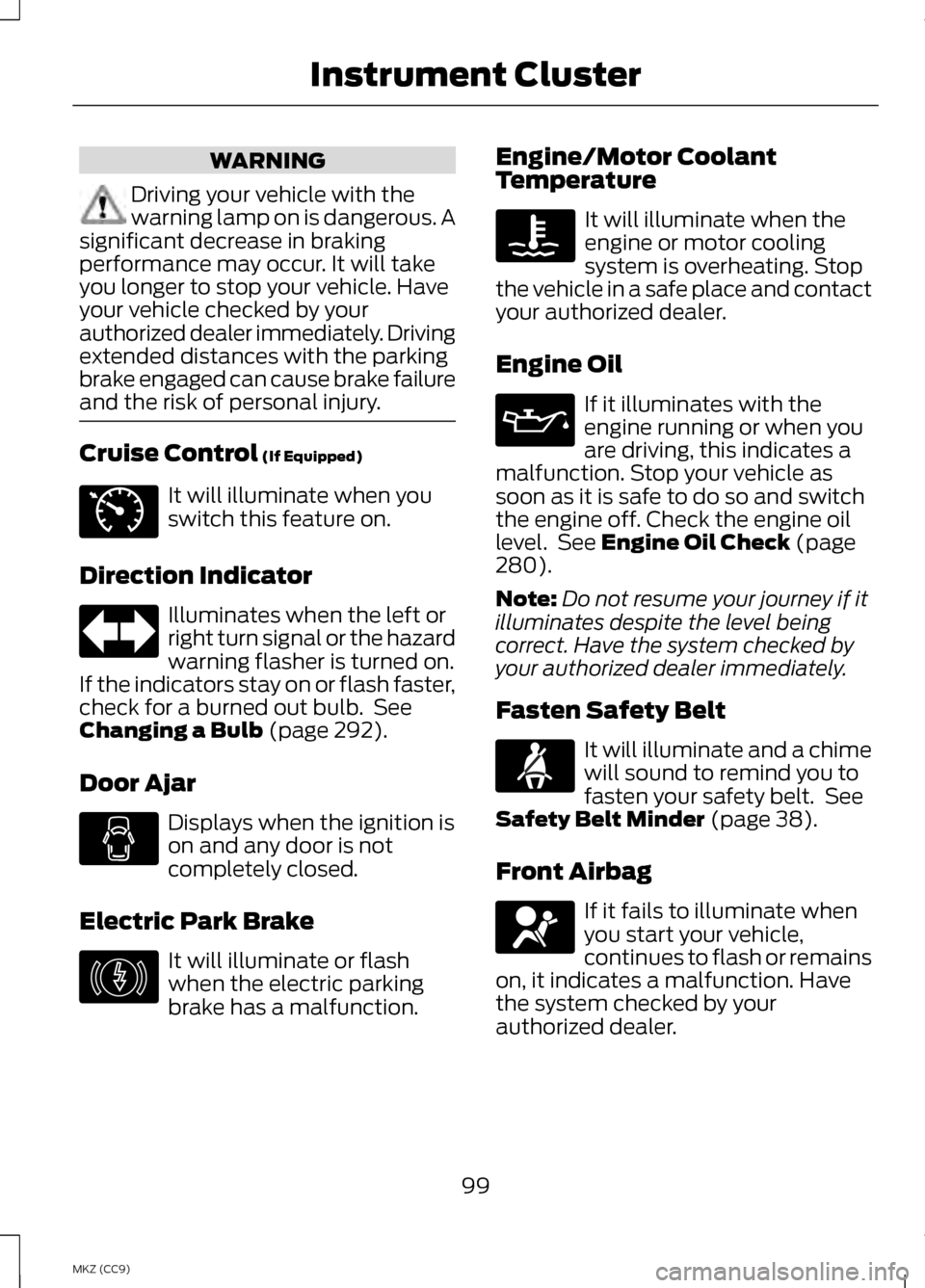
and the risk of personal injury. Cruise Control (If Equipped)
It will illuminate when you
switch this feature on.
Direction Indicator Illuminates when the left or
right turn signal or the hazard
warning flasher is turned on.
If the indicators stay on or flash faster,
check for a burned out bulb. See
Changing a Bulb
(page 292).
Door Ajar Displays when the ignition is
on and any door is not
completely closed.
Electric Park Brake It will illuminate or flash
when the electric parking
brake has a malfunction. Engine/Motor Coolant
Temperature It will illuminate when the
engine or motor cooling
system is overheating. Stop
the vehicle in a safe place and contact
your authorized dealer.
Engine Oil If it illuminates with the
engine running or when you
are driving, this indicates a
malfunction. Stop your vehicle as
soon as it is safe to do so and switch
the engine off. Check the engine oil
level. See
Engine Oil Check (page
280).
Note: Do not resume your journey if it
illuminates despite the level being
correct. Have the system checked by
your authorized dealer immediately.
Fasten Safety Belt It will illuminate and a chime
will sound to remind you to
fasten your safety belt. See
Safety Belt Minder
(page 38).
Front Airbag If it fails to illuminate when
you start your vehicle,
continues to flash or remains
on, it indicates a malfunction. Have
the system checked by your
authorized dealer.
99
MKZ (CC9) Instrument ClusterE71340 E146190
Page 102 of 475
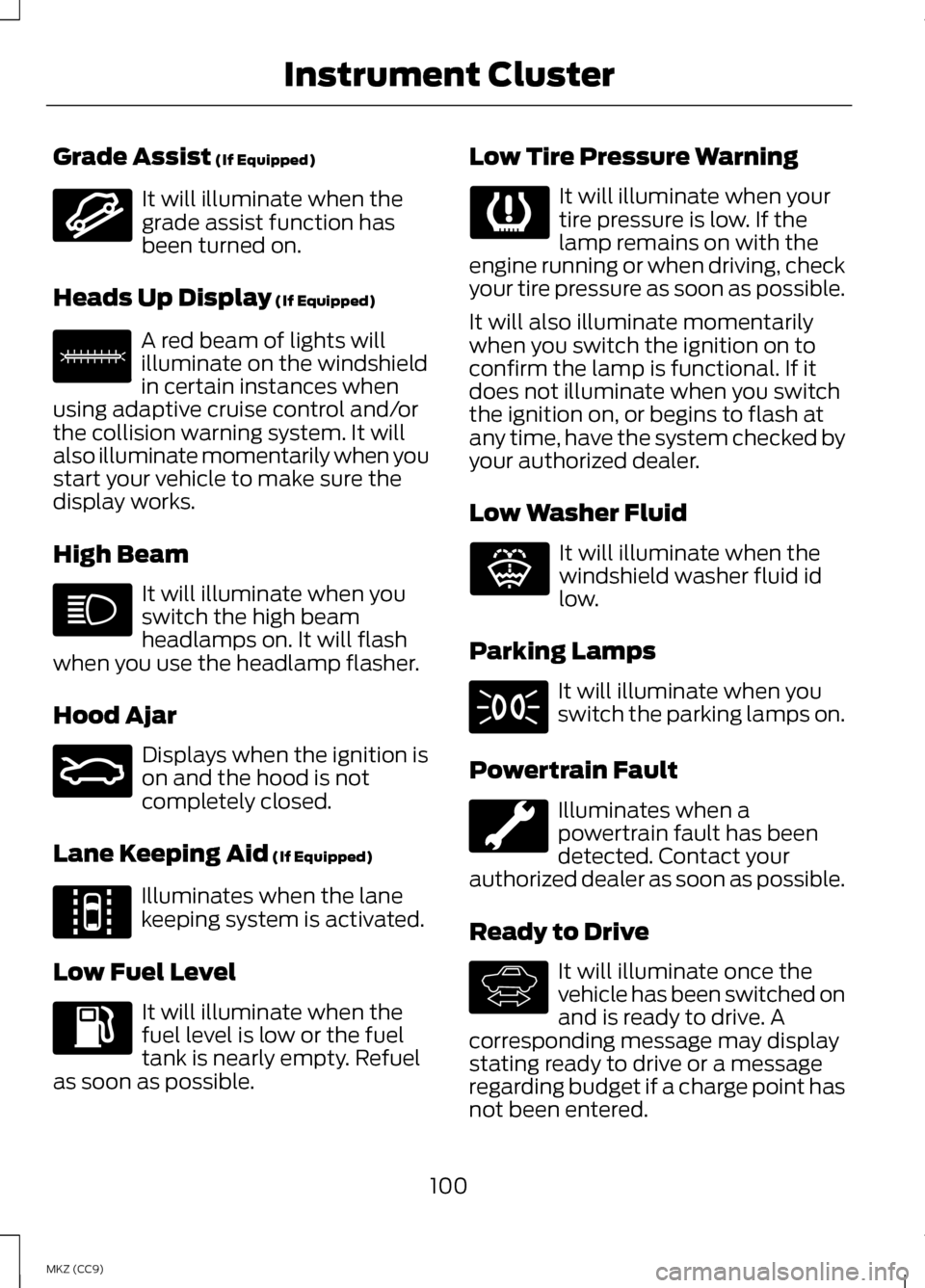
Grade Assist (If Equipped)
It will illuminate when the
grade assist function has
been turned on.
Heads Up Display
(If Equipped) A red beam of lights will
illuminate on the windshield
in certain instances when
using adaptive cruise control and/or
the collision warning system. It will
also illuminate momentarily when you
start your vehicle to make sure the
display works.
High Beam It will illuminate when you
switch the high beam
headlamps on. It will flash
when you use the headlamp flasher.
Hood Ajar Displays when the ignition is
on and the hood is not
completely closed.
Lane Keeping Aid
(If Equipped) Illuminates when the lane
keeping system is activated.
Low Fuel Level It will illuminate when the
fuel level is low or the fuel
tank is nearly empty. Refuel
as soon as possible. Low Tire Pressure Warning It will illuminate when your
tire pressure is low. If the
lamp remains on with the
engine running or when driving, check
your tire pressure as soon as possible.
It will also illuminate momentarily
when you switch the ignition on to
confirm the lamp is functional. If it
does not illuminate when you switch
the ignition on, or begins to flash at
any time, have the system checked by
your authorized dealer.
Low Washer Fluid It will illuminate when the
windshield washer fluid id
low.
Parking Lamps It will illuminate when you
switch the parking lamps on.
Powertrain Fault Illuminates when a
powertrain fault has been
detected. Contact your
authorized dealer as soon as possible.
Ready to Drive It will illuminate once the
vehicle has been switched on
and is ready to drive. A
corresponding message may display
stating ready to drive or a message
regarding budget if a charge point has
not been entered.
100
MKZ (CC9) Instrument ClusterE144523 E156133 E159324 E144813 E132353 E144692
Page 105 of 475
GENERAL INFORMATION
WARNING
Driving while distracted can
result in loss of vehicle control,
accident and injury. We strongly
recommend that you use extreme
caution when using any device or
feature that may take your focus off
the road. Your primary responsibility
is the safe operation of the vehicle.
We recommend against the use of any
handheld device while driving and that
you comply with all applicable laws. Various systems on your vehicle can
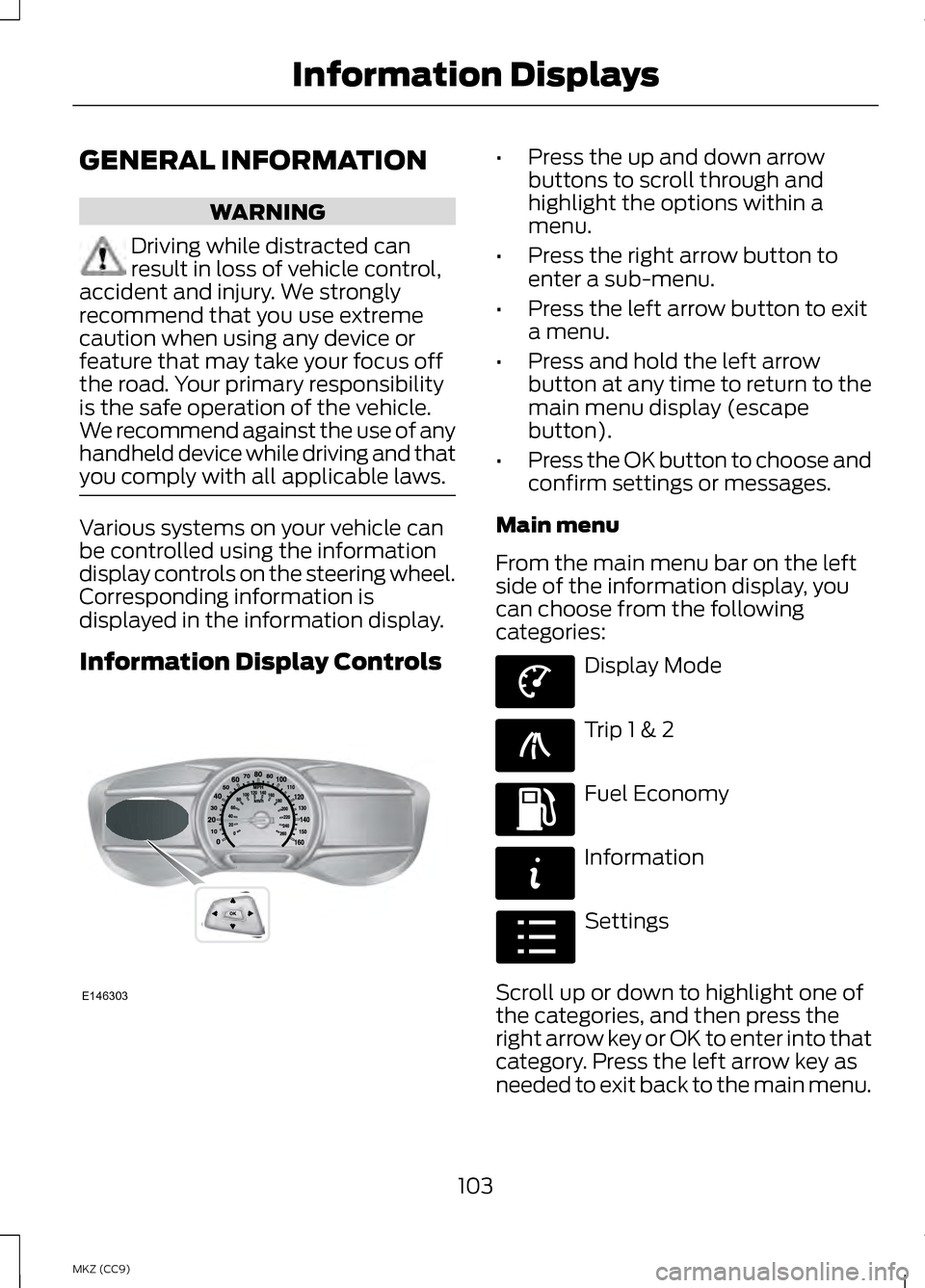
be controlled using the information
display controls on the steering wheel.
Corresponding information is
displayed in the information display.
Information Display Controls •
Press the up and down arrow
buttons to scroll through and
highlight the options within a
menu.
• Press the right arrow button to
enter a sub-menu.
• Press the left arrow button to exit
a menu.
• Press and hold the left arrow
button at any time to return to the
main menu display (escape
button).
• Press the OK button to choose and
confirm settings or messages.
Main menu
From the main menu bar on the left
side of the information display, you
can choose from the following
categories: Display Mode
Trip 1 & 2
Fuel Economy
Information
Settings
Scroll up or down to highlight one of
the categories, and then press the
right arrow key or OK to enter into that
category. Press the left arrow key as
needed to exit back to the main menu.
103
MKZ (CC9) Information DisplaysE146303 E144639 E138660 E144640 E144642 E100023
Page 137 of 475
Do not expose discs to direct sunlight
or heat sources for extended periods.
MP3 Track and Folder
Structure
Audio systems capable of recognizing
and playing MP3 individual tracks and
folder structures work as follows:
•
There are two different modes for
MP3 disc playback: MP3 track
mode (system default) and MP3
folder mode.
• MP3 track mode ignores any folder
structure on the MP3 disc. The
player numbers each MP3 track on
the disc (noted by the .mp3 file
extension) from T001 to a
maximum of T255. The maximum
number of playable MP3 files may
be less depending on the structure
of the CD and exact model of radio
present.
• MP3 folder mode represents a
folder structure consisting of one
level of folders. The CD player
numbers all MP3 tracks on the disc
(noted by the .mp3 file extension)
and all folders containing MP3
files, from F001 (folder) T001
(track) to F253 T255.
• Creating discs with only one level
of folders helps with navigation
through the disc files.
If you are burning your own MP3 discs,
it is important to understand how the
system reads the structures you
create. While various files may be
present, (files with extensions other
than mp3), only files with the .mp3 extension are played; other files are
ignored by the system. This enables
you to use the same MP3 disc for a
variety of tasks on your work
computer, home computer and your
in-vehicle system.
In track mode, the system displays
and plays the structure as if it were
only one level deep (all .mp3 files
play, regardless of being in a specific
folder). In folder mode, the system
only plays the .mp3 files in the current
folder.
AUDIO UNIT - VEHICLES
WITH: PREMIUM
AM/FM/CD
WARNING
Driving while distracted can
result in loss of vehicle control,
crash and injury. We strongly
recommend that you use extreme
caution when using any device that
may take your focus off the road. Your
primary responsibility is the safe
operation of your vehicle. We
recommend against the use of any
hand-held device while driving and
encourage the use of voice-operated
systems when possible. Make sure you
are aware of all applicable local laws
that may affect the use of electronic
devices while driving. Note:
The MyLincoln Touch system
controls most of the audio features.
See Entertainment (page 367).
135
MKZ (CC9) Audio System
Page 152 of 475
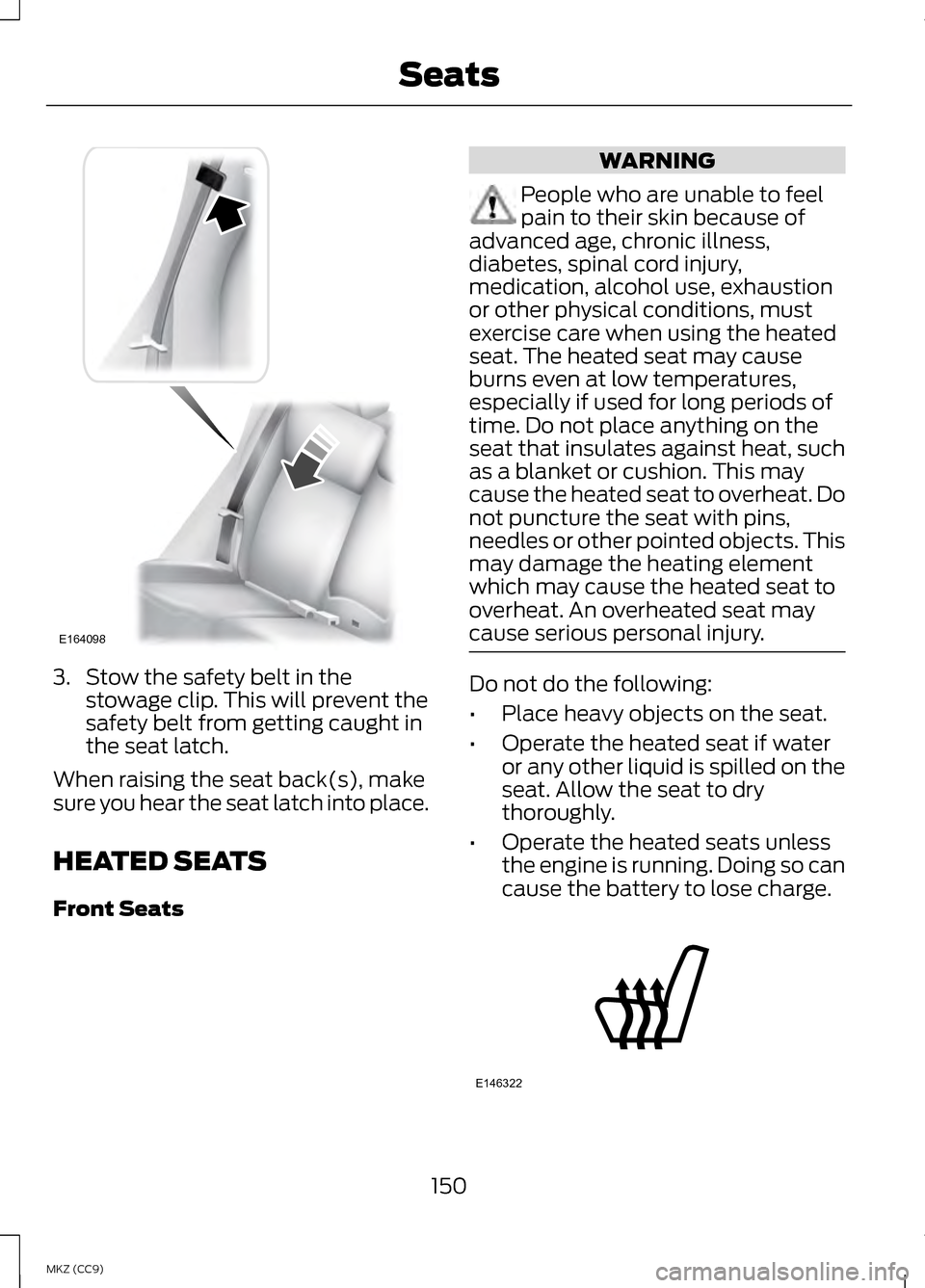
3. Stow the safety belt in the
stowage clip. This will prevent the
safety belt from getting caught in
the seat latch.
When raising the seat back(s), make
sure you hear the seat latch into place.
HEATED SEATS
Front Seats WARNING
People who are unable to feel
pain to their skin because of
advanced age, chronic illness,
diabetes, spinal cord injury,
medication, alcohol use, exhaustion
or other physical conditions, must
exercise care when using the heated
seat. The heated seat may cause
burns even at low temperatures,
especially if used for long periods of
time. Do not place anything on the
seat that insulates against heat, such
as a blanket or cushion. This may
cause the heated seat to overheat. Do
not puncture the seat with pins,
needles or other pointed objects. This
may damage the heating element
which may cause the heated seat to
overheat. An overheated seat may
cause serious personal injury. Do not do the following:
•
Place heavy objects on the seat.
• Operate the heated seat if water
or any other liquid is spilled on the
seat. Allow the seat to dry
thoroughly.
• Operate the heated seats unless
the engine is running. Doing so can
cause the battery to lose charge. 150
MKZ (CC9) SeatsE164098 E146322
Page 153 of 475
Touch the heated seat symbol on the
touchscreen to cycle through the
various heat settings and off. Warmer
settings are indicated by more
indicator lights.
Rear Heated Seats (If Equipped)
WARNING
Persons who are unable to feel
pain to the skin because of
advanced age, chronic illness,
diabetes, spinal cord injury,
medication, alcohol use, exhaustion,
or other physical conditions, must
exercise care when using the seat
heater. The seat heater may cause
burns even at low temperatures,
especially if used for long periods of
time. Do not place anything on the
seat that insulates against heat, such
as a blanket or cushion, because this
may cause the seat heater to
overheat. Do not puncture the seat
with pins, needles, or other pointed
objects because this may damage the
heating element which may cause the
seat heater to overheat. An
overheated seat may cause serious
personal injury. Note:
Do not do the following:
• Place heavy objects on the seat.
• Operate the seat heater if water or
any other liquid is spilled on the
seat. Allow the seat to dry
thoroughly.
The rear seat heat controls are
located on the rear of the center
console. The heated seats only operate when
the ignition is on.
•
Press the heated seat symbol to
cycle through the various heat
settings and off. Warmer settings
are indicated by more indicator
lights.
• Press again to deactivate.
The heated seat module resets at
every ignition run cycle. While the
ignition is on, press the high or low
heated seat switch to enable heating
mode. When activated, they will turn
off automatically when you turn the
engine off.
VENTILATED SEATS
(IF
EQUIPPED)
The ventilated seats will only function
when the engine is running. To operate the ventilated seats:
151
MKZ (CC9) SeatsE146322 E146309
Page 159 of 475
1.
Press and hold the program button
on the garage door opener motor
until both blue indicator lights turn
on.
2. Release the program button. Only the smaller round indicator light
should be on.
3. Press and release the program button. The larger purple indicator
light will flash.
Note: The next two steps must be
completed in 30 seconds.
4. Press and release the Genie Intellicode 2 hand-held
transmitter ’s previously
programmed button. Both
indicator lights on the garage door
opener motor unit should now
flash purple.
5. Press and hold the previously programmed button on the visor
for 2 seconds. Repeat this step up
to 3 times until the garage door
moves.
Programming is now complete.
Clearing a HomeLink Device
To erase programming from the three
HomeLink buttons press and hold the
two outer HomeLink buttons until the
indicator light begins to flash. The
indicator light will begin flashing in 10
to 20 seconds, at which time both
buttons should be released.
Programming has now been erased,
and the indicator light should blink
slowly to indicate the device is in train
mode when any of the three
HomeLink buttons are pressed. FCC and RSS-210 Industry Canada
Compliance
This device complies with Part 15 of
the FCC Rules and with RSS-210 of
Industry Canada. Operation is subject
to the following two conditions: (1)
this device may not cause harmful
interference, and (2) this device must
accept any interference received,
including interference that may cause
undesired operation.
Changes or modifications to your
device not expressly approved by the
party responsible for compliance can
void the user
’s authority to operate
the equipment.
157
MKZ (CC9) Universal Garage Door Opener
Page 166 of 475
Important Ventilating
Information
If you stop your vehicle and the leave
the engine idling for long periods of
time, we recommend that you do one
of the following:
•
Open the windows at least 1 inch
(2.5 centimeters)
• Set your climate control to outside
air.
ENGINE BLOCK HEATER (IF
EQUIPPED) WARNINGS
Failure to follow engine block
heater instructions could result
in property damage or serious
personal injury. Do not use your heater with
ungrounded electrical systems
or two-pronged adapters. There is a
risk of electrical shock. Note:
The heater is most effective
when outdoor temperatures are below
0°F (-18°C).
The heater acts as a starting aid by
warming the engine coolant. This
allows the climate control system to
respond quickly. The equipment
includes a heater element (installed
in the engine block) and a wire
harness. You can connect the system
to a grounded 120-volt AC electrical
source. We recommend that you do the
following for a safe and correct
operation:
•
Use a 16-gauge outdoor extension
cord that is product certified by
Underwriter ’s Laboratory (UL) or
Canadian Standards Association
(CSA). This extension cord must
be suitable for use outdoors, in
cold temperatures, and be clearly
marked Suitable for Use with
Outdoor Appliances. Do not use an
indoor extension cord outdoors.
This could result in an electric
shock or become a fire hazard.
• Use as short an extension cord as
possible.
• Do not use multiple extension
cords.
• Make sure that when in operation,
the extension cord plug and heater
cord plug connections are free and
clear of water. This could cause an
electric shock or fire.
• Make sure your vehicle is parked in
a clean area, clear of
combustibles.
• Make sure the heater, heater cord
and extension cord are firmly
connected.
• Check for heat anywhere in the
electrical hookup once the system
has been operating for
approximately 30 minutes.
164
MKZ (CC9) Starting and Stopping the Engine
Page 172 of 475
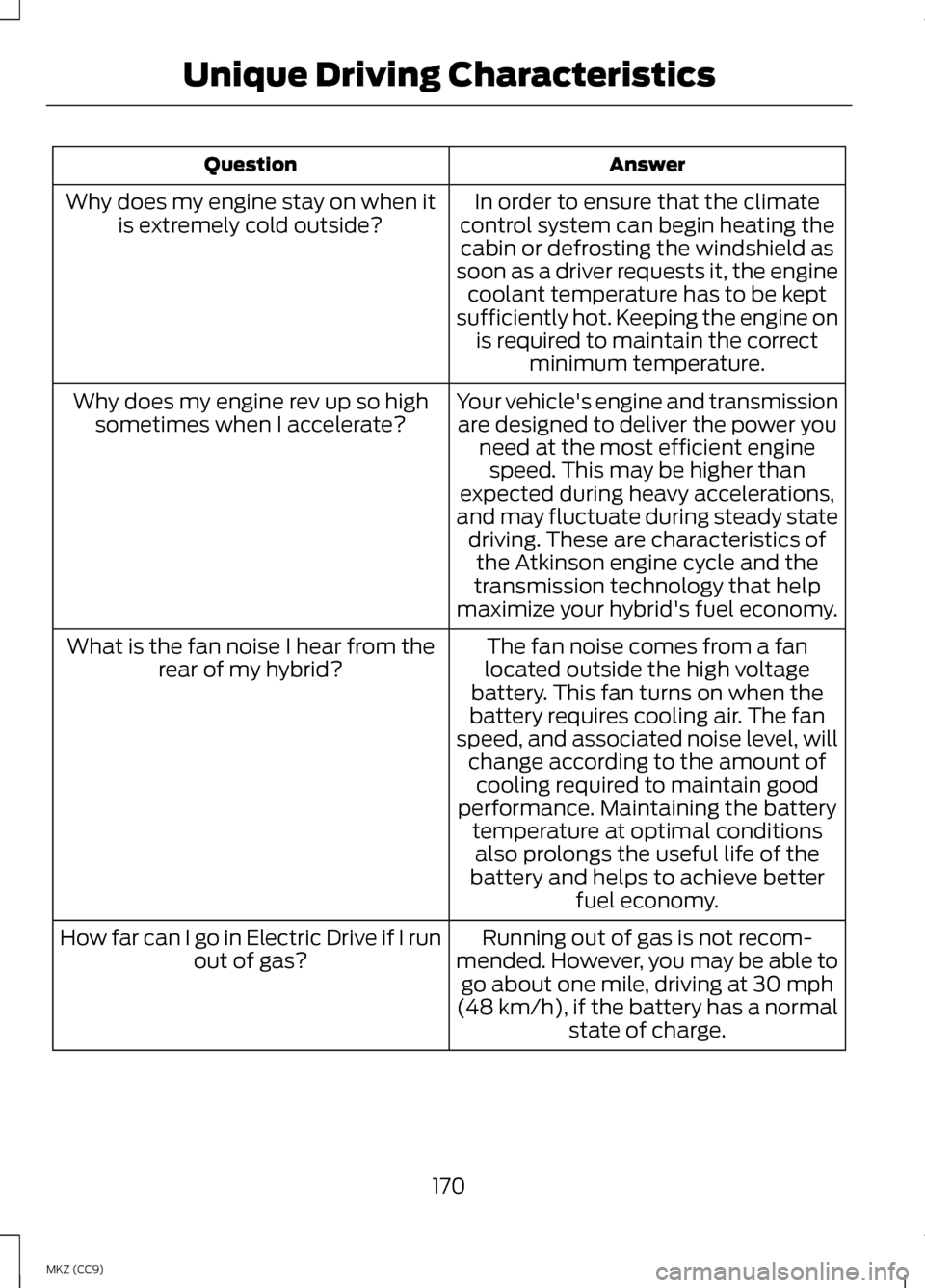
Answer
Question
In order to ensure that the climate
control system can begin heating the cabin or defrosting the windshield as
soon as a driver requests it, the engine coolant temperature has to be kept
sufficiently hot. Keeping the engine on is required to maintain the correct minimum temperature.
Why does my engine stay on when it
is extremely cold outside?
Your vehicle's engine and transmissionare designed to deliver the power you need at the most efficient enginespeed. This may be higher than
expected during heavy accelerations,
and may fluctuate during steady state driving. These are characteristics ofthe Atkinson engine cycle and the
transmission technology that help
maximize your hybrid's fuel economy.
Why does my engine rev up so high
sometimes when I accelerate?
The fan noise comes from a fan
located outside the high voltage
battery. This fan turns on when the
battery requires cooling air. The fan
speed, and associated noise level, will change according to the amount of
What is the fan noise I hear from the
rear of my hybrid?
cooling required to maintain good
performance. Maintaining the battery temperature at optimal conditionsalso prolongs the useful life of the
battery and helps to achieve better fuel economy.
Running out of gas is not recom-
mended. However, you may be able to go about one mile, driving at 30 mph
(48 km/h), if the battery has a normal state of charge.
How far can I go in Electric Drive if I run
out of gas?
170
MKZ (CC9) Unique Driving Characteristics