key LINCOLN MKZ HYBRID 2013 Workshop Manual
[x] Cancel search | Manufacturer: LINCOLN, Model Year: 2013, Model line: MKZ HYBRID, Model: LINCOLN MKZ HYBRID 2013Pages: 475, PDF Size: 3.89 MB
Page 222 of 475
The current assessment of your
alertness is within a typical range.
The current assessment of your
alertness indicates that you should
rest as soon as safely possible.
The status bar will travel from left to
right as the calculated alertness level
decreases. As the rest icon is
approached the color turns from
green to yellow to red.
•
Green - No rest required.
• Yellow - First warning is active.
• Red - Second warning is active.
Note: If you have recently received a
warning; you should consider resting,
even if the current assessment is with
the typical range.
Note: The alertness level will be
shown in grey for a short time if the
camera sensor cannot track the road
lane markings or if the vehicle speed
drops below approximately 40 mph
(64 km/h), after which the system
display will inform the driver that the
system is unavailable. Resetting the System
You can reset the system by either:
•
Switching the ignition off and on.
• Stopping the vehicle and then
opening and closing the driver ’s
door.
LANE KEEPING SYSTEM WARNING
The system is designed to aid the
driver. It is not intended to
replace the driver ’s attention and
judgment. The driver is still
responsible to drive with due care and
attention. Note:
The system needs to be
activated by the driver at each key
cycle.
Note: The system works above 40
mph (64 km/h).
Note: The system works as long as one
lane marking can be detected by the
camera.
Note: If the camera is blocked or if the
windshield is damaged, the system
may not function.
Note: When Aid mode is on and the
system detects no driver steering
activity for a short continuous period
of time, the system alerts the driver to
put their hands on the steering wheel.
The system may detect a light
grip/touch on the steering wheel as
hands off driving.
220
MKZ (CC9) Driving AidsE131358 E131359
Page 223 of 475
The system is designed to notify you
to stay in your lane through alerts
from the steering system and
instrument cluster when the front
camera detects an unintentional drift
out of your lane. The system
automatically detects and tracks the
road lane markings using a camera
that is mounted behind the interior
rear view mirror.
Switching the System On and
Off
Note:
The system defaults to off each
time the vehicle is started, unless a
MyKey® is detected. If a MyKey® is
detected, the system is defaulted to
on and the Alert mode is automatically
selected.
Note: If a MyKey® is detected,
pressing the button will not affect the
on/off status of the system. Only the
Mode and Intensity settings can be
changed when a MyKey® is present. To turn the system on, press
the button located on the left
steering wheel stalk. The
button must be pressed each time the
vehicle is started. The system can be
turned off by pressing the button
again. System Settings
The system has two optional setting
menus available. To view or adjust
them, select Settings > Driver Assist
> Lane Keeping Sys in the information
display using the OK button on the
steering wheel. The last-known
selection for each of these settings is
stored by the system. You do not need
to readjust your settings each time
you turn on the system.
Mode: This setting allows the driver
to select which of the system features
will be enabled and turned on when
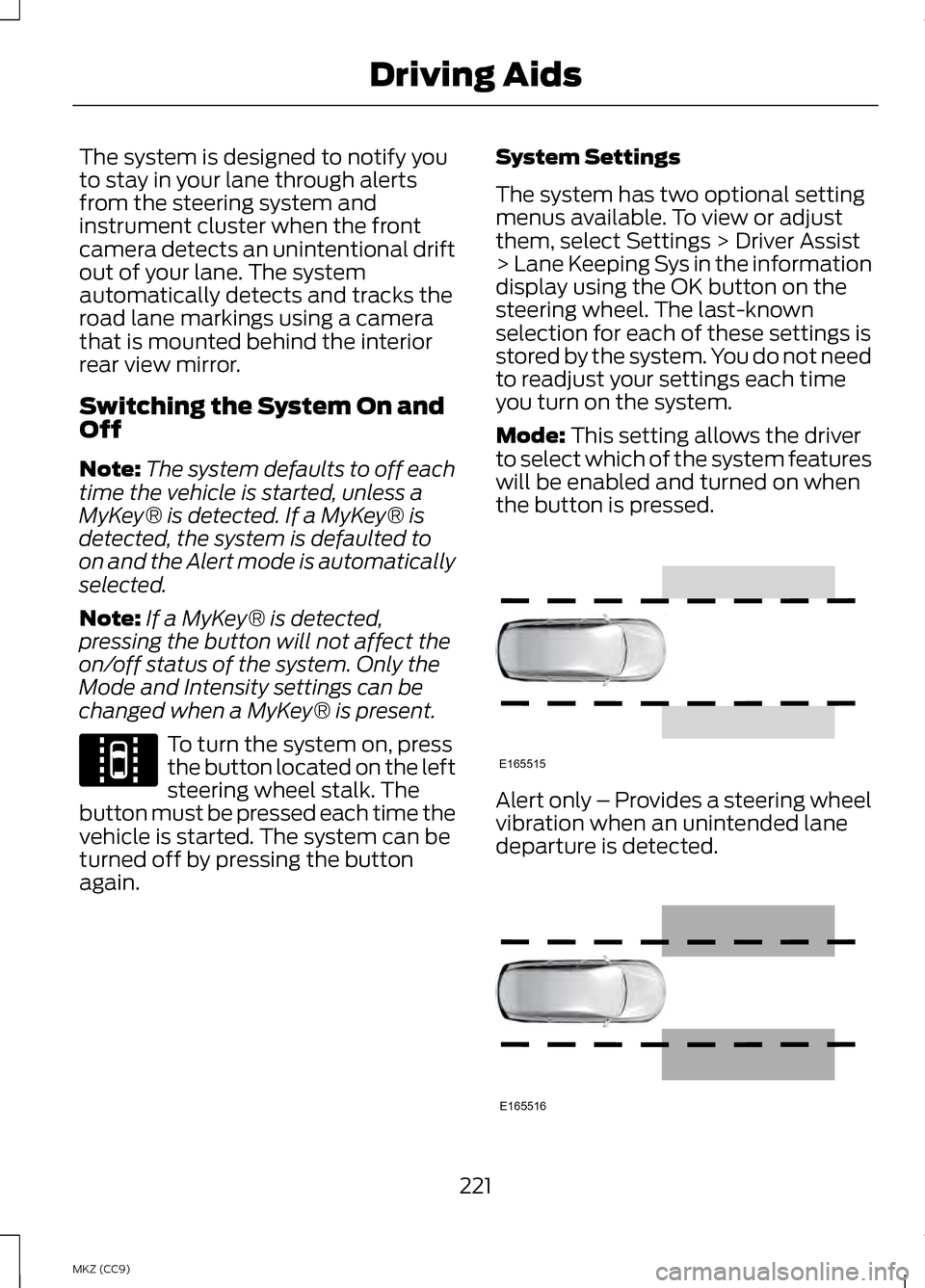
the button is pressed. Alert only – Provides a steering wheel
vibration when an unintended lane
departure is detected.
221
MKZ (CC9) Driving AidsE144813 E165515 E165516
Page 230 of 475

Note:
It is possible to get a blockage
warning with no blockage present; this
is rare and known as a false blockage
warning. A false blocked condition
either self-corrects or clears after a key
cycle. The system uses radar sensors which
are located behind the bumper fascia
on each side of your vehicle. Do not
allow these areas to become
obstructed by mud, snow or bumper
stickers, as this can cause degraded
system performance.
If the system detects a degraded
performance condition, a message
warning of a blocked sensor or a
message warning of low visibility will
appear in the information display and
the alert indicator illuminates in the
appropriate mirror(s). The information
display warning can be cleared but
the alert indicator remains
illuminated.
When the blockage is removed, the
system can be reset in two ways:
•
when at least two objects are
detected while driving, or
• turn the ignition from on to off,
then back on. If the blockage is still present after the
key cycle, the system senses again
that it is blocked after driving in traffic. Reasons for messages being
displayed
Clean the fascia area in front of the radar or
remove the obstruction.
The radar
surface is dirty or
obstructed
Drive normally in trafficfor a few minutes to
allow the radar to detect
passing vehicles so it can clear the blocked state.
The radar
surface is not dirty or
obstructed
No action required. Thesystem automatically
resets to an unblocked
state once the rainfall or snowfall rate decreases
or stops. Do not use BLIS or cross traffic alert in these conditions.
Heavy
rainfall/
snowfall
interferes with the radar
signals
System Limitations
The BLIS and cross traffic alert
systems do have their limitations;
situations such as severe weather
conditions or debris build-up on the
sensor area may limit vehicle
detection.
228
MKZ (CC9) Driving AidsE142443
Page 231 of 475
The following are other situations that
may limit the BLIS:
•
Certain maneuvering of vehicles
entering and exiting the blind zone.
• Vehicles passing through the blind
zone at very fast rates.
• When several vehicles forming a
convoy pass through the blind
zone.
The following are other situations that
may limit the cross traffic alert
system:
• Adjacently parked vehicles or
objects obstructing the sensors.
• Approaching vehicles passing at
speeds greater than 15 mph (24
km/h).
• Driving in reverse faster than 5
mph (8 km/h).
• Backing out of an angled parking
spot.
False Alerts
Note: If a trailer is connected to the
vehicle the BLIS system may detect the
trailer causing a false alert. You may
want to turn the BLIS off manually.
There may be certain instances when
either the BLIS or cross traffic alert
systems illuminate the alert indicator
with no vehicle in the coverage zone;
this is known as a false alert. Some
amount of false alerts are normal;
they are temporary and self-correct. System Errors
If either system senses a problem with
the left or right sensor, the BLIS
telltale will illuminate and a message
will appear in the information display.
All other system faults will only be
displayed by a message in the
information display.
Switching the Systems Off and On
One or both systems can be switched
off temporarily by using the
information display control. See
General Information (page 103).
When the BLIS is switched off, you will
not receive alerts and a telltale
illuminates in the information display.
Note: The CTA system always
switches on whenever the ignition is
switched on. However, the BLIS system
will remember the last selected on or
off setting.
One or both systems cannot be
switched off when MyKey is used. See
General Information
(page 343).
One or both systems can also be
switched off permanently at your
authorized dealer. Once switched off,
switching it back on must also be
done at your authorized dealer.
229
MKZ (CC9) Driving Aids
Page 233 of 475
The warning system sensitivity can be
adjusted to one of three possible
settings by using the information
display control. See General
Information (page 103).
Note: If the system cannot be turned
off in a vehicle equipped with MyKey®,
See
Principle of Operation (page 57).
Note: If collision warnings are
perceived as being too frequent or
disturbing then the warning sensitivity
can be reduced, though the
manufacturer recommends using the
highest sensitivity setting where
possible. Setting lower sensitivity
would lead to fewer and later system
warnings. See
General Information
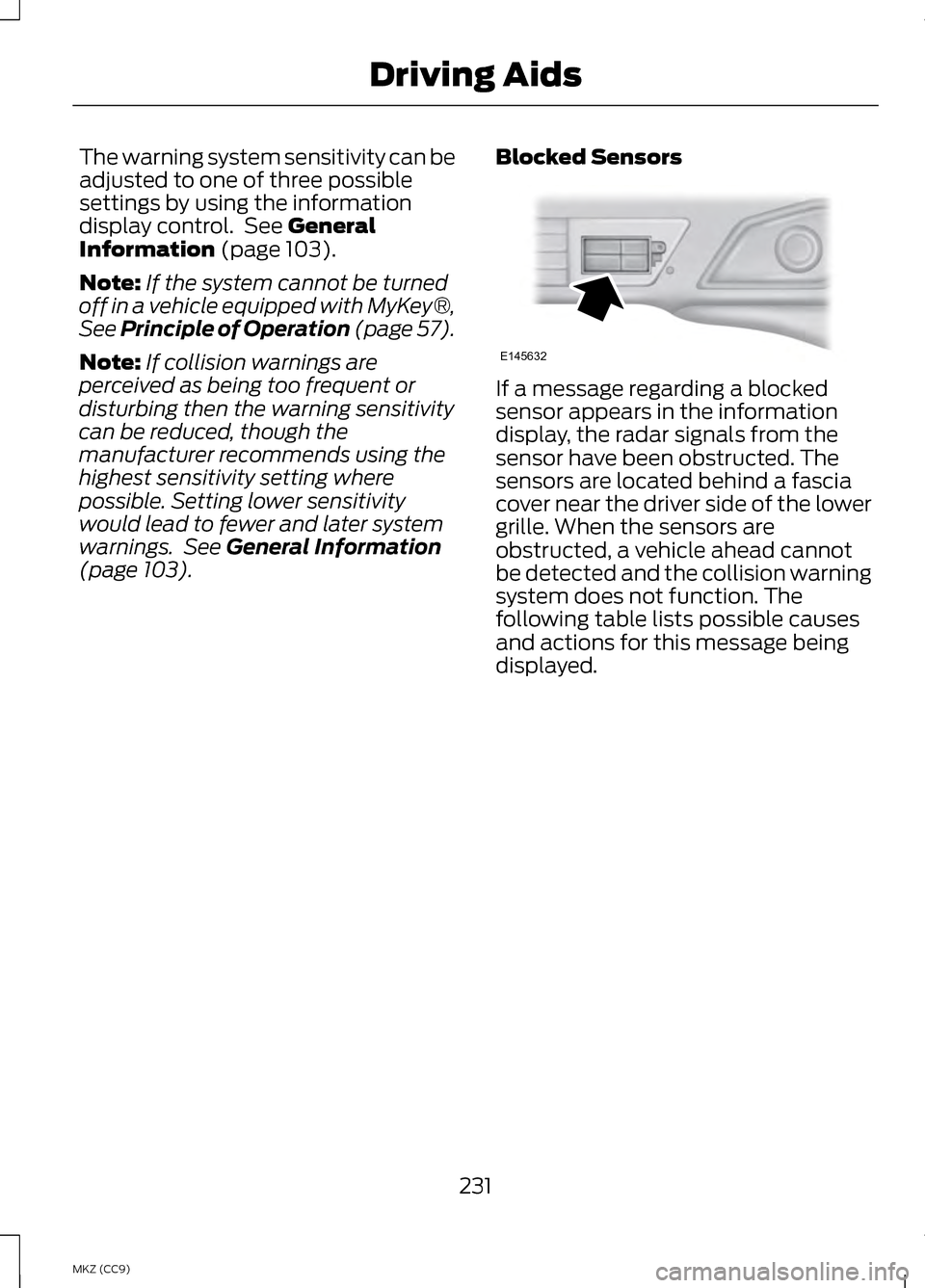
(page 103). Blocked Sensors If a message regarding a blocked
sensor appears in the information
display, the radar signals from the
sensor have been obstructed. The
sensors are located behind a fascia
cover near the driver side of the lower
grille. When the sensors are
obstructed, a vehicle ahead cannot
be detected and the collision warning
system does not function. The
following table lists possible causes
and actions for this message being
displayed.
231
MKZ (CC9) Driving AidsE145632
Page 237 of 475
•
Comfort – Provides a more relaxed
driving experience, maximizing
comfort. Steering effort is
decreased and suspension
movement is more fluid. Comfort
mode is ideal when enhanced
traveling comfort is desired.
• Normal – Delivers a balanced
combination of comfortable,
controlled ride and confident
handling. This mode provides an
engaging drive experience and a
direct connection to the road
without sacrificing any of the
composure demanded from a
luxury vehicle.
• Sport – Provides a sportier driving
experience. Suspension stiffens,
with an emphasis on handling and
control. The engine responds more
directly to your inputs and takes
on a more powerful tone. Sport
mode is intended to be used during
more spirited driving.
Using Lincoln Drive Control
You can configure which of the Drive
Control modes are active when the
vehicle is in D (Drive) or in S (Sport).
The configuration is retained until
modified from the main menu on the
information display.
To change the vehicle ’s Drive Control
settings from the main menu on the
information display:
1. Choose Settings.
2. Choose Driver Assist.
3. Choose Vehicle. 4.
Select the shift position you would
like to configure, either
D or S.
5. Choose from Comfort, Normal, or Sport modes as your preferred
setting in
D.
6. Choose from Normal or Sport
modes as your preferred setting in
S.
Note: Lincoln Drive Control has
diagnostic checks that continuously
monitor the system to ensure proper
operation. Certain types of system
errors will gray out the mode selections
within the information display,
preventing you from changing states
when the gear position is changed.
Other types of errors will produce a
temporary message that states Drive
Control Malfunction. If either condition
persists for multiple key cycles, take
your vehicle to an authorized dealer to
have it checked.
235
MKZ (CC9) Driving Aids
Page 248 of 475
•
Place the vehicle in Neutral Tow
mode by doing the following:
•Put the ignition in accessory
mode (ignition on, engine off).
See Keyless Starting (page
161).
• Select
Neutral Tow in the
information display.
• When prompted by the
information display, press the
brake pedal and select Neutral
on the transmission. Make sure
the parking brake is off. If done
successfully, Neutral Tow
Engaged
appears in the
display.
• Shut the ignition off. See
Keyless Starting
(page 161).
If the process is completed
successfully, the
N on the
transmission slowly blinks and
"Neutral tow engaged" appears
in the information display.
• Do not exceed 70 mph (113 km/h).
• Start the engine and allow it to run
for one minute at the beginning of
each day. With the engine running
and your foot on the brake, shift
into position
D and then into
position R before shifting back into
position
N.
246
MKZ (CC9) Towing
Page 252 of 475
ROADSIDE ASSISTANCE
Vehicles Sold In The U.S.:
Getting Roadside Assistance
To fully assist you should you have a
vehicle concern Ford Motor Company
offers a complimentary roadside
assistance program. This program is
separate from the New Vehicle
Limited Warranty. The service is
available:
•
24-hours, seven days a week.
• for the coverage period listed on
the Roadside Assistance Card
included in your Owner's Manual
portfolio.
Roadside assistance will cover:
• a flat tire change with a good spare
(except vehicles that have been
supplied with a tire inflation kit).
• battery jump start.
• lock-out assistance (key
replacement cost is the customer's
responsibility).
• fuel delivery — Independent
Service Contractors, if not
prohibited by state, local or
municipal law shall deliver up to
2.0 gallons (7.5L) of gasoline or
5.0 gallons (18.9L) of diesel fuel
to a disabled vehicle. Fuel delivery
service is limited to two no-charge
occurrences within a 12-month
period. •
winch out — available within 100
feet (30.5 meters) of a paved or
county maintained road, no
recoveries.
• towing — Ford and Lincoln eligible
vehicles towed to an authorized
dealer within 35 miles (56 km) of
the disablement location or to the
nearest authorized dealer. If a
member requests to be towed to
an authorized dealer more than 35
miles (56 km) from the
disablement location, the member
shall be responsible for any
mileage costs in excess of 35 miles
(56 km).
Trailers shall be covered up to $200
if the disabled eligible vehicle requires
service at the nearest authorized
dealer. If the trailer is disabled, but the
towing vehicle is operational, the
trailer does not qualify for any
roadside services.
Vehicles Sold In The U.S. :
Using Roadside Assistance
Complete the roadside assistance
identification card and place it in your
wallet for quick reference. This card
is found in the owner's information
portfolio in the glove compartment.
U.S. Lincoln vehicle customers who
require Roadside Assistance, call
1-800-521-4140.
250
MKZ (CC9) Roadside Emergencies
Page 258 of 475
Vehicle Information and General
Safety Practices
•
Know the make and model of your
vehicle.
• Review the owner ’s manual and
become familiar with your vehicle ’s
safety information and
recommended safety practices.
• Do not attempt to repair damaged
electric and hybrid-electric
vehicles yourself. Contact an
authorized Ford Dealer or vehicle
manufacturer representative for
service.
Crashes
A crash or impact significant enough
to require an emergency response for
conventional vehicles would also
require the same response for an
electric or hybrid-electric vehicle.
If possible
• Move your car to a safe, nearby
location and remain on the scene.
• Roll down the windows before
shutting your vehicle off.
• Place your vehicle in Park, set the
parking brake, turn off the vehicle,
activate the hazard lights, and
move your key(s) at least 16 feet
(5 meters) away from the vehicle. Always
•
Call 911 if assistance is needed and
advise that an electric or
hybrid-electric vehicle is involved.
• Do not touch exposed electrical
components or the engine
compartment, as a shock hazard
may exist.
• Avoid contact with leaking fluids
and gases, and remain out of the
way of oncoming traffic until
emergency responders arrive.
• When emergency responders
arrive, tell them that the vehicle
involved is an electric vehicle or
hybrid vehicle.
Fires
As with any vehicle, call 911
immediately if you see sparks, smoke
or flames coming from the vehicle.
• Exit the vehicle immediately.
• Advise 911 that an electric or
hybrid-electric vehicle is involved.
• As with any vehicle fire, do not
inhale smoke, vapors or gas from
the vehicle, as they may be
hazardous.
• Remain a safe distance upwind
and uphill from the vehicle fire.
• Stay out of the roadway and stay
out of the way of any oncoming
traffic while awaiting the arrival of
emergency responders.
256
MKZ (CC9) Roadside Emergencies
Page 276 of 475
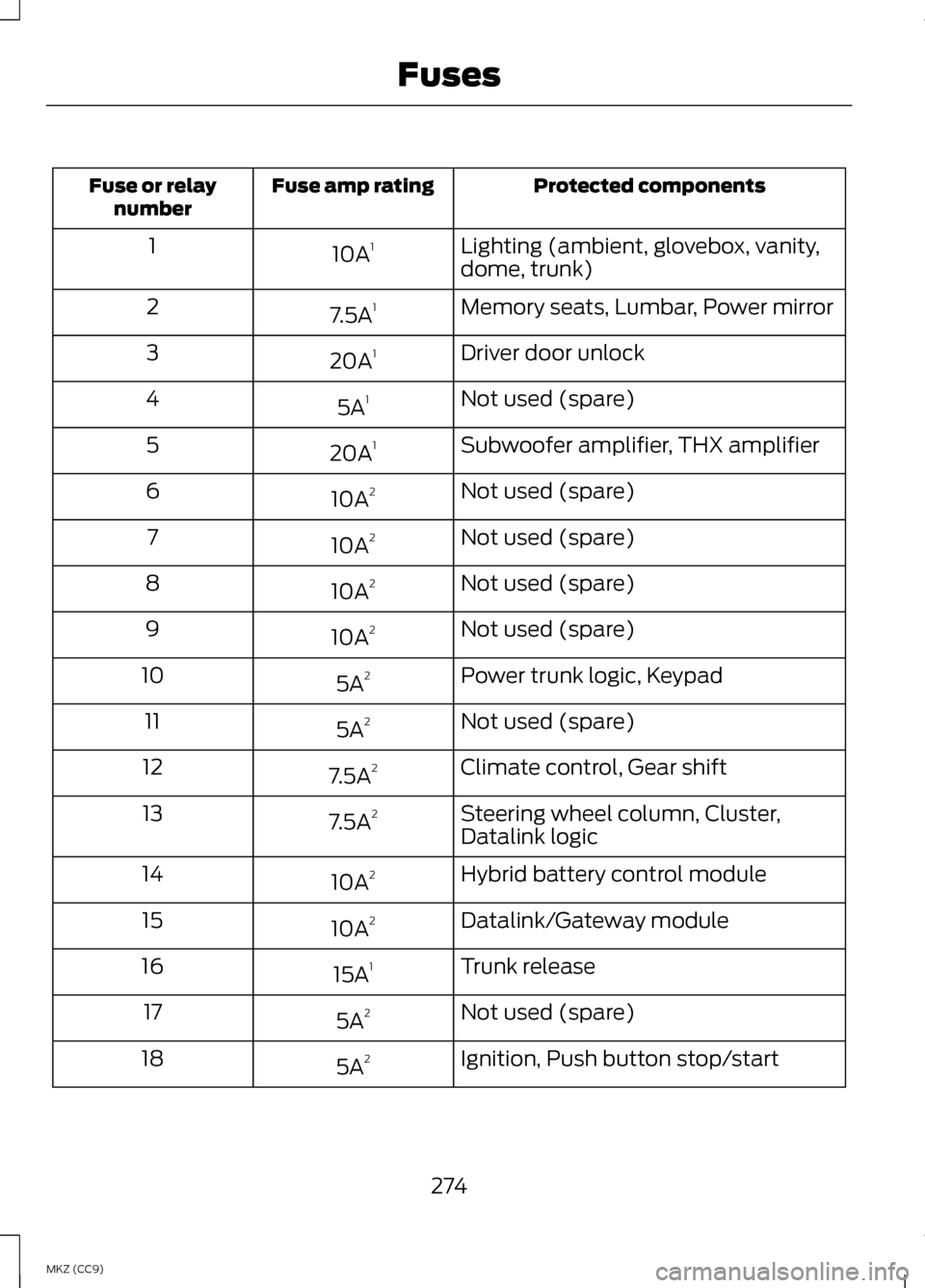
Protected components
Fuse amp rating
Fuse or relay
number
Lighting (ambient, glovebox, vanity,
dome, trunk)
10A
1
1
Memory seats, Lumbar, Power mirror
7.5A 1
2
Driver door unlock
20A 1
3
Not used (spare)
5A 1
4
Subwoofer amplifier, THX amplifier
20A 1
5
Not used (spare)
10A 2
6
Not used (spare)
10A 2
7
Not used (spare)
10A 2
8
Not used (spare)
10A 2
9
Power trunk logic, Keypad
5A 2
10
Not used (spare)
5A 2
11
Climate control, Gear shift
7.5A 2
12
Steering wheel column, Cluster,
Datalink logic
7.5A
2
13
Hybrid battery control module
10A 2
14
Datalink/Gateway module
10A 2
15
Trunk release
15A 1
16
Not used (spare)
5A 2
17
Ignition, Push button stop/start
5A 2
18
274
MKZ (CC9) Fuses