key LINCOLN MKZ HYBRID 2013 Owner's Manual
[x] Cancel search | Manufacturer: LINCOLN, Model Year: 2013, Model line: MKZ HYBRID, Model: LINCOLN MKZ HYBRID 2013Pages: 475, PDF Size: 3.89 MB
Page 74 of 475
PASSIVE ANTI-THEFT
SYSTEM
Note:
The system is not compatible
with non-Ford aftermarket remote start
systems. Use of these systems may
result in vehicle starting problems and
a loss of security protection.
Note: Metallic objects, electronic
devices or a second coded key on the
same key chain may cause vehicle
starting problems if they are too close
to the key when starting your vehicle.
Prevent these objects from touching
the coded key while starting your
vehicle. Switch the ignition off, move
all objects on the key chain away from
the coded key and restart your vehicle
if a problem occurs.
Note: Do not leave a duplicate coded
key in your vehicle. Always take your
keys and lock all doors when leaving
your vehicle.
SecuriLock®
The system helps prevent your vehicle
from starting unless you use a coded
key programmed to your vehicle.
Using the wrong key may prevent your
vehicle from starting. A message may
appear in the information display.
If you are unable to start your vehicle
with a correctly coded key, a
malfunction has happened. A
message may appear in the
information display. Automatic Arming
Your vehicle arms immediately after
switching the ignition off.
Automatic Disarming
Switching the ignition on with a coded
key disarms your vehicle.
Replacement Keys
Note:
Your vehicle comes equipped
with two intelligent access keys.
The intelligent access key functions
as a programmed key that operates
the driver door lock and activates the
intelligent access with push button
start system, as well as a remote
control.
If your programmed transmitters are
lost or stolen and you do not have an
extra coded key, you will need to have
your vehicle towed to an authorized
dealer. You need to erase the key
codes from your vehicle and program
new coded keys.
Store an extra programmed key away
from your vehicle in a safe place to
help prevent any inconveniences. See
your authorized dealer to purchase
additional spare or replacement keys.
Programming a Spare Intelligent
Access Key
Note: You can program a maximum
for four intelligent access keys to your
vehicle.
72
MKZ (CC9) Security
Page 75 of 475
You must have two previously
programmed intelligent access keys
inside your vehicle and the new
unprogrammed intelligent access keys
readily accessible. See an authorized
dealer to have the spare key
programmed if two previously
programmed keys are not available.
Make sure that your vehicle is off
before beginning this procedure. Make
sure that you close all the doors
before beginning and that they remain
closed throughout the procedure.
Perform all steps within 30 seconds
of starting the sequence. Stop and
wait for at least one minute before
starting again if you perform any steps
out of sequence.
Read and understand the entire
procedure before you begin.
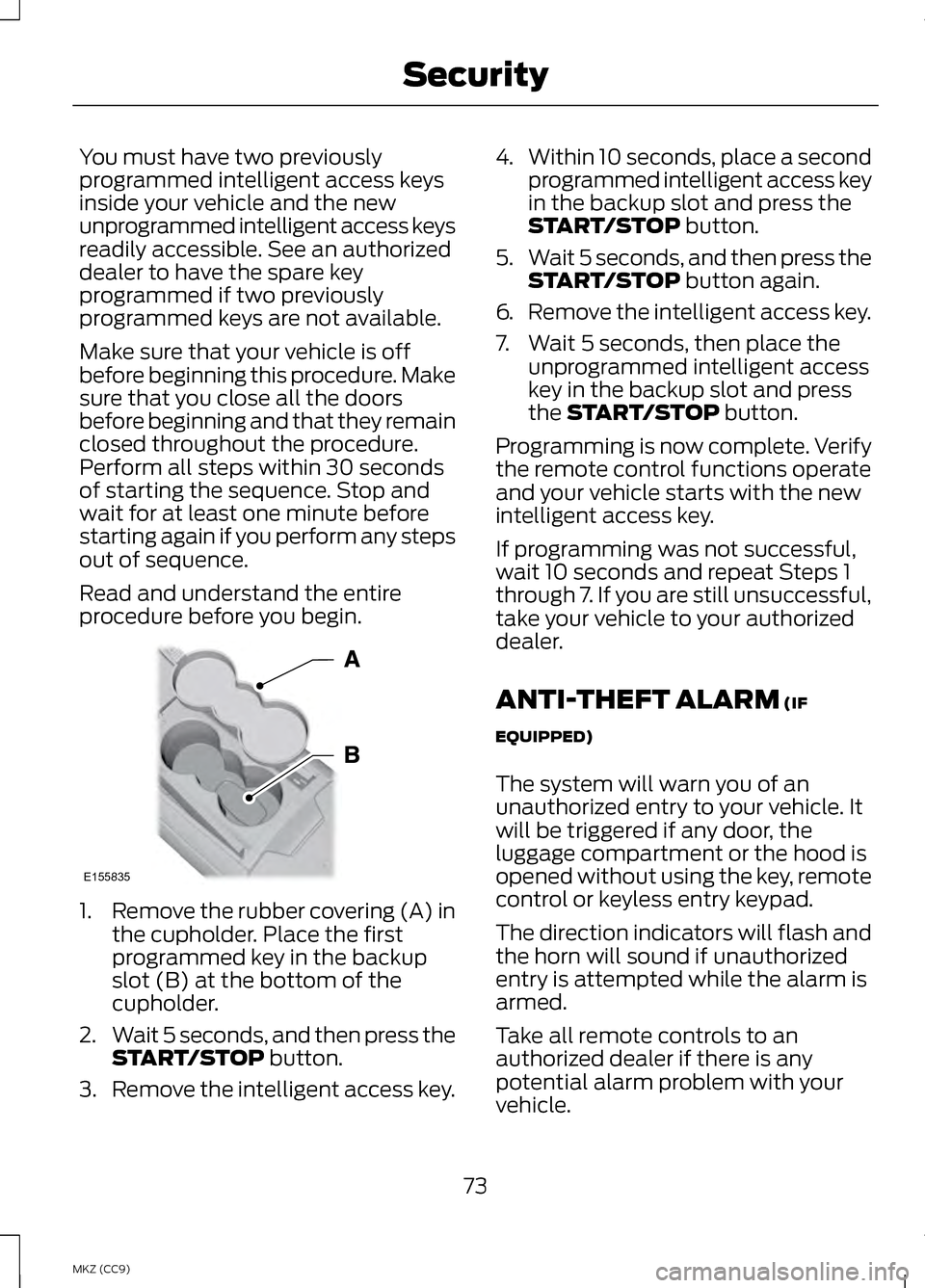
1.
Remove the rubber covering (A) in
the cupholder. Place the first
programmed key in the backup
slot (B) at the bottom of the
cupholder.
2. Wait 5 seconds, and then press the
START/STOP button.
3. Remove the intelligent access key. 4.
Within 10 seconds, place a second
programmed intelligent access key
in the backup slot and press the
START/STOP
button.
5. Wait 5 seconds, and then press the
START/STOP
button again.
6. Remove the intelligent access key.
7. Wait 5 seconds, then place the unprogrammed intelligent access
key in the backup slot and press
the
START/STOP button.
Programming is now complete. Verify
the remote control functions operate
and your vehicle starts with the new
intelligent access key.
If programming was not successful,
wait 10 seconds and repeat Steps 1
through 7. If you are still unsuccessful,
take your vehicle to your authorized
dealer.
ANTI-THEFT ALARM
(IF
EQUIPPED)
The system will warn you of an
unauthorized entry to your vehicle. It
will be triggered if any door, the
luggage compartment or the hood is
opened without using the key, remote
control or keyless entry keypad.
The direction indicators will flash and
the horn will sound if unauthorized
entry is attempted while the alarm is
armed.
Take all remote controls to an
authorized dealer if there is any
potential alarm problem with your
vehicle.
73
MKZ (CC9) SecurityE155835
Page 76 of 475
Arming the Alarm
The alarm is ready to arm when there
is not a key in the ignition.
Electronically lock the vehicle to arm
the alarm.
Disarming the Alarm
Disarm the alarm by any of the
following actions:
•
Unlock the doors or luggage
compartment with the remote
control or keyless entry keypad.
• Switch the ignition on or start the
vehicle.
• Use a key in the driver ’s door to
unlock the vehicle, then switch the
ignition on within 12 seconds.
Note: Pressing the panic button on the
remote control will stop the horn and
signal indicators, but will not disarm
the system.
74
MKZ (CC9) Security
Page 99 of 475
Fuel Gauge:
The fuel gauge will indicate
approximately how much fuel is left
in the fuel tank. The fuel gauge may
vary slightly when your vehicle is
moving or on a gradient. The arrow
adjacent to the fuel pump symbol
indicates on which side of the vehicle
the fuel filler door is located.
Brake Coach Display:
The Brake Coach appears after the
vehicle has come to a stop. It coaches
you to brake in a manner which
maximizes the amount of energy
returned through the regenerative
braking system. The percent displayed
is an indication of the regenerative
braking efficiency with 100%
representing the maximum amount
of energy recovery.
Trip Summary and Lifetime
Summary:
These will be displayed upon shutting
off the vehicle. Trip Summary will
appear first, then Lifetime Summary
will be displayed. You can toggle
between these displays using the up
and down arrow keys on the left hand
steering wheel controls.
Trip Summary data is from the last
power cycle, while Lifetime Summary
data is cumulative from the last
Lifetime Summary reset done through
the Settings menu in the information
display screen.
Trip Summary:
•
Distance- The total distance
traveled, distance traveled on
battery power only (EV distance)
and Regen distance are displayed.
Regen distance is the estimated
range gained from energy
recaptured through regenerative
braking.
• Energy Use- The average fuel
economy and total fuel used are
displayed.
• Brake Score- The average
percentage of braking energy
recaptured and returned to the
high-voltage battery through
regenerative braking. The brake
score will be shown in blue if
greater than (better than) the
lifetime brake score.
Lifetime Summary:
• Distance- The distance traveled
on battery power only (EV
distance) and Regen distance are
displayed. Regen distance is the
estimated range gained from
energy recaptured through
regenerative braking.
• Energy Use- The average fuel
economy and total fuel used are
displayed.
• Brake Score- The average
percentage of braking energy
recaptured and returned to the
high-voltage battery through
regenerative braking.
97
MKZ (CC9) Instrument Cluster
Page 104 of 475
AUDIBLE WARNINGS AND
INDICATORS
Key in Ignition Warning Chime
Sounds when you open the driver's
door and you have left the key in the
ignition with it in the off or accessory
position.
Keyless Warning Alert (If Equipped)
Chirps the horn twice when you exit
the vehicle with the intelligent access
key and the keyless vehicle is in RUN,
indicating the vehicle is still on.
Headlamps On Warning Chime
Sounds when you remove the key
from the ignition and open the driver's
door and you have left the headlamps
or parking lamps on.
Parking Brake On Warning
Chime
Sounds when you have left the
parking brake on and drive your
vehicle. If the warning chime remains
on after you have released the parking
brake, have the system checked by
your authorized dealer immediately.
102
MKZ (CC9) Instrument Cluster
Page 105 of 475
GENERAL INFORMATION
WARNING
Driving while distracted can
result in loss of vehicle control,
accident and injury. We strongly
recommend that you use extreme
caution when using any device or
feature that may take your focus off
the road. Your primary responsibility
is the safe operation of the vehicle.
We recommend against the use of any
handheld device while driving and that
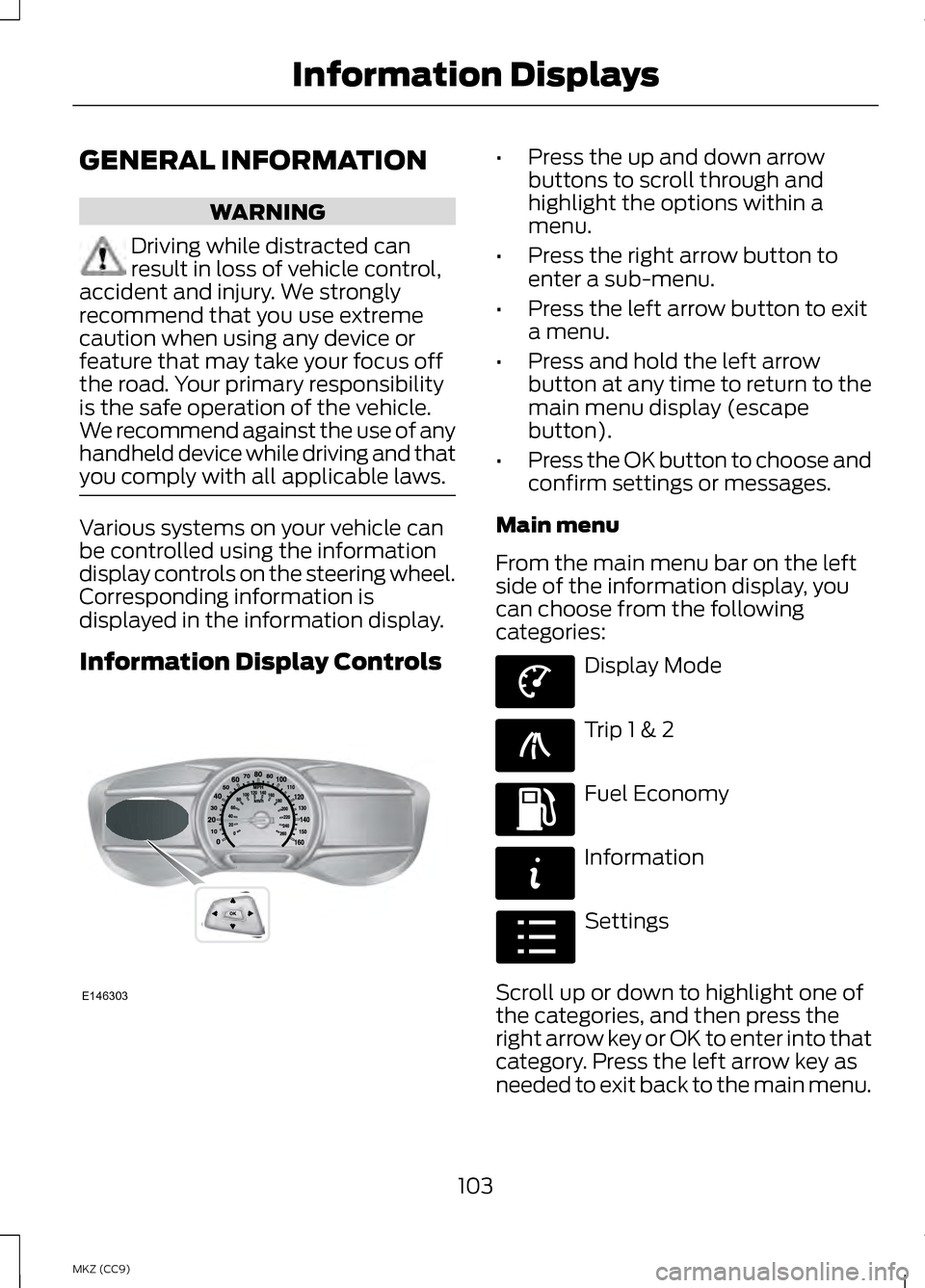
you comply with all applicable laws. Various systems on your vehicle can
be controlled using the information
display controls on the steering wheel.
Corresponding information is
displayed in the information display.
Information Display Controls •
Press the up and down arrow
buttons to scroll through and
highlight the options within a
menu.
• Press the right arrow button to
enter a sub-menu.
• Press the left arrow button to exit
a menu.
• Press and hold the left arrow
button at any time to return to the
main menu display (escape
button).
• Press the OK button to choose and
confirm settings or messages.
Main menu
From the main menu bar on the left
side of the information display, you
can choose from the following
categories: Display Mode
Trip 1 & 2
Fuel Economy
Information
Settings
Scroll up or down to highlight one of
the categories, and then press the
right arrow key or OK to enter into that
category. Press the left arrow key as
needed to exit back to the main menu.
103
MKZ (CC9) Information DisplaysE146303 E144639 E138660 E144640 E144642 E100023
Page 106 of 475
Display Mode
Use the up or down arrow
buttons to choose between
the following display options.
Note:
The cluster will remember the
menu level 2 state when the individual
key state is changed from the RUN
position to the OFF position. Display Mode
Menu level 5
Menu level 4
Menu level 3
Menu level 2
—
—
Instantaneous
Fuel
Vehicle Range:
Estimated Range + Battery Gauge + Fuel Gauge Apply to all
screens?
Regen Active
Battery Display
Charge Assist Yes / No
Charge Level
Help —
—
Help
—
—
Instantaneous
Fuel
Inform: Avg Fuel
Economy + Battery
Gauge + Fuel Gauge Apply to all
screens?
Regen Active
Battery Display
Charge Assist Yes / No
Charge Level
Help —
—
Help
—
—
Instantaneous
Fuel
Enlighten: Power +
Avg Fuel Economy + Battery Gauge + Fuel Gauge Apply to all
screens?
Regen Active
Battery Display
Charge Assist Yes / No
Charge Level
Help —
—
Help
104
MKZ (CC9) Information DisplaysE144639
Page 111 of 475
•
Accessory Power — Indicates electrical power demands from your vehicle ’s
accessory systems. Accessories use power but do not contribute to propelling
the vehicle. The gauge separately displays power demand in kilowatts (kW)
for climate and other accessories.
Climate includes the power being used by high voltage climate control
components such as the electric A/C compressor and the electric heater (Energi
vehicles only)
Other includes all power being used by the low voltage accessories (cabin fans,
headlights, heated seats, etc.).
• Coolant Temp – Indicates engine coolant temperature. At normal operating
temperature, the level indicator will be white and will be in the normal range
(between H and C). If the engine coolant temperature exceeds the normal
range, the level indicator will change to red to indicate that the engine is
overheating. Stop the vehicle as soon as safely possible, turn off the vehicle
and let the engine cool.
The thermometer indicator next to the gauge will illuminate in blue or white to
indicate the following:
• Blue thermometer - This indicates that the hybrid system is not warm enough
to allow EV operation. The gasoline engine will typically run continuously
when the indicator is blue.
Note: During silent key start mode, the thermometer indicator will be blue, but
the gasoline engine will not run. This is the result of the vehicle computer allowing
the engine to be cooler during the silent key start period. This is normal operation
and does not indicate a problem with your vehicle. After the first engine start the
indicator will turn white when the gasoline engine is warm enough to turn off.
• White thermometer - This indicates that the hybrid system is warm enough
to allow EV operation. If the vehicle operates on battery power long enough,
it is possible that the gasoline engine may need to run to keep the system
warm. In this case, the thermometer indicator will revert back to blue.
• Tach rpm x 1000 — When the gasoline engine is running, the tachometer
gauge displays the engine speed in revolutions per minute (RPM). When the
vehicle is operating on battery power only with the engine off, EV is displayed
and the tachometer is greyed out.
Note: The trip data, and average fuel economy cannot be reset in MyView.
109
MKZ (CC9) Information Displays
Page 115 of 475
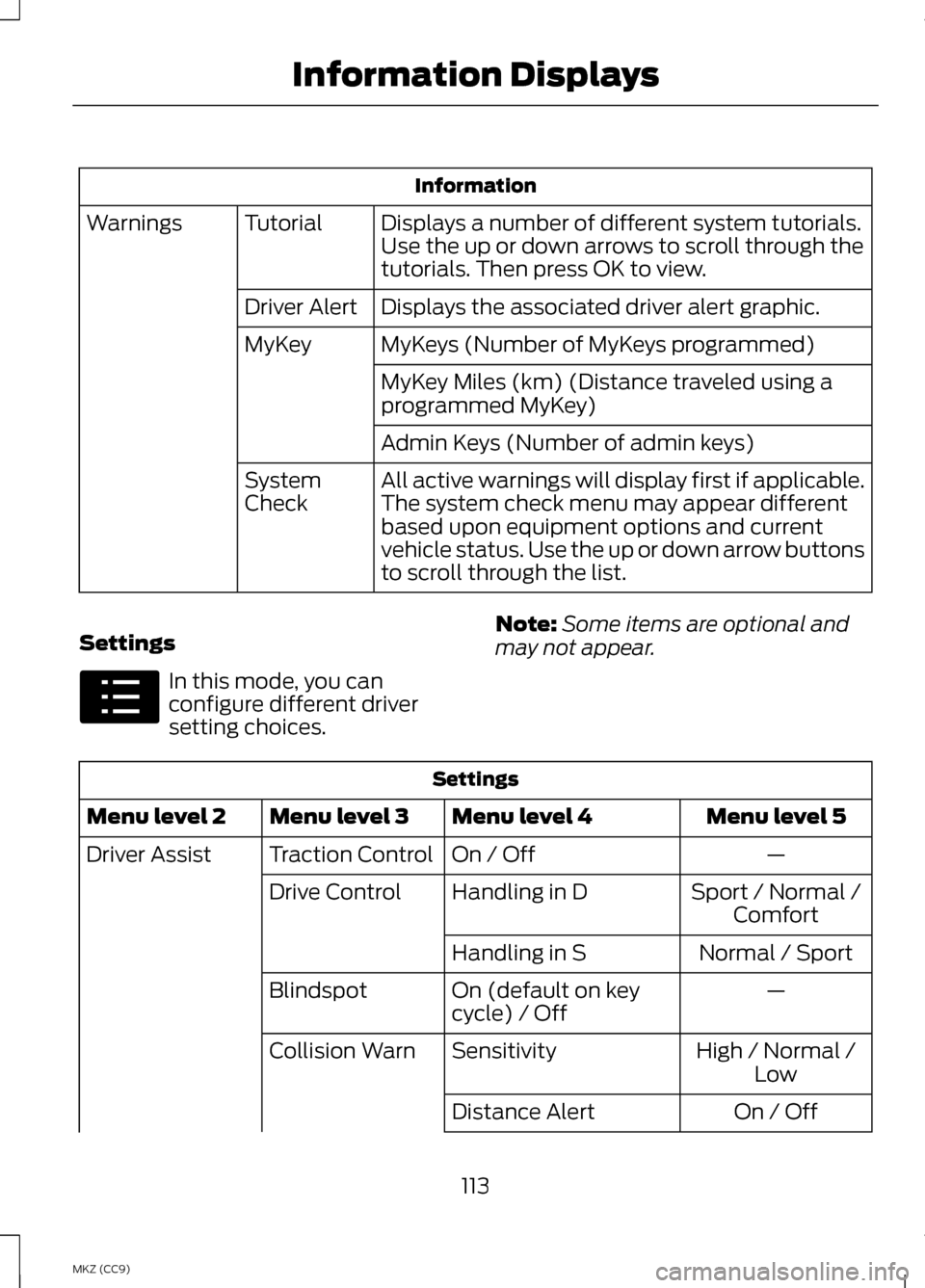
Information
Displays a number of different system tutorials.
Use the up or down arrows to scroll through the
tutorials. Then press OK to view.
Tutorial
Warnings
Displays the associated driver alert graphic.
Driver Alert
MyKeys (Number of MyKeys programmed)
MyKey
MyKey Miles (km) (Distance traveled using a
programmed MyKey)
Admin Keys (Number of admin keys)
All active warnings will display first if applicable.
The system check menu may appear different
based upon equipment options and current
vehicle status. Use the up or down arrow buttons
to scroll through the list.
System
Check
Settings In this mode, you can
configure different driver
setting choices.
Note:
Some items are optional and
may not appear. Settings
Menu level 5
Menu level 4
Menu level 3
Menu level 2
—
On / Off
Traction Control
Driver Assist
Sport / Normal /Comfort
Handling in D
Drive Control
Normal / Sport
Handling in S
—
On (default on key
cycle) / Off
Blindspot
High / Normal /Low
Sensitivity
Collision Warn
On / Off
Distance Alert
113
MKZ (CC9) Information DisplaysE100023
Page 116 of 475
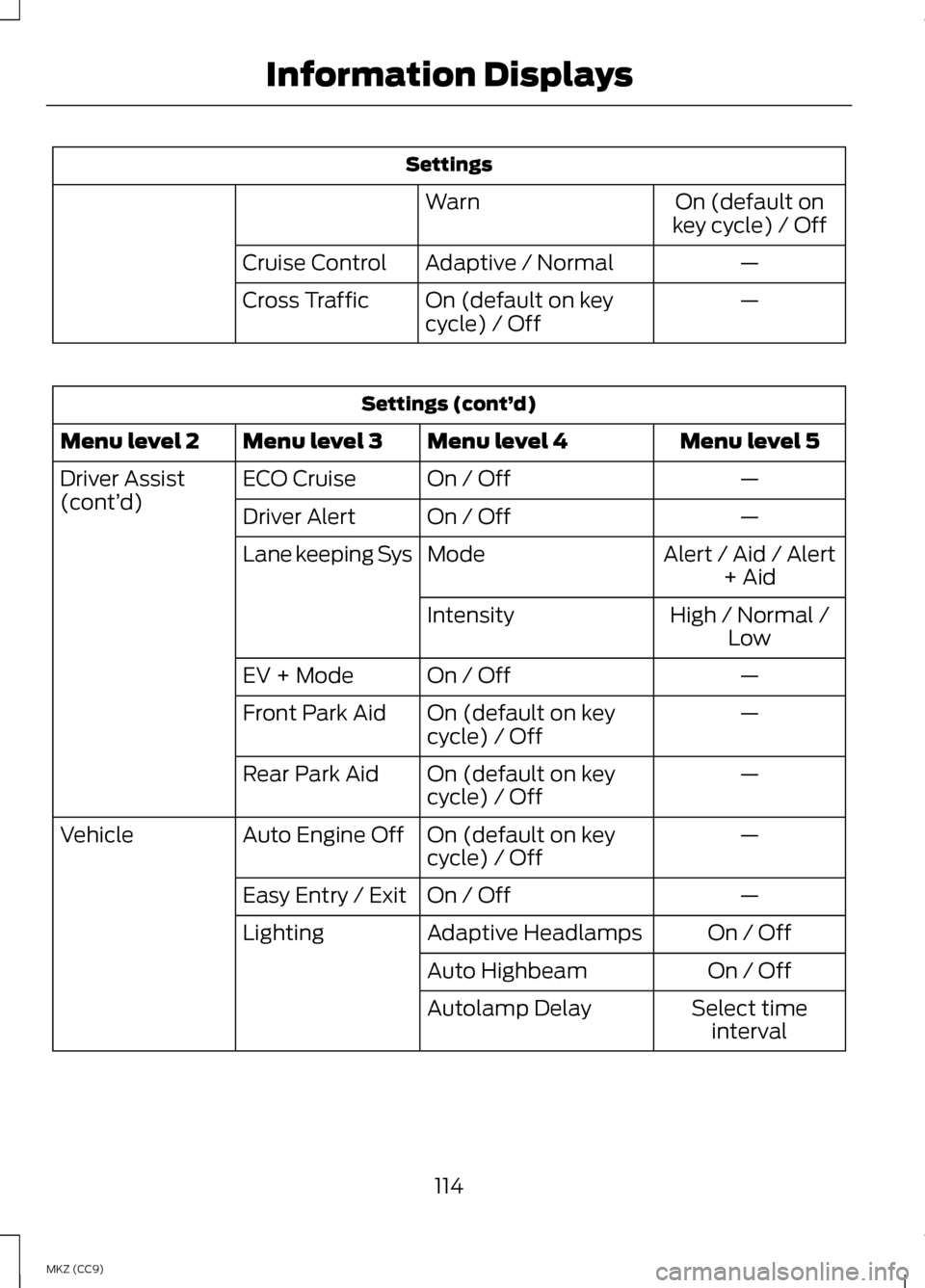
Settings
On (default on
key cycle) / Off
Warn
—
Adaptive / Normal
Cruise Control
—
On (default on key
cycle) / Off
Cross Traffic Settings (cont’
d)
Menu level 5
Menu level 4
Menu level 3
Menu level 2
—
On / Off
ECO Cruise
Driver Assist
(cont’ d)
—
On / Off
Driver Alert
Alert / Aid / Alert+ Aid
Mode
Lane keeping Sys
High / Normal /Low
Intensity
—
On / Off
EV + Mode
—
On (default on key
cycle) / Off
Front Park Aid
—
On (default on key
cycle) / Off
Rear Park Aid
—
On (default on key
cycle) / Off
Auto Engine Off
Vehicle
—
On / Off
Easy Entry / Exit
On / Off
Adaptive Headlamps
Lighting
On / Off
Auto Highbeam
Select timeinterval
Autolamp Delay
114
MKZ (CC9) Information Displays