key LINCOLN MKZ HYBRID 2013 Repair Manual
[x] Cancel search | Manufacturer: LINCOLN, Model Year: 2013, Model line: MKZ HYBRID, Model: LINCOLN MKZ HYBRID 2013Pages: 475, PDF Size: 3.89 MB
Page 279 of 475
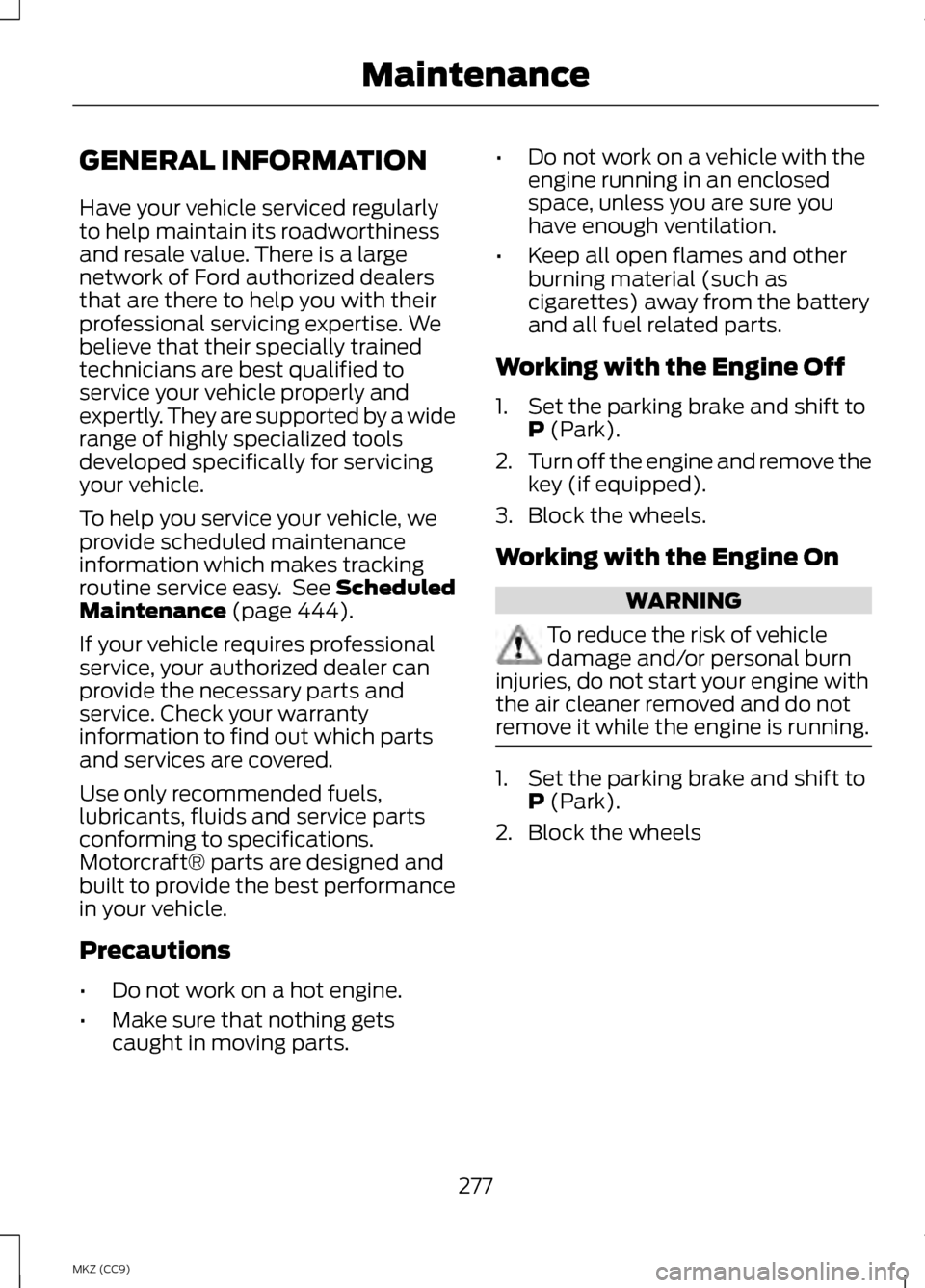
GENERAL INFORMATION
Have your vehicle serviced regularly
to help maintain its roadworthiness
and resale value. There is a large
network of Ford authorized dealers
that are there to help you with their
professional servicing expertise. We
believe that their specially trained
technicians are best qualified to
service your vehicle properly and
expertly. They are supported by a wide
range of highly specialized tools
developed specifically for servicing
your vehicle.
To help you service your vehicle, we
provide scheduled maintenance
information which makes tracking
routine service easy. See Scheduled
Maintenance (page 444).
If your vehicle requires professional
service, your authorized dealer can
provide the necessary parts and
service. Check your warranty
information to find out which parts
and services are covered.
Use only recommended fuels,
lubricants, fluids and service parts
conforming to specifications.
Motorcraft® parts are designed and
built to provide the best performance
in your vehicle.
Precautions
• Do not work on a hot engine.
• Make sure that nothing gets
caught in moving parts. •
Do not work on a vehicle with the
engine running in an enclosed
space, unless you are sure you
have enough ventilation.
• Keep all open flames and other
burning material (such as
cigarettes) away from the battery
and all fuel related parts.
Working with the Engine Off
1. Set the parking brake and shift to P
(Park).
2. Turn off the engine and remove the
key (if equipped).
3. Block the wheels.
Working with the Engine On WARNING
To reduce the risk of vehicle
damage and/or personal burn
injuries, do not start your engine with
the air cleaner removed and do not
remove it while the engine is running. 1. Set the parking brake and shift to
P
(Park).
2. Block the wheels
277
MKZ (CC9) Maintenance
Page 349 of 475
•
Do not leave playing devices in
your vehicle during extreme
conditions as it could cause them
damage. See your device's user
guide for further information.
• For your safety, some SYNC
functions are speed-dependent.
Their use is limited to when your
vehicle is traveling at speeds under
3 mph (5 km/h).
Make sure that you review your
device's manual before using it with
SYNC. Speed-restricted Features
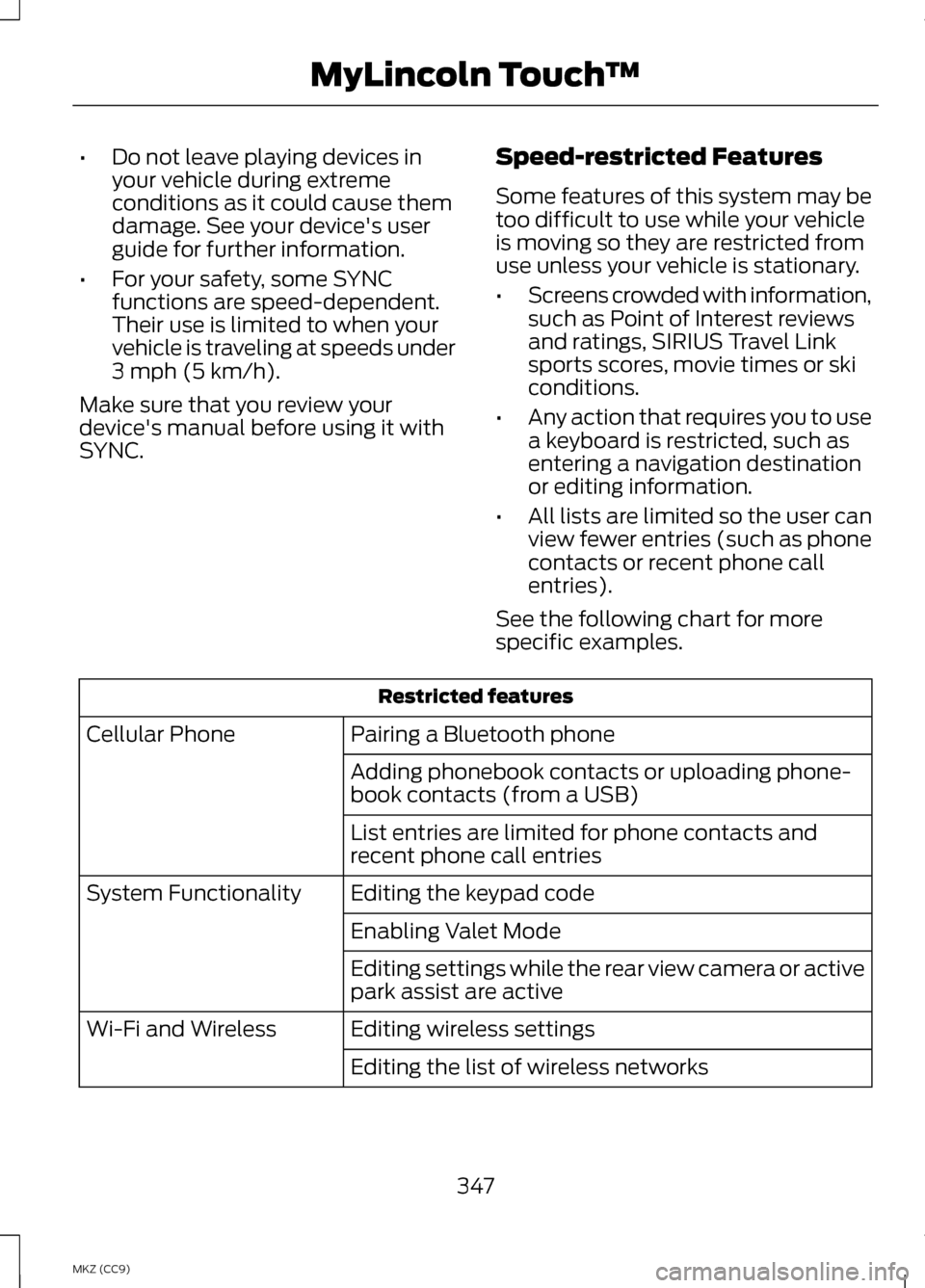
Some features of this system may be
too difficult to use while your vehicle
is moving so they are restricted from
use unless your vehicle is stationary.
•
Screens crowded with information,
such as Point of Interest reviews
and ratings, SIRIUS Travel Link
sports scores, movie times or ski
conditions.
• Any action that requires you to use
a keyboard is restricted, such as
entering a navigation destination
or editing information.
• All lists are limited so the user can
view fewer entries (such as phone
contacts or recent phone call
entries).
See the following chart for more
specific examples. Restricted features
Pairing a Bluetooth phone
Cellular Phone
Adding phonebook contacts or uploading phone-
book contacts (from a USB)
List entries are limited for phone contacts and
recent phone call entries
Editing the keypad code
System Functionality
Enabling Valet Mode
Editing settings while the rear view camera or active
park assist are active
Editing wireless settings
Wi-Fi and Wireless
Editing the list of wireless networks
347
MKZ (CC9) MyLincoln Touch
™
Page 350 of 475
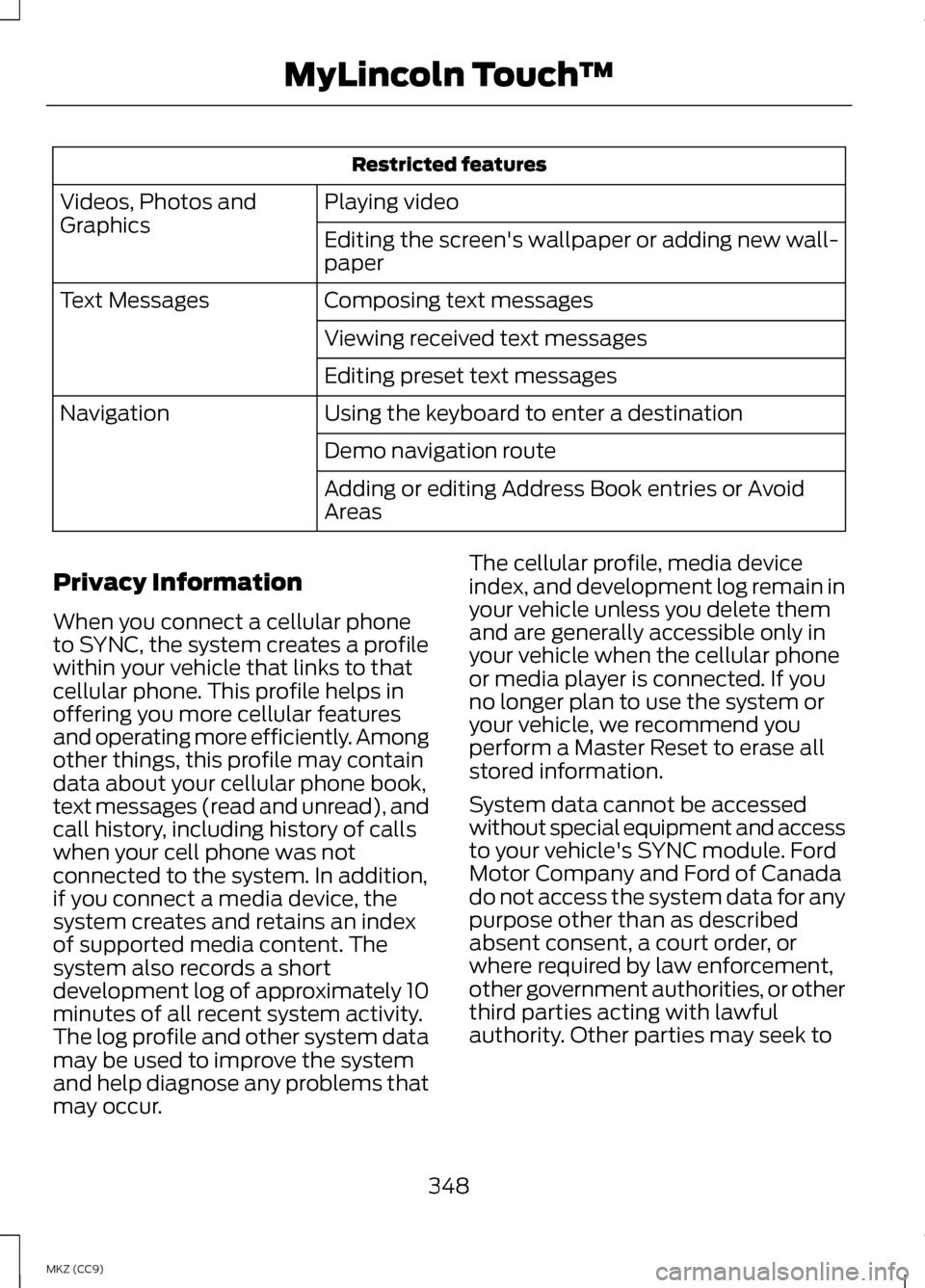
Restricted features
Playing video
Videos, Photos and
Graphics
Editing the screen's wallpaper or adding new wall-
paper
Composing text messages
Text Messages
Viewing received text messages
Editing preset text messages
Using the keyboard to enter a destination
Navigation
Demo navigation route
Adding or editing Address Book entries or Avoid
Areas
Privacy Information
When you connect a cellular phone
to SYNC, the system creates a profile
within your vehicle that links to that
cellular phone. This profile helps in
offering you more cellular features
and operating more efficiently. Among
other things, this profile may contain
data about your cellular phone book,
text messages (read and unread), and
call history, including history of calls
when your cell phone was not
connected to the system. In addition,
if you connect a media device, the
system creates and retains an index
of supported media content. The
system also records a short
development log of approximately 10
minutes of all recent system activity.
The log profile and other system data
may be used to improve the system
and help diagnose any problems that
may occur. The cellular profile, media device
index, and development log remain in
your vehicle unless you delete them
and are generally accessible only in
your vehicle when the cellular phone
or media player is connected. If you
no longer plan to use the system or
your vehicle, we recommend you
perform a Master Reset to erase all
stored information.
System data cannot be accessed
without special equipment and access
to your vehicle's SYNC module. Ford
Motor Company and Ford of Canada
do not access the system data for any
purpose other than as described
absent consent, a court order, or
where required by law enforcement,
other government authorities, or other
third parties acting with lawful
authority. Other parties may seek to
348
MKZ (CC9) MyLincoln Touch
™
Page 361 of 475
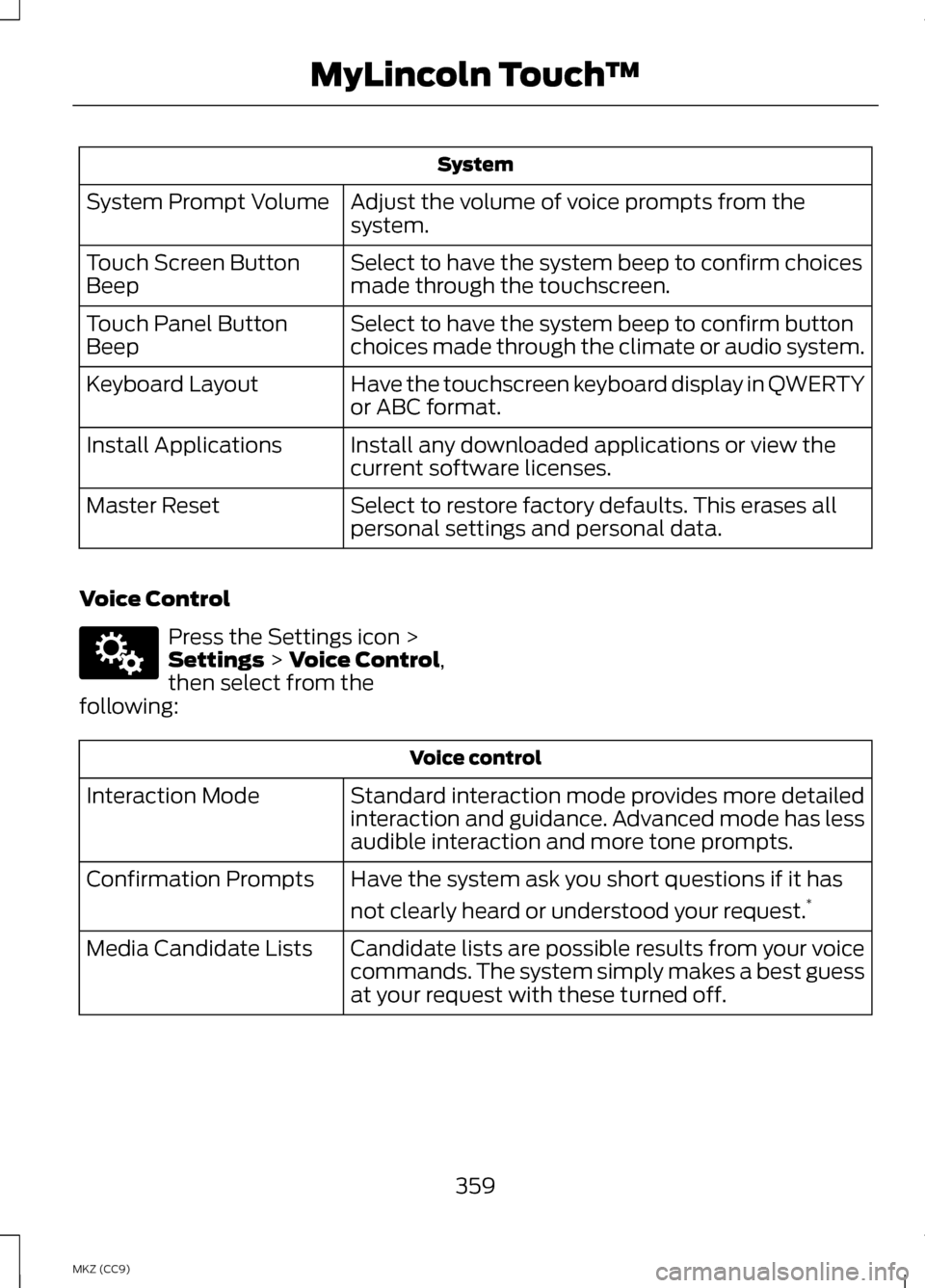
System
Adjust the volume of voice prompts from the
system.
System Prompt Volume
Select to have the system beep to confirm choices
made through the touchscreen.
Touch Screen Button
Beep
Select to have the system beep to confirm button
choices made through the climate or audio system.
Touch Panel Button
Beep
Have the touchscreen keyboard display in QWERTY
or ABC format.
Keyboard Layout
Install any downloaded applications or view the
current software licenses.
Install Applications
Select to restore factory defaults. This erases all
personal settings and personal data.
Master Reset
Voice Control Press the Settings icon >
Settings > Voice Control,
then select from the
following: Voice control
Standard interaction mode provides more detailed
interaction and guidance. Advanced mode has less
audible interaction and more tone prompts.
Interaction Mode
Have the system ask you short questions if it has
not clearly heard or understood your request. *
Confirmation Prompts
Candidate lists are possible results from your voice
commands. The system simply makes a best guess
at your request with these turned off.
Media Candidate Lists
359
MKZ (CC9) MyLincoln Touch
™E142607
Page 380 of 475
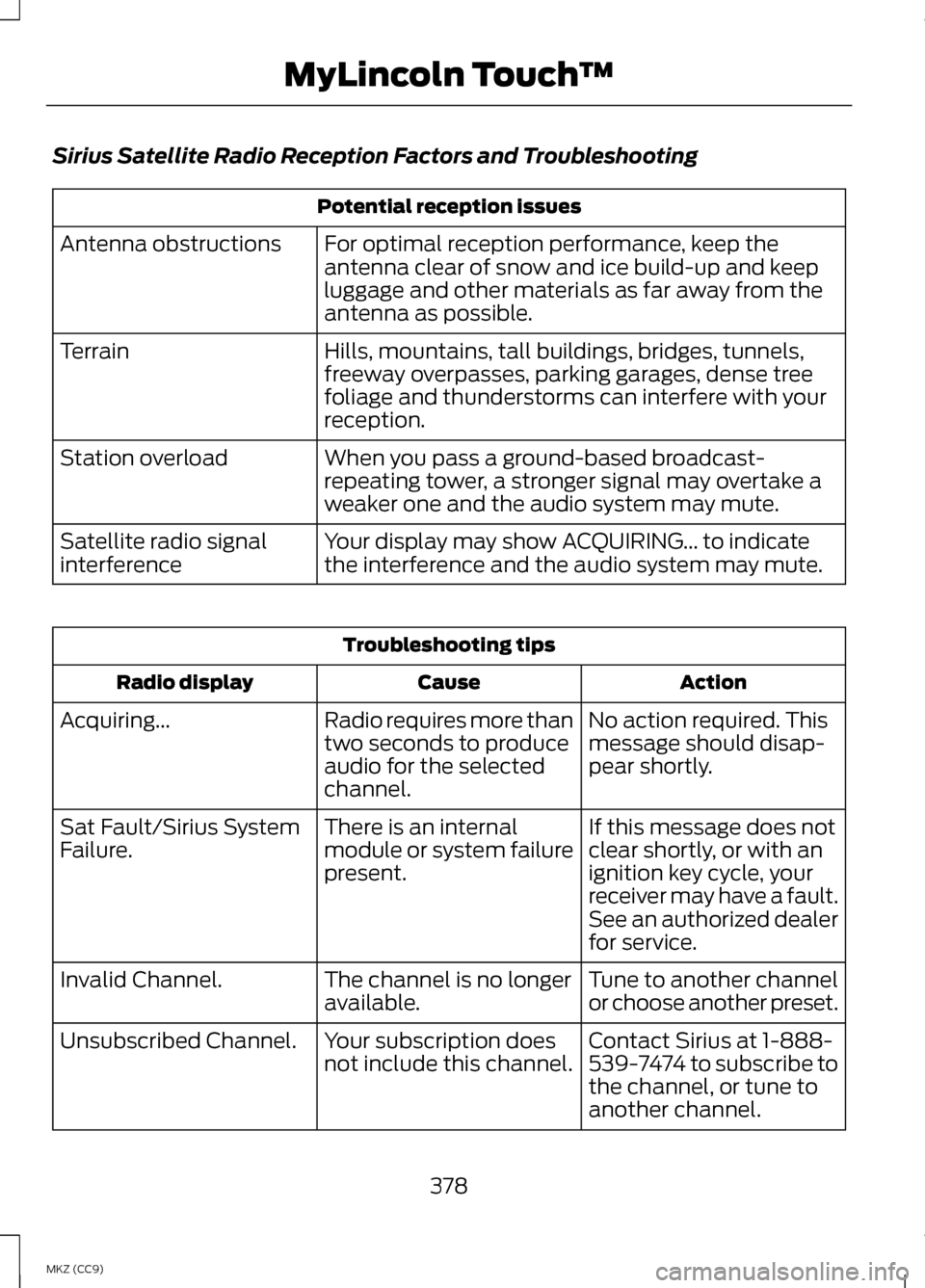
Sirius Satellite Radio Reception Factors and Troubleshooting
Potential reception issues
For optimal reception performance, keep the
antenna clear of snow and ice build-up and keep
luggage and other materials as far away from the
antenna as possible.
Antenna obstructions
Hills, mountains, tall buildings, bridges, tunnels,
freeway overpasses, parking garages, dense tree
foliage and thunderstorms can interfere with your
reception.
Terrain
When you pass a ground-based broadcast-
repeating tower, a stronger signal may overtake a
weaker one and the audio system may mute.
Station overload
Your display may show ACQUIRING... to indicate
the interference and the audio system may mute.
Satellite radio signal
interference Troubleshooting tips
Action
Cause
Radio display
No action required. This
message should disap-
pear shortly.
Radio requires more than
two seconds to produce
audio for the selected
channel.
Acquiring...
If this message does not
clear shortly, or with an
ignition key cycle, your
receiver may have a fault.
See an authorized dealer
for service.
There is an internal
module or system failure
present.
Sat Fault/Sirius System
Failure.
Tune to another channel
or choose another preset.
The channel is no longer
available.
Invalid Channel.
Contact Sirius at 1-888-
539-7474 to subscribe to
the channel, or tune to
another channel.
Your subscription does
not include this channel.
Unsubscribed Channel.
378
MKZ (CC9) MyLincoln Touch
™
Page 463 of 475
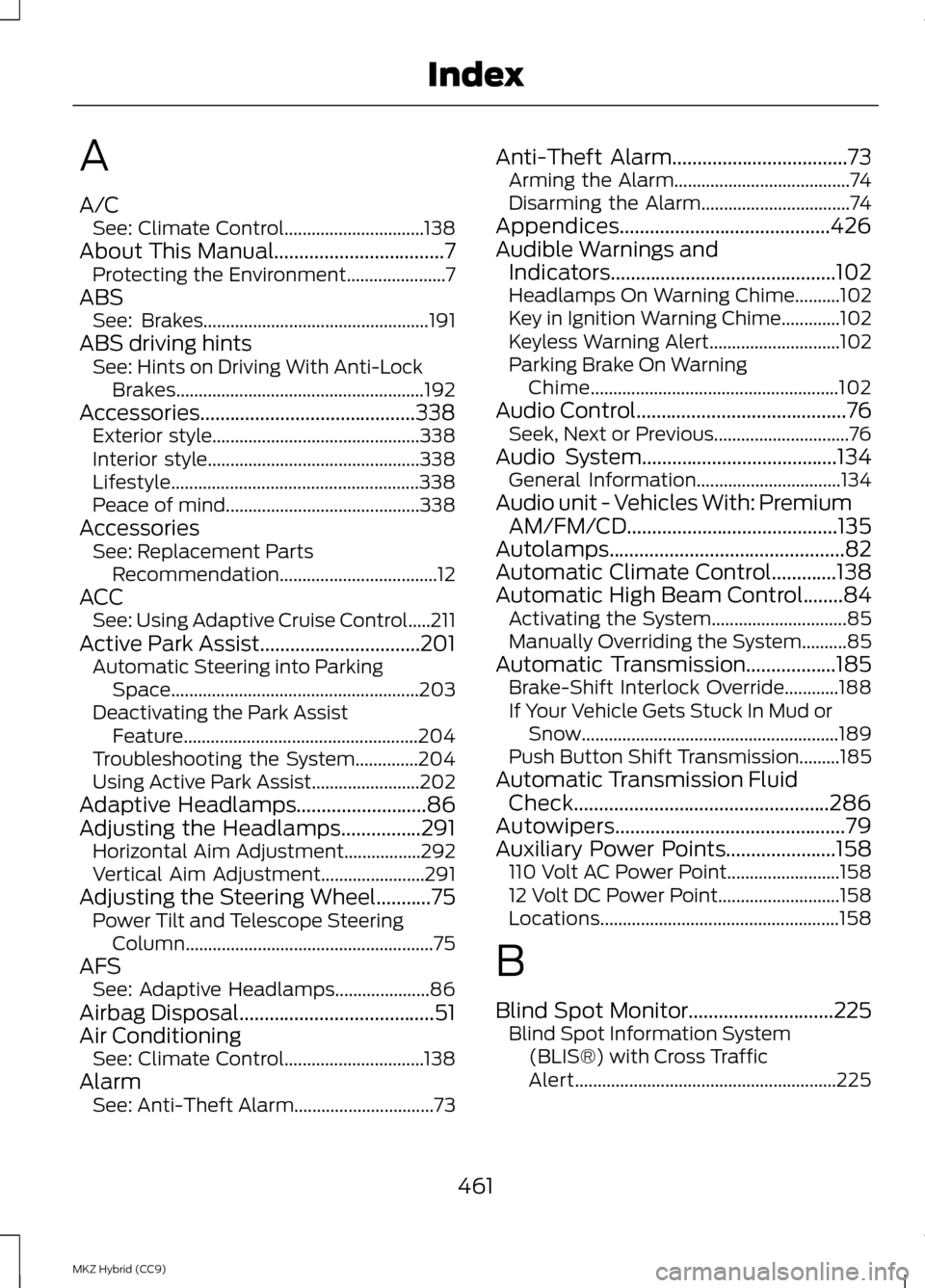
A
A/C
See: Climate Control...............................138
About This Manual..................................7
Protecting the Environment......................7
ABS See: Brakes.................................................. 191
ABS driving hints See: Hints on Driving With Anti-Lock
Brakes....................................................... 192
Accessories...........................................338 Exterior style.............................................. 338
Interior style............................................... 338
Lifestyle....................................................... 338
Peace of mind........................................... 338
Accessories See: Replacement Parts
Recommendation...................................12
ACC See: Using Adaptive Cruise Control.....211
Active Park Assist................................201 Automatic Steering into Parking
Space....................................................... 203
Deactivating the Park Assist Feature.................................................... 204
Troubleshooting the System..............204
Using Active Park Assist........................202
Adaptive Headlamps
..........................86
Adjusting the Headlamps................291
Horizontal Aim Adjustment.................292
Vertical Aim Adjustment.......................291
Adjusting the Steering Wheel...........75 Power Tilt and Telescope Steering
Column....................................................... 75
AFS See: Adaptive Headlamps.....................86
Airbag Disposal.......................................51
Air Conditioning See: Climate Control...............................138
Alarm See: Anti-Theft Alarm...............................73 Anti-Theft Alarm...................................73
Arming the Alarm.......................................74
Disarming the Alarm.................................74
Appendices..........................................426
Audible Warnings and Indicators.............................................102
Headlamps On Warning Chime..........102
Key in Ignition Warning Chime .............102
Keyless Warning Alert.............................102
Parking Brake On Warning Chime....................................................... 102
Audio Control..........................................76 Seek, Next or Previous..............................76
Audio System
.......................................134
General Information................................134
Audio unit - Vehicles With: Premium AM/FM/CD..........................................135
Autolamps...............................................82
Automatic Climate Control
.............138
Automatic High Beam Control........84
Activating the System..............................85
Manually Overriding the System..........85
Automatic Transmission
..................185
Brake-Shift Interlock Override............188
If Your Vehicle Gets Stuck In Mud or
Snow......................................................... 189
Push Button Shift Transmission.........185
Automatic Transmission Fluid Check...................................................286
Autowipers..............................................79
Auxiliary Power Points......................158 110 Volt AC Power Point.........................158
12 Volt DC Power Point...........................158
Locations..................................................... 158
B
Blind Spot Monitor.............................225 Blind Spot Information System
(BLIS®) with Cross Traffic
Alert.......................................................... 225
461
MKZ Hybrid (CC9) Index
Page 464 of 475
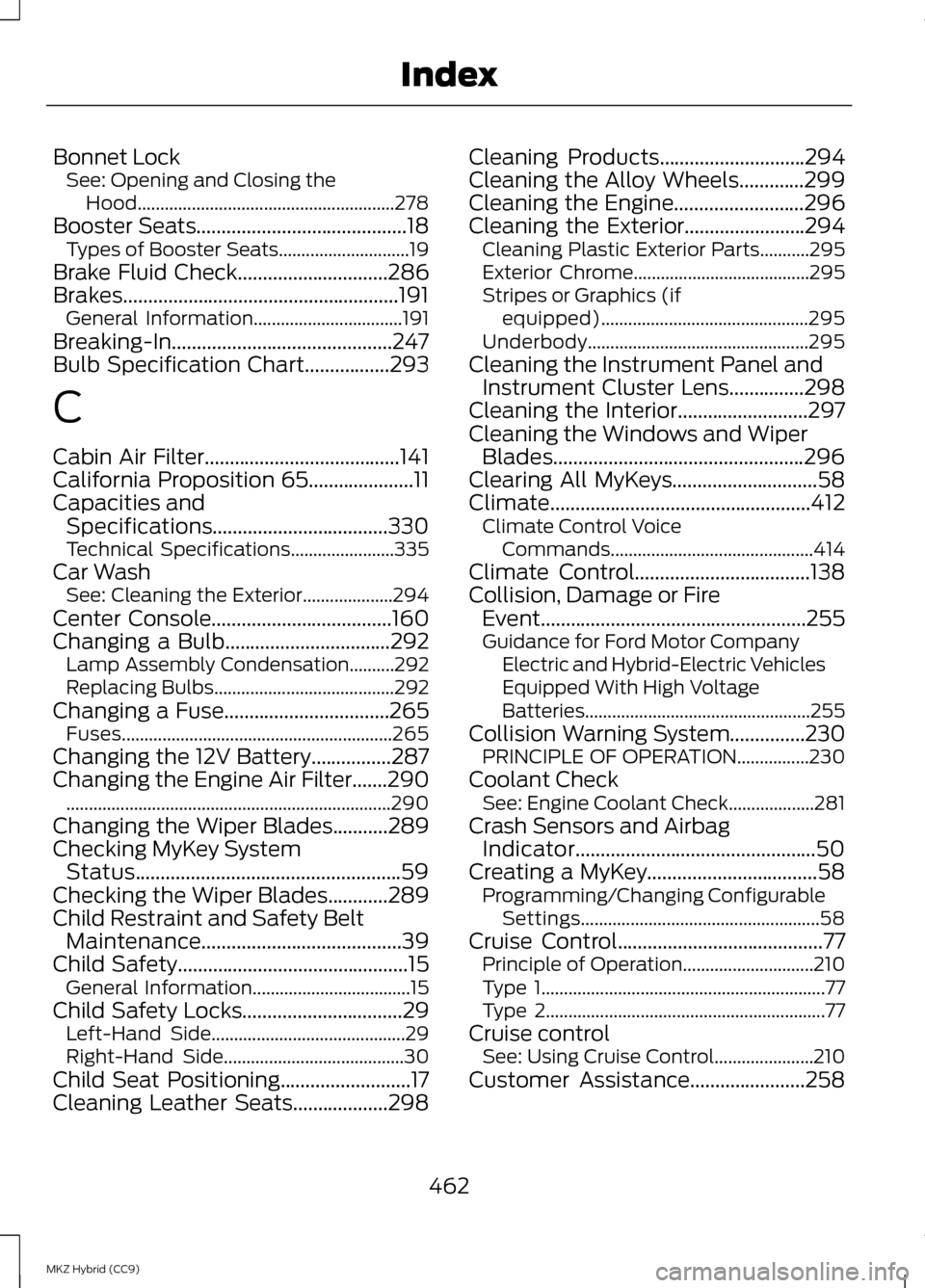
Bonnet Lock
See: Opening and Closing the
Hood......................................................... 278
Booster Seats..........................................18
Types of Booster Seats.............................19
Brake Fluid Check
..............................286
Brakes.......................................................191 General Information.................................191
Breaking-In............................................247
Bulb Specification Chart
.................293
C
Cabin Air Filter.......................................141
California Proposition 65
.....................11
Capacities and Specifications...................................330
Technical Specifications.......................335
Car Wash See: Cleaning the Exterior....................294
Center Console
....................................160
Changing a Bulb.................................292 Lamp Assembly Condensation..........292
Replacing Bulbs........................................292
Changing a Fuse.................................265 Fuses............................................................ 265
Changing the 12V Battery
................287
Changing the Engine Air Filter.......290 ........................................................................\
290
Changing the Wiper Blades...........289
Checking MyKey System Status.....................................................59
Checking the Wiper Blades............289
Child Restraint and Safety Belt Maintenance
........................................39
Child Safety..............................................15
General Information...................................15
Child Safety Locks................................29 Left-Hand Side........................................... 29
Right-Hand Side........................................30
Child Seat Positioning
..........................17
Cleaning Leather Seats...................298 Cleaning Products
.............................294
Cleaning the Alloy Wheels.............299
Cleaning the Engine
..........................296
Cleaning the Exterior........................294
Cleaning Plastic Exterior Parts...........295
Exterior Chrome.......................................295
Stripes or Graphics (if
equipped).............................................. 295
Underbody................................................. 295
Cleaning the Instrument Panel and Instrument Cluster Lens
...............298
Cleaning the Interior..........................297
Cleaning the Windows and Wiper Blades
..................................................296
Clearing All MyKeys.............................58
Climate....................................................412 Climate Control Voice
Commands............................................. 414
Climate Control
...................................138
Collision, Damage or Fire Event.....................................................255
Guidance for Ford Motor Company Electric and Hybrid-Electric Vehicles
Equipped With High Voltage
Batteries.................................................. 255
Collision Warning System
...............230
PRINCIPLE OF OPERATION................230
Coolant Check See: Engine Coolant Check...................281
Crash Sensors and Airbag Indicator................................................50
Creating a MyKey
..................................58
Programming/Changing Configurable
Settings..................................................... 58
Cruise Control
.........................................77
Principle of Operation.............................210
Type 1............................................................... 77
Type 2.............................................................. 77
Cruise control See: Using Cruise Control......................210
Customer Assistance
.......................258
462
MKZ Hybrid (CC9) Index
Page 467 of 475
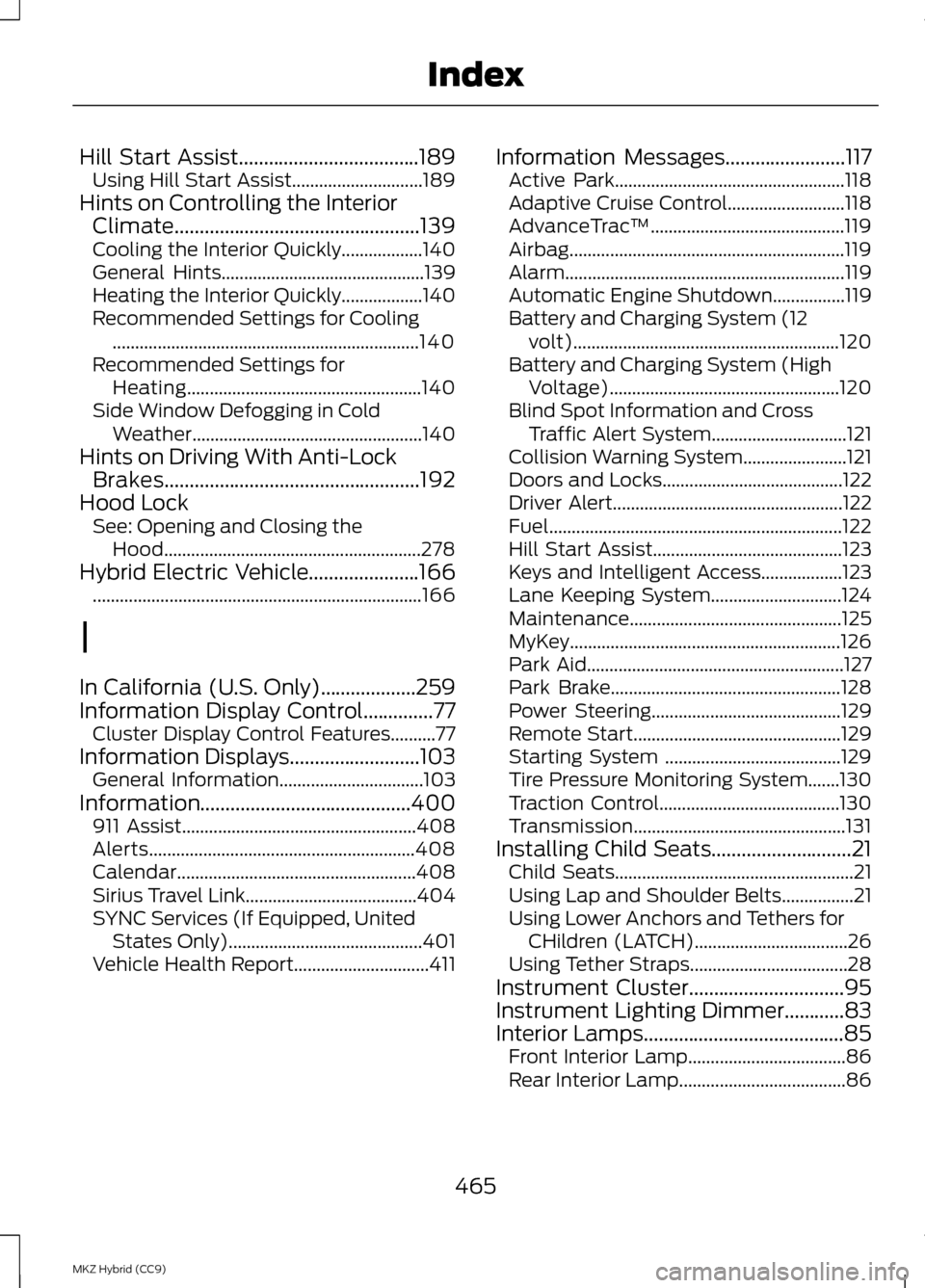
Hill Start Assist....................................189
Using Hill Start Assist.............................189
Hints on Controlling the Interior Climate.................................................139
Cooling the Interior Quickly..................140
General Hints............................................. 139
Heating the Interior Quickly..................140
Recommended Settings for Cooling .................................................................... 140
Recommended Settings for Heating.................................................... 140
Side Window Defogging in Cold Weather................................................... 140
Hints on Driving With Anti-Lock Brakes...................................................192
Hood Lock See: Opening and Closing the
Hood......................................................... 278
Hybrid Electric Vehicle......................166 ........................................................................\
. 166
I
In California (U.S. Only)...................259
Information Display Control..............77 Cluster Display Control Features..........77
Information Displays..........................103
General Information................................103
Information..........................................400 911 Assist.................................................... 408
Alerts........................................................... 408
Calendar..................................................... 408
Sirius Travel Link......................................404
SYNC Services (If Equipped, United States Only)........................................... 401
Vehicle Health Report..............................411 Information Messages
........................117
Active Park................................................... 118
Adaptive Cruise Control..........................118
AdvanceTrac ™........................................... 119
Airbag............................................................. 119
Alarm.............................................................. 119
Automatic Engine Shutdown................119
Battery and Charging System (12 volt)........................................................... 120
Battery and Charging System (High Voltage)................................................... 120
Blind Spot Information and Cross Traffic Alert System..............................121
Collision Warning System.......................121
Doors and Locks........................................122
Driver Alert................................................... 122
Fuel................................................................. 122
Hill Start Assist.......................................... 123
Keys and Intelligent Access..................123
Lane Keeping System.............................124
Maintenance............................................... 125
MyKey............................................................ 126
Park Aid......................................................... 127
Park Brake................................................... 128
Power Steering.......................................... 129
Remote Start.............................................. 129
Starting System .......................................129
Tire Pressure Monitoring System.......130
Traction Control........................................130
Transmission............................................... 131
Installing Child Seats
............................21
Child Seats..................................................... 21
Using Lap and Shoulder Belts................21
Using Lower Anchors and Tethers for CHildren (LATCH)..................................26
Using Tether Straps...................................28
Instrument Cluster...............................95
Instrument Lighting Dimmer............83
Interior Lamps
........................................85
Front Interior Lamp...................................86
Rear Interior Lamp.....................................86
465
MKZ Hybrid (CC9) Index
Page 468 of 475
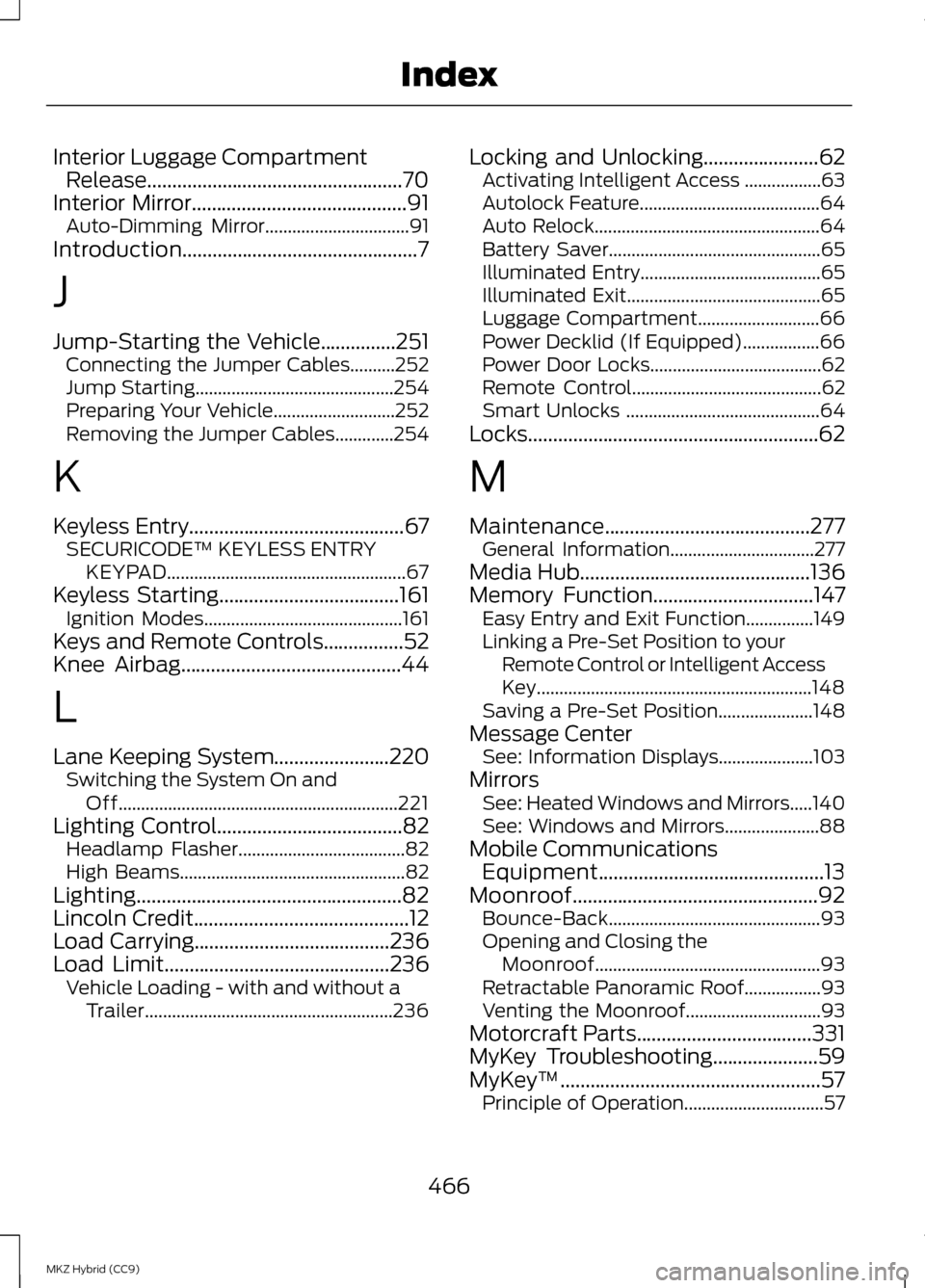
Interior Luggage Compartment
Release...................................................70
Interior Mirror...........................................91 Auto-Dimming Mirror................................91
Introduction...............................................7
J
Jump-Starting the Vehicle...............251 Connecting the Jumper Cables..........252
Jump Starting............................................ 254
Preparing Your Vehicle...........................252
Removing the Jumper Cables.............254
K
Keyless Entry...........................................67 SECURICODE™ KEYLESS ENTRY
KEYPAD..................................................... 67
Keyless Starting....................................161
Ignition Modes............................................ 161
Keys and Remote Controls................52
Knee Airbag
............................................44
L
Lane Keeping System
.......................220
Switching the System On and
Off.............................................................. 221
Lighting Control
.....................................82
Headlamp Flasher.....................................82
High Beams.................................................. 82
Lighting.....................................................82
Lincoln Credit
...........................................12
Load Carrying.......................................236
Load Limit.............................................236 Vehicle Loading - with and without a
Trailer....................................................... 236Locking and Unlocking.......................62
Activating Intelligent Access .................63
Autolock Feature........................................64
Auto Relock.................................................. 64
Battery Saver............................................... 65
Illuminated Entry........................................65
Illuminated Exit........................................... 65
Luggage Compartment...........................66
Power Decklid (If Equipped).................66
Power Door Locks......................................62
Remote Control.......................................... 62
Smart Unlocks ........................................... 64
Locks..........................................................62
M
Maintenance.........................................277 General Information................................277
Media Hub
..............................................136
Memory Function................................147
Easy Entry and Exit Function...............149
Linking a Pre-Set Position to your
Remote Control or Intelligent Access
Key............................................................. 148
Saving a Pre-Set Position.....................148
Message Center See: Information Displays.....................103
Mirrors See: Heated Windows and Mirrors.....140
See: Windows and Mirrors.....................88
Mobile Communications Equipment.............................................13
Moonroof.................................................92 Bounce-Back............................................... 93
Opening and Closing the Moonroof.................................................. 93
Retractable Panoramic Roof.................93
Venting the Moonroof..............................93
Motorcraft Parts
...................................331
MyKey Troubleshooting.....................59
MyKey ™....................................................57
Principle of Operation...............................57
466
MKZ Hybrid (CC9) Index
Page 470 of 475
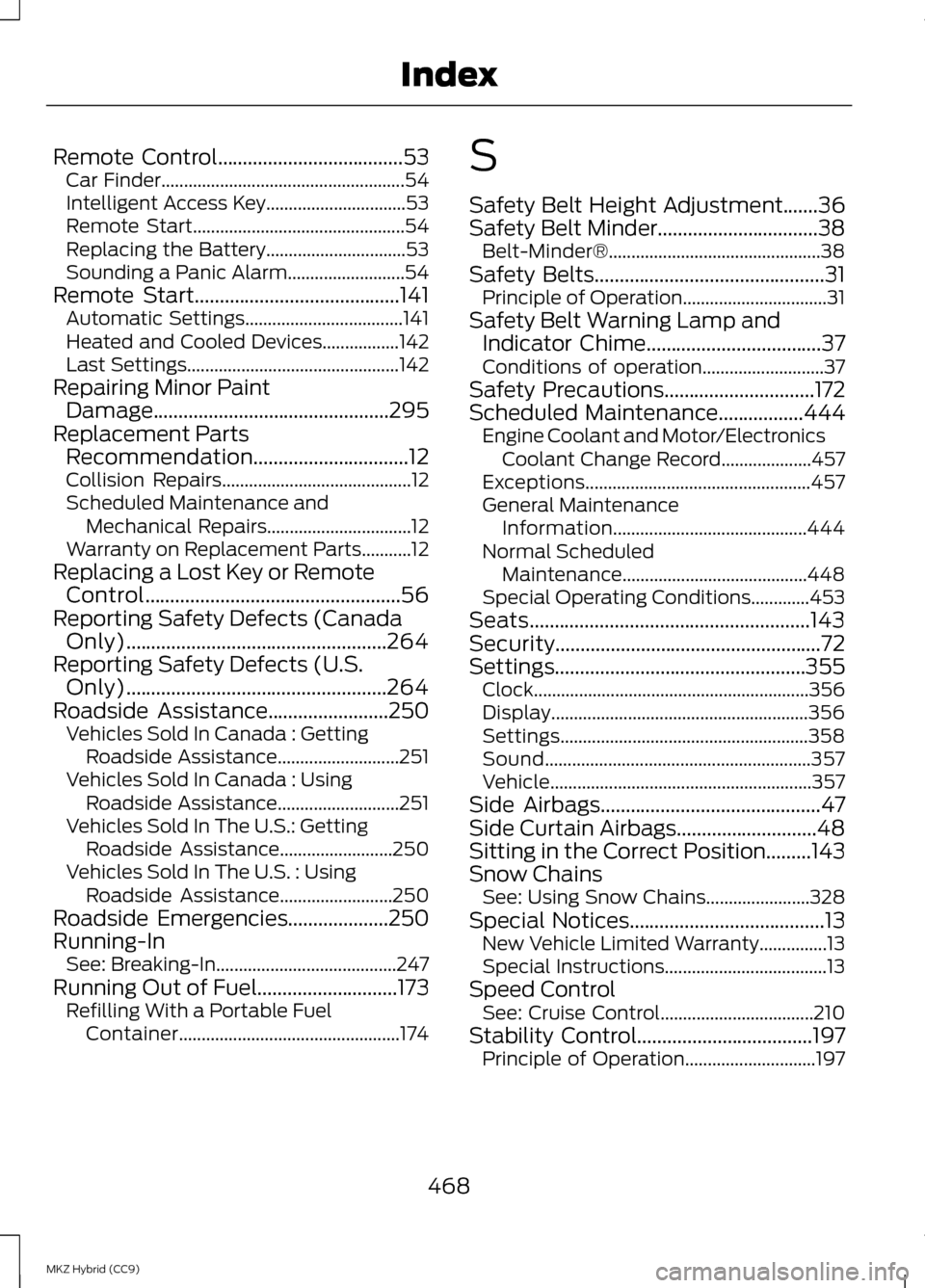
Remote Control.....................................53
Car Finder...................................................... 54
Intelligent Access Key...............................53
Remote Start............................................... 54
Replacing the Battery...............................53
Sounding a Panic Alarm..........................54
Remote Start.........................................141 Automatic Settings...................................141
Heated and Cooled Devices.................142
Last Settings............................................... 142
Repairing Minor Paint Damage
...............................................295
Replacement Parts Recommendation
...............................12
Collision Repairs.......................................... 12
Scheduled Maintenance and Mechanical Repairs................................12
Warranty on Replacement Parts...........12
Replacing a Lost Key or Remote Control...................................................56
Reporting Safety Defects (Canada Only)....................................................264
Reporting Safety Defects (U.S. Only)....................................................264
Roadside Assistance........................250 Vehicles Sold In Canada : Getting
Roadside Assistance...........................251
Vehicles Sold In Canada : Using Roadside Assistance...........................251
Vehicles Sold In The U.S.: Getting Roadside Assistance.........................250
Vehicles Sold In The U.S. : Using Roadside Assistance.........................250
Roadside Emergencies
....................250
Running-In See: Breaking-In........................................247
Running Out of Fuel
............................173
Refilling With a Portable Fuel
Container................................................. 174S
Safety Belt Height Adjustment.......36
Safety Belt Minder
................................38
Belt-Minder®............................................... 38
Safety Belts
..............................................31
Principle of Operation................................31
Safety Belt Warning Lamp and Indicator Chime
...................................37
Conditions of operation...........................37
Safety Precautions
..............................172
Scheduled Maintenance.................444
Engine Coolant and Motor/Electronics
Coolant Change Record....................457
Exceptions.................................................. 457
General Maintenance Information........................................... 444
Normal Scheduled Maintenance.........................................448
Special Operating Conditions.............453
Seats........................................................143
Security.....................................................72
Settings..................................................355 Clock ............................................................. 356
Display......................................................... 356
Settings....................................................... 358
Sound........................................................... 357
Vehicle.......................................................... 357
Side Airbags
............................................47
Side Curtain Airbags............................48
Sitting in the Correct Position.........143
Snow Chains See: Using Snow Chains.......................328
Special Notices
.......................................13
New Vehicle Limited Warranty...............13
Special Instructions....................................13
Speed Control See: Cruise Control..................................210
Stability Control
...................................197
Principle of Operation.............................197
468
MKZ Hybrid (CC9) Index