display LINCOLN MKZ HYBRID 2014 Workshop Manual
[x] Cancel search | Manufacturer: LINCOLN, Model Year: 2014, Model line: MKZ HYBRID, Model: LINCOLN MKZ HYBRID 2014Pages: 445, PDF Size: 3.8 MB
Page 121 of 445
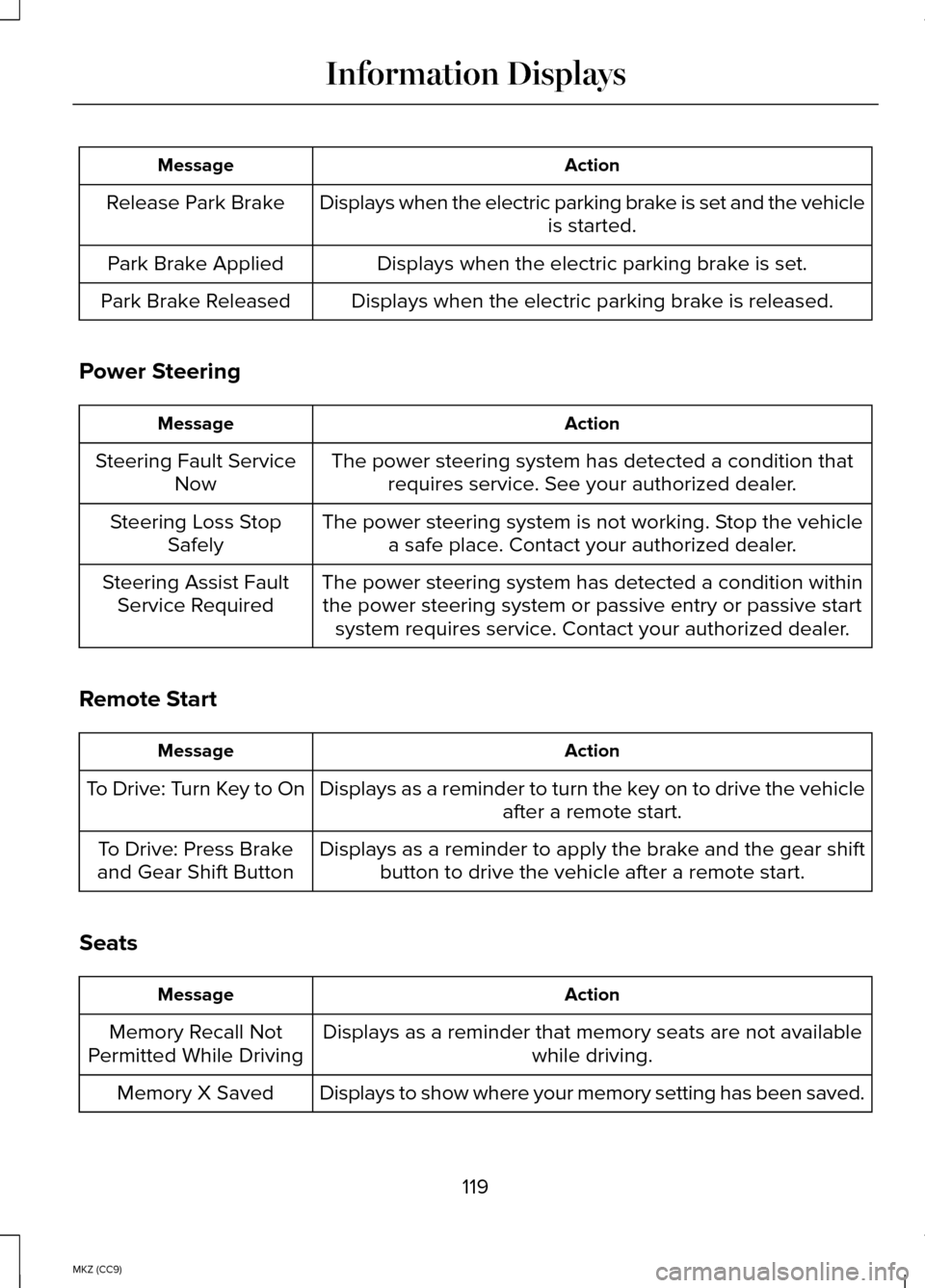
Action
Message
Displays when the electric parking brake is set and the vehicle is started.
Release Park Brake
Displays when the electric parking brake is set.
Park Brake Applied
Displays when the electric parking brake is released.
Park Brake Released
Power Steering Action
Message
The power steering system has detected a condition thatrequires service. See your authorized dealer.
Steering Fault Service
Now
The power steering system is not working. Stop the vehiclea safe place. Contact your authorized dealer.
Steering Loss Stop
Safely
The power steering system has detected a condition withinthe power steering system or passive entry or passive start system requires service. Contact your authorized dealer.
Steering Assist Fault
Service Required
Remote Start Action
Message
Displays as a reminder to turn the key on to drive the vehicle after a remote start.
To Drive: Turn Key to On
Displays as a reminder to apply the brake and the gear shiftbutton to drive the vehicle after a remote start.
To Drive: Press Brake
and Gear Shift Button
Seats Action
Message
Displays as a reminder that memory seats are not available while driving.
Memory Recall Not
Permitted While Driving
Displays to show where your memory setting has been saved.
Memory X Saved
119
MKZ (CC9) Information Displays
Page 122 of 445
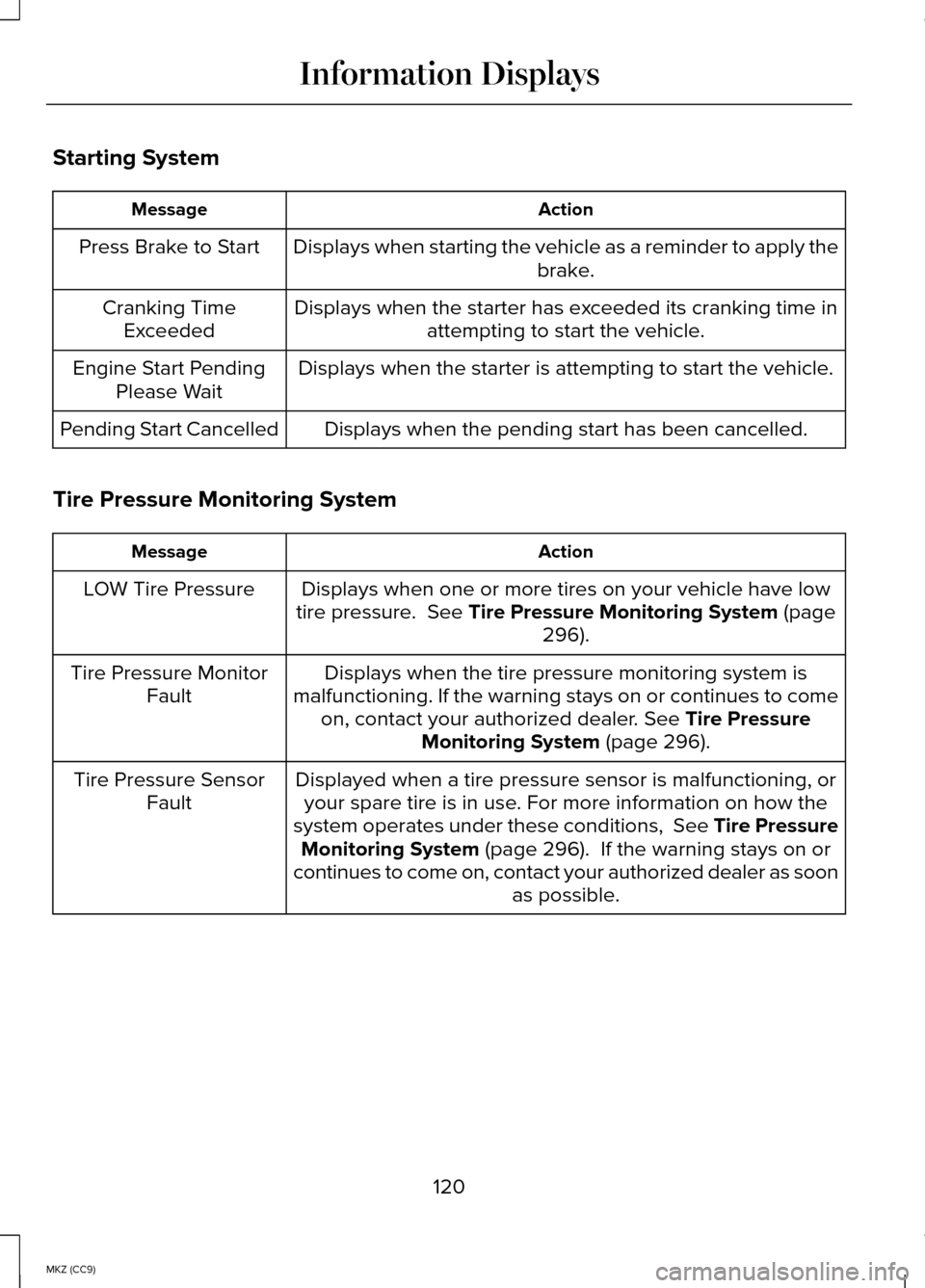
Starting System
Action
Message
Displays when starting the vehicle as a reminder to apply the brake.
Press Brake to Start
Displays when the starter has exceeded its cranking time inattempting to start the vehicle.
Cranking Time
Exceeded
Displays when the starter is attempting to start the vehicle.
Engine Start Pending
Please Wait
Displays when the pending start has been cancelled.
Pending Start Cancelled
Tire Pressure Monitoring System Action
Message
Displays when one or more tires on your vehicle have low
tire pressure. See Tire Pressure Monitoring System (page
296).
LOW Tire Pressure
Displays when the tire pressure monitoring system is
malfunctioning. If the warning stays on or continues to come on, contact your authorized dealer.
See Tire Pressure
Monitoring System (page 296).
Tire Pressure Monitor
Fault
Displayed when a tire pressure sensor is malfunctioning, oryour spare tire is in use. For more information on how the
system operates under these conditions, See Tire Pressure Monitoring System
(page 296). If the warning stays on or
continues to come on, contact your authorized dealer as soon as possible.
Tire Pressure Sensor
Fault
120
MKZ (CC9) Information Displays
Page 123 of 445
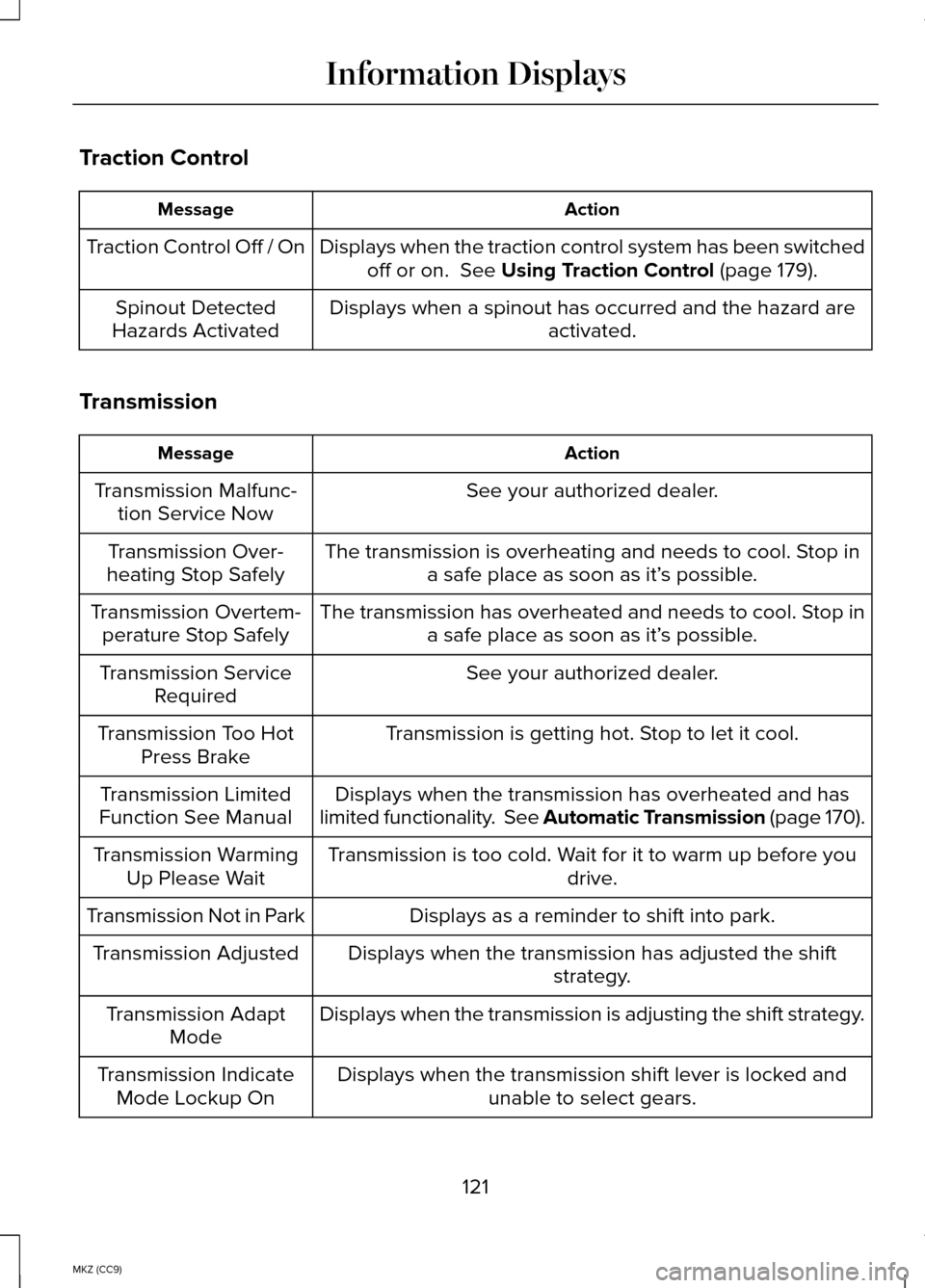
Traction Control
Action
Message
Displays when the traction control system has been switchedoff or on. See Using Traction Control (page 179).
Traction Control Off / On
Displays when a spinout has occurred and the hazard areactivated.
Spinout Detected
Hazards Activated
Transmission Action
Message
See your authorized dealer.
Transmission Malfunc-
tion Service Now
The transmission is overheating and needs to cool. Stop ina safe place as soon as it’ s possible.
Transmission Over-
heating Stop Safely
The transmission has overheated and needs to cool. Stop ina safe place as soon as it’ s possible.
Transmission Overtem-
perature Stop Safely
See your authorized dealer.
Transmission Service
Required
Transmission is getting hot. Stop to let it cool.
Transmission Too Hot
Press Brake
Displays when the transmission has overheated and has
limited functionality. See Automatic Transmission (page 170).
Transmission Limited
Function See Manual
Transmission is too cold. Wait for it to warm up before you drive.
Transmission Warming
Up Please Wait
Displays as a reminder to shift into park.
Transmission Not in Park
Displays when the transmission has adjusted the shiftstrategy.
Transmission Adjusted
Displays when the transmission is adjusting the shift strategy.
Transmission Adapt
Mode
Displays when the transmission shift lever is locked andunable to select gears.
Transmission Indicate
Mode Lockup On
121
MKZ (CC9) Information Displays
Page 124 of 445
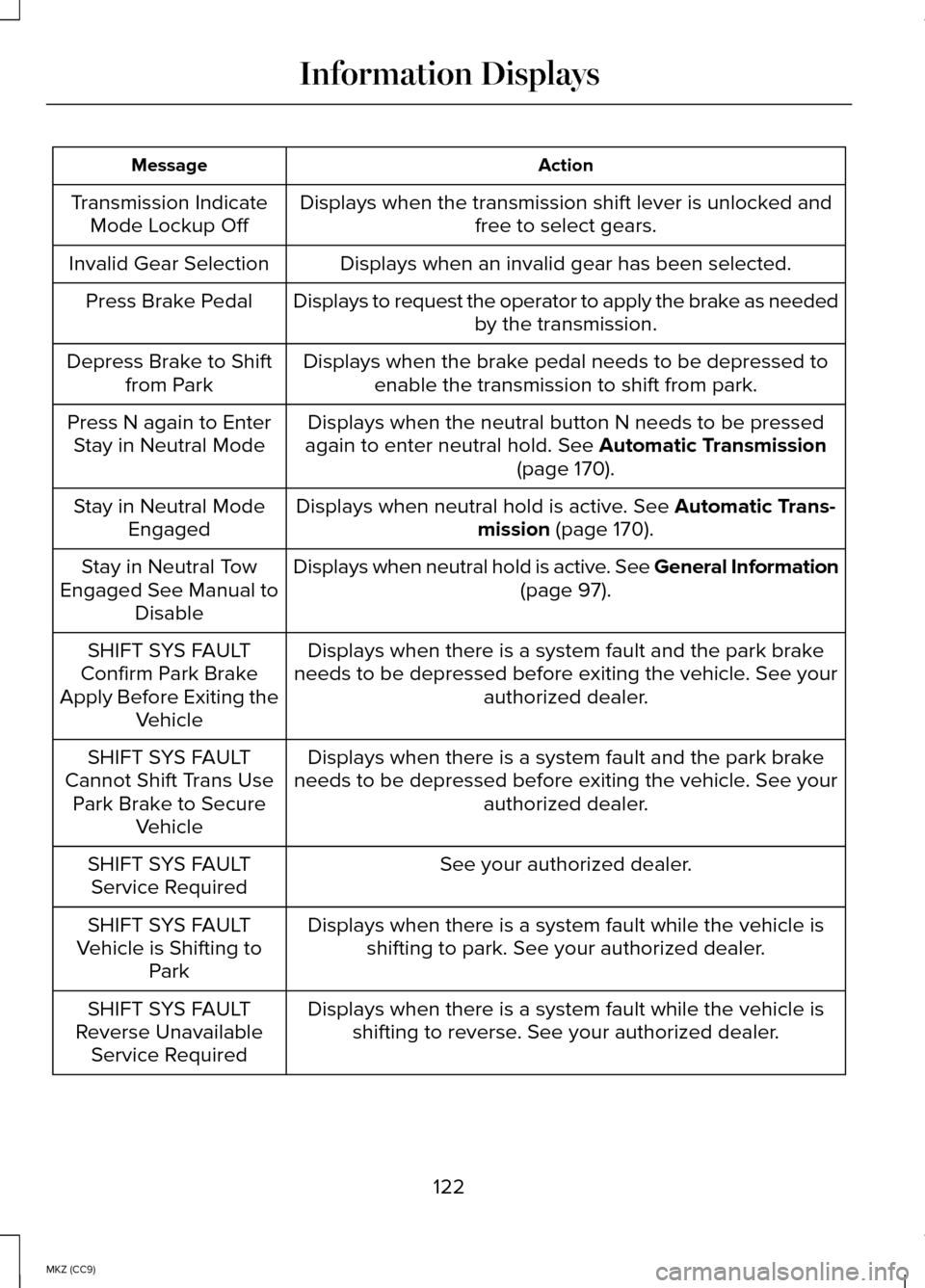
Action
Message
Displays when the transmission shift lever is unlocked and free to select gears.
Transmission Indicate
Mode Lockup Off
Displays when an invalid gear has been selected.
Invalid Gear Selection
Displays to request the operator to apply the brake as neededby the transmission.
Press Brake Pedal
Displays when the brake pedal needs to be depressed toenable the transmission to shift from park.
Depress Brake to Shift
from Park
Displays when the neutral button N needs to be pressed
again to enter neutral hold. See Automatic Transmission
(page 170).
Press N again to Enter
Stay in Neutral Mode
Displays when neutral hold is active.
See Automatic Trans-
mission (page 170).
Stay in Neutral Mode
Engaged
Displays when neutral hold is active.
See General Information
(page 97).
Stay in Neutral Tow
Engaged See Manual to Disable
Displays when there is a system fault and the park brake
needs to be depressed before exiting the vehicle. See your authorized dealer.
SHIFT SYS FAULT
Confirm Park Brake
Apply Before Exiting the Vehicle
Displays when there is a system fault and the park brake
needs to be depressed before exiting the vehicle. See your authorized dealer.
SHIFT SYS FAULT
Cannot Shift Trans Use Park Brake to Secure Vehicle
See your authorized dealer.
SHIFT SYS FAULT
Service Required
Displays when there is a system fault while the vehicle isshifting to park. See your authorized dealer.
SHIFT SYS FAULT
Vehicle is Shifting to Park
Displays when there is a system fault while the vehicle isshifting to reverse. See your authorized dealer.
SHIFT SYS FAULT
Reverse Unavailable Service Required
122
MKZ (CC9) Information Displays
Page 125 of 445
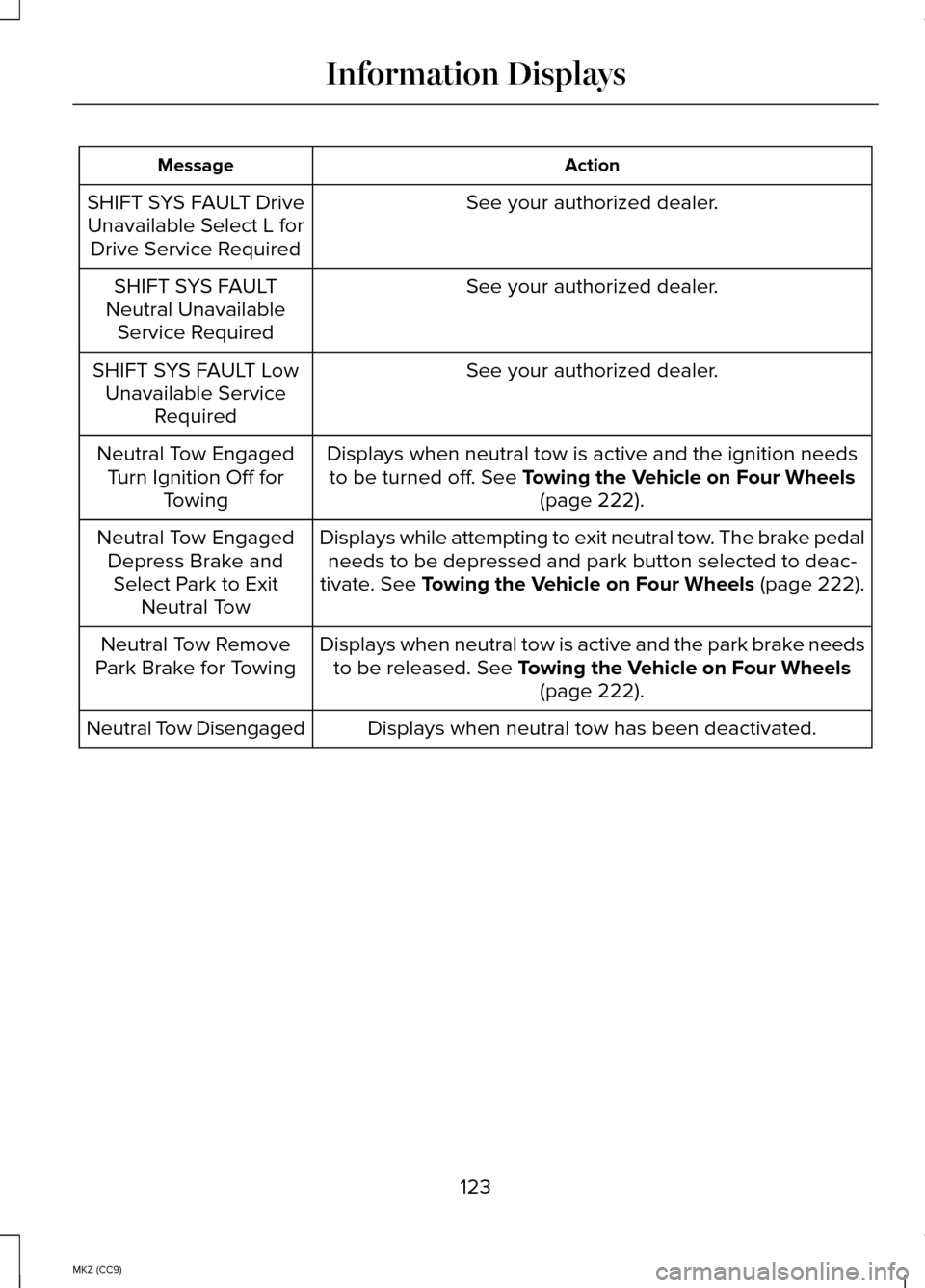
Action
Message
See your authorized dealer.
SHIFT SYS FAULT Drive
Unavailable Select L for Drive Service Required
See your authorized dealer.
SHIFT SYS FAULT
Neutral Unavailable Service Required
See your authorized dealer.
SHIFT SYS FAULT Low
Unavailable Service Required
Displays when neutral tow is active and the ignition needsto be turned off. See Towing the Vehicle on Four Wheels (page 222).
Neutral Tow Engaged
Turn Ignition Off for Towing
Displays while attempting to exit neutral tow. The brake pedalneeds to be depressed and park button selected to deac-
tivate.
See Towing the Vehicle on Four Wheels (page 222).
Neutral Tow Engaged
Depress Brake andSelect Park to Exit Neutral Tow
Displays when neutral tow is active and the park brake needsto be released.
See Towing the Vehicle on Four Wheels (page 222).
Neutral Tow Remove
Park Brake for Towing
Displays when neutral tow has been deactivated.
Neutral Tow Disengaged
123
MKZ (CC9) Information Displays
Page 129 of 445
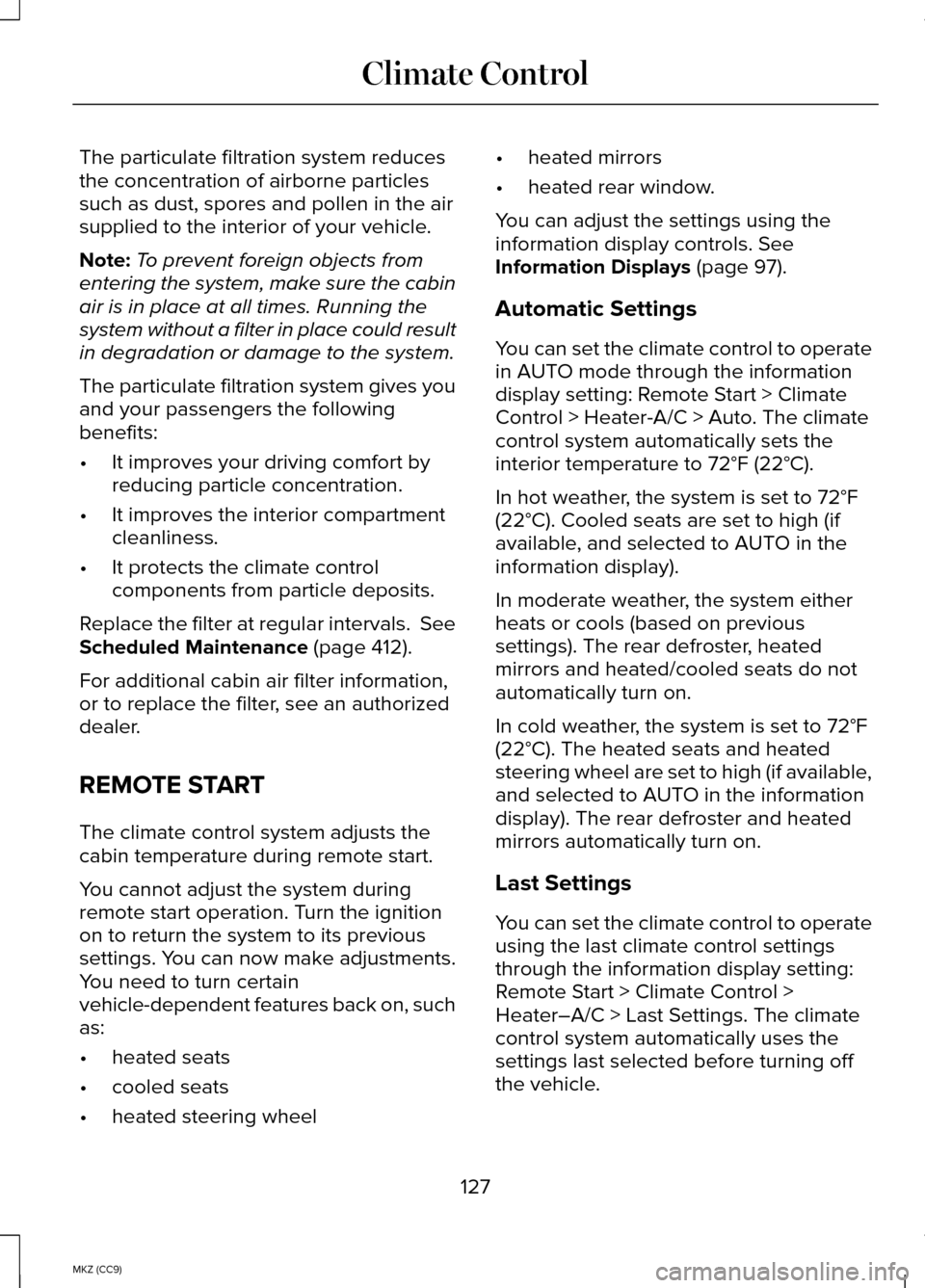
The particulate filtration system reduces
the concentration of airborne particles
such as dust, spores and pollen in the air
supplied to the interior of your vehicle.
Note:
To prevent foreign objects from
entering the system, make sure the cabin
air is in place at all times. Running the
system without a filter in place could result
in degradation or damage to the system.
The particulate filtration system gives you
and your passengers the following
benefits:
• It improves your driving comfort by
reducing particle concentration.
• It improves the interior compartment
cleanliness.
• It protects the climate control
components from particle deposits.
Replace the filter at regular intervals. See
Scheduled Maintenance (page 412).
For additional cabin air filter information,
or to replace the filter, see an authorized
dealer.
REMOTE START
The climate control system adjusts the
cabin temperature during remote start.
You cannot adjust the system during
remote start operation. Turn the ignition
on to return the system to its previous
settings. You can now make adjustments.
You need to turn certain
vehicle-dependent features back on, such
as:
• heated seats
• cooled seats
• heated steering wheel •
heated mirrors
• heated rear window.
You can adjust the settings using the
information display controls.
See
Information Displays (page 97).
Automatic Settings
You can set the climate control to operate
in AUTO mode through the information
display setting: Remote Start > Climate
Control > Heater-A/C > Auto. The climate
control system automatically sets the
interior temperature to 72°F (22°C).
In hot weather, the system is set to 72°F
(22°C). Cooled seats are set to high (if
available, and selected to AUTO in the
information display).
In moderate weather, the system either
heats or cools (based on previous
settings). The rear defroster, heated
mirrors and heated/cooled seats do not
automatically turn on.
In cold weather, the system is set to 72°F
(22°C). The heated seats and heated
steering wheel are set to high (if available,
and selected to AUTO in the information
display). The rear defroster and heated
mirrors automatically turn on.
Last Settings
You can set the climate control to operate
using the last climate control settings
through the information display setting:
Remote Start > Climate Control >
Heater–A/C > Last Settings. The climate
control system automatically uses the
settings last selected before turning off
the vehicle.
127
MKZ (CC9) Climate Control
Page 130 of 445
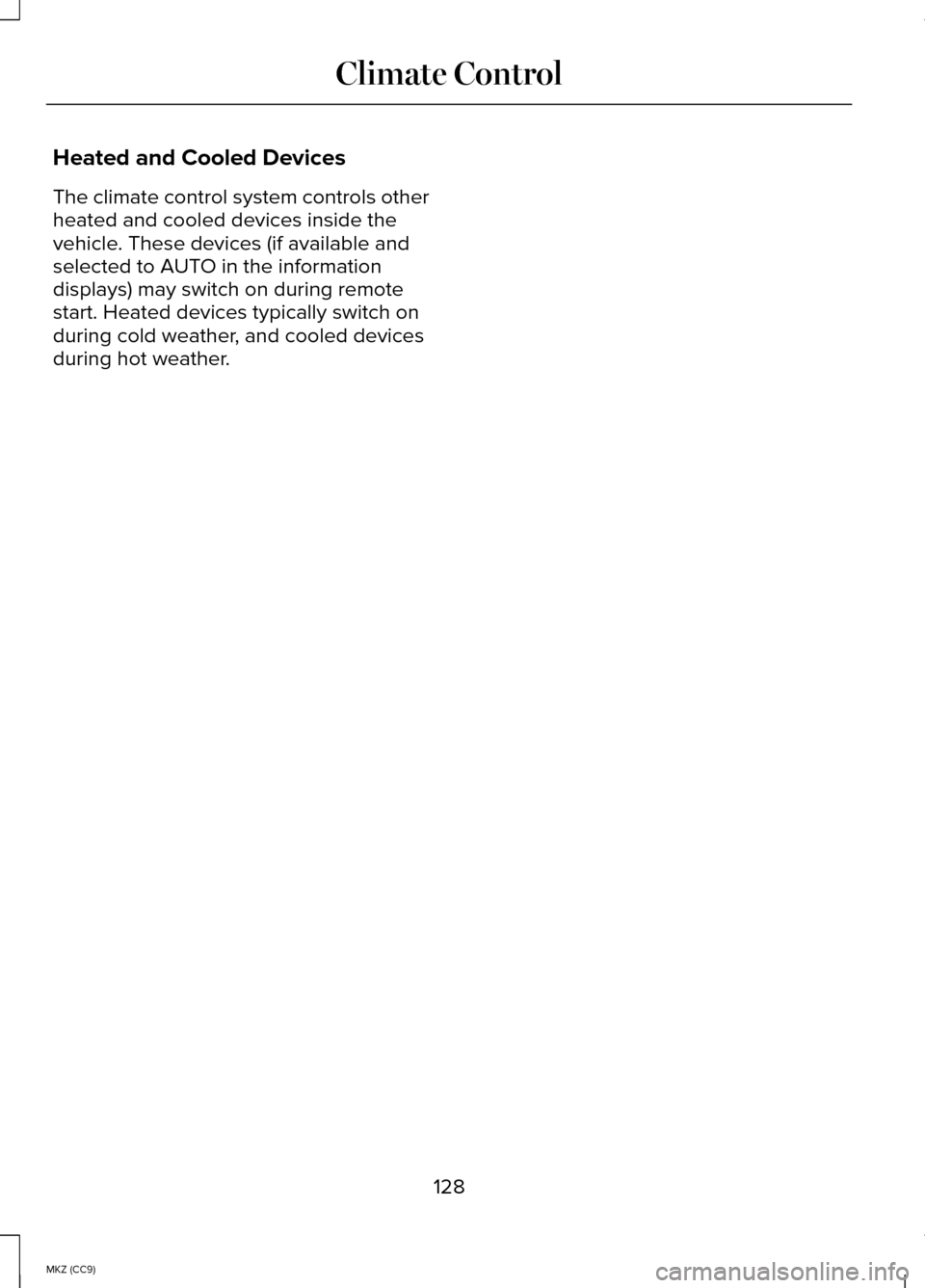
Heated and Cooled Devices
The climate control system controls other
heated and cooled devices inside the
vehicle. These devices (if available and
selected to AUTO in the information
displays) may switch on during remote
start. Heated devices typically switch on
during cold weather, and cooled devices
during hot weather.
128
MKZ (CC9) Climate Control
Page 135 of 445
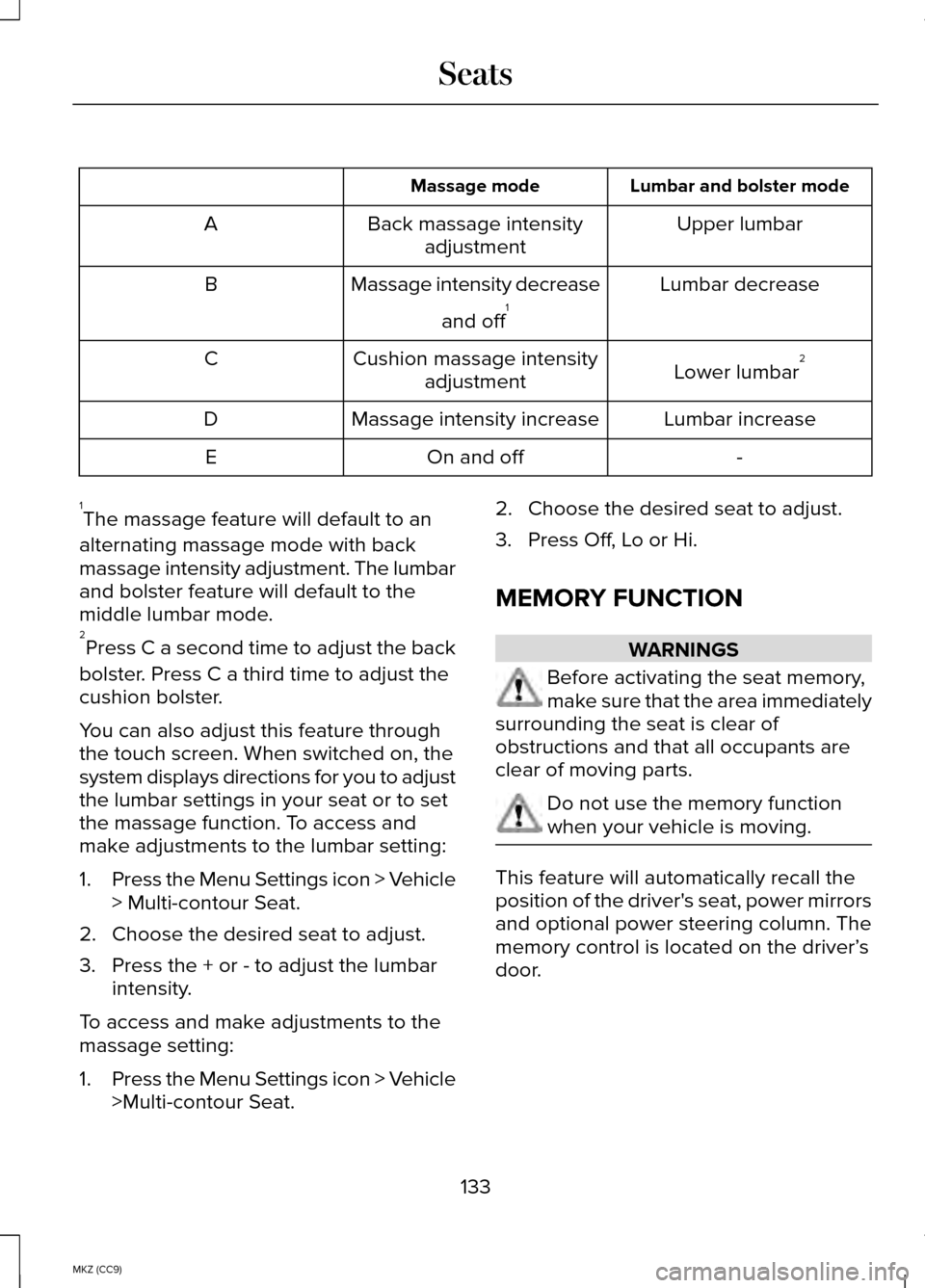
Lumbar and bolster mode
Massage mode
Upper lumbar
Back massage intensity
adjustment
A
Lumbar decrease
Massage intensity decrease
and off1
B
Lower lumbar2
Cushion massage intensity
adjustment
C
Lumbar increase
Massage intensity increase
D
-
On and off
E
1 The massage feature will default to an
alternating massage mode with back
massage intensity adjustment. The lumbar
and bolster feature will default to the
middle lumbar mode.
2 Press C a second time to adjust the back
bolster. Press C a third time to adjust the
cushion bolster.
You can also adjust this feature through
the touch screen. When switched on, the
system displays directions for you to adjust
the lumbar settings in your seat or to set
the massage function. To access and
make adjustments to the lumbar setting:
1. Press the Menu Settings icon > Vehicle
> Multi-contour Seat.
2. Choose the desired seat to adjust.
3. Press the + or - to adjust the lumbar intensity.
To access and make adjustments to the
massage setting:
1. Press the Menu Settings icon > Vehicle
>Multi-contour Seat. 2. Choose the desired seat to adjust.
3. Press Off, Lo or Hi.
MEMORY FUNCTION
WARNINGS
Before activating the seat memory,
make sure that the area immediately
surrounding the seat is clear of
obstructions and that all occupants are
clear of moving parts. Do not use the memory function
when your vehicle is moving.
This feature will automatically recall the
position of the driver's seat, power mirrors
and optional power steering column. The
memory control is located on the driver’
s
door.
133
MKZ (CC9) Seats
Page 137 of 445
The driver seat will return to the previous
position when you put the key in the
ignition or the keyless start ignition is
activated.
You can turn off the easy entry and exit
feature by using the driver information
display.
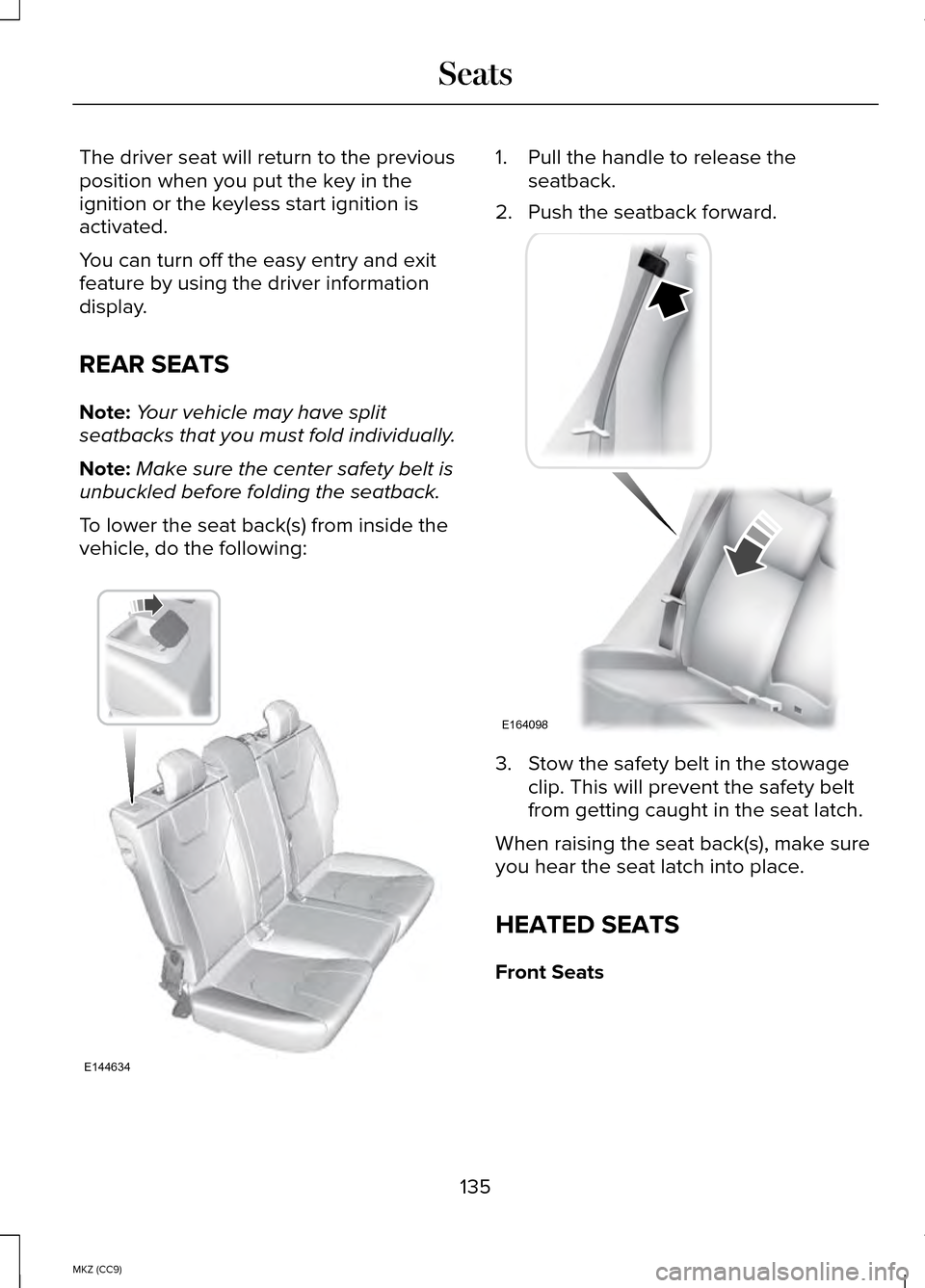
REAR SEATS
Note:
Your vehicle may have split
seatbacks that you must fold individually.
Note: Make sure the center safety belt is
unbuckled before folding the seatback.
To lower the seat back(s) from inside the
vehicle, do the following: 1. Pull the handle to release the
seatback.
2. Push the seatback forward. 3. Stow the safety belt in the stowage
clip. This will prevent the safety belt
from getting caught in the seat latch.
When raising the seat back(s), make sure
you hear the seat latch into place.
HEATED SEATS
Front Seats
135
MKZ (CC9) SeatsE144634 E164098
Page 144 of 445
2.
Press the same button twice to confirm
the change to programming mode. If
done properly the indicator light will
appear red.
3. Hold the transmitter within 1–3 inches (2–8 centimeters) of the button on the
visor you want to program.
4. Press and hold both the programmed Genie button on the hand-held
transmitter and the button you want to
program. The indicator light on the
visor will flash rapidly when the
programming is successful.
Note: The Genie transmitter will transmit
for up to 30 seconds. If HomeLink does
not program within 30 seconds the Genie
transmitter will need to be pressed again.
If the Genie transmitter indicator light
displays green and red, release the button
until the indicator light turns off before
pressing the button again.
Once HomeLink has been programmed
successfully, the Genie transmitter must
be changed out of program mode. To do
this:
1. Press and hold the previously programmed Genie button on the
hand-held transmitter for 10 seconds.
The indicator light will change from red
to red and green.
2. Press the same button twice to confirm
the change. If done correctly the
indicator light will turn green.
Programming HomeLink to the Genie
Intellicode Garage Door Opener Motor
Note: You may need a ladder to access
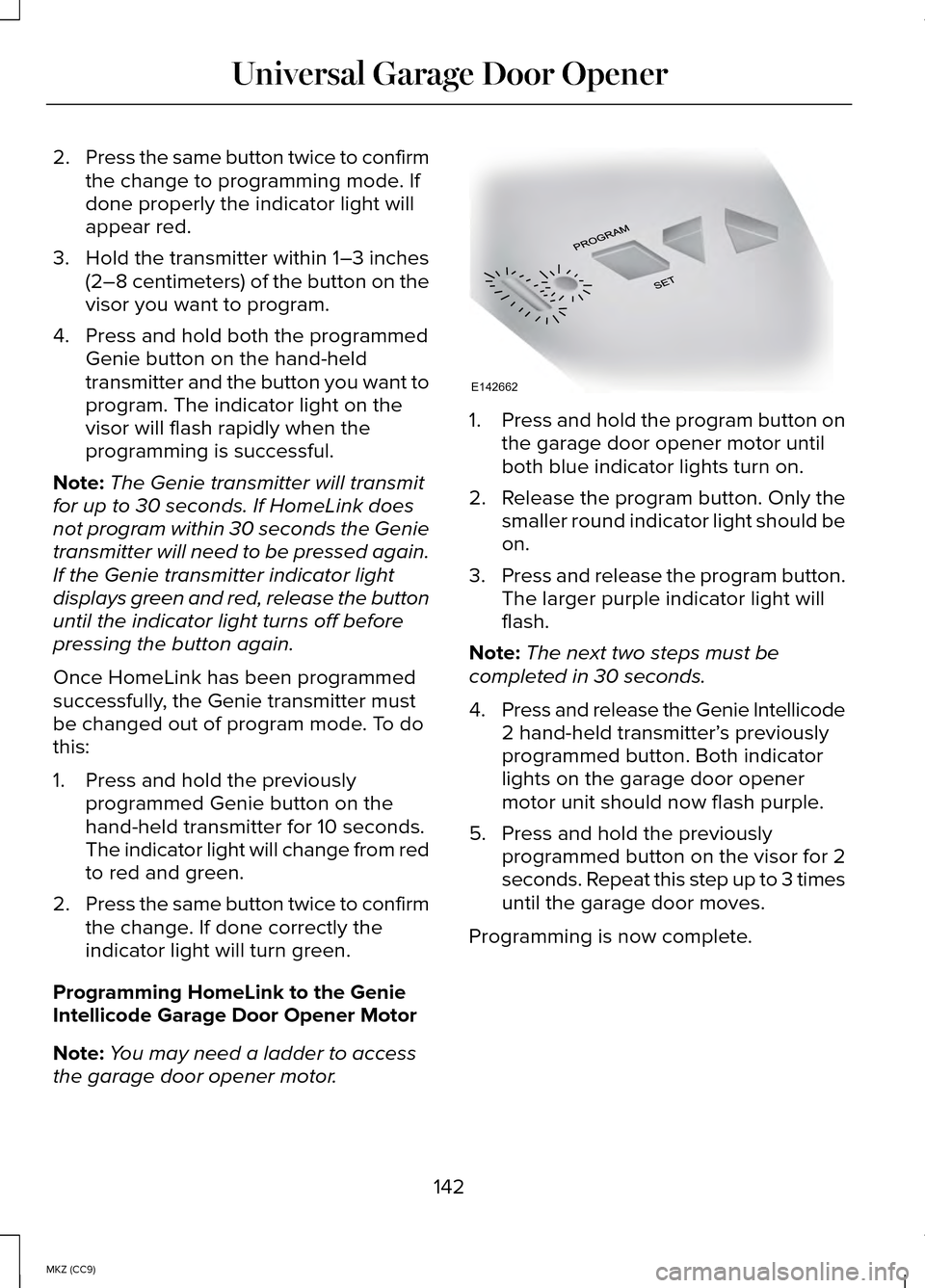
the garage door opener motor. 1.
Press and hold the program button on
the garage door opener motor until
both blue indicator lights turn on.
2. Release the program button. Only the
smaller round indicator light should be
on.
3. Press and release the program button.
The larger purple indicator light will
flash.
Note: The next two steps must be
completed in 30 seconds.
4. Press and release the Genie Intellicode
2 hand-held transmitter’ s previously
programmed button. Both indicator
lights on the garage door opener
motor unit should now flash purple.
5. Press and hold the previously programmed button on the visor for 2
seconds. Repeat this step up to 3 times
until the garage door moves.
Programming is now complete.
142
MKZ (CC9) Universal Garage Door OpenerE142662