warning LINCOLN MKZ HYBRID 2014 Workshop Manual
[x] Cancel search | Manufacturer: LINCOLN, Model Year: 2014, Model line: MKZ HYBRID, Model: LINCOLN MKZ HYBRID 2014Pages: 445, PDF Size: 3.8 MB
Page 97 of 445
Note:
If your engine is misfiring, excessive
exhaust temperatures could damage the
catalytic converter or other vehicle
components.
The service engine soon indicator lights
when the you first switch on your vehicle,
prior to engine start, to check the bulb and
to indicate whether the vehicle is ready
for inspection maintenance testing.
Normally, the service engine soon light
will stay on until the engine cranks, then
turn itself off if no malfunctions are
present. However, if after 15 seconds the
service engine soon light blinks eight
times, it means that the vehicle is not
ready for inspection maintenance testing.
See Emission Control System (page 164).
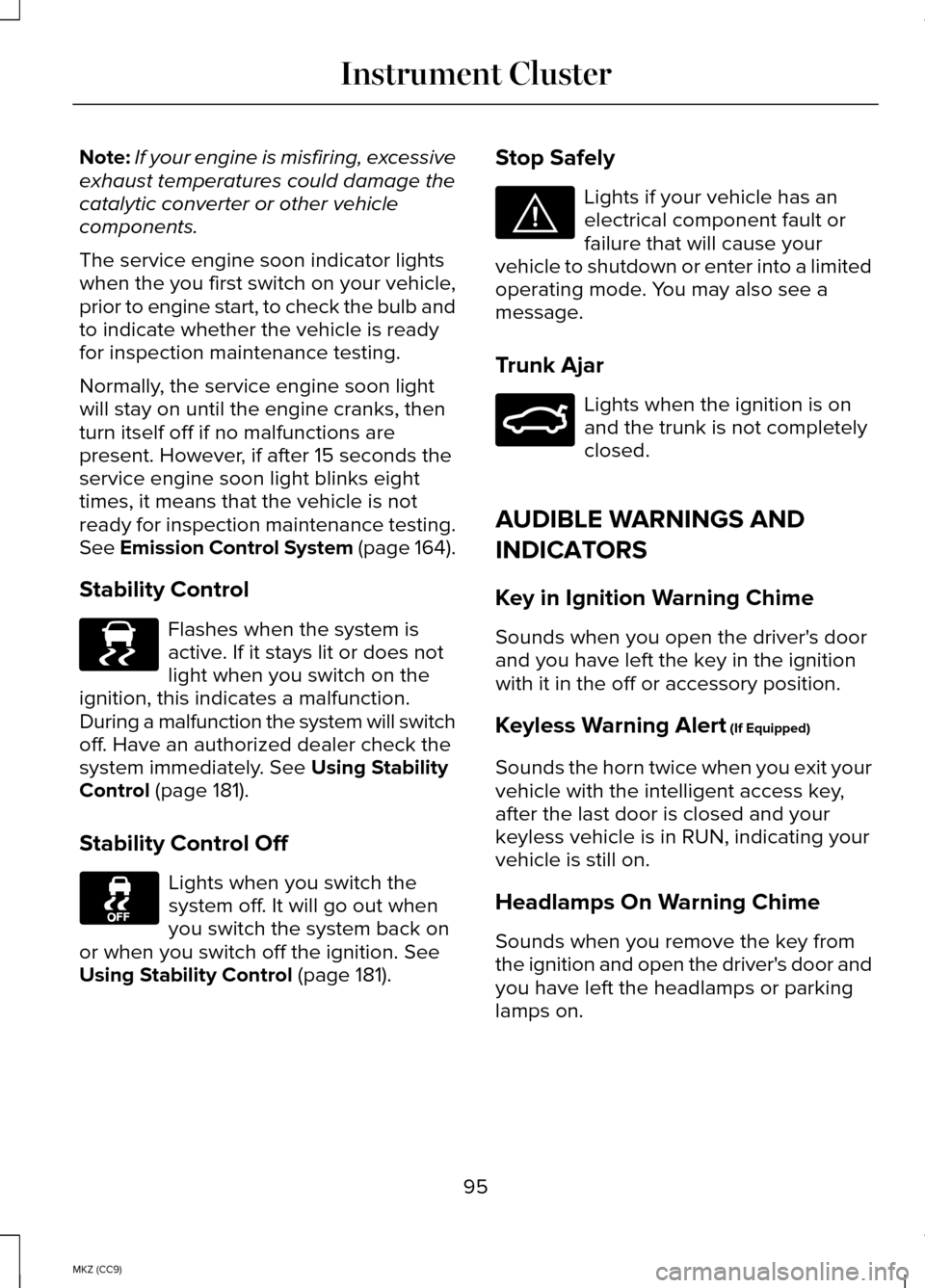
Stability Control Flashes when the system is
active. If it stays lit or does not
light when you switch on the
ignition, this indicates a malfunction.
During a malfunction the system will switch
off. Have an authorized dealer check the
system immediately.
See Using Stability
Control (page 181).
Stability Control Off Lights when you switch the
system off. It will go out when
you switch the system back on
or when you switch off the ignition.
See
Using Stability Control (page 181). Stop Safely Lights if your vehicle has an
electrical component fault or
failure that will cause your
vehicle to shutdown or enter into a limited
operating mode. You may also see a
message.
Trunk Ajar Lights when the ignition is on
and the trunk is not completely
closed.
AUDIBLE WARNINGS AND
INDICATORS
Key in Ignition Warning Chime
Sounds when you open the driver's door
and you have left the key in the ignition
with it in the off or accessory position.
Keyless Warning Alert
(If Equipped)
Sounds the horn twice when you exit your
vehicle with the intelligent access key,
after the last door is closed and your
keyless vehicle is in RUN, indicating your
vehicle is still on.
Headlamps On Warning Chime
Sounds when you remove the key from
the ignition and open the driver's door and
you have left the headlamps or parking
lamps on.
95
MKZ (CC9) Instrument ClusterE138639 E144693 E159323
Page 98 of 445
Parking Brake On Warning Chime
Sounds when you have left the parking
brake on and drive your vehicle. If the
warning chime remains on after you have
released the parking brake, have the
system checked by an authorized dealer
immediately.
96
MKZ (CC9) Instrument Cluster
Page 99 of 445
GENERAL INFORMATION
WARNING
Driving while distracted can result in
loss of vehicle control, crash and
injury. We strongly recommend that you
use extreme caution when using any
device that may take your focus off the
road. Your primary responsibility is the
safe operation of your vehicle. We
recommend against the use of any
hand-held device while driving and
encourage the use of voice-operated
systems when possible. Make sure you
are aware of all applicable local laws that
may affect the use of electronic devices
while driving Various systems on your vehicle can be
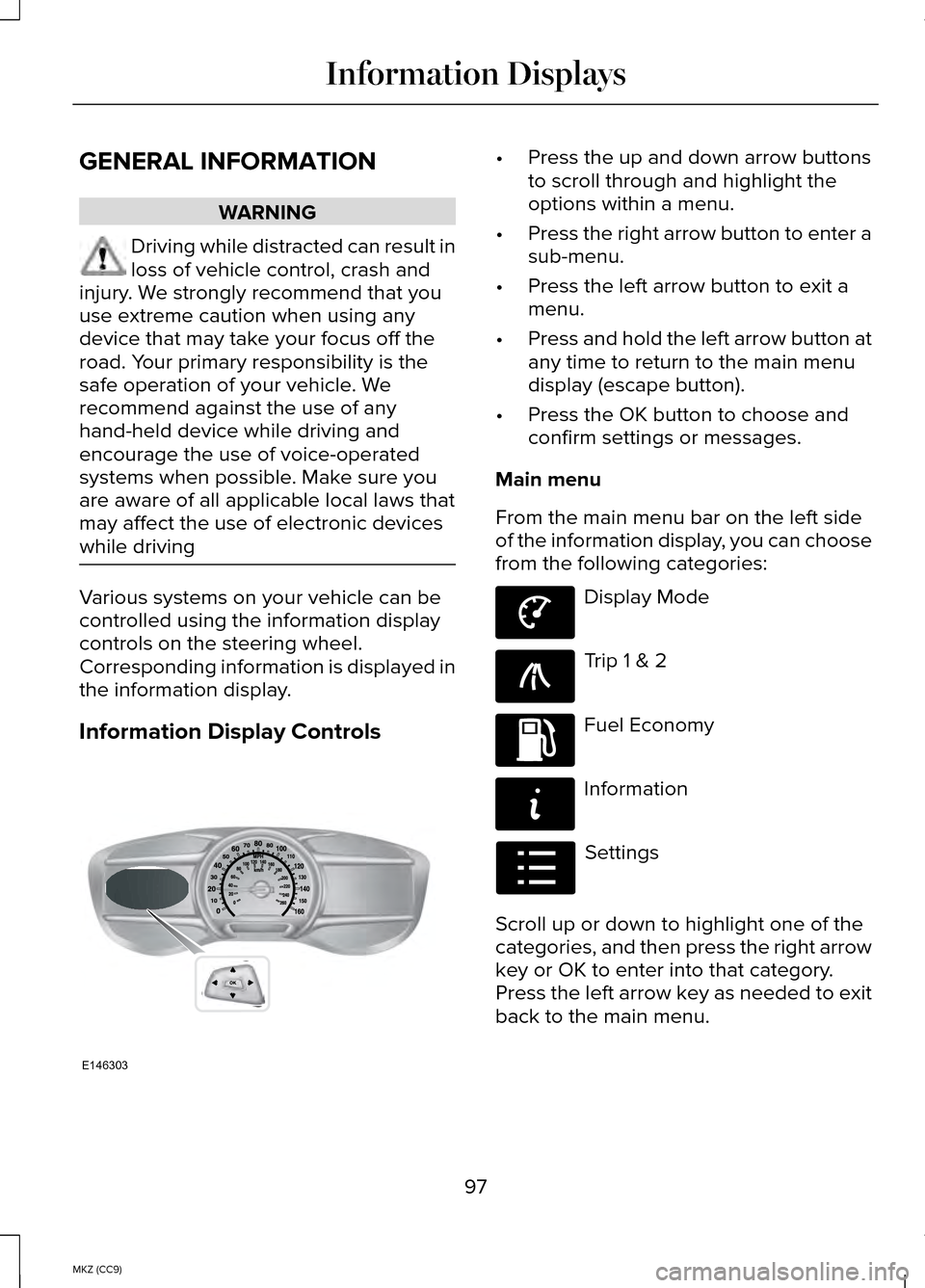
controlled using the information display
controls on the steering wheel.
Corresponding information is displayed in
the information display.
Information Display Controls •
Press the up and down arrow buttons
to scroll through and highlight the
options within a menu.
• Press the right arrow button to enter a
sub-menu.
• Press the left arrow button to exit a
menu.
• Press and hold the left arrow button at
any time to return to the main menu
display (escape button).
• Press the OK button to choose and
confirm settings or messages.
Main menu
From the main menu bar on the left side
of the information display, you can choose
from the following categories: Display Mode
Trip 1 & 2
Fuel Economy
Information
Settings
Scroll up or down to highlight one of the
categories, and then press the right arrow
key or OK to enter into that category.
Press the left arrow key as needed to exit
back to the main menu.
97
MKZ (CC9) Information DisplaysE146303 E144639 E138660 E144640 E144642 E100023
Page 107 of 445
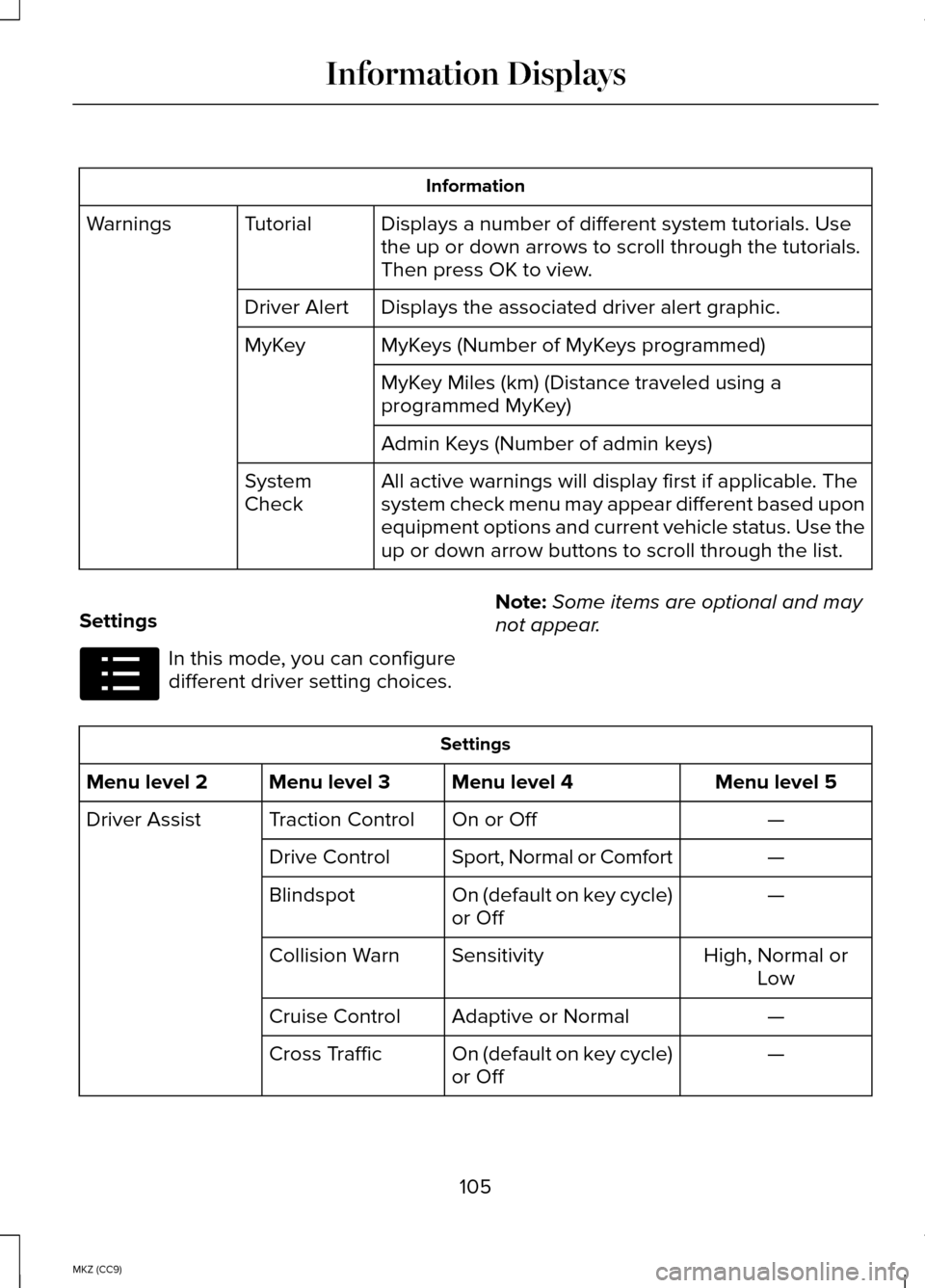
Information
Displays a number of different system tutorials. Use
the up or down arrows to scroll through the tutorials.
Then press OK to view.
Tutorial
Warnings
Displays the associated driver alert graphic.
Driver Alert
MyKeys (Number of MyKeys programmed)
MyKey
MyKey Miles (km) (Distance traveled using a
programmed MyKey)
Admin Keys (Number of admin keys)
All active warnings will display first if applicable. The
system check menu may appear different based upon
equipment options and current vehicle status. Use the
up or down arrow buttons to scroll through the list.
System
Check
Settings In this mode, you can configure
different driver setting choices.
Note:
Some items are optional and may
not appear. Settings
Menu level 5
Menu level 4
Menu level 3
Menu level 2
—
On or Off
Traction Control
Driver Assist
—
Sport, Normal or Comfort
Drive Control
—
On (default on key cycle)
or Off
Blindspot
High, Normal orLow
Sensitivity
Collision Warn
—
Adaptive or Normal
Cruise Control
—
On (default on key cycle)
or Off
Cross Traffic
105
MKZ (CC9) Information DisplaysE100023
Page 113 of 445
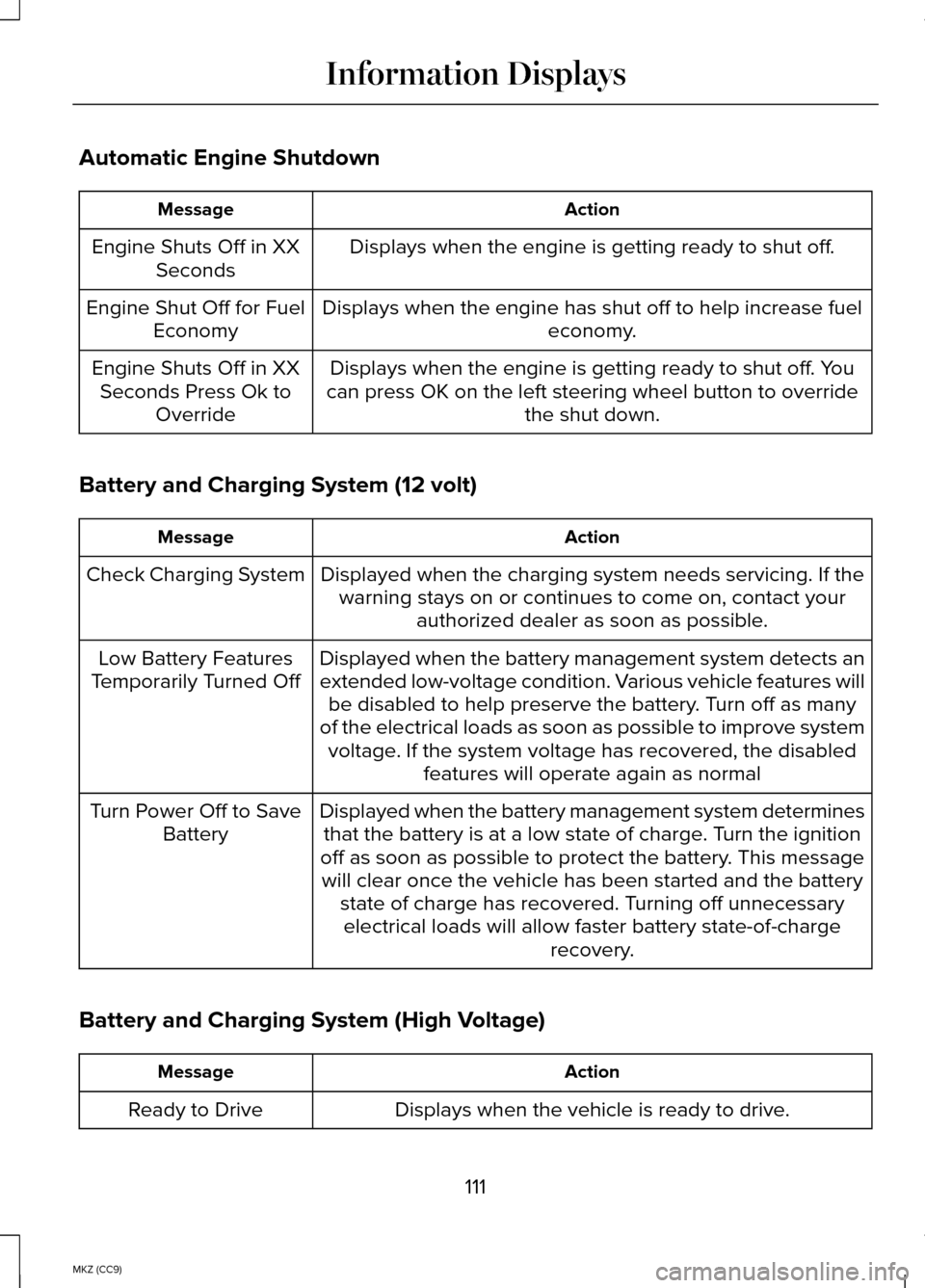
Automatic Engine Shutdown
Action
Message
Displays when the engine is getting ready to shut off.
Engine Shuts Off in XX
Seconds
Displays when the engine has shut off to help increase fuel economy.
Engine Shut Off for Fuel
Economy
Displays when the engine is getting ready to shut off. You
can press OK on the left steering wheel button to override the shut down.
Engine Shuts Off in XX
Seconds Press Ok to Override
Battery and Charging System (12 volt) Action
Message
Displayed when the charging system needs servicing. If thewarning stays on or continues to come on, contact your authorized dealer as soon as possible.
Check Charging System
Displayed when the battery management system detects an
extended low-voltage condition. Various vehicle features willbe disabled to help preserve the battery. Turn off as many
of the electrical loads as soon as possible to improve system voltage. If the system voltage has recovered, the disabled features will operate again as normal
Low Battery Features
Temporarily Turned Off
Displayed when the battery management system determinesthat the battery is at a low state of charge. Turn the ignition
off as soon as possible to protect the battery. This message will clear once the vehicle has been started and the battery state of charge has recovered. Turning off unnecessaryelectrical loads will allow faster battery state-of-charge recovery.
Turn Power Off to Save
Battery
Battery and Charging System (High Voltage) Action
Message
Displays when the vehicle is ready to drive.
Ready to Drive
111
MKZ (CC9) Information Displays
Page 114 of 445
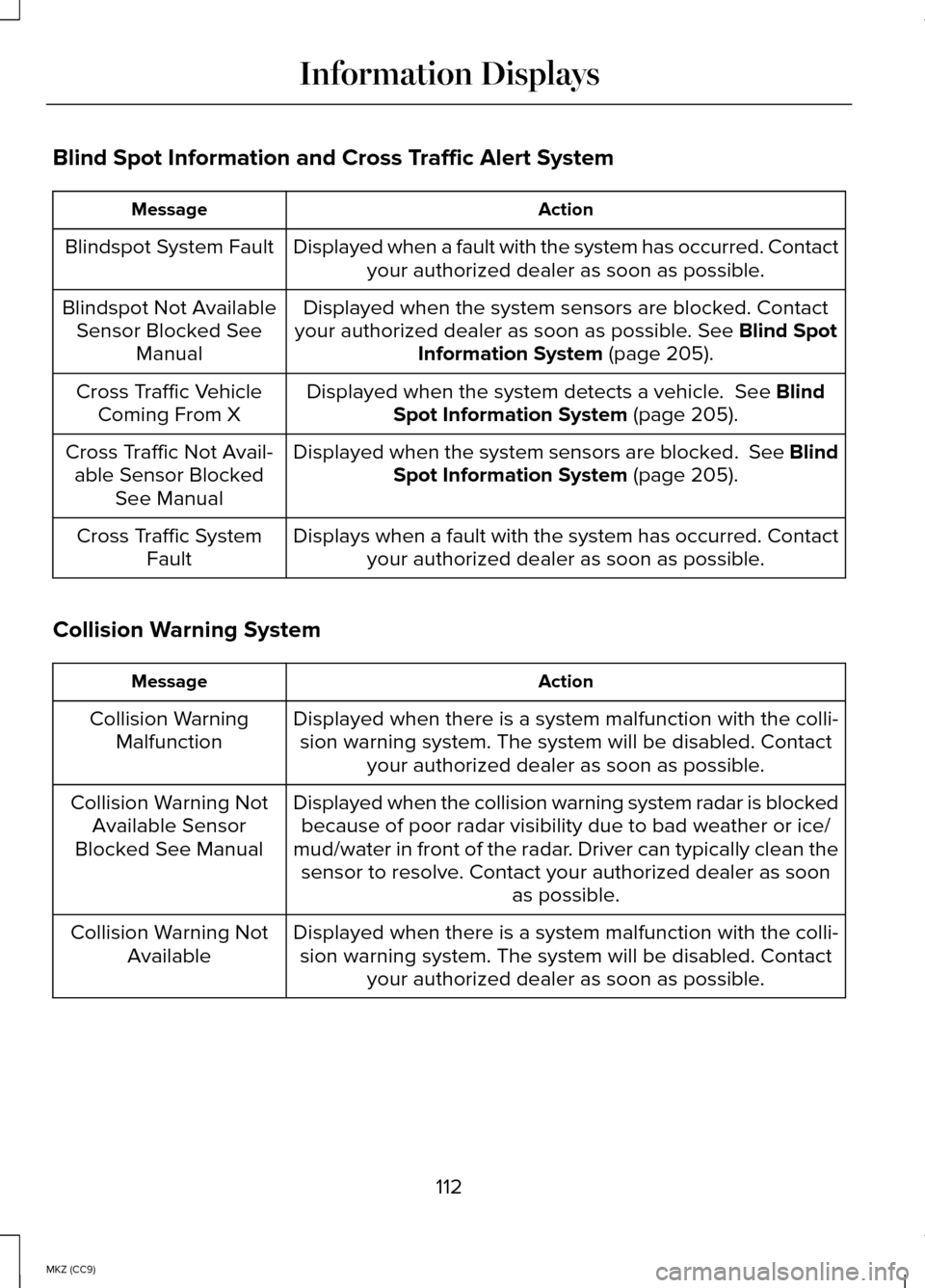
Blind Spot Information and Cross Traffic Alert System
Action
Message
Displayed when a fault with the system has occurred. Contactyour authorized dealer as soon as possible.
Blindspot System Fault
Displayed when the system sensors are blocked. Contact
your authorized dealer as soon as possible. See Blind Spot
Information System (page 205).
Blindspot Not Available
Sensor Blocked See Manual
Displayed when the system detects a vehicle.
See Blind
Spot Information System (page 205).
Cross Traffic Vehicle
Coming From X
Displayed when the system sensors are blocked.
See Blind
Spot Information System (page 205).
Cross Traffic Not Avail-
able Sensor Blocked See Manual
Displays when a fault with the system has occurred. Contactyour authorized dealer as soon as possible.
Cross Traffic System
Fault
Collision Warning System Action
Message
Displayed when there is a system malfunction with the colli-sion warning system. The system will be disabled. Contact your authorized dealer as soon as possible.
Collision Warning
Malfunction
Displayed when the collision warning system radar is blockedbecause of poor radar visibility due to bad weather or ice/
mud/water in front of the radar. Driver can typically clean the sensor to resolve. Contact your authorized dealer as soon as possible.
Collision Warning Not
Available Sensor
Blocked See Manual
Displayed when there is a system malfunction with the colli-sion warning system. The system will be disabled. Contact your authorized dealer as soon as possible.
Collision Warning Not
Available
112
MKZ (CC9) Information Displays
Page 115 of 445
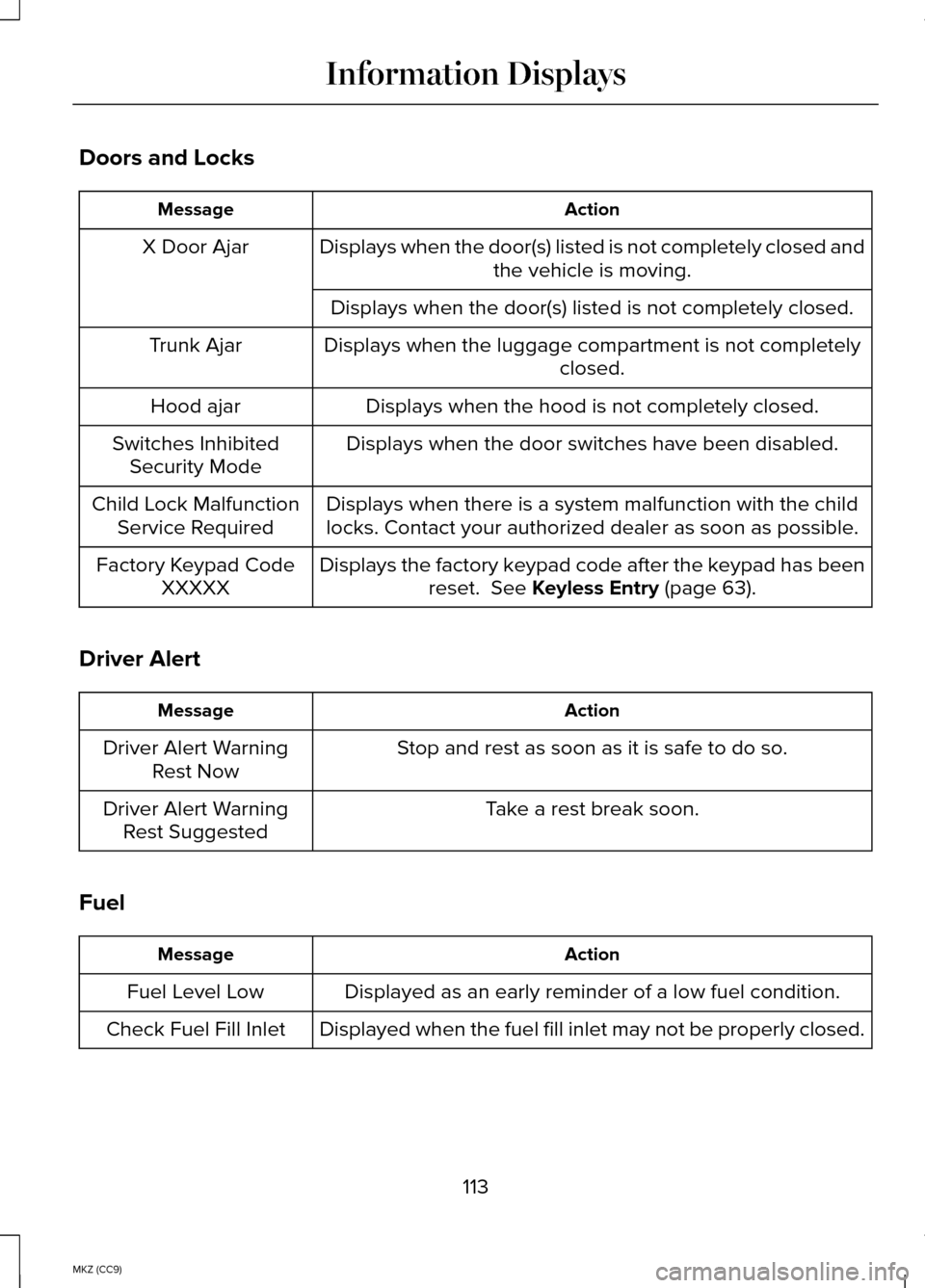
Doors and Locks
Action
Message
Displays when the door(s) listed is not completely closed and the vehicle is moving.
X Door Ajar
Displays when the door(s) listed is not completely closed.
Displays when the luggage compartment is not completely closed.
Trunk Ajar
Displays when the hood is not completely closed.
Hood ajar
Displays when the door switches have been disabled.
Switches Inhibited
Security Mode
Displays when there is a system malfunction with the child
locks. Contact your authorized dealer as soon as possible.
Child Lock Malfunction
Service Required
Displays the factory keypad code after the keypad has beenreset. See Keyless Entry (page 63).
Factory Keypad Code
XXXXX
Driver Alert Action
Message
Stop and rest as soon as it is safe to do so.
Driver Alert Warning
Rest Now
Take a rest break soon.
Driver Alert Warning
Rest Suggested
Fuel Action
Message
Displayed as an early reminder of a low fuel condition.
Fuel Level Low
Displayed when the fuel fill inlet may not be properly closed.
Check Fuel Fill Inlet
113
MKZ (CC9) Information Displays
Page 118 of 445
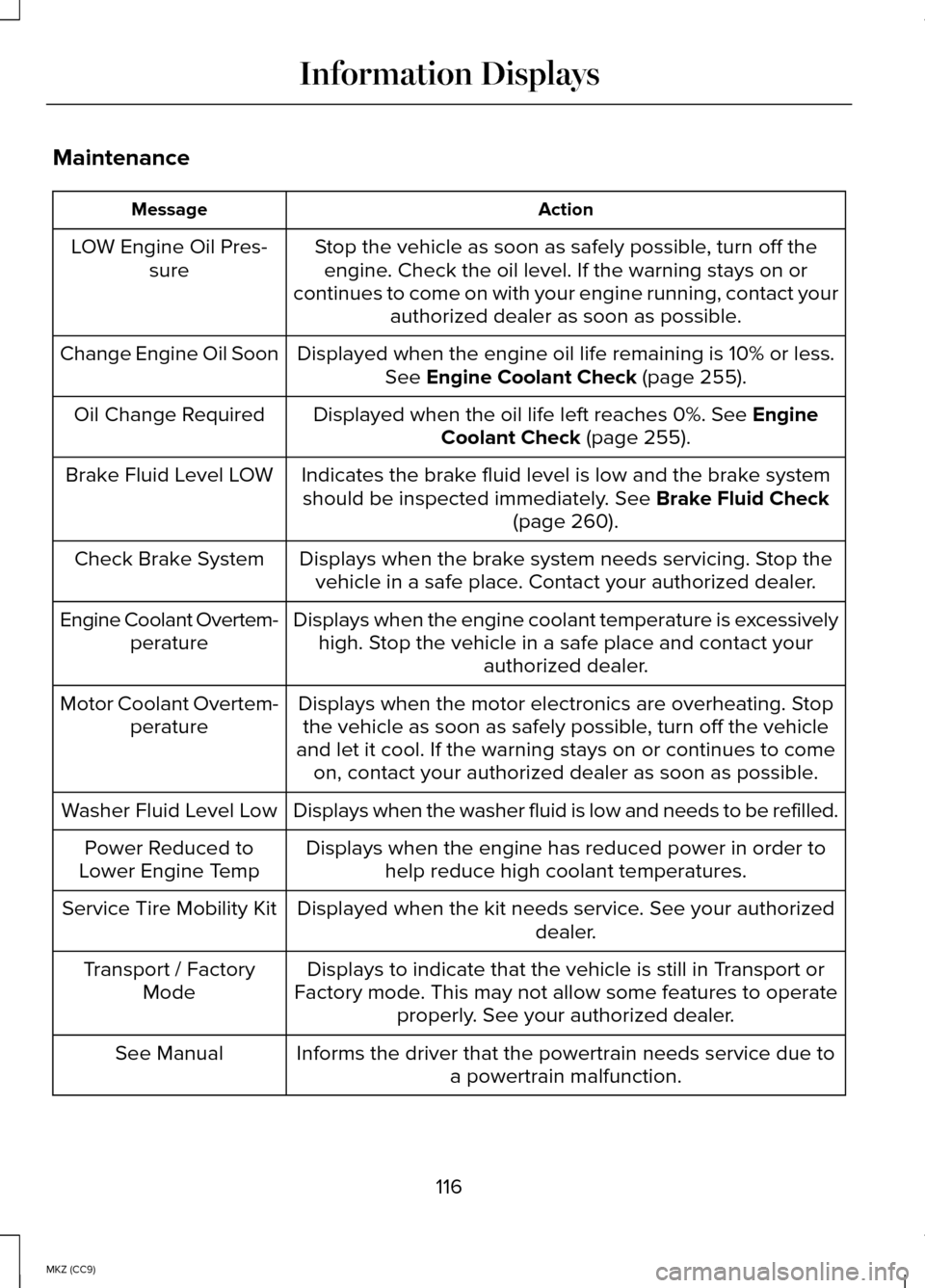
Maintenance
Action
Message
Stop the vehicle as soon as safely possible, turn off theengine. Check the oil level. If the warning stays on or
continues to come on with your engine running, contact your authorized dealer as soon as possible.
LOW Engine Oil Pres-
sure
Displayed when the engine oil life remaining is 10% or less.See Engine Coolant Check (page 255).
Change Engine Oil Soon
Displayed when the oil life left reaches 0%.
See Engine
Coolant Check (page 255).
Oil Change Required
Indicates the brake fluid level is low and the brake systemshould be inspected immediately.
See Brake Fluid Check
(page 260).
Brake Fluid Level LOW
Displays when the brake system needs servicing. Stop thevehicle in a safe place. Contact your authorized dealer.
Check Brake System
Displays when the engine coolant temperature is excessivelyhigh. Stop the vehicle in a safe place and contact your authorized dealer.
Engine Coolant Overtem-
perature
Displays when the motor electronics are overheating. Stopthe vehicle as soon as safely possible, turn off the vehicle
and let it cool. If the warning stays on or continues to come on, contact your authorized dealer as soon as possible.
Motor Coolant Overtem-
perature
Displays when the washer fluid is low and needs to be refilled.
Washer Fluid Level Low
Displays when the engine has reduced power in order tohelp reduce high coolant temperatures.
Power Reduced to
Lower Engine Temp
Displayed when the kit needs service. See your authorized dealer.
Service Tire Mobility Kit
Displays to indicate that the vehicle is still in Transport or
Factory mode. This may not allow some features to operate properly. See your authorized dealer.
Transport / Factory
Mode
Informs the driver that the powertrain needs service due toa powertrain malfunction.
See Manual
116
MKZ (CC9) Information Displays
Page 120 of 445
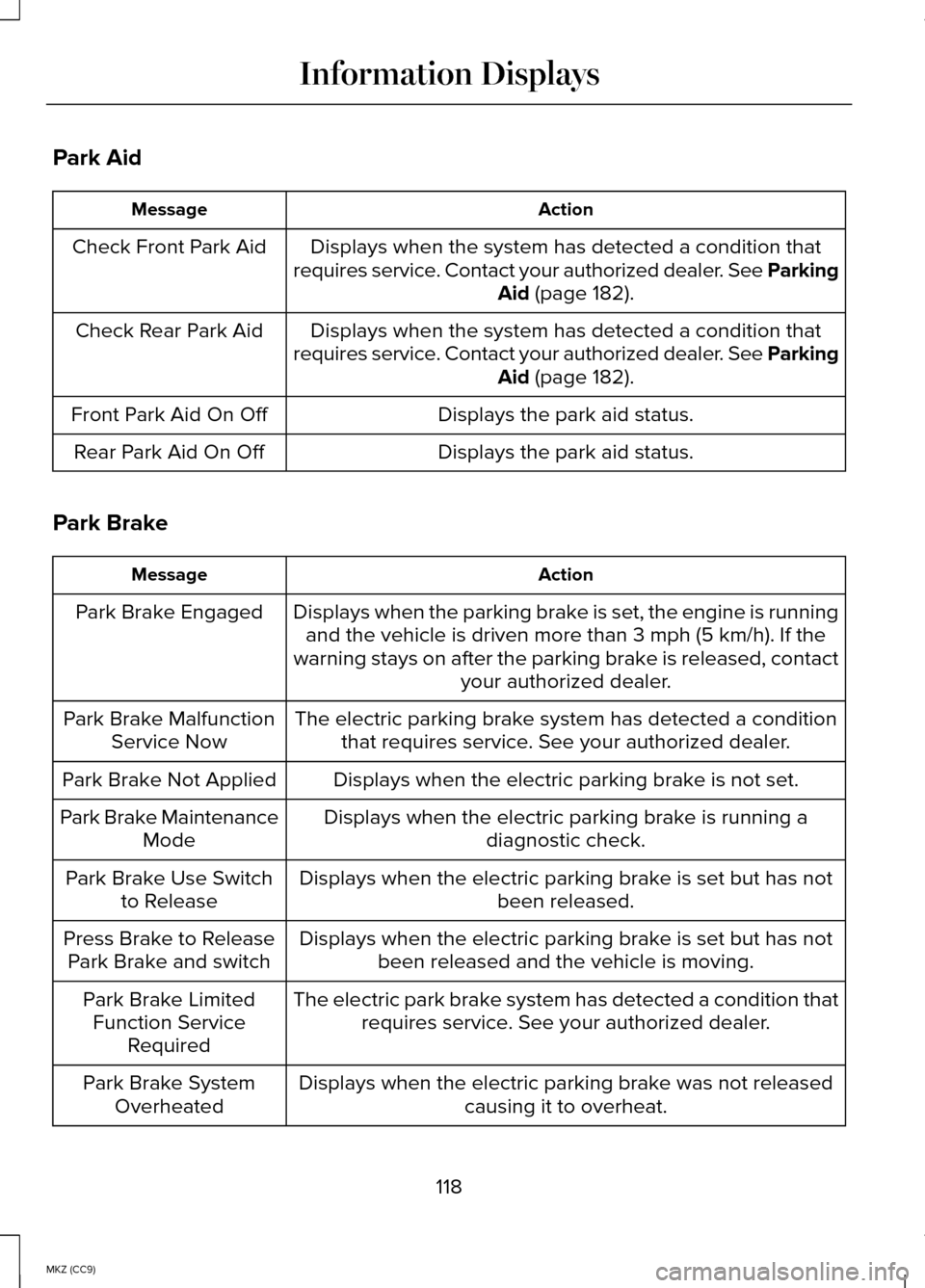
Park Aid
Action
Message
Displays when the system has detected a condition that
requires service. Contact your authorized dealer. See Parking Aid (page 182).
Check Front Park Aid
Displays when the system has detected a condition that
requires service. Contact your authorized dealer. See Parking Aid
(page 182).
Check Rear Park Aid
Displays the park aid status.
Front Park Aid On Off
Displays the park aid status.
Rear Park Aid On Off
Park Brake Action
Message
Displays when the parking brake is set, the engine is runningand the vehicle is driven more than 3 mph (5 km/h). If the
warning stays on after the parking brake is released, contact your authorized dealer.
Park Brake Engaged
The electric parking brake system has detected a conditionthat requires service. See your authorized dealer.
Park Brake Malfunction
Service Now
Displays when the electric parking brake is not set.
Park Brake Not Applied
Displays when the electric parking brake is running adiagnostic check.
Park Brake Maintenance
Mode
Displays when the electric parking brake is set but has not been released.
Park Brake Use Switch
to Release
Displays when the electric parking brake is set but has notbeen released and the vehicle is moving.
Press Brake to Release
Park Brake and switch
The electric park brake system has detected a condition thatrequires service. See your authorized dealer.
Park Brake Limited
Function Service Required
Displays when the electric parking brake was not releasedcausing it to overheat.
Park Brake System
Overheated
118
MKZ (CC9) Information Displays
Page 122 of 445
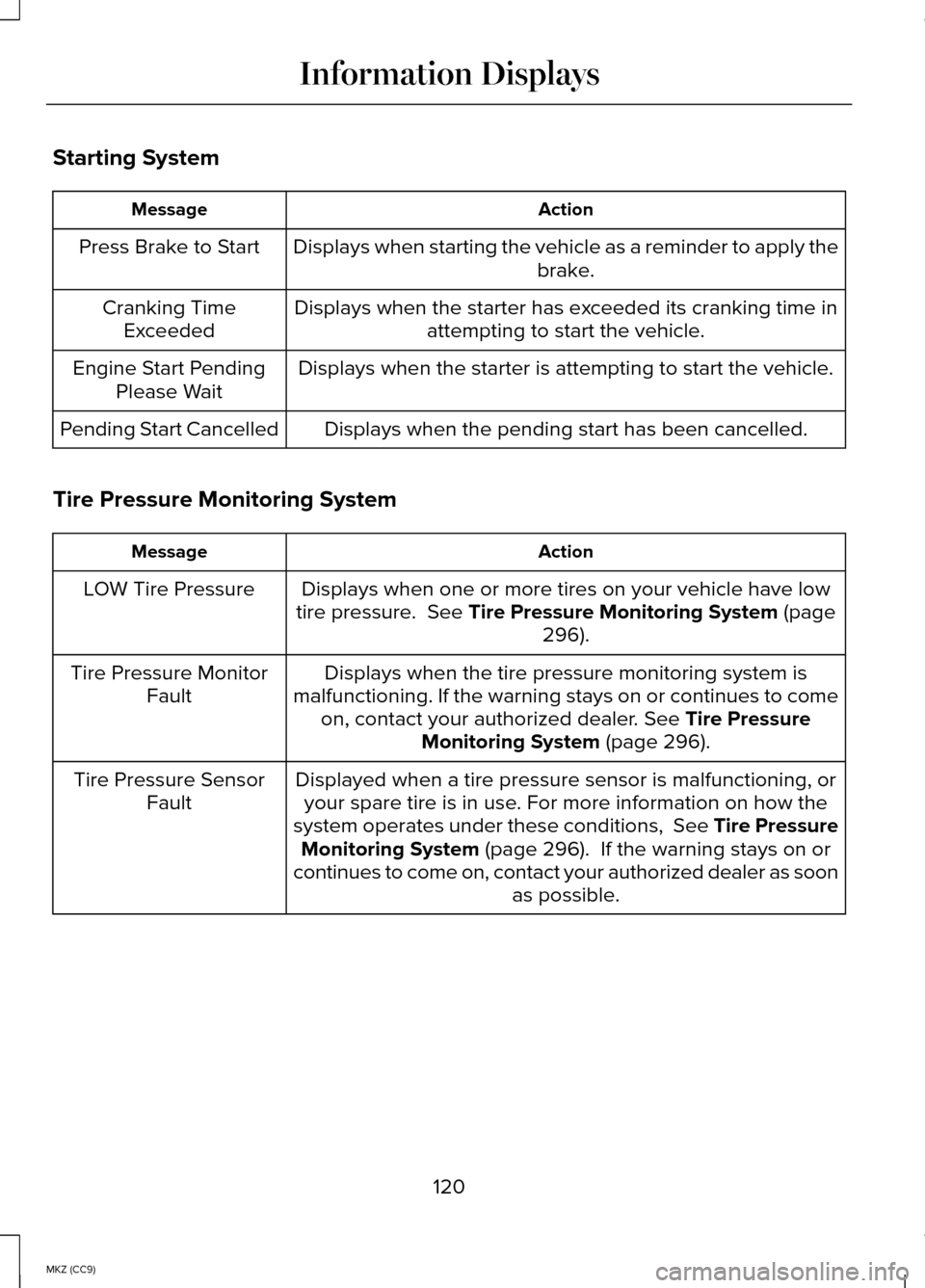
Starting System
Action
Message
Displays when starting the vehicle as a reminder to apply the brake.
Press Brake to Start
Displays when the starter has exceeded its cranking time inattempting to start the vehicle.
Cranking Time
Exceeded
Displays when the starter is attempting to start the vehicle.
Engine Start Pending
Please Wait
Displays when the pending start has been cancelled.
Pending Start Cancelled
Tire Pressure Monitoring System Action
Message
Displays when one or more tires on your vehicle have low
tire pressure. See Tire Pressure Monitoring System (page
296).
LOW Tire Pressure
Displays when the tire pressure monitoring system is
malfunctioning. If the warning stays on or continues to come on, contact your authorized dealer.
See Tire Pressure
Monitoring System (page 296).
Tire Pressure Monitor
Fault
Displayed when a tire pressure sensor is malfunctioning, oryour spare tire is in use. For more information on how the
system operates under these conditions, See Tire Pressure Monitoring System
(page 296). If the warning stays on or
continues to come on, contact your authorized dealer as soon as possible.
Tire Pressure Sensor
Fault
120
MKZ (CC9) Information Displays