reset LINCOLN MKZ HYBRID 2016 Service Manual
[x] Cancel search | Manufacturer: LINCOLN, Model Year: 2016, Model line: MKZ HYBRID, Model: LINCOLN MKZ HYBRID 2016Pages: 543, PDF Size: 5.04 MB
Page 410 of 543
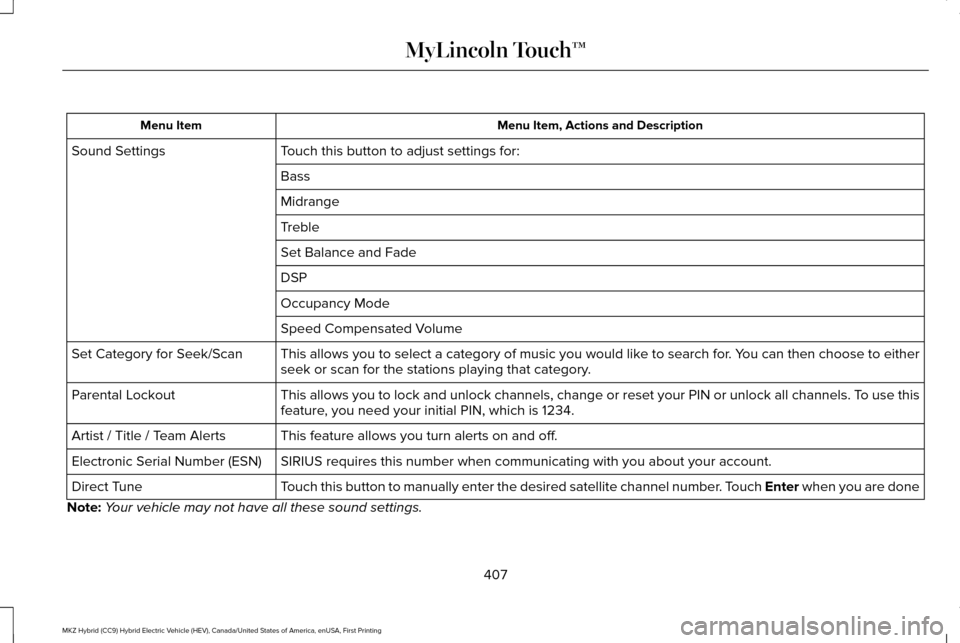
Menu Item, Actions and Description
Menu Item
Touch this button to adjust settings for:
Sound Settings
Bass
Midrange
Treble
Set Balance and Fade
DSP
Occupancy Mode
Speed Compensated Volume
This allows you to select a category of music you would like to search for. You can then choose to either
seek or scan for the stations playing that category.
Set Category for Seek/Scan
This allows you to lock and unlock channels, change or reset your PIN or\
unlock all channels. To use this
feature, you need your initial PIN, which is 1234.
Parental Lockout
This feature allows you turn alerts on and off.
Artist / Title / Team Alerts
SIRIUS requires this number when communicating with you about your accou\
nt.
Electronic Serial Number (ESN)
Touch this button to manually enter the desired satellite channel number. Touch Enter when you are done
Direct Tune
Note: Your vehicle may not have all these sound settings.
407
MKZ Hybrid (CC9) Hybrid Electric Vehicle (HEV), Canada/United States of America, enUSA, First Printing MyLincoln Touch™
Page 412 of 543
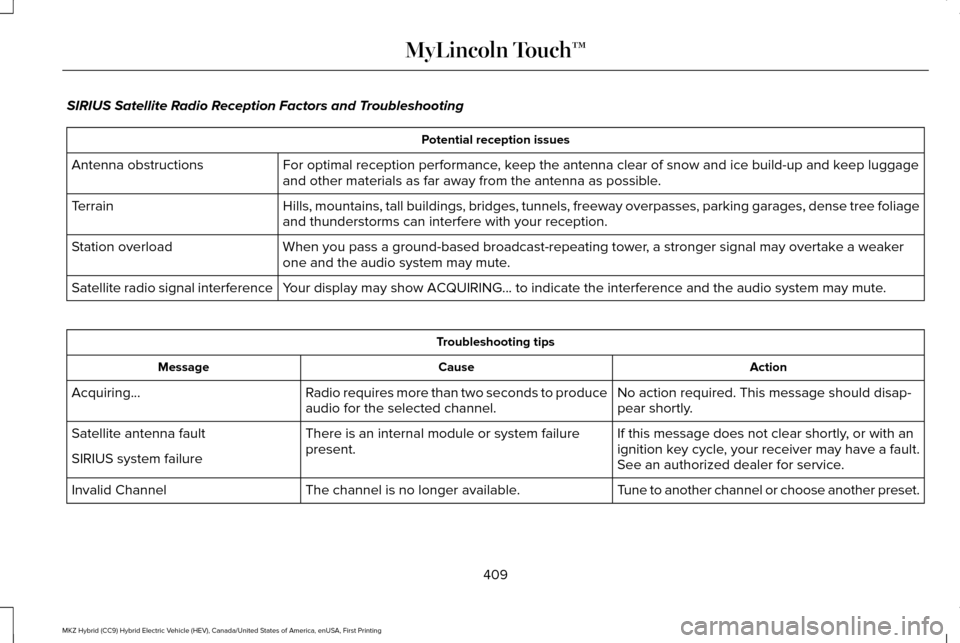
SIRIUS Satellite Radio Reception Factors and Troubleshooting
Potential reception issues
For optimal reception performance, keep the antenna clear of snow and ice build-up and keep luggage
and other materials as far away from the antenna as possible.
Antenna obstructions
Hills, mountains, tall buildings, bridges, tunnels, freeway overpasses, \
parking garages, dense tree foliage
and thunderstorms can interfere with your reception.
Terrain
When you pass a ground-based broadcast-repeating tower, a stronger signal may overtake a weaker
one and the audio system may mute.
Station overload
Your display may show ACQUIRING... to indicate the interference and the a\
udio system may mute.
Satellite radio signal interference Troubleshooting tips
Action
Cause
Message
No action required. This message should disap-
pear shortly.
Radio requires more than two seconds to produce
audio for the selected channel.
Acquiring…
If this message does not clear shortly, or with an
ignition key cycle, your receiver may have a fault.
See an authorized dealer for service.
There is an internal module or system failure
present.
Satellite antenna fault
SIRIUS system failure
Tune to another channel or choose another preset.
The channel is no longer available.
Invalid Channel
409
MKZ Hybrid (CC9) Hybrid Electric Vehicle (HEV), Canada/United States of America, enUSA, First Printing MyLincoln Touch™
Page 454 of 543

Max Defrost: Touch the button to maximize defrosting. Outside air flows through the wi\
ndshield vents, fan automatically adjusts to
the highest speed and the temperature dial returns to the full heat posi\
tion. You can use this setting to defog or clear a thin covering
of ice from the windshield. The heated rear window also automatically tu\
rns on when you select Max Defrost.
I
Air distribution control:
Touch these buttons to switch airflow from the windshield, instrument pan\
el, or footwell vents on or off.
The system can distribute air through any combination of these vents.
J
Note:
To prevent window fogging, you cannot select recirculated air when MAX De\
frost is on.
Driver settings:
K
Touch the
+ or – to increase or decrease the air temperature on the driver side of the v\
ehicle.
Touch the heated seat icon to switch the heated seat off and on (if equi\
pped).
Touch the climate-controlled seat icon to switch the climate-controlled s\
eat off and on (if equipped).
Touch
MyTemp to select your preset temperature setpoint. Touch and hold MyTemp to save a new preset temperature setpoint.
Touch the heated steering wheel icon to switch the heated steering wheel \
on and off (if equipped).
Note: If your vehicle is equipped with a
wood-trimmed steering wheel, it does not
heat between the 10 o'clock and 2 o'clock
positions. Smart Zone Feature
Each time you start your vehicle and drive
without an occupant in the front passenger
seat, the climate control system may
automatically switch to single zone mode (if
it was previously in dual zone mode) in order
to improve fuel economy. When this occurs,
the DUAL button turns off and the passenger
temperature changes to agree with the
driver's temperature.Press the
DUAL button or adjust the
passenger temperature to start dual zone
mode without a passenger present. The
system remains in dual zone mode until the
start your vehicle again.
Turning the Feature On
Press and hold the
DUAL button for more
than four seconds. Only the driver's
temperature display flashes to signify that
the feature is on.
451
MKZ Hybrid (CC9) Hybrid Electric Vehicle (HEV), Canada/United States of America, enUSA, First Printing MyLincoln Touch™
Page 469 of 543
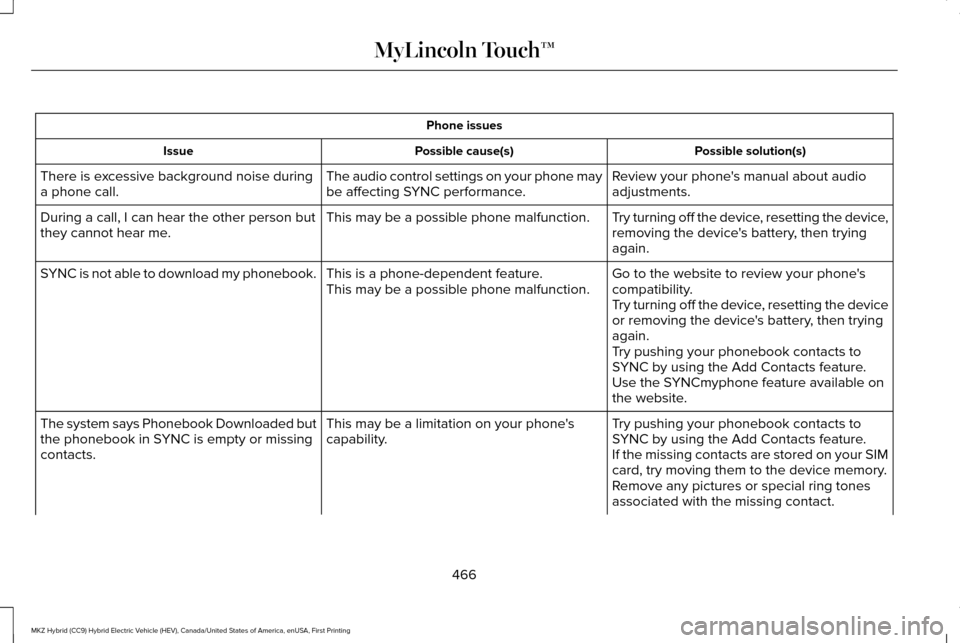
Phone issues
Possible solution(s)
Possible cause(s)
Issue
Review your phone's manual about audio
adjustments.
The audio control settings on your phone may
be affecting SYNC performance.
There is excessive background noise during
a phone call.
Try turning off the device, resetting the device,
removing the device's battery, then trying
again.
This may be a possible phone malfunction.
During a call, I can hear the other person but
they cannot hear me.
Go to the website to review your phone's
compatibility.
This is a phone-dependent feature.
This may be a possible phone malfunction.
SYNC is not able to download my phonebook.
Try turning off the device, resetting the device
or removing the device's battery, then trying
again.
Try pushing your phonebook contacts to
SYNC by using the Add Contacts feature.
Use the SYNCmyphone feature available on
the website.
Try pushing your phonebook contacts to
SYNC by using the Add Contacts feature.
This may be a limitation on your phone's
capability.
The system says Phonebook Downloaded but
the phonebook in SYNC is empty or missing
contacts.
If the missing contacts are stored on your SIM
card, try moving them to the device memory.
Remove any pictures or special ring tones
associated with the missing contact.
466
MKZ Hybrid (CC9) Hybrid Electric Vehicle (HEV), Canada/United States of America, enUSA, First Printing MyLincoln Touch™
Page 470 of 543
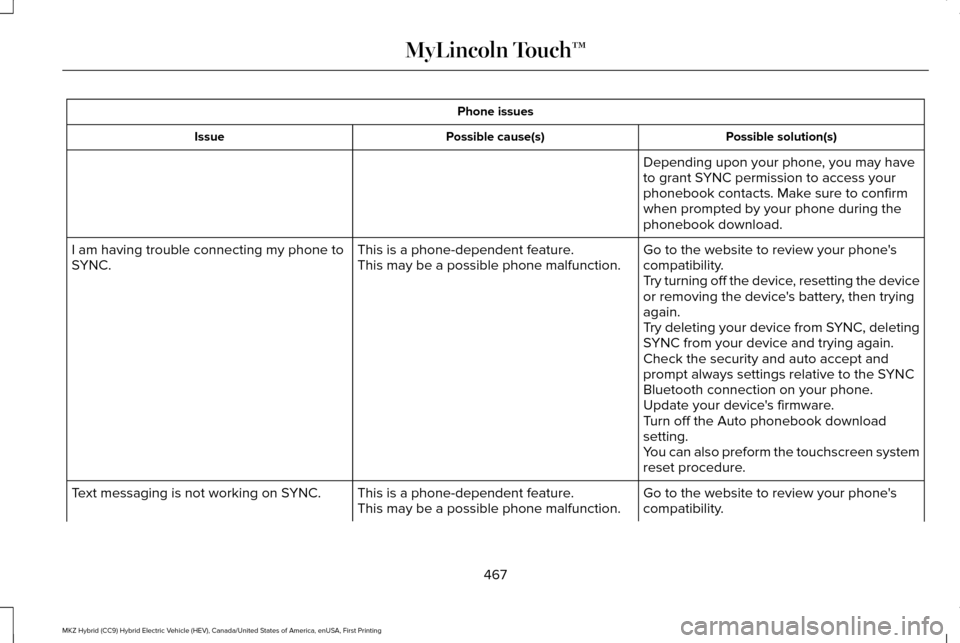
Phone issues
Possible solution(s)
Possible cause(s)
Issue
Depending upon your phone, you may have
to grant SYNC permission to access your
phonebook contacts. Make sure to confirm
when prompted by your phone during the
phonebook download.
Go to the website to review your phone's
compatibility.
This is a phone-dependent feature.
This may be a possible phone malfunction.
I am having trouble connecting my phone to
SYNC.
Try turning off the device, resetting the device
or removing the device's battery, then trying
again.
Try deleting your device from SYNC, deleting
SYNC from your device and trying again.
Check the security and auto accept and
prompt always settings relative to the SYNC
Bluetooth connection on your phone.
Update your device's firmware.
Turn off the Auto phonebook download
setting.
You can also preform the touchscreen system
reset procedure.
Go to the website to review your phone's
compatibility.
This is a phone-dependent feature.
This may be a possible phone malfunction.
Text messaging is not working on SYNC.
467
MKZ Hybrid (CC9) Hybrid Electric Vehicle (HEV), Canada/United States of America, enUSA, First Printing MyLincoln Touch™
Page 471 of 543
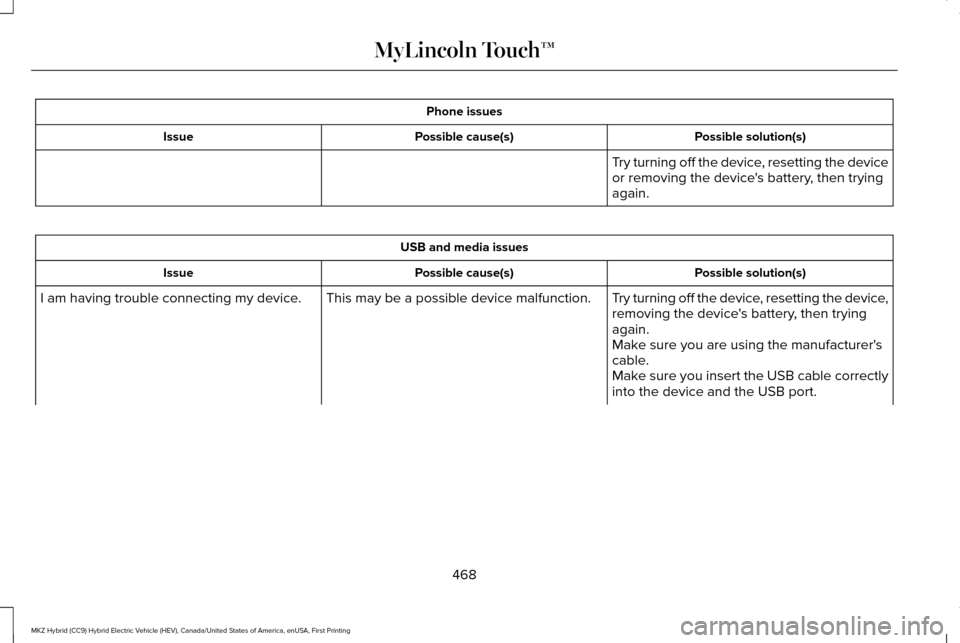
Phone issues
Possible solution(s)
Possible cause(s)
Issue
Try turning off the device, resetting the device
or removing the device's battery, then trying
again.USB and media issues
Possible solution(s)
Possible cause(s)
Issue
Try turning off the device, resetting the device,
removing the device's battery, then trying
again.
This may be a possible device malfunction.
I am having trouble connecting my device.
Make sure you are using the manufacturer's
cable.
Make sure you insert the USB cable correctly
into the device and the USB port.
468
MKZ Hybrid (CC9) Hybrid Electric Vehicle (HEV), Canada/United States of America, enUSA, First Printing MyLincoln Touch™
Page 472 of 543
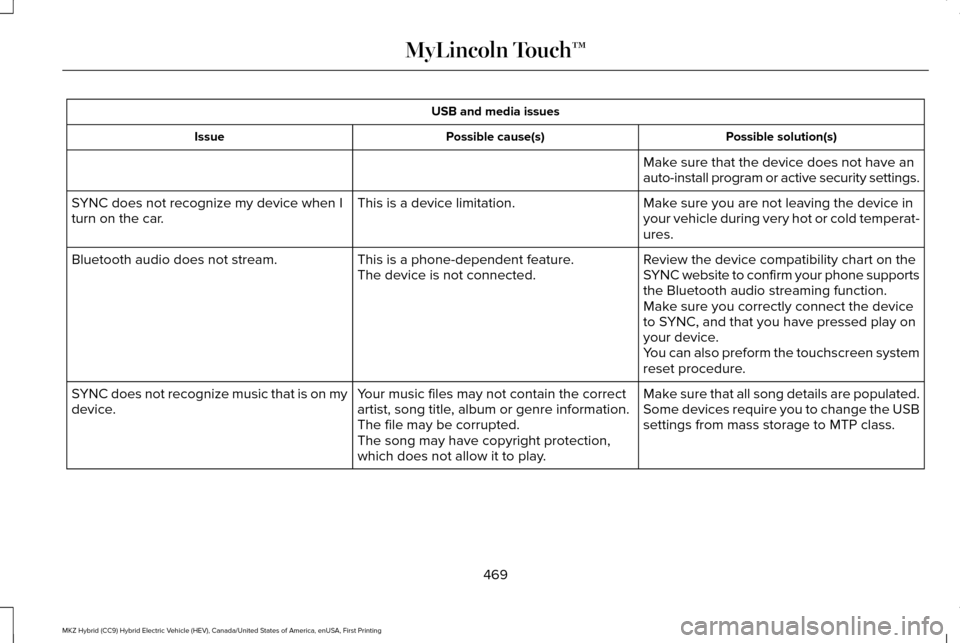
USB and media issues
Possible solution(s)
Possible cause(s)
Issue
Make sure that the device does not have an
auto-install program or active security settings.
Make sure you are not leaving the device in
your vehicle during very hot or cold temperat-
ures.
This is a device limitation.
SYNC does not recognize my device when I
turn on the car.
Review the device compatibility chart on the
SYNC website to confirm your phone supports
the Bluetooth audio streaming function.
This is a phone-dependent feature.
The device is not connected.
Bluetooth audio does not stream.
Make sure you correctly connect the device
to SYNC, and that you have pressed play on
your device.
You can also preform the touchscreen system
reset procedure.
Make sure that all song details are populated.
Your music files may not contain the correct
artist, song title, album or genre information.
SYNC does not recognize music that is on my
device.
Some devices require you to change the USB
settings from mass storage to MTP class.
The file may be corrupted.
The song may have copyright protection,
which does not allow it to play.
469
MKZ Hybrid (CC9) Hybrid Electric Vehicle (HEV), Canada/United States of America, enUSA, First Printing MyLincoln Touch™
Page 476 of 543
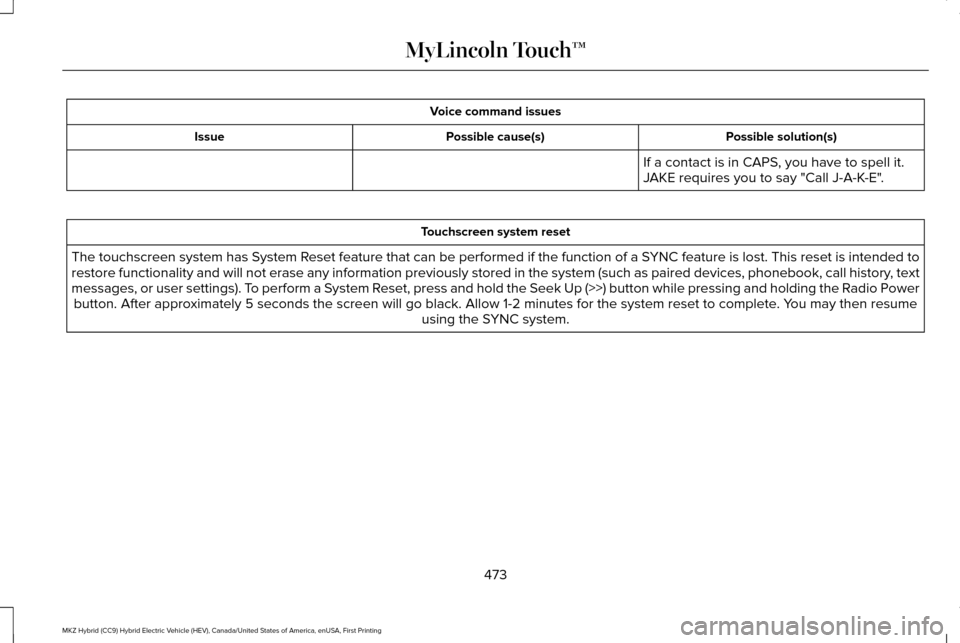
Voice command issues
Possible solution(s)
Possible cause(s)
Issue
If a contact is in CAPS, you have to spell it.
JAKE requires you to say "Call J-A-K-E".Touchscreen system reset
The touchscreen system has System Reset feature that can be performed if the function of a SYNC feature is lost. This reset is intended to
restore functionality and will not erase any information previously stor\
ed in the system (such as paired devices, phonebook, call history , text
messages, or user settings). To perform a System Reset, press and hold the Seek Up (>>) button while pressing and holdin\
g the Radio Power button. After approximately 5 seconds the screen will go black. Allow 1-2 minutes for the s\
ystem reset to complete. You may then resume using the SYNC system.
473
MKZ Hybrid (CC9) Hybrid Electric Vehicle (HEV), Canada/United States of America, enUSA, First Printing MyLincoln Touch™
Page 483 of 543
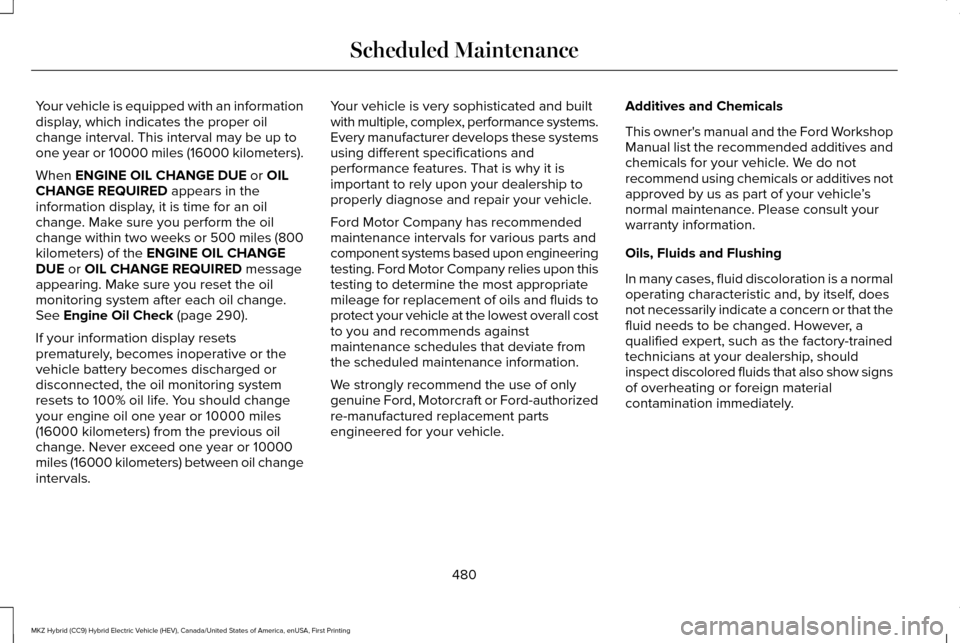
Your vehicle is equipped with an information
display, which indicates the proper oil
change interval. This interval may be up to
one year or 10000 miles (16000 kilometers).
When ENGINE OIL CHANGE DUE or OIL
CHANGE REQUIRED appears in the
information display, it is time for an oil
change. Make sure you perform the oil
change within two weeks or 500 miles (800
kilometers) of the
ENGINE OIL CHANGE
DUE or OIL CHANGE REQUIRED message
appearing. Make sure you reset the oil
monitoring system after each oil change.
See
Engine Oil Check (page 290).
If your information display resets
prematurely, becomes inoperative or the
vehicle battery becomes discharged or
disconnected, the oil monitoring system
resets to 100% oil life. You should change
your engine oil one year or 10000 miles
(16000 kilometers) from the previous oil
change. Never exceed one year or 10000
miles (16000 kilometers) between oil change
intervals. Your vehicle is very sophisticated and built
with multiple, complex, performance systems.
Every manufacturer develops these systems
using different specifications and
performance features. That is why it is
important to rely upon your dealership to
properly diagnose and repair your vehicle.
Ford Motor Company has recommended
maintenance intervals for various parts and
component systems based upon engineering
testing. Ford Motor Company relies upon this
testing to determine the most appropriate
mileage for replacement of oils and fluids to
protect your vehicle at the lowest overall cost
to you and recommends against
maintenance schedules that deviate from
the scheduled maintenance information.
We strongly recommend the use of only
genuine Ford, Motorcraft or Ford-authorized
re-manufactured replacement parts
engineered for your vehicle.
Additives and Chemicals
This owner's manual and the Ford Workshop
Manual list the recommended additives and
chemicals for your vehicle. We do not
recommend using chemicals or additives not
approved by us as part of your vehicle
’s
normal maintenance. Please consult your
warranty information.
Oils, Fluids and Flushing
In many cases, fluid discoloration is a normal
operating characteristic and, by itself, does
not necessarily indicate a concern or that the
fluid needs to be changed. However, a
qualified expert, such as the factory-trained
technicians at your dealership, should
inspect discolored fluids that also show signs
of overheating or foreign material
contamination immediately.
480
MKZ Hybrid (CC9) Hybrid Electric Vehicle (HEV), Canada/United States of America, enUSA, First Printing Scheduled Maintenance
Page 487 of 543
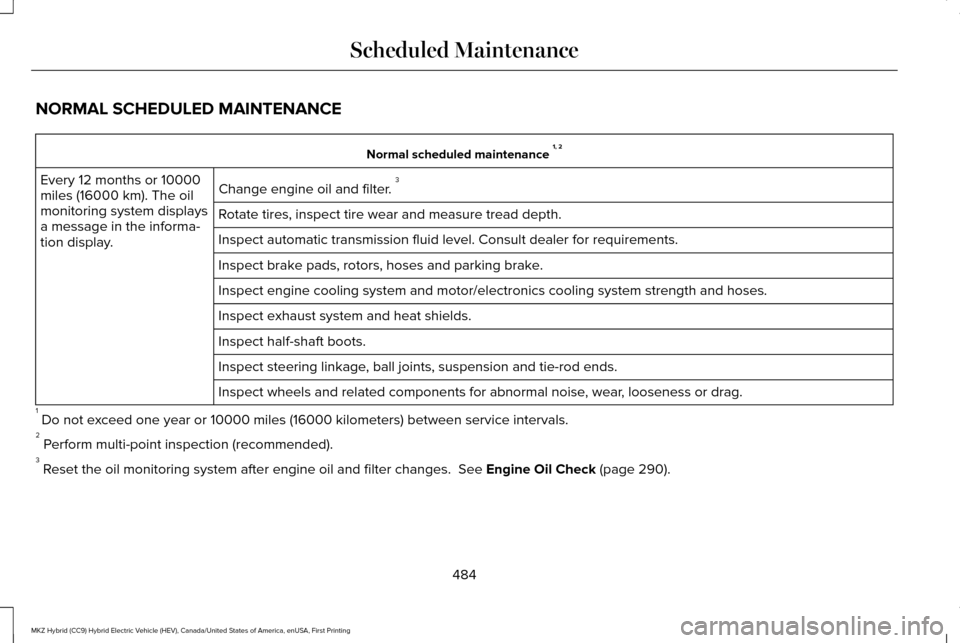
NORMAL SCHEDULED MAINTENANCE
Normal scheduled maintenance
1, 2
Change engine oil and filter. 3
Every 12 months or 10000
miles (16000 km). The oil
monitoring system displays
a message in the informa-
tion display. Rotate tires, inspect tire wear and measure tread depth.
Inspect automatic transmission fluid level. Consult dealer for requireme\
nts.
Inspect brake pads, rotors, hoses and parking brake.
Inspect engine cooling system and motor/electronics cooling system stren\
gth and hoses.
Inspect exhaust system and heat shields.
Inspect half-shaft boots.
Inspect steering linkage, ball joints, suspension and tie-rod ends.
Inspect wheels and related components for abnormal noise, wear, looseness or drag.
1 Do not exceed one year or 10000 miles (16000 kilometers) between service interv\
als.
2 Perform multi-point inspection (recommended).
3 Reset the oil monitoring system after engine oil and filter changes. See Engine Oil Check (page 290).
484
MKZ Hybrid (CC9) Hybrid Electric Vehicle (HEV), Canada/United States of America, enUSA, First Printing Scheduled Maintenance