clock LINCOLN NAUTILUS 2020 User Guide
[x] Cancel search | Manufacturer: LINCOLN, Model Year: 2020, Model line: NAUTILUS, Model: LINCOLN NAUTILUS 2020Pages: 596, PDF Size: 5.88 MB
Page 432 of 596
GENERAL INFORMATION
WARNING: Driving while distracted
can result in loss of vehicle control, crash
and injury. We strongly recommend that
you use extreme caution when using any
device that may take your focus off the
road. Your primary responsibility is the safe
operation of your vehicle. We recommend
against the use of any hand-held device
while driving and encourage the use of
voice-operated systems when possible.
Make sure you are aware of all applicable
local laws that may affect the use of
electronic devices while driving.
About SYNC
The system allows you to interact with the
entertainment, information and
communication systems on your vehicle
using voice commands and a touchscreen.
The system provides easy interaction with
audio, phone, navigation, mobile apps and
settings. Note:
You can switch the system on and use
it for up to an hour without switching the
ignition on.
Note: You can use the system after you
switch the ignition off for up to 10 minutes or
until you open a door.
Note: For your safety, some features are
speed-dependent. Their use is limited to
when your vehicle speed is less than 3 mph
(5 km/h)
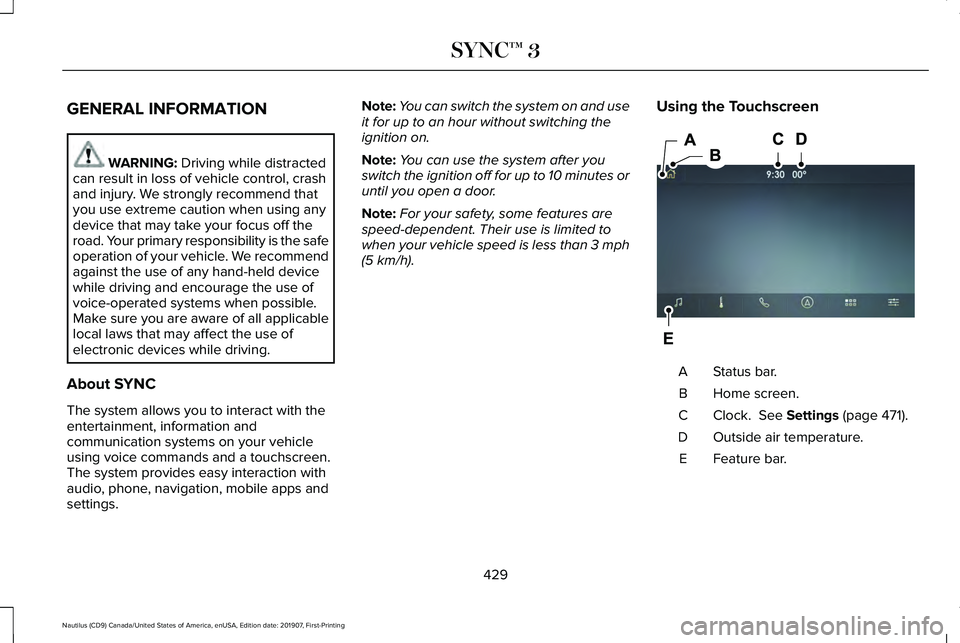
. Using the Touchscreen Status bar.
A
Home screen.
B
Clock.
See Settings (page 471).
C
Outside air temperature.
D
Feature bar.
E
429
Nautilus (CD9) Canada/United States of America, enUSA, Edition date: 201907, First-Printing SYNC™ 3E297844
Page 474 of 596
SETTINGS
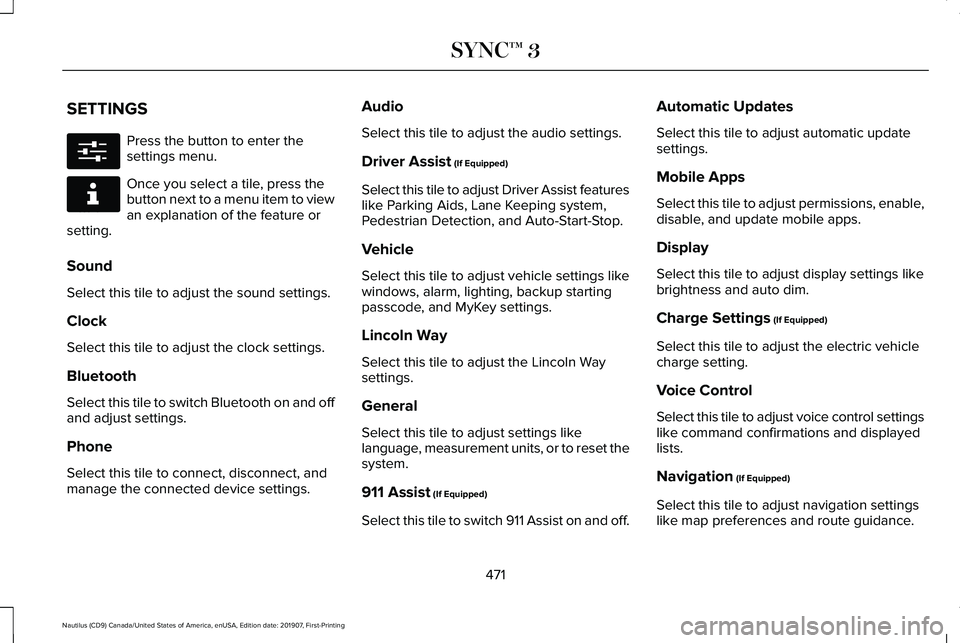
Press the button to enter the
settings menu.
Once you select a tile, press the
button next to a menu item to view
an explanation of the feature or
setting.
Sound
Select this tile to adjust the sound settings.
Clock
Select this tile to adjust the clock settings.
Bluetooth
Select this tile to switch Bluetooth on and off
and adjust settings.
Phone
Select this tile to connect, disconnect, and
manage the connected device settings. Audio
Select this tile to adjust the audio settings.
Driver Assist (If Equipped)
Select this tile to adjust Driver Assist features
like Parking Aids, Lane Keeping system,
Pedestrian Detection, and Auto-Start-Stop.
Vehicle
Select this tile to adjust vehicle settings like
windows, alarm, lighting, backup starting
passcode, and MyKey settings.
Lincoln Way
Select this tile to adjust the Lincoln Way
settings.
General
Select this tile to adjust settings like
language, measurement units, or to reset the
system.
911 Assist
(If Equipped)
Select this tile to switch 911 Assist on and off. Automatic Updates
Select this tile to adjust automatic update
settings.
Mobile Apps
Select this tile to adjust permissions, enable,
disable, and update mobile apps.
Display
Select this tile to adjust display settings like
brightness and auto dim.
Charge Settings
(If Equipped)
Select this tile to adjust the electric vehicle
charge setting.
Voice Control
Select this tile to adjust voice control settings
like command confirmations and displayed
lists.
Navigation
(If Equipped)
Select this tile to adjust navigation settings
like map preferences and route guidance.
471
Nautilus (CD9) Canada/United States of America, enUSA, Edition date: 201907, First-Printing SYNC™ 3E280315 E268570
Page 592 of 596
Reporting Safety Defects (Canada
Only)...............................................................301
Reporting Safety Defects (U.S. Only).......301
Resuming the Set Speed...........................235
Roadside Assistance...................................288 Vehicles Sold in Canada: Getting Roadside
Assistance.......................................................289
Vehicles sold in the United States: Getting Roadside Assistance.....................................288
Vehicles Sold in the United States: Using Roadside Assistance.....................................288
Roadside Emergencies
...............................288
Roof Racks and Load Carriers...................272
Running-In See: Breaking-In.................................................285
Running Out of Fuel.....................................183 Adding Fuel From a Portable Fuel
Container..........................................................183
Filling a Portable Fuel Container.....................183
S
Safety Canopy™
...............................................52
Safety Precautions.........................................181
Satellite Radio...............................................424 Satellite Radio Electronic Serial Number
(ESN)..................................................................425
Satellite Radio Reception Factors..................424 SiriusXM Satellite Radio Service....................425
Troubleshooting..................................................426
Scheduled Maintenance Record..............507
Scheduled Maintenance............................495
Seatbelt Extensions
........................................43
Seatbelt Height Adjustment.........................39
Seatbelt Reminder
...........................................41
Belt-Minder™............................................................41
Seatbelts...........................................................36 Principle of Operation..........................................36
Seatbelt Warning Lamp and Indicator Chime..............................................................40
Conditions of operation......................................40
Seats.................................................................147
Security.............................................................82
Settings............................................................471 911 Assist................................................................471
Ambient Lighting................................................472
Audio.......................................................................471
Automatic Updates.............................................471
Bluetooth...............................................................471
Charge Settings...................................................471
Clock.......................................................................471
Display....................................................................471
Driver Assist..........................................................471
General...................................................................471
Lincoln Way...........................................................471
Message Center.................................................472 Mobile Apps..........................................................471
Multi Contour Seats...........................................472
Navigation.............................................................471
Personal Profiles.................................................472
Phone......................................................................471
Seats......................................................................472
Sound......................................................................471
Valet Mode...........................................................472
Vehicle....................................................................471
Voice Control........................................................471
Setting the Cruise Control Speed............234 Changing the Set Speed..................................234
Side Airbags
......................................................51
Side Sensing System...................................218 Object Distance Indicator.................................219
Sitting in the Correct Position.....................147
Snow Chains See: Using Snow Chains..................................
370
Spare Wheel See: Changing a Road Wheel.........................376
Special Notices
................................................15
New Vehicle Limited Warranty...........................15
Notice to Owners of Pickup Trucks and Utility
Type Vehicles.....................................................16
On Board Diagnostics Data Link Connector...........................................................16
Special Instructions...............................................15
Using Your Vehicle as an Ambulance..............
16
589
Nautilus (CD9) Canada/United States of America, enUSA, Edition date: 201907, First-Printing Index