change wheel LINCOLN NAUTILUS 2021 User Guide
[x] Cancel search | Manufacturer: LINCOLN, Model Year: 2021, Model line: NAUTILUS, Model: LINCOLN NAUTILUS 2021Pages: 579, PDF Size: 6.9 MB
Page 264 of 579
SWITCHING FROM ADAPTIVE
CRUISE CONTROL TO CRUISE
CONTROL
WARNING: Normal cruise control will
not brake when your vehicle is
approaching slower vehicles. Always be
aware of which mode you have selected
and apply the brakes when necessary.
You can change from adaptive cruise control
to normal cruise control through the
information display. The cruise control indicator light
replaces the adaptive cruise
control indicator light if you select
normal cruise control. The gap setting does
not display, and the system does not respond
to lead vehicles. Automatic braking remains
active to maintain set speed. LANE CENTERING
How Does Lane Centering Work
Adaptive cruise control with lane centering
uses radar and camera sensors to help keep
your vehicle in the lane by applying
continuous assistance steering torque input
toward the lane center on highways.
Note:
The adaptive cruise control gap setting
operates normally.
Lane Centering Precautions WARNING:
Do not use the system
when towing a trailer. Failure to follow this
instruction could result in the loss of
control of your vehicle, personal injury or
death. WARNING: Do not use the system if
any changes or modifications to the
steering wheel have been made. Any
changes or modifications to the steering
wheel could affect the functionality or
performance of the system. Failure to
follow this instruction could result in the
loss of control of your vehicle, personal
injury or death.
Adaptive cruise control precautions apply to
lane centering unless stated otherwise or
contradicted by a lane centering precaution.
See
Adaptive Cruise Control Precautions
(page 253).
Lane Centering Requirements
You must keep your hands on the steering
wheel at all times.
260
2021 Nautilus (CD9) Canada/United States of America, enUSA, Edition date: 202011, First-Printing Adaptive Cruise Control
(If Equipped)E71340
Page 265 of 579
The system only activates when all of the
following occur:
•
You have adaptive cruise control with
stop and go on.
• You have your hands on the steering
wheel.
• The system detects both lane markings.
Note: If it does not detect valid lane
markings, the system stays inactive until
valid markings are available.
Lane Centering Limitations
Adaptive cruise control limitations apply to
lane centering unless stated otherwise or
contradicted by a lane centering limitation.
See Adaptive Cruise Control Limitations
(page 254).
Lane Centering may not correctly operate in
any of the following conditions:
• Your vehicle is not centered in the lane.
• The lane is too narrow or wide.
• The system does not detect at least one
lane marking or when lanes merge or
split. •
Limited steering torque input is applied.
• Areas under construction or new
infrastructure.
• When modifications to the steering
system have been made.
• When using a spare tire.
• In high wind conditions.
Note: The driving assistance torque is limited
and may not be sufficient for all driving
situations such as driving through tight
curves or driving through curves at high
speeds.
Note: In exceptional conditions, the system
may deviate from the center line.
Switching Lane Centering On and Off
You must keep your hands on the steering
wheel at all times.
The controls are on the steering wheel. Press the button.The indicator appears in the information
display. When the system is on, the color of
the indicator changes to indicate the system
status.
You can override the system at any time by
steering your vehicle.
Note:
The correct requirements must be met
before you can switch the system on.
See
Lane Centering Requirements (page 260).
Lane Centering Alerts
When the system is active and detects no
steering activity for a certain period of time,
the system alerts you to put your hands on
the steering wheel. If you do not react to the
warnings the system cancels and slows your
vehicle down to idle speeds while
maintaining steering control.
The system also alerts you if your vehicle
crosses lane markings without detected
steering activity.
Note: The system may detect a light grip or
touch on the steering wheel as hands-off
driving.
261
2021 Nautilus (CD9) Canada/United States of America, enUSA, Edition date: 202011, First-Printing Adaptive Cruise Control
(If Equipped)E262175
Page 266 of 579
Lane Centering Automatic Cancellation
When an external condition cancels the
system, for example, no lane markings
available, a tone sounds and a message
appears in the information display.
If your vehicle starts to slow down,
you must provide steering input to
the wheel and press and release
the button to regain full system performance.
Automatic cancellation can also occur if:
• The lane becomes too wide or too
narrow.
• The system cannot detect valid lane
markings.
• Lane markings cross over one another. Note:
The system disables until the next key
cycle if your vehicle slows down due to driver
inactivity twice within a key cycle.
Lane Centering Indicators Illuminates when you switch lane
centering on. The color of the
indicator changes to indicate the
system status.
Gray indicates the system is on but inactive.
Green indicates the system is active and
applying steering torque assistance input to
keep your vehicle in the center of the lane.
Amber with an audible tone and then gray
indicates a system automatic cancellation. ADAPTIVE CRUISE CONTROL –
TROUBLESHOOTING
Adaptive Cruise Control – Information
Messages - Vehicles With: Lane
Centering
Note:
Depending on your vehicle options
and instrument cluster type, not all messages
display or are available.
Note: The system could abbreviate or
shorten certain messages depending upon
which cluster type you have. Action
Message
Return your hands to the steering wheel and provide steering input.
Keep Hands on Steering Wheel
Conditions exist that prevent the system from being available.
Lane Centering Assist Not Available
You need to switch on adaptive cruise control before you can switch on la\
ne centering.
For Lane Centering Assist to work Turn On
Adaptive Cruise
262
2021 Nautilus (CD9) Canada/United States of America, enUSA, Edition date: 202011, First-Printing Adaptive Cruise Control (If Equipped) E262175
Page 268 of 579
WHAT IS DRIVE MODE CONTROL
Your vehicle has various drive modes that
you can select for different driving
conditions. Depending on the drive mode
that you select, the system adjusts various
vehicle settings.
HOW DOES DRIVE MODE
CONTROL WORK
Drive mode control adjusts your vehicle
configuration for each mode you select.
Changing the drive mode changes the
functionality of the steering system to adjust
the steering effort and feel.
Active noise control utilizes your vehicle
electronics to enhance the acoustic
experience.
The stability and traction control assist your
vehicle control in adverse conditions or
high-performance driving.
Throttle control enhances the powertrain
response, transmission controls become
optimized with shift schedules, and
four-wheel drive settings are optimized and
tuned to each mode.
Note:
The system has diagnostic checks that
continuously monitor the system for proper
operation. If a mode is unavailable due to a
system fault, the mode defaults to normal.
SELECTING A DRIVE MODE
You can configure which of the drive control
modes are active when your vehicle is in
drive (D) or in sport (S). The configuration
remains active until modified from the main
menu on the instrument cluster display. See
Instrument Cluster Display Main Menu
(page 144).
Note: Not all settings may be available.
Note: Drive mode changes may not be
available when the ignition is off. DRIVE MODES
Comfort
Provides a more relaxed driving experience,
maximizing comfort. Your steering effort
decreases and the suspension movement is
more fluid. Comfort mode is ideal when you
desire enhanced traveling comfort.
Normal
Delivers a balanced combination of a
comfortable, controlled ride and confident
handling. This mode provides an engaging
driving experience and a direct connection
to the road without sacrificing any of the
composure demanded from a luxury vehicle.
Sport
Provides a sportier driving experience. The
suspension stiffens, with an emphasis on
handling and control. The engine responds
more directly to your inputs and takes on a
more powerful tone. This mode is ideal for
use during more spirited driving.
264
2021 Nautilus (CD9) Canada/United States of America, enUSA, Edition date: 202011, First-Printing Drive Mode Control
Page 270 of 579
LANE KEEPING SYSTEM
LIMITATIONS
The lane keeping system only operates when
the vehicle speed is greater than 40 mph
(64 km/h).
The system works when the camera can
detect at least one lane marking.
The lane keeping system may not correctly
operate in any of the following conditions:
• The lane keeping system does not detect
at least one lane marking.
• You switch the turn signal on.
• You apply direct steering, accelerate fast
or brake hard.
• The vehicle speed is less than
40 mph
(64 km/h).
• The anti-lock brake, stability control or
traction control system activates.
• The lane is too narrow.
• Something is obscuring the camera or it
is unable to detect the lane markings due
to environment, traffic or vehicle
conditions. The lane keeping system may not correct
lane positioning in any of the following
conditions:
•
High winds.
• Uneven road surfaces.
• Heavy or uneven loads.
• Incorrect tire pressure.
SWITCHING THE LANE KEEPING
SYSTEM ON AND OFF To activate the lane keeping
system, press the button on the
turn signal lever.
Note: The system stores the on or off setting
until manually changed, unless it detects a
MyKey™. If the system detects a MyKey™, it
defaults to on and the mode is set to alert.
Note: If the system detects a MyKey™,
pressing the button does not affect the on
or off status of the system. You can only
change the mode and intensity settings. SWITCHING THE LANE KEEPING
SYSTEM MODE
The lane keeping system has different
settings that you can view or adjust using
the information display.
The system stores the last known selection
for each of these settings. You do not need
to readjust your settings each time you
switch on the system.
To change the lane keeping system mode,
use the instrument cluster display:
1. Using the instrument cluster display
controls on the steering wheel, select
SETTINGS
.
2. Select
Driver assistance.
3. Select
Lane keeping system.
4. Select
Mode.
5. Select a mode.
Note: The system remembers the last setting
when you start your vehicle. If the system
detects a MyKey™, it defaults to the last
setting for that MyKey™.
266
2021 Nautilus (CD9) Canada/United States of America, enUSA, Edition date: 202011, First-Printing Lane Keeping SystemE308131
Page 271 of 579
LANE KEEPING SYSTEM SETTINGS
To change the steering wheel vibration, use
the instrument cluster display:
1. Using the instrument cluster display
controls on the steering wheel, select
Driver Assist.
2. Select
Lane Keeping Sys.
3. Select
Alert Intensity.
4. Select a setting.
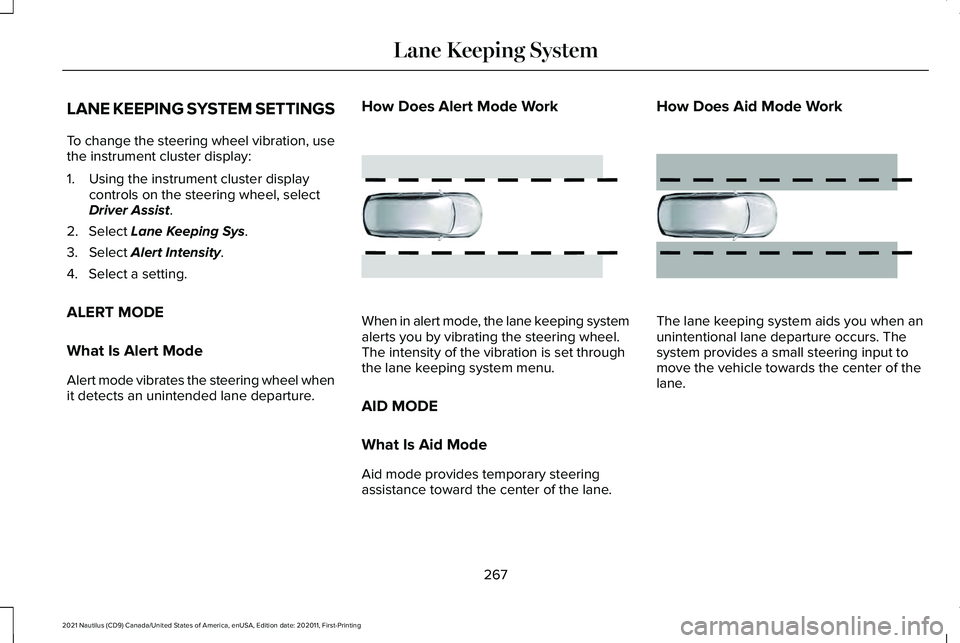
ALERT MODE
What Is Alert Mode
Alert mode vibrates the steering wheel when
it detects an unintended lane departure. How Does Alert Mode Work
When in alert mode, the lane keeping system
alerts you by vibrating the steering wheel.
The intensity of the vibration is set through
the lane keeping system menu.
AID MODE
What Is Aid Mode
Aid mode provides temporary steering
assistance toward the center of the lane.How Does Aid Mode Work
The lane keeping system aids you when an
unintentional lane departure occurs. The
system provides a small steering input to
move the vehicle towards the center of the
lane.
267
2021 Nautilus (CD9) Canada/United States of America, enUSA, Edition date: 202011, First-Printing Lane Keeping SystemE165515 E165516
Page 343 of 579
WARNING: Do not add engine oil
when the engine is hot. Failure to follow
this instruction could result in personal
injury.
Do not use supplemental engine oil additives
because they are unnecessary and could
lead to engine damage that the vehicle
warranty may not cover.
1. Clean the area surrounding the engine oil filler cap before you remove it.
2. Remove the engine oil filler cap.
3. Add engine oil that meets our specifications.
See Capacities and
Specifications (page 402).
4. Reinstall the engine oil filler cap. Turn it clockwise until you feel a strong
resistance.
Note: Do not add oil further than the
maximum mark. Oil levels above the
maximum mark may cause engine damage.
Note: Immediately soak up any oil spillage
with an absorbent cloth. Resetting the Engine Oil Change
Reminder
Use the information display controls on the
steering wheel to reset the oil change
indicator.
From the main menu scroll to:
Action and description
Message
Press the right arrow button,
then from this menu scroll to
the following message.
Settings
Press the right arrow button,
then from this menu scroll to
the following message.
Vehicle
Press the right arrow button,
then from this menu scroll to
the following message.
Oil Life
Press and hold the OK button
until the instrument cluster
displays the following
message.
Hold OK to
Reset
Reset Successful Action and description
Message
When the oil change indicator
resets the instrument cluster
displays 100%.
Remaining Life
{00}%
If the instrument cluster
displays one of the following
messages, repeat the
process.
Not Reset
Reset Cancelled
Engine Oil Capacity and Specification
For filling information, please refer to the
Capacities and Specifications section of your
owner's manual.
See Engine Oil Capacity
and Specification (page 404).
339
2021 Nautilus (CD9) Canada/United States of America, enUSA, Edition date: 202011, First-Printing Maintenance
Page 365 of 579
PREPARING YOUR VEHICLE FOR
STORAGE
If you plan on storing your vehicle for 30
days or more, the following maintenance
recommendations ensures your vehicle stays
in good operating condition.
Under various conditions, long-term storage
may lead to degraded engine performance
or failure unless you use specific precautions
to preserve your vehicle.
General
•
Store all vehicles in a dry, ventilated
place.
• If vehicles are stored outside, they
require regular maintenance to protect
against rust and weather damage.
• Make sure all linkages, cables, levers and
pins under your vehicle are covered with
grease to prevent rust. •
Move vehicles at least 25 ft (7.5 m) every
15 days to lubricate working parts and
prevent corrosion.
• Fill the fuel tank with high-quality fuel
until the first automatic shutoff of the fuel
pump nozzle.
Engine
• Change the engine oil and filter prior to
storage because used engine oil contains
contaminants which may cause engine
damage.
• Start the engine every 15 days for a
minimum of 15 minutes. Run at fast idle
with the climate controls set to defrost
until the engine reaches normal
operating temperature.
• With your foot on the brake, shift through
all the gears while the engine is running. Body
•
Wash your vehicle thoroughly to remove
dirt, grease, oil, tar or mud from exterior
surfaces, rear-wheel housings and the
underside of front fenders.
• Periodically wash your vehicle if it is
stored in exposed locations.
• Touch-up exposed or primed metal to
prevent rust.
• Cover chrome and stainless steel parts
with a thick coat of auto wax to prevent
discoloration. Re-wax as necessary when
you wash your vehicle.
• Lubricate all hood, door and luggage
compartment hinges and latches with a
light grade oil.
• Cover interior trim to prevent fading.
• Keep all rubber parts free from oil and
solvents.
361
2021 Nautilus (CD9) Canada/United States of America, enUSA, Edition date: 202011, First-Printing Storing Your Vehicle
Page 366 of 579
Hybrid Battery Systems
We recommend the following actions for your
vehicle:
•
When storing your vehicle for greater
than 30 days the state of charge should
be approximately 50%. Additionally we
recommend disconnecting the 12V
battery which will reduce system loads
on the HV battery.
12 Volt Battery
• Check and recharge as necessary. Keep
connections clean.
Note: It is necessary to reset memory
features if you disconnect the battery cables.
Brakes
Make sure the brakes and parking brake
release fully.
Note: If you intend on parking your vehicle
for an extended period after cleaning the
wheels with a wheel cleaner, drive your
vehicle for a few minutes before doing so to
reduce the risk of increased corrosion of the
brake discs, brake pads and linings. Tires
•
Maintain recommended air pressure.
Note: If you intend on parking your vehicle
for an extended period after cleaning the
wheels with a wheel cleaner, drive your
vehicle for a few minutes before doing so.
This reduces the risk of corrosion of the
brake discs, brake pads and linings.
REMOVING YOUR VEHICLE FROM
STORAGE
When your vehicle is ready to come out of
storage, do the following:
• We recommend that you change the
engine oil before you use your vehicle
again.
• Wash your vehicle to remove any dirt or
grease film build-up on window surfaces.
• Check windshield wipers for any
deterioration.
• Check under the hood for any foreign
material that may have collected during
storage such as mice or squirrel nests. •
Check the exhaust for any foreign
material that may have collected during
storage.
• Check tire pressures and set tire inflation
per the Tire Label.
• Check brake pedal operation. Drive your
vehicle 15 ft (4.5 m) back and forth to
remove rust build-up.
• Check fluid levels (including coolant, oil
and gas) to make sure there are no leaks,
and fluids are at recommended levels.
• If you remove the battery, clean the
battery cable ends and check for
damage.
Contact an authorized dealer if you have any
concerns or issues.
362
2021 Nautilus (CD9) Canada/United States of America, enUSA, Edition date: 202011, First-Printing Storing Your Vehicle
Page 369 of 579
A. P: Indicates a tire, designated by the
Tire and Rim Association, that may be
used for service on cars, sport utility
vehicles, minivans and light trucks.
Note:
If your tire size does not begin with a
letter this may mean it is designated by
either the European Tire and Rim
Technical Organization or the Japan Tire
Manufacturing Association.
B.
215: Indicates the nominal width of
the tire in millimeters from sidewall edge
to sidewall edge. In general, the larger
the number, the wider the tire.
C.
65: Indicates the aspect ratio which
gives the tire's ratio of height to width.
D.
R: Indicates a radial type tire.
E.
15: Indicates the wheel or rim
diameter in inches. If you change your
wheel size, you will have to purchase
new tires to match the new wheel
diameter. F.
95: Indicates the tire's load index. It
is an index that relates to how much
weight a tire can carry. You may find this
information in your owner’ s manual. If
not, contact a local tire dealer.
Note: You may not find this information
on all tires because it is not required by
federal law.
G.
H: Indicates the tire's speed rating.
The speed rating denotes the speed at
which a tire is designed to be driven for
extended periods of time under a
standard condition of load and inflation
pressure. The tires on your vehicle may
operate at different conditions for load
and inflation pressure. These speed
ratings may need to be adjusted for the
difference in conditions. The ratings
range from
81 mph (130 km/h) to
186 mph (299 km/h). These ratings are
listed in the following chart.
Note: You may not find this information
on all tires because it is not required by
federal law. Speed rating
Letter rating
81 mph (130 km/h)
M
87 mph (140 km/h)
N
99 mph (159 km/h)
Q
106 mph (171 km/h)
R
112 mph (180 km/h)
S
118 mph (190 km/h)
T
124 mph (200 km/h)
U
130 mph (210 km/h)
H
149 mph (240 km/h)
V
365
2021 Nautilus (CD9) Canada/United States of America, enUSA, Edition date: 202011, First-Printing Wheel and Tire Information