remote start LINCOLN NAUTILUS 2021 User Guide
[x] Cancel search | Manufacturer: LINCOLN, Model Year: 2021, Model line: NAUTILUS, Model: LINCOLN NAUTILUS 2021Pages: 579, PDF Size: 6.9 MB
Page 95 of 579
3. Select Vehicle.
4. Select
Locks.
5. Switch
Autounlock on or off.
AUTOLOCK
What Is Autolock
Autolock is a locking feature that locks your
vehicle doors when you start driving.
Autolock Requirements
Autolock locks all the doors when all of the
following occur:
• All doors are closed.
• The ignition is on.
• Your vehicle reaches a speed greater
than
12 mph (20 km/h). MISLOCK
What Is Mislock
Mislock is a locking feature that warns you
if your vehicle has not locked.
Mislock Limitations
When you press the lock button once, the
direction indicators do not flash if:
•
Any door or the liftgate is open.
• The hood is open.
If you switch mislock off, the horn does not
sound if you press the lock button on the
remote control when a door is open.
Switching Mislock On and Off
1. Press the menu button on the steering wheel to enter the information display
main menu.
2. Select
Settings. 3. Select
Vehicle.
4. Select
Locks.
5. Switch
Mislock Chirp on or off.
DOORS AND LOCKS AUDIBLE
WARNINGS
Door Ajar Audible Warning
Sounds when a door is not fully closed and
your vehicle is moving.
DOORS AND LOCKS –
TROUBLESHOOTING
Doors and Locks – Warning Lamps
Door Ajar Warning Lamp It illuminates when you switch the
ignition on and remains on if any
door or the hood is open.
91
2021 Nautilus (CD9) Canada/United States of America, enUSA, Edition date: 202011, First-Printing Doors and LocksE249859
Page 112 of 579
PASSIVE ANTI-THEFT SYSTEM
What Is the Passive Anti-Theft System
The passive anti-theft system prevents
someone from starting the vehicle with an
incorrectly coded key.
How Does the Passive Anti-Theft
System Work
The passive anti-theft system arms when you
switch the ignition off.
It disarms when the ignition is switched on
with a correctly coded key.
Note:
The system is not compatible with
non-Ford aftermarket remote start systems.
Note: Do not leave a duplicate coded key
in your vehicle. Always take the keys and
lock all doors when leaving your vehicle. ANTI-THEFT ALARM SYSTEM
What Is the Anti-Theft Alarm System
The Anti-Theft Alarm System warns you of
an unauthorized entry to your vehicle.
How Does the Anti-Theft Alarm System
Work
When armed, the anti-theft alarm is triggered
in any of the following ways:
•
If someone opens a door, the liftgate or
the hood without a correctly coded key
or remote control.
• If you turn the power on without a
correctly coded key.
• If the interior sensors detect movement
inside your vehicle.
• If the inclination sensors detect an
attempt to raise your vehicle.
• If someone disconnects the vehicle
battery or the battery backup alarm. If the anti-theft alarm is triggered, the alarm
horn sounds for 30 seconds and the
direction indicators flash for 5 minutes.
Any further attempts to carry out one of the
above sounds the alarm again.
What Is the Perimeter Alarm
The perimeter alarm is designed to detect
unauthorized access to your vehicle.
What Are the Interior Sensors
The interior sensors are designed to detect
any movement inside your vehicle.
The interior sensors are in the overhead
console.
Note:
Do not cover the interior sensors.
What Are the Inclination Sensors (If
Equipped)
The inclination sensor is designed to detect
an attempt to raise your vehicle, for example
to remove a wheel or to tow it away.
108
2021 Nautilus (CD9) Canada/United States of America, enUSA, Edition date: 202011, First-Printing Security
Page 115 of 579
Security – Frequently Asked Questions
What should I do if there is any potential
alarm problem with my vehicle?
Take all remote controls to an
authorized dealer if there is any
potential alarm problem with your
vehicle.
What should I do if the vehicle is unable to
start with a correctly coded key? Have your vehicle checked as soon as
possible.
111
2021 Nautilus (CD9) Canada/United States of America, enUSA, Edition date: 202011, First-Printing Security
Page 134 of 579
GLOBAL OPENING AND CLOSING
What Is Global Opening and Closing
You can use the remote control to open the
windows with the ignition off.
Using Global Opening
1. Press and release the unlock button on
the remote control.
2. Press and hold the unlock button on the
remote control.
3. Release the button when the windows start to open.
Press the lock or the unlock button on the
remote control to stop global opening.
Note: You can use global opening for a short
period of time when you unlock your vehicle
using the remote control.
Switching Global Opening On and Off
1. Access the vehicle drawer on the touchscreen. 2. Press Settings.
3. Press
Vehicle.
4. Press
Windows.
5. Switch
Remote Open on or off.
Using Global Closing WARNING:
When closing the power
windows, verify they are free of obstruction
and make sure that children and pets are
not in the proximity of the window
openings.
1. Press and hold the lock button on the remote control.
2. Release the button when the windows start to close.
Press the lock or the unlock button on the
remote control to stop global closing.
Note: Bounce-back is on during global
closing. See What Is Window Bounce-Back
(page
130). Switching Global Closing On and Off
1. Access the vehicle drawer on the
touchscreen.
2. Press
Settings.
3. Press
Vehicle.
4. Press
Windows.
5. Switch
Remote Close on or off.
WINDOW BOUNCE-BACK
What Is Window Bounce-Back
The window stops and reverses if it detects
an obstruction when closing.
Overriding Window Bounce-Back WARNING:
If you override
bounce-back, the window does not reverse
if it detects an obstacle. Take care when
closing the windows to avoid personal
injury or damage to your vehicle.
130
2021 Nautilus (CD9) Canada/United States of America, enUSA, Edition date: 202011, First-Printing Windows
Page 155 of 579
WHAT IS REMOTE START
The system allows you to remotely start your
vehicle and to adjust the interior temperature
according to the settings that you chose.
REMOTE START PRECAUTIONS
WARNING: Do not start the engine
in a closed garage or in other enclosed
areas. Exhaust fumes are toxic. Always
open the garage door before you start the
engine. Failure to follow this instruction
could result in personal injury or death.
REMOTE START LIMITATIONS
Remote start does not work under the
following conditions:
• The alarm horn is sounding.
• The hood is open.
• The transmission is not in park (P). •
The ignition is on.
• The battery voltage is below the
minimum operating voltage.
Note: Do not use remote start if your fuel
level is low.
Note: To use remote start with Lincoln Way
or Phone as a Key, enable the modem.
See
Connecting the Vehicle to a Wi-Fi Network
(page
417).
ENABLING REMOTE START
1. Using the instrument cluster display controls on the steering wheel, select
Settings
.
2. Select
Vehicle.
3. Select
Remote Start.
4. Switch
System on.
Note: To use remote start, make sure that
the modem is enabled.
See Enabling and
Disabling the Modem (page 417). REMOTELY STARTING AND
STOPPING THE VEHICLE
Remotely Starting the Vehicle Press the button on the remote
control.
Within three seconds, press the
button on the remote control.
Within three seconds, press the
button again.
Note: You can also use the Lincoln Way App
to start the vehicle.
Note: The direction indicators flash twice.
Note: The parking lamps turn on when the
vehicle is running.
Note: The horn sounds if the system fails to
start.
Note: All other vehicle systems remain off
when you have remotely started the vehicle.
Note: The vehicle remains secured when
you have remotely started the vehicle. A
valid key must be inside your vehicle to
switch the ignition on and drive your vehicle.
151
2021 Nautilus (CD9) Canada/United States of America, enUSA, Edition date: 202011, First-Printing Remote StartE138623 E138625
Page 156 of 579
Remotely Stopping the Vehicle
Within three seconds, press the
button on the remote control.
Within three seconds, press the
button again.
EXTENDING THE REMOTE START
DURATION
To extend the remote start duration during
remote start, do the following: Press the button on the remote
control.
Within three seconds, press the
button on the remote control.
Within three seconds, press the
button again.
If the duration is set to 15 minutes, the
duration extends by another 15 minutes. This
provides a total of 30 minutes.
Note: Remote start can only be extended
once. Note:
A maximum of two remote starts, or
one remote start with an extension, are
allowed. To reset the restart procedure
switch the vehicle to on, then to off.
REMOTE START REMOTE
CONTROL INDICATORS
Remote Control Feedback
An LED on the remote control provides status
feedback of remote start or stop commands. Status
LED
Remote startsuccessful.
Solid green.
Remote stopsuccessful.
Solid red.
Request failed or
status not received.
Blinking red.
Status incomplete.
Blinking green. REMOTE START SETTINGS
Switching Climate Control Last
Settings On and Off
1. Using the instrument cluster display
controls on the steering wheel, select
Settings.
2. Select
Vehicle.
3. Select
Remote Start Setup.
4. Select
Climate Control.
5. Select
Auto or Last settings.
Note: If you switch the last settings on, the
system remembers the last used settings.
Switching the Heated Seat Settings On
and Off
1. Using the instrument cluster display controls on the steering wheel, select
Settings
.
2. Select
Vehicle.
3. Select
Remote Start.
4. Select
Seats.
152
2021 Nautilus (CD9) Canada/United States of America, enUSA, Edition date: 202011, First-Printing Remote StartE138625 E138623 E138625
Page 157 of 579
5. Select Auto or Off.
Note: If you switch the heated seat settings
on, the heated seats turn on during cold
weather.
Note: You cannot adjust the heated seat
settings when you have remotely started the
engine.
Switching the Heated Steering Wheel
Settings On and Off
1. Using the instrument cluster display controls on the steering wheel, select
Settings
.
2. Select
Vehicle.
3. Select
Remote Start.
4. Select
Seats and Wheel.
5. Select
Auto or Off.
Note: If you switch the heated steering wheel
settings on, the heated steering wheel turns
on during cold weather.
Note: You cannot adjust the heated steering
wheel settings when you have remotely
started the engine. Setting the Remote Start Duration
You can set a duration for the engine to run.
Note:
Wait a few seconds before remotely
starting the engine after the engine stops
running.
1. Using the instrument cluster display controls on the steering wheel, select
Settings
.
2. Select
Vehicle.
3. Select
Remote Start.
4. Select
Duration.
153
2021 Nautilus (CD9) Canada/United States of America, enUSA, Edition date: 202011, First-Printing Remote Start
Page 168 of 579
WARNING: Do not place anything on
the seat that blocks the heat, for example
a seat cover or a cushion. This could cause
the seat to overheat. Failure to follow this
instruction could result in personal injury.
Do not:
• Place heavy objects on the seat.
• Operate the heated seat if water or any
other liquid spills on the seat. Allow the
seat to dry.
Switching the Heated Seats On and Off
The vehicle must be running to use this
feature. Press the heated seat symbol to cycle
through the various heat settings and off.
The more indicators that display, the warmer
the temperature of the seat.
Note:
The heated seats may remain on after
you remote start your vehicle, based on your
remote start settings. The heated seats may
also turn on when you start your vehicle if
they were on when you switched your
vehicle off.
VENTILATED SEATS
Switching the Ventilated Seats On and
Off
The vehicle must be running to use this
feature. Press this symbol to cycle through the
various ventilation settings and off. More
indicator lights indicate higher fan speeds.
If the engine falls below 350 RPM while the
ventilated seats are on, the feature turns
itself off. You need to reactivate it.
Note:
The ventilated seats may remain on
after you remote start your vehicle, based
on your remote start settings. The ventilated
seats may also turn on when you start your
vehicle if they were on when you switched
your vehicle off.
Automatic Climate Controlled Seats
(If
Equipped)
When you switch the auto setting on, the
climate controlled seats switch between the
heated seats and ventilated seats to match
your climate control setting.
164
2021 Nautilus (CD9) Canada/United States of America, enUSA, Edition date: 202011, First-Printing Front SeatsE146322 E224689
Page 315 of 579
2.
Connect the other end of the positive (+)
jumper cable to the positive (+) terminal
of the booster vehicle battery.
3. Connect the negative (-) jumper cable to
the negative (-) terminal of the booster
vehicle battery.
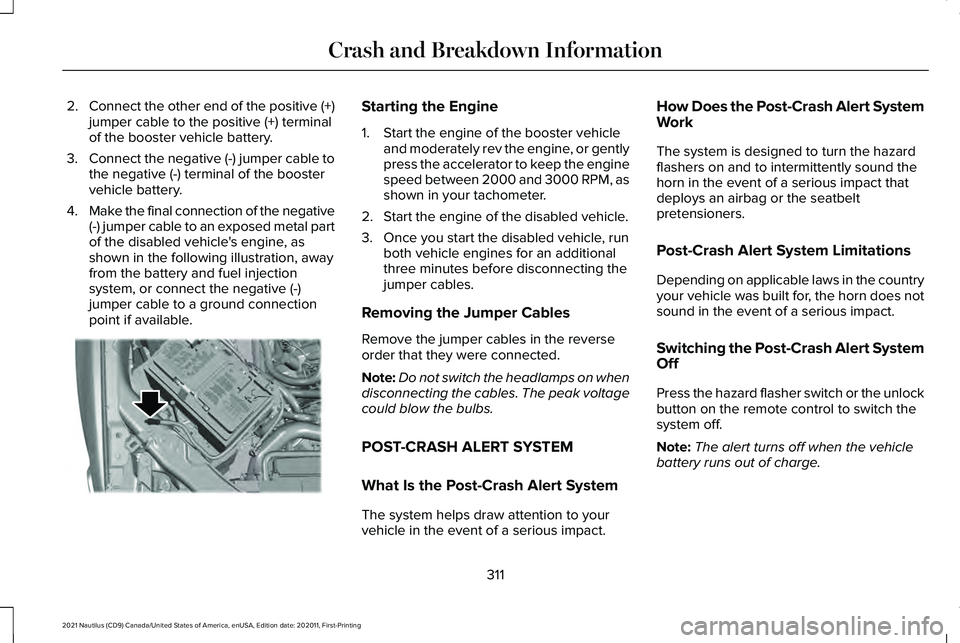
4. Make the final connection of the negative
(-) jumper cable to an exposed metal part
of the disabled vehicle's engine, as
shown in the following illustration, away
from the battery and fuel injection
system, or connect the negative (-)
jumper cable to a ground connection
point if available. Starting the Engine
1. Start the engine of the booster vehicle
and moderately rev the engine, or gently
press the accelerator to keep the engine
speed between 2000 and 3000 RPM, as
shown in your tachometer.
2. Start the engine of the disabled vehicle.
3. Once you start the disabled vehicle, run both vehicle engines for an additional
three minutes before disconnecting the
jumper cables.
Removing the Jumper Cables
Remove the jumper cables in the reverse
order that they were connected.
Note: Do not switch the headlamps on when
disconnecting the cables. The peak voltage
could blow the bulbs.
POST-CRASH ALERT SYSTEM
What Is the Post-Crash Alert System
The system helps draw attention to your
vehicle in the event of a serious impact. How Does the Post-Crash Alert System
Work
The system is designed to turn the hazard
flashers on and to intermittently sound the
horn in the event of a serious impact that
deploys an airbag or the seatbelt
pretensioners.
Post-Crash Alert System Limitations
Depending on applicable laws in the country
your vehicle was built for, the horn does not
sound in the event of a serious impact.
Switching the Post-Crash Alert System
Off
Press the hazard flasher switch or the unlock
button on the remote control to switch the
system off.
Note:
The alert turns off when the vehicle
battery runs out of charge.
311
2021 Nautilus (CD9) Canada/United States of America, enUSA, Edition date: 202011, First-Printing Crash and Breakdown InformationE309115
Page 456 of 579
UPDATING THE VEHICLE SYSTEMS
WIRELESSLY
System software updates allow you
to update your vehicle system
software wirelessly. To make sure
you receive all updates, set a recurring
schedule and connect to Wi-Fi. Updates may
take longer if not connected to Wi-Fi, or may
not download at all.
System Update Requirements
Before updating, reference this list to make
sure your vehicle is ready be updated. If
these requirements are not met during a
scheduled update, the update will be
canceled and you can reschedule.
• Your vehicle is not running.
• Your vehicle is stopped.
• Your vehicle is parked.
• The hazard indicators are switched off.
• The alarm is not sounding.
• The doors are closed.
• The parking lights are switched off. •
You are not pressing the brake pedal.
• An emergency call is not in progress.
• Your vehicle is not in limp mode.
Scheduling an Update
Make sure Vehicle Connectivity and
Automatic Updates are switched on.
Using the Settings Menu Press the settings option on the
feature bar.
1. Press the System Update tile.
2. Press
Schedule Update.
3. Use the controls to set the time and day
of the update.
4. Save the schedule.
Note: You can set the updates to occur
every seven days.
Using the Status Bar Icon When an update is available, tap
the notification icon and follow the
prompts on the screen.Applying a Vehicle System Software
Update
You can schedule a convenient time for the
update to complete. During scheduled
updates you may not be able to use your
vehicle.
Note:
Updates may take up to 30 minutes
to complete.
You can see the progress of the update on
the touchscreen. An update cannot be
canceled once it has been started.
During an update you will not be able to
drive your vehicle, start the vehicle, use
remote controls to lock and unlock the
vehicle. The alarm, central locks, and door
tones are disabled. The electronic door lock
will not function during an update. You can
open the doors using the mechanical latch
if child locks are not on. Pull the handle until
it stops to use the mechanical latch.
Note: Double locking is switched off and
central locking is switched on during and
after an update.
452
2021 Nautilus (CD9) Canada/United States of America, enUSA, Edition date: 202011, First-Printing Vehicle System UpdatesE327789 E280315 E327785