seats LINCOLN NAUTILUS 2021 Owner's Guide
[x] Cancel search | Manufacturer: LINCOLN, Model Year: 2021, Model line: NAUTILUS, Model: LINCOLN NAUTILUS 2021Pages: 579, PDF Size: 6.9 MB
Page 326 of 579
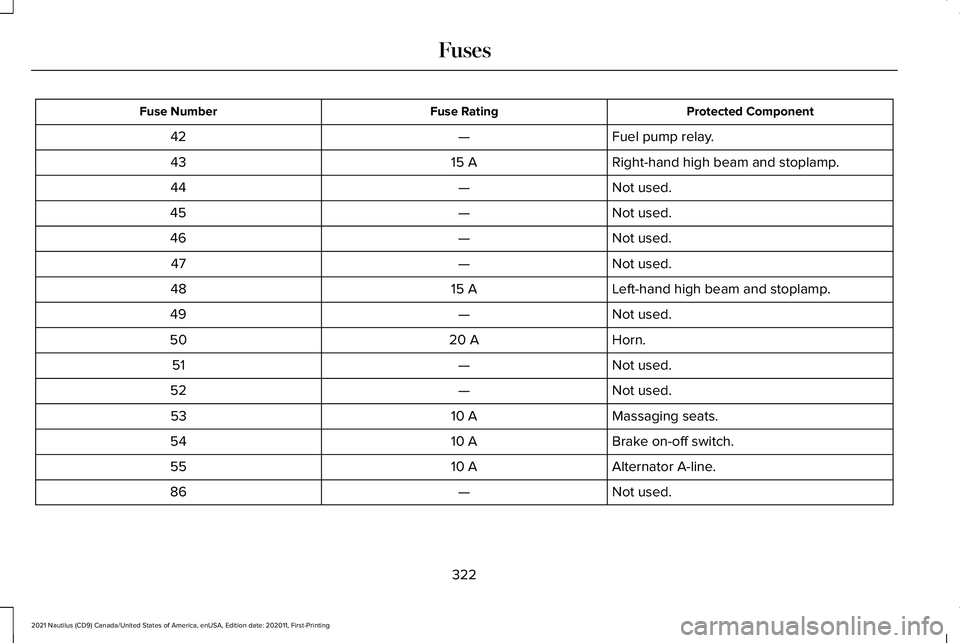
Protected Component
Fuse Rating
Fuse Number
Fuel pump relay.
—
42
Right-hand high beam and stoplamp.
15 A
43
Not used.
—
44
Not used.
—
45
Not used.
—
46
Not used.
—
47
Left-hand high beam and stoplamp.
15 A
48
Not used.
—
49
Horn.
20 A
50
Not used.
—
51
Not used.
—
52
Massaging seats.
10 A
53
Brake on-off switch.
10 A
54
Alternator A-line.
10 A
55
Not used.
—
86
322
2021 Nautilus (CD9) Canada/United States of America, enUSA, Edition date: 202011, First-Printing Fuses
Page 329 of 579
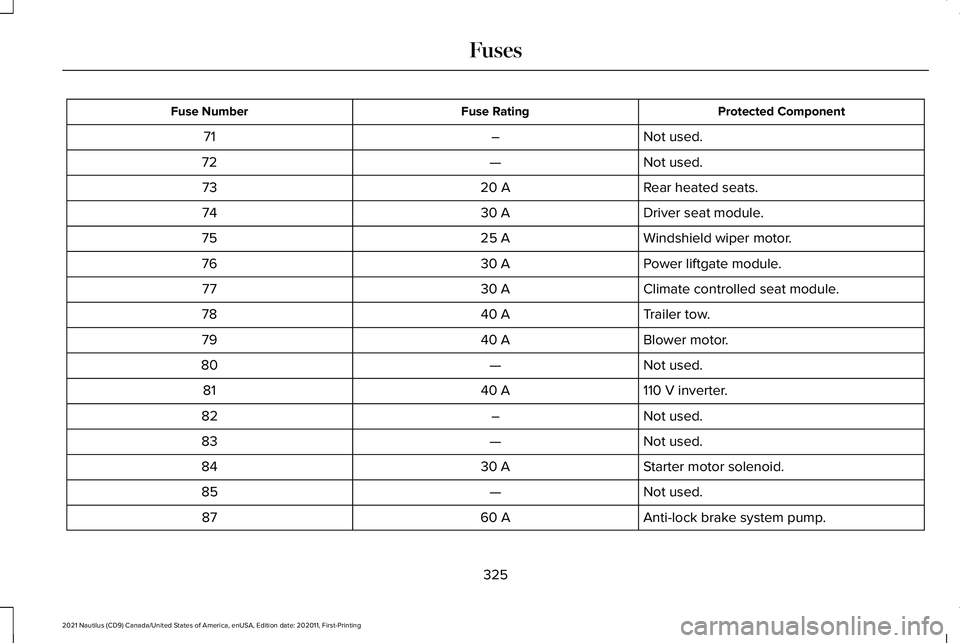
Protected Component
Fuse Rating
Fuse Number
Not used.
–
71
Not used.
—
72
Rear heated seats.
20 A
73
Driver seat module.
30 A
74
Windshield wiper motor.
25 A
75
Power liftgate module.
30 A
76
Climate controlled seat module.
30 A
77
Trailer tow.
40 A
78
Blower motor.
40 A
79
Not used.
—
80
110 V inverter.
40 A
81
Not used.
–
82
Not used.
—
83
Starter motor solenoid.
30 A
84
Not used.
—
85
Anti-lock brake system pump.
60 A
87
325
2021 Nautilus (CD9) Canada/United States of America, enUSA, Edition date: 202011, First-Printing Fuses
Page 331 of 579
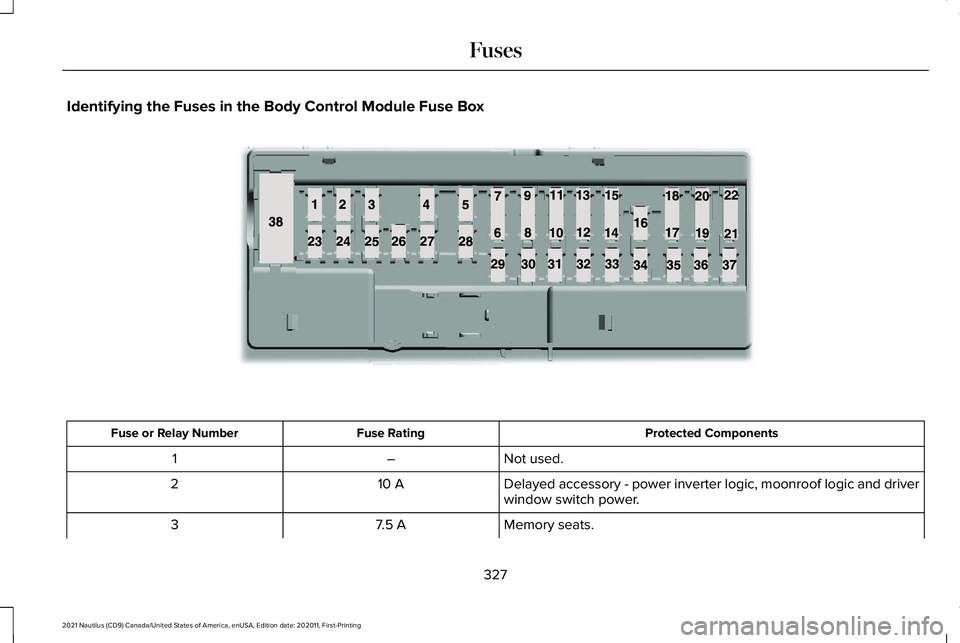
Identifying the Fuses in the Body Control Module Fuse Box
Protected Components
Fuse Rating
Fuse or Relay Number
Not used.
–
1
Delayed accessory - power inverter logic, moonroof logic and driver
window switch power.
10 A
2
Memory seats.
7.5 A
3
327
2021 Nautilus (CD9) Canada/United States of America, enUSA, Edition date: 202011, First-Printing FusesE145984
Page 351 of 579
If you disconnect or replace the battery and
your vehicle has an automatic transmission,
it must relearn its adaptive strategy. Because
of this, the transmission may shift firmly when
first driven. This is normal operation while
the transmission fully updates its operation
to optimum shift feel.
Remove and Reinstall the Battery
To disconnect or remove the battery, do the
following:
1. Apply the parking brake and switch the
ignition off.
2. Switch all electrical equipment off, for example lights and radio.
3. Wait a minimum of two minutes before disconnecting the battery.
Note: The engine management system has
a power hold function and remains powered
for a period of time after you switch the
ignition off. This is to allow diagnostic and
adaptive tables to be stored. Disconnecting
the battery without waiting can cause
damage not covered by the vehicle
Warranty. 4. Disconnect the negative battery cable
terminal.
5. Disconnect the positive battery cable terminal.
6. Remove the battery securing clamp.
7. Remove the battery.
8. To install, reverse the removal procedure.
Note: Before reconnecting the battery, make
sure the ignition remains switched off.
Note: Make sure the battery cable terminals
are fully tightened.
Note: After cleaning or replacing the battery,
make sure you reinstall the battery cover or
shield.
If you disconnect or replace the vehicle
battery, you must reset the following
features:
• Window bounce-back. See Windows
(page 130).
• Clock Settings.
• Pre-set radio stations.
• Steering Angle Sensor. Note:
To calibrate the steering angle sensor,
drive the vehicle above
30 mph (50 km/h)
for a minimum of 1.2 mi (2 km). Make sure to
drive straight ahead for a minimum of 30
seconds. Several vehicle functions are
disabled and a warning light could appear
until the sensor is calibrated.
Battery Management System
The battery management system monitors
battery conditions and takes actions to
extend battery life. If excessive battery drain
is detected, the system temporarily disables
some of the following features:
• Heated rear window.
• Heated seats.
• Climate control.
• Heated steering wheel.
• Audio unit.
• Navigation system.
A message may appear in the information
display to alert you that battery protection
actions are active.
347
2021 Nautilus (CD9) Canada/United States of America, enUSA, Edition date: 202011, First-Printing Maintenance
Page 362 of 579
4.
Rub the conditioner into the leather until
it disappears. Allow the conditioner to
dry, then repeat the process for the entire
interior. If a film appears, wipe it off with
a dry, clean cloth.
5. For additional information and assistance,
we recommend that you contact an
authorized dealer.
Cleaning Fabric Seats and Headliners WARNING: On vehicles equipped
with seat-mounted airbags, do not use
chemical solvents or strong detergents.
Such products could contaminate the side
airbag system and affect performance of
the side airbag in a crash.
We recommend that you only clean the fabric
seats and headliners in the following way:
1. Remove dust and loose dirt with a vacuum cleaner.
2. Wipe the surface with a soft, damp cloth
and a mild soap and water solution. Dry
the area with a clean, soft cloth. 3.
For additional information and assistance,
we recommend that you contact an
authorized dealer.
For heavy stains, spot clean the area. If a ring
forms on the fabric, clean the entire area
immediately, but do not oversaturate or the
ring could set.
Cleaning Carpets and Floor Mats
We recommend that you only clean your
carpets in the following way:
1. Remove dust and loose dirt with a vacuum cleaner.
2. Wipe the surface with a soft, damp cloth
and a mild soap and water solution. Dry
the area with a clean, soft cloth.
3. For additional information and assistance,
we recommend that you contact an
authorized dealer.
For heavy stains, spot clean the area. If a ring
forms on the fabric, clean the entire area
immediately, but do not oversaturate or the
ring could set. We recommend that you only clean your
floor mats in the following way:
1. Remove dust and loose dirt with a
vacuum cleaner.
2. Wash rubber floor mats using mild soap and lukewarm or cold water.
3. Completely dry the floor mat before placing them back in your vehicle.
Cleaning Seatbelts WARNING: Do not use cleaning
solvents, bleach or dye on the vehicle's
seatbelts, as these actions may weaken
the belt webbing.
1. Wipe the surface with a soft, damp cloth
and a mild soap and water solution. Dry
the area with a clean, soft cloth.
Cleaning Storage Compartments
1. Remove dust and loose dirt with a vacuum cleaner.
358
2021 Nautilus (CD9) Canada/United States of America, enUSA, Edition date: 202011, First-Printing Vehicle Care
Page 451 of 579
HOW DO PERSONAL PROFILES
WORK
This feature allows you to create multiple
personal profiles enabling users to
personalize vehicle
’s settings such as seats
and mirrors, as well as non-positional settings
like radio, navigation, driver assist system
settings. Positional settings are saved by
holding a memory seat button.
Non-positional settings are saved you
change a setting while a profile is active. You
can create one profile for each preset
memory seat button along with a guest
profile.
Recalling and Changing a Profile
You can recall a profile using the
touchscreen or the preset button you
selected when you created your profile. You
can also link a remote control and a mobile
device to your profile, which are used to
recall it. ENABLING OR DISABLING
PERSONAL PROFILES
When you switch on the Personal Profiles
feature:
•
Unlocking a door with a remote control
or mobile device that is not linked to a
driver profile does not change the active
profile, but remains in the last known
profile. It does not change the positional
settings.
• Pressing a memory seat button that is
not linked to a driver profile or saved to
a preset setting does not change the
active profile, but remains in the last
known profile. It does not change the
positional settings.
• Pressing a memory seat button that is
not linked to a driver profile but is saved
to a preset setting does not change the
active profile, but remains in the last
known profile. It recalls the positional
settings that you saved to that memory
seat button. When you switch off a Personal Profiles
feature:
•
Unlocking a door with a remote control
or mobile device does not recall any
non-positional settings but still recalls
positional settings from the driver profile
which the remote control or mobile
device is linked to.
• Pressing a memory seat button that is
not linked to a driver profile or saved to
a preset setting recalls non-positional
settings from the guest profile. It does
not change the positional settings.
• Pressing a memory seat button that is
linked to a driver profile or has saved to
a preset setting recalls non-positional
settings from the guest profile. It recalls
the positional settings that you saved to
that memory seat button.
CREATING A PERSONAL PROFILE
Use the touchscreen to create a personal
profile.
1. Switch the vehicle on and leave the vehicle in park (P).
447
2021 Nautilus (CD9) Canada/United States of America, enUSA, Edition date: 202011, First-Printing Personal Profiles
Page 479 of 579
REPORTING SAFETY DEFECTS IN
CANADA
If you believe that your vehicle has a defect
which could cause a crash or could cause
injury or death, you should immediately
inform Transport Canada and Ford of
Canada. Transport Canada Contact Information
https://tc. canada. ca/en/road-transportation/defects-recalls-vehicles-tires-child-car-seats\
Website
https://tc. canada. ca/fr/transport-routier/defauts-rappels-vehicules-pneus-sieges-auto-enfa\
ntWebsite
1-800-333-0510
Phone Lincoln of Canada Contact Information
www .LincolnCanada. comWebsite
1-800-387-9333
Phone
475
2021 Nautilus (CD9) Canada/United States of America, enUSA, Edition date: 202011, First-Printing Customer Information
Page 560 of 579
Auto Mode......................................................156
Auto Mode Indicators.........................................156
Switching Auto Mode On and Off...................
156
Auto-Start-Stop..............................................194 Auto-Start-Stop – Troubleshooting.................195
Auto-Start-Stop Indicators...........................194
Auto-Start-Stop Precautions.......................194
Auto-Start-Stop – Troubleshooting..........195 Auto-Start-Stop – Frequently Asked
Questions.........................................................196
Auto-Start-Stop – Information Messages..........................................................195
Autounlock.......................................................90 Autounlock Requirements..................................90
Switching Autounlock On and Off....................
90
What Is Autounlock..............................................90
Autowipers.......................................................114 Adjusting the Sensitivity of the Rain
Sensor.................................................................115
Autowipers Settings.............................................114
What Are Autowipers..........................................114
AWD See: All-Wheel Drive...........................................214
B
Battery See: Changing the 12V Battery.......................345 Beginning a Voice Interaction
...................435
Blind Spot Information System..................273 Blind Spot Information System –
Troubleshooting.............................................275
Blind Spot Information System Indicators.....................................................275
Blind Spot Information System Limitations....................................................273
Blind Spot Information System Precautions..................................................273
Blind Spot Information System Requirements..............................................274
Blind Spot Information System – Troubleshooting.........................................275
Blind Spot Information System – Information Messages.........................................................275
Bluetooth®
......................................................443
Body Control Module Fuse Box...............326 Accessing the Body Control Module Fuse
Box.....................................................................326
Identifying the Fuses in the Body Control Module Fuse Box...........................................327
Locating the Body Control Module Fuse Box.....................................................................326
Body Styling Kit Precautions.....................360
Body Styling Kits...........................................360
Bonnet Lock See: Opening and Closing the Hood............332 Booster Seats..................................................49
Types of Booster Seats.......................................49
Brake Fluid Specification............................219
Brake Over Accelerator...............................218
Brake Precautions
.........................................218
Brakes..............................................................218 Anti-Lock Braking System.................................
218
Brakes – Troubleshooting.................................219
Brakes – Troubleshooting..........................219 Brakes – Frequently Asked Questions........220
Brakes – Information Messages....................
220
Brakes – Warning Lamps..................................219
Breaking-In.....................................................305
C
Calculating Payload......................................291
Calculating the Load Limit..........................291 Helpful examples for calculating the available
amount of cargo and luggage load
capacity............................................................292
California Proposition 65............................514
Canceling the Set Speed...........................252
Capacities and Specifications
...................398
Catalytic Converter......................................204
Catalytic Converter – Troubleshooting........204
Catalytic Converter Precautions..............204
556
2021 Nautilus (CD9) Canada/United States of America, enUSA, Edition date: 202011, First-Printing Index
Page 561 of 579
Catalytic Converter –
Troubleshooting.........................................204
Catalytic Converter – Warning Lamps..........204
Center Console................................................31
Changing a Flat Tire.....................................391 ........................................................................\
........396
Dissimilar Spare Wheel and Tire Assembly
Information.......................................................391
Stowing the flat tire ...........................................396
Tire Change Procedure....................................392
Changing a Road Wheel.............................391
Changing the 12V Battery..........................345 Remove and Reinstall the Battery..................347
Changing the Engine Air Filter..................344
Changing the Fuel Filter.............................344
Changing the Remote Control Battery.............................................................76
Changing the Vehicle Wi-Fi Hotspot Name or Password.................................................421
Changing the Wi-Fi Hotspot Frequency.......422
Charging a Device .........................................178
Charging a Wireless Device.......................183
Checking MyKey System Status.................87 MyKey Distance.....................................................87
Number of Admin Keys.......................................87
Number of MyKeys...............................................87
Checking the Brake Fluid
...........................218 Checking the Coolant.................................340
Adding Coolant...................................................340
Coolant Change...................................................341
Engine Coolant Temperature
Management...................................................343
Fail-Safe Cooling................................................342
Severe Climates...................................................341
Checking the Seatbelts................................60
Checking the Tire Pressures.....................374
Checking the Wiper Blades.........................116
Children and Airbags.....................................67
Child Restraint Anchor Points
......................40
Locating the Child Restraint Lower Anchor
Points....................................................................41
Locating the Child Restraint Top Tether Anchor Points.....................................................41
What Are the Child Restraint Anchor Points...................................................................40
Child Restraints
................................................41
Child Restraint Position Information..................41
Child Restraints Recommendation...................43
Child Safety
......................................................39
Child Restraint Anchor Points............................40
Child Restraints.......................................................41
Installing Child Restraints....................................44
Child Safety Locks..........................................52 Left-Hand Side.......................................................52
Right-Hand Side....................................................52 Child Safety Precautions
...............................39
Cleaning Products........................................354
Materials...............................................................354
Cleaning the Exterior
..................................355
Cleaning Camera Lenses and Sensors........356
Cleaning Chrome, Aluminium or Stainless
Steel..................................................................355
Cleaning Headlamps and Rear Lamps.........355
Cleaning Stripes or Graphics..........................356
Cleaning the Engine Compartment...............356
Cleaning Wheels................................................356
Cleaning Windows and Wiper Blades
..........355
Cleaning the Interior....................................357 Cleaning Carpets and Floor Mats..................358
Cleaning Displays and Screens......................357
Cleaning Fabric Seats and Headliners.........358
Cleaning Leather and Vinyl ............................357
Cleaning Moonroof Tracks...............................359
Cleaning Plastic...................................................357
Cleaning Seatbelts.............................................358
Cleaning Storage Compartments..................358
Cleaning the Instrument Panel........................357
Clearing All MyKeys.......................................86
Clearing the Garage Door Opener...........176
Climate Control..............................................154 Auto Mode............................................................156
Climate Control – Troubleshooting................157
557
2021 Nautilus (CD9) Canada/United States of America, enUSA, Edition date: 202011, First-Printing Index
Page 565 of 579
Exterior Lighting.............................................119
Adaptive Front Lighting.....................................125
Autolamps.............................................................120
Automatic High Beam Control.........................122
Automatic High Beam Control –
Troubleshooting..............................................125
Exterior Lamps......................................................121
Headlamps.............................................................119
Headlamps – Troubleshooting........................120
Exterior Mirrors
...............................................133
Auto-Dimming Exterior Mirror..........................134
F
Fastening and Unfastening the Seatbelts........................................................54
Unfastening the Seatbelts..................................55
Using a Sliding Clip..............................................55
Feature Bar
....................................................433
Flat Tire See: Changing a Flat Tire..................................391
Floor Mats
......................................................306
Folding the Exterior Mirrors - Vehicles With: Manual Folding Mirrors
.............................133
Folding the Exterior Mirrors - Vehicles With: Power Folding Mirrors...............................133
Switching Auto-fold On and Off.......................134
Front Exterior...................................................35 Front Parking Aid..........................................236
Front Parking Aid Audible Warnings.............236
Front Parking Aid Limitations..........................
236
Locating the Front Parking Aid Sensors.......236
What is the Front Parking Aid.........................236
Front Passenger Sensing System...............67 Front Passenger Sensing System
Indicators............................................................70
Front Passenger Sensing System Precautions........................................................70
How Does the Front Passenger Sensing System Work......................................................67
What Is the Front Passenger Sensing System.................................................................67
Front Seat Precautions
................................159
Front Seats......................................................159
Heated Seats........................................................163
Massage Seats.....................................................163
Power Seats..........................................................160
Ventilated Seats...................................................164
Fuel and Refueling
........................................197
Fuel and Refueling – Troubleshooting.........203
Fuel Quality...........................................................198
Refueling..............................................................200
Running Out of Fuel...........................................199
Fuel and Refueling Precautions.................197 Fuel and Refueling –
Troubleshooting.........................................
203
Fuel and Refueling – Information
Messages .........................................................203
Fuel and Refueling – Warning Lamps...........203
Fuel Gauge
.....................................................138
Fuel Gauge Limitations......................................138
Locating the Fuel Filler Door............................138
What Is Distance to Empty................................139
What Is the Fuel Gauge.....................................138
What Is the Low Fuel Reminder.......................138
Fuel Quality.....................................................198 Selecting the Correct Fuel................................198
Fuel Tank Capacity......................................202 Advertised Capacity..........................................202
Fuse Precautions
...........................................316
Fuses................................................................316 Body Control Module Fuse Box.....................326
Fuses – Troubleshooting...................................331
Under Hood Fuse Box.......................................316
Fuses – Troubleshooting.............................331 Fuses – Frequently Asked Questions............331
G
Garage Door Opener...................................173
Garage Door Opener Limitations
..............174
Garage Door Opener Precautions............173
561
2021 Nautilus (CD9) Canada/United States of America, enUSA, Edition date: 202011, First-Printing Index