tire pressure LINCOLN NAUTILUS 2021 Owners Manual
[x] Cancel search | Manufacturer: LINCOLN, Model Year: 2021, Model line: NAUTILUS, Model: LINCOLN NAUTILUS 2021Pages: 579, PDF Size: 6.9 MB
Page 15 of 579
Recreationally Towing Your Vehicle - 2.0L,
FWD .............................................................314
Recreationally Towing Your Vehicle - 2.7L .......................................................................
314
Emergency Towing ......................................
315
Fuses
Fuse Precautions ..........................................
316
Under Hood Fuse Box ................................
316
Body Control Module Fuse Box ..............
326
Identifying Fuse Types ................................
331
Fuses – Troubleshooting ...........................
331
Maintenance
Maintenance Precautions .........................
332
Opening and Closing the Hood ..............
332
Under Hood Overview - 2.0L ...................
334
Under Hood Overview - 2.7L ...................
336
Engine Oil ......................................................
338
Checking the Coolant ................................
340
Changing the Engine Air Filter .................
344
Changing the Fuel Filter ............................
344
Drive Belt Routing Overview - 2.0L ........
345Drive Belt Routing Overview - 2.7L
.........
345
Changing the 12V Battery .........................
345
Adjusting the Headlamps ..........................
348
Exterior Bulbs ...............................................
350
Interior Bulbs ................................................
353
Vehicle Care
Cleaning Products .......................................
354
Cleaning the Exterior .................................
355
Waxing ............................................................
357
Cleaning the Interior ...................................
357
Repairing Minor Paint Damage ................
359
Body Styling Kits
Body Styling Kit Precautions ....................
360
Storing Your Vehicle
Preparing Your Vehicle for Storage .........
361
Removing Your Vehicle From Storage ......................................................................
362
Wheel and Tire Information
Locating the Tire label ...............................
363Department of Transportation Uniform Tire
Quality Grades .........................................
363
Information on the Tire Sidewall .............
364
Glossary of Tire Terminology ...................
369
Tire Replacement Requirements ............
369
Using Snow Chains .....................................
372
Tire Care
Checking the Tire Pressures ....................
374
Inflating the Tires .........................................
374
Inspecting the Tire for Wear .....................
375
Inspecting the Tire for Damage ...............
375
Inspecting the Wheel Valve Stems .........
376
Tire Rotation .................................................
376
Tire Sealant and Inflator Kit
What Is the Tire Sealant and Inflator Kit ......................................................................
378
Tire Sealant and Inflator Kit Precautions ......................................................................
378
Locating the Tire Sealant and Inflator Kit ......................................................................
378
Tire Sealant and Inflator Kit Components ......................................................................
379
11
2021 Nautilus (CD9) Canada/United States of America, enUSA, Edition date: 202011, First-Printing Table of Contents
Page 16 of 579
Using the Tire Sealant and Inflator Kit
......................................................................379
Tire Pressure Monitoring System
What Is the Tire Pressure Monitoring System .......................................................
385
Tire Pressure Monitoring System Overview ......................................................................
385
Tire Pressure Monitoring System Precautions ..............................................
386
Tire Pressure Monitoring System Limitations .................................................
387
Viewing the Tire Pressures .......................
387
Resetting Tire Pressure Monitoring System ......................................................................
387
Tire Pressure Monitoring System – Troubleshooting ......................................
388
Changing a Road Wheel
Changing a Flat Tire ....................................
391
Wheel Nuts ...................................................
396
Capacities and Specifications
Engine Specifications - 2.0L .....................
398Engine Specifications - 2.7L
.....................
399
Motorcraft Parts - 2.0L ...............................
400
Motorcraft Parts - 2.7L .................................
401
Engine Oil Capacity and Specification - 2.0L .............................................................
402
Engine Oil Capacity and Specification - 2.7L .............................................................
404
Cooling System Capacity and Specification - 2.0L ..........................................................
407
Cooling System Capacity and Specification - 2.7L ...........................................................
408
Fuel Tank Capacity .....................................
409
Air Conditioning System Capacity and Specification - 2.0L ..................................
410
Air Conditioning System Capacity and Specification - 2.7L ..................................
412
Washer Fluid Specification ........................
413
Brake Fluid Specification ...........................
414
Vehicle Identification
Vehicle Identification Number ..................
416
Connected Vehicle
What Is a Connected Vehicle ....................
417Connected Vehicle Requirements
...........
417
Connected Vehicle Limitations .................
417
Connecting the Vehicle to a Mobile Network ......................................................
417
Connecting the Vehicle to a Wi-Fi Network .......................................................................
417
Connected Vehicle – Troubleshooting .......................................................................
418
Vehicle Wi-Fi Hotspot
Creating a Vehicle Wi-Fi Hotspot .............
421
Changing the Vehicle Wi-Fi Hotspot Name or Password ...............................................
421
Audio System
Audio System Precautions ........................
423
Switching the Audio Unit On and Off ......
423
Selecting the Audio Source .....................
423
Playing or Pausing the Audio Source .....
423
Adjusting the Volume .................................
423
Switching Shuffle Mode On and Off ......
424
Switching Repeat Mode On and Off ......
424
Setting a Memory Preset ...........................
424
Muting the Audio .........................................
424
12
2021 Nautilus (CD9) Canada/United States of America, enUSA, Edition date: 202011, First-Printing Table of Contents
Page 24 of 579
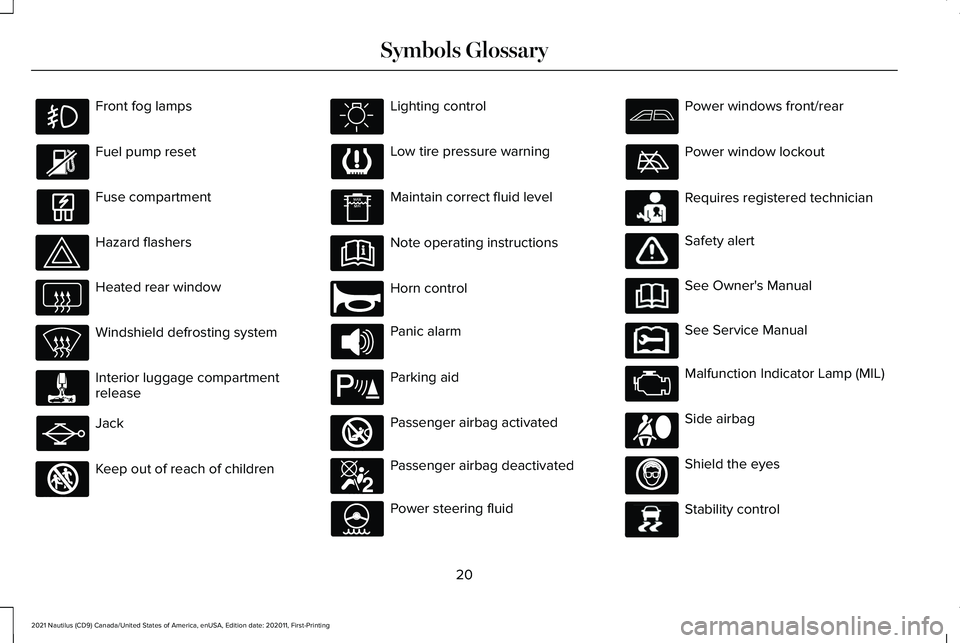
Front fog lamps
Fuel pump reset
Fuse compartment
Hazard flashers
Heated rear window
Windshield defrosting system
Interior luggage compartment
release
Jack
Keep out of reach of children Lighting control
Low tire pressure warning
Maintain correct fluid level
Note operating instructions
Horn control
Panic alarm
Parking aid
Passenger airbag activated
Passenger airbag deactivated
Power steering fluid Power windows front/rear
Power window lockout
Requires registered technician
Safety alert
See Owner's Manual
See Service Manual
Malfunction Indicator Lamp (MIL)
Side airbag
Shield the eyes
Stability control
20
2021 Nautilus (CD9) Canada/United States of America, enUSA, Edition date: 202011, First-Printing Symbols Glossary E161353 E270945 E139213 E270849 E270850 E231159 E231158 E167012 E138639
Page 26 of 579
WARNING: Do not connect wireless
plug-in devices to the data link connector.
Unauthorized third parties could gain
access to vehicle data and impair the
performance of safety related systems.
Only allow repair facilities that follow our
service and repair instructions to connect
their equipment to the data link connector.
We respect your privacy and are committed
to protecting it. The information contained
in this manual was correct at the time of
publication but as technology rapidly
changes, we recommend that you visit the
local Lincoln website for the latest
information.
Your vehicle has electronic control units that
have data recording functionality and the
ability to permanently or temporarily store
data. This data could include information on
the condition and status of your vehicle,
vehicle maintenance requirements, events
and malfunctions. The types of data that can
be recorded are described in this section.
Some of the data recorded is stored in event
logs or error logs. Note:
Error logs are reset following a service
or repair.
Note: We may provide information in
response to requests from law enforcement,
other government authorities and third
parties acting with lawful authority or through
a legal process. Such information could be
used by them in legal proceedings.
Data recorded includes, for example:
• Operating states of system components,
for example fuel level, tire pressure and
battery charge level.
• Vehicle and component status, for
example wheel speed, deceleration,
lateral acceleration and seatbelt status.
• Events or errors in essential systems, for
example headlamps and brakes.
• System responses to driving situations,
for example airbag deployment and
stability control.
• Environmental conditions, for example
temperature. Some of this data, when used in combination
with other information, for example an
accident report, damage to a vehicle or
eyewitness statements, could be associated
with a specific person.
Services That We Provide
If you use our services, we collect and use
data, for example account information,
vehicle location and driving characteristics,
that could identify you. We transmit this data
through a dedicated, protected connection.
We only collect and use data to enable your
use of our services to which you have
subscribed, with your consent or where
permitted by law. For additional information,
see the terms and conditions of the services
to which you have subscribed.
For additional information about our privacy
policy, refer to the local Lincoln website.
22
2021 Nautilus (CD9) Canada/United States of America, enUSA, Edition date: 202011, First-Printing Data Privacy
Page 144 of 579
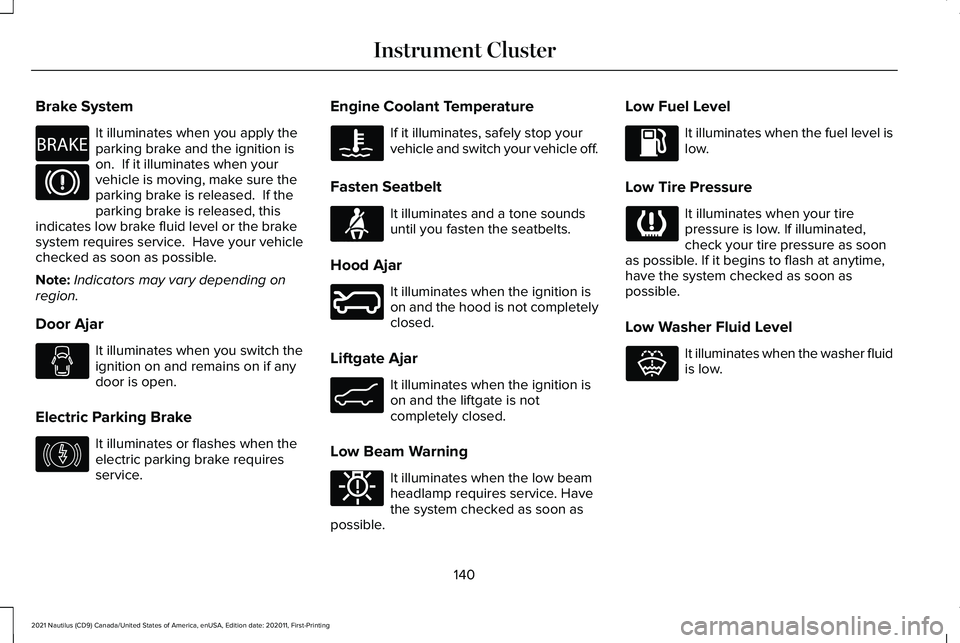
Brake System
It illuminates when you apply the
parking brake and the ignition is
on. If it illuminates when your
vehicle is moving, make sure the
parking brake is released. If the
parking brake is released, this
indicates low brake fluid level or the brake
system requires service. Have your vehicle
checked as soon as possible.
Note: Indicators may vary depending on
region.
Door Ajar It illuminates when you switch the
ignition on and remains on if any
door is open.
Electric Parking Brake It illuminates or flashes when the
electric parking brake requires
service. Engine Coolant Temperature If it illuminates, safely stop your
vehicle and switch your vehicle off.
Fasten Seatbelt It illuminates and a tone sounds
until you fasten the seatbelts.
Hood Ajar It illuminates when the ignition is
on and the hood is not completely
closed.
Liftgate Ajar It illuminates when the ignition is
on and the liftgate is not
completely closed.
Low Beam Warning It illuminates when the low beam
headlamp requires service. Have
the system checked as soon as
possible. Low Fuel Level It illuminates when the fuel level is
low.
Low Tire Pressure It illuminates when your tire
pressure is low. If illuminated,
check your tire pressure as soon
as possible. If it begins to flash at anytime,
have the system checked as soon as
possible.
Low Washer Fluid Level It illuminates when the washer fluid
is low.
140
2021 Nautilus (CD9) Canada/United States of America, enUSA, Edition date: 202011, First-Printing Instrument ClusterE270480 E146190 E71880 E246598 E162453 E181350 E132353
Page 154 of 579
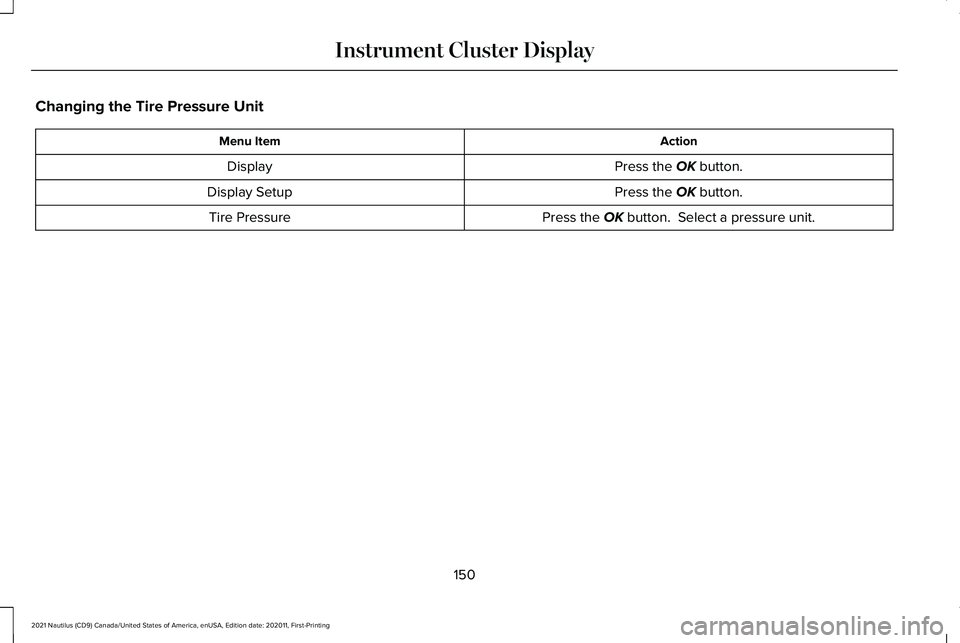
Changing the Tire Pressure Unit
Action
Menu Item
Press the OK button.
Display
Press the
OK button.
Display Setup
Press the
OK button. Select a pressure unit.
Tire Pressure
150
2021 Nautilus (CD9) Canada/United States of America, enUSA, Edition date: 202011, First-Printing Instrument Cluster Display
Page 218 of 579
HOW DOES ALL-WHEEL DRIVE
WORK
All-wheel drive uses all four wheels to power
the vehicle. This increases traction, enabling
you to drive over terrain and road conditions
that a conventional two-wheel drive vehicle
cannot. The AWD system turns on when
needed and does not require input from you.
Note:
The AWD feature gives your vehicle
some limited off-road capabilities in which
driving surfaces are relatively level,
obstruction-free and otherwise similar to
normal on-road driving conditions. Operating
your vehicle in conditions other than those,
could subject the vehicle to excess stress
which might result in damage which is not
covered under your warranty. ALL-WHEEL DRIVE PRECAUTIONS WARNING: If you are driving in
slippery conditions that require tire chains
or cables, then it is critical that you drive
cautiously. Keep speeds down, allow for
longer stopping distances and avoid
aggressive steering to reduce the chances
of a loss of vehicle control which can lead
to serious injury or death. If the rear end
of your vehicle slides while cornering, steer
in the direction of the slide until you regain
control of your vehicle. WARNING:
Do not become
overconfident in the ability of all-wheel
drive vehicles. Although an all-wheel drive
vehicle may accelerate better than a
two-wheel drive vehicle in low traction
situations, it won't stop any faster than
two-wheel drive vehicles. Always drive at
a safe speed. ALL-WHEEL DRIVE LIMITATIONS
When using a mismatch spare tire on your
vehicle the all-wheel drive system can
become limited in function. To regain full
all-wheel drive capabilities have the standard
wheel replaced.
Different tire sizes between the front and
rear axles can cause system damage, or
disable the all-wheel drive system.
ALL-WHEEL DRIVE DRIVING HINTS
Emergency Maneuvers
In an unavoidable emergency where a
sudden sharp turn will be made, remember
to avoid over-driving your vehicle, for
example, turn the steering wheel only as
rapidly and as far as required to avoid the
emergency. Apply smooth pressure to the
accelerator pedal or brake pedal as needed.
214
2021 Nautilus (CD9) Canada/United States of America, enUSA, Edition date: 202011, First-Printing All-Wheel Drive
(If Equipped)
Page 220 of 579
Once through water, always try the brakes.
Wet brakes will not stop your vehicle as
quickly as dry brakes. Apply light pressure
to the brake pedal while slowly moving the
vehicle to dry the brakes.
Note:
Driving through deep water could
cause damage to the transmission. If the
front or rear axle is submerged in water, the
axle lubricant and power transfer unit
lubricant should be checked and changed
if necessary.
Driving on Hilly or Sloping Terrain
Although natural obstacles could make it
necessary to travel diagonally up or down a
hill or steep incline, you should try to drive
straight up or straight down.
Note: Avoid turning on steep slopes or hills.
A danger lies in losing traction, slipping
sideways and possible vehicle roll over.
Whenever driving on a hill, determine
beforehand the route you can use. Do not
drive over the crest of a hill without seeing
what conditions are on the other side. Do
not drive in reverse over a hill without the
aid of an observer. Apply just enough power to the wheels to
climb the hill. Too much power will cause the
tires to slip, spin or lose traction, and you
could lose control of your vehicle.
When descending a steep hill, do not
descend the hill in neutral. Avoid sudden
hard braking to keep the front wheels rolling
and to maintain your vehicle's steering.
Note:
If your vehicle has anti-lock brakes,
apply the brakes steadily. Do not pump the
brakes.
Note: If your vehicle gets stuck driving on
hilly or sloping terrain, it may be rocked out
by shifting between forward and reverse
gears, stopping between shifts in a steady
pattern. Press lightly on the accelerator in
each gear.
Note: Do not rock your vehicle if the engine
is not at normal operating temperature, as
damage to the transmission may occur.
Note: Do not rock your vehicle for more than
a minute, as damage to the transmission
and tires may occur or the engine may
overheat. Driving on Snow and Ice WARNING: If you are driving in
slippery conditions that require tire chains
or cables, then it is critical that you drive
cautiously. Keep speeds down, allow for
longer stopping distances and avoid
aggressive steering to reduce the chances
of a loss of vehicle control which can lead
to serious injury or death. If the rear end
of your vehicle slides while cornering, steer
in the direction of the slide until you regain
control of your vehicle.
Avoid sudden applications of power and
quick changes of direction on snow and ice.
Apply the accelerator slowly and steadily
when starting from a full stop.
Avoid sudden braking. Although an all-wheel
drive vehicle accelerates better than a
two-wheel drive vehicle in snow and ice, it
cannot stop any faster as braking occurs at
all four wheels. Do not become
overconfident of the road conditions.
216
2021 Nautilus (CD9) Canada/United States of America, enUSA, Edition date: 202011, First-Printing All-Wheel Drive
(If Equipped)
Page 270 of 579
LANE KEEPING SYSTEM
LIMITATIONS
The lane keeping system only operates when
the vehicle speed is greater than 40 mph
(64 km/h).
The system works when the camera can
detect at least one lane marking.
The lane keeping system may not correctly
operate in any of the following conditions:
• The lane keeping system does not detect
at least one lane marking.
• You switch the turn signal on.
• You apply direct steering, accelerate fast
or brake hard.
• The vehicle speed is less than
40 mph
(64 km/h).
• The anti-lock brake, stability control or
traction control system activates.
• The lane is too narrow.
• Something is obscuring the camera or it
is unable to detect the lane markings due
to environment, traffic or vehicle
conditions. The lane keeping system may not correct
lane positioning in any of the following
conditions:
•
High winds.
• Uneven road surfaces.
• Heavy or uneven loads.
• Incorrect tire pressure.
SWITCHING THE LANE KEEPING
SYSTEM ON AND OFF To activate the lane keeping
system, press the button on the
turn signal lever.
Note: The system stores the on or off setting
until manually changed, unless it detects a
MyKey™. If the system detects a MyKey™, it
defaults to on and the mode is set to alert.
Note: If the system detects a MyKey™,
pressing the button does not affect the on
or off status of the system. You can only
change the mode and intensity settings. SWITCHING THE LANE KEEPING
SYSTEM MODE
The lane keeping system has different
settings that you can view or adjust using
the information display.
The system stores the last known selection
for each of these settings. You do not need
to readjust your settings each time you
switch on the system.
To change the lane keeping system mode,
use the instrument cluster display:
1. Using the instrument cluster display
controls on the steering wheel, select
SETTINGS
.
2. Select
Driver assistance.
3. Select
Lane keeping system.
4. Select
Mode.
5. Select a mode.
Note: The system remembers the last setting
when you start your vehicle. If the system
detects a MyKey™, it defaults to the last
setting for that MyKey™.
266
2021 Nautilus (CD9) Canada/United States of America, enUSA, Edition date: 202011, First-Printing Lane Keeping SystemE308131
Page 276 of 579
 when I can s\
ee the lane markings on the road?
Lane width is too narrow or too wide.
You have not calibrated the camera after a windshield re")
Why is the feature not available (lane markings are gray) when I can s\
ee the lane markings on the road?
Lane width is too narrow or too wide.
You have not calibrated the camera after a windshield replacement. Driving on tight or on uneven roads. Why does the vehicle not come back toward the middle of the lane, as expected, in the Aid, or Aid + Alert mode?
High cross winds are present.There is a large road crown.
Rough roads, grooves or shoulder drop-offs.
Heavy, uneven loading of the vehicle or improper tire inflation pressure. You changed the tires or modified the suspension.
272
2021 Nautilus (CD9) Canada/United States of America, enUSA, Edition date: 202011, First-Printing Lane Keeping System