brakes LINCOLN NAUTILUS 2022 User Guide
[x] Cancel search | Manufacturer: LINCOLN, Model Year: 2022, Model line: NAUTILUS, Model: LINCOLN NAUTILUS 2022Pages: 586, PDF Size: 13.97 MB
Page 228 of 586
5.Release the switch and pull away in anormal manner.
AUTOMATICALLY RELEASING THE
ELECTRIC PARKING BRAKE
1.Close the driver door.
2.Shift into gear.
3.Press the accelerator pedal and pull awayin a normal manner.
ELECTRIC PARKING BRAKE
AUDIBLE WARNING
Sounds when the parking brake is on andyour vehicle is moving. If the warning tonecontinues after you have released theparking brake, this indicates a malfunction.Have your vehicle checked as soon aspossible.
RELEASING THE ELECTRIC
PARKING BRAKE IF THE VEHICLE
BATTERY HAS RUN OUT OF
CHARGE
WARNING: The electric parkingbrake does not operate if the vehiclebattery has run out of charge.
Connect a booster battery to the vehiclebattery to release the electric parking brakeif the vehicle battery has run out of charge.See Jump Starting the Vehicle (page 317).
ELECTRIC PARKING BRAKE –
TROUBLESHOOTING
ELECTRIC PARKING BRAKE –WARNING LAMPS
Brake System
It illuminates red when you applythe parking brake and your vehicleis on. If the lamp flashes when theparking brake has been released,this indicates the parking brakesystem requires service. Haveyour vehicle checked as soon as possible.
Note:Lamps may vary depending on region.
Electric Parking Brake
When the lamp illuminates yellow,it indicates a malfunction in theelectric parking brake. Have yourvehicle checked as soon as possible.
224
2022 Nautilus (CD9) Canada/United States of America, enUSA, Edition date: 202108, First-PrintingElectric Parking BrakeE270480 E146190
Page 229 of 586
ELECTRIC PARKING BRAKE – INFORMATION MESSAGES
Park Brake
ActionMessage
The parking brake is set, the engine is running and you drive your vehicle more than 3 mph(5 km/h). If the warning stays on after the parking brake is released, contact an authorized dealeras soon as possible.
Park Brake Engaged
The electric parking brake is set and a manual release is attempted without the brake pedalbeing pressed.To Release: Press Brake and Switch
The electric parking brake is set and an automatic release is attempted but cannot be performed.Perform a manual release.Park Brake Use Switch to Release
The electric parking brake is set and your vehicle speed exceeds 3 mph (5 km/h). Release parkbrake before continued driving.Release Park Brake
The electric parking brake is not fully applied.Park Brake Not Applied
The electric parking brake is not fully released.Park Brake Not Released
The electric parking brake system has been put into a special mode that is used to allow serviceof the rear brakes. Contact an authorized dealer.Park Brake Maintenance Mode
The electric park brake system has detected a condition that requires service. Some functionalitymay still be available. Contact your authorized dealer.Park Brake Limited Function ServiceRequired
The electric parking brake system has detected a condition that requires service. Contact yourauthorized dealer.Park Brake Malfunction Service Now
225
2022 Nautilus (CD9) Canada/United States of America, enUSA, Edition date: 202108, First-PrintingElectric Parking Brake
Page 231 of 586
WHAT IS HILL START ASSIST
Hill Start Assist makes it easier for you to pullaway when your vehicle is on a slope withoutusing the parking brake.
HOW DOES HILL START ASSIST
WORK
When the system activates, your vehicleremains stationary for a few seconds afteryou release the brake pedal. This gives youtime to move your foot from the brake pedalto the accelerator pedal. The brakes releasewhen the engine has developed sufficienttorque to prevent your vehicle from rollingdown the slope.
HILL START ASSIST PRECAUTIONS
WARNING: The system does notreplace the parking brake. When you leaveyour vehicle, always apply the parkingbrake.
WARNING: You must remain in yourvehicle when the system turns on. At alltimes, you are responsible for controllingyour vehicle, supervising the system andintervening, if required. Failure to take caremay result in the loss of control of yourvehicle, serious personal injury or death.
WARNING: The system will turn offif a malfunction is apparent. Failure to takecare may result in the loss of control ofyour vehicle, serious personal injury ordeath.
HILL START ASSIST –
TROUBLESHOOTING
HILL START ASSIST – INFORMATIONMESSAGES
ActionMessage
Displays whensystem is not avail-able. Have yourvehicle checked assoon as possible.
Hill Start Assist NotAvailable
227
2022 Nautilus (CD9) Canada/United States of America, enUSA, Edition date: 202108, First-PrintingHill Start Assist
Page 232 of 586
HOW DOES AUTO HOLD WORK
Auto Hold applies the brakes to hold yourvehicle after you stop it and release thebrake pedal. This can help when waiting ona hill or in traffic.
SWITCHING AUTO HOLD ON AND
OFF
WARNING: The system does notreplace the parking brake. When you leaveyour vehicle, always apply the parkingbrake.
WARNING: You must remain in yourvehicle when the system turns on. At alltimes, you are responsible for controllingyour vehicle, supervising the system andintervening, if required. Failure to take caremay result in the loss of control of yourvehicle, serious personal injury or death.
WARNING: The system will turn offif a malfunction is apparent. Failure to takecare may result in the loss of control ofyour vehicle, serious personal injury ordeath.
Select the drive assist menu in the centerdisplay screen to switch auto hold on andoff.
Note:You can only switch the system onafter you close the driver door, fasten yourseatbelt and start the engine.
Note:The system remembers the last settingwhen you start your vehicle.
Make sure you switch the system off beforetowing with your vehicle or before using anautomatic car wash.
USING AUTO HOLD
1.Bring your vehicle to a complete stop.The auto hold active indicator illuminatesin the information display.
2.Release the brake pedal. The systemholds your vehicle at a standstill. Theauto hold active indicator remainsilluminated in the information display.
3.Pull away in the normal manner. Thesystem releases the brakes and the autohold active indicator switches off.
Note:The system only activates if you applyenough brake pressure on the brake pedal.
Note:Under certain conditions, the systemcould apply the electric parking brake. Thebrake system warning lamp illuminates. Theelectric parking brake releases when youpress the accelerator pedal. SeeAutomatically Releasing the ElectricParking Brake (page 224).
Note:The system switches off if you shiftinto reverse (R) and press the brake pedal.
There could be actions that can cause theauto hold system not to work when thefollowing occur:
•When you use active park assist.
•Your vehicle is in stay in neutral mode.
•The driver door is open.
228
2022 Nautilus (CD9) Canada/United States of America, enUSA, Edition date: 202108, First-PrintingAuto Hold
Page 234 of 586
HOW DOES TRACTION CONTROL
WORK
If your vehicle begins to slide, the systemapplies the brakes to individual wheels and,when needed, reduces power at the sametime. If the wheels spin when acceleratingon slippery or loose surfaces, the systemreduces power in order to increase traction.
SWITCHING TRACTION CONTROL
ON AND OFF
WARNING: Operating your vehiclewith the traction control disabled couldlead to an increased risk of loss of vehiclecontrol, vehicle rollover, personal injuryand death.
When you switch the system off or on, amessage appears in the information displayshowing system status.
You can switch the system off with thetraction control switch.
Using a Switch
Use the traction control switch on theinstrument panel to switch the system off oron.
TRACTION CONTROL INDICATOR
TRACTION CONTROL –
TROUBLESHOOTING
TRACTION CONTROL – WARNING
LAMPS
System Messages
The traction control lighttemporarily illuminates on start-upand flashes when activated by adriving condition.
The traction control off light temporarilyilluminates on start-up and stays on:
•When you switch the traction controlsystem off.
•When you select an alternative stabilitycontrol mode.
•If a problem occurs in the system.
230
2022 Nautilus (CD9) Canada/United States of America, enUSA, Edition date: 202108, First-PrintingTraction ControlE138639 E130458 E138639
Page 235 of 586
HOW DOES STABILITY CONTROL
WORK
WARNING: Vehicle modificationsinvolving braking system, aftermarket roofracks, suspension, steering system, tireconstruction and wheel and tire size maychange the handling characteristics of yourvehicle and may adversely affect theperformance of the electronic stabilitycontrol system. In addition, installing anystereo loudspeakers may interfere withand adversely affect the electronic stabilitycontrol system. Install any aftermarketstereo loudspeaker as far as possible fromthe front center console, the tunnel, andthe front seats in order to minimize the riskof interfering with the electronic stabilitycontrol sensors. Reducing theeffectiveness of the electronic stabilitycontrol system could lead to an increasedrisk of loss of vehicle control, vehiclerollover, personal injury and death.
WARNING: Remember that evenadvanced technology cannot defy the lawsof physics. It's always possible to losecontrol of a vehicle due to inappropriatedriver input for the conditions. Aggressivedriving on any road condition can causeyou to lose control of your vehicleincreasing the risk of personal injury orproperty damage. Activation of theelectronic stability control system is anindication that at least some of the tireshave exceeded their ability to grip theroad; this could reduce the operator'sability to control the vehicle potentiallyresulting in a loss of vehicle control, vehiclerollover, personal injury and death. If yourelectronic stability control system activates,SLOW DOWN.
If a driving condition activates either thestability control or the traction control systemyou may experience the following conditions:
•The stability and traction control lightflashes.
•Your vehicle slows down.
•Reduced engine power.
The stability control system has severalfeatures built into it to help you maintaincontrol of your vehicle:
Electronic Stability Control
Electronic stability control enhances yourvehicle’s ability to prevent skids or lateralslides by applying brakes to one or more ofthe wheels individually and, if necessary,reducing engine power.
Roll Stability Control
Roll stability control enhances your vehicle’sability to prevent rollovers by detecting yourvehicle’s roll motion and the rate at which itchanges by applying the brakes to one ormore wheels individually.
231
2022 Nautilus (CD9) Canada/United States of America, enUSA, Edition date: 202108, First-PrintingStability Control
Page 236 of 586
Curve Control
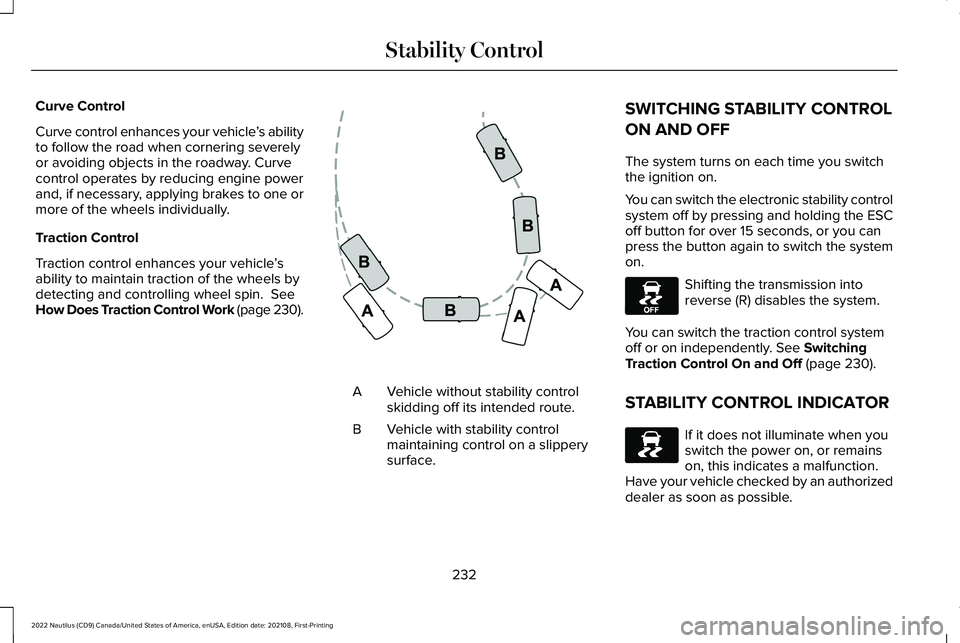
Curve control enhances your vehicle’s abilityto follow the road when cornering severelyor avoiding objects in the roadway. Curvecontrol operates by reducing engine powerand, if necessary, applying brakes to one ormore of the wheels individually.
Traction Control
Traction control enhances your vehicle’sability to maintain traction of the wheels bydetecting and controlling wheel spin. SeeHow Does Traction Control Work (page 230).
Vehicle without stability controlskidding off its intended route.A
Vehicle with stability controlmaintaining control on a slipperysurface.
B
SWITCHING STABILITY CONTROL
ON AND OFF
The system turns on each time you switchthe ignition on.
You can switch the electronic stability controlsystem off by pressing and holding the ESCoff button for over 15 seconds, or you canpress the button again to switch the systemon.
Shifting the transmission intoreverse (R) disables the system.
You can switch the traction control systemoff or on independently. See SwitchingTraction Control On and Off (page 230).
STABILITY CONTROL INDICATOR
If it does not illuminate when youswitch the power on, or remainson, this indicates a malfunction. Have your vehicle checked by an authorizeddealer as soon as possible.
232
2022 Nautilus (CD9) Canada/United States of America, enUSA, Edition date: 202108, First-PrintingStability ControlE72903 E130458 E138639
Page 240 of 586
PARKING AID PRECAUTIONS
WARNING: To help avoid personalinjury, always use caution when in reverse(R) and when using the sensing system.
WARNING: The system may notdetect objects with surfaces that absorbreflection. Always drive with due care andattention. Failure to take care may resultin a crash.
WARNING: Traffic control systems,fluorescent lamps, inclement weather, airbrakes, external motors and fans mayaffect the correct operation of the sensingsystem. This may cause reducedperformance or false alerts.
WARNING: The system may notdetect small or moving objects, particularlythose close to the ground.
WARNING: The parking aid systemcan only assist you to detect objects whenyour vehicle is moving at parking speeds.To help avoid personal injury you musttake care when using the parking aidsystem.
WARNING: The system may notfunction if the sensor is blocked.
WARNING: In cold and severeweather conditions the system may notfunction. Rain, snow and spray can all limitsensor performance.
WARNING: If damage occurs in theimmediate area surrounding the sensor,have your vehicle checked as soon aspossible.
Note:If your vehicle sustains damageleaving the sensors misaligned, this willcause inaccurate measurements or falsealerts.
When you connect a trailer to your vehicle,the rear parking aid detects the trailer andprovides an alert. Disable the parking aidwhen you connect a trailer to prevent thealert.
Note:Certain add-on devices installedaround the bumper or fascia may createfalse alerts, for example, large trailer hitches,bike or surfboard racks, license platebrackets, bumper covers or any other devicethat could block the normal detection zoneof the parking aid system. Aftermarket sparetires or spare tire covers mounted to the reartailgate could cause false alerts from thepark aid system. Remove the add-on deviceto prevent false alerts.
Note: Keep the sensors free from snow, iceand large accumulations of dirt. If thesensors are covered, the system's accuracycan be affected.
Do not clean the sensors with sharp objects.
Note: When using a programmed MyKey,you cannot switch the parking aids off. SeeMyKey™ (page 85).
236
2022 Nautilus (CD9) Canada/United States of America, enUSA, Edition date: 202108, First-PrintingParking Aids
Page 258 of 586
WHAT IS CRUISE CONTROL
Cruise control lets you maintain a set speedwithout keeping your foot on the acceleratorpedal.
Requirements
Use cruise control when the vehicle speedis greater than 20 mph (30 km/h).
SWITCHING CRUISE CONTROL ON
AND OFF
WARNING: Do not use cruise controlon winding roads, in heavy traffic or whenthe road surface is slippery. This couldresult in loss of vehicle control, seriousinjury or death.
The cruise controls are on the steeringwheel. See What Is Cruise Control (page254).
Switching Cruise Control On
Press the button.
Switching Cruise Control Off
Press the button when the systemis in standby mode.
The system also turns off when you switchthe ignition off.
Note:The set speed erases when you switchthe system off.
SETTING THE CRUISE CONTROL
SPEED
WARNING: When you are goingdownhill, your vehicle speed couldincrease above the set speed. The systemdoes not apply the brakes.
Drive to the speed you prefer.
Press either button to set thecurrent speed.
Take your foot off the accelerator pedal.
Note:The indicator changes color in theinformation display.
Changing the Set Speed
Press and release the button toincrease the set speed in smallincrements.
Press and hold the button to accelerate.Release the button when you reach yourpreferred speed.
Press and release the button todecrease the set speed in smallincrements.
Press and hold the button to decelerate.Release the button when you reach yourpreferred speed.
254
2022 Nautilus (CD9) Canada/United States of America, enUSA, Edition date: 202108, First-PrintingCruise Control (If Equipped)E265296 E265297
Page 260 of 586
HOW DOES ADAPTIVE CRUISE
CONTROL WITH STOP AND GO
WORK
Adaptive cruise control with stop and gouses radar and camera sensors to maintaina set gap between your vehicle and thevehicle in front of you while following it to acomplete stop. Stop and go can also be setto follow a vehicle directly in front of you andadjust the set speed, while you are at acomplete stop.
ADAPTIVE CRUISE CONTROL
PRECAUTIONS
WARNING: You are responsible forcontrolling your vehicle at all times. Thesystem is designed to be an aid and doesnot relieve you of your responsibility todrive with due care and attention. Failureto follow this instruction could result in theloss of control of your vehicle, personalinjury or death.
WARNING: Do not use adaptivecruise control on winding roads, in heavytraffic or when the road surface is slippery.This could result in loss of vehicle control,serious injury or death.
WARNING: Pay close attention tochanging road conditions such as enteringor leaving a highway, on roads withintersections or roundabouts, roadswithout visible lanes of travel, roads thatare unpaved, or steep slopes. Failure tofollow this instruction could result in theloss of control of your vehicle, personalinjury or death.
WARNING: The system is not a crashwarning or avoidance system.
WARNING: Do not use the systemwhen towing a trailer that has aftermarketelectronic trailer brake controls. Failure tofollow this instruction could result in theloss of control of your vehicle, personalinjury or death.
WARNING: Do not use tire sizesother than those recommended becausethis can affect the normal operation of thesystem. Failure to do so may result in a lossof vehicle control, which could result inserious injury.
WARNING: Do not use the systemwith a snow plow blade installed.
WARNING: Do not use the system inpoor visibility, for example fog, heavy rain,spray or snow.
When Following a Vehicle
WARNING: When following a vehiclethat is braking, your vehicle does notalways decelerate quickly enough to avoida crash without driver intervention. Applythe brakes when necessary. Failure tofollow this instruction could result inpersonal injury or death.
256
2022 Nautilus (CD9) Canada/United States of America, enUSA, Edition date: 202108, First-PrintingAdaptive Cruise Control (If Equipped)