lock LINCOLN NAUTILUS 2022 Manual PDF
[x] Cancel search | Manufacturer: LINCOLN, Model Year: 2022, Model line: NAUTILUS, Model: LINCOLN NAUTILUS 2022Pages: 586, PDF Size: 13.97 MB
Page 283 of 586
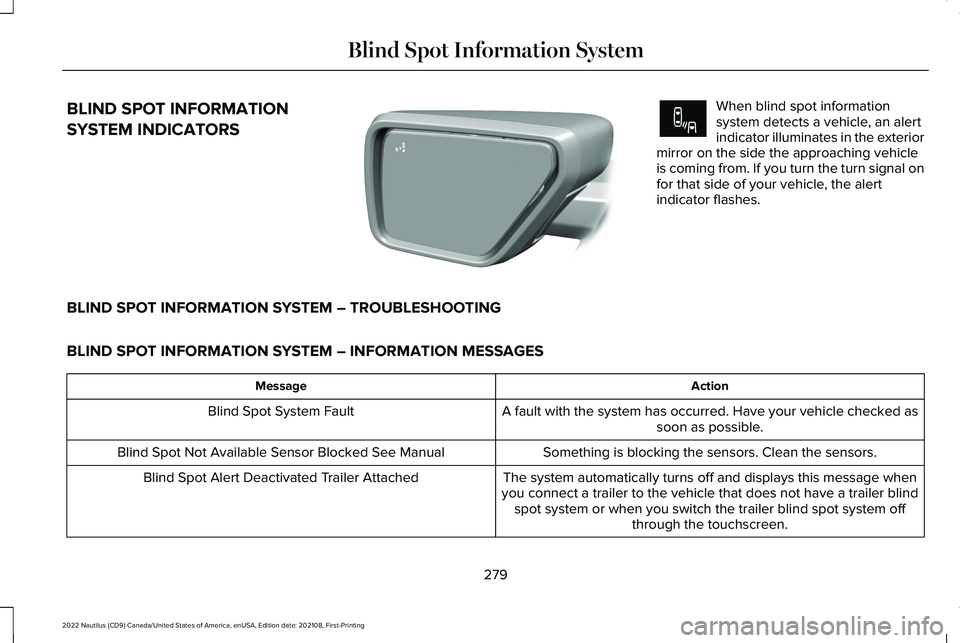
BLIND SPOT INFORMATION
SYSTEM INDICATORS
When blind spot informationsystem detects a vehicle, an alertindicator illuminates in the exteriormirror on the side the approaching vehicleis coming from. If you turn the turn signal onfor that side of your vehicle, the alertindicator flashes.
BLIND SPOT INFORMATION SYSTEM – TROUBLESHOOTING
BLIND SPOT INFORMATION SYSTEM – INFORMATION MESSAGES
ActionMessage
A fault with the system has occurred. Have your vehicle checked assoon as possible.Blind Spot System Fault
Something is blocking the sensors. Clean the sensors.Blind Spot Not Available Sensor Blocked See Manual
The system automatically turns off and displays this message whenyou connect a trailer to the vehicle that does not have a trailer blindspot system or when you switch the trailer blind spot system offthrough the touchscreen.
Blind Spot Alert Deactivated Trailer Attached
279
2022 Nautilus (CD9) Canada/United States of America, enUSA, Edition date: 202108, First-PrintingBlind Spot Information SystemE309137 E249861E249861
Page 285 of 586
CROSS TRAFFIC ALERT
LIMITATIONS
Cross traffic alert may not correctly operatewhen any of the following occur:
•Something is blocking the sensors.
•Adjacently parked vehicles or objects areobstructing the sensors.
•Vehicles approach at speeds less than4 mph (6 km/h) or greater than 37 mph(60 km/h).
•Your vehicle speed is greater than 7 mph(12 km/h).
•You reverse out of an angled parkingspace.
SWITCHING CROSS TRAFFIC
ALERT ON AND OFF
To switch cross traffic alert on or off use theinstrument cluster display:
1.Using the instrument cluster displaycontrols on the steering wheel, selectSETTINGS.
2.Select Driver assistance.
3.Switch Cross traffic alert on or off.
LOCATING THE CROSS TRAFFIC
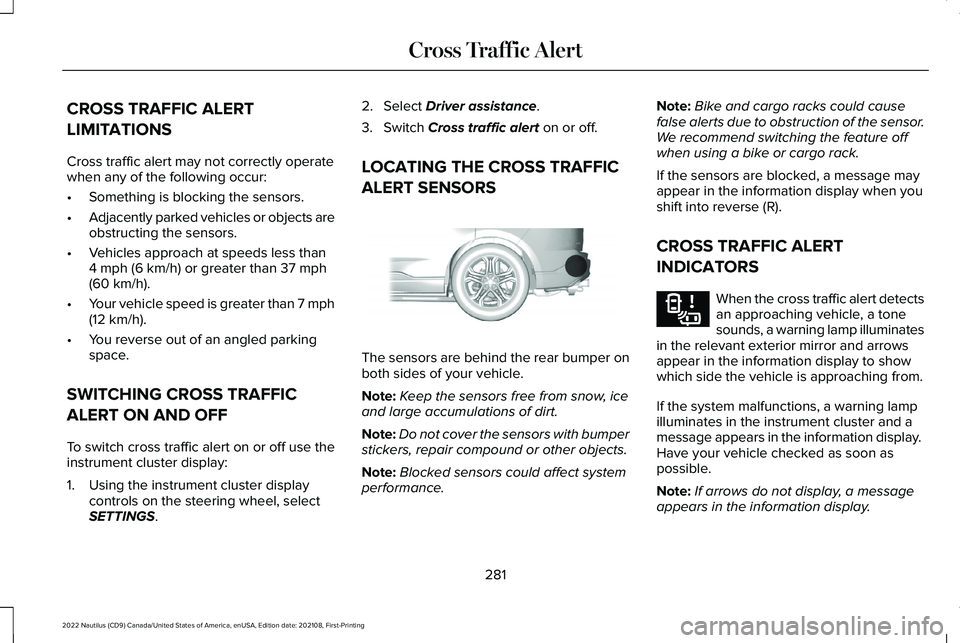
ALERT SENSORS
The sensors are behind the rear bumper onboth sides of your vehicle.
Note:Keep the sensors free from snow, iceand large accumulations of dirt.
Note:Do not cover the sensors with bumperstickers, repair compound or other objects.
Note:Blocked sensors could affect systemperformance.
Note:Bike and cargo racks could causefalse alerts due to obstruction of the sensor.We recommend switching the feature offwhen using a bike or cargo rack.
If the sensors are blocked, a message mayappear in the information display when youshift into reverse (R).
CROSS TRAFFIC ALERT
INDICATORS
When the cross traffic alert detectsan approaching vehicle, a tonesounds, a warning lamp illuminatesin the relevant exterior mirror and arrowsappear in the information display to showwhich side the vehicle is approaching from.
If the system malfunctions, a warning lampilluminates in the instrument cluster and amessage appears in the information display. Have your vehicle checked as soon aspossible.
Note:If arrows do not display, a messageappears in the information display.
281
2022 Nautilus (CD9) Canada/United States of America, enUSA, Edition date: 202108, First-PrintingCross Traffic AlertE205199 E268294
Page 286 of 586
Note:In some conditions, the system couldalert you, even when there is nothing in thedetection zone, for example a vehiclepassing further away from your vehicle.
CROSS TRAFFIC ALERT – TROUBLESHOOTING
CROSS TRAFFIC ALERT – INFORMATION MESSAGES
ActionMessage
Displays instead of indication arrows when the system detects avehicle. Check for approaching traffic.Cross Traffic Alert
Indicates blocked cross traffic alert system sensors. Clean the sensors.If the message continues to appear, have your vehicle checked assoon as possible.
Cross Traffic Not Available Sensor Blocked See Manual
The system has malfunctioned. Have your vehicle checked as soonas possible.Cross Traffic System Fault
Displays if you attach a trailer to your vehicle.Cross Traffic Alert Deactivated Trailer Attached
282
2022 Nautilus (CD9) Canada/United States of America, enUSA, Edition date: 202108, First-PrintingCross Traffic Alert
Page 289 of 586
The system is active at speeds above 3 mph(5 km/h)
Note:The pre-collision assist systemdisables when you select four-wheel drivelow or manually disable AdvanceTrac™.
Note:Brake support and automaticemergency braking are active at speeds upto 80 mph (130 km/h). If the vehicle has aradar sensor included with adaptive cruisecontrol, then brake support and automaticemergency braking are active up to themaximum speed of the vehicle.
Pedestrian Detection Limitations
Pedestrian detection is active at speeds upto 50 mph (80 km/h).
Pedestrian detection functions optimallywhen detected hazards are clearlyidentifiable. System performance may reducein situations where pedestrians are running,partly obscured, have a complexbackground, or cannot be distinguished froma group.
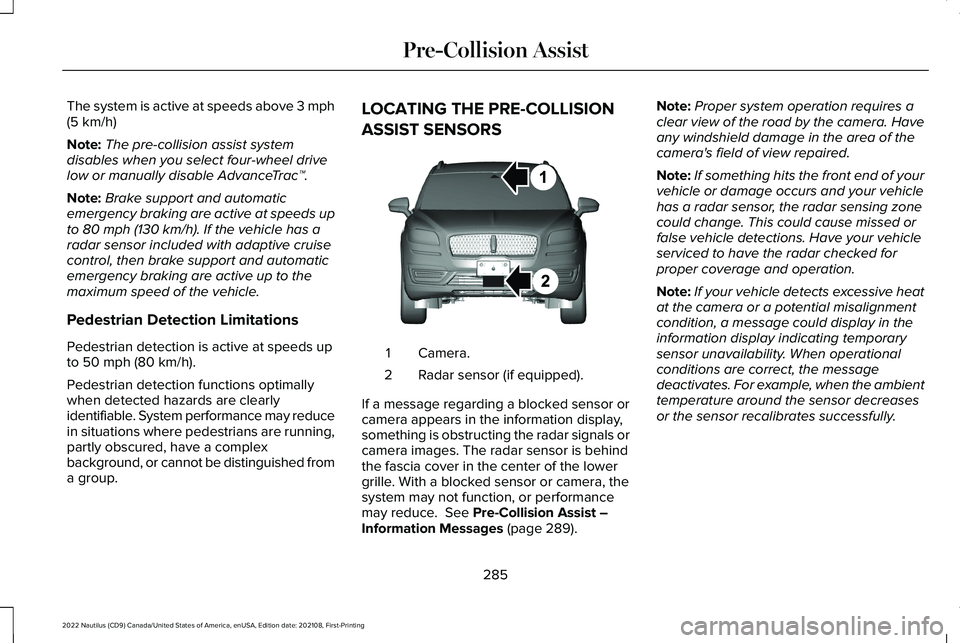
LOCATING THE PRE-COLLISION
ASSIST SENSORS
Camera.1
Radar sensor (if equipped).2
If a message regarding a blocked sensor orcamera appears in the information display,something is obstructing the radar signals orcamera images. The radar sensor is behindthe fascia cover in the center of the lowergrille. With a blocked sensor or camera, thesystem may not function, or performancemay reduce. See Pre-Collision Assist –Information Messages (page 289).
Note:Proper system operation requires aclear view of the road by the camera. Haveany windshield damage in the area of thecamera's field of view repaired.
Note:If something hits the front end of yourvehicle or damage occurs and your vehiclehas a radar sensor, the radar sensing zonecould change. This could cause missed orfalse vehicle detections. Have your vehicleserviced to have the radar checked forproper coverage and operation.
Note:If your vehicle detects excessive heatat the camera or a potential misalignmentcondition, a message could display in theinformation display indicating temporarysensor unavailability. When operationalconditions are correct, the messagedeactivates. For example, when the ambienttemperature around the sensor decreasesor the sensor recalibrates successfully.
285
2022 Nautilus (CD9) Canada/United States of America, enUSA, Edition date: 202108, First-PrintingPre-Collision AssistE268024
Page 293 of 586
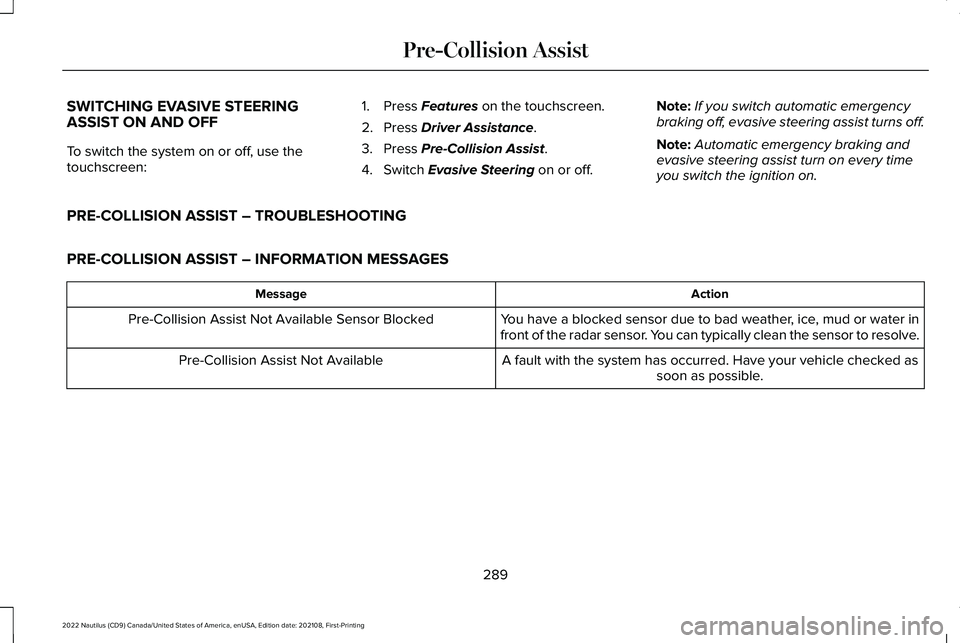
SWITCHING EVASIVE STEERINGASSIST ON AND OFF
To switch the system on or off, use thetouchscreen:
1.Press Features on the touchscreen.
2.Press Driver Assistance.
3.Press Pre-Collision Assist.
4.Switch Evasive Steering on or off.
Note:If you switch automatic emergencybraking off, evasive steering assist turns off.
Note:Automatic emergency braking andevasive steering assist turn on every timeyou switch the ignition on.
PRE-COLLISION ASSIST – TROUBLESHOOTING
PRE-COLLISION ASSIST – INFORMATION MESSAGES
ActionMessage
You have a blocked sensor due to bad weather, ice, mud or water infront of the radar sensor. You can typically clean the sensor to resolve.Pre-Collision Assist Not Available Sensor Blocked
A fault with the system has occurred. Have your vehicle checked assoon as possible.Pre-Collision Assist Not Available
289
2022 Nautilus (CD9) Canada/United States of America, enUSA, Edition date: 202108, First-PrintingPre-Collision Assist
Page 295 of 586
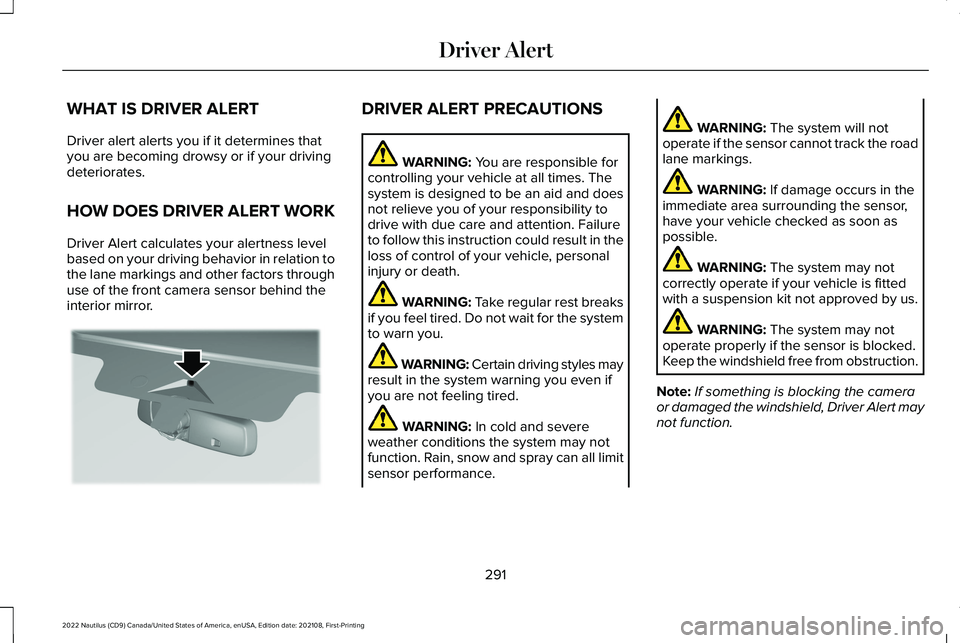
WHAT IS DRIVER ALERT
Driver alert alerts you if it determines thatyou are becoming drowsy or if your drivingdeteriorates.
HOW DOES DRIVER ALERT WORK
Driver Alert calculates your alertness levelbased on your driving behavior in relation tothe lane markings and other factors throughuse of the front camera sensor behind theinterior mirror.
DRIVER ALERT PRECAUTIONS
WARNING: You are responsible forcontrolling your vehicle at all times. Thesystem is designed to be an aid and doesnot relieve you of your responsibility todrive with due care and attention. Failureto follow this instruction could result in theloss of control of your vehicle, personalinjury or death.
WARNING: Take regular rest breaksif you feel tired. Do not wait for the systemto warn you.
WARNING: Certain driving styles mayresult in the system warning you even ifyou are not feeling tired.
WARNING: In cold and severeweather conditions the system may notfunction. Rain, snow and spray can all limitsensor performance.
WARNING: The system will notoperate if the sensor cannot track the roadlane markings.
WARNING: If damage occurs in theimmediate area surrounding the sensor,have your vehicle checked as soon aspossible.
WARNING: The system may notcorrectly operate if your vehicle is fittedwith a suspension kit not approved by us.
WARNING: The system may notoperate properly if the sensor is blocked.Keep the windshield free from obstruction.
Note:If something is blocking the cameraor damaged the windshield, Driver Alert maynot function.
291
2022 Nautilus (CD9) Canada/United States of America, enUSA, Edition date: 202108, First-PrintingDriver AlertE309385
Page 305 of 586
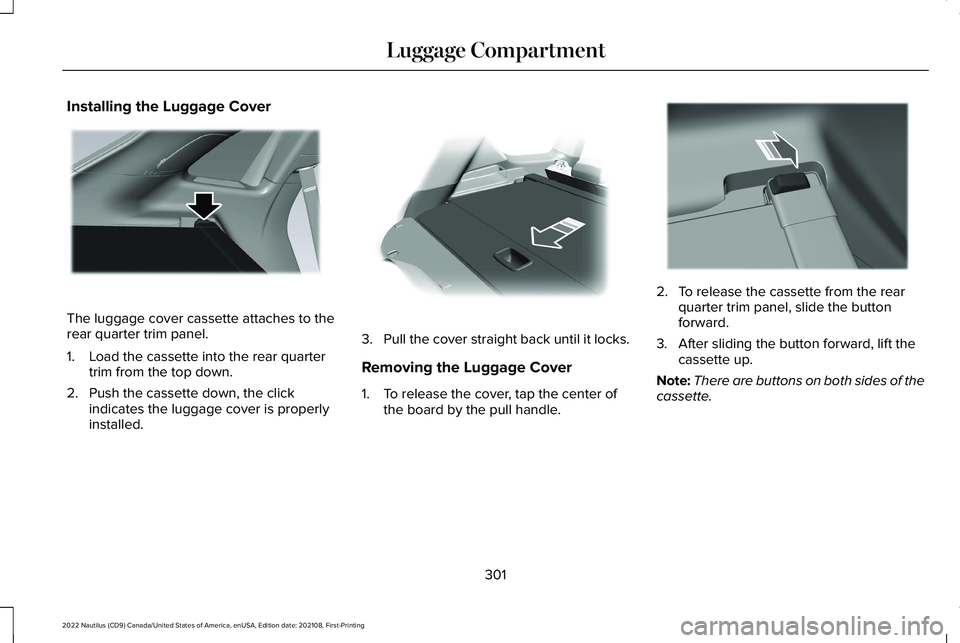
Installing the Luggage Cover
The luggage cover cassette attaches to therear quarter trim panel.
1.Load the cassette into the rear quartertrim from the top down.
2.Push the cassette down, the clickindicates the luggage cover is properlyinstalled.
3.Pull the cover straight back until it locks.
Removing the Luggage Cover
1.To release the cover, tap the center ofthe board by the pull handle.
2.To release the cassette from the rearquarter trim panel, slide the buttonforward.
3.After sliding the button forward, lift thecassette up.
Note:There are buttons on both sides of thecassette.
301
2022 Nautilus (CD9) Canada/United States of America, enUSA, Edition date: 202108, First-PrintingLuggage CompartmentE273165 E272389 E273166
Page 308 of 586
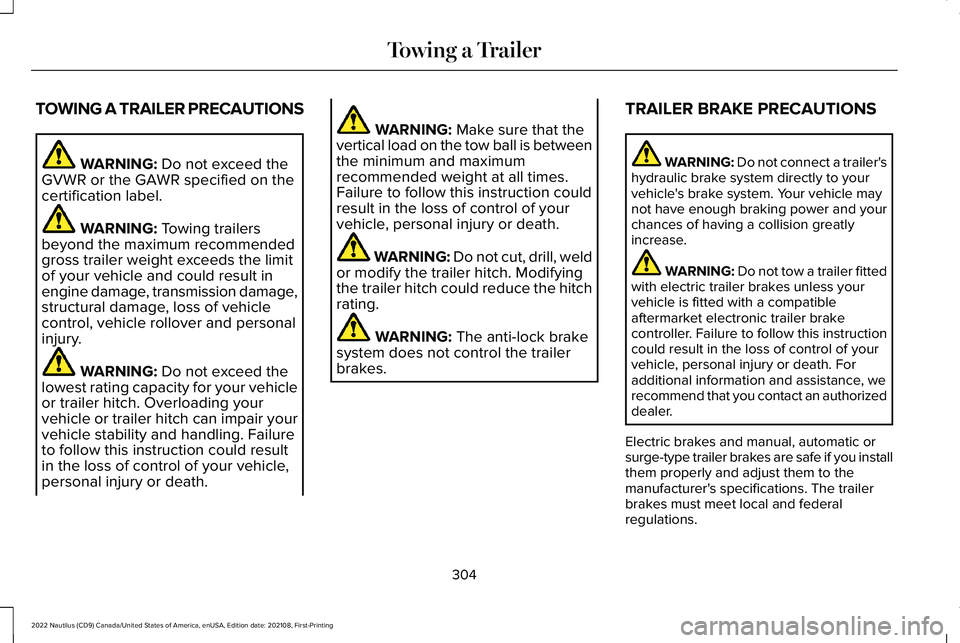
TOWING A TRAILER PRECAUTIONS
WARNING: Do not exceed theGVWR or the GAWR specified on thecertification label.
WARNING: Towing trailersbeyond the maximum recommendedgross trailer weight exceeds the limitof your vehicle and could result inengine damage, transmission damage,structural damage, loss of vehiclecontrol, vehicle rollover and personalinjury.
WARNING: Do not exceed thelowest rating capacity for your vehicleor trailer hitch. Overloading yourvehicle or trailer hitch can impair yourvehicle stability and handling. Failureto follow this instruction could resultin the loss of control of your vehicle,personal injury or death.
WARNING: Make sure that thevertical load on the tow ball is betweenthe minimum and maximumrecommended weight at all times.Failure to follow this instruction couldresult in the loss of control of yourvehicle, personal injury or death.
WARNING: Do not cut, drill, weldor modify the trailer hitch. Modifyingthe trailer hitch could reduce the hitchrating.
WARNING: The anti-lock brakesystem does not control the trailerbrakes.
TRAILER BRAKE PRECAUTIONS
WARNING: Do not connect a trailer'shydraulic brake system directly to yourvehicle's brake system. Your vehicle maynot have enough braking power and yourchances of having a collision greatlyincrease.
WARNING: Do not tow a trailer fittedwith electric trailer brakes unless yourvehicle is fitted with a compatibleaftermarket electronic trailer brakecontroller. Failure to follow this instructioncould result in the loss of control of yourvehicle, personal injury or death. Foradditional information and assistance, werecommend that you contact an authorizeddealer.
Electric brakes and manual, automatic orsurge-type trailer brakes are safe if you installthem properly and adjust them to themanufacturer's specifications. The trailerbrakes must meet local and federalregulations.
304
2022 Nautilus (CD9) Canada/United States of America, enUSA, Edition date: 202108, First-PrintingTowing a Trailer
Page 312 of 586
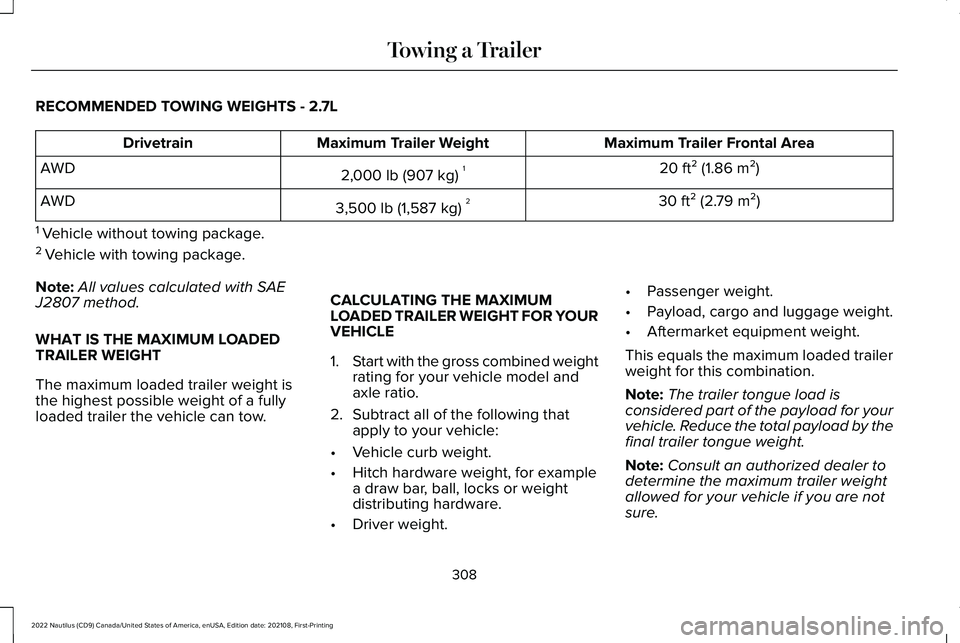
RECOMMENDED TOWING WEIGHTS - 2.7L
Maximum Trailer Frontal AreaMaximum Trailer WeightDrivetrain
20 ft² (1.86 m²)2,000 lb (907 kg)1AWD
30 ft² (2.79 m²)3,500 lb (1,587 kg)2AWD
1 Vehicle without towing package.
2 Vehicle with towing package.
Note:All values calculated with SAEJ2807 method.
WHAT IS THE MAXIMUM LOADEDTRAILER WEIGHT
The maximum loaded trailer weight isthe highest possible weight of a fully
loaded trailer the vehicle can tow.
CALCULATING THE MAXIMUMLOADED TRAILER WEIGHT FOR YOURVEHICLE
1.Start with the gross combined weightrating for your vehicle model andaxle ratio.
2.Subtract all of the following thatapply to your vehicle:
•Vehicle curb weight.
•Hitch hardware weight, for examplea draw bar, ball, locks or weightdistributing hardware.
•Driver weight.
•Passenger weight.
•Payload, cargo and luggage weight.
•Aftermarket equipment weight.
This equals the maximum loaded trailerweight for this combination.
Note:The trailer tongue load isconsidered part of the payload for yourvehicle. Reduce the total payload by thefinal trailer tongue weight.
Note:Consult an authorized dealer todetermine the maximum trailer weightallowed for your vehicle if you are notsure.
308
2022 Nautilus (CD9) Canada/United States of America, enUSA, Edition date: 202108, First-PrintingTowing a Trailer
Page 316 of 586
Note:Driving through deep water couldcause damage to the transmission. If thefront or rear axle is submerged in water,have the axle lubricant and power transferunit lubricant checked and changed ifnecessary.
DRIVING ON HILLY OR SLOPINGTERRAIN
WARNING: Extreme care should beused when steering the vehicle in reversedown a slope so as not to cause thevehicle to swerve out of control.
Although natural obstacles could make itnecessary to travel diagonally up or down ahill or steep incline, you should try to drivestraight up or straight down.
Note:Avoid turning on steep slopes or hills.A danger lies in losing traction, slippingsideways and possible vehicle roll over.Whenever driving on a hill, determinebeforehand the route you can use. Do notdrive over the crest of a hill without seeingwhat conditions are on the other side. Donot drive in reverse over a hill without theaid of an observer.
Apply just enough power to the wheels toclimb the hill. Too much power causes thetires to slip, spin or lose traction, and youcould lose control of your vehicle. Whendescending a steep hill, do not descend thehill in neutral. Avoid sudden hard braking tokeep the front wheels rolling and to maintainyour vehicle's steering.
Note:Your vehicle has anti-lock brakes,apply the brakes steadily. Do not pump thebrakes.
Note:If your vehicle gets stuck driving onhilly or sloping terrain, it could be rocked outby shifting between forward and reversegears, stopping between shifts in a steadypattern. Press lightly on the accelerator ineach gear.
Note:Do not rock your vehicle if the engineis not at normal operating temperature, asdamage to the transmission could occur.
Note:Do not rock your vehicle for more thana minute, as damage to the transmissionand tires could occur or the engine couldoverheat.
DRIVING IN SAND
When driving over sand, try to keep all fourwheels on the most solid area of the trail. Steadily drive through the terrain. Apply theaccelerator slowly and avoid excessivewheel slip. Do not drive your vehicle in deepsand for an extended period of time. Thiscould overheat the system. A messageappears in the instrument cluster display.
Note:If your vehicle gets stuck driving onhilly or sloping terrain, it could be rocked outby shifting between forward and reversegears, stopping between shifts in a steadypattern. Press lightly on the accelerator ineach gear.
312
2022 Nautilus (CD9) Canada/United States of America, enUSA, Edition date: 202108, First-PrintingDriving Hints