lock LINCOLN NAUTILUS 2022 Workshop Manual
[x] Cancel search | Manufacturer: LINCOLN, Model Year: 2022, Model line: NAUTILUS, Model: LINCOLN NAUTILUS 2022Pages: 586, PDF Size: 13.97 MB
Page 178 of 586
HOW DOES THE MEMORY
FUNCTION WORK
The memory function recalls the position ofthese features:
•Driver seat.
•Power mirrors.
•Optional power steering column.
MEMORY FUNCTION
PRECAUTIONS
WARNING: Before activating thememory seat, make sure that the areaimmediately surrounding the seat is clearof obstructions and that all occupants areclear of moving parts.
WARNING: Do not use the memoryfunction when your vehicle is moving.
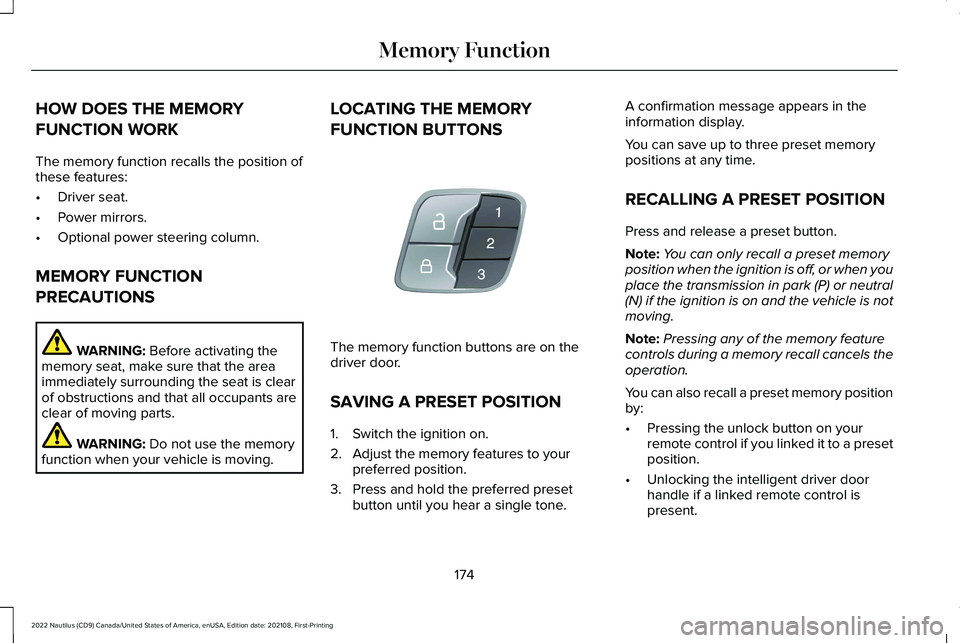
LOCATING THE MEMORY
FUNCTION BUTTONS
The memory function buttons are on thedriver door.
SAVING A PRESET POSITION
1.Switch the ignition on.
2.Adjust the memory features to yourpreferred position.
3.Press and hold the preferred presetbutton until you hear a single tone.
A confirmation message appears in theinformation display.
You can save up to three preset memorypositions at any time.
RECALLING A PRESET POSITION
Press and release a preset button.
Note:You can only recall a preset memoryposition when the ignition is off, or when youplace the transmission in park (P) or neutral(N) if the ignition is on and the vehicle is notmoving.
Note:Pressing any of the memory featurecontrols during a memory recall cancels theoperation.
You can also recall a preset memory positionby:
•Pressing the unlock button on yourremote control if you linked it to a presetposition.
•Unlocking the intelligent driver doorhandle if a linked remote control ispresent.
174
2022 Nautilus (CD9) Canada/United States of America, enUSA, Edition date: 202108, First-PrintingMemory FunctionE142554
Page 180 of 586
WHAT IS THE GARAGE DOOR
OPENER
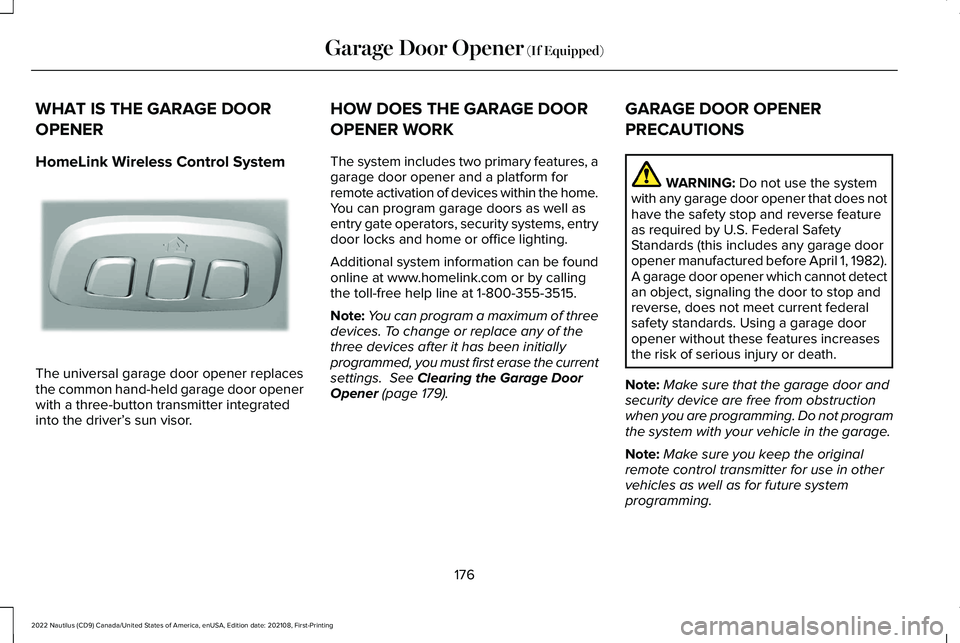
HomeLink Wireless Control System
The universal garage door opener replacesthe common hand-held garage door openerwith a three-button transmitter integratedinto the driver’s sun visor.
HOW DOES THE GARAGE DOOR
OPENER WORK
The system includes two primary features, agarage door opener and a platform forremote activation of devices within the home.You can program garage doors as well asentry gate operators, security systems, entrydoor locks and home or office lighting.
Additional system information can be foundonline at www.homelink.com or by callingthe toll-free help line at 1-800-355-3515.
Note:You can program a maximum of threedevices. To change or replace any of thethree devices after it has been initiallyprogrammed, you must first erase the currentsettings. See Clearing the Garage DoorOpener (page 179).
GARAGE DOOR OPENER
PRECAUTIONS
WARNING: Do not use the systemwith any garage door opener that does nothave the safety stop and reverse featureas required by U.S. Federal SafetyStandards (this includes any garage dooropener manufactured before April 1, 1982).A garage door opener which cannot detectan object, signaling the door to stop andreverse, does not meet current federalsafety standards. Using a garage dooropener without these features increasesthe risk of serious injury or death.
Note:Make sure that the garage door andsecurity device are free from obstructionwhen you are programming. Do not programthe system with your vehicle in the garage.
Note:Make sure you keep the originalremote control transmitter for use in othervehicles as well as for future systemprogramming.
176
2022 Nautilus (CD9) Canada/United States of America, enUSA, Edition date: 202108, First-PrintingGarage Door Opener (If Equipped)E188211
Page 196 of 586
ENGINE BLOCK HEATER (IF EQUIPPED)
ENGINE BLOCK HEATERPRECAUTIONS
WARNING: Failure to follow engineblock heater instructions could result inproperty damage or serious personalinjury.
WARNING: Do not use your heaterwith ungrounded electrical systems ortwo-pronged adapters. There is a risk ofelectrical shock.
WARNING: Do not fully close thehood, or allow it to drop under its ownweight when using the engine blockheater. This could damage the power cableand may cause an electrical short resultingin fire, injury and property damage.
We recommend that you do the following fora safe and correct operation:
•Use a 16-gauge outdoor extension cordthat is product certified by Underwriter’sLaboratory (UL) or Canadian StandardsAssociation (CSA). This extension cordmust be suitable for use outdoors, in coldtemperatures, and be clearly markedSuitable for Use with OutdoorAppliances. Do not use an indoorextension cord outdoors. This couldresult in an electric shock or become afire hazard.
•Use as short an extension cord aspossible.
•Do not use multiple extension cords.
•Make sure that when in operation, theextension cord plug and engine blockheater cord plug connections are freeand clear of water. This could cause anelectric shock or fire.
•If the engine block heater cord is underthe hood, do not remove the wiring fromits original location. Do not close thehood on the extension wiring.
•Park your vehicle in a clean area, clearof combustible materials.
•Firmly connect the engine block heatercord and the extension cord.
•Check the extension cord for heatanywhere when the system has beenoperating for approximately 30 minutes.
•Unplug and properly stow the systembefore starting and driving your vehicle.The protective cover seals the terminalsof the engine block heater cord plugwhen not in use.
•Check the engine block heater systemfor proper operation before winter.
HOW DOES THE ENGINE BLOCKHEATER WORK
The engine block heater warms the enginecoolant. This allows the climate controlsystem to quickly respond. The equipmentincludes a heater element installed in theengine block and a wire harness. You canconnect the system to a grounded 220-240volt AC electrical source.
192
2022 Nautilus (CD9) Canada/United States of America, enUSA, Edition date: 202108, First-PrintingStarting and Stopping the Engine
Page 197 of 586
Note:The engine block heater is mosteffective when outdoor temperatures arebelow 0°F (-18°C).
USING THE ENGINE BLOCK HEATER
Make sure the receptacle terminals are cleanand dry prior to use. Clean them with a drycloth if necessary.
The heater uses 0.4 to 1.0 kilowatt-hours ofenergy per hour of use. The system does nothave a thermostat. It achieves maximumtemperature after approximately three hoursof operation. Using the engine block heaterlonger than three hours does not improvesystem performance and unnecessarily useselectricity.
STOPPING THE ENGINE
STOPPING THE ENGINE WHEN YOURVEHICLE IS STATIONARY
1.Shift into park (P).
2.Apply the parking brake.
3.Wait until the engine reaches idle speed.
4.Press the push button ignition switch.
STOPPING THE ENGINE WHEN YOURVEHICLE IS MOVING
WARNING: Switching off the enginewhen your vehicle is still moving results ina significant decrease in brakingassistance. Higher effort is required toapply the brakes and to stop your vehicle.A significant decrease in steeringassistance could also occur. The steeringdoes not lock, but higher effort could berequired to steer your vehicle. When youswitch the ignition off, some electricalcircuits, for example airbags, also turn off.If you unintentionally switch the ignitionoff, shift into neutral (N) and restart theengine.
1.Press and hold the push button ignitionswitch until the engine stops, or press itthree times within two seconds.
2.Shift into neutral and use the brakes tobring your vehicle to a safe stop.
3.Shift into park (P).
4.Apply the parking brake.
AUTOMATIC ENGINE STOP (IF EQUIPPED)
WHAT IS AUTOMATIC ENGINE STOP
Automatic engine stop is a feature thatswitches the engine off if it has been idlingfor an extended period to help you save fuel.
193
2022 Nautilus (CD9) Canada/United States of America, enUSA, Edition date: 202108, First-PrintingStarting and Stopping the EngineE321258 E321258
Page 199 of 586
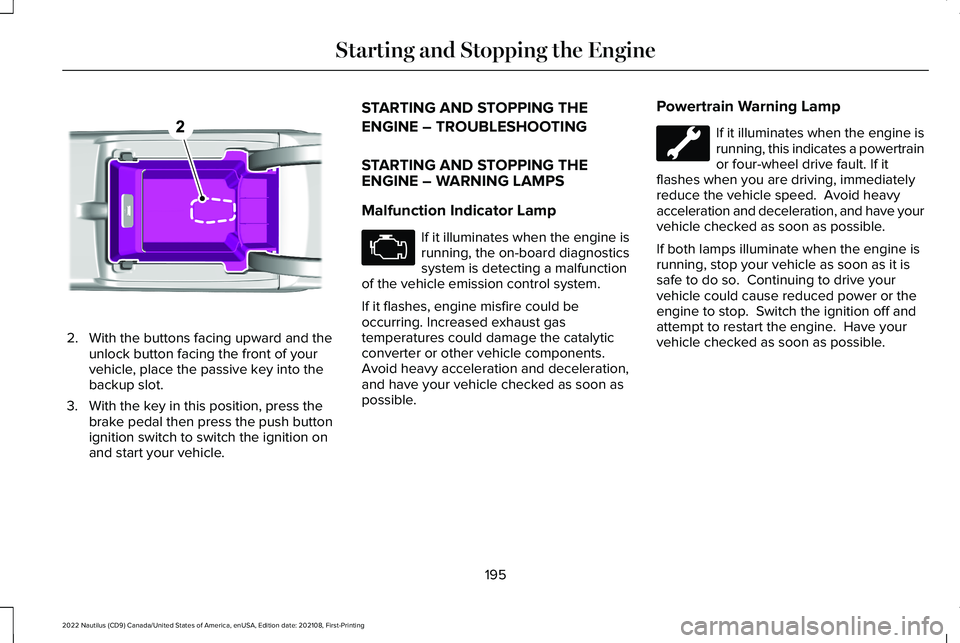
2.With the buttons facing upward and theunlock button facing the front of yourvehicle, place the passive key into thebackup slot.
3.With the key in this position, press thebrake pedal then press the push buttonignition switch to switch the ignition onand start your vehicle.
STARTING AND STOPPING THE
ENGINE – TROUBLESHOOTING
STARTING AND STOPPING THEENGINE – WARNING LAMPS
Malfunction Indicator Lamp
If it illuminates when the engine isrunning, the on-board diagnosticssystem is detecting a malfunctionof the vehicle emission control system.
If it flashes, engine misfire could beoccurring. Increased exhaust gastemperatures could damage the catalyticconverter or other vehicle components.Avoid heavy acceleration and deceleration,and have your vehicle checked as soon aspossible.
Powertrain Warning Lamp
If it illuminates when the engine isrunning, this indicates a powertrainor four-wheel drive fault. If itflashes when you are driving, immediatelyreduce the vehicle speed. Avoid heavyacceleration and deceleration, and have yourvehicle checked as soon as possible.
If both lamps illuminate when the engine isrunning, stop your vehicle as soon as it issafe to do so. Continuing to drive yourvehicle could cause reduced power or theengine to stop. Switch the ignition off andattempt to restart the engine. Have yourvehicle checked as soon as possible.
195
2022 Nautilus (CD9) Canada/United States of America, enUSA, Edition date: 202108, First-PrintingStarting and Stopping the EngineE203694
Page 214 of 586
AUTOMATIC TRANSMISSION
PRECAUTIONS
WARNING: Always fully apply theparking brake and make sure you shift intopark (P). Failure to follow this instructioncould result in personal injury or death.
WARNING: Do not apply the brakepedal and accelerator pedalsimultaneously. Applying both pedalssimultaneously for more than a fewseconds will limit engine performance,which may result in difficulty maintainingspeed in traffic and could lead to seriousinjury.
WARNING: When your vehicle isstationary, keep the brake pedal fullypressed when shifting gears. Failure tofollow this instruction could result inpersonal injury, death or property damage.
Note:Do not use supplemental transmissionfluid additives, treatments, or cleaningagents. Failure to follow this instruction couldresult in vehicle damage not covered by thevehicle warranty.
AUTOMATIC TRANSMISSION
POSITIONS
PARK (P)
WARNING: Move the transmissionselector lever to park (P) only when yourvehicle is stationary.
This position locks the driveline. Come to acomplete stop before shifting into and outof park (P).
The electric parking brake could apply whenyou shift to park (P) without the brake pedalfully pressed. The electric parking brakeapplies when you shift to park (P) on largeslopes. The electric parking brake releaseswith the drive away release function. SeeElectric Parking Brake (page 223).
Note:A tone sounds if you attempt to exityour vehicle without the transmission in park(P).
Note:Your vehicle may not shift out of park(P) if the vehicle battery has run out ofcharge. See Jump Starting the Vehicle(page 316).
Note:Your vehicle may not shift out of park(P) if a fuse is blown. See Fuses (page 323).
Note:Your vehicle may not shift out of park(P) unless the key or remote control is insideyour vehicle.
Note:Your vehicle shifts into park (P) if youattempt to exit your vehicle without thetransmission in park (P). See How DoesAutomatic Return to Park (P) Work (page213).
Note:If you shift into park (P) without fullypressing the brake, the parking brake couldapply. If you shift into park (P) on a slope, theparking brake could apply. SeeAutomatically Releasing the ElectricParking Brake (page 224).
Note:You can start your vehicle in thisposition.
210
2022 Nautilus (CD9) Canada/United States of America, enUSA, Edition date: 202108, First-PrintingAutomatic Transmission
Page 224 of 586
BRAKE PRECAUTIONS
WARNING: Driving your vehicle withthe warning lamp on is dangerous. Asignificant decrease in brakingperformance may occur. It may take youlonger to stop your vehicle. Have yourvehicle checked as soon as possible.Driving extended distances with theparking brake engaged can cause brakefailure and the risk of personal injury.
Wet brakes result in reduced brakingefficiency. Gently press the brake pedal afew times when leaving a car wash or drivingfrom standing water to dry the brakes.
Note:Depending on applicable laws andregulations in the country for which yourvehicle was originally built, the stoplampscould flash during heavy braking. Followingthis the hazard warning flashers could alsoturn on when your vehicle comes to a stop.
ANTI-LOCK BRAKING SYSTEM
ANTI-LOCK BRAKING SYSTEMLIMITATIONS
The anti-lock braking system does noteliminate the risk of crash when:
•You drive too closely to the vehicle infront of you.
•Your vehicle is hydroplaning.
•You take corners too fast.
•The road surface is poor.
Note: If the system activates, the brakepedal could pulse and travel further. Maintain pressure on the brake pedal.
BRAKE OVER ACCELERATOR
In the event the accelerator pedal becomesstuck or entrapped, apply steady and firmpressure to the brake pedal to slow thevehicle and reduce engine power. If youexperience this condition, apply the brakesand bring your vehicle to a safe stop. Move
the transmission to park (P), switch theengine off and apply the parking brake.Inspect the accelerator pedal for anyinterference. If none are found and thecondition persists, have your vehicle towedto the nearest authorized dealer.
LOCATING THE BRAKE FLUID
RESERVOIR
See Under Hood Overview (page 341).
CHECKING THE BRAKE FLUID
WARNING: Do not use any fluid otherthan the recommended brake fluid as thiswill reduce brake efficiency. Use ofincorrect fluid could result in the loss ofvehicle control, serious personal injury ordeath.
220
2022 Nautilus (CD9) Canada/United States of America, enUSA, Edition date: 202108, First-PrintingBrakes
Page 225 of 586
WARNING: Only use brake fluid froma sealed container. Contamination with dirt,water, petroleum products or othermaterials may result in brake systemdamage or failure. Failure to adhere to thiswarning could result in the loss of vehiclecontrol, serious personal injury or death.
WARNING: Do not allow the fluid totouch your skin or eyes. If this happens,rinse the affected areas immediately withplenty of water and contact your physician.
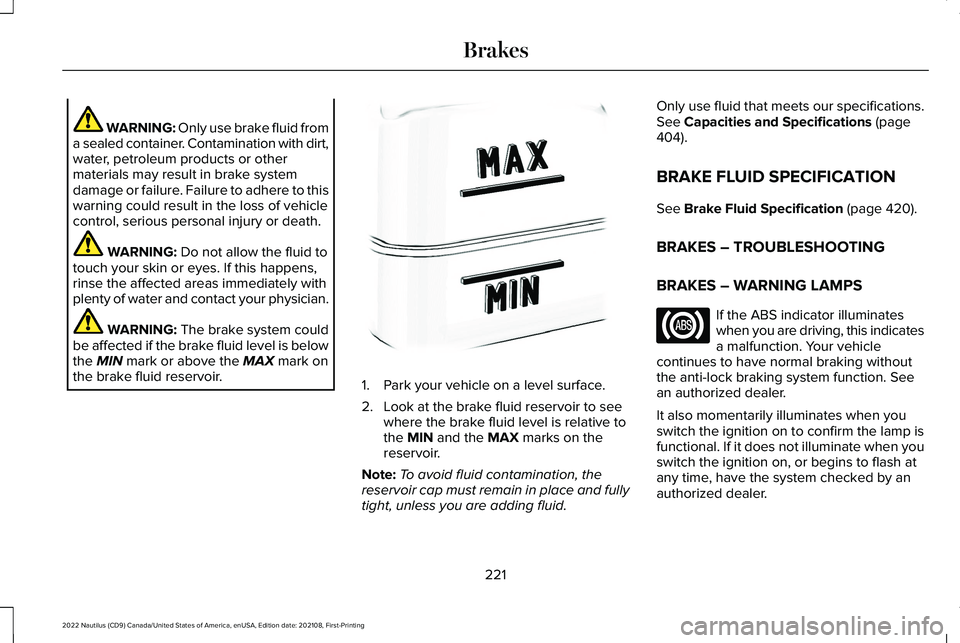
WARNING: The brake system couldbe affected if the brake fluid level is belowthe MIN mark or above the MAX mark onthe brake fluid reservoir.1.Park your vehicle on a level surface.
2.Look at the brake fluid reservoir to seewhere the brake fluid level is relative tothe MIN and the MAX marks on thereservoir.
Note:To avoid fluid contamination, thereservoir cap must remain in place and fullytight, unless you are adding fluid.
Only use fluid that meets our specifications.See Capacities and Specifications (page404).
BRAKE FLUID SPECIFICATION
See Brake Fluid Specification (page 420).
BRAKES – TROUBLESHOOTING
BRAKES – WARNING LAMPS
If the ABS indicator illuminateswhen you are driving, this indicatesa malfunction. Your vehiclecontinues to have normal braking withoutthe anti-lock braking system function. Seean authorized dealer.
It also momentarily illuminates when youswitch the ignition on to confirm the lamp isfunctional. If it does not illuminate when youswitch the ignition on, or begins to flash atany time, have the system checked by anauthorized dealer.
221
2022 Nautilus (CD9) Canada/United States of America, enUSA, Edition date: 202108, First-PrintingBrakesE170684
Page 240 of 586
PARKING AID PRECAUTIONS
WARNING: To help avoid personalinjury, always use caution when in reverse(R) and when using the sensing system.
WARNING: The system may notdetect objects with surfaces that absorbreflection. Always drive with due care andattention. Failure to take care may resultin a crash.
WARNING: Traffic control systems,fluorescent lamps, inclement weather, airbrakes, external motors and fans mayaffect the correct operation of the sensingsystem. This may cause reducedperformance or false alerts.
WARNING: The system may notdetect small or moving objects, particularlythose close to the ground.
WARNING: The parking aid systemcan only assist you to detect objects whenyour vehicle is moving at parking speeds.To help avoid personal injury you musttake care when using the parking aidsystem.
WARNING: The system may notfunction if the sensor is blocked.
WARNING: In cold and severeweather conditions the system may notfunction. Rain, snow and spray can all limitsensor performance.
WARNING: If damage occurs in theimmediate area surrounding the sensor,have your vehicle checked as soon aspossible.
Note:If your vehicle sustains damageleaving the sensors misaligned, this willcause inaccurate measurements or falsealerts.
When you connect a trailer to your vehicle,the rear parking aid detects the trailer andprovides an alert. Disable the parking aidwhen you connect a trailer to prevent thealert.
Note:Certain add-on devices installedaround the bumper or fascia may createfalse alerts, for example, large trailer hitches,bike or surfboard racks, license platebrackets, bumper covers or any other devicethat could block the normal detection zoneof the parking aid system. Aftermarket sparetires or spare tire covers mounted to the reartailgate could cause false alerts from thepark aid system. Remove the add-on deviceto prevent false alerts.
Note: Keep the sensors free from snow, iceand large accumulations of dirt. If thesensors are covered, the system's accuracycan be affected.
Do not clean the sensors with sharp objects.
Note: When using a programmed MyKey,you cannot switch the parking aids off. SeeMyKey™ (page 85).
236
2022 Nautilus (CD9) Canada/United States of America, enUSA, Edition date: 202108, First-PrintingParking Aids
Page 243 of 586
FRONT PARKING AID AUDIBLEWARNINGS
A warning tone sounds when there is anobject within 28 in (70 cm) from the frontbumper. As your vehicle moves closer to anobject, the rate of the tone increases.
The warning tone continuously sounds whenan object is 12 in (30 cm) or less from thefront bumper.
Note:If the detected object is 12 in (30 cm)or less from your vehicle, visual indicationremains on.
SIDE PARKING AID
WHAT IS THE SIDE PARKING AID
The front and rear outermost parking aidsensors map objects that are near to thesides of your vehicle.
SIDE PARKING AID LIMITATIONS
The sensor coverage is up to 24 in (60 cm)from the sides of your vehicle.
The side parking aid may not function if:
•Your vehicle remains stationary for overtwo minutes.
•The anti-lock brake system activates.
•The traction control system activates.
•Your vehicle is in park (P).
•The steering wheel angle information isnot available. You must drive at least492 ft (150 m) above 19 mph (30 km/h) toreset the steering wheel angleinformation.
Note:If you switch traction control off, theside sensing system also turns off.
To reinitialize the system, drive the length ofyour vehicle.
The side parking aid does not detect anobject that is moving toward the side of yourvehicle, for example another vehicle movingat a low speed, if it does not pass a front orrear parking aid sensor.
If the transmission is in reverse (R), the sidesensing system provides audible warnings.When your vehicle is moving slowly,obstacles are detected within 24 in (60 cm)and are inside the driving path of yourvehicle. If your vehicle remains stationary fora few seconds, the audible warning turns off.Visual indication is always present in reverse(R).
If your vehicle is in neutral (N), the sidesensing system provides visual indicationonly when your vehicle is moving slowly andthere is a front or rear parking aid obstacledetected, and the side obstacle is within24 in (60 cm) from the side of your vehicle.If your vehicle remains stationary for a fewseconds, the visual indication turns off.
If the transmission is in drive (D) or any otherforward gear, the side sensing systemprovides audible and visual warnings. Whenyour vehicle is moving slowly, obstacles aredetected within 24 in (60 cm) and are insidethe driving path of your vehicle. If yourvehicle remains stationary for a few seconds,the visual indication and audible warningturns off.
239
2022 Nautilus (CD9) Canada/United States of America, enUSA, Edition date: 202108, First-PrintingParking Aids