bluetooth LINCOLN NAVIGATOR 2014 Owner's Manual
[x] Cancel search | Manufacturer: LINCOLN, Model Year: 2014, Model line: NAVIGATOR, Model: LINCOLN NAVIGATOR 2014Pages: 506, PDF Size: 5.72 MB
Page 402 of 506
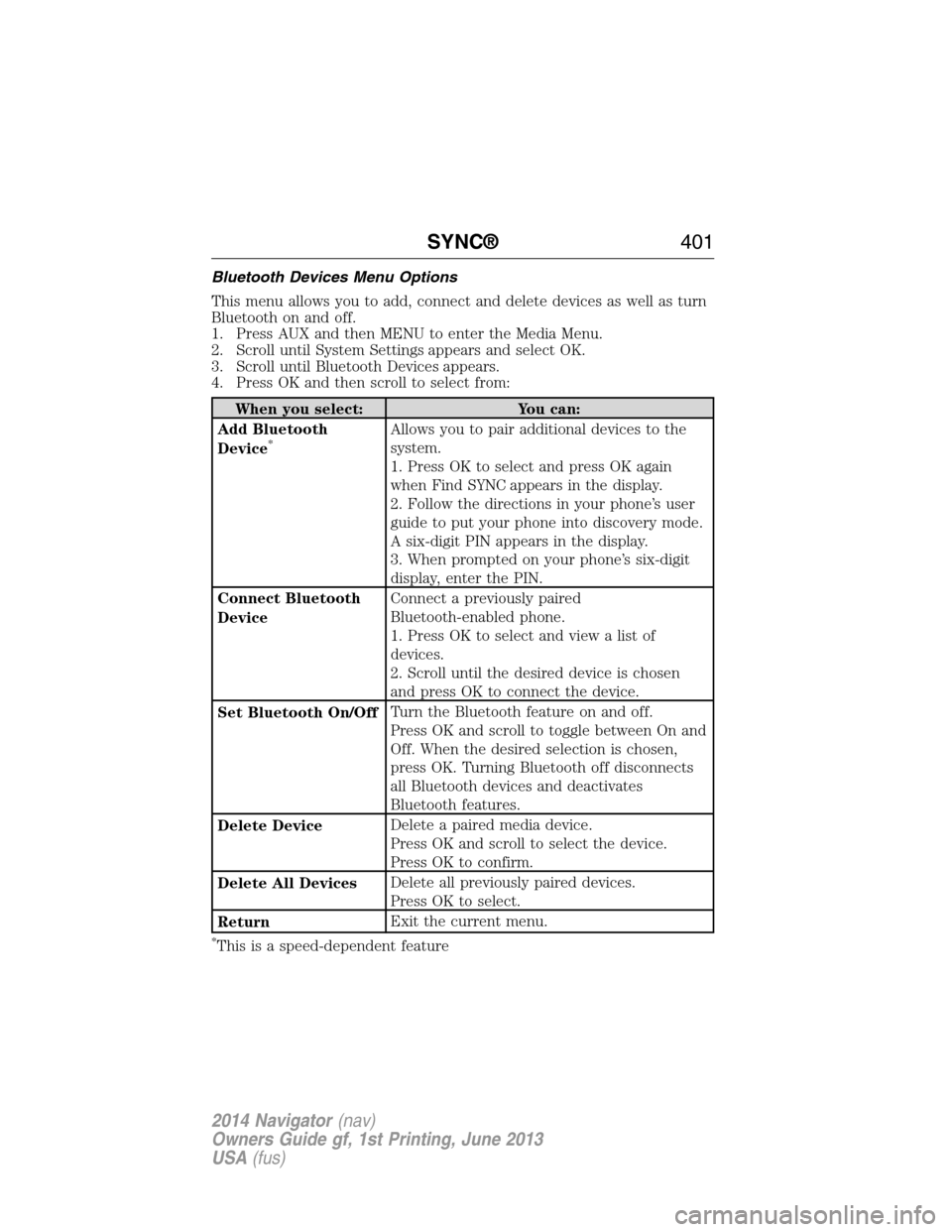
Bluetooth Devices Menu Options
This menu allows you to add, connect and delete devices as well as turn
Bluetooth on and off.
1. Press AUX and then MENU to enter the Media Menu.
2. Scroll until System Settings appears and select OK.
3. Scroll until Bluetooth Devices appears.
4. Press OK and then scroll to select from:
When you select: You can:
Add Bluetooth
Device
*Allows you to pair additional devices to the
system.
1. Press OK to select and press OK again
when Find SYNC appears in the display.
2. Follow the directions in your phone’s user
guide to put your phone into discovery mode.
A six-digit PIN appears in the display.
3. When prompted on your phone’s six-digit
display, enter the PIN.
Connect Bluetooth
DeviceConnect a previously paired
Bluetooth-enabled phone.
1. Press OK to select and view a list of
devices.
2. Scroll until the desired device is chosen
and press OK to connect the device.
Set Bluetooth On/OffTurn the Bluetooth feature on and off.
Press OK and scroll to toggle between On and
Off. When the desired selection is chosen,
press OK. Turning Bluetooth off disconnects
all Bluetooth devices and deactivates
Bluetooth features.
Delete DeviceDelete a paired media device.
Press OK and scroll to select the device.
Press OK to confirm.
Delete All DevicesDelete all previously paired devices.
Press OK to select.
ReturnExit the current menu.
*This is a speed-dependent feature
SYNC®401
2014 Navigator(nav)
Owners Guide gf, 1st Printing, June 2013
USA(fus)
Page 406 of 506
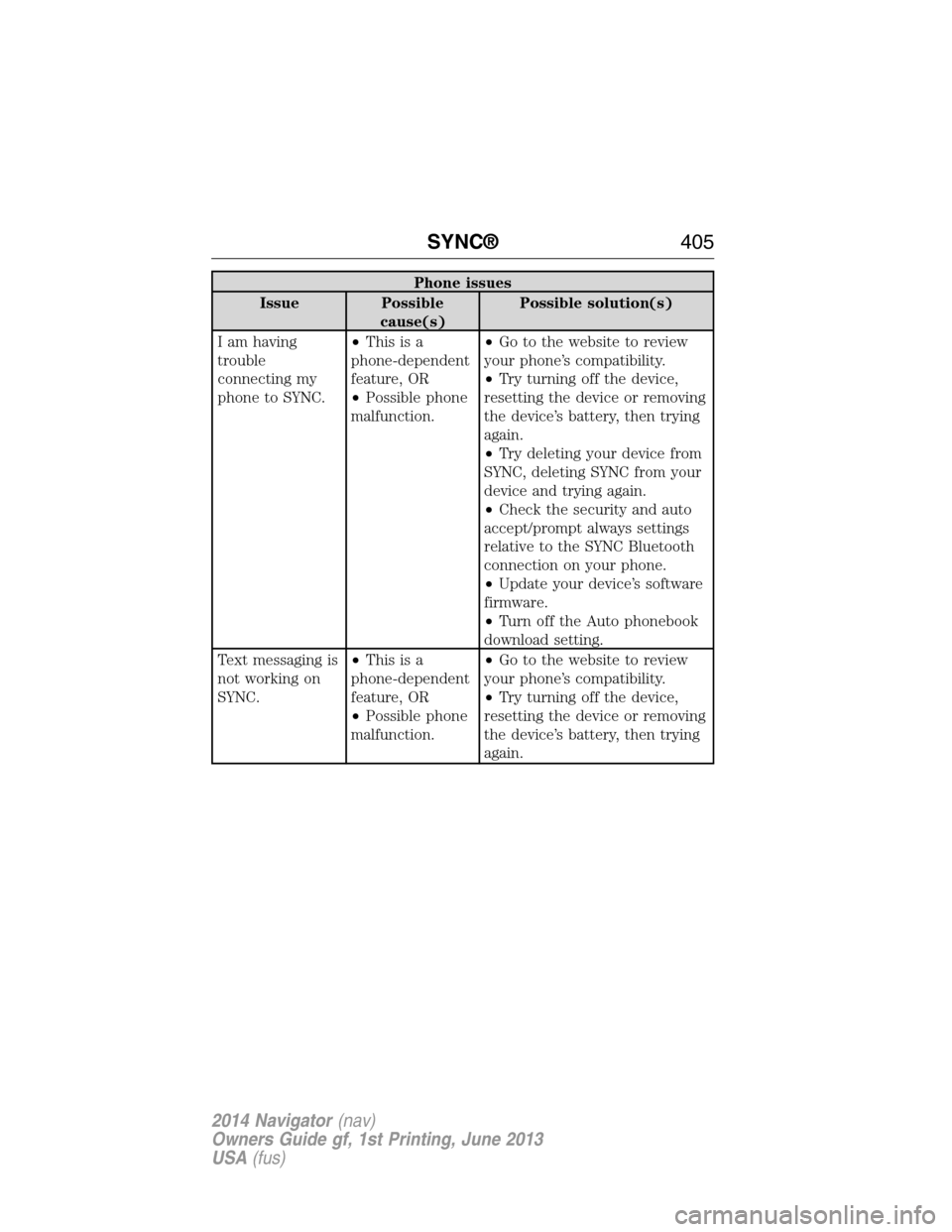
Phone issues
Issue Possible
cause(s)Possible solution(s)
I am having
trouble
connecting my
phone to SYNC.•Thisisa
phone-dependent
feature, OR
•Possible phone
malfunction.•Go to the website to review
your phone’s compatibility.
•Try turning off the device,
resetting the device or removing
the device’s battery, then trying
again.
•Try deleting your device from
SYNC, deleting SYNC from your
device and trying again.
•Check the security and auto
accept/prompt always settings
relative to the SYNC Bluetooth
connection on your phone.
•Update your device’s software
firmware.
•Turn off the Auto phonebook
download setting.
Text messaging is
not working on
SYNC.•Thisisa
phone-dependent
feature, OR
•Possible phone
malfunction.•Go to the website to review
your phone’s compatibility.
•Try turning off the device,
resetting the device or removing
the device’s battery, then trying
again.
SYNC®405
2014 Navigator(nav)
Owners Guide gf, 1st Printing, June 2013
USA(fus)
Page 407 of 506
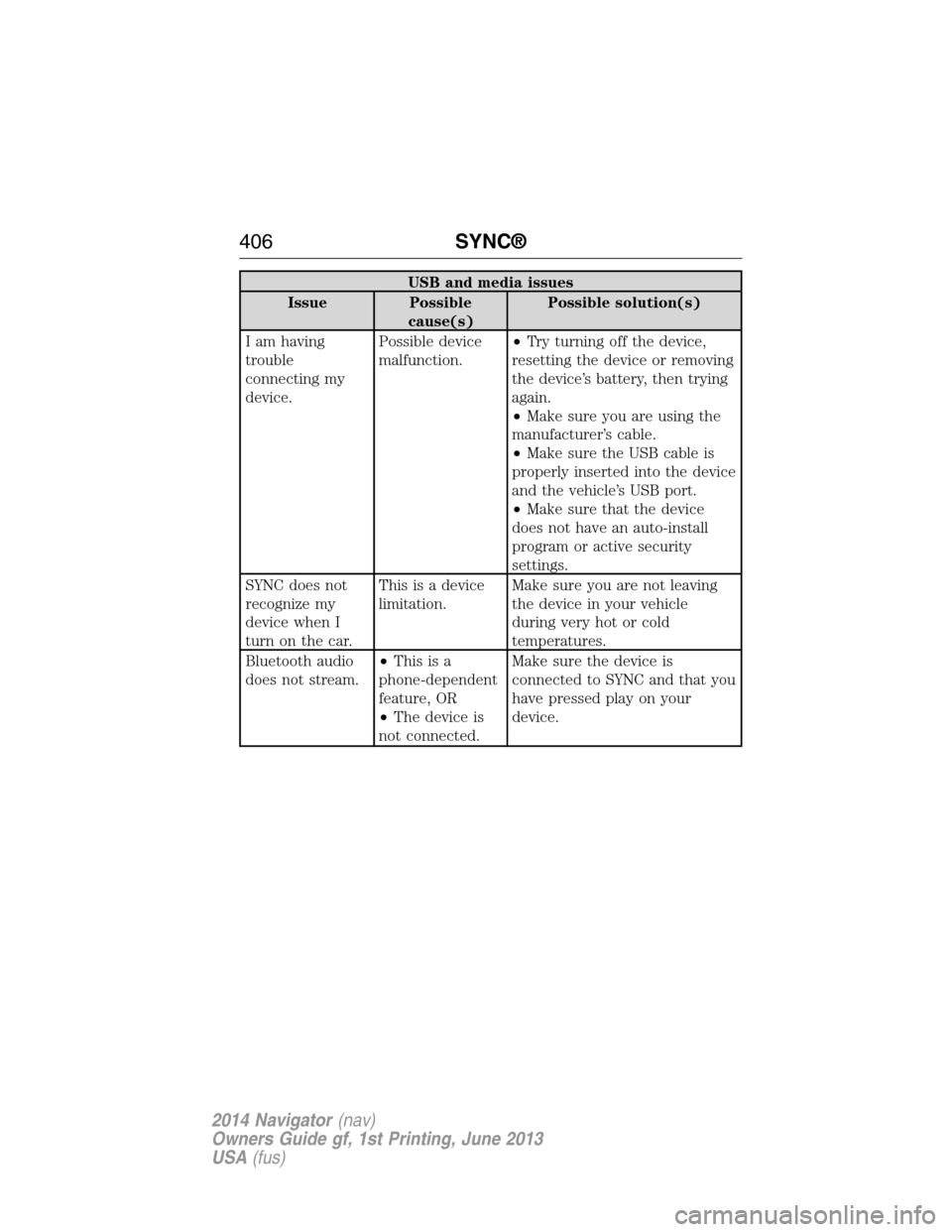
USB and media issues
Issue Possible
cause(s)Possible solution(s)
I am having
trouble
connecting my
device.Possible device
malfunction.•Try turning off the device,
resetting the device or removing
the device’s battery, then trying
again.
•Make sure you are using the
manufacturer’s cable.
•Make sure the USB cable is
properly inserted into the device
and the vehicle’s USB port.
•Make sure that the device
does not have an auto-install
program or active security
settings.
SYNC does not
recognize my
device when I
turn on the car.This is a device
limitation.Make sure you are not leaving
the device in your vehicle
during very hot or cold
temperatures.
Bluetooth audio
does not stream.•Thisisa
phone-dependent
feature, OR
•The device is
not connected.Make sure the device is
connected to SYNC and that you
have pressed play on your
device.
406SYNC®
2014 Navigator(nav)
Owners Guide gf, 1st Printing, June 2013
USA(fus)
Page 409 of 506
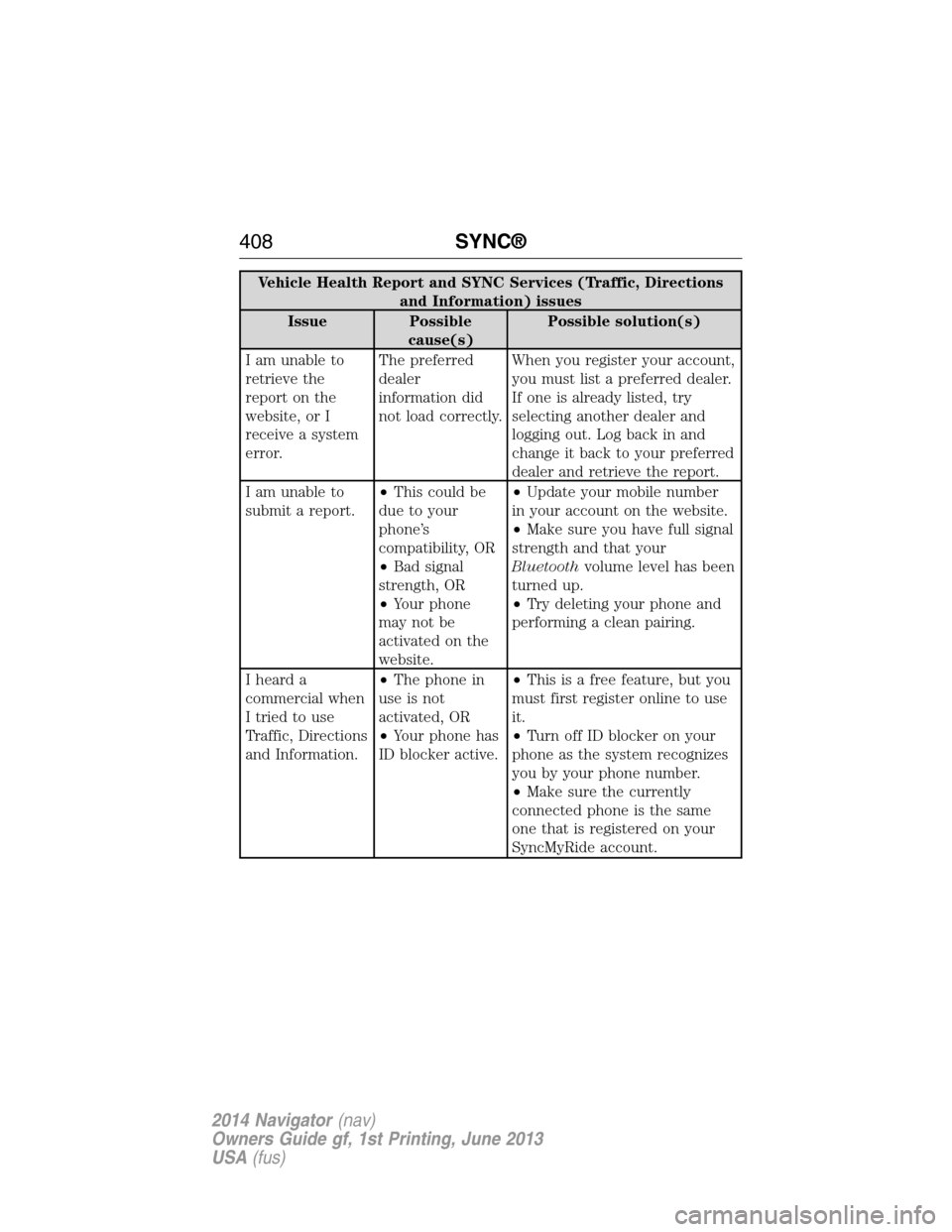
Vehicle Health Report and SYNC Services (Traffic, Directions
and Information) issues
Issue Possible
cause(s)Possible solution(s)
I am unable to
retrieve the
report on the
website, or I
receive a system
error.The preferred
dealer
information did
not load correctly.When you register your account,
you must list a preferred dealer.
If one is already listed, try
selecting another dealer and
logging out. Log back in and
change it back to your preferred
dealer and retrieve the report.
I am unable to
submit a report.•This could be
due to your
phone’s
compatibility, OR
•Bad signal
strength, OR
•Your phone
may not be
activated on the
website.•Update your mobile number
in your account on the website.
•Make sure you have full signal
strength and that your
Bluetoothvolume level has been
turned up.
•Try deleting your phone and
performing a clean pairing.
I heard a
commercial when
I tried to use
Traffic, Directions
and Information.•The phone in
use is not
activated, OR
•Your phone has
ID blocker active.•This is a free feature, but you
must first register online to use
it.
•Turn off ID blocker on your
phone as the system recognizes
you by your phone number.
•Make sure the currently
connected phone is the same
one that is registered on your
SyncMyRide account.
408SYNC®
2014 Navigator(nav)
Owners Guide gf, 1st Printing, June 2013
USA(fus)
Page 416 of 506
Display mode voice commands
“Night”
“Auto”
“Help”
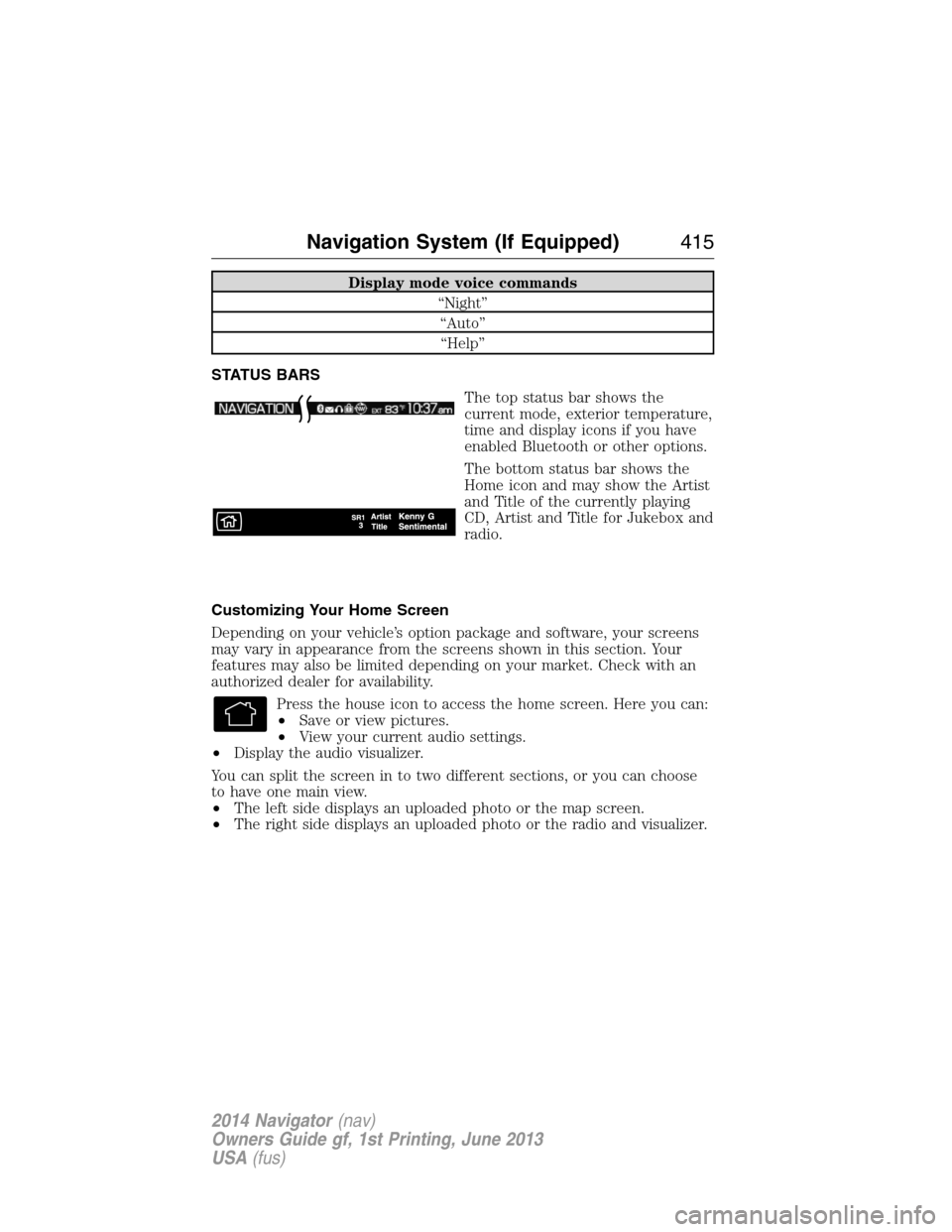
STATUS BARS
The top status bar shows the
current mode, exterior temperature,
time and display icons if you have
enabled Bluetooth or other options.
The bottom status bar shows the
Home icon and may show the Artist
and Title of the currently playing
CD, Artist and Title for Jukebox and
radio.
Customizing Your Home Screen
Depending on your vehicle’s option package and software, your screens
may vary in appearance from the screens shown in this section. Your
features may also be limited depending on your market. Check with an
authorized dealer for availability.
Press the house icon to access the home screen. Here you can:
•Save or view pictures.
•View your current audio settings.
•Display the audio visualizer.
You can split the screen in to two different sections, or you can choose
to have one main view.
•The left side displays an uploaded photo or the map screen.
•The right side displays an uploaded photo or the radio and visualizer.
Navigation System (If Equipped)415
2014 Navigator(nav)
Owners Guide gf, 1st Printing, June 2013
USA(fus)
Page 503 of 506
M
MAP DVD - Loading and
Unloading ..................................353
Map icons ..................................462
Map mode ..................................461
Map updates ..............................465
Master lighting switch ................89
Media Bluetooth menu options
(adding, connecting, deleting,
turning on/off) ..........................401
Message center .........................109
warning messages ...................115
Mirrors ...................................95, 98
programmable memory ............60
side view mirrors (power) .......95
signal ...................................96–97
Moon roof ..................................100
Motorcraft® parts .............278, 324
MyKey ..........................................62
N
Navigation end user license
agreement ..................................475
Navigation features ...................448
O
Octane rating ............................167
P
Pairing other phones ................370
Pairing your phone for the first
time ............................................370Parental MyKey programming ...62
Parking brake ............................191
Parts (see Motorcraft®
parts) .........................................324
Phone Bluetooth menu options
(adding, connecting, deleting,
turning on/off) ..........................381
Phone redial ..............................375
Playing a DVD in the system ...353
Playing music (by artist,
album, genre, playlist, tracks,
similar) ......................................398
POI categories ...........................456
Point of Interest (POI) .............456
Power deployable running
boards ........................................214
Power distribution box
(see Fuses) .......................247, 251
Power door locks ........................69
Power liftgate ..............................73
Power mirrors .............................95
Powerpoint ................................155
Power steering ..........................203
fluid, checking and adding ....264
fluid, refill capacity ................320
fluid, specifications .................320
Power Windows ...........................94
Privacy information ..................366
Putting a call on/off hold .........373
Q
Quick touch buttons .................464
502Index
2014 Navigator(nav)
Owners Guide gf, 1st Printing, June 2013
USA(fus)