mirror LINCOLN NAVIGATOR 2015 Owner's Guide
[x] Cancel search | Manufacturer: LINCOLN, Model Year: 2015, Model line: NAVIGATOR, Model: LINCOLN NAVIGATOR 2015Pages: 475, PDF Size: 5.13 MB
Page 284 of 475
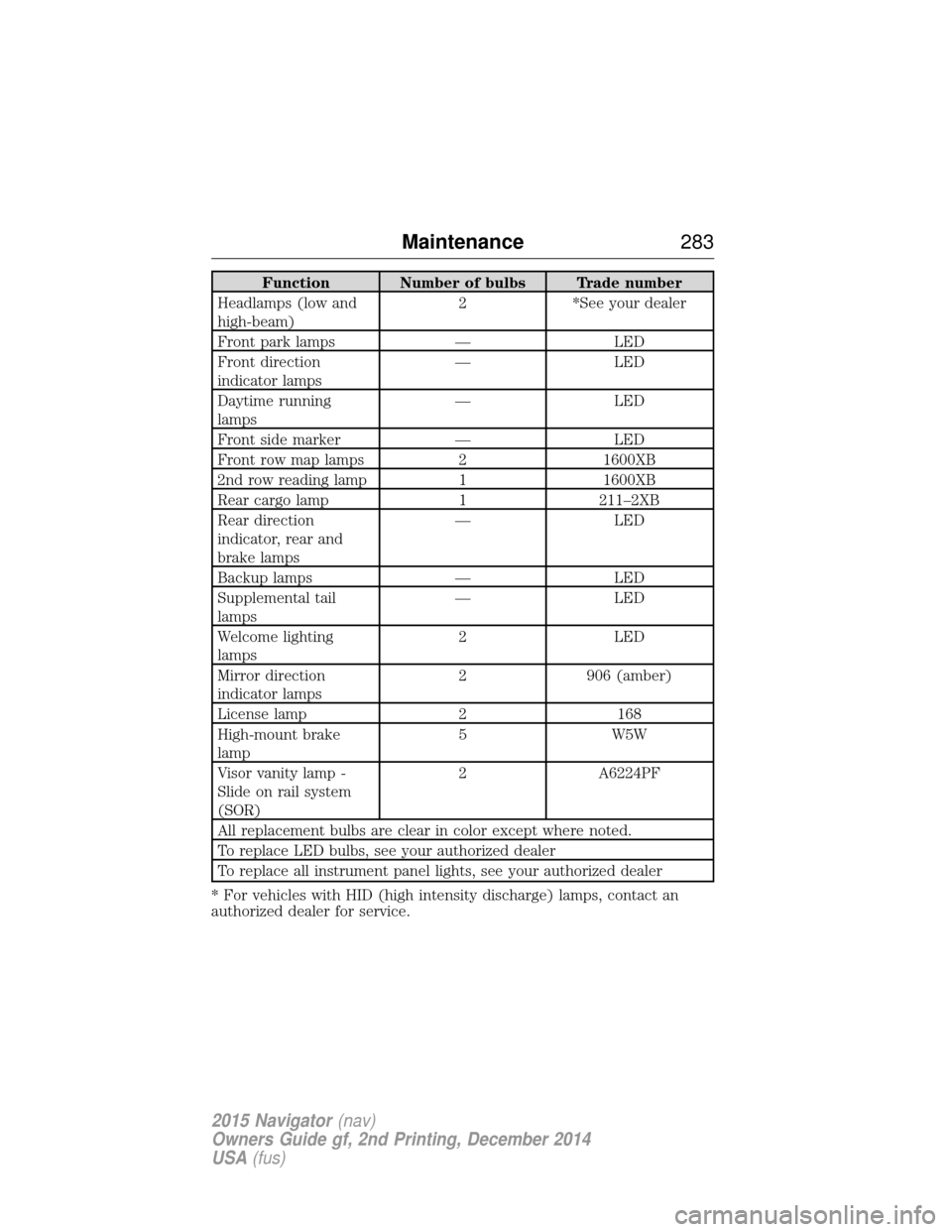
Function Number of bulbs Trade number
Headlamps (low and
high-beam) 2 *See your dealer
Front park lamps — LED
Front direction
indicator lamps — LED
Daytime running
lamps — LED
Front side marker — LED
Front row map lamps 2 1600XB
2nd row reading lamp 1 1600XB
Rear cargo lamp 1 211–2XB
Rear direction
indicator, rear and
brake lamps — LED
Backup lamps — LED
Supplemental tail
lamps — LED
Welcome lighting
lamps 2 LED
Mirror direction
indicator lamps 2 906 (amber)
License lamp 2 168
High-mount brake
lamp 5 W5W
Visor vanity lamp -
Slide on rail system
(SOR) 2 A6224PF
All replacement bulbs are clear in color except where noted.
To replace LED bulbs, see your authorized dealer
To replace all instrument panel lights, see your authorized dealer
* For vehicles with HID (high intensity discharge) lamps, contact an
authorized dealer for service.
Maintenance 283
2015 Navigator(nav)
Owners Guide gf, 2nd Printing, December 2014
USA (fus)
Page 287 of 475
WAXING
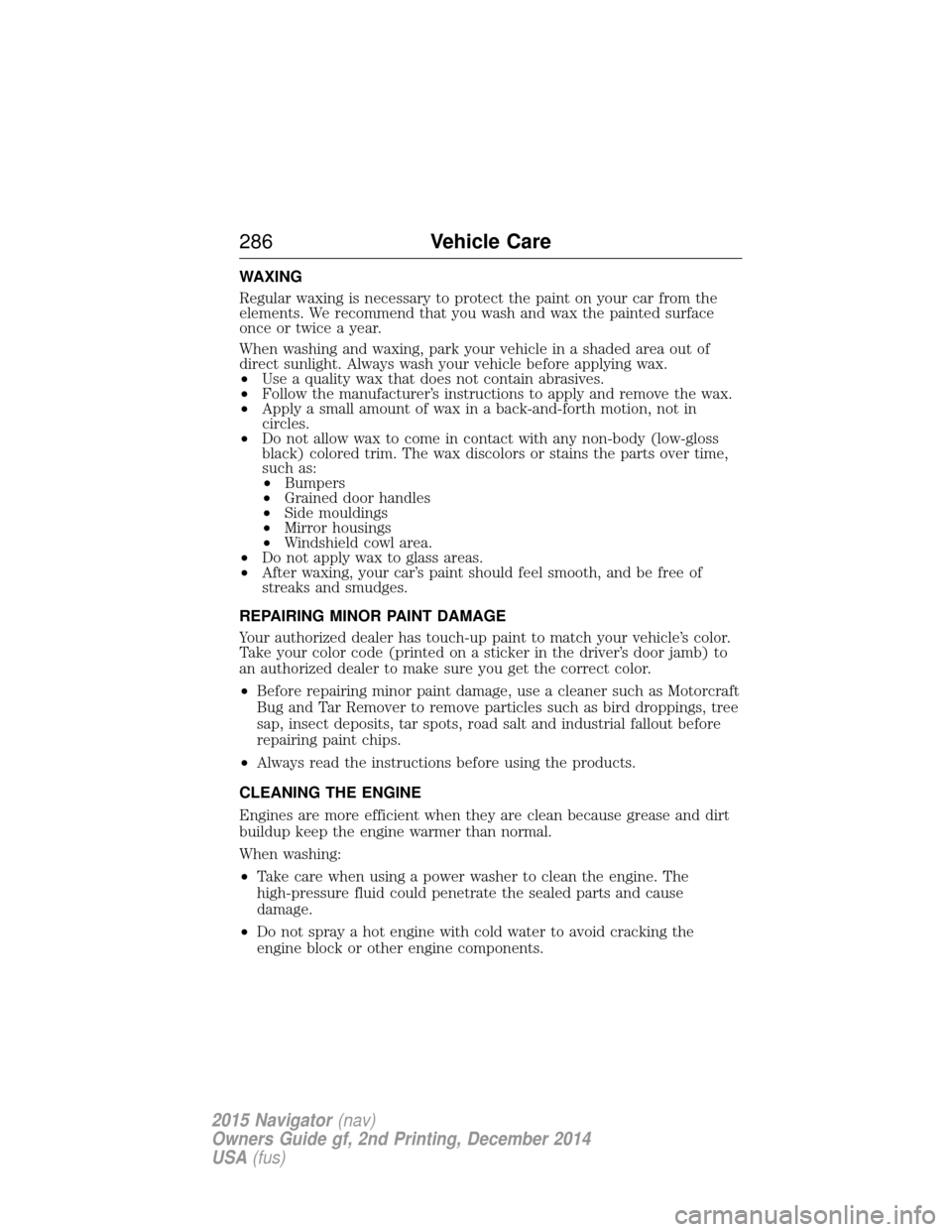
Regular waxing is necessary to protect the paint on your car from the
elements. We recommend that you wash and wax the painted surface
once or twice a year.
When washing and waxing, park your vehicle in a shaded area out of
direct sunlight. Always wash your vehicle before applying wax.
•Use a quality wax that does not contain abrasives.
• Follow the manufacturer’s instructions to apply and remove the wax.
• Apply a small amount of wax in a back-and-forth motion, not in
circles.
• Do not allow wax to come in contact with any non-body (low-gloss
black) colored trim. The wax discolors or stains the parts over time,
such as:
• Bumpers
• Grained door handles
• Side mouldings
• Mirror housings
• Windshield cowl area.
• Do not apply wax to glass areas.
• After waxing, your car’s paint should feel smooth, and be free of
streaks and smudges.
REPAIRING MINOR PAINT DAMAGE
Your authorized dealer has touch-up paint to match your vehicle’s color.
Take your color code (printed on a sticker in the driver’s door jamb) to
an authorized dealer to make sure you get the correct color.
• Before repairing minor paint damage, use a cleaner such as Motorcraft
Bug and Tar Remover to remove particles such as bird droppings, tree
sap, insect deposits, tar spots, road salt and industrial fallout before
repairing paint chips.
• Always read the instructions before using the products.
CLEANING THE ENGINE
Engines are more efficient when they are clean because grease and dirt
buildup keep the engine warmer than normal.
When washing:
• Take care when using a power washer to clean the engine. The
high-pressure fluid could penetrate the sealed parts and cause
damage.
• Do not spray a hot engine with cold water to avoid cracking the
engine block or other engine components.
286 Vehicle Care
2015 Navigator(nav)
Owners Guide gf, 2nd Printing, December 2014
USA (fus)
Page 417 of 475
Note:When the system is controlling the fan speed automatically, all
the fan speed indicators turn off.
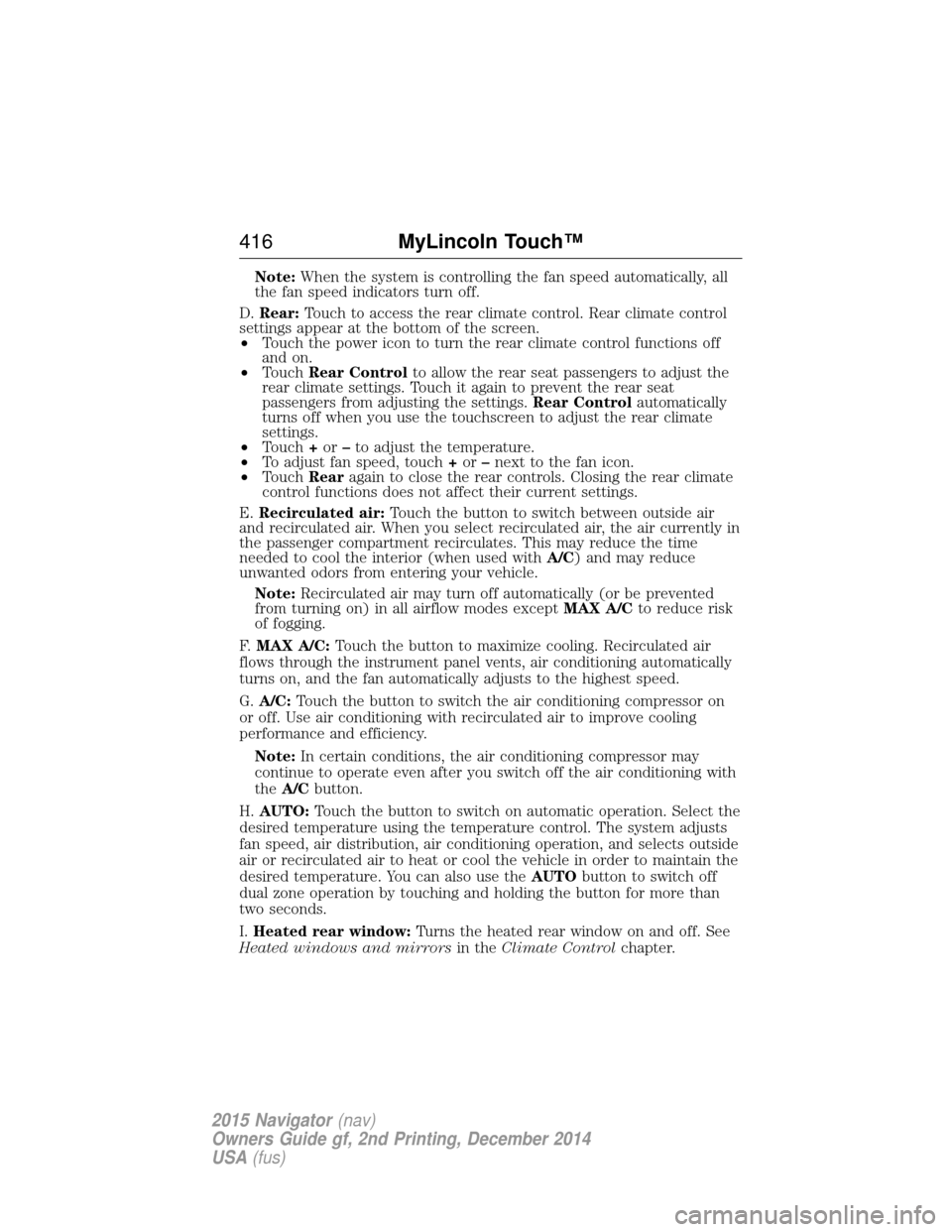
D. Rear: Touch to access the rear climate control. Rear climate control
settings appear at the bottom of the screen.
• Touch the power icon to turn the rear climate control functions off
and on.
• Touch Rear Control to allow the rear seat passengers to adjust the
rear climate settings. Touch it again to prevent the rear seat
passengers from adjusting the settings. Rear Controlautomatically
turns off when you use the touchscreen to adjust the rear climate
settings.
• Touch +or –to adjust the temperature.
• To adjust fan speed, touch +or –next to the fan icon.
• Touch Rearagain to close the rear controls. Closing the rear climate
control functions does not affect their current settings.
E. Recirculated air: Touch the button to switch between outside air
and recirculated air. When you select recirculated air, the air currently in
the passenger compartment recirculates. This may reduce the time
needed to cool the interior (when used with A/C) and may reduce
unwanted odors from entering your vehicle.
Note: Recirculated air may turn off automatically (or be prevented
from turning on) in all airflow modes except MAX A/Cto reduce risk
of fogging.
F. MAX A/C: Touch the button to maximize cooling. Recirculated air
flows through the instrument panel vents, air conditioning automatically
turns on, and the fan automatically adjusts to the highest speed.
G. A/C: Touch the button to switch the air conditioning compressor on
or off. Use air conditioning with recirculated air to improve cooling
performance and efficiency.
Note: In certain conditions, the air conditioning compressor may
continue to operate even after you switch off the air conditioning with
the A/C button.
H. AUTO: Touch the button to switch on automatic operation. Select the
desired temperature using the temperature control. The system adjusts
fan speed, air distribution, air conditioning operation, and selects outside
air or recirculated air to heat or cool the vehicle in order to maintain the
desired temperature. You can also use the AUTObutton to switch off
dual zone operation by touching and holding the button for more than
two seconds.
I. Heated rear window: Turns the heated rear window on and off. See
Heated windows and mirrors in theClimate Control chapter.
416 MyLincoln Touch™
2015 Navigator(nav)
Owners Guide gf, 2nd Printing, December 2014
USA (fus)
Page 472 of 475
How to use voice commands ...361
I
Ignition .......................................327
Illuminated visor mirror .............98
Inspection/maintenance (I/M)
testing ........................................171
Instrument panelcleaning ...................................289
cluster ......................................100
lighting up panel and interior..89
Intelligent Access Key ................54
J
Jack ............................................318 positioning ...............................318
storage .....................................318
Jump-starting your vehicle ......244
K
Keyless entry system autolock .....................................68
keypad .......................................74
locking and unlocking doors ....75
programming entry code .........74
L
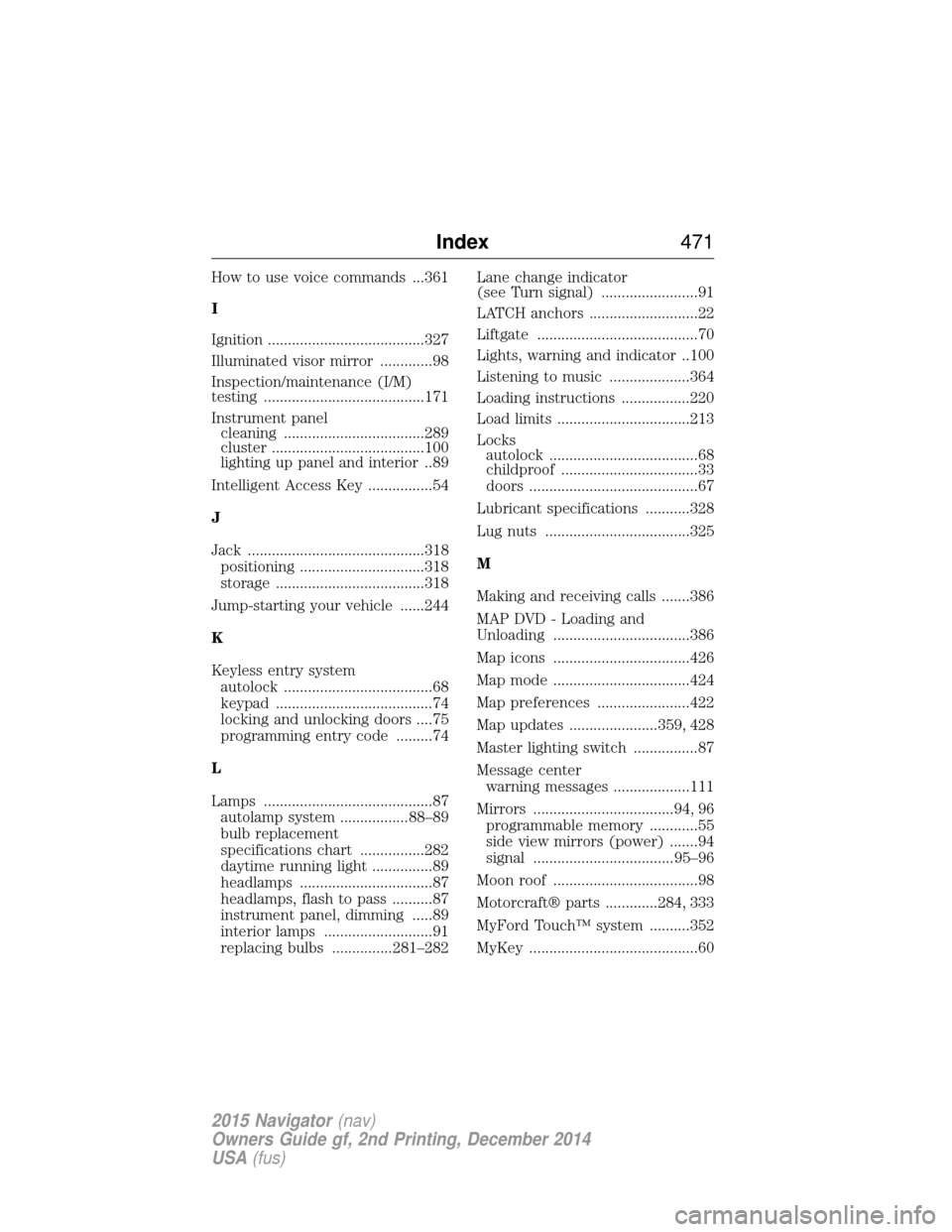
Lamps ..........................................87 autolamp system .................88–89
bulb replacement
specifications chart ................282
daytime running light ...............89
headlamps .................................87
headlamps, flash to pass ..........87
instrument panel, dimming .....89
interior lamps ...........................91
replacing bulbs ...............281–282 Lane change indicator
(see Turn signal) ........................91
LATCH anchors ...........................22
Liftgate ........................................70
Lights, warning and indicator ..100
Listening to music ....................364
Loading instructions .................220
Load limits .................................213
Locks
autolock .....................................68
childproof ..................................33
doors ..........................................67
Lubricant specifications ...........328
Lug nuts ....................................325
M
Making and receiving calls .......386
MAP DVD - Loading and
Unloading ..................................386
Map icons ..................................426
Map mode ..................................424
Map preferences .......................422
Map updates ......................359, 428
Master lighting switch ................87
Message center warning messages ...................111
Mirrors ...................................94, 96 programmable memory ............55
side view mirrors (power) .......94
signal ...................................95–96
Moon roof ....................................98
Motorcraft® parts .............284, 333
MyFord Touch™ system ..........352
MyKey ..........................................60
Index 471
2015 Navigator(nav)
Owners Guide gf, 2nd Printing, December 2014
USA (fus)
Page 473 of 475
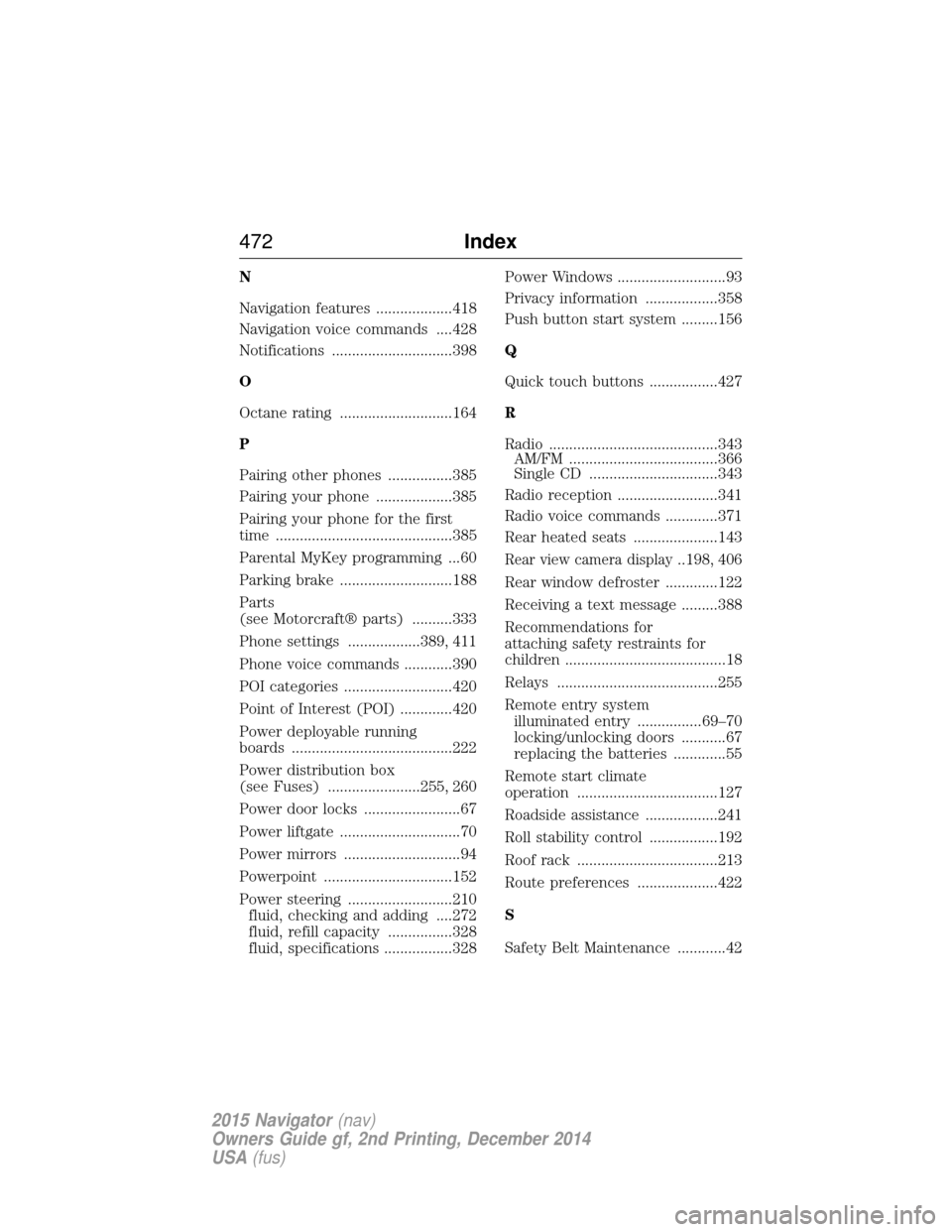
N
Navigation features ...................418
Navigation voice commands ....428
Notifications ..............................398
O
Octane rating ............................164
P
Pairing other phones ................385
Pairing your phone ...................385
Pairing your phone for the first
time ............................................385
Parental MyKey programming ...60
Parking brake ............................188
Parts
(see Motorcraft® parts) ..........333
Phone settings ..................389, 411
Phone voice commands ............390
POI categories ...........................420
Point of Interest (POI) .............420
Power deployable running
boards ........................................222
Power distribution box
(see Fuses) .......................255, 260
Power door locks ........................67
Power liftgate ..............................70
Power mirrors .............................94
Powerpoint ................................152
Power steering ..........................210fluid, checking and adding ....272
fluid, refill capacity ................328
fluid, specifications .................328 Power Windows ...........................93
Privacy information ..................358
Push button start system .........156
Q
Quick touch buttons .................427
R
Radio ..........................................343
AM/FM .....................................366
Single CD ................................343
Radio reception .........................341
Radio voice commands .............371
Rear heated seats .....................143
Rear view camera display..198, 406
Rear window defroster .............122
Receiving a text message .........388
Recommendations for
attaching safety restraints for
children ........................................18
Relays ........................................255
Remote entry system illuminated entry ................69–70
locking/unlocking doors ...........67
replacing the batteries .............55
Remote start climate
operation ...................................127
Roadside assistance ..................241
Roll stability control .................192
Roof rack ...................................213
Route preferences ....................422
S
Safety Belt Maintenance ............42
472 Index
2015 Navigator(nav)
Owners Guide gf, 2nd Printing, December 2014
USA (fus)