mirror LINCOLN NAVIGATOR 2015 Owner's Manual
[x] Cancel search | Manufacturer: LINCOLN, Model Year: 2015, Model line: NAVIGATOR, Model: LINCOLN NAVIGATOR 2015Pages: 475, PDF Size: 5.13 MB
Page 206 of 475
BLIND SPOT INFORMATION SYSTEM (BLIS®) WITH CROSS
TRAFFIC ALERT (CTA) (IF EQUIPPED)
WARNING:To help avoid injuries, NEVER use the BLIS® as a
replacement for using the interior and exterior mirrors and
looking over your shoulder before changing lanes. BLIS® is not a
replacement for careful driving.
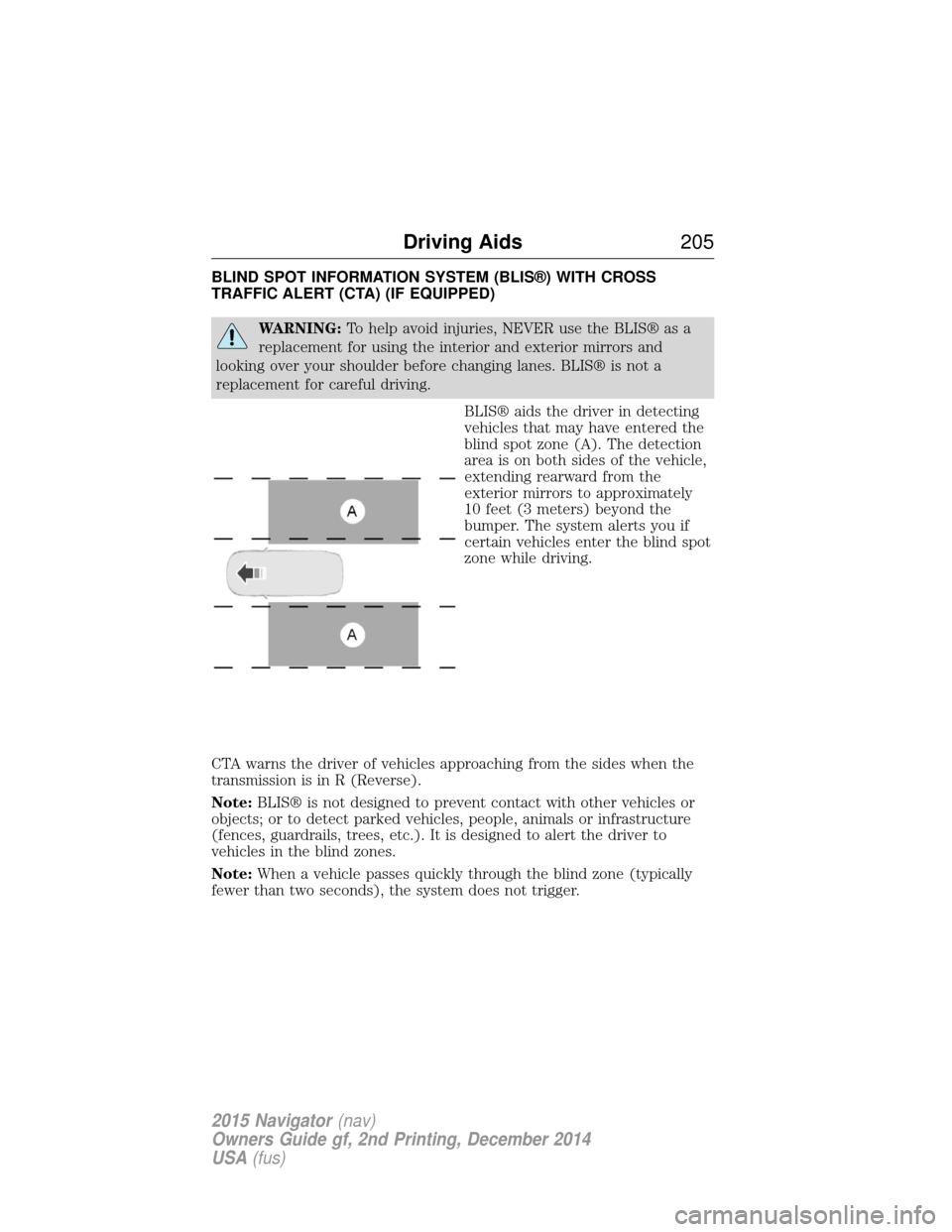
BLIS® aids the driver in detecting
vehicles that may have entered the
blind spot zone (A). The detection
area is on both sides of the vehicle,
extending rearward from the
exterior mirrors to approximately
10 feet (3 meters) beyond the
bumper. The system alerts you if
certain vehicles enter the blind spot
zone while driving.
CTA warns the driver of vehicles approaching from the sides when the
transmission is in R (Reverse).
Note: BLIS® is not designed to prevent contact with other vehicles or
objects; or to detect parked vehicles, people, animals or infrastructure
(fences, guardrails, trees, etc.). It is designed to alert the driver to
vehicles in the blind zones.
Note: When a vehicle passes quickly through the blind zone (typically
fewer than two seconds), the system does not trigger.
Driving Aids 205
2015 Navigator(nav)
Owners Guide gf, 2nd Printing, December 2014
USA (fus)
Page 207 of 475
Using the Systems
BLIS® turns on when the engine is started and the vehicle is driven
forward above 3 mph (5 km/h); it remains on while the transmission is in
D (Drive) or N (Neutral). If shifted out of D (Drive) or N (Neutral), the
system enters CTA mode. Once shifted back into D (Drive), BLIS® turns
back on when the vehicle is driven above 3 mph (5 km/h).
Note:BLIS® does not function in R (Reverse) or P (Park) or provide
any additional warning when a turn signal is on.
CTA detects approaching vehicles from up to 45 feet (14 meters) away
though coverage decreases when the sensors are blocked. Reversing
slowly helps increase the coverage area and effectiveness.
WARNING: To help avoid personal injury, NEVER use the CTA
system as a replacement for using the interior and exterior
mirrors and looking over your shoulder before backing out of a parking
space. CTA is not a replacement for careful driving.
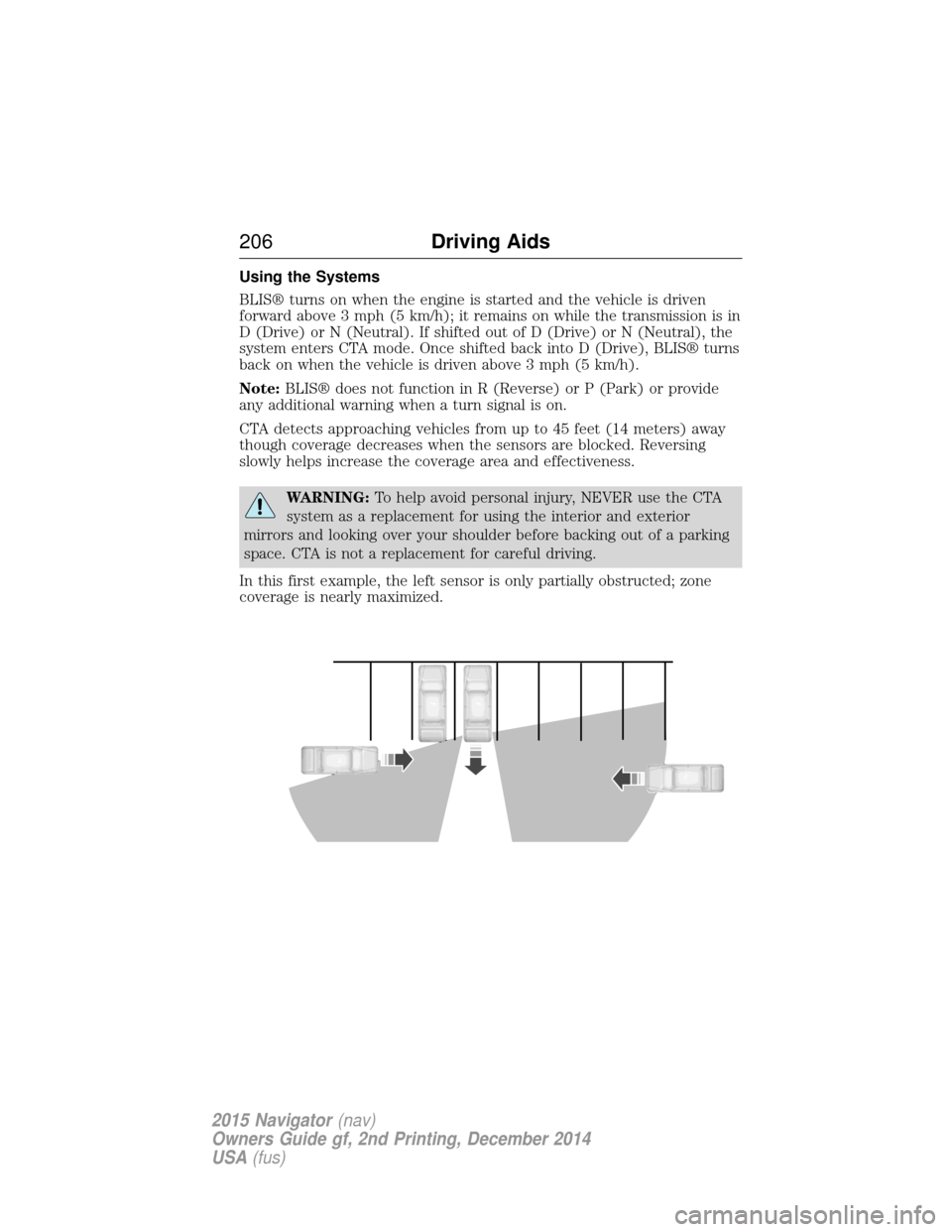
In this first example, the left sensor is only partially obstructed; zone
coverage is nearly maximized.
206 Driving Aids
2015 Navigator(nav)
Owners Guide gf, 2nd Printing, December 2014
USA (fus)
Page 208 of 475
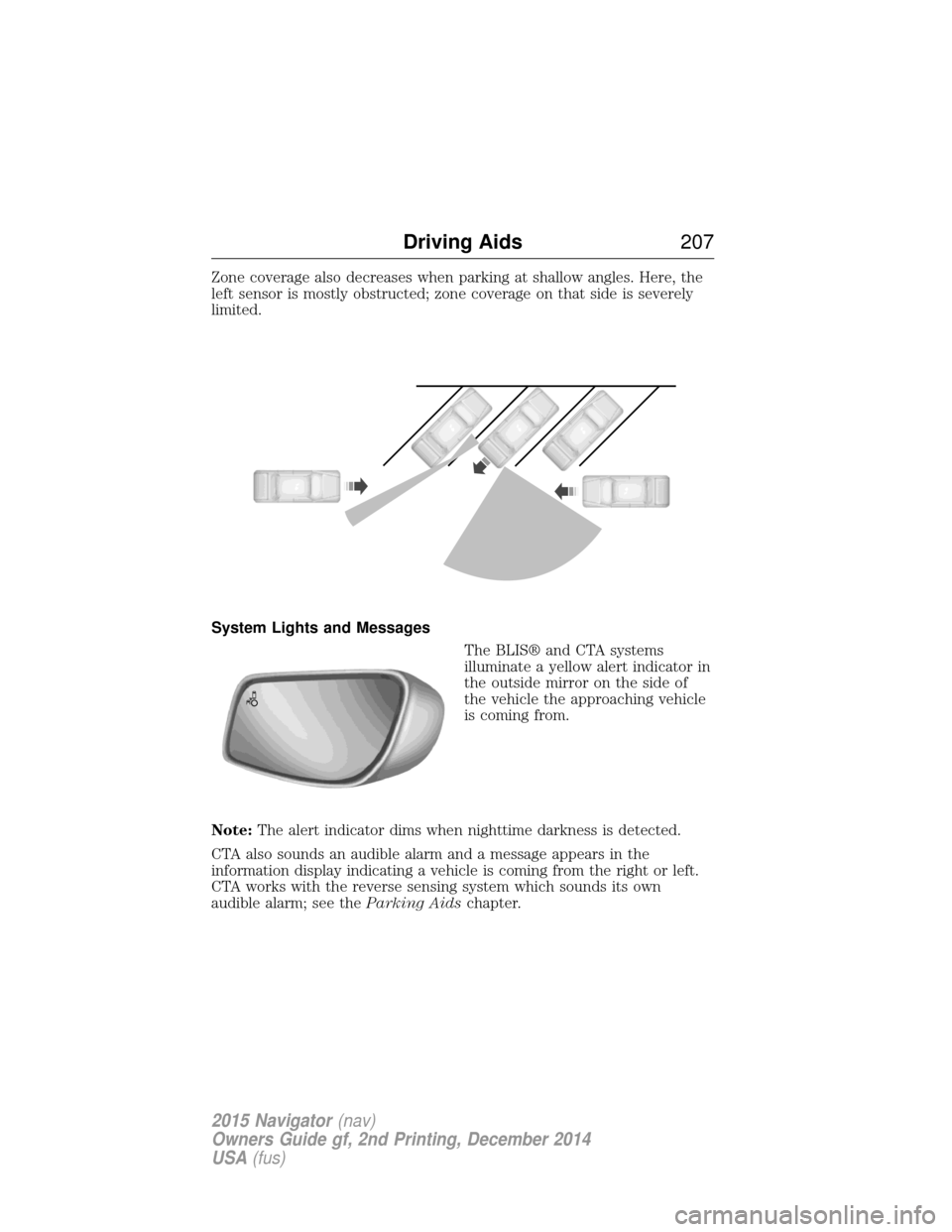
Zone coverage also decreases when parking at shallow angles. Here, the
left sensor is mostly obstructed; zone coverage on that side is severely
limited.
System Lights and MessagesThe BLIS® and CTA systems
illuminate a yellow alert indicator in
the outside mirror on the side of
the vehicle the approaching vehicle
is coming from.
Note: The alert indicator dims when nighttime darkness is detected.
CTA also sounds an audible alarm and a message appears in the
information display indicating a vehicle is coming from the right or left.
CTA works with the reverse sensing system which sounds its own
audible alarm; see the Parking Aidschapter.
Driving Aids 207
2015 Navigator(nav)
Owners Guide gf, 2nd Printing, December 2014
USA (fus)
Page 209 of 475
System Sensors
WARNING:Just prior to the system recognizing a blocked
condition and alerting the driver, the number of missed objects
will increase. To help avoid injuries, NEVER use the BLIS® as a
replacement for using the side and rear view mirrors and looking over
your shoulder before changing lanes. BLIS® is not a replacement for
careful driving.
Note: It is possible to get a blockage warning with no blockage present;
this is rare and known as a false blockage warning. A false blocked
condition either self-corrects or clears after a key cycle.
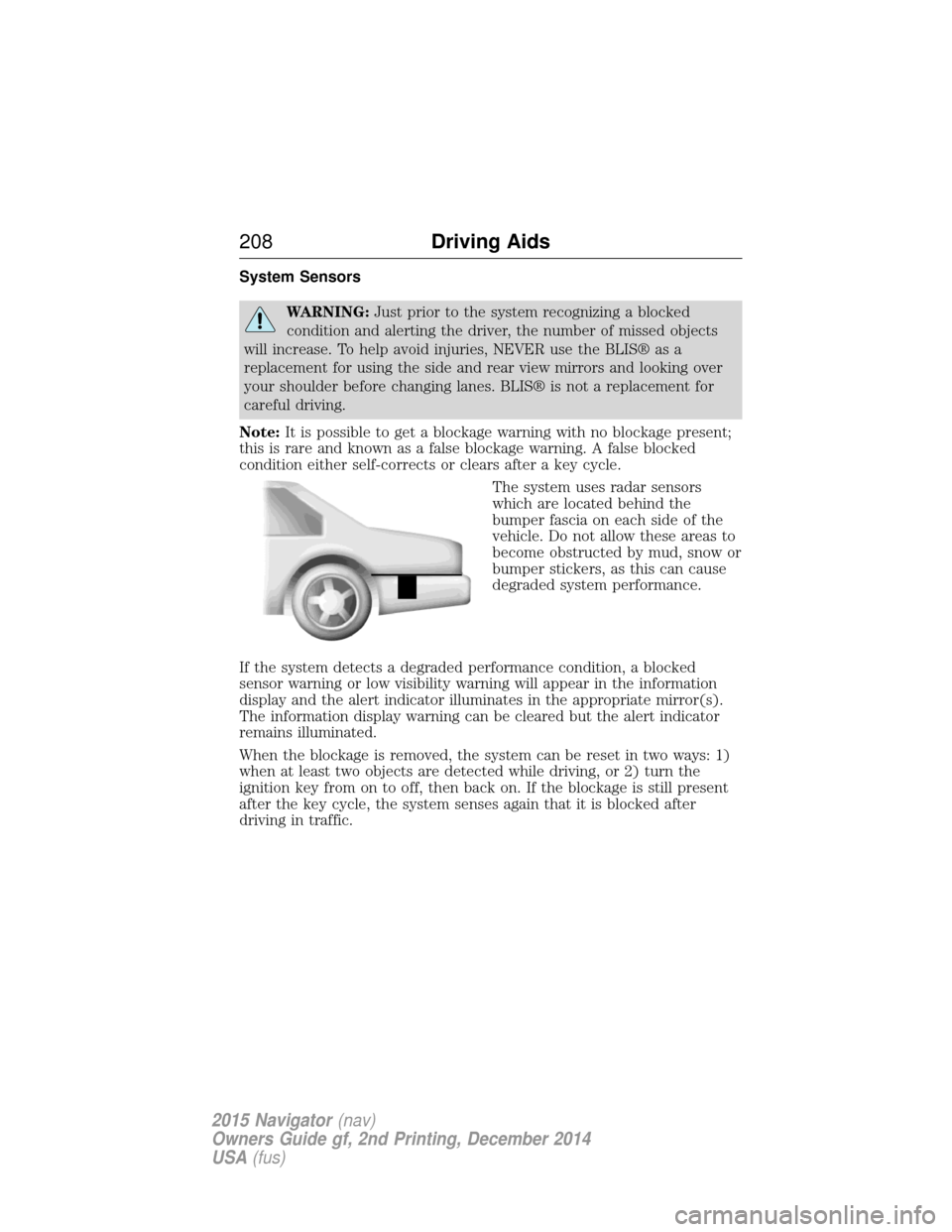
The system uses radar sensors
which are located behind the
bumper fascia on each side of the
vehicle. Do not allow these areas to
become obstructed by mud, snow or
bumper stickers, as this can cause
degraded system performance.
If the system detects a degraded performance condition, a blocked
sensor warning or low visibility warning will appear in the information
display and the alert indicator illuminates in the appropriate mirror(s).
The information display warning can be cleared but the alert indicator
remains illuminated.
When the blockage is removed, the system can be reset in two ways: 1)
when at least two objects are detected while driving, or 2) turn the
ignition key from on to off, then back on. If the blockage is still present
after the key cycle, the system senses again that it is blocked after
driving in traffic.
208 Driving Aids
2015 Navigator(nav)
Owners Guide gf, 2nd Printing, December 2014
USA (fus)
Page 211 of 475
System Errors
If either system senses a problem with the left or right sensor, the
BLIS® indicator in the information display will illuminate and remain on.
Also,BLIND SPOT SYSTEM FAULT orCROSS TRAFFIC SYSTEM
FAULT message will appear. When problems that may cause the left or
right indicator not to illuminate, only the information display message
faults appear.
Switching the Systems Off and On
One or both systems can be switched off temporarily by using the
information display control; refer to the Information Displaychapter.
When you switch off the Blind Spot Information System, you will not
receive alerts and the information display will display a system off
message. The yellow alert indicator in the outside mirror will also flash
twice. The system switches back on whenever you switch the ignition on.
You can also have one or both systems switched off permanently at an
authorized dealer. Once switched off, the system can only be switched
back on at an authorized dealer.
STEERING
Electric Power Steering
WARNING: The electric power steering system has diagnostic
checks that continuously monitor the system to ensure proper
operation. When a system error is detected a steering message will
appear in the information display.
WARNING: The electric power steering system has diagnostic
checks that continuously monitor the system to ensure proper
operation of the electronic system. When an electronic error is
detected, a message will be displayed in the information display. If this
happens, stop the vehicle in a safe place, and turn off the engine. After
at least 10 seconds, reset the system by restarting the engine, and
watch the information display for a steering message. If a steering
message returns, or returns while driving, take the vehicle to your
dealer to have it checked.
210 Driving Aids
2015 Navigator(nav)
Owners Guide gf, 2nd Printing, December 2014
USA (fus)
Page 257 of 475
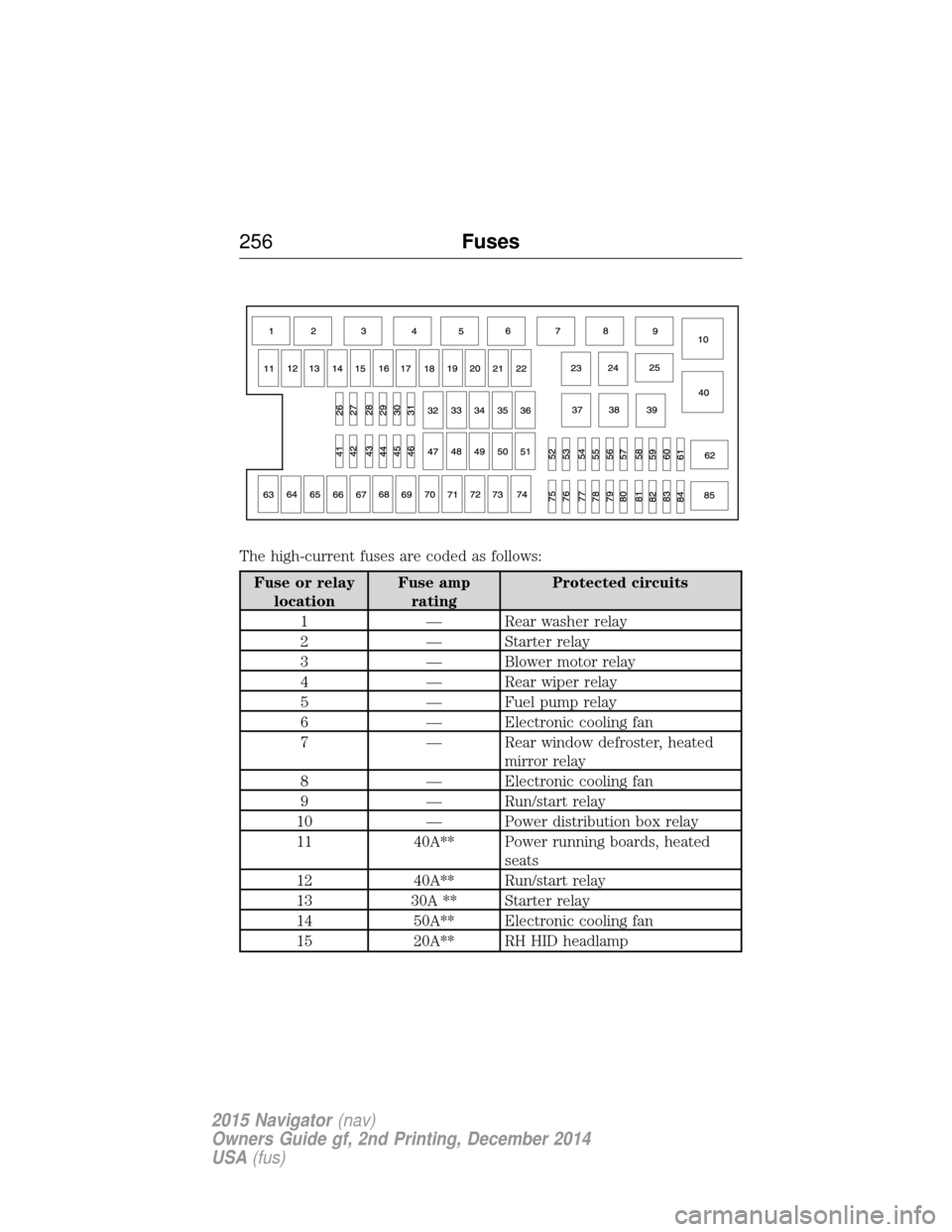
The high-current fuses are coded as follows:
Fuse or relaylocation Fuse amp
rating Protected circuits
1 — Rear washer relay
2 — Starter relay
3 — Blower motor relay
4 — Rear wiper relay
5 — Fuel pump relay
6 — Electronic cooling fan
7 — Rear window defroster, heated mirror relay
8 — Electronic cooling fan
9 — Run/start relay
10 — Power distribution box relay
11 40A** Power running boards, heated seats
12 40A** Run/start relay
13 30A ** Starter relay
14 50A** Electronic cooling fan
15 20A** RH HID headlamp
256 Fuses
2015 Navigator(nav)
Owners Guide gf, 2nd Printing, December 2014
USA (fus)
Page 259 of 475
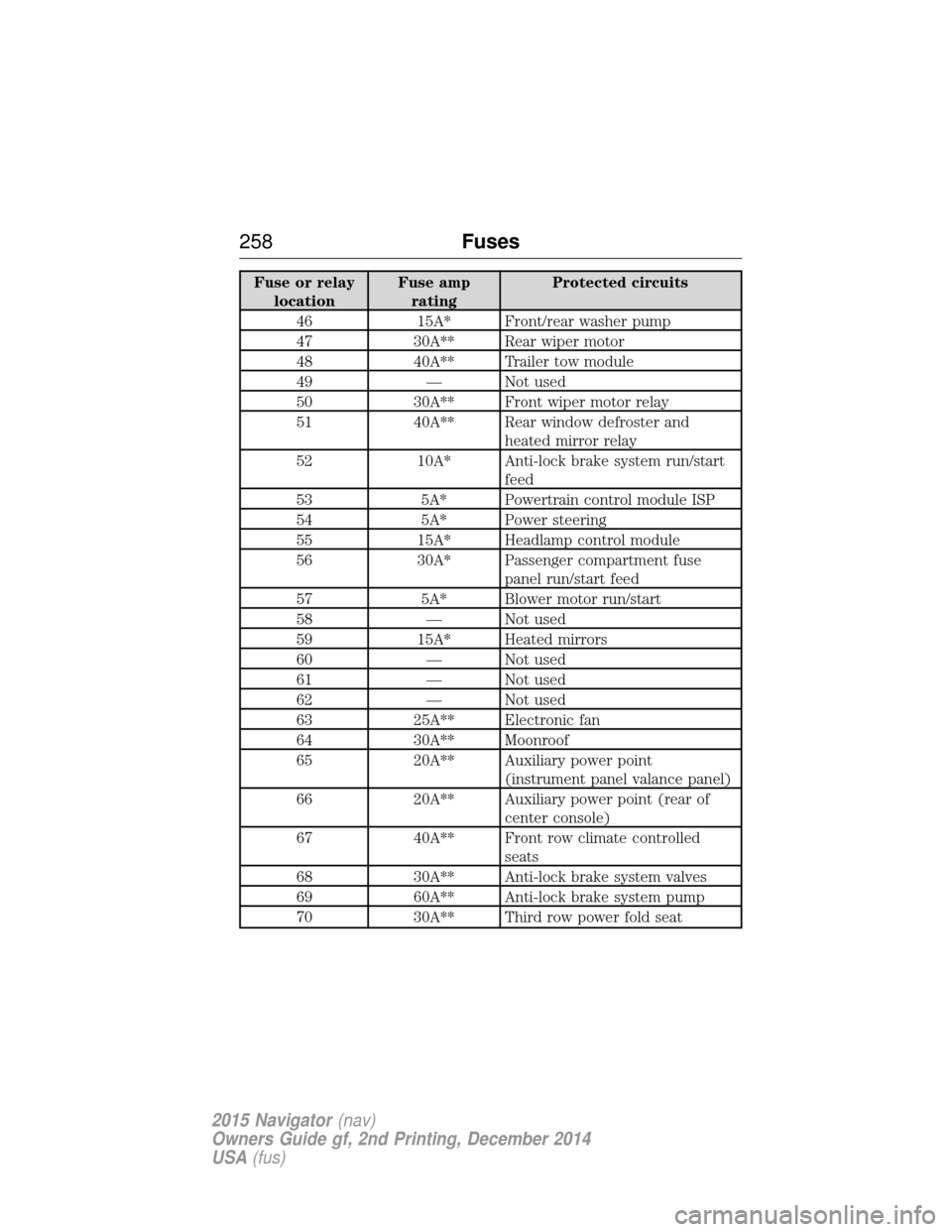
Fuse or relaylocation Fuse amp
rating Protected circuits
46 15A* Front/rear washer pump
47 30A** Rear wiper motor
48 40A** Trailer tow module
49 — Not used
50 30A** Front wiper motor relay
51 40A** Rear window defroster and heated mirror relay
52 10A* Anti-lock brake system run/start feed
53 5A* Powertrain control module ISP
54 5A* Power steering
55 15A* Headlamp control module
56 30A* Passenger compartment fuse panel run/start feed
57 5A* Blower motor run/start
58 — Not used
59 15A* Heated mirrors
60 — Not used
61 — Not used
62 — Not used
63 25A** Electronic fan
64 30A** Moonroof
65 20A** Auxiliary power point (instrument panel valance panel)
66 20A** Auxiliary power point (rear of center console)
67 40A** Front row climate controlled seats
68 30A** Anti-lock brake system valves
69 60A** Anti-lock brake system pump
70 30A** Third row power fold seat
258 Fuses
2015 Navigator(nav)
Owners Guide gf, 2nd Printing, December 2014
USA (fus)
Page 262 of 475
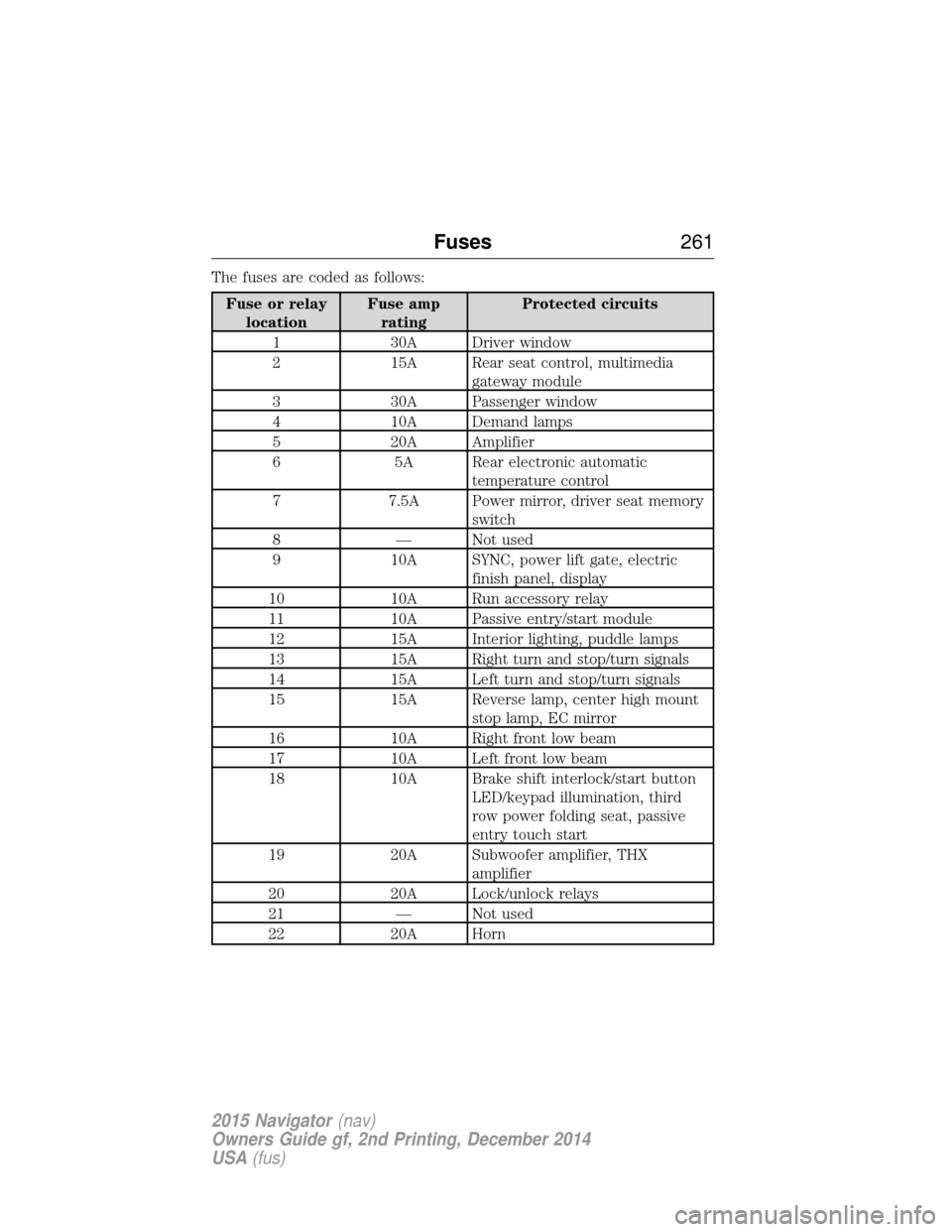
The fuses are coded as follows:
Fuse or relaylocation Fuse amp
rating Protected circuits
1 30A Driver window
2 15A Rear seat control, multimedia gateway module
3 30A Passenger window
4 10A Demand lamps
5 20A Amplifier
6 5A Rear electronic automatic temperature control
7 7.5A Power mirror, driver seat memory switch
8 — Not used
9 10A SYNC, power lift gate, electric finish panel, display
10 10A Run accessory relay
11 10A Passive entry/start module
12 15A Interior lighting, puddle lamps
13 15A Right turn and stop/turn signals
14 15A Left turn and stop/turn signals
15 15A Reverse lamp, center high mount stop lamp, EC mirror
16 10A Right front low beam
17 10A Left front low beam
18 10A Brake shift interlock/start button LED/keypad illumination, third
row power folding seat, passive
entry touch start
19 20A Subwoofer amplifier, THX amplifier
20 20A Lock/unlock relays
21 — Not used
22 20A Horn
Fuses 261
2015 Navigator(nav)
Owners Guide gf, 2nd Printing, December 2014
USA (fus)
Page 263 of 475
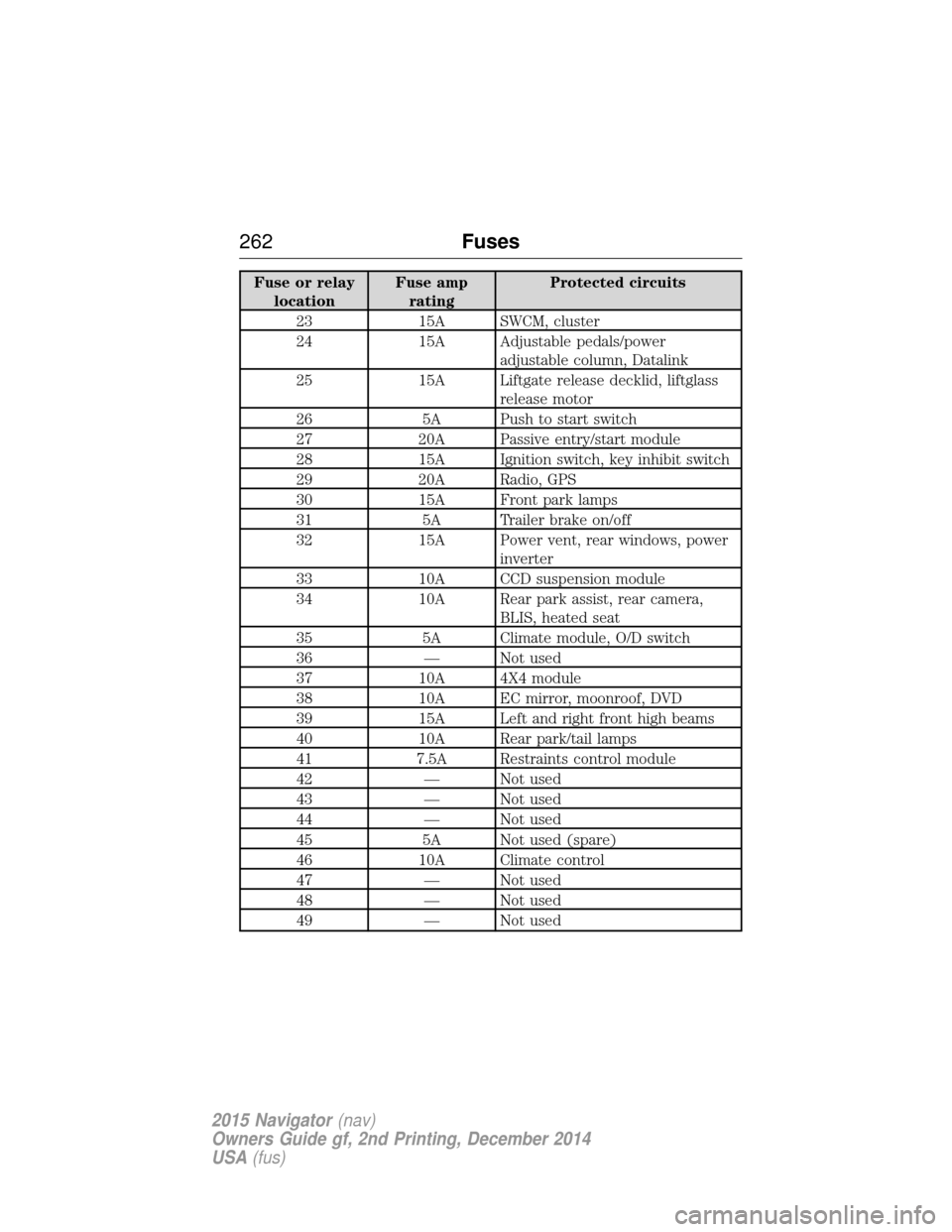
Fuse or relaylocation Fuse amp
rating Protected circuits
23 15A SWCM, cluster
24 15A Adjustable pedals/power adjustable column, Datalink
25 15A Liftgate release decklid, liftglass release motor
26 5A Push to start switch
27 20A Passive entry/start module
28 15A Ignition switch, key inhibit switch
29 20A Radio, GPS
30 15A Front park lamps
31 5A Trailer brake on/off
32 15A Power vent, rear windows, power inverter
33 10A CCD suspension module
34 10A Rear park assist, rear camera, BLIS, heated seat
35 5A Climate module, O/D switch
36 — Not used
37 10A 4X4 module
38 10A EC mirror, moonroof, DVD
39 15A Left and right front high beams
40 10A Rear park/tail lamps
41 7.5A Restraints control module
42 — Not used
43 — Not used
44 — Not used
45 5A Not used (spare)
46 10A Climate control
47 — Not used
48 — Not used
49 — Not used
262 Fuses
2015 Navigator(nav)
Owners Guide gf, 2nd Printing, December 2014
USA (fus)
Page 283 of 475
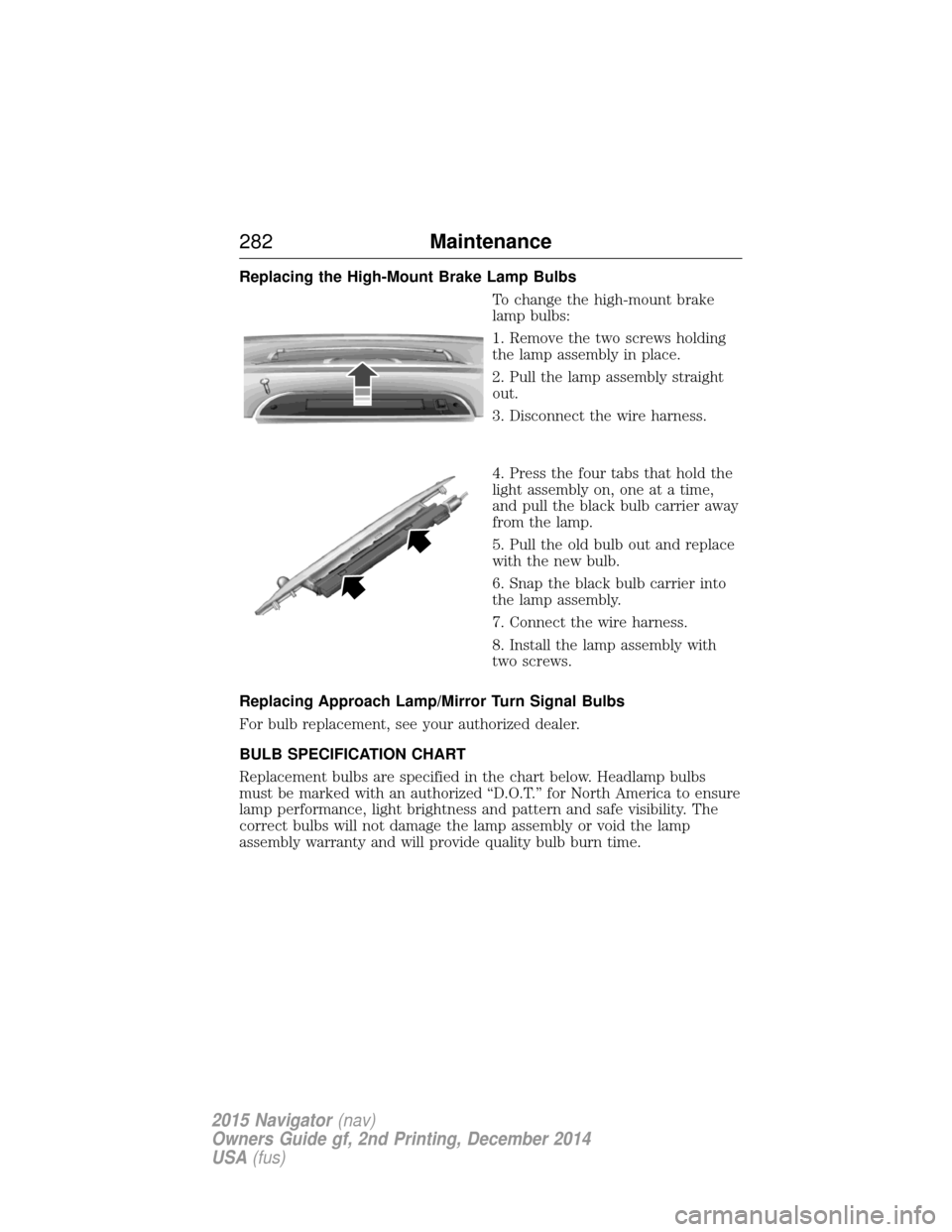
Replacing the High-Mount Brake Lamp BulbsTo change the high-mount brake
lamp bulbs:
1. Remove the two screws holding
the lamp assembly in place.
2. Pull the lamp assembly straight
out.
3. Disconnect the wire harness.
4. Press the four tabs that hold the
light assembly on, one at a time,
and pull the black bulb carrier away
from the lamp.
5. Pull the old bulb out and replace
with the new bulb.
6. Snap the black bulb carrier into
the lamp assembly.
7. Connect the wire harness.
8. Install the lamp assembly with
two screws.
Replacing Approach Lamp/Mirror Turn Signal Bulbs
For bulb replacement, see your authorized dealer.
BULB SPECIFICATION CHART
Replacement bulbs are specified in the chart below. Headlamp bulbs
must be marked with an authorized “D.O.T.” for North America to ensure
lamp performance, light brightness and pattern and safe visibility. The
correct bulbs will not damage the lamp assembly or void the lamp
assembly warranty and will provide quality bulb burn time.
282 Maintenance
2015 Navigator(nav)
Owners Guide gf, 2nd Printing, December 2014
USA (fus)