lock LINCOLN NAVIGATOR 2015 Owners Manual
[x] Cancel search | Manufacturer: LINCOLN, Model Year: 2015, Model line: NAVIGATOR, Model: LINCOLN NAVIGATOR 2015Pages: 475, PDF Size: 5.13 MB
Page 2 of 475
Introduction8
Child Safety 16
Installing child seats ....................................18
Booster seats .........................................29
Child seat positioning ...................................31
Child safety locks ......................................33
Safety Belts 34
Fastening the safety belts ................................36
Safety belt height adjustment .............................39
Safetybeltwarninglightandindicatorchime..................40
Safety belt-minder .....................................41
Child restraint and safety belt maintenance ...................42
Supplementary Restraints System 43
Driver and passenger airbags .............................45
Side airbags ..........................................47
Safety canopy curtain airbags .............................48
Crash sensors and airbag indicator .........................50
Airbag disposal ........................................52
Keys and Remote Control 53
General information on radio frequencies .....................53
Remote control .......................................54
Replacing a lost key or remote control .......................59
MyKey 60
Settings, MyKey .......................................60
Creating .............................................61
Clearing.............................................62
System status .........................................62
Remote start, MyKey ...................................63
Troubleshooting, MyKey .................................65
Table of Contents 1
2015 Navigator(nav)
Owners Guide gf, 2nd Printing, December 2014
USA (fus)
Page 3 of 475
Locks67
Locking and unlocking ..................................67
SecuriCode™ keyless entry keypad .........................73
Security 76
SecuriLock® passive anti-theft system .......................76
Anti-theft alarm .......................................77
Steering Wheel 79
Adjusting the steering wheel ..............................79
Steering wheel controls .................................80
Pedals 84
Adjustable pedals ......................................84
Wipers and Washers 85
Windshield wipers .....................................85
Rain-sensing wipers ....................................85
Windshield washers ....................................86
Rear-window wiper and washer ............................86
Lighting 87
Lighting control .......................................87
Autolamps ...........................................88
Instrument lighting dimmer ...............................89
Daytime running lamps ..................................89
Adaptive headlamps ....................................90
Directionindicators ....................................91
Interior lamps ........................................91
Windows and Mirrors 93
Power windows .......................................93
Exteriormirrors.......................................94
Interiormirrors .......................................96
Sunvisors ...........................................98
Moonroof ............................................98
2 Table of Contents
2015 Navigator(nav)
Owners Guide gf, 2nd Printing, December 2014
USA (fus)
Page 4 of 475
Instrument Cluster100
Gauges .............................................100
Warning lamps and indicators ............................100
Audible warnings and indicators ..........................105
Information Displays 106
Message center .......................................106
Information messages ..................................111
Climate Control 122
Dual automatic temperature control ........................122
Rear window defroster .................................126
Remote Start ........................................127
Seats 128
Sitting in the correct position ............................128
Head restraints .......................................129
Power seats .........................................131
Memory function .....................................132
Rear seats ..........................................136
Universal Garage Door Opener (If Equipped) 147
HomeLink® wireless control system .......................147
Auxiliary Power Points 152
Storage Compartments 155
Center console .......................................155
Overhead console .....................................155
Starting and Stopping the Engine 156
Engine block heater ...................................160
Fuel and Refueling 162
Fuel quality .........................................163
Refueling...........................................166
Fuel consumption .....................................168
Table of Contents 3
2015 Navigator(nav)
Owners Guide gf, 2nd Printing, December 2014
USA (fus)
Page 5 of 475
Transmission172
Automatic transmission .................................172
Four-Wheel Drive (If Equipped) 179
Four wheel drive .....................................179
Brakes 187
Brakes .............................................187
Hints on driving with anti-lock brakes ......................188
Parking brake ........................................188
Hill start assist .......................................188
Traction Control 190
TractionControl™ ....................................190
Stability Control 191
AdvanceTrac® .......................................192
Terrain Response 194
Hill descent control ...................................194
Parking Aids 196
Sensing system .......................................196
Rear-view camera system ...............................198
Cruise Control 203
Usingcruisecontrol ...................................203
Driving Aids 205
Blind Spot Information System (BLIS) with Cross Traffic Alert
(CTA) .............................................205
Steering............................................210
Auto leveling suspension ................................212
Load Carrying 213
Roof racks and load carriers .............................213
Vehicle loading .......................................213
Cargo management system ..............................220
4Table of Contents
2015 Navigator(nav)
Owners Guide gf, 2nd Printing, December 2014
USA (fus)
Page 10 of 475
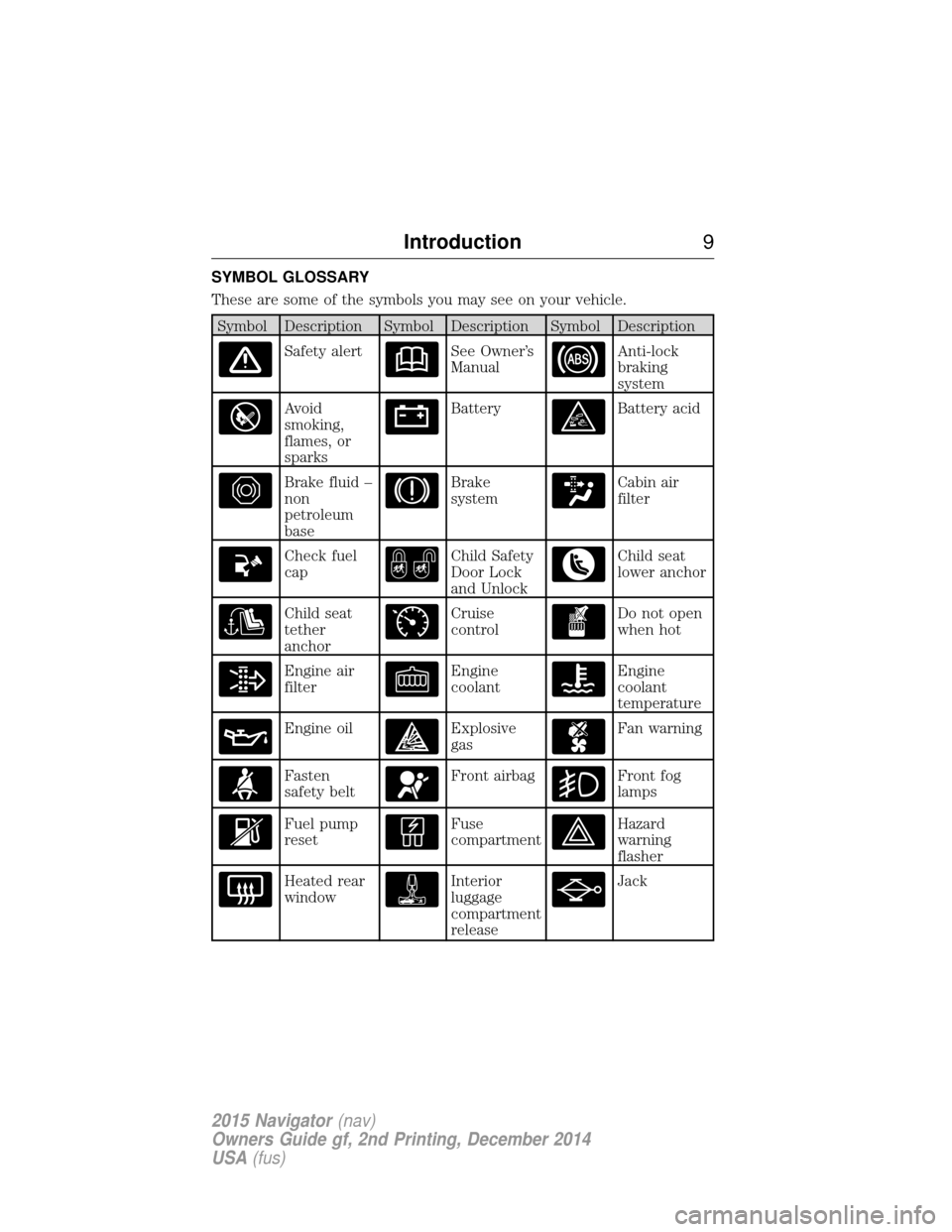
SYMBOL GLOSSARY
These are some of the symbols you may see on your vehicle.
Symbol Description Symbol Description Symbol Description
Safety alertSee Owner’s
ManualAnti-lock
braking
system
Avoid
smoking,
flames, or
sparksBatteryBattery acid
Brake fluid –
non
petroleum
baseBrake
systemCabin air
filter
Check fuel
capChild Safety
Door Lock
and UnlockChild seat
lower anchor
Child seat
tether
anchorCruise
controlDo not open
when hot
Engine air
filterEngine
coolantEngine
coolant
temperature
Engine oilExplosive
gasFan warning
Fasten
safety beltFront airbagFront fog
lamps
Fuel pump
resetFuse
compartmentHazard
warning
flasher
Heated rear
windowInterior
luggage
compartment
releaseJack
Introduction9
2015 Navigator(nav)
Owners Guide gf, 2nd Printing, December 2014
USA (fus)
Page 11 of 475
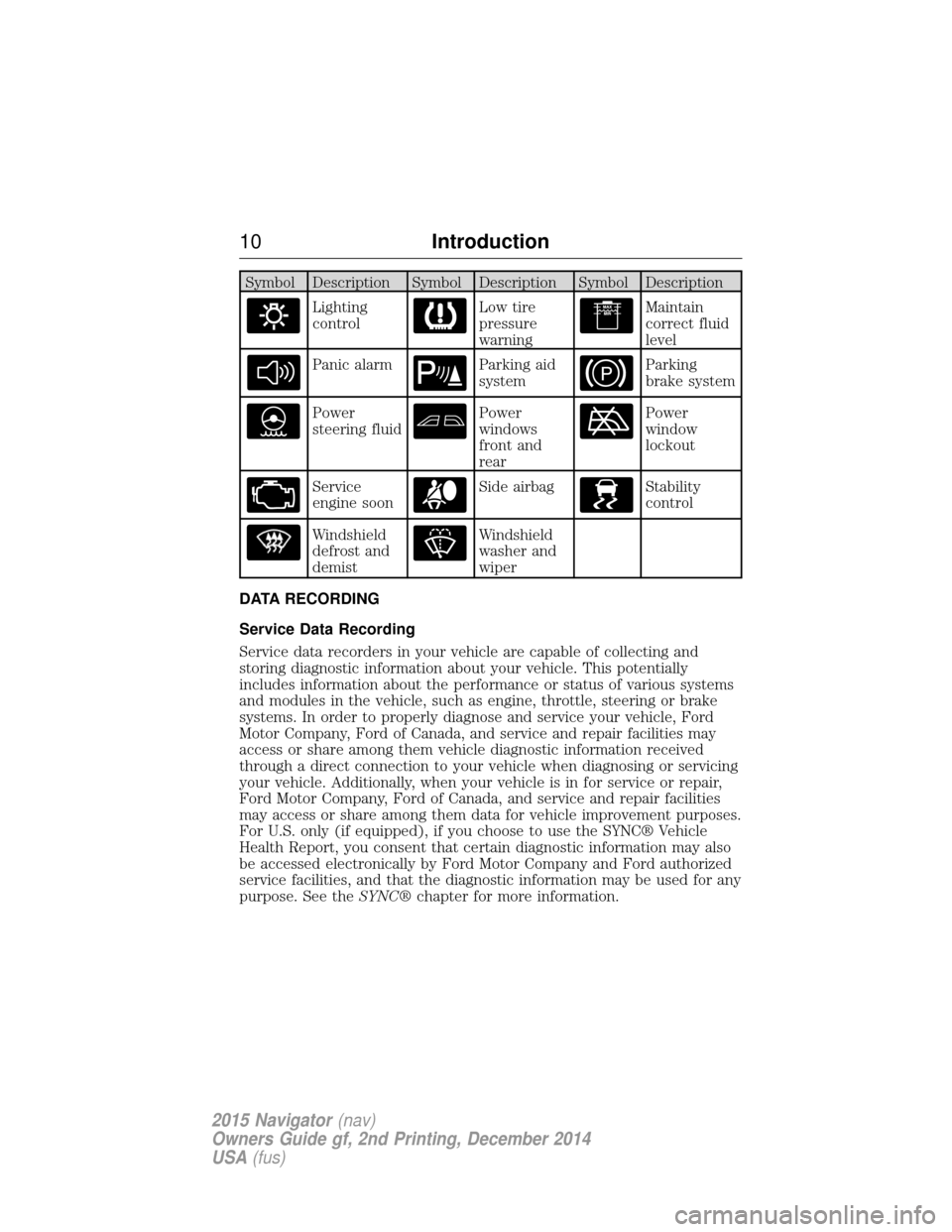
Symbol Description Symbol Description Symbol Description
Lighting
controlLow tire
pressure
warningMaintain
correct fluid
level
Panic alarmParking aid
systemParking
brake system
Power
steering fluidPower
windows
front and
rearPower
window
lockout
Service
engine soonSide airbagStability
control
Windshield
defrost and
demistWindshield
washer and
wiper
DATA RECORDING
Service Data Recording
Service data recorders in your vehicle are capable of collecting and
storing diagnostic information about your vehicle. This potentially
includes information about the performance or status of various systems
and modules in the vehicle, such as engine, throttle, steering or brake
systems. In order to properly diagnose and service your vehicle, Ford
Motor Company, Ford of Canada, and service and repair facilities may
access or share among them vehicle diagnostic information received
through a direct connection to your vehicle when diagnosing or servicing
your vehicle. Additionally, when your vehicle is in for service or repair,
Ford Motor Company, Ford of Canada, and service and repair facilities
may access or share among them data for vehicle improvement purposes.
For U.S. only (if equipped), if you choose to use the SYNC® Vehicle
Health Report, you consent that certain diagnostic information may also
be accessed electronically by Ford Motor Company and Ford authorized
service facilities, and that the diagnostic information may be used for any
purpose. See the SYNC®chapter for more information.
10 Introduction
2015 Navigator(nav)
Owners Guide gf, 2nd Printing, December 2014
USA (fus)
Page 19 of 475
INSTALLING CHILD SEATS
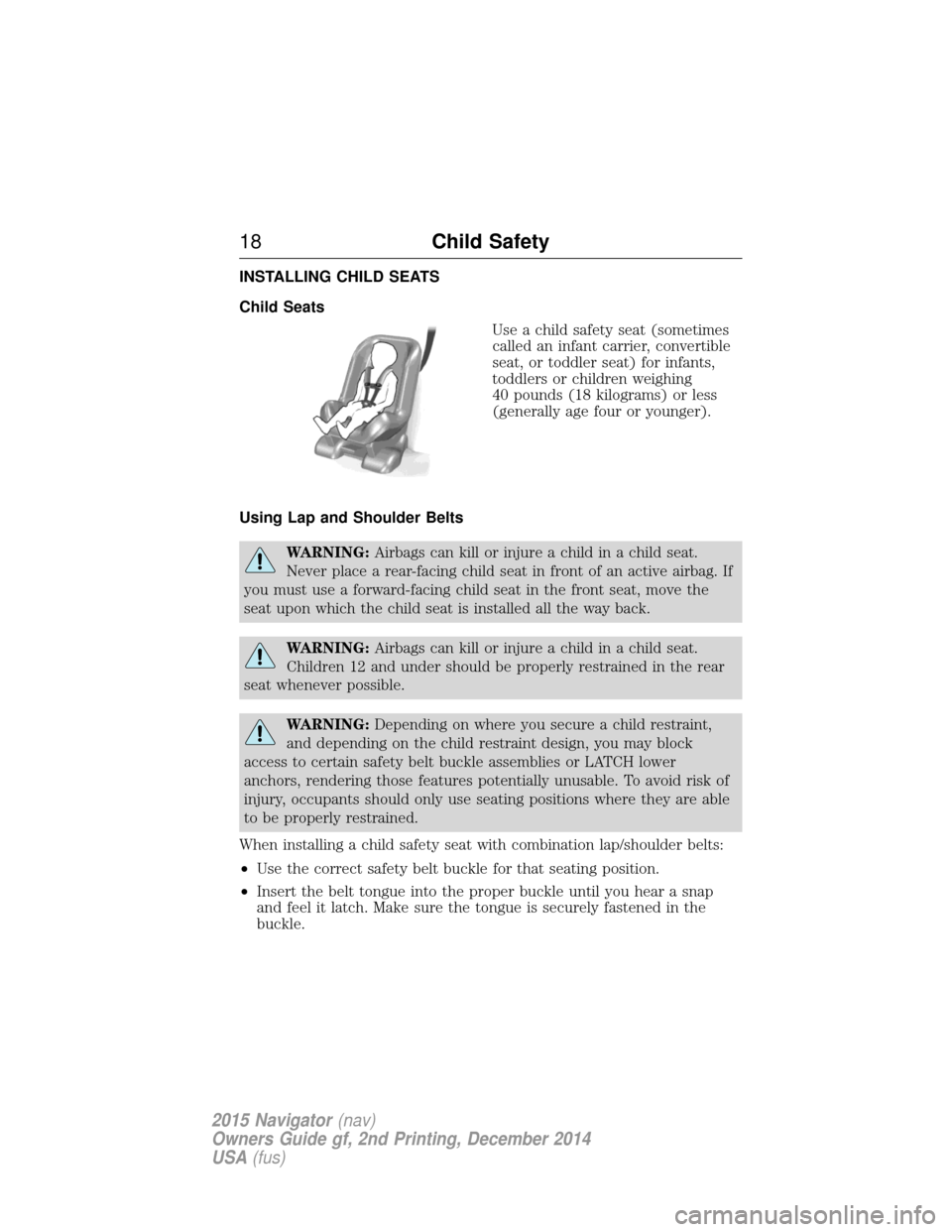
Child SeatsUse a child safety seat (sometimes
called an infant carrier, convertible
seat, or toddler seat) for infants,
toddlers or children weighing
40 pounds (18 kilograms) or less
(generally age four or younger).
Using Lap and Shoulder Belts
WARNING: Airbags can kill or injure a child in a child seat.
Never place a rear-facing child seat in front of an active airbag. If
you must use a forward-facing child seat in the front seat, move the
seat upon which the child seat is installed all the way back.
WARNING: Airbags can kill or injure a child in a child seat.
Children 12 and under should be properly restrained in the rear
seat whenever possible.
WARNING: Depending on where you secure a child restraint,
and depending on the child restraint design, you may block
access to certain safety belt buckle assemblies or LATCH lower
anchors, rendering those features potentially unusable. To avoid risk of
injury, occupants should only use seating positions where they are able
to be properly restrained.
When installing a child safety seat with combination lap/shoulder belts:
• Use the correct safety belt buckle for that seating position.
• Insert the belt tongue into the proper buckle until you hear a snap
and feel it latch. Make sure the tongue is securely fastened in the
buckle.
18 Child Safety
2015 Navigator(nav)
Owners Guide gf, 2nd Printing, December 2014
USA (fus)
Page 20 of 475
•Keep the buckle release button pointing up and away from the safety
seat, with the tongue between the child seat and the release button,
to prevent accidental unbuckling.
• Place the vehicle seat upon which the child seat will be installed in
the upright position.
• Put the safety belt in the automatic locking mode. See Step 5. This
vehicle does not require the use of a locking clip.
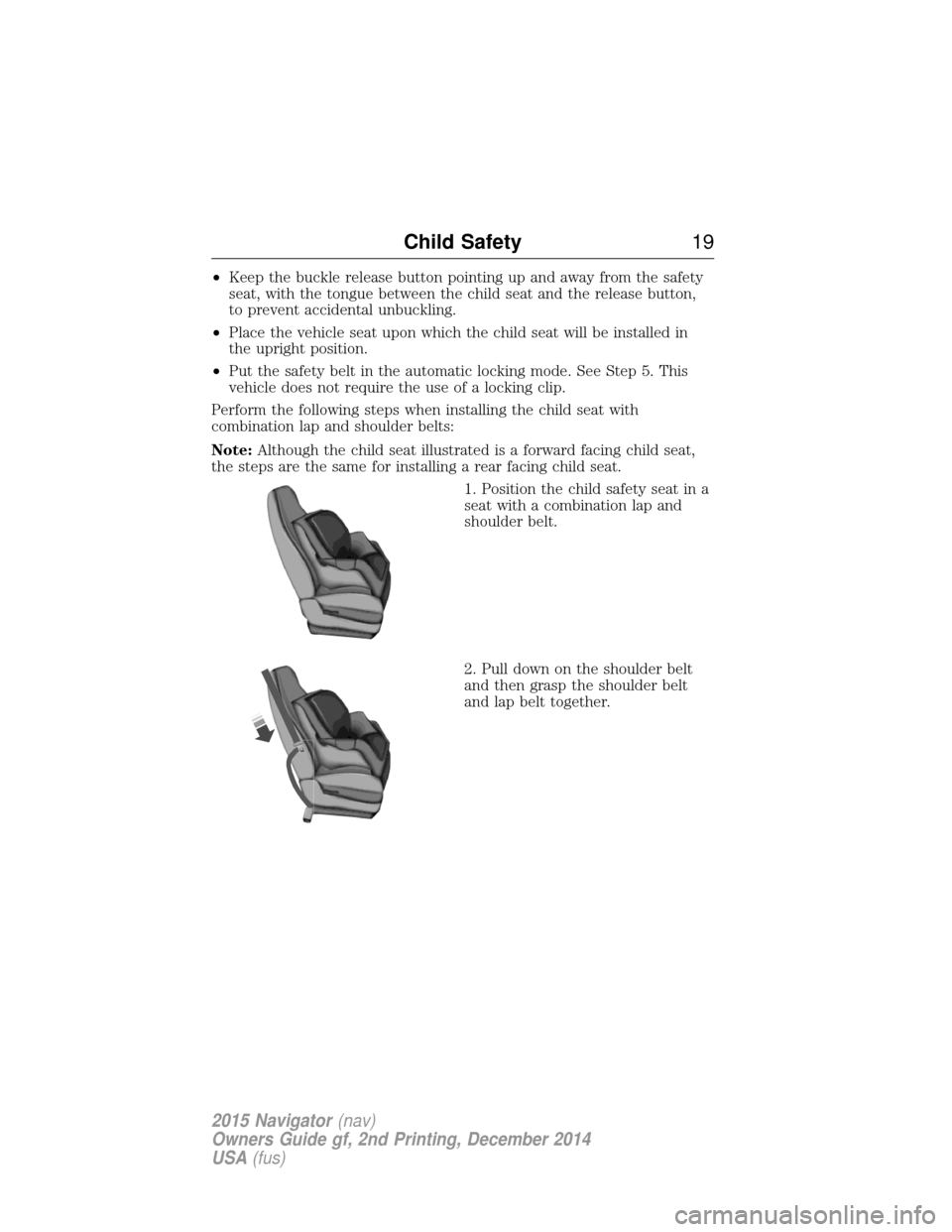
Perform the following steps when installing the child seat with
combination lap and shoulder belts:
Note: Although the child seat illustrated is a forward facing child seat,
the steps are the same for installing a rear facing child seat.
1. Position the child safety seat in a
seat with a combination lap and
shoulder belt.
2. Pull down on the shoulder belt
and then grasp the shoulder belt
and lap belt together.
Child Safety19
2015 Navigator(nav)
Owners Guide gf, 2nd Printing, December 2014
USA (fus)
Page 21 of 475
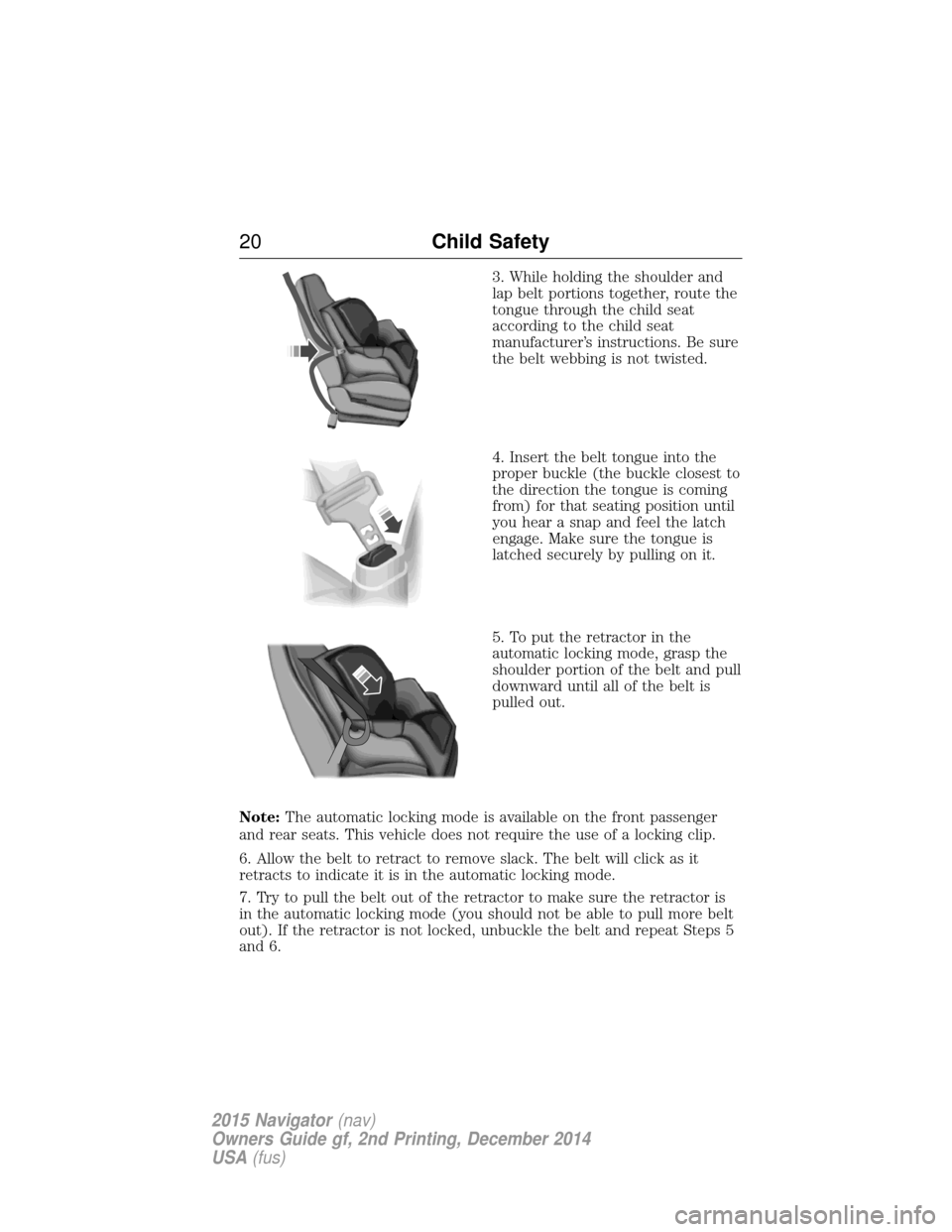
3. While holding the shoulder and
lap belt portions together, route the
tongue through the child seat
according to the child seat
manufacturer’s instructions. Be sure
the belt webbing is not twisted.
4. Insert the belt tongue into the
proper buckle (the buckle closest to
the direction the tongue is coming
from) for that seating position until
you hear a snap and feel the latch
engage. Make sure the tongue is
latched securely by pulling on it.
5. To put the retractor in the
automatic locking mode, grasp the
shoulder portion of the belt and pull
downward until all of the belt is
pulled out.
Note: The automatic locking mode is available on the front passenger
and rear seats. This vehicle does not require the use of a locking clip.
6. Allow the belt to retract to remove slack. The belt will click as it
retracts to indicate it is in the automatic locking mode.
7. Try to pull the belt out of the retractor to make sure the retractor is
in the automatic locking mode (you should not be able to pull more belt
out). If the retractor is not locked, unbuckle the belt and repeat Steps 5
and 6.
20 Child Safety
2015 Navigator(nav)
Owners Guide gf, 2nd Printing, December 2014
USA (fus)
Page 34 of 475
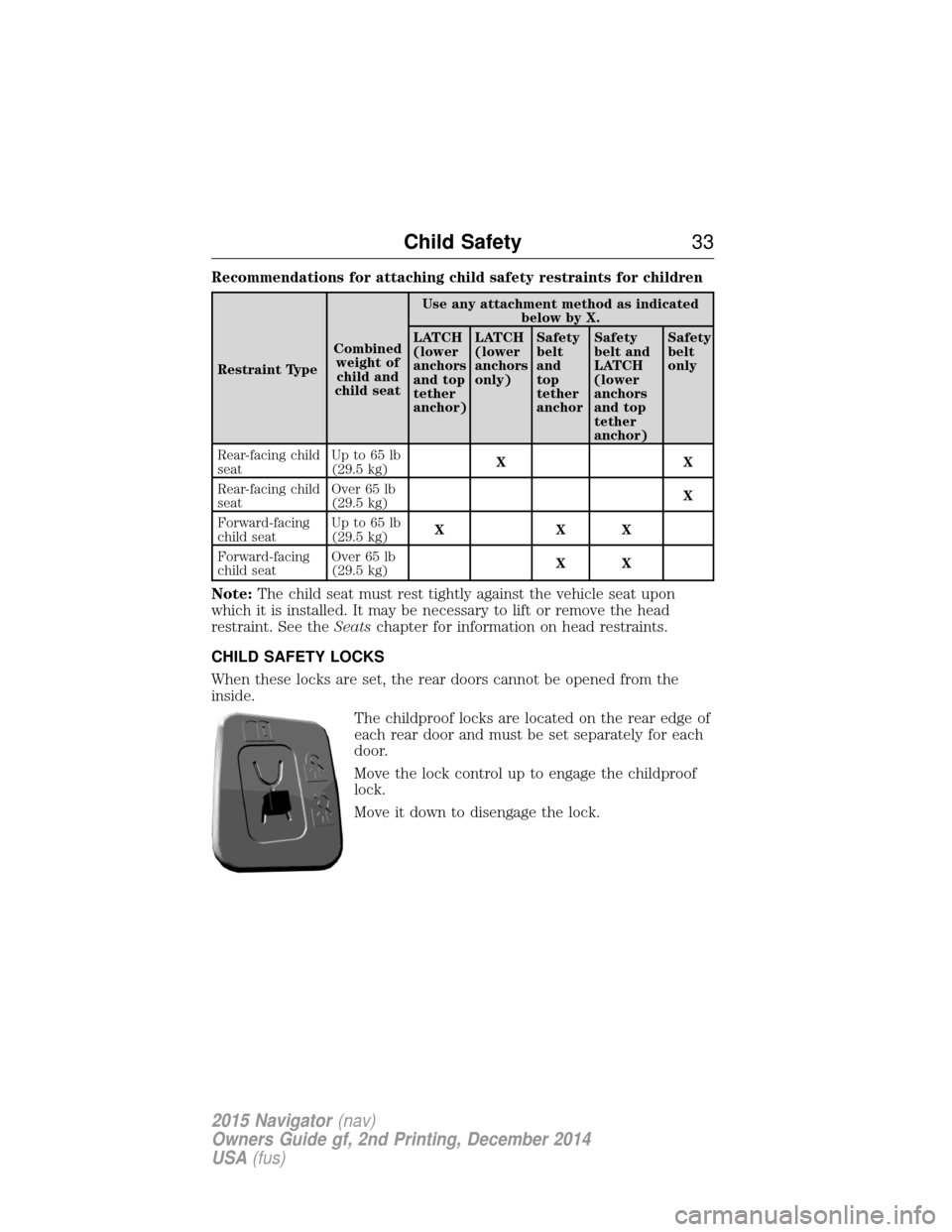
Recommendations for attaching child safety restraints for children
Restraint TypeCombined
weight ofchild and
child seat Use any attachment method as indicated
below by X.
LATCH
(lower
anchors
and top
tether
anchor) LATCH
(lower
anchors
only)
Safety
belt
and
top
tether
anchorSafety
belt and
LATCH
(lower
anchors
and top
tether
anchor) Safety
belt
only
Rear-facing child
seat Up to 65 lb
(29.5 kg)
XX
Rear-facing child
seat Over 65 lb
(29.5 kg)
X
Forward-facing
child seat Up to 65 lb
(29.5 kg)
XXX
Forward-facing
child seat Over 65 lb
(29.5 kg)
XX
Note:
The child seat must rest tightly against the vehicle seat upon
which it is installed. It may be necessary to lift or remove the head
restraint. See the Seatschapter for information on head restraints.
CHILD SAFETY LOCKS
When these locks are set, the rear doors cannot be opened from the
inside. The childproof locks are located on the rear edge of
each rear door and must be set separately for each
door.
Move the lock control up to engage the childproof
lock.
Move it down to disengage the lock.
Child Safety 33
2015 Navigator(nav)
Owners Guide gf, 2nd Printing, December 2014
USA (fus)