ECU LINCOLN NAVIGATOR 2018 Owner's Manual
[x] Cancel search | Manufacturer: LINCOLN, Model Year: 2018, Model line: NAVIGATOR, Model: LINCOLN NAVIGATOR 2018Pages: 649, PDF Size: 4.96 MB
Page 184 of 649
HomeLink Wireless Control System
WARNING: Make sure that thegarage door and security device are freefrom obstruction when you areprogramming. Do not program the systemwith the vehicle in the garage.
WARNING: Do not use the systemwith any garage door opener that does nothave the safety stop and reverse featureas required by U.S. Federal SafetyStandards (this includes any garage dooropener manufactured before April 1, 1982).A garage door opener which cannot detectan object, signaling the door to stop andreverse, does not meet current federalsafety standards. Using a garage dooropener without these features increasesthe risk of serious injury or death.
Note:Make sure you keep the originalremote control transmitter for use in othervehicles as well as for future systemprogramming.
Note:We recommend that upon the sale orlease termination of your vehicle, you erasethe programmed function buttons for securityreasons. See Erasing the Function ButtonCodes later in this section.
Note:You can program a maximum of threedevices. To change or replace any of thethree devices after it has been initiallyprogrammed, you must first erase the currentsettings. See Erasing the Function ButtonCodes.
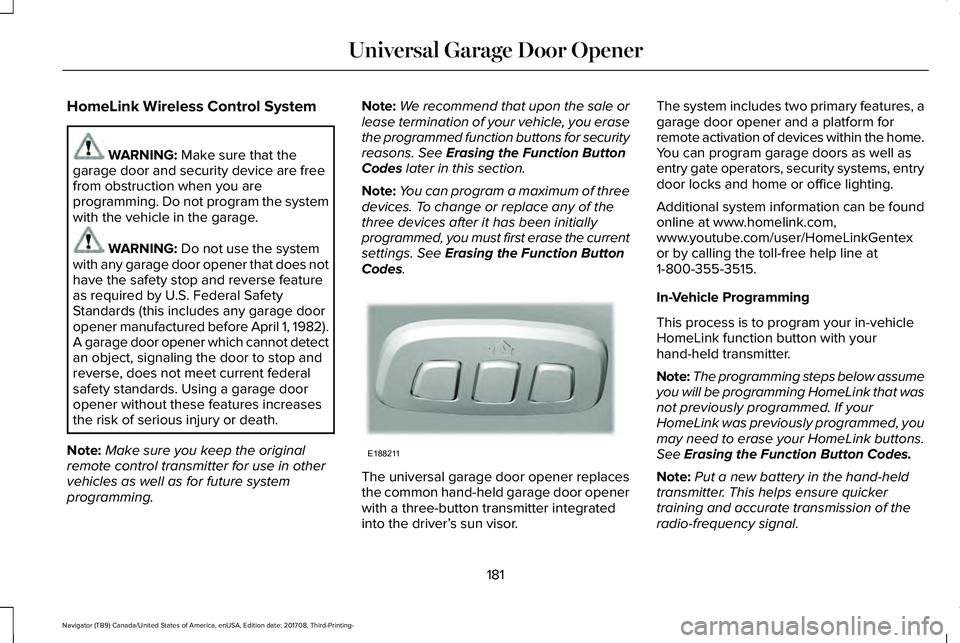
The universal garage door opener replacesthe common hand-held garage door openerwith a three-button transmitter integratedinto the driver’s sun visor.
The system includes two primary features, agarage door opener and a platform forremote activation of devices within the home.You can program garage doors as well asentry gate operators, security systems, entrydoor locks and home or office lighting.
Additional system information can be foundonline at www.homelink.com,www.youtube.com/user/HomeLinkGentexor by calling the toll-free help line at1-800-355-3515.
In-Vehicle Programming
This process is to program your in-vehicleHomeLink function button with yourhand-held transmitter.
Note:The programming steps below assumeyou will be programming HomeLink that wasnot previously programmed. If yourHomeLink was previously programmed, youmay need to erase your HomeLink buttons.See Erasing the Function Button Codes.
Note:Put a new battery in the hand-heldtransmitter. This helps ensure quickertraining and accurate transmission of theradio-frequency signal.
181
Navigator (TB9) Canada/United States of America, enUSA, Edition date: 201708, Third-Printing-
Universal Garage Door OpenerE188211
Page 222 of 649
Truck and utility vehicles can differ fromsome other vehicles. Your vehicle may behigher to allow it to travel over rough terrainwithout getting hung up or damagingunderbody components.
The differences that make your vehicle soversatile also make it handle differently thanan ordinary passenger car.
Maintain steering wheel control at all times,especially in rough terrain. Since suddenchanges in terrain can result in abruptsteering wheel motion, make sure you gripthe steering wheel from the outside. Do notgrip the spokes.
Drive cautiously to avoid vehicle damagefrom concealed objects such as rocks andstumps.
You should either know the terrain orexamine maps of the area before driving.Map out your route before driving in the area.To maintain steering and braking control ofyour vehicle, you must have all four wheelson the ground and they must be rolling, notsliding or spinning.
Driving Off-Road With Truck and UtilityVehicles
Note:On some models, the initial shift fromtwo-wheel drive to four-wheel drive whenthe vehicle is moving can cause somemomentary clunk and ratcheting sounds.This is the front drivetrain coming up tospeed and the automatic locking hubsengaging and is not cause for concern.
Note:Your vehicle may have a front air dam.Due to low ground clearance, you candamage it when taking your vehicle off-road.You can take the air dam off by removingthe bolts that secure it.
Four-wheel drive vehicles are speciallyequipped for driving on sand, snow, mud andrough terrain and have operatingcharacteristics that are somewhat differentfrom conventional vehicles, both on and offthe road.
Power is supplied to all four wheels througha transfer case. On four-wheel drive vehicles,the transfer case allows you to utilizedifferent 4X4 modes when necessary.Information on transfer case operation andshifting procedures can be found in this
chapter and the Driving Aids chapter.Information on transfer case maintenancecan be found in the Maintenance chapter.You should become thoroughly familiar withthis information before you operate yourvehicle.
Four-wheel drive, when you select a4X4-capable drive mode, it uses all fourwheels to power the vehicle. This increasestraction, enabling you to drive over terrainand road conditions that a conventionaltwo-wheel drive vehicle cannot.
219
Navigator (TB9) Canada/United States of America, enUSA, Edition date: 201708, Third-Printing-
Four-Wheel Drive (If Equipped)
Page 293 of 649
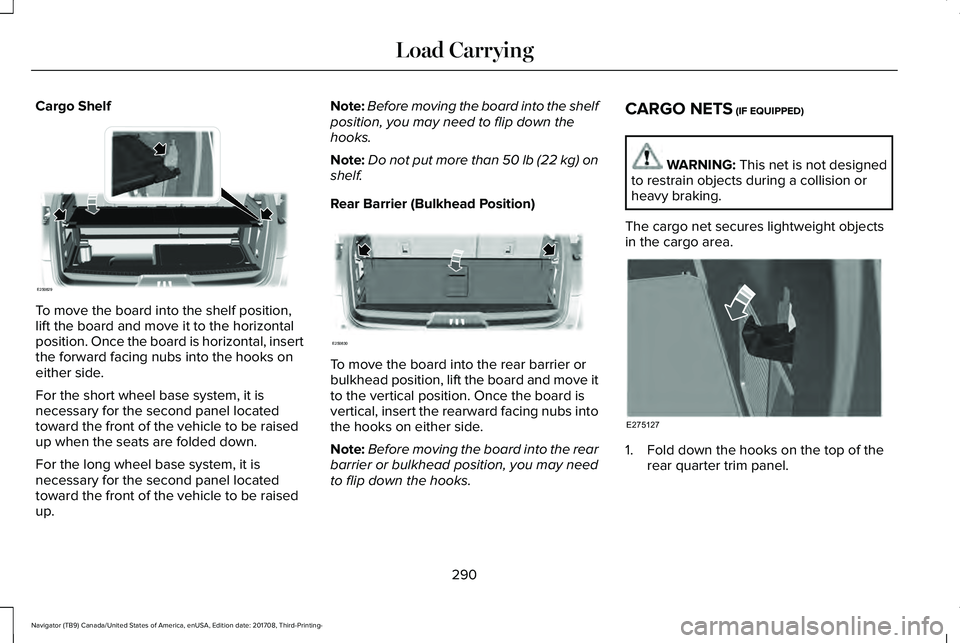
Cargo Shelf
To move the board into the shelf position,lift the board and move it to the horizontalposition. Once the board is horizontal, insertthe forward facing nubs into the hooks oneither side.
For the short wheel base system, it isnecessary for the second panel locatedtoward the front of the vehicle to be raisedup when the seats are folded down.
For the long wheel base system, it isnecessary for the second panel locatedtoward the front of the vehicle to be raisedup.
Note:Before moving the board into the shelfposition, you may need to flip down thehooks.
Note:Do not put more than 50 lb (22 kg) onshelf.
Rear Barrier (Bulkhead Position)
To move the board into the rear barrier orbulkhead position, lift the board and move itto the vertical position. Once the board isvertical, insert the rearward facing nubs intothe hooks on either side.
Note:Before moving the board into the rearbarrier or bulkhead position, you may needto flip down the hooks.
CARGO NETS (IF EQUIPPED)
WARNING: This net is not designedto restrain objects during a collision orheavy braking.
The cargo net secures lightweight objectsin the cargo area.
1. Fold down the hooks on the top of therear quarter trim panel.
290
Navigator (TB9) Canada/United States of America, enUSA, Edition date: 201708, Third-Printing-
Load CarryingE250829 E250830 E275127
Page 294 of 649
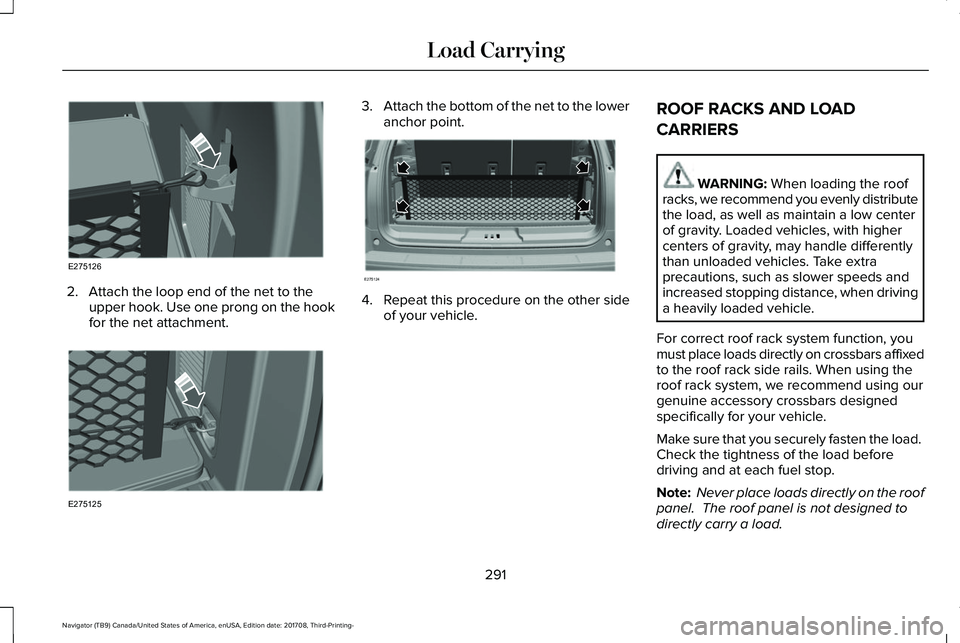
2. Attach the loop end of the net to theupper hook. Use one prong on the hookfor the net attachment.
3.Attach the bottom of the net to the loweranchor point.
4. Repeat this procedure on the other sideof your vehicle.
ROOF RACKS AND LOAD
CARRIERS
WARNING: When loading the roofracks, we recommend you evenly distributethe load, as well as maintain a low centerof gravity. Loaded vehicles, with highercenters of gravity, may handle differentlythan unloaded vehicles. Take extraprecautions, such as slower speeds andincreased stopping distance, when drivinga heavily loaded vehicle.
For correct roof rack system function, youmust place loads directly on crossbars affixedto the roof rack side rails. When using theroof rack system, we recommend using ourgenuine accessory crossbars designedspecifically for your vehicle.
Make sure that you securely fasten the load. Check the tightness of the load beforedriving and at each fuel stop.
Note: Never place loads directly on the roofpanel. The roof panel is not designed todirectly carry a load.
291
Navigator (TB9) Canada/United States of America, enUSA, Edition date: 201708, Third-Printing-
Load CarryingE275126 E275125 E275124
Page 317 of 649
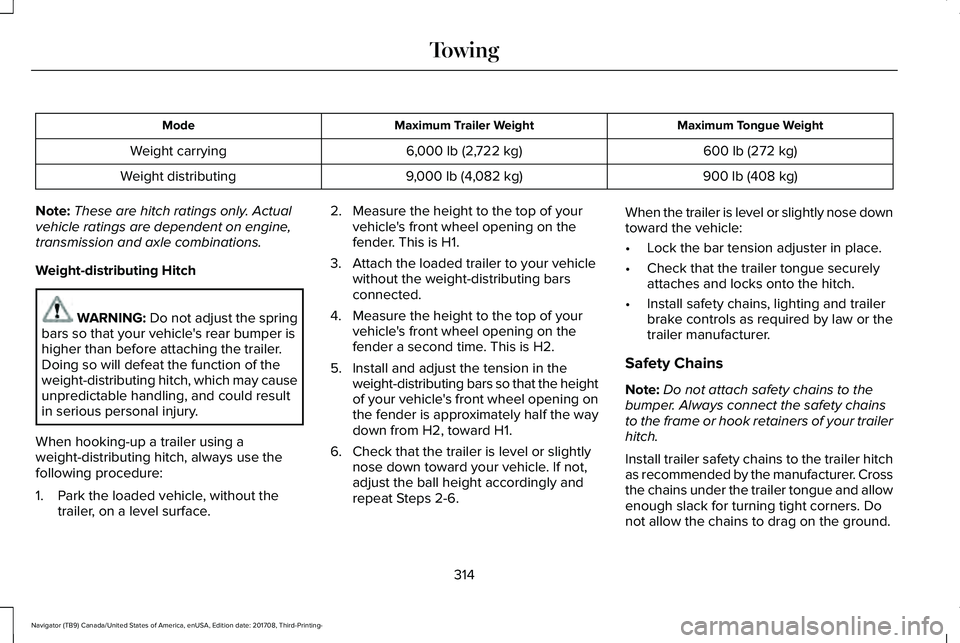
Maximum Tongue WeightMaximum Trailer WeightMode
600 lb (272 kg)6,000 lb (2,722 kg)Weight carrying
900 lb (408 kg)9,000 lb (4,082 kg)Weight distributing
Note:These are hitch ratings only. Actualvehicle ratings are dependent on engine,transmission and axle combinations.
Weight-distributing Hitch
WARNING: Do not adjust the springbars so that your vehicle's rear bumper ishigher than before attaching the trailer.Doing so will defeat the function of theweight-distributing hitch, which may causeunpredictable handling, and could resultin serious personal injury.
When hooking-up a trailer using aweight-distributing hitch, always use thefollowing procedure:
1. Park the loaded vehicle, without thetrailer, on a level surface.
2. Measure the height to the top of yourvehicle's front wheel opening on thefender. This is H1.
3. Attach the loaded trailer to your vehiclewithout the weight-distributing barsconnected.
4. Measure the height to the top of yourvehicle's front wheel opening on thefender a second time. This is H2.
5. Install and adjust the tension in theweight-distributing bars so that the heightof your vehicle's front wheel opening onthe fender is approximately half the waydown from H2, toward H1.
6. Check that the trailer is level or slightlynose down toward your vehicle. If not,adjust the ball height accordingly andrepeat Steps 2-6.
When the trailer is level or slightly nose downtoward the vehicle:
•Lock the bar tension adjuster in place.
•Check that the trailer tongue securelyattaches and locks onto the hitch.
•Install safety chains, lighting and trailerbrake controls as required by law or thetrailer manufacturer.
Safety Chains
Note:Do not attach safety chains to thebumper. Always connect the safety chainsto the frame or hook retainers of your trailerhitch.
Install trailer safety chains to the trailer hitchas recommended by the manufacturer. Crossthe chains under the trailer tongue and allowenough slack for turning tight corners. Donot allow the chains to drag on the ground.
314
Navigator (TB9) Canada/United States of America, enUSA, Edition date: 201708, Third-Printing-
Towing
Page 324 of 649
Four-wheel Drive Vehicles Without 4x4LOW
If your vehicle does not have 4x4 Low, youcannot tow your vehicle with any wheels onthe ground or vehicle damage may occur.You must tow your vehicle with all fourwheels off the ground, for example whenusing a car-hauling trailer.
Four-wheel Drive Vehicles With 4x4 LOW
You can only tow a vehicle with 4X4 LOWwith all wheels on the ground by placing thetransfer case in its neutral position andengaging the four wheel down towingfeature. Perform the steps outlined in thefollowing section after positioning yourvehicle behind the tow vehicle and properlysecuring them together.
Four-wheel-down Towing
Note:If completed successfully, theinformation display shows Neutral TowEnabled Leave Transmission in Neutral.This indicates that your vehicle is safe to towwith all wheels on the ground.
Note:If you do not see the message in theinformation display, you must perform theprocedure again from the beginning.
Note:Make sure you properly secure yourvehicle to the tow vehicle.
1. Start your vehicle.
2. Confirm that your vehicle is in NORMALmode. See Drive Mode Control (page285).
3. Place your vehicle in stay in neutralmode. See Automatic Transmission(page 210).
4. Switch your vehicle off by pressing theengine START/STOP button once. ATransmission Not in Park messageappears in the information display.
5.Place your vehicle in accessory mode bypressing the start button once withoutpressing the brake pedal.
6. Press and hold the brake pedal.
7. Enable neutral tow through theinformation display by selecting Settingsfrom the menu. See General Information(page 119).
8. Then select Advanced Settings.
9. Then select Vehicle.
10. Then select Neutral Tow.
11. Press and hold the OK button until theinformation display states Neutral TowEnabled Leave Transmission inNeutral.
Note:If completed successfully, theinformation display shows Neutral TowEnabled Leave Transmission in Neutral.This indicates that your vehicle is safe to towwith all wheels on the ground.
Note:If you do not see the message in theinformation display, you must perform theprocedure again from the beginning.
Note:You may hear an audible noise as thetransfer case shifts into neutral, this isnormal.
12. Leave the transmission in neutral (N)and switch the ignition off by pressingthe engine START/STOP button oncewithout pressing the brake pedal. Youdo not need to leave your keys in thevehicle. You can lock and unlock yourvehicle as you normally do.
321
Navigator (TB9) Canada/United States of America, enUSA, Edition date: 201708, Third-Printing-
Towing
Page 325 of 649
WARNING: Do not disconnect thebattery during recreational towing. Itprevents the transfer case from shiftingproperly and may cause the vehicle to roll,even if the transmission is in park (P).
WARNING: Shifting the transfer caseto its neutral position for recreationaltowing may cause the vehicle to roll, evenif the transmission is in park (P). It mayinjure the driver and others. Make sure youpress the foot brake and the vehicle is ina secure, safe position when you shift toneutral (N).
Note:Failing to put the transfer case in itsneutral position can damage vehiclecomponents.
Note:You can check four-wheel-downtowing status at any time by opening thedriver's door or turning the ignition to theaccessory or on position. A messageappears in the information display confirmingyour vehicle is in neutral tow.
To exit four-wheel-down towing and returnthe transfer case to its 2H position:
1. With your vehicle still properly securedto the tow vehicle, press the brake pedaland start the engine.
2. Switch your vehicle off by pressing theengine START/STOP button once.
3.Place your vehicle in accessory mode bypressing the start button once withoutpressing the brake pedal.
4. Press the brake pedal.
5.Place the transmission back into park (P).
6. Release the brake pedal.
Note:If completed successfully, theinformation display shows 2H and NeutralTow Disabled.
Note:If the indicator light and message donot display, you must perform the procedureagain from the beginning.
Note:You may hear an audible noise as thetransfer case shifts out of its neutral position,this is normal.
Note:If Shift Delayed Pull Forward displaysin the instrument cluster, transfer case geartooth blockage is present. See theinstructions following this section.
7.Apply the parking brake, then disconnectyour vehicle from the tow vehicle.
8. Release the parking brake, start theengine, and shift the transmission intodrive (D) to make sure the transfer caseis out of the neutral tow position.
9.If the transfer case does not successfullyshift out of neutral (N), set the parkingbrake until you can have your vehicleserviced.
Resolving the Shift Delayed Pull Forwardor To Exit 4x4 LOW Shift to N Message
If the instrument cluster displays thesemessages, perform the following:
1. Press and hold the brake pedal.
2.Put the transmission into neutral (N), thenstart the engine.
3. With the engine running, shift thetransmission into drive (D) and let thevehicle roll forward, up to 3 ft (1 m). Youmay hear an audible noise as the transfercase shifts out of its neutral position. Thisis normal.
322
Navigator (TB9) Canada/United States of America, enUSA, Edition date: 201708, Third-Printing-
Towing
Page 329 of 649
WARNING: Secure the floor mat toboth retention devices so that it cannot slipout of position and interfere with thepedals. Failure to follow this instructioncould result in the loss of control of yourvehicle, personal injury or death.
WARNING: Do not place additionalfloor mats or any other covering on top ofthe original floor mats. This could result inthe floor mat interfering with the operationof the pedals. Failure to follow thisinstruction could result in the loss ofcontrol of your vehicle, personal injury ordeath.
WARNING: Always make sure thatobjects cannot fall into the driver foot wellwhile your vehicle is moving. Objects thatare loose can become trapped under thepedals causing a loss of vehicle control.
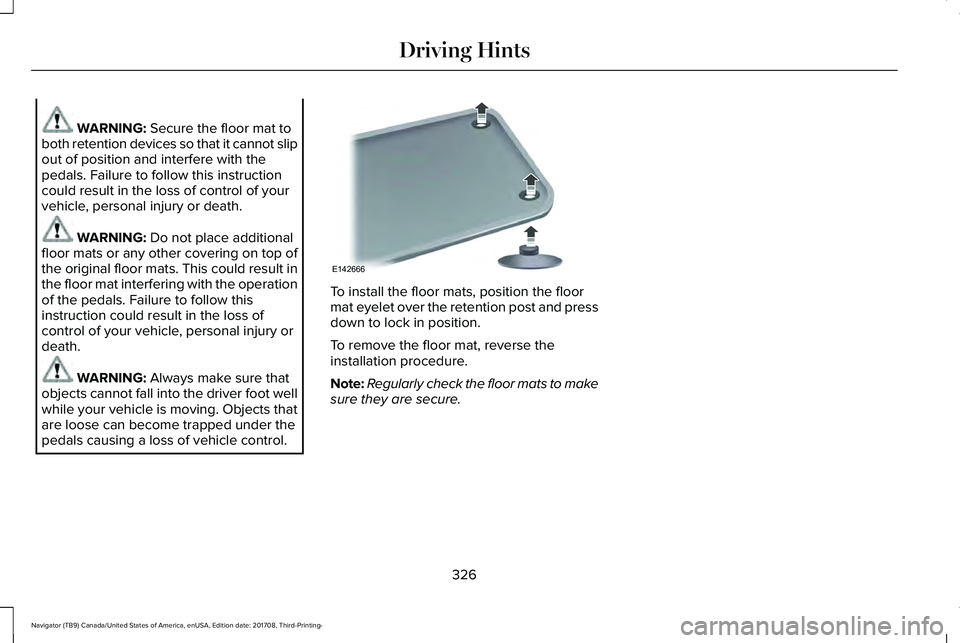
To install the floor mats, position the floormat eyelet over the retention post and pressdown to lock in position.
To remove the floor mat, reverse theinstallation procedure.
Note:Regularly check the floor mats to makesure they are secure.
326
Navigator (TB9) Canada/United States of America, enUSA, Edition date: 201708, Third-Printing-
Driving HintsE142666
Page 336 of 649
We recommend towing a rear-wheel drivevehicle with the front wheels on a tow dollywhen towing your vehicle from the rear usingwheel lift equipment. This prevents damageto the front fascia.
TOWING POINTS
WARNING: Using recovery hooks isdangerous and should only be done by aperson familiar with proper vehiclerecovery safety practices. Improper use ofrecovery hooks may cause hook failure orseparation from the vehicle and couldresult in serious injury or death.
WARNING: Always slowly removethe slack from the recovery strap prior topulling. Failure to do so can introducesignificantly higher loads which can causethe recovery hooks to break off, or therecovery strap to fail which can causeserious injury or death.
WARNING: Never link two strapstogether with a clevis pin. These heavymetal objects could become projectiles ifthe strap breaks and can cause seriousinjury or death.
Your vehicle comes equipped withframe-mounted front recovery hooks. Thesehooks should never have a load applied tothem greater than the gross vehicle weightrating of your vehicle.
Before using recovery hooks:
•Make sure all attaching points are secureand capable of withstanding the appliedload.
•Never use chains, cables or tow strapswith metal hook ends.
•Only use recovery straps that have aminimum breaking strength two to threetimes the gross vehicle weight of thestuck vehicle.
•Make sure the recovery strap is in goodcondition and free of visible cuts, tearsor damage.
•Use a damper device such as a tarp,heavy blanket or piece of carpet drapedover the recovery strap to help absorbthe energy in the event the strap breaks.
•Make sure the stuck vehicle is not loadedheavier than its gross vehicle weightrating specified on the certification label.
•Always align the tow vehicle and stuckvehicle in a straight line (within 10degrees).
•Keep bystanders to the sides of thevehicle, at a distance of at least twice thelength of the recovery strap. This helpsavoid injury from the hazard of a recoveryhook or strap breaking, or a vehiclelurching into their path.
333
Navigator (TB9) Canada/United States of America, enUSA, Edition date: 201708, Third-Printing-
Roadside Emergencies
Page 339 of 649
vehicle and reimburse the buyer in anamount equal to the actual price paid orpayable by the consumer (less a reasonableallowance for consumer use). The consumerhas the right to choose whether to receivea refund or replacement vehicle.
California Civil Code Section 1793.22(b)presumes that the manufacturer has had areasonable number of attempts to conformthe vehicle to its applicable expresswarranties if, within the first 18 months ofownership of a new vehicle or the first18,000 mi (29,000 km), whichever occursfirst:
1. Two or more repair attempts are madeon the same non-conformity likely tocause death or serious bodily injury OR
2. Four or more repair attempts are madeon the same nonconformity (a defect orcondition that substantially impairs theuse, value or safety of the vehicle) OR
3.The vehicle is out of service for repair ofnonconformities for a total of more than30 calendar days (not necessarily all atone time).
In the case of 1 or 2 above, the consumermust also notify the manufacturer of the needfor the repair of the nonconformity at thefollowing address:
Ford Motor Company16800 Executive Plaza DriveMail Drop 3NE-BDearborn, MI 48126
You are required to submit your warrantydispute to BBB AUTO LINE before assertingin court any rights or remedies conferred byCalifornia Civil Code Section 1793.22(b). Youare also required to use BBB AUTO LINEbefore exercising rights or seeking remediescreated by the Federal Magnuson-MossWarranty Act, 15 U.S.C. sec. 2301 et seq. Ifyou choose to seek redress by pursuingrights and remedies not created by CaliforniaCivil Code Section 1793.22(b) or theMagnuson-Moss Warranty Act, resort to BBBAUTO LINE is not required by those statutes.
THE BETTER BUSINESS BUREAU
(BBB) AUTO LINE PROGRAM (U.S.
ONLY)
Your satisfaction is important to Ford MotorCompany and to your dealer. If a warrantyconcern has not been resolved using thethree-step procedure outlined earlier in thischapter in the Getting the Services you needsection, you may be eligible to participate inthe BBB AUTO LINE program.
The BBB AUTO LINE program consists oftwo parts – mediation and arbitration. Duringmediation, a representative of the BBB willcontact both you and Ford Motor Companyto explore options for settlement of the claim.If an agreement is not reached duringmediation or you do not want to participatein mediation, and if your claim is eligible, youmay participate in the arbitration process. Anarbitration hearing will be scheduled so thatyou can present your case in an informalsetting before an impartial person. Thearbitrator will consider the testimonyprovided and make a decision after thehearing.
336
Navigator (TB9) Canada/United States of America, enUSA, Edition date: 201708, Third-Printing-
Customer Assistance