ECU LINCOLN NAVIGATOR 2018 Owner's Guide
[x] Cancel search | Manufacturer: LINCOLN, Model Year: 2018, Model line: NAVIGATOR, Model: LINCOLN NAVIGATOR 2018Pages: 649, PDF Size: 4.96 MB
Page 342 of 649
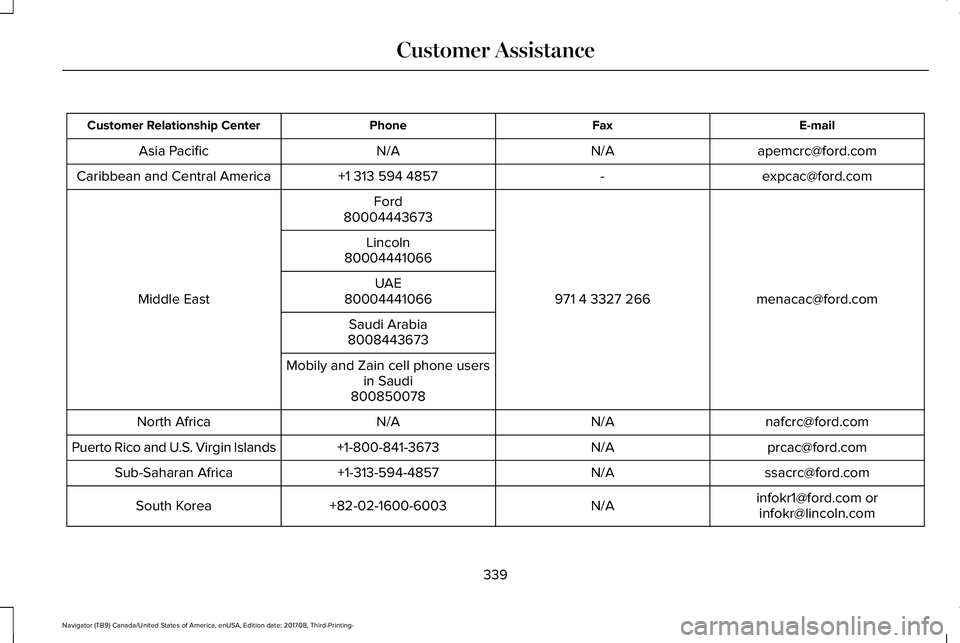
E-mailFaxPhoneCustomer Relationship Center
[email protected]/AN/AAsia Pacific
[email protected]+1 313 594 4857Caribbean and Central America
[email protected] 4 3327 266
Ford
Middle East
80004443673
Lincoln80004441066
UAE80004441066
Saudi Arabia8008443673
Mobily and Zain cell phone usersin Saudi800850078
[email protected]/AN/ANorth Africa
[email protected]/A+1-800-841-3673Puerto Rico and U.S. Virgin Islands
[email protected]/A+1-313-594-4857Sub-Saharan Africa
[email protected] [email protected]/A+82-02-1600-6003South Korea
339
Navigator (TB9) Canada/United States of America, enUSA, Edition date: 201708, Third-Printing-
Customer Assistance
Page 343 of 649
If you buy your vehicle in North America andthen relocate to any of the above locations,register your vehicle identification number(VIN) and new address with Ford GlobalTrade Services by emailing,[email protected].
If you are in another foreign country, contactthe nearest authorized dealer. In the eventyour inquiry is unresolved, communicate yourconcern with the dealership’s Sales Manager,Service Manager or Customer RelationsManager. If you require additional assistanceor clarification, please contact the respectiveCustomer Relationship Center as previouslylisted.
Customers in the U.S. should call1-800-392-3673.
ORDERING ADDITIONAL OWNER'S
LITERATURE
To order the publications in this portfolio,contact Helm, Incorporated at:
HELM, INCORPORATED47911 Halyard DrivePlymouth, Michigan 48170Attention: Customer Service
Or to order a free publication catalog, calltoll free: 1-800-782-4356
Monday-Friday 8:00 a.m. - 6:00 p.m. EST
Helm, Incorporated can also be reached bytheir website:
www.helminc.com
(Items in this catalog may be purchased bycredit card, check or money order.)
Obtaining a French Owner’s Manual
French Owner’s Manual can be obtainedfrom your authorized dealer or by contactingHelm, Incorporated using the contactinformation listed previously in this section.
REPORTING SAFETY DEFECTS
(U.S. ONLY)
If you believe that your vehicle has adefect which could cause a crash orcould cause injury or death, you shouldimmediately inform the NationalHighway Traffic Safety Administration(NHTSA) in addition to notifying FordMotor Company.
If NHTSA receives similar complaints, itmay open an investigation, and if it findsthat a safety defect exists in a group ofvehicles, it may order a recall and
remedy campaign. However, NHTSAcannot become involved in individualproblems between you, your dealer, orFord Motor Company.
340
Navigator (TB9) Canada/United States of America, enUSA, Edition date: 201708, Third-Printing-
Customer AssistanceE142557
Page 344 of 649
To contact NHTSA, you may call theVehicle Safety Hotline toll-free at1-888-327-4236 (TTY: 1-800-424-9153);go to http://www.safercar.gov; or writeto:
Administrator
1200 New Jersey Avenue, Southeast
Washington, D.C. 20590
You can also obtain other informationabout motor vehicle safety fromhttp://www.safercar.gov.
REPORTING SAFETY DEFECTS
(CANADA ONLY)
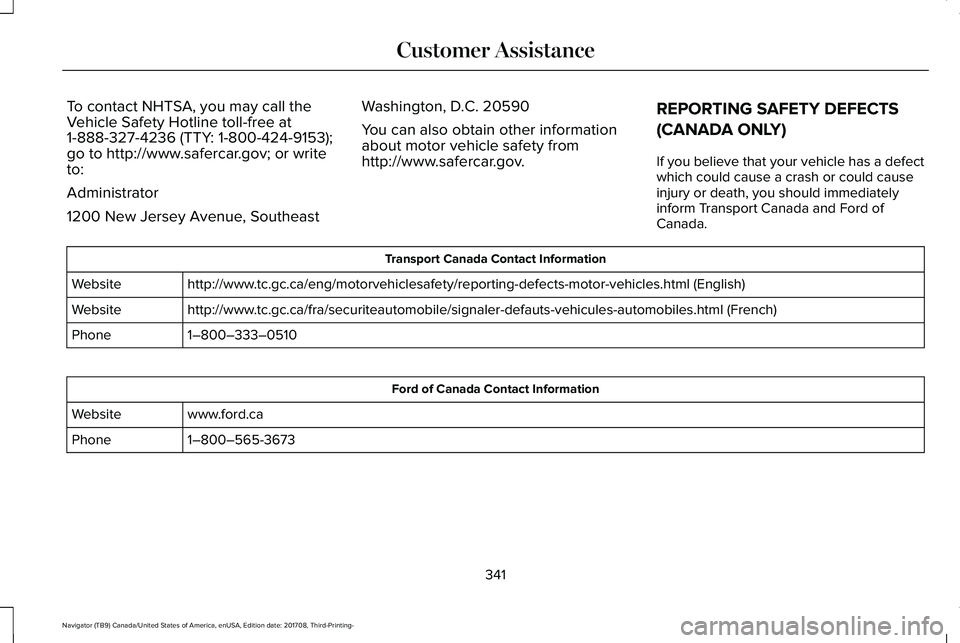
If you believe that your vehicle has a defectwhich could cause a crash or could causeinjury or death, you should immediatelyinform Transport Canada and Ford ofCanada.
Transport Canada Contact Information
http://www.tc.gc.ca/eng/motorvehiclesafety/reporting-defects-motor-vehicles.html (English)Website
http://www.tc.gc.ca/fra/securiteautomobile/signaler-defauts-vehicules-automobiles.html (French)Website
1–800–333–0510Phone
Ford of Canada Contact Information
www.ford.caWebsite
1–800–565-3673Phone
341
Navigator (TB9) Canada/United States of America, enUSA, Edition date: 201708, Third-Printing-
Customer Assistance
Page 384 of 649
CHANGING THE ENGINE AIR
FILTER
WARNING: To reduce the risk ofvehicle damage and personal burn injuries,do not start your engine with the aircleaner removed and do not remove itwhile the engine is running.
Note: Failure to use the correct air filterelement may result in severe enginedamage. Resulting component damage maynot be covered by the vehicle Warranty.
When changing the air filter element, useonly the air filter element listed. SeeMotorcraft Parts (page 423).
Change the air filter element at the correctinterval. See Capacities and Specifications(page 422).
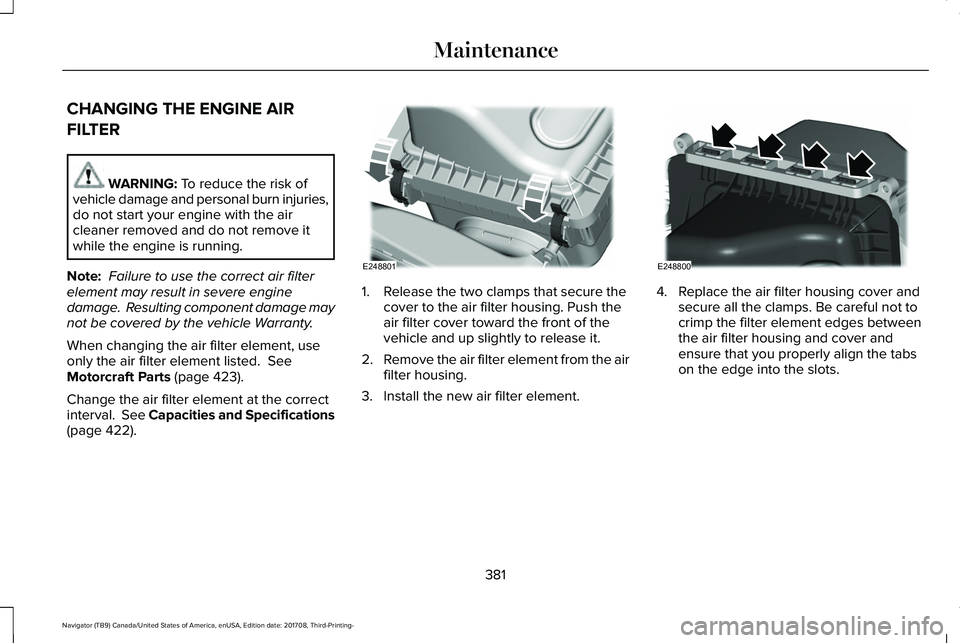
1. Release the two clamps that secure thecover to the air filter housing. Push theair filter cover toward the front of thevehicle and up slightly to release it.
2.Remove the air filter element from the airfilter housing.
3. Install the new air filter element.
4. Replace the air filter housing cover andsecure all the clamps. Be careful not tocrimp the filter element edges betweenthe air filter housing and cover andensure that you properly align the tabson the edge into the slots.
381
Navigator (TB9) Canada/United States of America, enUSA, Edition date: 201708, Third-Printing-
MaintenanceE248801 E248800
Page 412 of 649
Follow these guidelines when using snowtires and chains:
•If possible, avoid fully loading yourvehicle.
•Use only cable type chains or chainsoffered by Ford/Lincoln as an accessoryor equivalent. Other conventional linktype chains may contact and causedamage to the vehicle's wheel houseand/or body.
•Do not install chains on the front tires asthis may interfere with suspensioncomponents.
•Only certain snow cables or chains havebeen approved by Ford/Lincoln as safefor use on your vehicle with the followingtires: 265/70R17 and 275/65R18.
•You should install snow cables or chainsthat have been rated as SAE Class S.
•Install chains securely, verifying that thechains do not touch any wiring, brakelines, or fuel lines.
•Do not exceed 31 mph (50 km/h) or lessif recommended by the chainmanufacturer while using snow chains.
•Drive cautiously. If you hear the chainsrub or bang against your vehicle, stopand retighten the chains. If this does notwork, remove the chains to preventdamage to your vehicle.
•Remove the tire chains when they are nolonger needed. Do not use tire chains ondry roads.
•Purchase chains or cables from amanufacturer that clearly labels body totire dimension restrictions. The snowchains or cables must be mounted inpairs on the rear tires only.
If you have any questions regarding snowchains or cables, please contact yourauthorized dealer.
TIRE PRESSURE MONITORING
SYSTEM
WARNING: The tire pressuremonitoring system is not a substitute formanually checking tire pressures. Youshould periodically check tire pressuresusing a pressure gauge. Failure to correctlymaintain tire pressures could increase therisk of tire failure, loss of control, vehiclerollover and personal injury.
Note: You should only use tire sealants inroadside emergencies as they may causedamage to the tire pressure monitoringsystem sensor.
Note: If the tire pressure monitoring systemsensor becomes damaged, it may notfunction.
409
Navigator (TB9) Canada/United States of America, enUSA, Edition date: 201708, Third-Printing-
Wheels and Tires
Page 419 of 649
LocationItem
Under the vehicle, just forward of the rear bumperSpare tire
Under the access panel located in the floor compartment behind therear seatJack and tool kit bag
Tire Change Procedure
WARNING: Only use replacementtires and wheels that are the same size,load index, speed rating and type (such asP-metric versus LT-metric or all-seasonversus all-terrain) as those originallyprovided by Ford. The recommended tireand wheel size may be found on either theSafety Compliance Certification Label(affixed to either the door hinge pillar,door-latch post, or the door edge thatmeets the door-latch post, next to thedriver's seating position), or the Tire Labelwhich is located on the B-Pillar or edge ofthe driver's door. If this information is notfound on these labels, then you shouldcontact your authorized dealer as soon as
possible. Use of any tire or wheel notrecommended by Ford can affect thesafety and performance of your vehicle,which could result in an increased risk ofloss of vehicle control, vehicle rollover,personal injury and death.
WARNING: When one of the frontwheels is off the ground, the transmissionalone will not prevent the vehicle frommoving or slipping off the jack, even if thetransmission is in park (P).
WARNING: To help prevent yourvehicle from moving when changing awheel, shift the transmission into park (P),set the parking brake and use anappropriate block or wheel chock tosecure the wheel diagonally opposite tothe wheel being changed. For example,when changing the front left wheel, placean appropriate block or wheel chock onthe right rear wheel.
WARNING: Do not attempt to changea tire on the side of the vehicle close tomoving traffic. Pull far enough off the roadto avoid the danger of being hit whenoperating the jack or changing the wheel.
416
Navigator (TB9) Canada/United States of America, enUSA, Edition date: 201708, Third-Printing-
Wheels and Tires
Page 420 of 649
WARNING: Always use the jackprovided as original equipment with yourvehicle. If using a jack other than the oneprovided, make sure the jack capacity isadequate for the vehicle weight, includingany vehicle cargo or modifications. If youare unsure if the jack capacity is adequate,contact the authorized dealer.
WARNING: Switch off the runningboards before jacking or placing any objectunder your vehicle. Never place your handbetween the extended running board andyour vehicle. A moving running board maycause injury.
WARNING: Only use the spare wheelcarrier to stow the wheel provided withyour vehicle. Other wheel sizes couldcause the spare wheel carrier to fail if itdoes not fit securely or is too heavy.
1.Park the vehicle on firm, level ground andactivate the hazard flashers.
2. Apply the parking brake, place thetransmission in park (P) and switch theignition off.
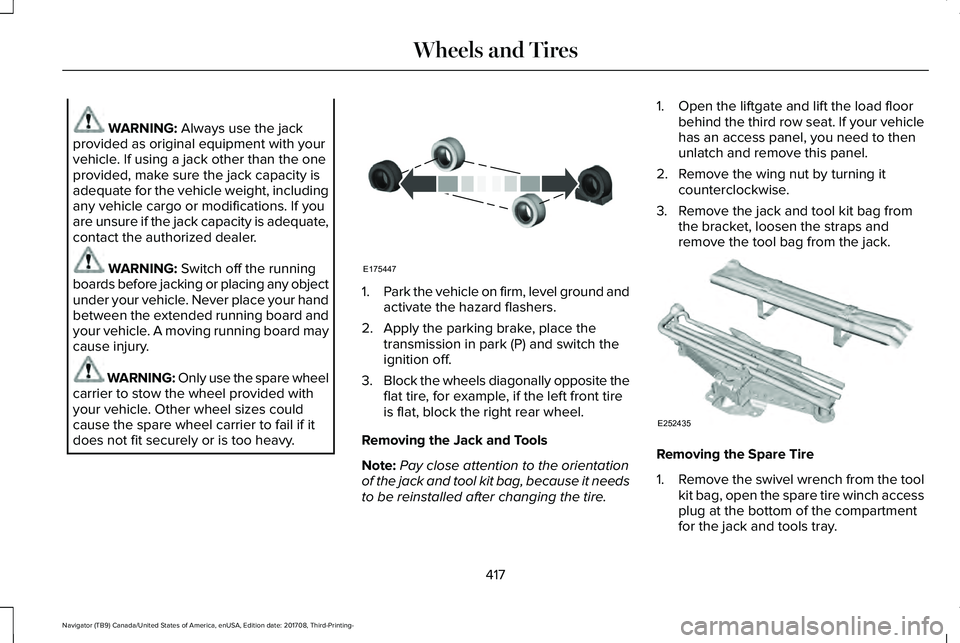
3.Block the wheels diagonally opposite theflat tire, for example, if the left front tireis flat, block the right rear wheel.
Removing the Jack and Tools
Note:Pay close attention to the orientationof the jack and tool kit bag, because it needsto be reinstalled after changing the tire.
1. Open the liftgate and lift the load floorbehind the third row seat. If your vehiclehas an access panel, you need to thenunlatch and remove this panel.
2. Remove the wing nut by turning itcounterclockwise.
3. Remove the jack and tool kit bag fromthe bracket, loosen the straps andremove the tool bag from the jack.
Removing the Spare Tire
1.Remove the swivel wrench from the toolkit bag, open the spare tire winch accessplug at the bottom of the compartmentfor the jack and tools tray.
417
Navigator (TB9) Canada/United States of America, enUSA, Edition date: 201708, Third-Printing-
Wheels and TiresE175447 E252435
Page 423 of 649
Stowing the Flat or Spare Tire
1.Lay the tire on the ground, near the rearof the vehicle, with the valve stem sidefacing up.
2. Slide the wheel partially under thevehicle and install the retainer throughthe wheel center. You may have toremove the wheel center cap prior topushing the retainer through the centerof the wheel. To remove the center cap,press it off with the jack tool from theinner side of the wheel. Pull on the cableto align the components at the end of thecable.
3.Using the swivel wrench, insert it throughthe access hole behind the third row seatand engage the winch.
4. Turn the swivel wrench clockwise untilthe tire is raised to its stowed positionunderneath the vehicle. The wrenchbecomes harder to turn and the sparetire winch ratchets or slips when the tireis raised to maximum tightness. A clickingsound can be heard from the winchindicating that the tire is properly stowed.
5.Carefully place all tools back into the toolkit bag.
6.Reinstall the tool kit bag on the jack andtighten the straps.
7.Reinstall the jack properly on the bracketand secure with the wing nut.
8. Close the access hole with the rubberplug.
9. If the vehicle has an access panel,reinstall.
10. Unblock the wheel.
TECHNICAL SPECIFICATIONS
Wheel Lug Nut Torque Specifications
WARNING: When you install a wheel, always remove any corrosion, dirt or foreign materials present on the mounting surfaces of thewheel or the surface of the wheel hub, brake drum or brake disc that contacts the wheel. Make sure to secure any fasteners that attachthe rotor to the hub so they do not interfere with the mounting surfaces of the wheel. Installing wheels without correct metal-to-metal contactat the wheel mounting surfaces can cause the wheel nuts to loosen and the wheel to come off while your vehicle is in motion, resulting inloss of vehicle control, personal injury or death.
420
Navigator (TB9) Canada/United States of America, enUSA, Edition date: 201708, Third-Printing-
Wheels and Tires
Page 458 of 649
•SOUND: Press to access the Soundmenu where you can adjust sound andother audio settings.
•1-6: Press and hold to store or press toselect an AM, FM or SIRIUS memorypreset. See Audio System (page 434).
•DISP: Switch the display on or off. Youcan also touch the screen to switch thedisplay back on.
•Temperature, fan and climate controlbuttons: Control the temperature, fanspeed or settings of the climate controlsystem. See Climate Control (page 151).
911 Assist
WARNING: Unless the 911 Assistsetting is set on before a crash, the systemwill not dial for help which could delayresponse time, potentially increasing therisk of serious injury or death after a crash.
WARNING: Do not wait for 911 Assistto make an emergency call if you can doit yourself. Dial emergency servicesimmediately to avoid delayed responsetime which could increase the risk ofserious injury or death after a crash. If youdo not hear 911 Assist within five secondsof the crash, the system or phone may bedamaged or non-functional.
WARNING: Always place your phonein a secure location in your vehicle so itdoes not become a projectile or getdamaged in a crash. Failure to do so maycause serious injury to someone ordamage the phone which could prevent911 Assist from working properly.
Note:The SYNC 911 Assist feature must beset on before the incident.
Note:The SYNC 911 Assist feature onlyoperates in the U.S., Canada or in a territoryin which 911 is the emergency number.
Note:Before setting this feature on, makesure that you read the 911 Assist PrivacyNotice later in this section for importantinformation.
Note:If any user sets 911 Assist to on or off,that setting applies for all paired phones. If911 Assist is switched off and the phone isconnected to SYNC, an icon displays on thestatus bar.
Note:Every phone operates differently.While SYNC 911 Assist works with mostcellular phones, some may have troubleusing this feature.
If a crash deploys an airbag (excluding kneeairbags and rear inflatable safety belts [ifequipped]) or activates the fuel pumpshut-off, your SYNC-equipped vehicle maybe able to contact emergency services bydialing 911 through a paired and connectedBluetooth-enabled phone. You can learnmore about the 911 Assist feature, by visiting:
Website
www.owner.lincoln.comwww.syncmyride.ca
455
Navigator (TB9) Canada/United States of America, enUSA, Edition date: 201708, Third-Printing-
SYNC™ 3
Page 463 of 649
To install the update in your vehicle, removeanything that is plugged in the USB ports onthe media hub and plug in the USB drivecontaining the update. When the USB driveis plugged in, the installation should beginimmediately. After a successful installation,the update is available the next time thevehicle is started.
Please reference the website for any furtheractions.
Updating Over Wi-Fi
To update your System over Wi-Fi yourvehicle must connected to a Wi-Fi accesspoint. Data rates may apply.
To connect your system to Wi-Fi, select:
Menu Item
Settings
Wi-Fi
You can then select your Wi-Fi network. You may haveto enter the security code ifthe network is secured. Thesystem confirms when it hasconnected to the network.
Available Wi-Fi Networks
You must also give the system permissionto update automatically. Upon vehicledelivery, the System asks you if you wouldlike to use the automatic update feature. Ifyou agree to automatic updates, you canpress OK to confirm. If this selection doesnot appear upon vehicle delivery you canaccess it through the General Settings. SeeSettings (page 510). You can also perform amaster reset. See SYNC™ 3 Troubleshooting(page 530).
If you would like to switch this feature onlater, select:
Menu Item
Settings
General
From this menu, you canenable automatic updates.If you have not done soalready, the system promptsyou to set up a Wi-Ficonnection when youenable this feature.
AutomaticSystemUpdates
When the system is connected via Wi-Fi andautomatic updates are enabled, your systemchecks for software updates periodically. Ifa new version is available, it downloads atthat time. Software downloads can take placefor up to 30 minutes after you have switchedyour vehicle off. The updates do not interruptthe normal use of your SYNC 3 system. If adownload does not complete for any reason,
460
Navigator (TB9) Canada/United States of America, enUSA, Edition date: 201708, Third-Printing-
SYNC™ 3