ECU LINCOLN NAVIGATOR 2018 Service Manual
[x] Cancel search | Manufacturer: LINCOLN, Model Year: 2018, Model line: NAVIGATOR, Model: LINCOLN NAVIGATOR 2018Pages: 649, PDF Size: 4.96 MB
Page 479 of 649
AM/FM Radio
Tuning a Station
You can use the tune or seek controls on theradio bezel to select a station.
To tune a station using the touchscreen,select:
Menu item
Direct Tune
A pop up appears, allowing you to type inthe frequency of a station. You can only entera valid station for the source you arecurrently listening to.
You can press the backspace button todelete the previously entered number.
Once you have entered the station's callnumbers, you can select:
Action and descriptionMenu item
Press to beginplaying the stationyou have entered.
Enter
Press to exit withoutchanging the station.Cancel
Presets
To set a new preset, tune to the station andthen press and hold one of the memorypreset buttons. The audio mutes briefly whilethe system saves the station and thenreturns.
There are two preset banks available for AMand three banks for FM. To access additionalpresets, tap the preset button. The indicatoron the preset button shows which bank ofpresets you are currently viewing.
SiriusXM® Satellite Radio (If Activated)
Note: This feature may not be available inall markets and requires an activesubscription.
SiriusXM satellite radio is asubscription-based satellite radio service thatbroadcasts a variety of music, sports, news,weather, traffic and entertainmentprogramming. Your factory-installed SiriusXMsatellite radio system includes hardware anda limited subscription term that begins onthe date of sale or lease of your vehicle. Seean authorized dealer for availability.
476
Navigator (TB9) Canada/United States of America, enUSA, Edition date: 201708, Third-Printing-
SYNC™ 3E234451
Page 481 of 649
Action and descriptionMenu item
Replay audio on the current channel. You can replay approximately 45 minutes of audio as long asyou remain tuned to the current station. Changing stations erases the previous audio.Replay
When you are in replay mode, you are not able to select a differentpreset until you return to live audio. Pressing this button returns youto the live broadcast.
Live
Save the current song, artist, or team as a favorite. The system alerts you when it plays again onany channel.ALERT
Selecting this button allows you to enable and edit alerts. See Settings (page 510).
Memory Presets
To set a preset, tune to the station then pressand hold one of the memory preset buttons.The audio mutes briefly while the systemsaves the station and returns once thestation is stored.
There are three preset banks available forSiriusXM. To access additional presets, tapthe preset button. The indicator on the presetbutton shows which bank of presets you arecurrently viewing.
Satellite Radio Electronic Serial Number(ESN)
You need your ESN to activate, modify ortrack your satellite radio account. SeeSettings (page 510).
478
Navigator (TB9) Canada/United States of America, enUSA, Edition date: 201708, Third-Printing-
SYNC™ 3
Page 521 of 649
Action and DescriptionMenu Item
Activation of this feature allows you to listen to HD radio broadcasts.FM HD Radio
AM HD Radio
(Dependent on currentradio source, If Available)
This feature is available when FM Radio is your active media source. Activate this feature to have the systemdisplay radio text.Radio Text
RefreshAutoset Presets (AST)
Selecting this option stores the six strongest stations in your current location to the last preset bank of thecurrently tuned source.
SiriusXM
This button is available if SiriusXM is theactive audio source. Pressing the buttonallows you to access the following features:
518
Navigator (TB9) Canada/United States of America, enUSA, Edition date: 201708, Third-Printing-
SYNC™ 3
Page 528 of 649
Action and DescriptionMenu Item
Enable this option to connect to Wi-Fi for SYNC 3 vehicle software updates.Wi-Fi
This provides you with a list of available Wi-Fi networks within range.View Available Networks
Clicking on a network from the list allows you to connect or disconnect from that network. The system mayrequire a security code to connect.
When you click the information button next to a network, more information about the network displays suchas the signal strength, connection status and security type.
The system alerts you when your vehicle is parked and a Wi-Fi network is within range if SYNC is not alreadyconnected.Wi-Fi Available Notifications
Vehicle Hotspot
You can access the following:
Action and DescriptionMenu Item
Allows you to switch the hotspot on and off.Wi-Fi Hotspot On/Off
Allows you to view and edit hotspot settings such as the SSID and password.Settings
Allows you to view your vehicle's hotspot plan and data usage.Data Usage
Allows you to manage devices connected to your hotspot.Manage Devices
525
Navigator (TB9) Canada/United States of America, enUSA, Edition date: 201708, Third-Printing-
SYNC™ 3
Page 529 of 649
Note:The Vehicle Wi-Fi Hotspot (VehicleHotspot) may be operational while theignition is on and may remain operationalwhile the ignition is off.
Note:Vehicle Hotspot services are providedby the vehicle network carrier, subject toyour vehicle network carrier agreement,coverage and availability.
Note:It is the account owner’s responsibilityto remove the vehicle from the vehiclenetwork carrier account when ownership ofthe vehicle is transferred. If the owner wouldlike to remove the vehicle from the accountfor any reason, please contact your vehiclenetwork carrier for more information.
Note:: Data, for example the VehicleIdentification Number (VIN), SIM Card ID, anddata plan usage, is shared between FordMotor Company and the vehicle networkcarrier to provide the Vehicle Hotspot servicein accordance with your vehicle networkcarrier agreement, coverage and availability,and may be used to enable a seamlesstransition from an old to new embeddedmodem and to confirm any updates aresuccessfully delivered.
Note:For your convenience data usage maybe available for monitoring under Settingsbut may not reflect actual or current usage.The vehicle network carrier is responsiblefor providing information about your account.Please contact the vehicle network carrierfor more information.
Note:Ford Motor Company may need toupdate operating system software on yourvehicle, including security updates and bugfixes, to keep connected services current,like Vehicle Hotspot, without prior notice toyou.
Note:If you do not have an active vehiclehotspot data plan, open your web browserand go to a website using the HTTP protocolso you can be automatically redirected tothe vehicle network carrier landing pagewhere you can purchase data. Websitesusing HTTPS cannot automatically redirectyou.
Ambient Lighting
Tap a color once to active ambient lighting.This sets the color to the highest intensity.
You can drag the colors up and down toincrease or decrease the intensity.
To switch ambient lighting off, press theactive color once or drag the active color allthe way down to zero intensity.
Vehicle
Note:Your vehicle may not have all of thesefeatures.
You can select the following features toupdate their settings.
Door Keypad Code
Select this button to add or erase a personaldoor keypad code. To add or erase apersonal code, you first need to enter thefive-digit factory set code. You can find thiscode on the owner's wallet card in the glovebox or from your authorized dealer.
526
Navigator (TB9) Canada/United States of America, enUSA, Edition date: 201708, Third-Printing-
SYNC™ 3
Page 532 of 649
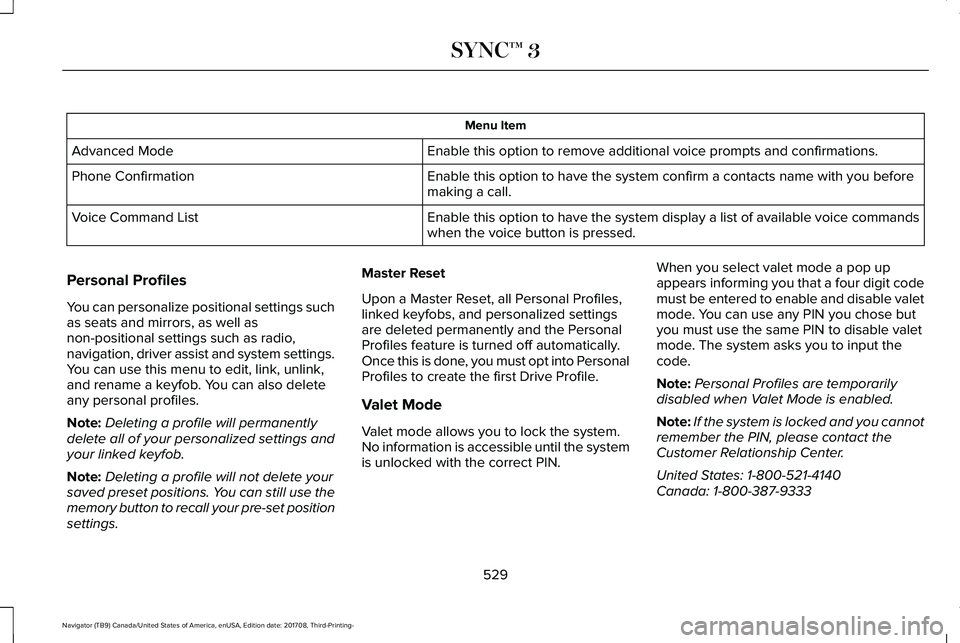
Menu Item
Enable this option to remove additional voice prompts and confirmations.Advanced Mode
Enable this option to have the system confirm a contacts name with you beforemaking a call.Phone Confirmation
Enable this option to have the system display a list of available voice commandswhen the voice button is pressed.Voice Command List
Personal Profiles
You can personalize positional settings suchas seats and mirrors, as well asnon-positional settings such as radio,navigation, driver assist and system settings.You can use this menu to edit, link, unlink,and rename a keyfob. You can also deleteany personal profiles.
Note:Deleting a profile will permanentlydelete all of your personalized settings andyour linked keyfob.
Note:Deleting a profile will not delete yoursaved preset positions. You can still use thememory button to recall your pre-set positionsettings.
Master Reset
Upon a Master Reset, all Personal Profiles,linked keyfobs, and personalized settingsare deleted permanently and the PersonalProfiles feature is turned off automatically.Once this is done, you must opt into PersonalProfiles to create the first Drive Profile.
Valet Mode
Valet mode allows you to lock the system.No information is accessible until the systemis unlocked with the correct PIN.
When you select valet mode a pop upappears informing you that a four digit codemust be entered to enable and disable valetmode. You can use any PIN you chose butyou must use the same PIN to disable valetmode. The system asks you to input thecode.
Note:Personal Profiles are temporarilydisabled when Valet Mode is enabled.
Note:If the system is locked and you cannotremember the PIN, please contact theCustomer Relationship Center.
United States: 1-800-521-4140Canada: 1-800-387-9333
529
Navigator (TB9) Canada/United States of America, enUSA, Edition date: 201708, Third-Printing-
SYNC™ 3
Page 535 of 649
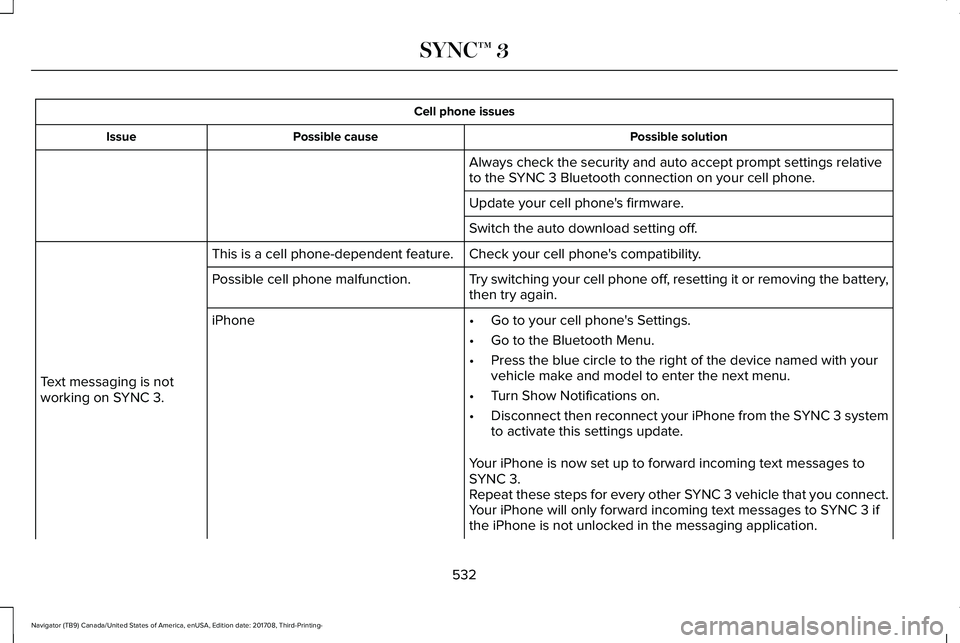
Cell phone issues
Possible solutionPossible causeIssue
Always check the security and auto accept prompt settings relativeto the SYNC 3 Bluetooth connection on your cell phone.
Update your cell phone's firmware.
Switch the auto download setting off.
Check your cell phone's compatibility.This is a cell phone-dependent feature.
Text messaging is notworking on SYNC 3.
Try switching your cell phone off, resetting it or removing the battery,then try again.Possible cell phone malfunction.
iPhone•Go to your cell phone's Settings.
•Go to the Bluetooth Menu.
•Press the blue circle to the right of the device named with yourvehicle make and model to enter the next menu.
•Turn Show Notifications on.
•Disconnect then reconnect your iPhone from the SYNC 3 systemto activate this settings update.
Your iPhone is now set up to forward incoming text messages toSYNC 3.Repeat these steps for every other SYNC 3 vehicle that you connect.Your iPhone will only forward incoming text messages to SYNC 3 ifthe iPhone is not unlocked in the messaging application.
532
Navigator (TB9) Canada/United States of America, enUSA, Edition date: 201708, Third-Printing-
SYNC™ 3
Page 537 of 649
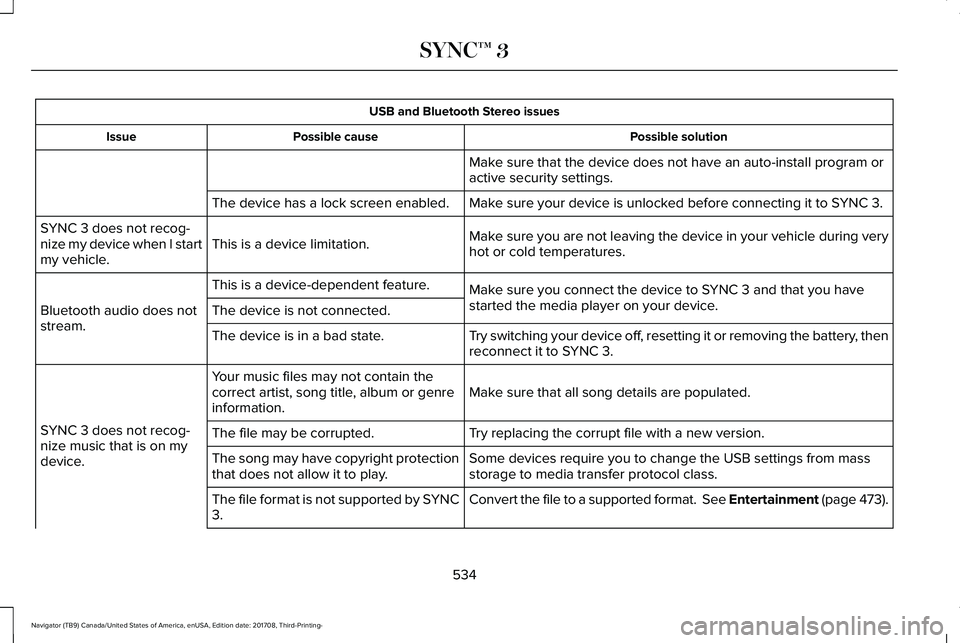
USB and Bluetooth Stereo issues
Possible solutionPossible causeIssue
Make sure that the device does not have an auto-install program oractive security settings.
Make sure your device is unlocked before connecting it to SYNC 3.The device has a lock screen enabled.
Make sure you are not leaving the device in your vehicle during veryhot or cold temperatures.This is a device limitation.SYNC 3 does not recog-nize my device when I startmy vehicle.
Make sure you connect the device to SYNC 3 and that you havestarted the media player on your device.
This is a device-dependent feature.
Bluetooth audio does notstream.The device is not connected.
Try switching your device off, resetting it or removing the battery, thenreconnect it to SYNC 3.The device is in a bad state.
Make sure that all song details are populated.Your music files may not contain thecorrect artist, song title, album or genreinformation.
SYNC 3 does not recog-nize music that is on mydevice.
Try replacing the corrupt file with a new version.The file may be corrupted.
Some devices require you to change the USB settings from massstorage to media transfer protocol class.The song may have copyright protectionthat does not allow it to play.
Convert the file to a supported format. See Entertainment (page 473).The file format is not supported by SYNC3.
534
Navigator (TB9) Canada/United States of America, enUSA, Edition date: 201708, Third-Printing-
SYNC™ 3
Page 550 of 649
For a complete listing of the accessories thatare available for your vehicle, please contactyour authorized dealer or visit the onlinestore web site:
Web Address (United States)
www.Accessories.Lincoln.com
Web Address (Canada)
www.LincolnCanada.com
Lincoln Motor Company will repair or replaceany properly authorized dealer-installedLincoln Original Accessory found to bedefective in factory-supplied materials orworkmanship during the warranty period, aswell as any component damaged by thedefective accessories.
Lincoln Motor Company will warrant yourLincoln original accessory through thewarranty that provides the greatest benefit:
•24 months, unlimited mileage.
•The remainder of your new vehiclelimited warranty.
Contact an authorized dealer for details anda copy of the warranty.
Exterior Style
•Side window deflectors*.
•Splash guards.
Interior Style
•Floor mats.
•Rear seat entertainment system*.
Lifestyle
•Ash cup or coin holder.
•Cargo organization and management.
•Roof rack and carriers*.
•SUV camping tent*.
•Tablet cradle.
•Trailer hitches, wiring harnesses andaccessories.
Peace of Mind
•Car cover*.
•Cargo area protector.
•Cargo security shade.
•In-vehicle safe*.
•Locking fuel plug.
•Remote start.
•Roadside assistance kits*.
•Vehicle security.
•Wheel locks.
*Lincoln Licensed Accessory. The accessorymanufacturer designs, develops andtherefore warrants Lincoln LicensedAccessories, and does not design or testthese accessories to Lincoln Motor Companyengineering requirements. Contact anauthorized Lincoln dealer for the accessorymanufacturer's limited warranty details andrequest a copy of the Lincoln LicensedAccessories product limited warranty fromthe accessory manufacturer.
547
Navigator (TB9) Canada/United States of America, enUSA, Edition date: 201708, Third-Printing-
Accessories
Page 553 of 649
Transferable Coverage
If you sell your vehicle before your LincolnProtect extended service plan coverageexpires, you can transfer any remainingcoverage to the new owner. Which shouldgive you and your potential buyer a littlemore peace of mind.
Less Cost to Properly Maintain Your Vehicle
Lincoln Protect extended service plan alsooffers a Premium Maintenance Plan thatcovers all scheduled maintenance, andselected wear items. The coverage isprepaid, so you never have to worry aboutthe cost of your vehicle’s maintenance.
Covered maintenance includes:
•Windshield wiper blades.
•Spark plugs.
•The clutch disc (if equipped).
•Brake pads and linings.
•Shock absorbers and struts.
•Engine cooling hoses, clamps ando-rings.
•Engine belts.
•Diesel exhaust fluid replenishment (ifequipped).
Interest Free Finance Options
Just a 10% down payment will provide youwith an affordable, no interest, no feepayment program allowing you all thesecurity and benefits Lincoln Protectextended service plan has to offer whilepaying over time. You are pre-approved withno credit check or hassles. To learn more,call our Lincoln Protect extended serviceplan specialists at 800-367-3377.
Complete the information below and mail to:
Lincoln Protect Extended Service PlanP.O. Box 321067Detroit, MI 48232
Lincoln Protect (CANADA ONLY)
You can get more protection for your vehicleby purchasing a Lincoln Protect extendedservice plan. Lincoln Protect extendedservice plan is the only service contractbacked by Lincoln Motor Company ofCanada, Limited. Depending on the plan youpurchase, Lincoln Protect extended serviceplan provides benefits such as:
•Rental reimbursement.
•Coverage for certain maintenance andwear items.
•Protection against repair costs after yourNew Vehicle Limited Warranty Coverageexpires.
•Roadside Assistance benefits.
550
Navigator (TB9) Canada/United States of America, enUSA, Edition date: 201708, Third-Printing-
Lincoln Protect