lock LINCOLN NAVIGATOR 2018 Repair Manual
[x] Cancel search | Manufacturer: LINCOLN, Model Year: 2018, Model line: NAVIGATOR, Model: LINCOLN NAVIGATOR 2018Pages: 649, PDF Size: 4.96 MB
Page 184 of 649
HomeLink Wireless Control System
WARNING: Make sure that thegarage door and security device are freefrom obstruction when you areprogramming. Do not program the systemwith the vehicle in the garage.
WARNING: Do not use the systemwith any garage door opener that does nothave the safety stop and reverse featureas required by U.S. Federal SafetyStandards (this includes any garage dooropener manufactured before April 1, 1982).A garage door opener which cannot detectan object, signaling the door to stop andreverse, does not meet current federalsafety standards. Using a garage dooropener without these features increasesthe risk of serious injury or death.
Note:Make sure you keep the originalremote control transmitter for use in othervehicles as well as for future systemprogramming.
Note:We recommend that upon the sale orlease termination of your vehicle, you erasethe programmed function buttons for securityreasons. See Erasing the Function ButtonCodes later in this section.
Note:You can program a maximum of threedevices. To change or replace any of thethree devices after it has been initiallyprogrammed, you must first erase the currentsettings. See Erasing the Function ButtonCodes.
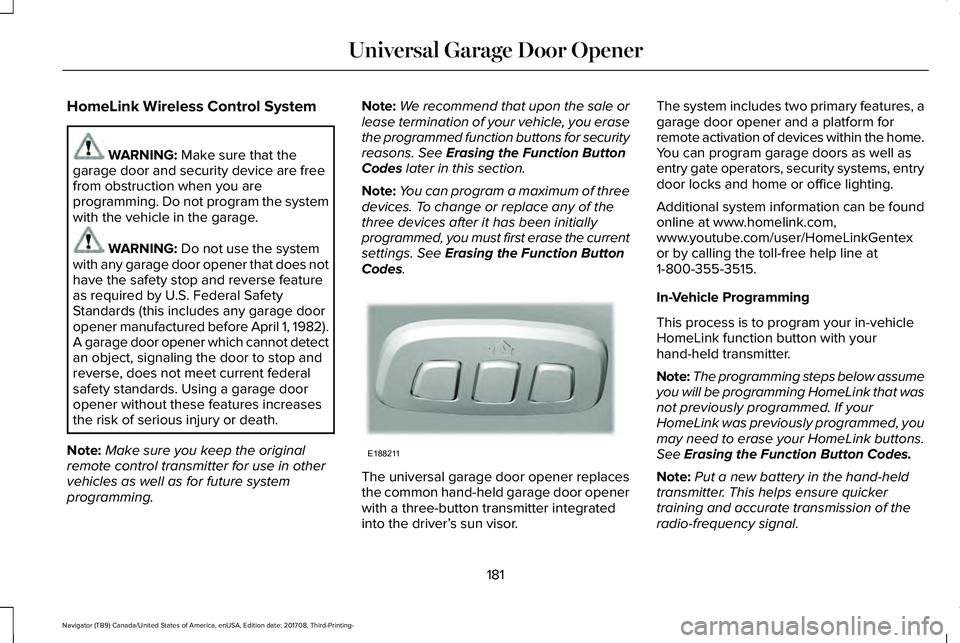
The universal garage door opener replacesthe common hand-held garage door openerwith a three-button transmitter integratedinto the driver’s sun visor.
The system includes two primary features, agarage door opener and a platform forremote activation of devices within the home.You can program garage doors as well asentry gate operators, security systems, entrydoor locks and home or office lighting.
Additional system information can be foundonline at www.homelink.com,www.youtube.com/user/HomeLinkGentexor by calling the toll-free help line at1-800-355-3515.
In-Vehicle Programming
This process is to program your in-vehicleHomeLink function button with yourhand-held transmitter.
Note:The programming steps below assumeyou will be programming HomeLink that wasnot previously programmed. If yourHomeLink was previously programmed, youmay need to erase your HomeLink buttons.See Erasing the Function Button Codes.
Note:Put a new battery in the hand-heldtransmitter. This helps ensure quickertraining and accurate transmission of theradio-frequency signal.
181
Navigator (TB9) Canada/United States of America, enUSA, Edition date: 201708, Third-Printing-
Universal Garage Door OpenerE188211
Page 197 of 649
You can stop the shutdown, or reset thetimer, at any point before the 30-secondcountdown has expired by doing any of thefollowing:
•Interacting with your vehicle, for examplepressing the brake or accelerator pedal.
•You can temporarily switch off theshutdown feature any time the ignition ison using the information display. SeeInformation Displays (page 119). Thefeature only remains off for the currentignition cycle.
•During the 30-second countdown, thesystem prompts you to press OK orRESET to temporarily switch the featureoff for the current ignition cycle only.
Stopping the Engine When YourVehicle is Stationary
1. Shift into park (P).
2. Press the push button ignition switch.
3. Apply the parking brake.
Note:The ignition, all electrical circuits andall warning lamps and indicators will beturned off.
Note:If the engine is idling for 30 minutes,the ignition and engine automatically shutsdown.
Stopping the Engine When YourVehicle is Moving
WARNING: Switching off the enginewhen the vehicle is still moving will resultin a loss of brake and steering assistance.The steering will not lock, but higher effortwill be required. When the ignition isswitched off, some electrical circuits,including air bags, warning lamps andindicators may also be off. If the ignitionwas turned off accidentally, you can shiftinto neutral (N) and re-start the engine.
1. Shift into neutral and use the brakes tobring your vehicle to a safe stop.
2.When your vehicle has stopped, shift intopark (P).
3. Press and hold the push button ignitionswitch, or press it three times within twoseconds.
4. Apply the parking brake.
Guarding Against Exhaust Fumes
WARNING: Exhaust leaks may resultin entry of harmful and potentially lethalfumes into the passenger compartment. Ifyou smell exhaust fumes inside yourvehicle, have your vehicle inspectedimmediately. Do not drive if you smellexhaust fumes.
Important Ventilating Information
If you stop your vehicle and then leave theengine idling for long periods, werecommend that you do one of the following:
•Open the windows at least 1 in (3 cm).
•Set your climate control to outside air.
ENGINE BLOCK HEATER (IF EQUIPPED)
WARNING: Failure to follow engineblock heater instructions could result inproperty damage or serious personalinjury.
194
Navigator (TB9) Canada/United States of America, enUSA, Edition date: 201708, Third-Printing-
Starting and Stopping the Engine
Page 198 of 649
WARNING: Do not use your heaterwith ungrounded electrical systems ortwo-pronged adapters. There is a risk ofelectrical shock.
WARNING: Do not fully close thehood, or allow it to drop under its ownweight when using the engine blockheater. This could damage the power cableand may cause an electrical short resultingin fire, injury and property damage.
Note:The heater is most effective whenoutdoor temperatures are below 0°F (-18°C).
The heater acts as a starting aid by warmingthe engine coolant. This allows the climatecontrol system to respond quickly. Theequipment includes a heater element(installed in the engine block) and a wireharness. You can connect the system to agrounded 120-volt AC electrical source.
We recommend that you do the following fora safe and correct operation:
•Use a 16-gauge outdoor extension cordthat is product certified by Underwriter’sLaboratory (UL) or Canadian StandardsAssociation (CSA). This extension cordmust be suitable for use outdoors, in coldtemperatures, and be clearly markedSuitable for Use with OutdoorAppliances. Do not use an indoorextension cord outdoors. This couldresult in an electric shock or become afire hazard.
•Use as short an extension cord aspossible.
•Do not use multiple extension cords.
•Make sure that when in operation, theextension cord plug and heater cord plugconnections are free and clear of water.This could cause an electric shock or fire.
•Make sure your vehicle is parked in aclean area, clear of combustibles.
•Make sure the heater, heater cord andextension cord are firmly connected.
•Check for heat anywhere in the electricalhookup once the system has beenoperating for approximately 30 minutes.
•Make sure the system is unplugged andproperly stowed before starting anddriving your vehicle. Make sure theprotective cover seals the prongs of theblock heater cord plug when not in use.
•Make sure the heater system is checkedfor proper operation before winter.
Using the Engine Block Heater
Make sure the receptacle terminals are cleanand dry prior to use. Clean them with a drycloth if necessary.
The heater uses 0.4 to 1.0 kilowatt-hours ofenergy per hour of use. The system does nothave a thermostat. It achieves maximumtemperature after approximately three hoursof operation. Using the heater longer thanthree hours does not improve systemperformance and unnecessarily useselectricity.
195
Navigator (TB9) Canada/United States of America, enUSA, Edition date: 201708, Third-Printing-
Starting and Stopping the Engine
Page 213 of 649
AUTOMATIC TRANSMISSION
WARNING: Always fully apply theparking brake and make sure you shift intopark (P). Failure to follow this instructioncould result in personal injury or death.
WARNING: Do not use tow/haulwhen the road surface is slippery. Failureto follow this instruction could result in theloss of control of your vehicle.
WARNING: When your vehicle isstationary, keep the brake pedal fullypressed when shifting gears. Failure tofollow this instruction could result inpersonal injury, death or property damage.
Note:You may not be able to shift out ofpark (P) unless the intelligent access key isinside your vehicle.
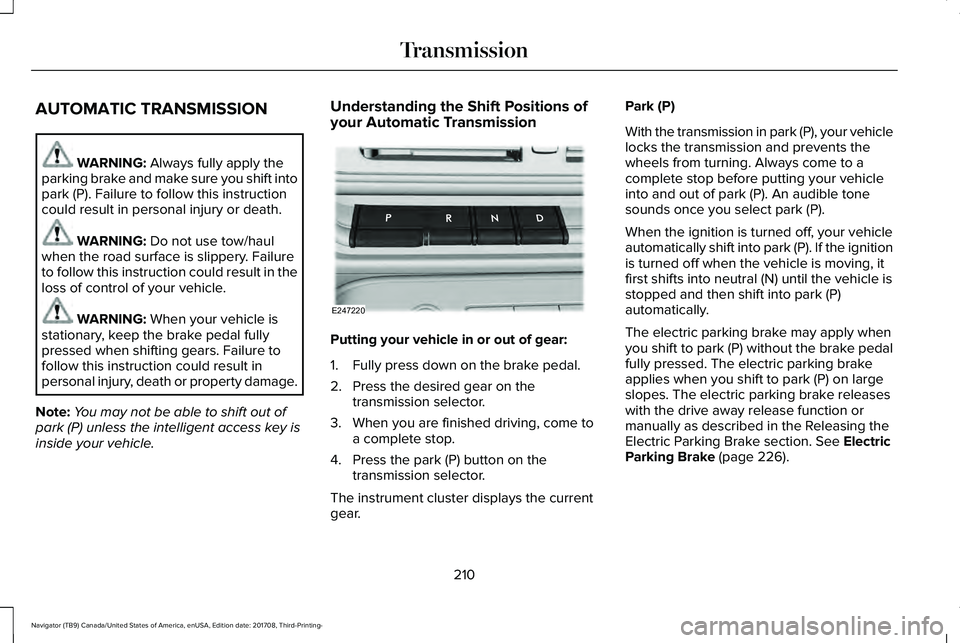
Understanding the Shift Positions ofyour Automatic Transmission
Putting your vehicle in or out of gear:
1. Fully press down on the brake pedal.
2. Press the desired gear on thetransmission selector.
3. When you are finished driving, come toa complete stop.
4. Press the park (P) button on thetransmission selector.
The instrument cluster displays the currentgear.
Park (P)
With the transmission in park (P), your vehiclelocks the transmission and prevents thewheels from turning. Always come to acomplete stop before putting your vehicleinto and out of park (P). An audible tonesounds once you select park (P).
When the ignition is turned off, your vehicleautomatically shift into park (P). If the ignitionis turned off when the vehicle is moving, itfirst shifts into neutral (N) until the vehicle isstopped and then shift into park (P)automatically.
The electric parking brake may apply whenyou shift to park (P) without the brake pedalfully pressed. The electric parking brakeapplies when you shift to park (P) on largeslopes. The electric parking brake releaseswith the drive away release function ormanually as described in the Releasing theElectric Parking Brake section. See ElectricParking Brake (page 226).
210
Navigator (TB9) Canada/United States of America, enUSA, Edition date: 201708, Third-Printing-
TransmissionE247220
Page 217 of 649
Brake-Shift Interlock Override
WARNING: When doing thisprocedure, you need to take thetransmission out of park (P) which meansyour vehicle can roll freely. To avoidunwanted vehicle movement, always fullyapply the parking brake prior to doing thisprocedure. Use wheels chocks ifappropriate.
WARNING: Do not drive your vehicleuntil you verify that the stoplamps areworking.
WARNING: If the parking brake isfully released, but the brake warning lampremains illuminated, the brakes may notbe working properly. Have your vehiclechecked as soon as possible.
Note:See your authorized dealer as soonas possible if this procedure is used.
Note:For some markets this feature isdisabled.
Note:This feature only functions if your12-volt battery has power.
Use the brake-shift interlock override tomove your transmission from the parkposition in the event of an electricalmalfunction.
1. Apply the parking brake and start theengine before performing this procedure.
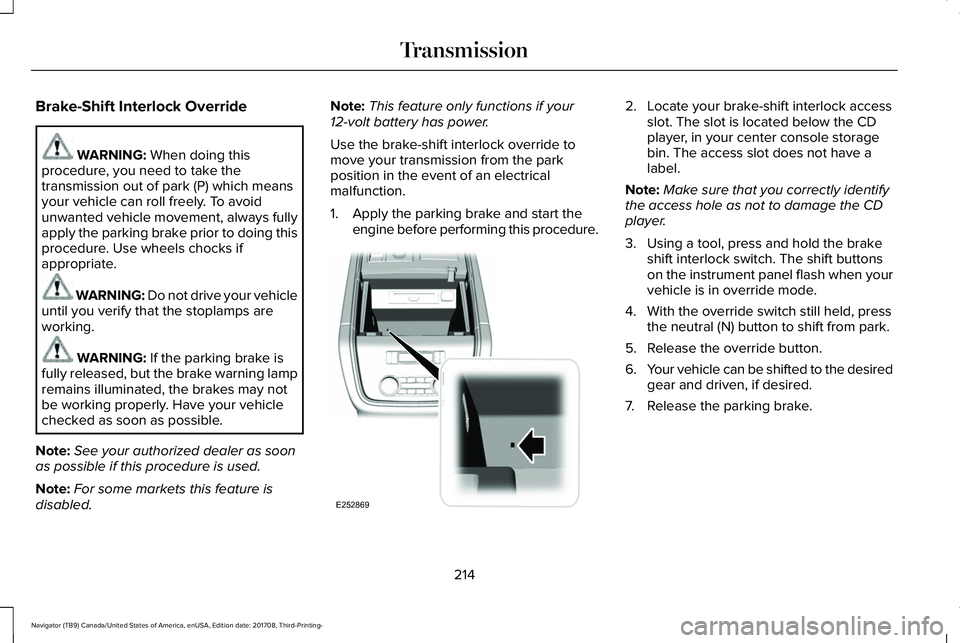
2. Locate your brake-shift interlock accessslot. The slot is located below the CDplayer, in your center console storagebin. The access slot does not have alabel.
Note:Make sure that you correctly identifythe access hole as not to damage the CDplayer.
3. Using a tool, press and hold the brakeshift interlock switch. The shift buttonson the instrument panel flash when yourvehicle is in override mode.
4. With the override switch still held, pressthe neutral (N) button to shift from park.
5. Release the override button.
6.Your vehicle can be shifted to the desiredgear and driven, if desired.
7. Release the parking brake.
214
Navigator (TB9) Canada/United States of America, enUSA, Edition date: 201708, Third-Printing-
TransmissionE252869
Page 220 of 649
Note:The AdvanceTrac® with RSC® stabilityenhancement system can be switched offby deselecting the feature in the clustermenu. See Using Traction Control (page232). This disables the engine managementfeature, allowing the vehicle to maintain fullpower and enhanced momentum throughthe obstacle.
Note:The AdvanceTrac system can takecontrol of the transfer case clutch anddisable it during driving maneuvers whennecessary.
Your vehicle engages 4X4 modes based onthe currently selected Drive Mode. SeeDrive Mode Control (page 285).
Note:The information display could showmessages during 4WD operation. SeeInformation Messages (page 124).
2H - 4X2
2H turns on when you select NORMAL orCONSERVE. Power is delivered to the rearwheels only. This mode is appropriate fornormal on-road driving on dry pavement andprovides the best fuel economy.
4A - 4X4 Auto
4A turns on when you select EXCITE,NORMAL 4x4 AUTO or SLIPPERY. Itprovides electronically controlled four-wheeldrive with power delivered to all four wheels,as required, for increased traction. 4A iscalibrated in conjunction with Drive Mode.4A in EXCITE is less aggressively tuned andis appropriate for dry road surfaces. 4A inNORMAL 4x4 AUTO is appropriate for allon-road driving conditions, such as dry roadsurfaces, wet pavement, light snow or gravel.4A in SLIPPERY is more aggressively tunedand is appropriate for slippery surfaces, suchas light snow or gravel.
4H - 4X4 High
4H turns on when you select DEEPCONDITIONS. It provides electronicallylocked four-wheel drive power to both thefront and rear wheels for use in off-road orwinter conditions such as deep snow, sandor mud. This mode is not for use on drypavement.
4L - 4X4 Low
4L turns on when you select SLOW CLIMB.It provides electronically locked four-wheeldrive power to both the front and rear wheelsfor use on low traction surfaces, but does sowith additional gearing for increased torquemultiplication. Intended only for off-roadapplications such as deep sand, steepgrades or pulling heavy objects. 4L does notengage when your vehicle is moving above3 mph (5 km/h); this is normal and should beno reason for concern.
Shifting Between 4WD System Modes
Note:Momentarily releasing the acceleratorpedal when a shift in progress messagedisplays improves engagement anddisengagement performance.
Note:Do not perform this operation if therear wheels are slipping.
Note:You may hear some noise as thesystem shifts or engages; this is normal.
217
Navigator (TB9) Canada/United States of America, enUSA, Edition date: 201708, Third-Printing-
Four-Wheel Drive (If Equipped)
Page 221 of 649
Shifting To or From 4L - 4X4 LOW
Note:4L mode is not intended for use on drypavement.
1. Bring the vehicle to a rolling speed of3 mph (5 km/h) or less.
2. Place the gearshift in neutral (N).
3. Rotate the drive mode knob to desiredmode.
The information display shows a messageindicating a 4X4 shift is in progress. Theinformation display shows the system modeselected. If any of the previous shiftconditions are not present, the shift does notoccur and the information display shows theinformation guiding the driver through theproper shifting procedures. If the previousconditions are not satisfied in 30 seconds,the system reverts back to the previous 4WDmode or drive mode.
If Shift Delayed Pull Forward displays in theinformation display, transfer case gear toothblockage is present. To alleviate thiscondition, place the transmission in a forwardgear, move the vehicle forwardapproximately 5 ft (2 m), and shift thetransmission back to neutral (N) to allow thetransfer case to complete the range shift.
Operating 4WD Vehicles With Spareor Mismatched Tires
On four-wheel drive vehicles, the size of thespare tire can affect the 4X4 system. If thereis a significant difference between the sizeof the spare tire and the remaining tires, youmay have limited four-wheel drivefunctionality.
When driving with the full-size dissimilarspare wheel and tire assembly, it isrecommended that you do not:
•Exceed 50 mph (80 km/h) with a 4WDmode turned on.
•Turn on a 4WD mode unless the vehicleis stationary.
•Use a 4WD mode on dry pavement.
Use of a dissimilar spare wheel and tireassembly may lead to impairment of thefollowing:
•Comfort and noise.
•Winter weather driving capability.
•Wet driving capability.
•Four-wheel drive capability.
How Your Vehicle Differs From OtherVehicles
WARNING: Vehicles with a highercenter of gravity (utility and four-wheeldrive vehicles) handle differently thanvehicles with a lower center of gravity(passenger cars). Avoid sharp turns,excessive speed and abrupt steering inthese vehicles. Failure to drive cautiouslyincreases the risk of losing control of yourvehicle, vehicle rollover, personal injuryand death.
218
Navigator (TB9) Canada/United States of America, enUSA, Edition date: 201708, Third-Printing-
Four-Wheel Drive (If Equipped)
Page 222 of 649
Truck and utility vehicles can differ fromsome other vehicles. Your vehicle may behigher to allow it to travel over rough terrainwithout getting hung up or damagingunderbody components.
The differences that make your vehicle soversatile also make it handle differently thanan ordinary passenger car.
Maintain steering wheel control at all times,especially in rough terrain. Since suddenchanges in terrain can result in abruptsteering wheel motion, make sure you gripthe steering wheel from the outside. Do notgrip the spokes.
Drive cautiously to avoid vehicle damagefrom concealed objects such as rocks andstumps.
You should either know the terrain orexamine maps of the area before driving.Map out your route before driving in the area.To maintain steering and braking control ofyour vehicle, you must have all four wheelson the ground and they must be rolling, notsliding or spinning.
Driving Off-Road With Truck and UtilityVehicles
Note:On some models, the initial shift fromtwo-wheel drive to four-wheel drive whenthe vehicle is moving can cause somemomentary clunk and ratcheting sounds.This is the front drivetrain coming up tospeed and the automatic locking hubsengaging and is not cause for concern.
Note:Your vehicle may have a front air dam.Due to low ground clearance, you candamage it when taking your vehicle off-road.You can take the air dam off by removingthe bolts that secure it.
Four-wheel drive vehicles are speciallyequipped for driving on sand, snow, mud andrough terrain and have operatingcharacteristics that are somewhat differentfrom conventional vehicles, both on and offthe road.
Power is supplied to all four wheels througha transfer case. On four-wheel drive vehicles,the transfer case allows you to utilizedifferent 4X4 modes when necessary.Information on transfer case operation andshifting procedures can be found in this
chapter and the Driving Aids chapter.Information on transfer case maintenancecan be found in the Maintenance chapter.You should become thoroughly familiar withthis information before you operate yourvehicle.
Four-wheel drive, when you select a4X4-capable drive mode, it uses all fourwheels to power the vehicle. This increasestraction, enabling you to drive over terrainand road conditions that a conventionaltwo-wheel drive vehicle cannot.
219
Navigator (TB9) Canada/United States of America, enUSA, Edition date: 201708, Third-Printing-
Four-Wheel Drive (If Equipped)
Page 225 of 649
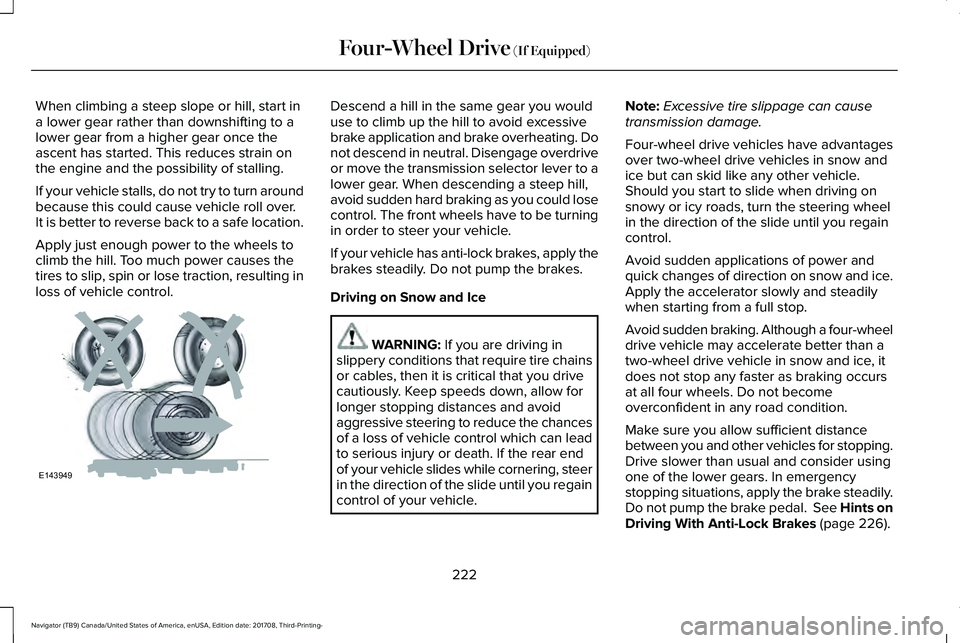
When climbing a steep slope or hill, start ina lower gear rather than downshifting to alower gear from a higher gear once theascent has started. This reduces strain onthe engine and the possibility of stalling.
If your vehicle stalls, do not try to turn aroundbecause this could cause vehicle roll over.It is better to reverse back to a safe location.
Apply just enough power to the wheels toclimb the hill. Too much power causes thetires to slip, spin or lose traction, resulting inloss of vehicle control.
Descend a hill in the same gear you woulduse to climb up the hill to avoid excessivebrake application and brake overheating. Donot descend in neutral. Disengage overdriveor move the transmission selector lever to alower gear. When descending a steep hill,avoid sudden hard braking as you could losecontrol. The front wheels have to be turningin order to steer your vehicle.
If your vehicle has anti-lock brakes, apply thebrakes steadily. Do not pump the brakes.
Driving on Snow and Ice
WARNING: If you are driving inslippery conditions that require tire chainsor cables, then it is critical that you drivecautiously. Keep speeds down, allow forlonger stopping distances and avoidaggressive steering to reduce the chancesof a loss of vehicle control which can leadto serious injury or death. If the rear endof your vehicle slides while cornering, steerin the direction of the slide until you regaincontrol of your vehicle.
Note:Excessive tire slippage can causetransmission damage.
Four-wheel drive vehicles have advantagesover two-wheel drive vehicles in snow andice but can skid like any other vehicle.Should you start to slide when driving onsnowy or icy roads, turn the steering wheelin the direction of the slide until you regaincontrol.
Avoid sudden applications of power andquick changes of direction on snow and ice.Apply the accelerator slowly and steadilywhen starting from a full stop.
Avoid sudden braking. Although a four-wheeldrive vehicle may accelerate better than atwo-wheel drive vehicle in snow and ice, itdoes not stop any faster as braking occursat all four wheels. Do not becomeoverconfident in any road condition.
Make sure you allow sufficient distancebetween you and other vehicles for stopping.Drive slower than usual and consider usingone of the lower gears. In emergencystopping situations, apply the brake steadily.Do not pump the brake pedal. See Hints onDriving With Anti-Lock Brakes (page 226).
222
Navigator (TB9) Canada/United States of America, enUSA, Edition date: 201708, Third-Printing-
Four-Wheel Drive (If Equipped)E143949
Page 227 of 649
LIMITED SLIP DIFFERENTIAL (IF
EQUIPPED)
The Electronic Limited Slip Differential (eLSD)system directs torque, enabling the vehicleto drive over terrain and road conditions thata conventional axle cannot. The system isactive at all times and requires no input fromthe driver.
Note:If your vehicle is not at optimaloperating conditions or a system fault ispresent, a warning may be displayed in theinstrument cluster. Depending on thewarning, your vehicle may need to beserviced. For more information regarding thesystem information messages, SeeInformation Messages (page 124).
Locking Function (If Equipped)
The lock button engages ‘lockermode’.
With the locker engaged, the systemelectronically locks the differential causingboth half shafts to turn at the same rate. Thisincreases traction during off road events.
The locker mode may automaticallydisengage based on certain conditions suchas vehicle speed. When engaged, a telltalein the instrument cluster will illuminate amberand the switch button will be illuminated.When the speed is exceeded the telltale willturn gray, the locker will be disengaged andbe in standby mode until the speedconditions are met. If the eLSD system isfaulted and the locker cannot engage, awarning message will be displayed in theinstrument cluster and the switch button willflash.
Spare Tire
If your vehicle is equipped with an ElectronicLimited Slip Differential, a spare tire of adifferent size than the tire provided, shouldnot be used. If a spare tire is installed, amessage may appear, indicating the systemhas disabled automatically or reducedfunction to prevent system overheat anddamage. It is recommended to reinstall therepaired or replaced road tire as soon aspossible. When the road tire is replaced, thesystem will resume normal operation on thenext key cycle.
Trailer Towing
The Electronic Limited Slip Differentialenhances vehicle stability during trailer towoperation. During high demand traileringevents (such as steep grades, high speedsor with a spare tire), the system may providea warning in the instrument cluster andreduce function or enter a temporarilydisabled state. To resume normal function,stop the vehicle in a safe location and allowthe unit to adequately cool. Once the systemhas reached normal operating temperatures,system function will be restored and theElectronic Limited Slip Differential Restoredmessage will be displayed.
224
Navigator (TB9) Canada/United States of America, enUSA, Edition date: 201708, Third-Printing-
Rear AxleE163170