lock LINCOLN NAVIGATOR 2018 Service Manual
[x] Cancel search | Manufacturer: LINCOLN, Model Year: 2018, Model line: NAVIGATOR, Model: LINCOLN NAVIGATOR 2018Pages: 649, PDF Size: 4.96 MB
Page 125 of 649
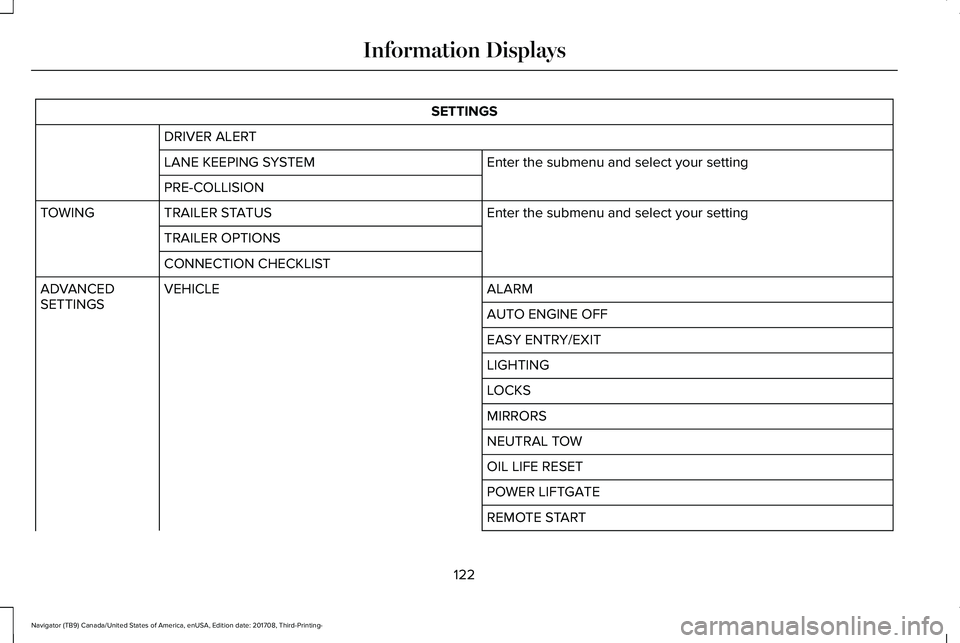
SETTINGS
DRIVER ALERT
Enter the submenu and select your settingLANE KEEPING SYSTEM
PRE-COLLISION
Enter the submenu and select your settingTRAILER STATUSTOWING
TRAILER OPTIONS
CONNECTION CHECKLIST
ALARMVEHICLEADVANCEDSETTINGSAUTO ENGINE OFF
EASY ENTRY/EXIT
LIGHTING
LOCKS
MIRRORS
NEUTRAL TOW
OIL LIFE RESET
POWER LIFTGATE
REMOTE START
122
Navigator (TB9) Canada/United States of America, enUSA, Edition date: 201708, Third-Printing-
Information Displays
Page 128 of 649
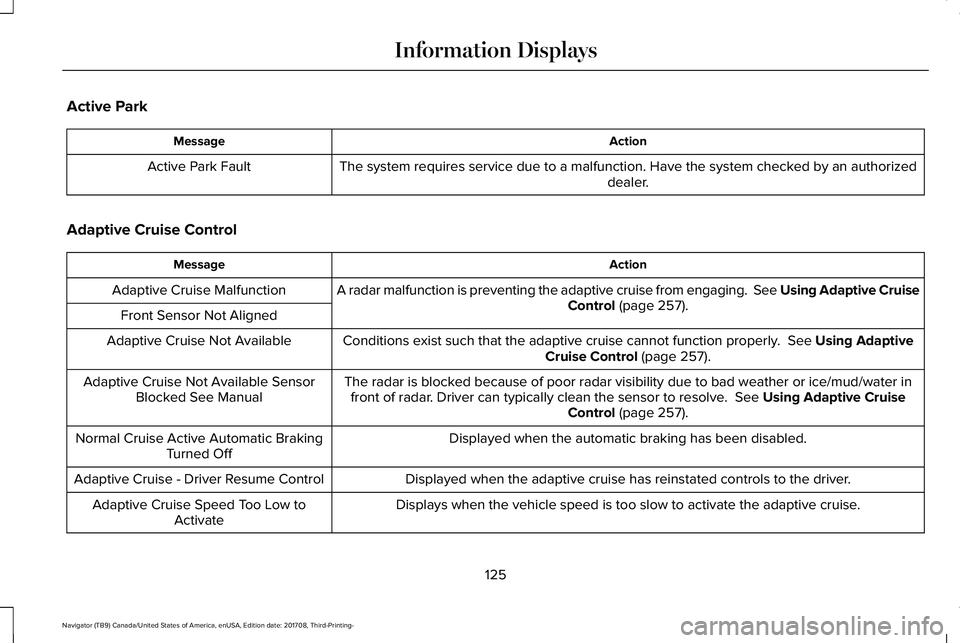
Active Park
ActionMessage
The system requires service due to a malfunction. Have the system checked by an authorizeddealer.Active Park Fault
Adaptive Cruise Control
ActionMessage
A radar malfunction is preventing the adaptive cruise from engaging. See Using Adaptive CruiseControl (page 257).Adaptive Cruise Malfunction
Front Sensor Not Aligned
Conditions exist such that the adaptive cruise cannot function properly. See Using AdaptiveCruise Control (page 257).Adaptive Cruise Not Available
The radar is blocked because of poor radar visibility due to bad weather or ice/mud/water infront of radar. Driver can typically clean the sensor to resolve. See Using Adaptive CruiseControl (page 257).
Adaptive Cruise Not Available SensorBlocked See Manual
Displayed when the automatic braking has been disabled.Normal Cruise Active Automatic BrakingTurned Off
Displayed when the adaptive cruise has reinstated controls to the driver.Adaptive Cruise - Driver Resume Control
Displays when the vehicle speed is too slow to activate the adaptive cruise.Adaptive Cruise Speed Too Low toActivate
125
Navigator (TB9) Canada/United States of America, enUSA, Edition date: 201708, Third-Printing-
Information Displays
Page 131 of 649
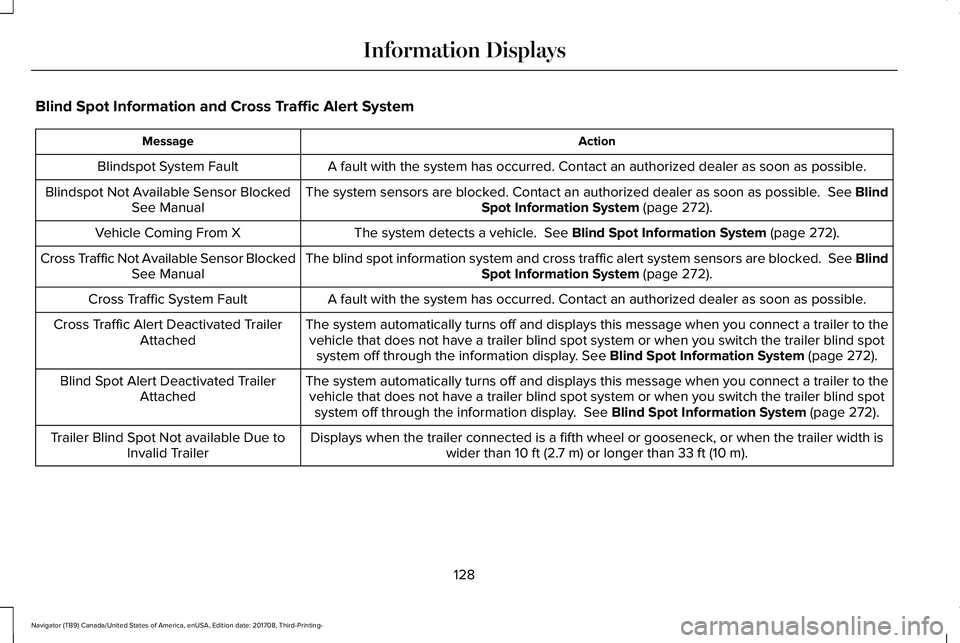
Blind Spot Information and Cross Traffic Alert System
ActionMessage
A fault with the system has occurred. Contact an authorized dealer as soon as possible.Blindspot System Fault
The system sensors are blocked. Contact an authorized dealer as soon as possible. See BlindSpot Information System (page 272).Blindspot Not Available Sensor BlockedSee Manual
The system detects a vehicle. See Blind Spot Information System (page 272).Vehicle Coming From X
The blind spot information system and cross traffic alert system sensors are blocked. See BlindSpot Information System (page 272).Cross Traffic Not Available Sensor BlockedSee Manual
A fault with the system has occurred. Contact an authorized dealer as soon as possible.Cross Traffic System Fault
The system automatically turns off and displays this message when you connect a trailer to thevehicle that does not have a trailer blind spot system or when you switch the trailer blind spotsystem off through the information display. See Blind Spot Information System (page 272).
Cross Traffic Alert Deactivated TrailerAttached
The system automatically turns off and displays this message when you connect a trailer to thevehicle that does not have a trailer blind spot system or when you switch the trailer blind spotsystem off through the information display. See Blind Spot Information System (page 272).
Blind Spot Alert Deactivated TrailerAttached
Displays when the trailer connected is a fifth wheel or gooseneck, or when the trailer width iswider than 10 ft (2.7 m) or longer than 33 ft (10 m).Trailer Blind Spot Not available Due toInvalid Trailer
128
Navigator (TB9) Canada/United States of America, enUSA, Edition date: 201708, Third-Printing-
Information Displays
Page 132 of 649
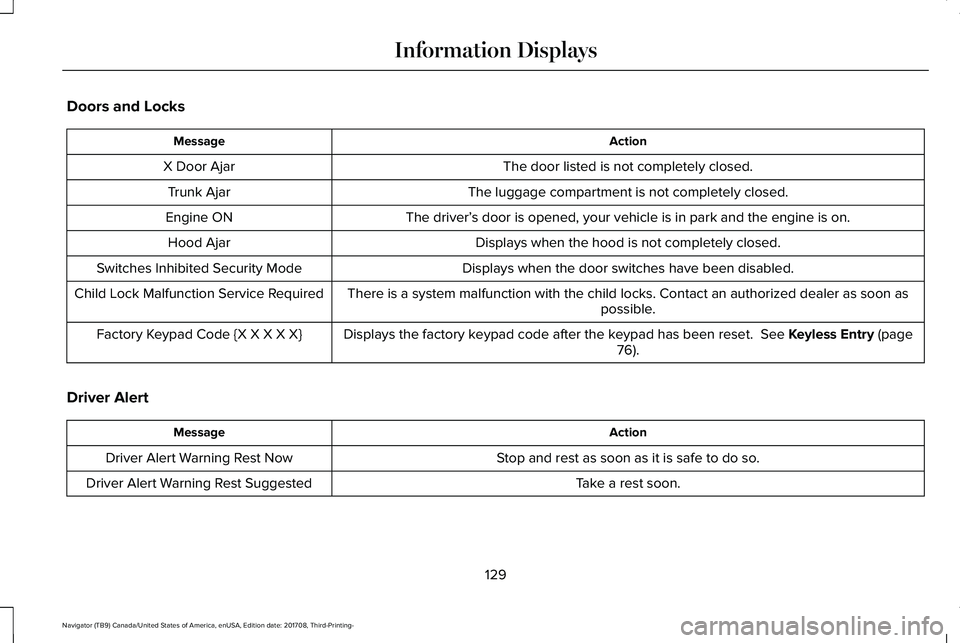
Doors and Locks
ActionMessage
The door listed is not completely closed.X Door Ajar
The luggage compartment is not completely closed.Trunk Ajar
The driver’s door is opened, your vehicle is in park and the engine is on.Engine ON
Displays when the hood is not completely closed.Hood Ajar
Displays when the door switches have been disabled.Switches Inhibited Security Mode
There is a system malfunction with the child locks. Contact an authorized dealer as soon aspossible.Child Lock Malfunction Service Required
Displays the factory keypad code after the keypad has been reset. See Keyless Entry (page76).Factory Keypad Code {X X X X X}
Driver Alert
ActionMessage
Stop and rest as soon as it is safe to do so.Driver Alert Warning Rest Now
Take a rest soon.Driver Alert Warning Rest Suggested
129
Navigator (TB9) Canada/United States of America, enUSA, Edition date: 201708, Third-Printing-
Information Displays
Page 134 of 649
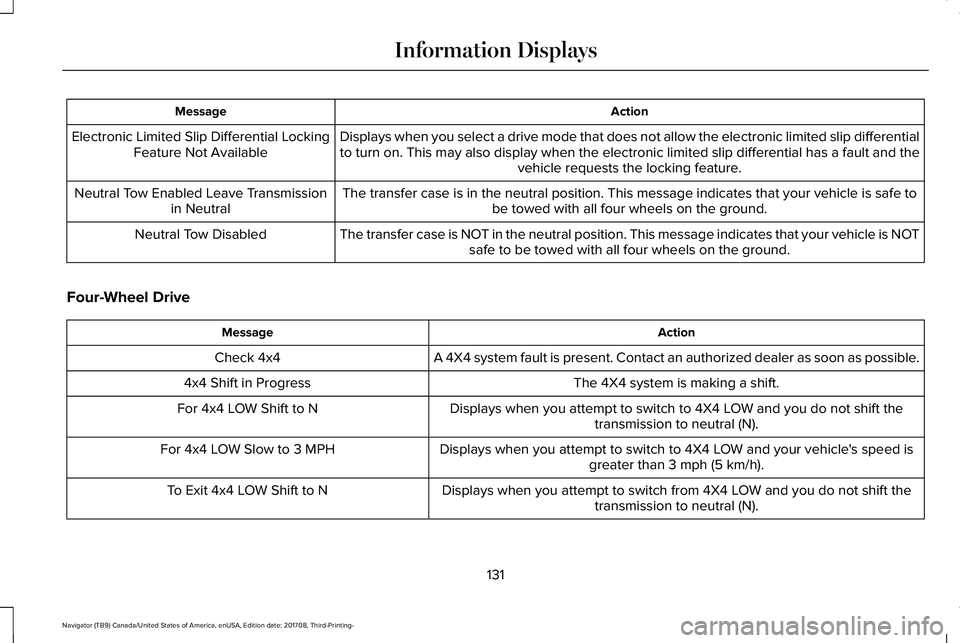
ActionMessage
Displays when you select a drive mode that does not allow the electronic limited slip differentialto turn on. This may also display when the electronic limited slip differential has a fault and thevehicle requests the locking feature.
Electronic Limited Slip Differential LockingFeature Not Available
The transfer case is in the neutral position. This message indicates that your vehicle is safe tobe towed with all four wheels on the ground.Neutral Tow Enabled Leave Transmissionin Neutral
The transfer case is NOT in the neutral position. This message indicates that your vehicle is NOTsafe to be towed with all four wheels on the ground.Neutral Tow Disabled
Four-Wheel Drive
ActionMessage
A 4X4 system fault is present. Contact an authorized dealer as soon as possible.Check 4x4
The 4X4 system is making a shift.4x4 Shift in Progress
Displays when you attempt to switch to 4X4 LOW and you do not shift thetransmission to neutral (N).For 4x4 LOW Shift to N
Displays when you attempt to switch to 4X4 LOW and your vehicle's speed isgreater than 3 mph (5 km/h).For 4x4 LOW Slow to 3 MPH
Displays when you attempt to switch from 4X4 LOW and you do not shift thetransmission to neutral (N).To Exit 4x4 LOW Shift to N
131
Navigator (TB9) Canada/United States of America, enUSA, Edition date: 201708, Third-Printing-
Information Displays
Page 135 of 649
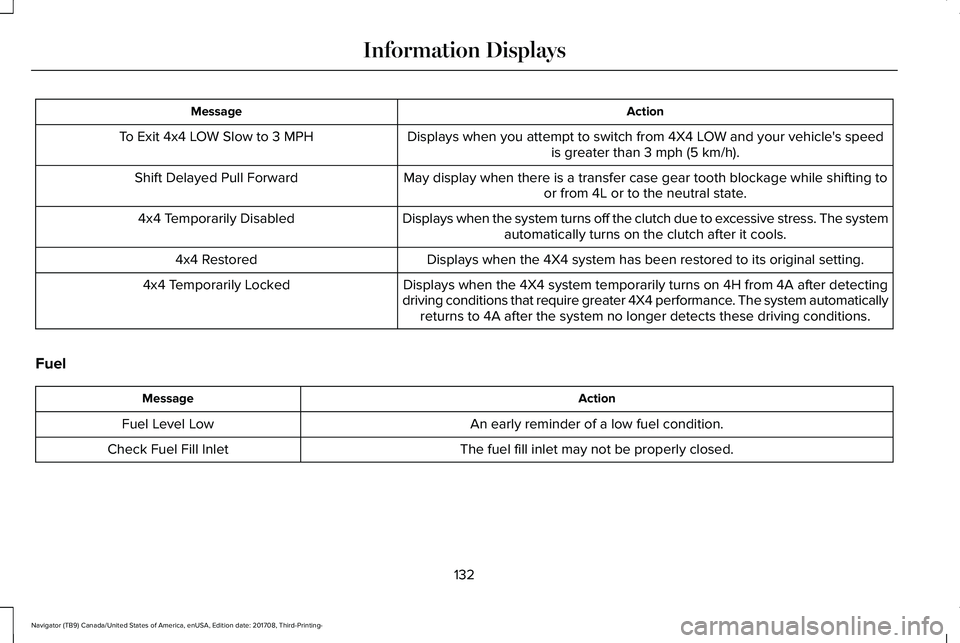
ActionMessage
Displays when you attempt to switch from 4X4 LOW and your vehicle's speedis greater than 3 mph (5 km/h).To Exit 4x4 LOW Slow to 3 MPH
May display when there is a transfer case gear tooth blockage while shifting toor from 4L or to the neutral state.Shift Delayed Pull Forward
Displays when the system turns off the clutch due to excessive stress. The systemautomatically turns on the clutch after it cools.4x4 Temporarily Disabled
Displays when the 4X4 system has been restored to its original setting.4x4 Restored
Displays when the 4X4 system temporarily turns on 4H from 4A after detectingdriving conditions that require greater 4X4 performance. The system automaticallyreturns to 4A after the system no longer detects these driving conditions.
4x4 Temporarily Locked
Fuel
ActionMessage
An early reminder of a low fuel condition.Fuel Level Low
The fuel fill inlet may not be properly closed.Check Fuel Fill Inlet
132
Navigator (TB9) Canada/United States of America, enUSA, Edition date: 201708, Third-Printing-
Information Displays
Page 143 of 649
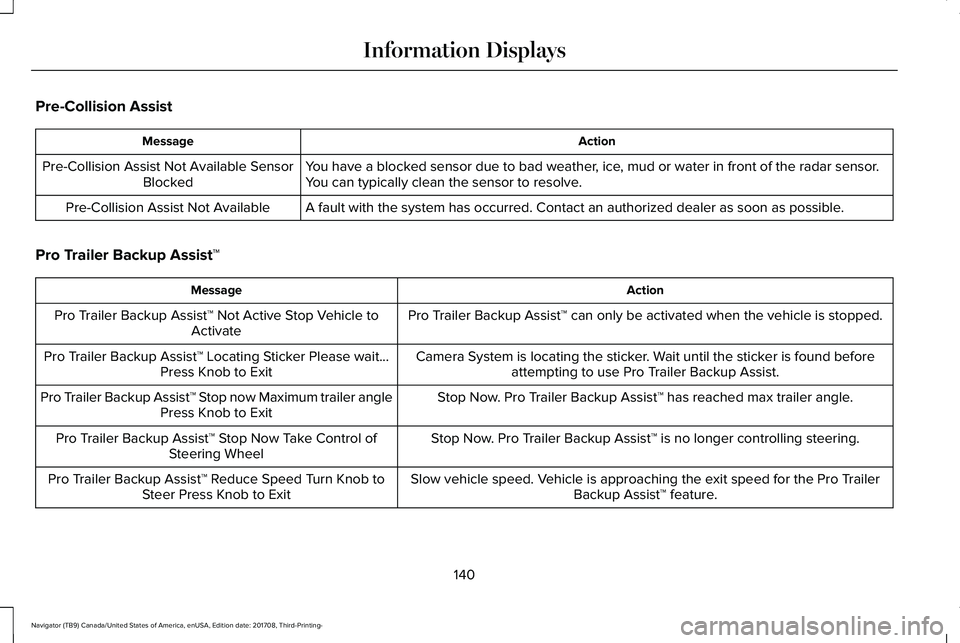
Pre-Collision Assist
ActionMessage
You have a blocked sensor due to bad weather, ice, mud or water in front of the radar sensor.You can typically clean the sensor to resolve.Pre-Collision Assist Not Available SensorBlocked
A fault with the system has occurred. Contact an authorized dealer as soon as possible.Pre-Collision Assist Not Available
Pro Trailer Backup Assist™
ActionMessage
Pro Trailer Backup Assist™ can only be activated when the vehicle is stopped.Pro Trailer Backup Assist™ Not Active Stop Vehicle toActivate
Camera System is locating the sticker. Wait until the sticker is found beforeattempting to use Pro Trailer Backup Assist.Pro Trailer Backup Assist™ Locating Sticker Please wait...Press Knob to Exit
Stop Now. Pro Trailer Backup Assist™ has reached max trailer angle.Pro Trailer Backup Assist™ Stop now Maximum trailer anglePress Knob to Exit
Stop Now. Pro Trailer Backup Assist™ is no longer controlling steering.Pro Trailer Backup Assist™ Stop Now Take Control ofSteering Wheel
Slow vehicle speed. Vehicle is approaching the exit speed for the Pro TrailerBackup Assist™ feature.Pro Trailer Backup Assist™ Reduce Speed Turn Knob toSteer Press Knob to Exit
140
Navigator (TB9) Canada/United States of America, enUSA, Edition date: 201708, Third-Printing-
Information Displays
Page 153 of 649
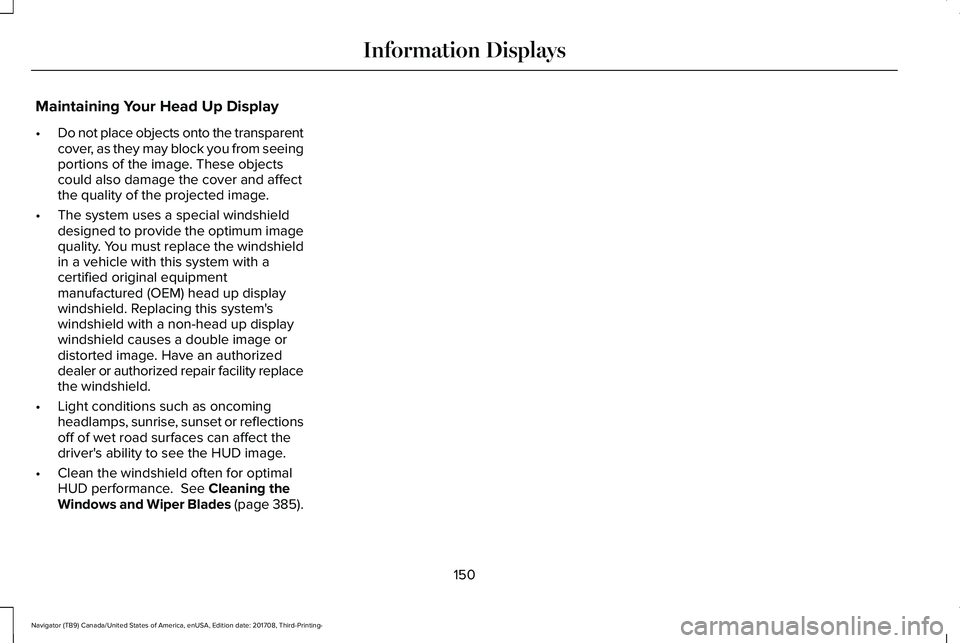
Maintaining Your Head Up Display
•Do not place objects onto the transparentcover, as they may block you from seeingportions of the image. These objectscould also damage the cover and affectthe quality of the projected image.
•The system uses a special windshielddesigned to provide the optimum imagequality. You must replace the windshieldin a vehicle with this system with acertified original equipmentmanufactured (OEM) head up displaywindshield. Replacing this system'swindshield with a non-head up displaywindshield causes a double image ordistorted image. Have an authorizeddealer or authorized repair facility replacethe windshield.
•Light conditions such as oncomingheadlamps, sunrise, sunset or reflectionsoff of wet road surfaces can affect thedriver's ability to see the HUD image.
•Clean the windshield often for optimalHUD performance. See Cleaning theWindows and Wiper Blades (page 385).
150
Navigator (TB9) Canada/United States of America, enUSA, Edition date: 201708, Third-Printing-
Information Displays
Page 159 of 649
Note: The rear climate systemturns off whenever you switch onmax defrost, and turns back onwhen you switch max defrost off.You can switch on the rear systemwith max defrost on.
Rear control lock: Whenilluminated, you can only operatethe rear passenger settingsthrough the front controls.
G
Note: The indicator brieflyilluminates if you try to use the rearclimate system when the controlsare locked.
HEATED WINDOWS AND MIRRORS
Note:Make sure the vehicle is runningbefore operating the heated windows.
Heated Rear Window
Press the button to clear theheated rear window of thin ice andfog. The heated rear window turnsoff after a short period of time. Press thebutton again to switch it off.
Note: Do not use razor blades or othersharp objects to clean or remove decals fromthe inside of the heated rear window. Thevehicle warranty does not cover damagecaused to the heated rear window grid lines.
Heated Exterior Mirrors (If Equipped)
When you switch the heated rear windowon, the heated exterior mirrors turn on.
Note:Do not remove ice from the mirrorswith a scraper or adjust the mirror glasswhen it is frozen in place.
Note:Do not clean the mirror housing orglass with harsh abrasives, fuel or otherpetroleum-based cleaning products.
Windshield Wiper De-icer (If Equipped)
The windshield wiper de-icer turns on in lowtemperatures.
CABIN AIR FILTER
Your vehicle is equipped with a cabin airfilter, which gives you and your passengersthe following benefits:
•It improves your driving comfort byreducing particle and odor concentration.
•It improves the interior compartmentcleanliness.
•It protects the climate controlcomponents from particle deposits.
You can locate the cabin air filter behind theglove box.
Note:Make sure you have a cabin air filterinstalled at all times. This prevents foreignobjects from entering the system. Runningthe system without a filter in place couldresult in degradation or damage to thesystem.
156
Navigator (TB9) Canada/United States of America, enUSA, Edition date: 201708, Third-Printing-
Climate ControlE72507
Page 162 of 649
HEAD RESTRAINTS
WARNING: Fully adjust the headrestraint before you sit in or operate yourvehicle. This will help minimize the risk ofneck injury in the event of a crash. Do notadjust the head restraint when your vehicleis moving.
WARNING: The head restraint is asafety device. Whenever possible it shouldbe installed and properly adjusted whenthe seat is occupied. Failure to adjust thehead restraint properly could reduce itseffectiveness during certain impacts.
Note:Adjust the seatback to an uprightdriving position before adjusting the headrestraint. Adjust the head restraint so thatthe top of it is level with the top of your headand as far forward as possible. Make surethat you remain comfortable. If you areextremely tall, adjust the head restraint toits highest position.
Front Seat Manual Head Restraints
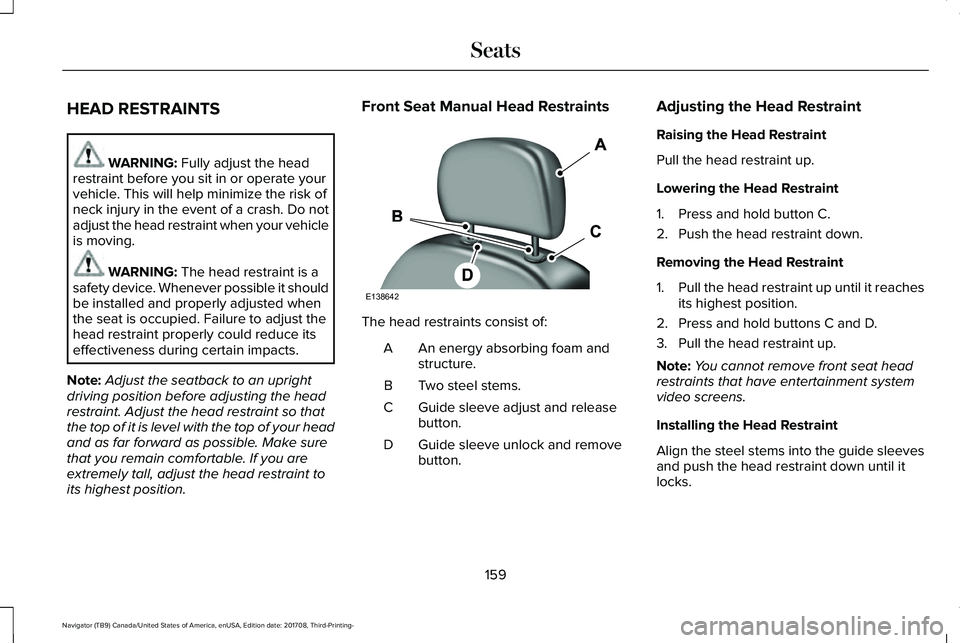
The head restraints consist of:
An energy absorbing foam andstructure.A
Two steel stems.B
Guide sleeve adjust and releasebutton.C
Guide sleeve unlock and removebutton.D
Adjusting the Head Restraint
Raising the Head Restraint
Pull the head restraint up.
Lowering the Head Restraint
1. Press and hold button C.
2. Push the head restraint down.
Removing the Head Restraint
1.Pull the head restraint up until it reachesits highest position.
2. Press and hold buttons C and D.
3. Pull the head restraint up.
Note:You cannot remove front seat headrestraints that have entertainment systemvideo screens.
Installing the Head Restraint
Align the steel stems into the guide sleevesand push the head restraint down until itlocks.
159
Navigator (TB9) Canada/United States of America, enUSA, Edition date: 201708, Third-Printing-
SeatsE138642