seats LINCOLN NAVIGATOR 2020 Owner's Manual
[x] Cancel search | Manufacturer: LINCOLN, Model Year: 2020, Model line: NAVIGATOR, Model: LINCOLN NAVIGATOR 2020Pages: 622, PDF Size: 6.47 MB
Page 66 of 622
WARNING: Do not attempt to service,
repair, or modify the supplementary
restraint system or associated components.
Failure to follow this instruction could result
in personal injury or death. WARNING: If a supplementary
restraint system component has deployed,
it will not function again. Have the system
and associated components inspected as
soon as possible. Failure to follow this
instruction could result in personal injury
or death.
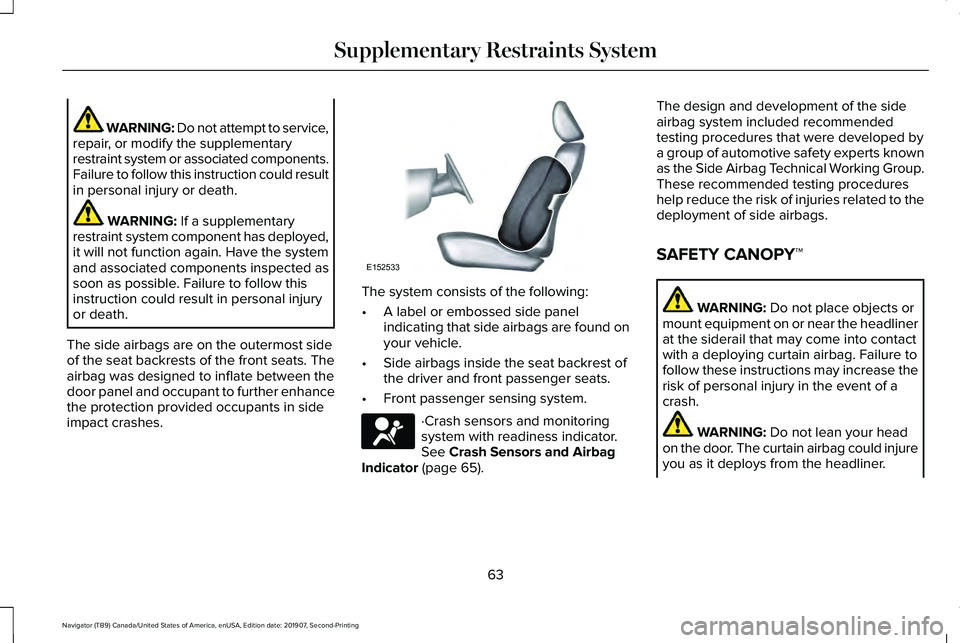
The side airbags are on the outermost side
of the seat backrests of the front seats. The
airbag was designed to inflate between the
door panel and occupant to further enhance
the protection provided occupants in side
impact crashes. The system consists of the following:
•
A label or embossed side panel
indicating that side airbags are found on
your vehicle.
• Side airbags inside the seat backrest of
the driver and front passenger seats.
• Front passenger sensing system. ·Crash sensors and monitoring
system with readiness indicator.
See
Crash Sensors and Airbag
Indicator (page 65). The design and development of the side
airbag system included recommended
testing procedures that were developed by
a group of automotive safety experts known
as the Side Airbag Technical Working Group.
These recommended testing procedures
help reduce the risk of injuries related to the
deployment of side airbags.
SAFETY CANOPY™
WARNING:
Do not place objects or
mount equipment on or near the headliner
at the siderail that may come into contact
with a deploying curtain airbag. Failure to
follow these instructions may increase the
risk of personal injury in the event of a
crash. WARNING:
Do not lean your head
on the door. The curtain airbag could injure
you as it deploys from the headliner.
63
Navigator (TB9) Canada/United States of America, enUSA, Edition date: 201907, Second-Printing Supplementary Restraints SystemE152533 E67017
Page 67 of 622
WARNING: Do not attempt to service,
repair, or modify the supplementary
restraint system or associated components.
Failure to follow this instruction could result
in personal injury or death. WARNING: All occupants of your
vehicle, including the driver, should always
properly wear their seatbelts, even when
an airbag supplemental restraint system is
provided. Failure to properly wear your
seatbelt could seriously increase the risk
of injury or death. WARNING:
To reduce risk of injury,
do not obstruct or place objects in the
deployment path of the airbag. WARNING:
If a supplementary
restraint system component has deployed,
it will not function again. Have the system
and associated components inspected as
soon as possible. Failure to follow this
instruction could result in personal injury
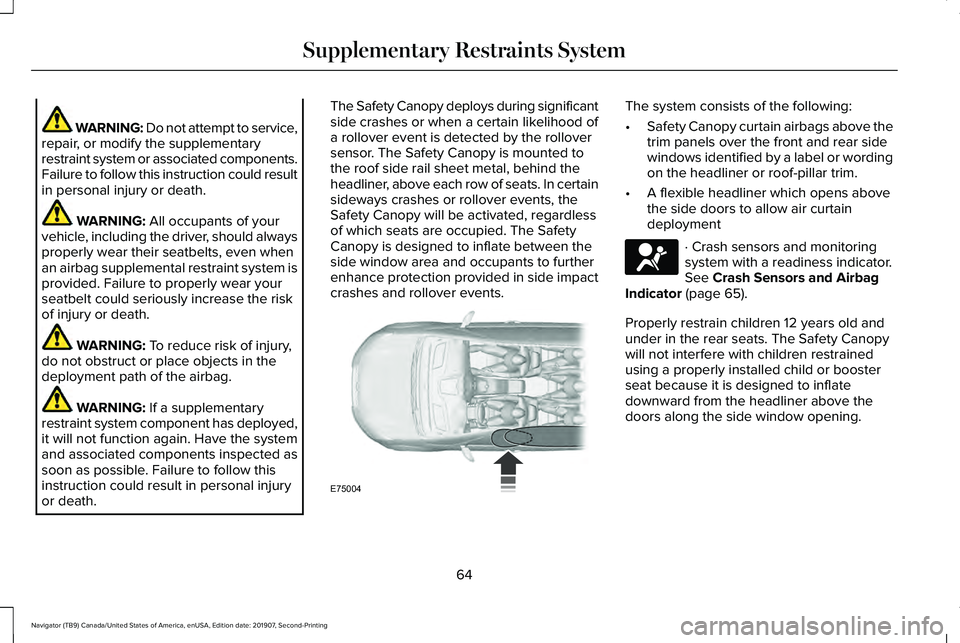
or death. The Safety Canopy deploys during significant
side crashes or when a certain likelihood of
a rollover event is detected by the rollover
sensor. The Safety Canopy is mounted to
the roof side rail sheet metal, behind the
headliner, above each row of seats. In certain
sideways crashes or rollover events, the
Safety Canopy will be activated, regardless
of which seats are occupied. The Safety
Canopy is designed to inflate between the
side window area and occupants to further
enhance protection provided in side impact
crashes and rollover events. The system consists of the following:
•
Safety Canopy curtain airbags above the
trim panels over the front and rear side
windows identified by a label or wording
on the headliner or roof-pillar trim.
• A flexible headliner which opens above
the side doors to allow air curtain
deployment · Crash sensors and monitoring
system with a readiness indicator.
See
Crash Sensors and Airbag
Indicator (page 65).
Properly restrain children 12 years old and
under in the rear seats. The Safety Canopy
will not interfere with children restrained
using a properly installed child or booster
seat because it is designed to inflate
downward from the headliner above the
doors along the side window opening.
64
Navigator (TB9) Canada/United States of America, enUSA, Edition date: 201907, Second-Printing Supplementary Restraints SystemE75004 E67017
Page 93 of 622

POWER LIFTGATE
WARNING: It is extremely dangerous
to ride in a cargo area, inside or outside of
a vehicle. In a crash, people riding in these
areas are more likely to be seriously
injured or killed. Do not allow people to
ride in any area of your vehicle that is not
equipped with seats and seatbelts. Make
sure everyone in your vehicle is in a seat
and properly using a seatbelt. Failure to
follow this warning could result in serious
personal injury or death. WARNING: Make sure that you fully
close the liftgate to prevent exhaust fumes
from entering your vehicle. If you are
unable to fully close the liftgate, open the
air vents or the windows to allow fresh air
to enter your vehicle. Failure to follow this
instruction could result in personal injury
or death. WARNING:
Make sure that you fully
close the liftgate to prevent passengers
and cargo from falling out. Failure to follow
this instruction could result in personal
injury or death. WARNING:
Keep keys out of reach
of children. Do not allow children to
operate or play near an open or moving
power liftgate. You should supervise the
operation of the power liftgate at all times.
Note: Make sure that you close the liftgate
before operating or moving your vehicle,
especially in an enclosure, like a garage or
a parking structure. This could damage the
liftgate and its components.
Note: Do not hang anything, for example a
bike rack, from the glass or liftgate. This
could damage the liftgate and its
components.
The liftgate only operates with the
transmission in park (P). Three warning tones sound as the liftgate
begins to power close. If there is a problem
with the open or close request, one of the
following may occur:
•
One tone sounds if the ignition is on and
the transmission is not in park (P).
• Three tones sound if the battery voltage
is below the minimum operating voltage.
• One tone sounds if the vehicle speed is
at or above
3 mph (5 km/h)
If the liftgate starts to close after it has fully
opened, this indicates there may be
excessive weight on the liftgate or a possible
strut failure. A repetitive tone sounds and
the liftgate closes under control. Remove
any excessive weight from the liftgate. If the
liftgate continues to close after opening,
have the system checked as soon as
possible.
Opening and Closing the Liftgate WARNING:
Make sure all persons
are clear of the power liftgate area before
using the power liftgate control.
90
Navigator (TB9) Canada/United States of America, enUSA, Edition date: 201907, Second-Printing Liftgate
Page 159 of 622
Remote Start
Action
Message
Displays as a reminder to apply the brake and push the gear shift button to drive the vehicle after a remote start.
To Drive: Press Brake and Gear Shift
Button
Seats Action
Message
Displays as a reminder that memory seats are not available while driving\
.
Memory Recall Not Permitted While Driving
Displays to show where your memory setting has been saved.
Memory {0} Saved
Stability Control Action
Message
Displayed when the system has detected a condition that requires service\
. Contact yourauthorized dealer as soon as possible.
Service AdvanceTrac
The traction control has been disabled or enabled by the driver.
AdvanceTrac Off On
156
Navigator (TB9) Canada/United States of America, enUSA, Edition date: 201907, Second-Printing Information Displays
Page 170 of 622
Note:
In certain conditions, such as
maximum defrost, the air conditioning
compressor may continue to operate even
though you switch off the air conditioning.
Switching Maximum Air Conditioning
On and Off Press and release the button for
maximum cooling.
The left-hand and right-hand settings set to
LO, recirculated air flows through the
instrument panel air vents, air conditioning
turns on and the blower motor adjusts to the
highest speed.
Switching Recirculated Air On and Off Press and release the button to
switch between outside air and
recirculated air.
The air currently in the passenger
compartment recirculates. This may reduce
the time needed to cool the interior, when
used with A/C, and reduce unwanted odors
from entering your vehicle. Note:
Recirculated air may turn off, or
prevent you from switching on, in all air flow
modes except MAX A/C to reduce the risk
of fogging. Recirculation may also turn on
and off in various air distribution control
combinations during hot weather to improve
cooling efficiency.
Switching the Heated Seats On and Off See
Heated Seats (page 191).
Switching the Ventilated Seats On and
Off See
Ventilated Seats (page 191).
HINTS ON CONTROLLING THE
INTERIOR CLIMATE
General Hints
Note: Prolonged use of recirculated air may
cause the windows to fog up. Note:
You may feel a small amount of air
from the footwell air vents regardless of the
air distribution setting.
Note: To reduce humidity build-up inside
your vehicle, do not drive with the system
switched off or with recirculated air always
switched on.
Note: Do not place objects under the front
seats as this may interfere with the airflow
to the rear seats.
Note: Remove any snow, ice or leaves from
the air intake area at the base of the
windshield.
Note: To improve the time to reach a
comfortable temperature in hot weather,
drive with the windows open until you feel
cold air through the air vents.
Automatic Climate Control
Note: Adjusting the settings when your
vehicle interior is extremely hot or cold is not
necessary. Automatic mode is best
recommended to maintain set temperature.
167
Navigator (TB9) Canada/United States of America, enUSA, Edition date: 201907, Second-Printing Climate Control E268558
Page 173 of 622
The system adjusts the blower motor speed,
air distribution, air conditioning operation to
reach and maintain the temperature you
have set.
Switching the Rear Climate Control On
and Off
Press and release the button to
switch the rear climate control on
or off.
Note: If the system is on and Max Defrost is
switched on through the front climate
controls, the system turns off. It turns back
on when Max Defrost is switched off.
Note: If Max Defrost is switched on, the
system can be turned on at the same time.
Switching the Rear Heated Seats On
and Off (If Equipped) See
Heated Seats (page 191).Switching the Rear Ventilated Seats
On and Off
(If Equipped) See
Ventilated Seats (page 191).
HEATED WINDSHIELD
Windshield Wiper De-Icer
The windshield wiper de-icer turns on in low
temperatures.
HEATED REAR WINDOW Press the button to clear the rear
window of thin ice and fog. The
heated rear window turns off after
a short period of time.
Note: Make sure the engine is on before
operating the heated windows. Note:
Do not use harsh chemicals, razor
blades or other sharp objects to clean or
remove decals from the inside of the heated
rear window. The vehicle warranty may not
cover damage to the heated rear window
grid lines.
HEATED EXTERIOR MIRRORS
When you switch the heated rear window
on, the heated exterior mirrors turn on.
Note: Do not remove ice from the mirrors
with a scraper or adjust the mirror glass
when it is frozen in place.
Note: Do not clean the mirror housing or
glass with harsh abrasives, fuel or other
petroleum-based cleaning products. The
vehicle warranty may not cover damage
caused to the mirror housing or glass.
170
Navigator (TB9) Canada/United States of America, enUSA, Edition date: 201907, Second-Printing Climate Control E268558
Page 174 of 622
CABIN AIR FILTER
Your vehicle is equipped with a cabin air
filter, which gives you and your passengers
the following benefits:
•
It improves your driving comfort by
reducing particle concentration.
• It improves the interior compartment
cleanliness.
• It protects the climate control
components from particle deposits.
You can locate the cabin air filter behind the
glove box.
Note: Make sure you have a cabin air filter
installed at all times. This prevents foreign
objects from entering the system. Running
the system without a filter in place could
result in degradation or damage to the
system.
Replace the filter at regular intervals. See
Scheduled Maintenance (page 537).
For additional cabin air filter information, or
to replace the filter, see an authorized dealer. REMOTE START
You can switch this feature on or off and
adjust the settings using the information
display controls.
See Information Displays
(page 133).
The climate control system adjusts the
interior temperature during remote start.
You cannot adjust the climate control setting
during remote start operation. Switch the
ignition on to make adjustments.
Based on your remote start settings, the
following vehicle-dependent features may
or may not remain on after remote starting
your vehicle:
• Climate controlled seats.
• Heated steering wheel.
• Heated mirrors.
• Heated rear window.
• Windshield wiper de-icer.
Note: For dual zone climate controlled seats,
the passenger seat setting defaults to match
the driver seat during remote start. Automatic Settings
If
Auto is on, the system sets the interior
temperature to 72°F (22°C) and heats or
cools the vehicle interior as required to
achieve comfort.
Note: In cold weather, the heated rear
window and heated mirrors turn on.
Last Settings
If
Last Settings is on, the system uses the
settings last selected before you turned off
the vehicle.
Heated and Cooled Features
In
Auto mode, certain heated features may
switch on during cold weather, and cooled
features during hot weather.
171
Navigator (TB9) Canada/United States of America, enUSA, Edition date: 201907, Second-Printing Climate Control
Page 175 of 622
SITTING IN THE CORRECT
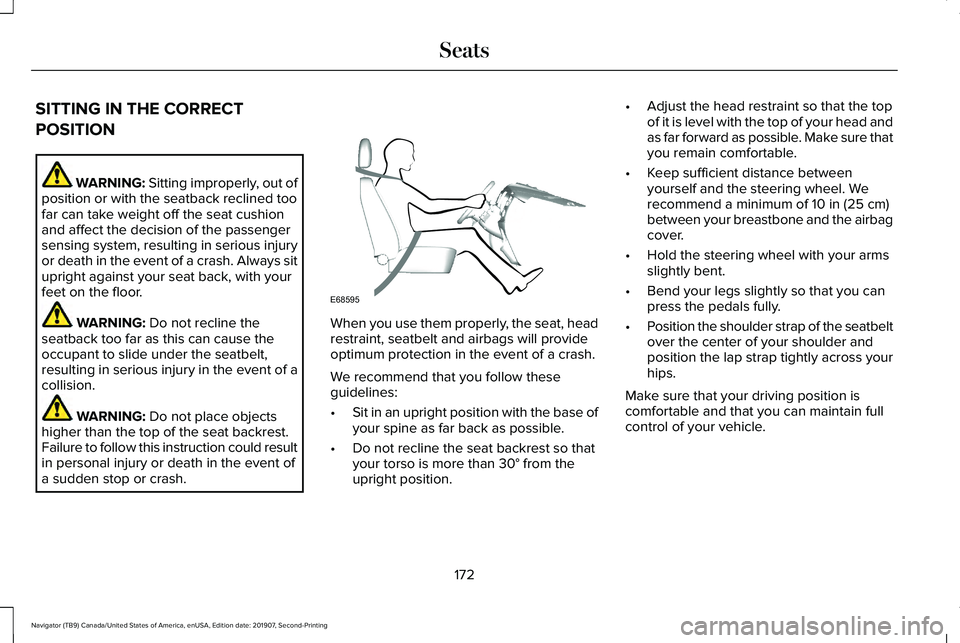
POSITION
WARNING: Sitting improperly, out of
position or with the seatback reclined too
far can take weight off the seat cushion
and affect the decision of the passenger
sensing system, resulting in serious injury
or death in the event of a crash. Always sit
upright against your seat back, with your
feet on the floor. WARNING: Do not recline the
seatback too far as this can cause the
occupant to slide under the seatbelt,
resulting in serious injury in the event of a
collision. WARNING:
Do not place objects
higher than the top of the seat backrest.
Failure to follow this instruction could result
in personal injury or death in the event of
a sudden stop or crash. When you use them properly, the seat, head
restraint, seatbelt and airbags will provide
optimum protection in the event of a crash.
We recommend that you follow these
guidelines:
•
Sit in an upright position with the base of
your spine as far back as possible.
• Do not recline the seat backrest so that
your torso is more than
30° from the
upright position. •
Adjust the head restraint so that the top
of it is level with the top of your head and
as far forward as possible. Make sure that
you remain comfortable.
• Keep sufficient distance between
yourself and the steering wheel. We
recommend a minimum of
10 in (25 cm)
between your breastbone and the airbag
cover.
• Hold the steering wheel with your arms
slightly bent.
• Bend your legs slightly so that you can
press the pedals fully.
• Position the shoulder strap of the seatbelt
over the center of your shoulder and
position the lap strap tightly across your
hips.
Make sure that your driving position is
comfortable and that you can maintain full
control of your vehicle.
172
Navigator (TB9) Canada/United States of America, enUSA, Edition date: 201907, Second-Printing SeatsE68595
Page 176 of 622
HEAD RESTRAINTS
WARNING: Fully adjust the head
restraint before you sit in or operate your
vehicle. This will help minimize the risk of
neck injury in the event of a crash. Do not
adjust the head restraint when your vehicle
is moving. WARNING:
The head restraint is a
safety device. Whenever possible it should
be installed and properly adjusted when
the seat is occupied. Failure to adjust the
head restraint properly could reduce its
effectiveness during certain impacts.
Note: Adjust the seat backrest to an upright
driving position before adjusting the head
restraint. Adjust the head restraint so that
the top of it is level with the top of your head
and as far forward as possible. Make sure
that you remain comfortable. If you are
extremely tall, adjust the head restraint to
its highest position. Front Seat Manual Head Restraints
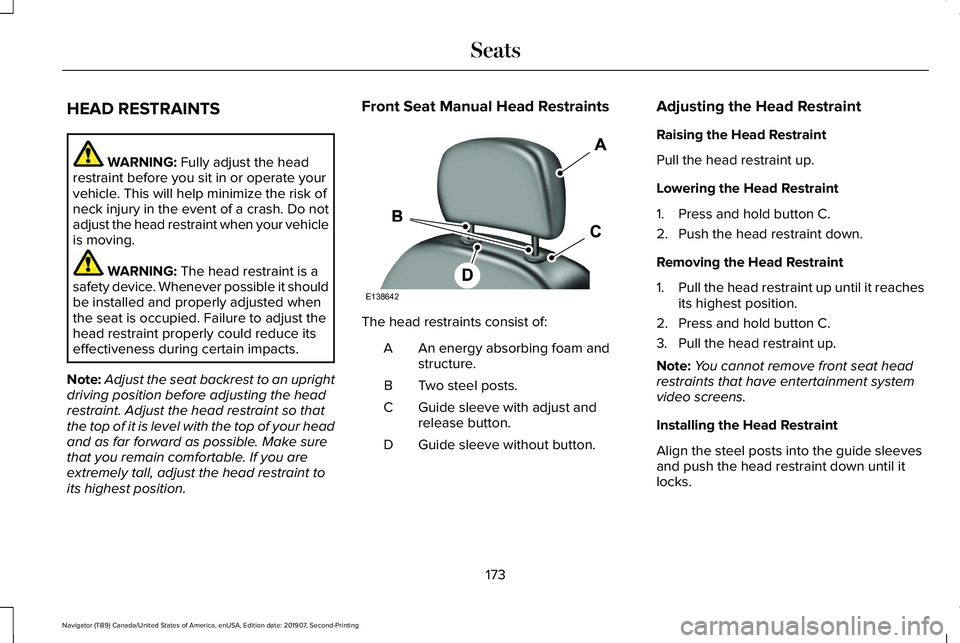
The head restraints consist of:
An energy absorbing foam and
structure.
A
Two steel posts.
B
Guide sleeve with adjust and
release button.
C
Guide sleeve without button.
D Adjusting the Head Restraint
Raising the Head Restraint
Pull the head restraint up.
Lowering the Head Restraint
1. Press and hold button C.
2. Push the head restraint down.
Removing the Head Restraint
1.
Pull the head restraint up until it reaches
its highest position.
2. Press and hold button C.
3. Pull the head restraint up.
Note: You cannot remove front seat head
restraints that have entertainment system
video screens.
Installing the Head Restraint
Align the steel posts into the guide sleeves
and push the head restraint down until it
locks.
173
Navigator (TB9) Canada/United States of America, enUSA, Edition date: 201907, Second-Printing SeatsE138642
Page 177 of 622
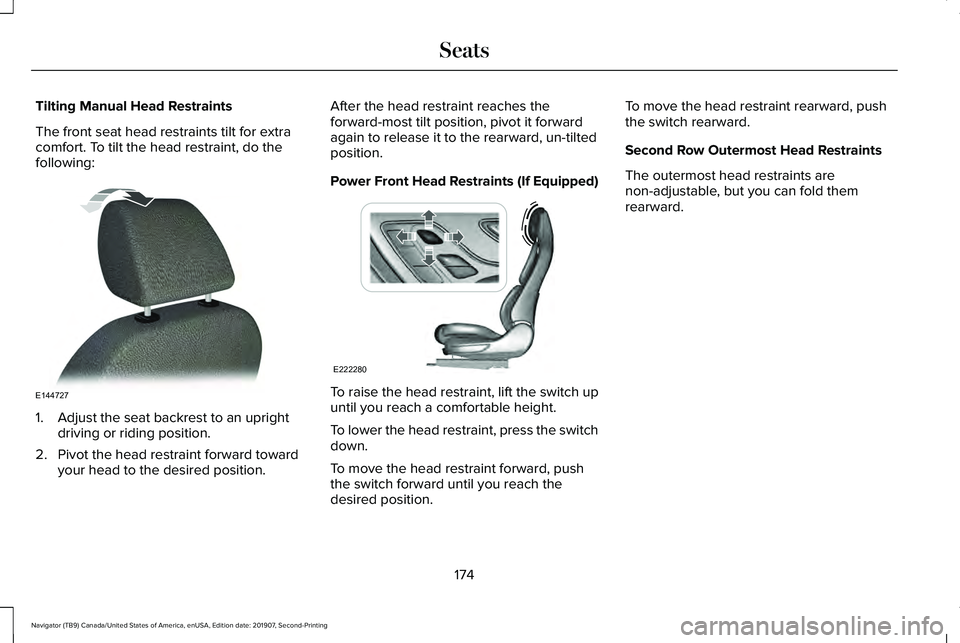
Tilting Manual Head Restraints
The front seat head restraints tilt for extra
comfort. To tilt the head restraint, do the
following:
1. Adjust the seat backrest to an upright
driving or riding position.
2. Pivot the head restraint forward toward your head to the desired position. After the head restraint reaches the
forward-most tilt position, pivot it forward
again to release it to the rearward, un-tilted
position.
Power Front Head Restraints (If Equipped)
To raise the head restraint, lift the switch up
until you reach a comfortable height.
To lower the head restraint, press the switch
down.
To move the head restraint forward, push
the switch forward until you reach the
desired position.To move the head restraint rearward, push
the switch rearward.
Second Row Outermost Head Restraints
The outermost head restraints are
non-adjustable, but you can fold them
rearward.
174
Navigator (TB9) Canada/United States of America, enUSA, Edition date: 201907, Second-Printing SeatsE144727 E222280