page 32 LINCOLN NAVIGATOR 2020 Workshop Manual
[x] Cancel search | Manufacturer: LINCOLN, Model Year: 2020, Model line: NAVIGATOR, Model: LINCOLN NAVIGATOR 2020Pages: 622, PDF Size: 6.47 MB
Page 135 of 622
It illuminates when you switch the ignition
on prior to engine start to check the bulb and
to indicate whether your vehicle is ready for
Inspection and Maintenance (I/M) testing.
Normally, it illuminates until the engine is
cranked and automatically turns off if no
malfunctions are present. However, if after
15 seconds it flashes eight times, this
indicates that your vehicle is not ready for
Inspection and Maintenance (I/M) testing.
See Catalytic Converter (page 219).
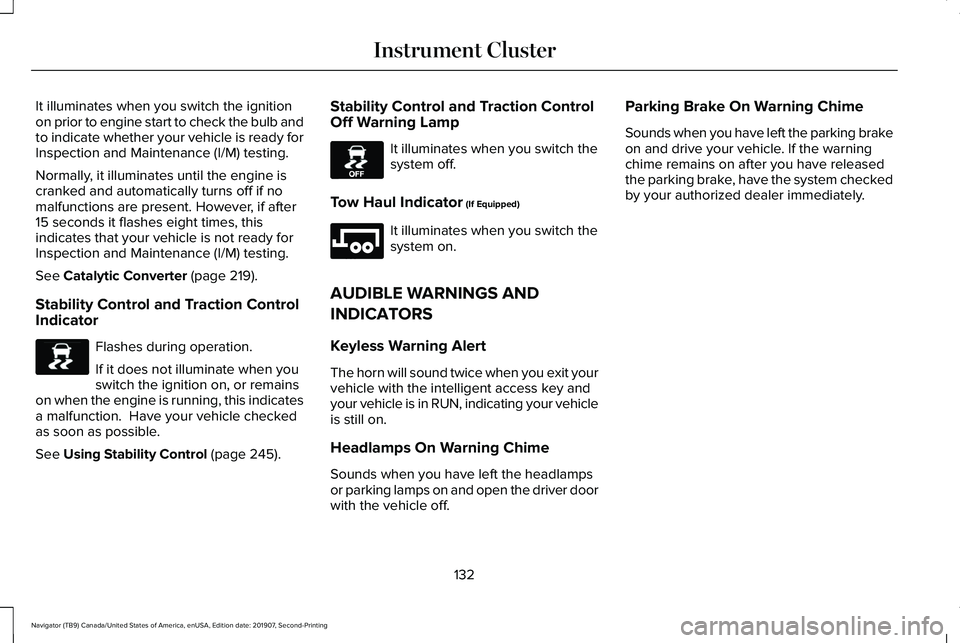
Stability Control and Traction Control
Indicator Flashes during operation.
If it does not illuminate when you
switch the ignition on, or remains
on when the engine is running, this indicates
a malfunction. Have your vehicle checked
as soon as possible.
See
Using Stability Control (page 245). Stability Control and Traction Control
Off Warning Lamp It illuminates when you switch the
system off.
Tow Haul Indicator
(If Equipped) It illuminates when you switch the
system on.
AUDIBLE WARNINGS AND
INDICATORS
Keyless Warning Alert
The horn will sound twice when you exit your
vehicle with the intelligent access key and
your vehicle is in RUN, indicating your vehicle
is still on.
Headlamps On Warning Chime
Sounds when you have left the headlamps
or parking lamps on and open the driver door
with the vehicle off. Parking Brake On Warning Chime
Sounds when you have left the parking brake
on and drive your vehicle. If the warning
chime remains on after you have released
the parking brake, have the system checked
by your authorized dealer immediately.
132
Navigator (TB9) Canada/United States of America, enUSA, Edition date: 201907, Second-Printing Instrument ClusterE138639 E130458 E246592
Page 137 of 622
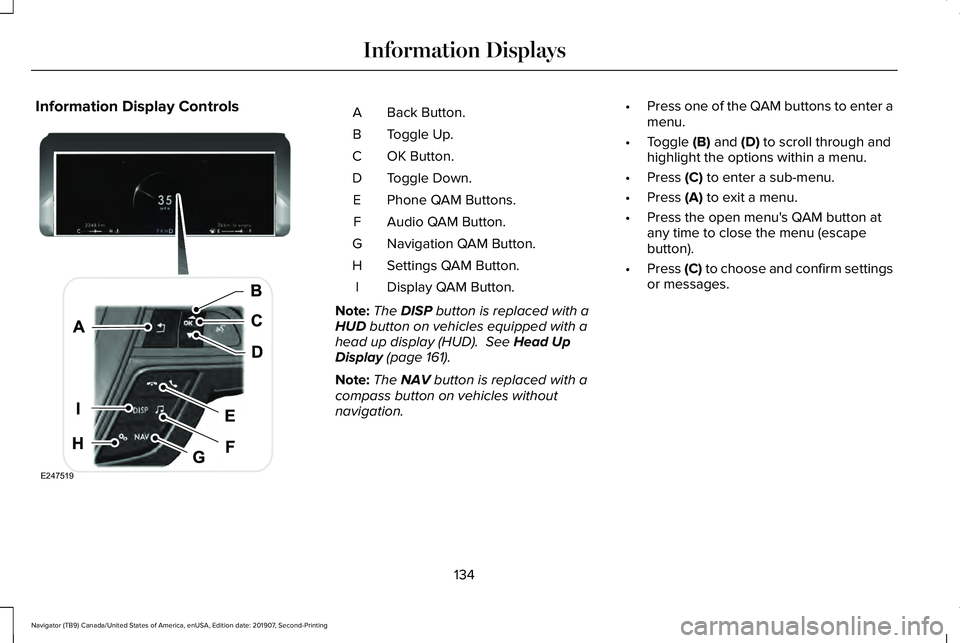
Information Display Controls
Back Button.
A
Toggle Up.
B
OK Button.
C
Toggle Down.
D
Phone QAM Buttons.
E
Audio QAM Button.
F
Navigation QAM Button.
G
Settings QAM Button.
H
Display QAM Button.
I
Note: The DISP button is replaced with a
HUD button on vehicles equipped with a
head up display (HUD). See Head Up
Display (page 161).
Note: The
NAV button is replaced with a
compass button on vehicles without
navigation. •
Press one of the QAM buttons to enter a
menu.
• Toggle
(B) and (D) to scroll through and
highlight the options within a menu.
• Press
(C) to enter a sub-menu.
• Press
(A) to exit a menu.
• Press the open menu's QAM button at
any time to close the menu (escape
button).
• Press
(C) to choose and confirm settings
or messages.
134
Navigator (TB9) Canada/United States of America, enUSA, Edition date: 201907, Second-Printing Information DisplaysE247519
Page 141 of 622
INFO/TRIP/FUEL
TIRE PRESSURE
TRAILER INFORMATION
• NO CONTENT - Displays a blank area.
• TRIP 1
- Displays distance traveled,
average fuel economy, and time spent
for trip. Press and hold
OK to reset.
• TRIP 2
information is the same as
TRIP 1.
• FUEL ECONOMY
- Displays your
vehicle's average fuel economy. Press
and hold
OK to reset.
• SEATBELTS
- Displays a graphic of the
connection status of the rear seatbelts.
• TIRE PRESSURE
- Displays a graphic of
current vehicle tire pressures.
• TRAILER INFORMATION
- Displays the
transmission temperature and trailer gain. Head Up Display
(If Equipped)
See
Head Up Display (page 161).
Phone
See
General Information (page 472).
Audio
See
General Information (page 472).
Navigation
(If Equipped)
See
General Information (page 472).
INFORMATION MESSAGES
Note: Depending on your vehicle options
and instrument cluster type, not all of the
messages will display or be available.
Certain messages may be abbreviated or
shortened depending upon which cluster
type you have. Press the
OK button to acknowledge and
remove some messages from the information
display. Other messages will be removed
automatically after a short time.
Certain messages need to be confirmed
before you can access the menus.
138
Navigator (TB9) Canada/United States of America, enUSA, Edition date: 201907, Second-Printing Information DisplaysE222314
Page 142 of 622
Active Park
Action
Message
The system requires service due to a malfunction. Have the system checked by an authorized dealer.
Active Park Fault
Adaptive Cruise Control Action
Message
A radar malfunction is preventing the adaptive cruise from engaging. Se\
e Using Adaptive Cruise Control (page 269).
Adaptive Cruise Malfunction
Front Sensor Not Aligned Conditions exist such that the adaptive cruise cannot function properly.
See Using Adaptive
Cruise Control (page 269).
Adaptive Cruise Not Available
The radar is blocked because of poor radar visibility due to bad weather or ice/mud/water \
infront of radar. Driver can typically clean the sensor to resolve.
See Using Adaptive Cruise
Control (page 269).
Adaptive Cruise Not Available Sensor
Blocked See Manual
Displayed when the automatic braking has been disabled.
Normal Cruise Active Automatic Braking
Turned Off
Displayed when the adaptive cruise has reinstated controls to the driver\
.
Adaptive Cruise - Driver Resume Control
Displays when the vehicle speed is too slow to activate the adaptive cru\
ise.
Adaptive Cruise Speed Too Low to
Activate
139
Navigator (TB9) Canada/United States of America, enUSA, Edition date: 201907, Second-Printing Information Displays
Page 145 of 622

Blind Spot Information and Cross Traffic Alert System
Action
Message
A fault with the system has occurred. Contact an authorized dealer as so\
on as possible.
Blindspot System Fault
The system sensors are blocked. Contact an authorized dealer as soon as possible. See Blind
Spot Information System (page 284).
Blindspot Not Available Sensor Blocked
See Manual
The system detects a vehicle.
See Blind Spot Information System (page 284).
Vehicle Coming From X
The blind spot information system and cross traffic alert system sensors\
are blocked. See BlindSpot Information System
(page 284).
Cross Traffic Not Available Sensor Blocked
See Manual
A fault with the system has occurred. Contact an authorized dealer as so\
on as possible.
Cross Traffic System Fault
The system automatically turns off and displays this message when you co\
nnect a trailer to thevehicle that does not have a trailer blind spot system or when you switc\
h the trailer blind spot system off through the information display.
See Blind Spot Information System (page 284).
Cross Traffic Alert Deactivated Trailer
Attached
The system automatically turns off and displays this message when you co\
nnect a trailer to thevehicle that does not have a trailer blind spot system or when you switc\
h the trailer blind spot system off through the information display.
See Blind Spot Information System (page 284).
Blind Spot Alert Deactivated Trailer
Attached
Displays when the trailer connected is a fifth wheel or gooseneck, or wh\
en the trailer width iswider than
10 ft (2.7 m) or longer than 33 ft (10 m).
Trailer Blind Spot Not available Due to
Invalid Trailer
142
Navigator (TB9) Canada/United States of America, enUSA, Edition date: 201907, Second-Printing Information Displays
Page 146 of 622
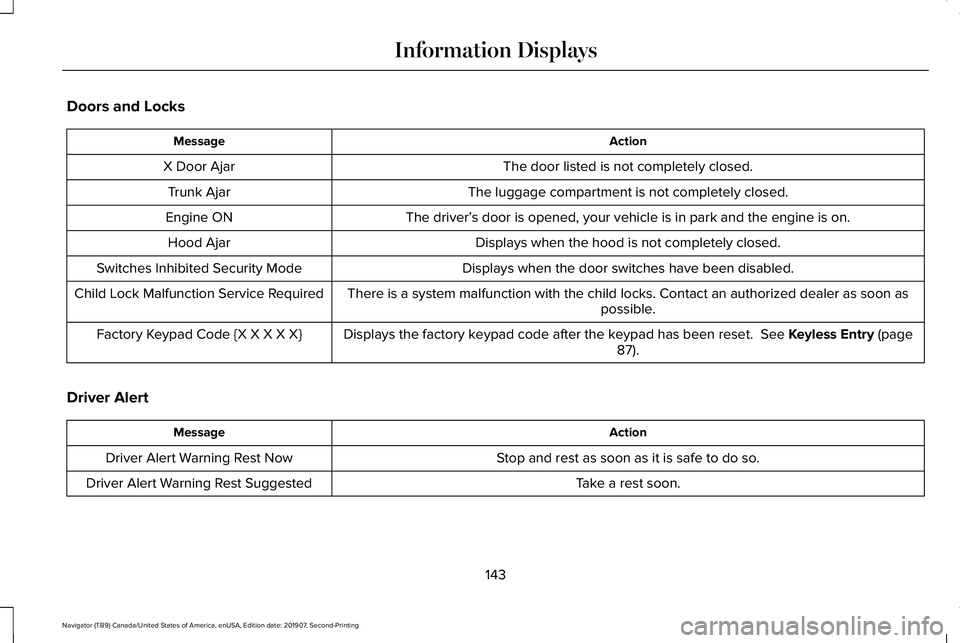
Doors and Locks
Action
Message
The door listed is not completely closed.
X Door Ajar
The luggage compartment is not completely closed.
Trunk Ajar
The driver’s door is opened, your vehicle is in park and the engine is on.
Engine ON
Displays when the hood is not completely closed.
Hood Ajar
Displays when the door switches have been disabled.
Switches Inhibited Security Mode
There is a system malfunction with the child locks. Contact an authorize\
d dealer as soon as possible.
Child Lock Malfunction Service Required
Displays the factory keypad code after the keypad has been reset. See Keyless Entry (page
87).
Factory Keypad Code {X X X X X}
Driver Alert Action
Message
Stop and rest as soon as it is safe to do so.
Driver Alert Warning Rest Now
Take a rest soon.
Driver Alert Warning Rest Suggested
143
Navigator (TB9) Canada/United States of America, enUSA, Edition date: 201907, Second-Printing Information Displays
Page 150 of 622
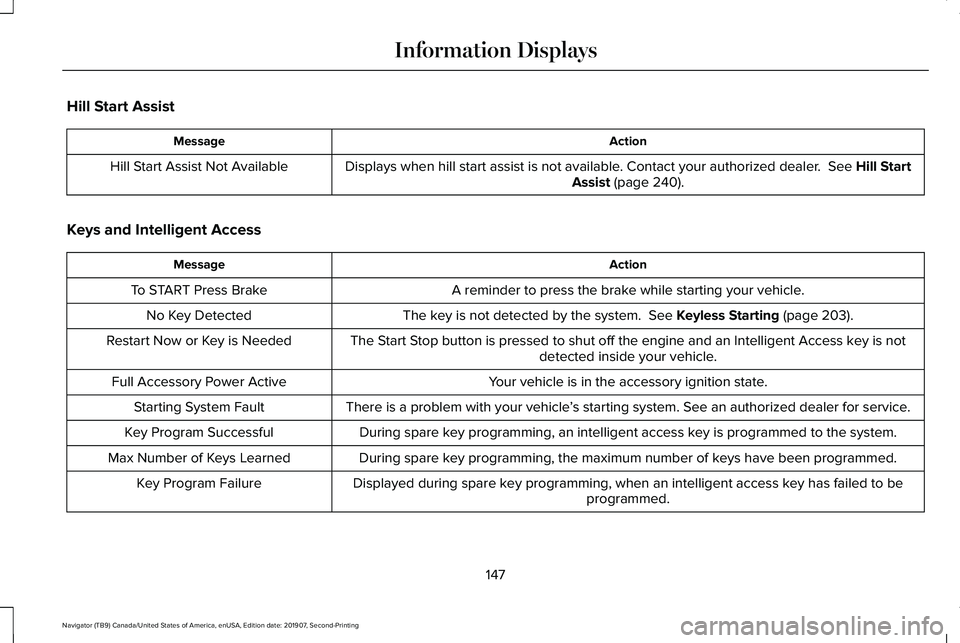
Hill Start Assist
Action
Message
Displays when hill start assist is not available. Contact your authorized dealer. See Hill Start
Assist (page 240).
Hill Start Assist Not Available
Keys and Intelligent Access Action
Message
A reminder to press the brake while starting your vehicle.
To START Press Brake
The key is not detected by the system.
See Keyless Starting (page 203).
No Key Detected
The Start Stop button is pressed to shut off the engine and an Intelligent Access k\
ey is notdetected inside your vehicle.
Restart Now or Key is Needed
Your vehicle is in the accessory ignition state.
Full Accessory Power Active
There is a problem with your vehicle’s starting system. See an authorized dealer for service.
Starting System Fault
During spare key programming, an intelligent access key is programmed to the system.
Key Program Successful
During spare key programming, the maximum number of keys have been programmed.
Max Number of Keys Learned
Displayed during spare key programming, when an intelligent access key has failed to beprogrammed.
Key Program Failure
147
Navigator (TB9) Canada/United States of America, enUSA, Edition date: 201907, Second-Printing Information Displays
Page 152 of 622
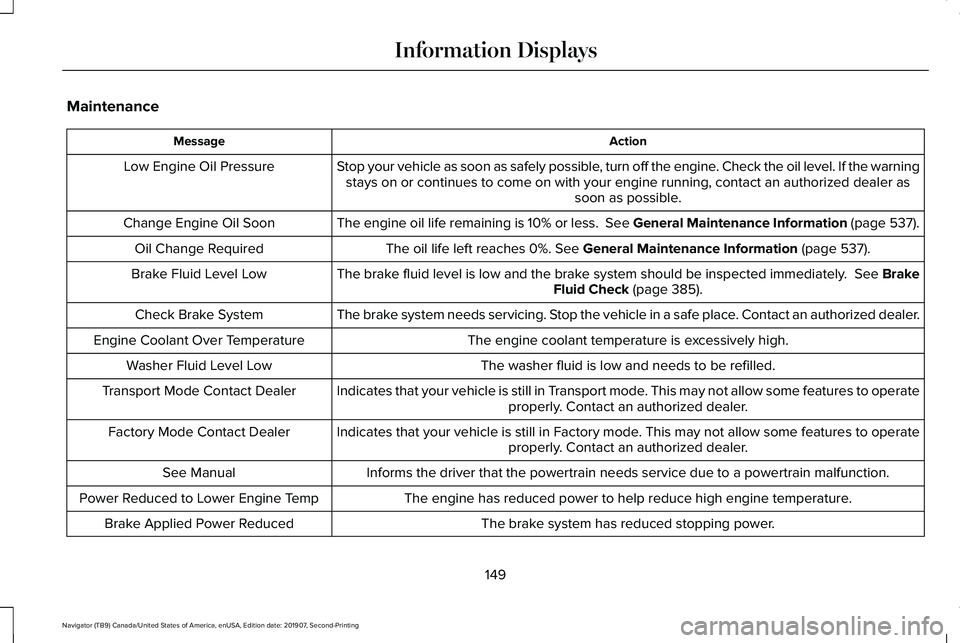
Maintenance
Action
Message
Stop your vehicle as soon as safely possible, turn off the engine. Check the oil level. If the warningstays on or continues to come on with your engine running, contact an au\
thorized dealer as soon as possible.
Low Engine Oil Pressure
The engine oil life remaining is 10% or less. See General Maintenance Information (page 537).
Change Engine Oil Soon
The oil life left reaches 0%. See General Maintenance Information (page 537).
Oil Change Required
The brake fluid level is low and the brake system should be inspected immediately.
See Brake
Fluid Check (page 385).
Brake Fluid Level Low
The brake system needs servicing. Stop the vehicle in a safe place. Contact an authorized dealer.
Check Brake System
The engine coolant temperature is excessively high.
Engine Coolant Over Temperature
The washer fluid is low and needs to be refilled.
Washer Fluid Level Low
Indicates that your vehicle is still in Transport mode. This may not allow some features to operateproperly. Contact an authorized dealer.
Transport Mode Contact Dealer
Indicates that your vehicle is still in Factory mode. This may not allow some features to operateproperly. Contact an authorized dealer.
Factory Mode Contact Dealer
Informs the driver that the powertrain needs service due to a powertrain\
malfunction.
See Manual
The engine has reduced power to help reduce high engine temperature.
Power Reduced to Lower Engine Temp
The brake system has reduced stopping power.
Brake Applied Power Reduced
149
Navigator (TB9) Canada/United States of America, enUSA, Edition date: 201907, Second-Printing Information Displays
Page 154 of 622
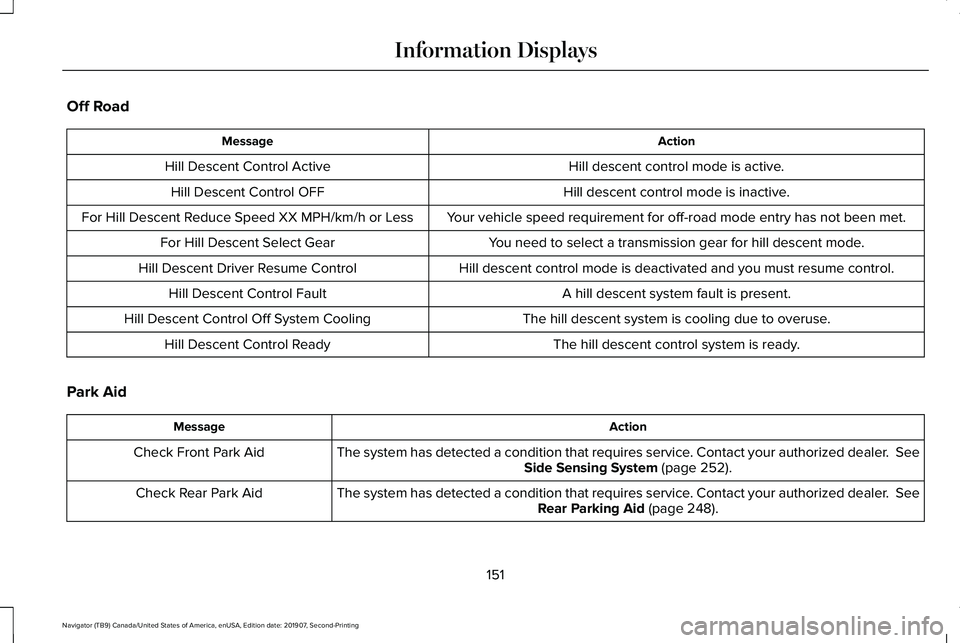
Off Road
Action
Message
Hill descent control mode is active.
Hill Descent Control Active
Hill descent control mode is inactive.
Hill Descent Control OFF
Your vehicle speed requirement for off-road mode entry has not been met.
For Hill Descent Reduce Speed XX MPH/km/h or Less
You need to select a transmission gear for hill descent mode.
For Hill Descent Select Gear
Hill descent control mode is deactivated and you must resume control.
Hill Descent Driver Resume Control
A hill descent system fault is present.
Hill Descent Control Fault
The hill descent system is cooling due to overuse.
Hill Descent Control Off System Cooling
The hill descent control system is ready.
Hill Descent Control Ready
Park Aid Action
Message
The system has detected a condition that requires service. Contact your authorized dealer. See
Side Sensing System (page 252).
Check Front Park Aid
The system has detected a condition that requires service. Contact your authorized dealer.
See
Rear Parking Aid (page 248).
Check Rear Park Aid
151
Navigator (TB9) Canada/United States of America, enUSA, Edition date: 201907, Second-Printing Information Displays
Page 158 of 622
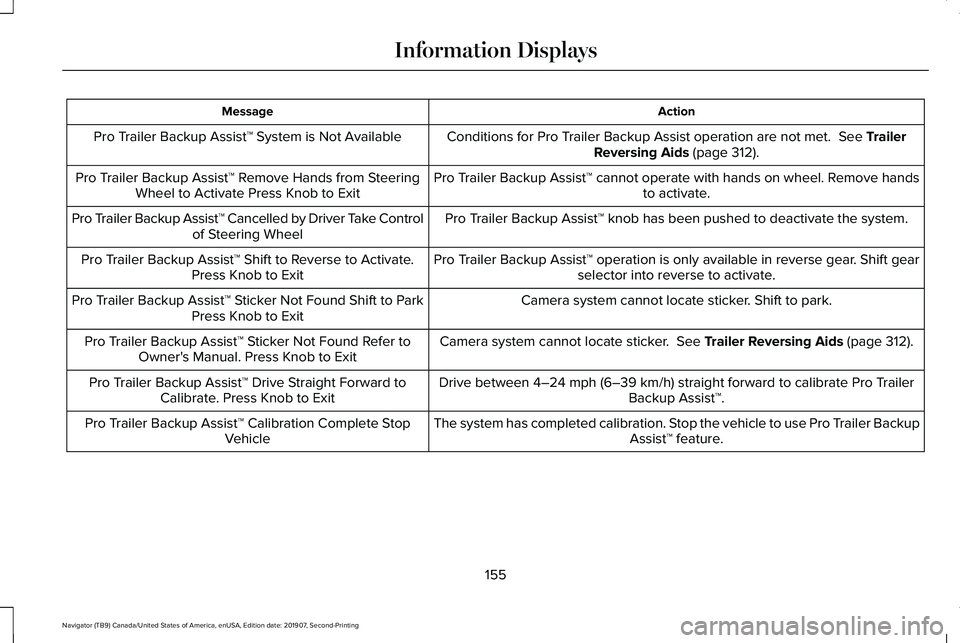
Action
Message
Conditions for Pro Trailer Backup Assist operation are not met. See Trailer
Reversing Aids (page 312).
Pro Trailer Backup Assist™ System is Not Available
Pro Trailer Backup Assist™ cannot operate with hands on wheel. Remove handsto activate.
Pro Trailer Backup Assist™ Remove Hands from Steering
Wheel to Activate Press Knob to Exit
Pro Trailer Backup Assist™ knob has been pushed to deactivate the system.
Pro Trailer Backup Assist™ Cancelled by Driver Take Control
of Steering Wheel
Pro Trailer Backup Assist™ operation is only available in reverse gear. Shift gearselector into reverse to activate.
Pro Trailer Backup Assist™ Shift to Reverse to Activate.
Press Knob to Exit
Camera system cannot locate sticker. Shift to park.
Pro Trailer Backup Assist™ Sticker Not Found Shift to Park
Press Knob to Exit
Camera system cannot locate sticker.
See Trailer Reversing Aids (page 312).
Pro Trailer Backup Assist™ Sticker Not Found Refer to
Owner's Manual. Press Knob to Exit
Drive between
4–24 mph (6–39 km/h) straight forward to calibrate Pro Trailer
Backup Assist™.
Pro Trailer Backup Assist™ Drive Straight Forward to
Calibrate. Press Knob to Exit
The system has completed calibration. Stop the vehicle to use Pro Trailer BackupAssist™ feature.
Pro Trailer Backup Assist™ Calibration Complete Stop
Vehicle
155
Navigator (TB9) Canada/United States of America, enUSA, Edition date: 201907, Second-Printing Information Displays