warning LINCOLN NAVIGATOR 2022 Owners Manual
[x] Cancel search | Manufacturer: LINCOLN, Model Year: 2022, Model line: NAVIGATOR, Model: LINCOLN NAVIGATOR 2022Pages: 646, PDF Size: 7.29 MB
Page 231 of 646
pedal when changes in vehicle speed are
required. Avoid abrupt steering, acceleration
and braking. This could result in an increased
risk of vehicle roll over, loss of vehicle control
and personal injury. Use all available road
surface to bring your vehicle to a safe
direction of travel.
In the event of an emergency stop, avoid
skidding the tires and do not attempt any
sharp steering wheel movements.
If your vehicle goes from one type of surface
to another (i.e. from concrete to gravel) there
can be a change in the way your vehicle
responds to a maneuver, i.e. steering,
acceleration or braking.
DRIVING IN SAND
When driving over sand, try to keep all four
wheels on the most solid area of the trail.
Avoid reducing the tire pressures but shift
to a lower gear and drive steadily through
the terrain. Apply the accelerator slowly and
avoid excessive wheel slip.
When driving at slow speeds in deep sand
under high outside temperatures, use a low
gear when possible. Low gear operation can
maximize the engine and transmission
cooling capability.
Avoid driving at excessive speed. This
causes vehicle momentum to work against
you and your vehicle could become stuck to
the point that assistance may be required
from another vehicle. Remember, you may
be able to back out the way you came if you
proceed with caution.
DRIVING THROUGH MUD AND WATER
WARNING: Do not spin the wheels
at over 34 mph (55 km/h). The tires may
fail and injure a passenger or bystander. Mud
Be cautious of sudden changes in vehicle
speed or direction when you are driving in
mud. Even four-wheel drive vehicles can lose
traction in slick mud. If your vehicle does
slide, steer in the direction of the slide until
you regain control of your vehicle. After
driving through mud, clean off residue stuck
to rotating driveshafts and tires. Excess mud
stuck on tires and rotating driveshafts can
cause an imbalance that could damage drive
components.
Water
If you must drive through high water, drive
slowly. Traction or brake capability may be
limited. When driving through water,
determine the depth and avoid water higher
than the bottom of the hubs. If the ignition
system gets wet, your vehicle may stall. Once
through water, test the brakes. Wet brakes
do not stop your vehicle as effectively as dry
brakes. Drying improves by applying light
pressure to the brake pedal while moving
slowly.
227
2022 Navigator (TB9) Canada/United States of America, enUSA, Edition date: 202109, First-Printing Four-Wheel Drive
(If Equipped)
Page 233 of 646
Note:
Excessive tire slippage can cause
transmission damage. FOUR-WHEEL DRIVE –
TROUBLESHOOTING
FOUR-WHEEL DRIVE – WARNING
LAMPS Illuminates when a four-wheel
drive or power train fault is
present.
Note:
When a system fault is present, the
system can typically remain in whichever
mode was selected prior to the fault
condition occurring. It does not default to
two-wheel drive in all circumstances. When
this warning is displayed, have your vehicle
serviced by an authorized dealer.
FOUR-WHEEL DRIVE – INFORMATION MESSAGES Action
Message
A four-wheel drive system fault is present. Have your vehicle checkedas soon as possible.
Check 4x4
The four-wheel drive system is making a shift.
4x4 Shift in Progress
Displays when you attempt to switch to four-wheel drive low modeand you do not shift the transmission to neutral (N).
For 4x4 LOW Shift to N
Displays when you attempt to switch to four-wheel drive low modeand your vehicle's speed is greater than 3 mph (5 km/h).
For 4x4 LOW Slow to 3 MPH
For 4x4 LOW Slow to 5 km/h Displays when you attempt to switch from four-wheel drive low modeand you do not shift the transmission to neutral (N).
To Exit 4x4 LOW Shift to N
229
2022 Navigator (TB9) Canada/United States of America, enUSA, Edition date: 202109, First-Printing Four-Wheel Drive
(If Equipped)
Page 235 of 646
WHAT IS THE ELECTRONIC
LIMITED-SLIP DIFFERENTIAL
The electronic limited-slip differential system
directs torque, enabling the vehicle to drive
over terrain and road conditions that a
conventional axle cannot. The system is
active at all times and requires no input from
the driver.
Note:
If your vehicle is not at optimal
operating conditions or a system fault is
present, a warning may display in the
instrument cluster. Depending on the
warning, you may need to service your
vehicle. Operating the Electronic Limited-Slip
Differential with a Spare or Mismatched
Tires
If your vehicle has an electronic limited-slip
differential, do not use a spare tire of a
different size than the tire provided. If you
have a spare tire installed, a message may
appear indicating the system has disabled
automatically or reduced function to prevent
system overheat and damage. We
recommend you reinstall the repaired or
replaced spare tire as soon as possible.
When you replace the spare tire, the system
resumes normal operation on the next key
cycle.
Trailer Towing
The electronic limited-slip differential
enhances vehicle stability during trailer tow
operation. During high demand trailering
events, such as steep slopes, high speeds
or with a spare tire, the system may provide
a warning in the instrument cluster and
reduce function or enter a temporarily
disabled state. To resume normal function,
stop the vehicle in a safe location and allow
the unit to adequately cool. Once the system
reaches normal operating temperatures,
system function restores and the electronic
limited-slip differential restored message
displays.
231
2022 Navigator (TB9) Canada/United States of America, enUSA, Edition date: 202109, First-Printing Electronic Limited-Slip Differential (If Equipped)
Page 237 of 646
BRAKE PRECAUTIONS
WARNING: Driving your vehicle with
the warning lamp on is dangerous. A
significant decrease in braking
performance may occur. It may take you
longer to stop your vehicle. Have your
vehicle checked as soon as possible.
Driving extended distances with the
parking brake engaged can cause brake
failure and the risk of personal injury.
Wet brakes result in reduced braking
efficiency. Gently press the brake pedal a
few times when leaving a car wash or driving
from standing water to dry the brakes.
Note: Depending on applicable laws and
regulations in the country for which your
vehicle was originally built, the stoplamps
could flash during heavy braking. Following
this the hazard warning flashers could also
turn on when your vehicle comes to a stop. ANTI-LOCK BRAKING SYSTEM
ANTI-LOCK BRAKING SYSTEM
LIMITATIONS
The anti-lock braking system does not
eliminate the risk of crash when:
•
You drive too closely to the vehicle in
front of you.
• Your vehicle is hydroplaning.
• You take corners too fast.
• The road surface is poor.
Note: If the system activates, the brake
pedal could pulse and travel further.
Maintain pressure on the brake pedal.
BRAKE OVER ACCELERATOR
In the event the accelerator pedal becomes
stuck or entrapped, apply steady and firm
pressure to the brake pedal to slow the
vehicle and reduce engine power. If you
experience this condition, apply the brakes
and bring your vehicle to a safe stop. Move the transmission to park (P), switch the
engine off and apply the parking brake.
Inspect the accelerator pedal for any
interference. If none are found and the
condition persists, have your vehicle towed
to the nearest authorized dealer.
LOCATING THE BRAKE FLUID
RESERVOIR
See
Under Hood Overview (page 415).
CHECKING THE BRAKE FLUID WARNING: Do not use any fluid other
than the recommended brake fluid as this
will reduce brake efficiency. Use of
incorrect fluid could result in the loss of
vehicle control, serious personal injury or
death.
233
2022 Navigator (TB9) Canada/United States of America, enUSA, Edition date: 202109, First-Printing Brakes
Page 238 of 646
WARNING: Only use brake fluid from
a sealed container. Contamination with dirt,
water, petroleum products or other
materials may result in brake system
damage or failure. Failure to adhere to this
warning could result in the loss of vehicle
control, serious personal injury or death. WARNING:
Do not allow the fluid to
touch your skin or eyes. If this happens,
rinse the affected areas immediately with
plenty of water and contact your physician. WARNING:
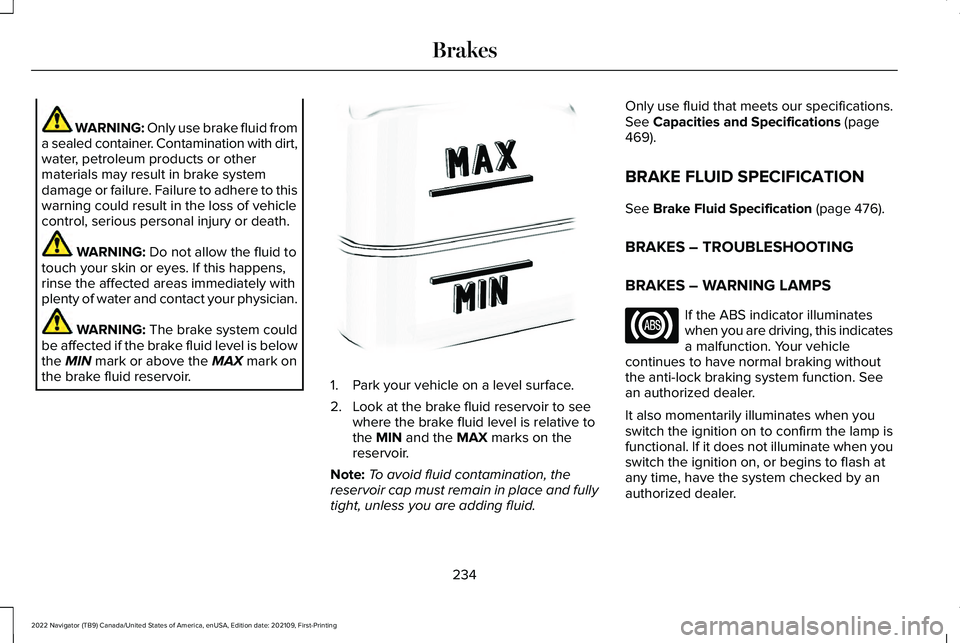
The brake system could
be affected if the brake fluid level is below
the
MIN mark or above the MAX mark on
the brake fluid reservoir. 1. Park your vehicle on a level surface.
2. Look at the brake fluid reservoir to see
where the brake fluid level is relative to
the
MIN and the MAX marks on the
reservoir.
Note: To avoid fluid contamination, the
reservoir cap must remain in place and fully
tight, unless you are adding fluid. Only use fluid that meets our specifications.
See
Capacities and Specifications (page
469).
BRAKE FLUID SPECIFICATION
See
Brake Fluid Specification (page 476).
BRAKES – TROUBLESHOOTING
BRAKES – WARNING LAMPS If the ABS indicator illuminates
when you are driving, this indicates
a malfunction. Your vehicle
continues to have normal braking without
the anti-lock braking system function. See
an authorized dealer.
It also momentarily illuminates when you
switch the ignition on to confirm the lamp is
functional. If it does not illuminate when you
switch the ignition on, or begins to flash at
any time, have the system checked by an
authorized dealer.
234
2022 Navigator (TB9) Canada/United States of America, enUSA, Edition date: 202109, First-Printing BrakesE170684
Page 240 of 646
WHAT IS THE ELECTRIC PARKING
BRAKE
The electric parking brake is used to hold
your vehicle on slopes and flat roads.
APPLYING THE ELECTRIC
PARKING BRAKE
WARNING: Always fully apply the
parking brake and make sure you shift into
park (P). Failure to follow this instruction
could result in personal injury or death. WARNING:
If you drive extended
distances with the parking brake applied,
you could cause damage to the brake
system. The switch is on the lower part of
the instrument panel.
1. Pull the switch up. The red warning lamp flashes during
operation and illuminates when the parking
brake is applied.
Note:
You can apply the electric parking
brake when the ignition is off.
Note: The electric parking brake could apply
when the transmission selector is in park (P).
See
Park (P) (page 219).
APPLYING THE ELECTRIC
PARKING BRAKE IN AN
EMERGENCY
You can use the electric parking brake to
slow or stop your vehicle in an emergency.
1. Pull the switch up and hold it.
The electric parking brake continues to slow
your vehicle down unless you release the
switch.
The red warning lamp illuminates, a tone
sounds and the stoplamps turn on when you
use the electric parking brake in an
emergency. Note:
Do not apply the electric parking brake
when your vehicle is moving, except in an
emergency. If you repeatedly use the electric
parking brake to slow or stop your vehicle,
you could cause damage to the brake
system.
MANUALLY RELEASING THE
ELECTRIC PARKING BRAKE
1. Switch the ignition on.
2. Press and hold the brake pedal.
3. Push the switch down.
The red warning lamp turns off.
Pulling Away on a Hill When Towing a
Trailer
1. Press and hold the brake pedal.
2. Pull the switch upward and hold it.
3. Shift into gear.
4. Press the accelerator pedal until engine has developed sufficient torque to
prevent your vehicle from rolling down
the hill.
236
2022 Navigator (TB9) Canada/United States of America, enUSA, Edition date: 202109, First-Printing Electric Parking BrakeE267156
Page 241 of 646
5. Release the switch and pull away in a
normal manner.
AUTOMATICALLY RELEASING THE
ELECTRIC PARKING BRAKE
1. Close the driver door.
2. Shift into gear.
3. Press the accelerator pedal and pull away
in a normal manner.
ELECTRIC PARKING BRAKE
AUDIBLE WARNING
Sounds when the parking brake is on and
your vehicle is moving. If the warning tone
continues after you have released the
parking brake, this indicates a malfunction.
Have your vehicle checked as soon as
possible. RELEASING THE ELECTRIC
PARKING BRAKE IF THE VEHICLE
BATTERY HAS RUN OUT OF
CHARGE WARNING: The electric parking
brake does not operate if the vehicle
battery has run out of charge.
Connect a booster battery to the vehicle
battery to release the electric parking brake
if the vehicle battery has run out of charge.
See
Jump Starting the Vehicle (page 392). ELECTRIC PARKING BRAKE –
TROUBLESHOOTING
ELECTRIC PARKING BRAKE –
WARNING LAMPS
Brake System It illuminates red when you apply
the parking brake and your vehicle
is on. If the lamp flashes when the
parking brake has been released,
this indicates the parking brake
system requires service. Have
your vehicle checked as soon as possible.
Note: Lamps may vary depending on region.
Electric Parking Brake When the lamp illuminates yellow,
it indicates a malfunction in the
electric parking brake. Have your
vehicle checked as soon as possible.
237
2022 Navigator (TB9) Canada/United States of America, enUSA, Edition date: 202109, First-Printing Electric Parking BrakeE270480 E146190
Page 243 of 646
WHAT IS REVERSE BRAKING
ASSIST
The system uses sensors on the rear of your
vehicle to detect a possible collision and
applies the brakes to either reduce the
damage from impact, or to assist in avoiding
the collision.
HOW DOES REVERSE BRAKING
ASSIST WORK
Reverse Braking Assist functions when in
reverse (R) and traveling at a speed of
1–7 mph (1.5–12 km/h).
If the system detects an obstacle behind your
vehicle, it provides a warning through the
rear parking aid or cross traffic alert system. REVERSE BRAKING ASSIST
PRECAUTIONS WARNING:
You are responsible for
controlling your vehicle at all times. The
system is designed to be an aid and does
not relieve you of your responsibility to
drive with due care and attention. Failure
to follow this instruction could result in the
loss of control of your vehicle, personal
injury or death. WARNING:
To help avoid personal
injury, always use caution when in reverse
(R) and when using the sensing system. WARNING:
The system may not
operate properly during severe weather
conditions, for example snow, ice, heavy
rain and spray. Always drive with due care
and attention. Failure to take care may
result in a crash. WARNING:
Traffic control systems,
fluorescent lamps, inclement weather, air
brakes, external motors and fans may
affect the correct operation of the sensing
system. This may cause reduced
performance or false alerts. WARNING:
Some situations and
objects prevent hazard detection. For
example low or direct sunlight, inclement
weather, unconventional vehicle types, and
pedestrians. Apply the brakes when
necessary. Failure to follow this instruction
could result in the loss of control of your
vehicle, personal injury or death. WARNING:
Do not use the system
with accessories that extend beyond the
front or rear of your vehicle, for example a
trailer hitch or bike rack. The system is not
able to make corrections for the additional
length of the accessories.
239
2022 Navigator (TB9) Canada/United States of America, enUSA, Edition date: 202109, First-Printing Reverse Braking Assist
Page 244 of 646
The system only applies the brakes for a
short period of time when an event occurs.
Act as soon as you notice the brakes apply
in order to remain in control of the vehicle.
If you do not intervene the vehicle may start
to move again.
Note:
Certain add-on devices around the
bumper or fascia may create false alerts. For
example, large trailer hitches, bicycle or
surfboard racks, license plate brackets,
bumper covers or any other device that may
block the normal detection zone of the
system. Remove the add-on device to
prevent false alerts.
Note: The system does not react to small or
moving objects, particularly those close to
the ground.
Note: The system does not operate during
hard acceleration or steering.
Note: If your vehicle sustains damage to the
bumper or fascia leaving it misaligned or
bent, it could alter the sensing zone causing
inaccurate measurement of obstacles or
false alerts. Note:
Vehicle loading and suspension
changes can impact the angle of the sensors
and may change the normal detection zone
of the system resulting in inaccurate
measurement of obstacles or false alerts.
Note: When you connect a trailer, the system
may detect the trailer and provide an alert,
or the system turns off. If the system does
not turn off, switch the system off manually
after you connect the trailer.
Note: You may experience reduced system
performance on road surfaces that limit
deceleration. For example, roads with ice,
loose gravel, mud or sand.
SWITCHING REVERSE BRAKING
ASSIST ON AND OFF
1. Press Features on the touchscreen.
2. Press
Driver Assistance.
3. Switch
Reverse Brake Assist on or off.
Note: The system is unavailable when the
rear parking aid, cross traffic alert or traction
control is off. Note:
If your vehicle is not equipped with
cross traffic alert the reverse braking assist
relies on input from the rear parking aid and
rear camera sensors.
Note: The default setting is on in some
regions.
OVERRIDING REVERSE BRAKING
ASSIST
There could be instances when unexpected
or unwanted braking occurs. Firmly pressing
the accelerator pedal or switching the feature
off overrides the system.
REVERSE BRAKING ASSIST
INDICATORS
If the system determines that a collision with
an obstacle may occur, full braking may
apply. Bring your vehicle to a stop a safe
distance away from the obstacle. A message and warning indicator
appear when the system applies
the brakes.
240
2022 Navigator (TB9) Canada/United States of America, enUSA, Edition date: 202109, First-Printing Reverse Braking AssistE293490
Page 247 of 646
WHAT IS HILL START ASSIST
Hill Start Assist makes it easier for you to pull
away when your vehicle is on a slope without
using the parking brake.
HOW DOES HILL START ASSIST
WORK
When the system activates, your vehicle
remains stationary for a few seconds after
you release the brake pedal. This gives you
time to move your foot from the brake pedal
to the accelerator pedal. The brakes release
when the engine has developed sufficient
torque to prevent your vehicle from rolling
down the slope.
HILL START ASSIST PRECAUTIONS
WARNING: The system does not
replace the parking brake. When you leave
your vehicle, always apply the parking
brake. WARNING: You must remain in your
vehicle when the system turns on. At all
times, you are responsible for controlling
your vehicle, supervising the system and
intervening, if required. Failure to take care
may result in the loss of control of your
vehicle, serious personal injury or death. WARNING:
The system will turn off
if a malfunction is apparent. Failure to take
care may result in the loss of control of
your vehicle, serious personal injury or
death. HILL START ASSIST –
TROUBLESHOOTING
HILL START ASSIST – INFORMATION
MESSAGES Action
Message
Displays when
system is not avail- able. Have your
vehicle checked as soon as possible.
Hill Start Assist Not
Available
243
2022 Navigator (TB9) Canada/United States of America, enUSA, Edition date: 202109, First-Printing Hill Start Assist