automatic transmission LINCOLN NAVIGATOR 2022 User Guide
[x] Cancel search | Manufacturer: LINCOLN, Model Year: 2022, Model line: NAVIGATOR, Model: LINCOLN NAVIGATOR 2022Pages: 646, PDF Size: 7.29 MB
Page 353 of 646
TOWING A TRAILER PRECAUTIONS
WARNING: Do not exceed the
GVWR or the GAWR specified on the
certification label. WARNING:
Towing trailers
beyond the maximum recommended
gross trailer weight exceeds the limit
of your vehicle and could result in
engine damage, transmission damage,
structural damage, loss of vehicle
control, vehicle rollover and personal
injury. WARNING:
Do not exceed the
lowest rating capacity for your vehicle
or trailer hitch. Overloading your
vehicle or trailer hitch can impair your
vehicle stability and handling. Failure
to follow this instruction could result
in the loss of control of your vehicle,
personal injury or death. WARNING:
Make sure that the
vertical load on the tow ball is between
the minimum and maximum
recommended weight at all times.
Failure to follow this instruction could
result in the loss of control of your
vehicle, personal injury or death. WARNING: Do not cut, drill, weld
or modify the trailer hitch. Modifying
the trailer hitch could reduce the hitch
rating. WARNING:
The anti-lock brake
system does not control the trailer
brakes. TRAILER BRAKE PRECAUTIONS WARNING:
Do not connect a trailer's
hydraulic brake system directly to your
vehicle's brake system. Your vehicle may
not have enough braking power and your
chances of having a collision greatly
increase. WARNING:
Do not tow a trailer fitted
with electric trailer brakes unless your
vehicle is fitted with a compatible
aftermarket electronic trailer brake
controller. Failure to follow this instruction
could result in the loss of control of your
vehicle, personal injury or death. For
additional information and assistance, we
recommend that you contact an authorized
dealer.
Electric brakes and manual, automatic or
surge-type trailer brakes are safe if you install
them properly and adjust them to the
manufacturer's specifications. The trailer
brakes must meet local and federal
regulations.
349
2022 Navigator (TB9) Canada/United States of America, enUSA, Edition date: 202109, First-Printing Towing a Trailer
Page 380 of 646
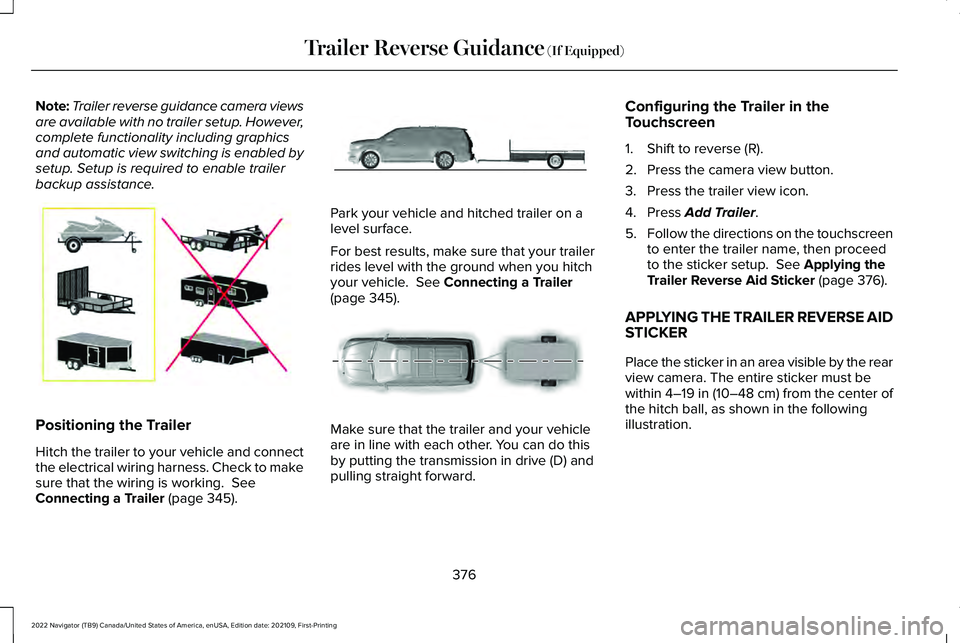
Note:
Trailer reverse guidance camera views
are available with no trailer setup. However,
complete functionality including graphics
and automatic view switching is enabled by
setup. Setup is required to enable trailer
backup assistance. Positioning the Trailer
Hitch the trailer to your vehicle and connect
the electrical wiring harness. Check to make
sure that the wiring is working. See
Connecting a Trailer (page 345). Park your vehicle and hitched trailer on a
level surface.
For best results, make sure that your trailer
rides level with the ground when you hitch
your vehicle.
See Connecting a Trailer
(page 345). Make sure that the trailer and your vehicle
are in line with each other. You can do this
by putting the transmission in drive (D) and
pulling straight forward.Configuring the Trailer in the
Touchscreen
1. Shift to reverse (R).
2. Press the camera view button.
3. Press the trailer view icon.
4. Press
Add Trailer.
5. Follow the directions on the touchscreen
to enter the trailer name, then proceed
to the sticker setup.
See Applying the
Trailer Reverse Aid Sticker (page 376).
APPLYING THE TRAILER REVERSE AID
STICKER
Place the sticker in an area visible by the rear
view camera. The entire sticker must be
within
4–19 in (10–48 cm) from the center of
the hitch ball, as shown in the following
illustration.
376
2022 Navigator (TB9) Canada/United States of America, enUSA, Edition date: 202109, First-Printing Trailer Reverse Guidance
(If Equipped)E209766 E247482 E247481
Page 396 of 646
WARNING: Keep batteries out of
reach of children. Batteries contain sulfuric
acid. Avoid contact with skin, eyes or
clothing. Shield your eyes when working
near the battery to protect against possible
splashing of acid solution. In case of acid
contact with skin or eyes, flush immediately
with water for a minimum of 15 minutes and
get prompt medical attention. If acid is
swallowed, call a physician immediately. WARNING:
Use only adequately
sized cables with insulated clamps. WARNING: Make sure that the cables
are clear of any moving parts and fuel
delivery system parts. WARNING:
Connect batteries with
only the same nominal voltage. WARNING:
If the engine is running
while the hood is open, stay clear of
moving engine components. Failure to
follow this warning could result in serious
personal injury or death. Do not attempt to push-start an automatic
transmission vehicle. This could cause
transmission damage.
Do not disconnect the battery of the disabled
vehicle. This could damage your vehicle's
electrical system.
PREPARING THE VEHICLE
Use only a 12 volt supply to start your vehicle.
Park the booster vehicle close to the hood
of the disabled vehicle, making sure the two
vehicles do not touch.
JUMP STARTING THE VEHICLE
Connecting the Jumper Cables
WARNING:
Do not connect the
negative jumper cable to any other part of
your vehicle. Use the ground point.
Note: If you are using a jump pack or booster
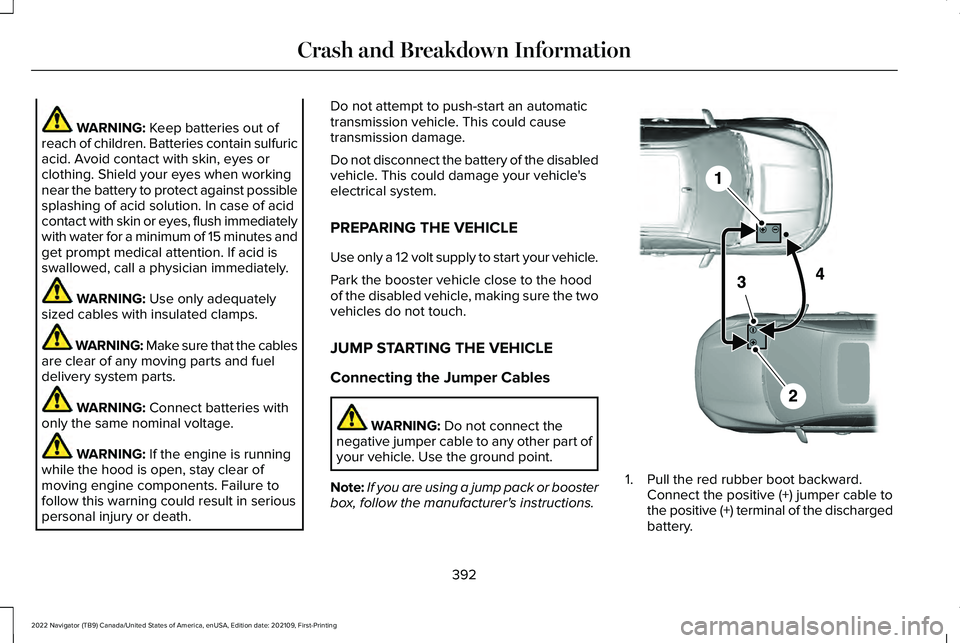
box, follow the manufacturer's instructions. 1. Pull the red rubber boot backward.
Connect the positive (+) jumper cable to
the positive (+) terminal of the discharged
battery.
392
2022 Navigator (TB9) Canada/United States of America, enUSA, Edition date: 202109, First-Printing Crash and Breakdown InformationE355173
Page 429 of 646
If you disconnect or replace the battery and
your vehicle has an automatic transmission,
it must relearn its adaptive strategy. Because
of this, the transmission may shift firmly when
first driven. This is normal operation while
the transmission fully updates its operation
to optimum shift feel.
Battery Sensor Reset
When you install a new battery, reset the
battery sensor by doing the following:
1. Switch the ignition on, and leave the
engine off.
Note: Complete Steps 2 and 3 within 10
seconds.
2. Flash the high beam headlamps five times, ending with the high beams off.
3. Press and release the brake pedal three
times.
The battery warning lamp flashes three times
to confirm that the reset is successful. Battery Management System (If Equipped)
The system monitors battery conditions and
takes actions to extend battery life. If
excessive battery drain is detected, the
system temporarily disables some electrical
systems to protect the battery.
Systems included are:
• Heated rear window.
• Heated seats.
• Climate control.
• Heated steering wheel.
• Audio unit.
• Navigation system.
A message may appear in the information
display to alert you that battery protection
actions are active. This message is only for
notification that an action is taking place, and
not intended to indicate an electrical problem
or that the battery requires replacement. After battery replacement, or in some cases
after charging the battery with an external
charger, the battery management system
requires eight hours of vehicle sleep time to
relearn the battery state of charge. During
this time, your vehicle must remain fully
locked with the ignition switched off.
Note:
Prior to relearning the battery state of
charge, the battery management system
may temporarily disable some electrical
systems.
Electrical Accessory Installation
To make sure the battery management
system works correctly, do not connect an
electrical device ground connection directly
to the battery negative post. This can cause
inaccurate measurements of the battery
condition and potential incorrect system
operation.
Note: If you add electrical accessories or
components to the vehicle, it may adversely
affect battery performance and durability.
This may also affect the performance of
other electrical systems in the vehicle.
425
2022 Navigator (TB9) Canada/United States of America, enUSA, Edition date: 202109, First-Printing Maintenance
Page 482 of 646
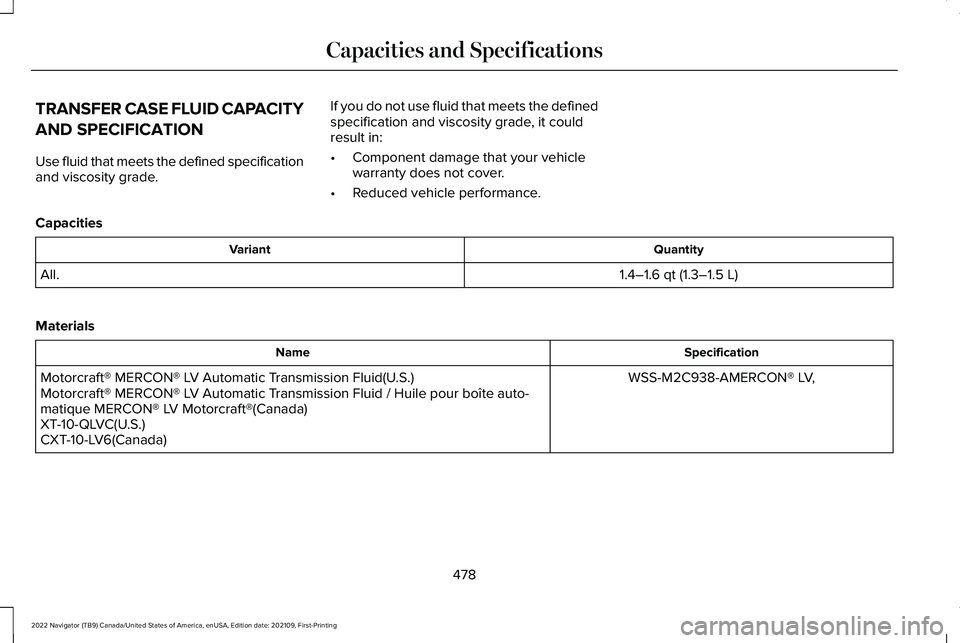
TRANSFER CASE FLUID CAPACITY
AND SPECIFICATION
Use fluid that meets the defined specification
and viscosity grade.
If you do not use fluid that meets the defined
specification and viscosity grade, it could
result in:
•
Component damage that your vehicle
warranty does not cover.
• Reduced vehicle performance.
Capacities Quantity
Variant
1.4–1.6 qt (1.3–1.5 L)
All.
Materials Specification
Name
WSS-M2C938-AMERCON® LV,
Motorcraft® MERCON® LV Automatic Transmission Fluid(U.S.)
Motorcraft® MERCON® LV Automatic Transmission Fluid / Huile pour boîte auto-
matique MERCON® LV Motorcraft®(Canada)
XT-10-QLVC(U.S.)
CXT-10-LV6(Canada)
478
2022 Navigator (TB9) Canada/United States of America, enUSA, Edition date: 202109, First-Printing Capacities and Specifications
Page 536 of 646
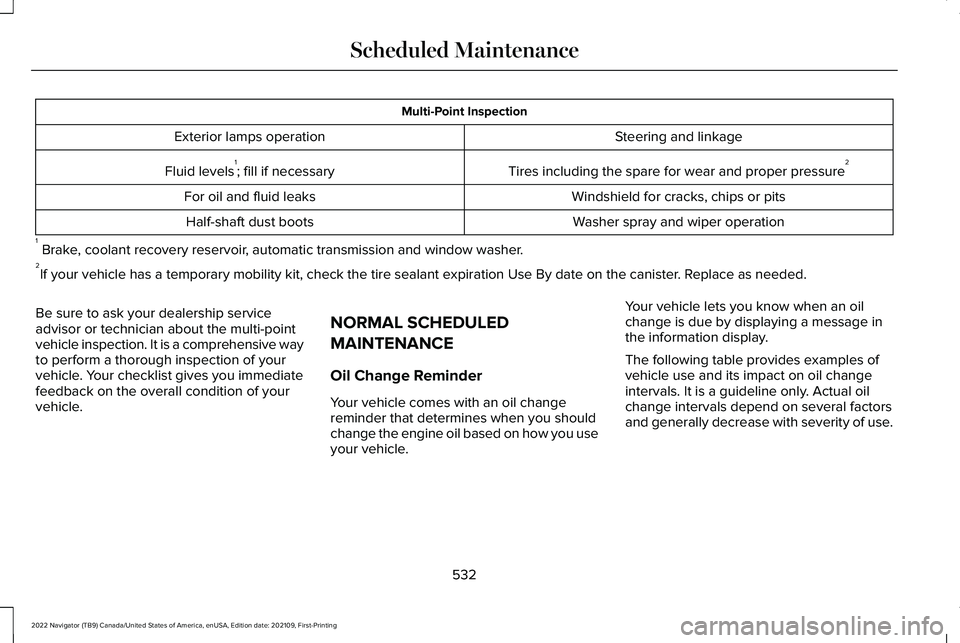
Multi-Point Inspection
Steering and linkage
Exterior lamps operation
Tires including the spare for wear and proper pressure 2
Fluid levels 1
; fill if necessary
Windshield for cracks, chips or pits
For oil and fluid leaks
Washer spray and wiper operation
Half-shaft dust boots
1 Brake, coolant recovery reservoir, automatic transmission and window washer.
2 If your vehicle has a temporary mobility kit, check the tire sealant exp\
iration Use By date on the canister. Replace as needed.
Be sure to ask your dealership service
advisor or technician about the multi-point
vehicle inspection. It is a comprehensive way
to perform a thorough inspection of your
vehicle. Your checklist gives you immediate
feedback on the overall condition of your
vehicle. NORMAL SCHEDULED
MAINTENANCE
Oil Change Reminder
Your vehicle comes with an oil change
reminder that determines when you should
change the engine oil based on how you use
your vehicle.Your vehicle lets you know when an oil
change is due by displaying a message in
the information display.
The following table provides examples of
vehicle use and its impact on oil change
intervals. It is a guideline only. Actual oil
change intervals depend on several factors
and generally decrease with severity of use.
532
2022 Navigator (TB9) Canada/United States of America, enUSA, Edition date: 202109, First-Printing Scheduled Maintenance
Page 538 of 646
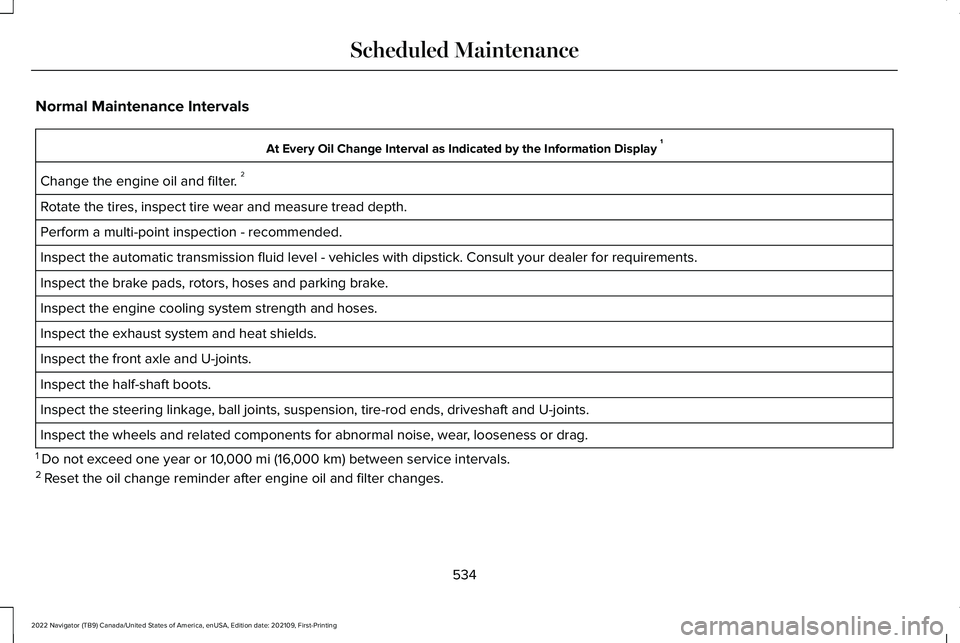
Normal Maintenance Intervals
At Every Oil Change Interval as Indicated by the Information Display
1
Change the engine oil and filter. 2
Rotate the tires, inspect tire wear and measure tread depth.
Perform a multi-point inspection - recommended.
Inspect the automatic transmission fluid level - vehicles with dipstick.\
Consult your dealer for requirements.
Inspect the brake pads, rotors, hoses and parking brake.
Inspect the engine cooling system strength and hoses.
Inspect the exhaust system and heat shields.
Inspect the front axle and U-joints.
Inspect the half-shaft boots.
Inspect the steering linkage, ball joints, suspension, tire-rod ends, driveshaft and U-joints.
Inspect the wheels and related components for abnormal noise, wear, looseness or drag.
1 Do not exceed one year or 10,000 mi (16,000 km) between service intervals.
2 Reset the oil change reminder after engine oil and filter changes.
534
2022 Navigator (TB9) Canada/United States of America, enUSA, Edition date: 202109, First-Printing Scheduled Maintenance
Page 539 of 646
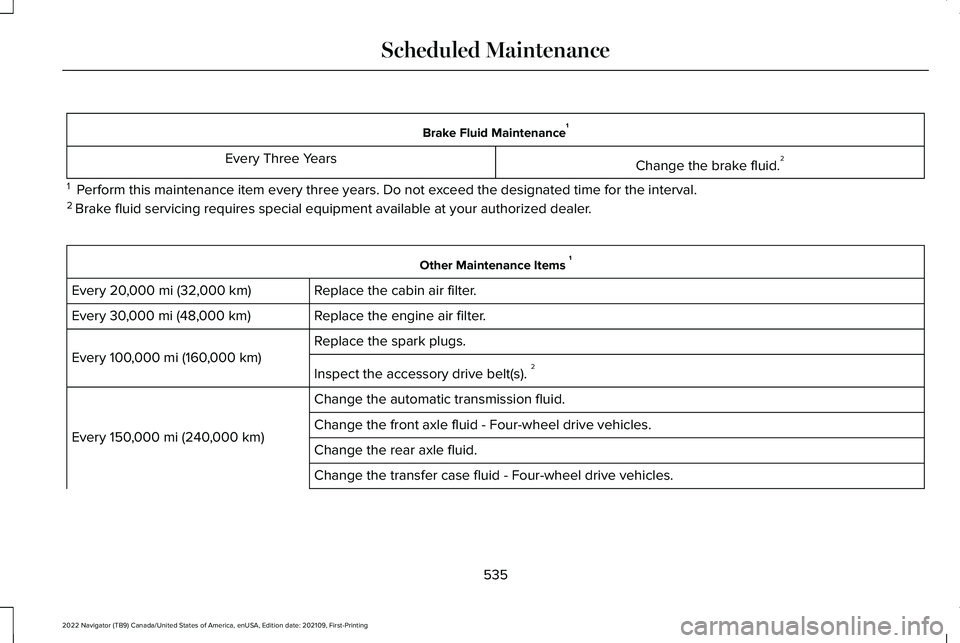
Brake Fluid Maintenance
1
Change the brake fluid. 2
Every Three Years
1 Perform this maintenance item every three years. Do not exceed the designated time for the interval.
2 Brake fluid servicing requires special equipment available at your authorize\
d dealer. Other Maintenance Items
1
Replace the cabin air filter.
Every 20,000 mi (32,000 km)
Replace the engine air filter.
Every
30,000 mi (48,000 km)
Replace the spark plugs.
Every
100,000 mi (160,000 km)
Inspect the accessory drive belt(s). 2
Change the automatic transmission fluid.
Every
150,000 mi (240,000 km) Change the front axle fluid - Four-wheel drive vehicles.
Change the rear axle fluid.
Change the transfer case fluid - Four-wheel drive vehicles.
535
2022 Navigator (TB9) Canada/United States of America, enUSA, Edition date: 202109, First-Printing Scheduled Maintenance
Page 540 of 646
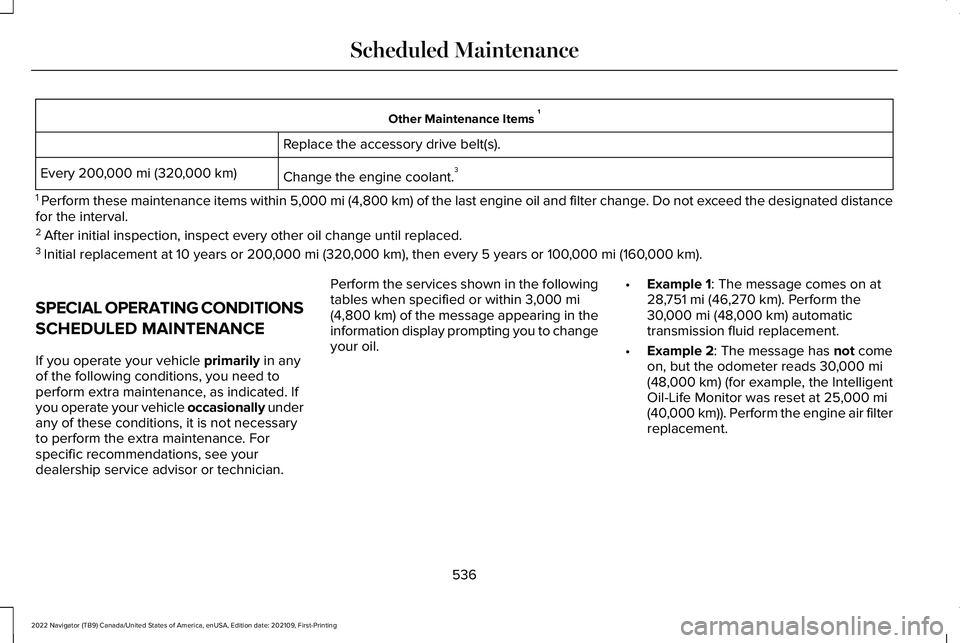
Other Maintenance Items
1
Replace the accessory drive belt(s).
Change the engine coolant. 3
Every 200,000 mi (320,000 km)
1 Perform these maintenance items within 5,000 mi (4,800 km) of the last engine oil and filter change. Do not exceed the designated distance
for the interval.
2 After initial inspection, inspect every other oil change until replaced.\
3 Initial replacement at 10 years or
200,000 mi (320,000 km), then every 5 years or 100,000 mi (160,000 km).
SPECIAL OPERATING CONDITIONS
SCHEDULED MAINTENANCE
If you operate your vehicle
primarily in any
of the following conditions, you need to
perform extra maintenance, as indicated. If
you operate your vehicle occasionally under
any of these conditions, it is not necessary
to perform the extra maintenance. For
specific recommendations, see your
dealership service advisor or technician. Perform the services shown in the following
tables when specified or within
3,000 mi
(4,800 km) of the message appearing in the
information display prompting you to change
your oil. •
Example 1: The message comes on at
28,751 mi (46,270 km). Perform the
30,000 mi (48,000 km) automatic
transmission fluid replacement.
• Example 2
: The message has not come
on, but the odometer reads 30,000 mi
(48,000 km) (for example, the Intelligent
Oil-Life Monitor was reset at 25,000 mi
(40,000 km)). Perform the engine air filter
replacement.
536
2022 Navigator (TB9) Canada/United States of America, enUSA, Edition date: 202109, First-Printing Scheduled Maintenance
Page 623 of 646
Autolock............................................................88
Autolock Requirements.......................................88
What Is Autolock...................................................88
Automatically Releasing the Electric Parking Brake.............................................237
Automatic Crash Shutoff............................394
Automatic Crash Shutoff Precautions...........394
Re-Enabling Your Vehicle.................................394
What Is Automatic Crash Shutoff...................394
Automatic Emergency Braking
.................326
Switching Automatic Emergency Braking On
and Off..............................................................326
What Is Automatic Emergency Braking
........326
Automatic Engine Stop...............................203 How Does Automatic Engine Stop
Work..................................................................204
Overriding Automatic Engine Stop................204
Switching Automatic Engine Stop On and Off......................................................................204
What Is Automatic Engine Stop......................203
Automatic High Beam Control
...................123
Automatic High Beam Control
Indicators..........................................................125
Automatic High Beam Control Limitations........................................................125
Automatic High Beam Control Precautions.......................................................124 Automatic High Beam Control
Requirements...................................................124
How Does Automatic High Beam Control Work...................................................................123
Overriding Automatic High Beam Control...............................................................125
Switching Automatic High Beam Control On and Off...............................................................125
Automatic High Beam Control – Troubleshooting..........................................126
Automatic High Beam Control – Information Messages..........................................................126
Automatic Locking Mode
..............................54
Disengaging Automatic Locking Mode..........55
Engaging Automatic Locking Mode................
55
What Is Automatic Locking Mode.....................54
When to Use Automatic Locking Mode..........54
Automatic Return to Park (P)......................221 Automatic Return to Park (P)
Limitations.......................................................222
How Does Automatic Return to Park (P) Work..................................................................222
What Is Automatic Return to Park (P).............221
Automatic Transmission Audible Warnings......................................................222
Automatic Transmission
..............................219
Automatic Return to Park (P)............................221
Automatic Transmission Positions..................219 Manually Shifting Gears...................................
220
Temporary Neutral Mode..................................221
Automatic Transmission Position Indicators.....................................................220
Automatic Transmission Positions............219 Drive (D).................................................................219
Neutral (N).............................................................219
Park (P)...................................................................219
Reverse (R)............................................................219
Automatic Transmission Precautions.......219
Auto Mode
......................................................160
Auto Mode Indicators.........................................160
Switching Auto Mode On and Off...................160
Switching Dual Mode On and Off....................161
Auto-Start-Stop
.............................................207
Auto-Start-Stop – Troubleshooting...............208
Auto-Start-Stop Indicators
..........................207
Auto-Start-Stop Precautions......................207
Auto-Start-Stop – Troubleshooting.........208 Auto-Start-Stop – Frequently Asked
Questions........................................................209
Auto-Start-Stop – Information Messages........................................................208
Autounlock.......................................................88 Autounlock Requirements..................................88
Switching Autounlock On and Off....................88
What Is Autounlock..............................................88
619
2022 Navigator (TB9) Canada/United States of America, enUSA, Edition date: 202109, First-Printing Index