ECU LINCOLN NAVIGATOR 2022 Owner's Manual
[x] Cancel search | Manufacturer: LINCOLN, Model Year: 2022, Model line: NAVIGATOR, Model: LINCOLN NAVIGATOR 2022Pages: 646, PDF Size: 7.29 MB
Page 343 of 646
ROOF RACK
ROOF RACK PRECAUTIONS
WARNING: Read and follow the
manufacturer's instructions when you are
fitting a roof rack. WARNING:
When loading the roof
racks, we recommend you evenly distribute
the load, as well as maintain a low center
of gravity. Loaded vehicles, with higher
centers of gravity, may handle differently
than unloaded vehicles. Take extra
precautions, such as slower speeds and
increased stopping distance, when driving
a heavily loaded vehicle.
Note: If you use a roof rack, the fuel
consumption of your vehicle will be higher
and you may experience different driving
characteristics. You must place loads directly on the
crossbars fitted to the roof rack side rails.
When using the roof rack system, we
recommend that you use genuine Ford Motor
Company accessory crossbars specifically
designed for your vehicle.
Make sure that you securely fasten the load.
Check the tightness of the load before
driving and at each fuel stop.
ROOF RACK LOAD CAPACITIES
Do not install crossbars if your vehicle has a
moonroof. Do not place any load on your
vehicle if it has a moonroof. Using crossbars
or loading the vehicle roof may void your
vehicle's warranty.
Maximum Recommended Load
Description
100 lb (45 kg)
Vehicles with a moonroof.
175 lb (79 kg)
Vehicles without a moonroof.
Note: The maximum roof load is based on
evenly distributing the load on the crossbars.
339
2022 Navigator (TB9) Canada/United States of America, enUSA, Edition date: 202109, First-Printing Load Carrying
Page 358 of 646
TOWING A TRAILER – TROUBLESHOOTING
TOWING A TRAILER – INFORMATION MESSAGES
Details
Message
The left-hand trailer turn lamp requires service.
Trailer Left Turn Lamps Fault Check Lamps
The right-hand trailer turn lamp requires service.
Trailer Right Turn Lamps Fault Check Lamps
The trailer battery voltage is too low to charge. If there is no trailerattached, the vehicle battery voltage is low.
Trailer Battery Not Charging See Manual
The system detects a short created by the trailer lamps. Inspect andrepair the trailer wiring, or have the system checked as soon as possible.
Trailer Lighting Module Fault See Manual
The trailer stoplamps require service.
Trailer Stop Lamps Fault Check Lamps
Verify the trailer brake connections are secure and that the aftermarkettrailer brake controller device is correctly installed. Perform a trailer
brake and trailer light check if possible. If the message persists, have your vehicle checked as soon as possible.
Trailer brake system fault See manual
Perform a trailer brake and trailer light check if possible. If the messagepersists, have your vehicle checked as soon as possible.
Trailer brake module fault
The trailer sway control detects trailer sway. Reduce the vehicle'sspeed.
Trailer Sway Reduce Speed
354
2022 Navigator (TB9) Canada/United States of America, enUSA, Edition date: 202109, First-Printing Towing a Trailer
Page 392 of 646
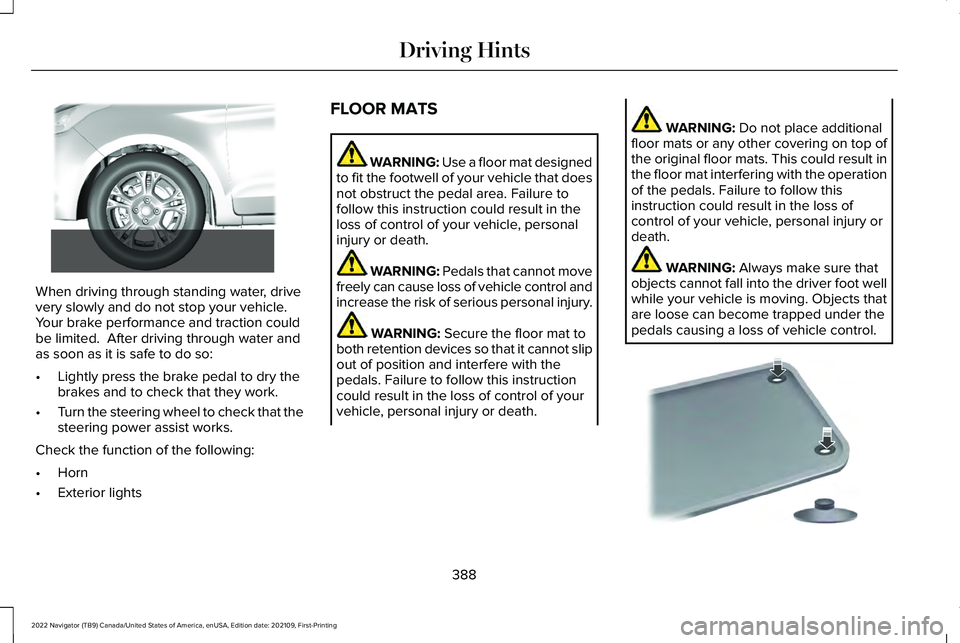
When driving through standing water, drive
very slowly and do not stop your vehicle.
Your brake performance and traction could
be limited. After driving through water and
as soon as it is safe to do so:
•
Lightly press the brake pedal to dry the
brakes and to check that they work.
• Turn the steering wheel to check that the
steering power assist works.
Check the function of the following:
• Horn
• Exterior lights FLOOR MATS WARNING: Use a floor mat designed
to fit the footwell of your vehicle that does
not obstruct the pedal area. Failure to
follow this instruction could result in the
loss of control of your vehicle, personal
injury or death. WARNING:
Pedals that cannot move
freely can cause loss of vehicle control and
increase the risk of serious personal injury. WARNING:
Secure the floor mat to
both retention devices so that it cannot slip
out of position and interfere with the
pedals. Failure to follow this instruction
could result in the loss of control of your
vehicle, personal injury or death. WARNING:
Do not place additional
floor mats or any other covering on top of
the original floor mats. This could result in
the floor mat interfering with the operation
of the pedals. Failure to follow this
instruction could result in the loss of
control of your vehicle, personal injury or
death. WARNING:
Always make sure that
objects cannot fall into the driver foot well
while your vehicle is moving. Objects that
are loose can become trapped under the
pedals causing a loss of vehicle control. 388
2022 Navigator (TB9) Canada/United States of America, enUSA, Edition date: 202109, First-Printing Driving Hints E266447 E142666
Page 393 of 646
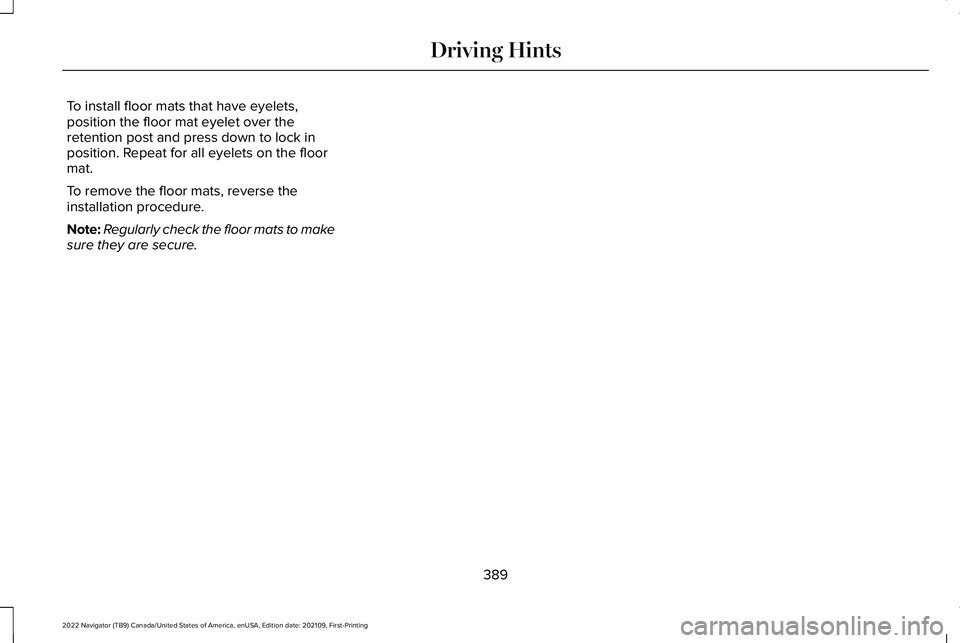
To install floor mats that have eyelets,
position the floor mat eyelet over the
retention post and press down to lock in
position. Repeat for all eyelets on the floor
mat.
To remove the floor mats, reverse the
installation procedure.
Note:
Regularly check the floor mats to make
sure they are secure.
389
2022 Navigator (TB9) Canada/United States of America, enUSA, Edition date: 202109, First-Printing Driving Hints
Page 399 of 646
WARNING: Switch the ignition off
before removing the recovery hook. Failure
to do so could result in personal injury. WARNING:
The recovery hook can
become hot. Let the recovery hook cool
down before removing it. Failure to do so
could result in personal injury.
Your vehicle has frame-mounted front
recovery hooks.
Note: Do not apply a load to the recovery
hooks that is greater than the gross vehicle
weight rating of your vehicle.
Before using recovery hooks:
• Make sure all attaching points are secure
and capable of withstanding the applied
load.
• Do not use chains, cables or tow straps
with metal hook ends.
• Only use recovery straps that have a
minimum breaking strength two to three
times the gross vehicle weight of the
stuck vehicle. •
Make sure the recovery strap is in good
condition and free of visible cuts, tears
or damage.
• Use a damper device such as a tarp,
heavy blanket or piece of carpet, and
place it over the recovery strap to help
absorb the energy in the event the strap
breaks.
• Make sure the stuck vehicle is not loaded
heavier than its gross vehicle weight
rating specified on the certification label.
• Align the tow vehicle and stuck vehicle
in a straight line, within 10 degrees.
• Keep bystanders to the sides of the
vehicle, at a distance of at least twice the
length of the recovery strap. This helps
avoid injury from the hazard of a recovery
hook or strap breaking, or a vehicle
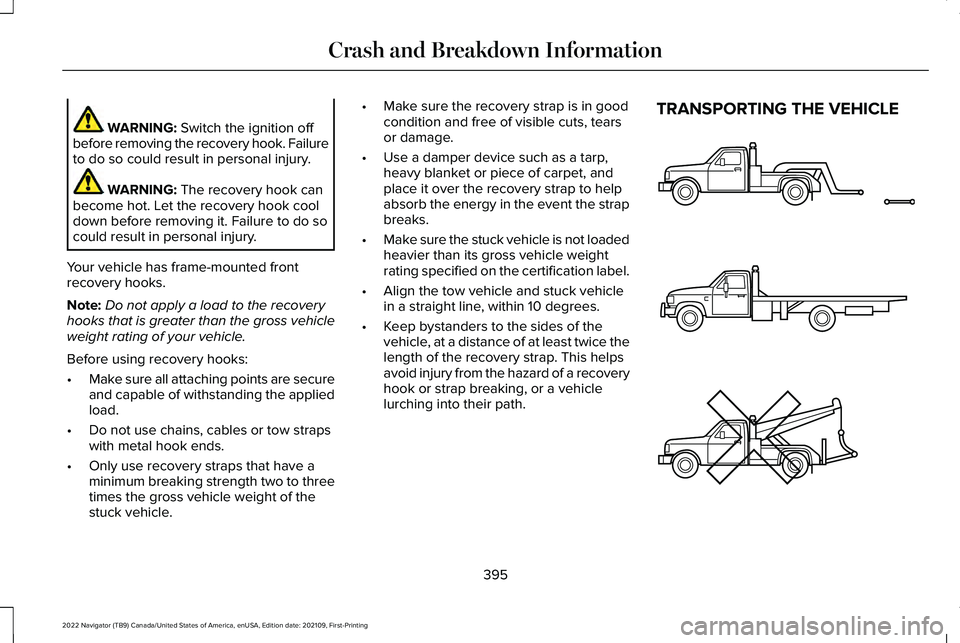
lurching into their path. TRANSPORTING THE VEHICLE
395
2022 Navigator (TB9) Canada/United States of America, enUSA, Edition date: 202109, First-Printing Crash and Breakdown InformationE143886
Page 401 of 646
TOWING YOUR VEHICLE
PRECAUTIONS
Use the following guidelines when towing
your vehicle. Failure to follow this instruction
could result in vehicle damage not covered
by the vehicle warranty.
Note:
Make sure you properly secure your
vehicle to the tow vehicle.
Note: If you are unsure of the vehicle ’s
configuration, contact an authorized dealer.
RECREATIONALLY TOWING YOUR
VEHICLE - 4X4 WARNING: Do not disconnect the
battery when recreationally towing your
vehicle. This prevents the transfer case
from shifting properly and could cause the
vehicle to roll, even if the transmission is
in park (P). WARNING:
Placing the transfer case
in its neutral position could cause your
vehicle to freely roll. Make sure you press
and hold the brake pedal and the vehicle
is in a secure, safe position when you place
the transfer case in its neutral position.
Follow these guidelines if you have a need
for recreational towing. An example of
recreational towing would be towing your
vehicle behind a motorhome. These
guidelines are to make sure that you do not
damage the transmission.
You can only tow your vehicle with all wheels
on the ground by placing the transfer case
in its neutral position and engaging the
recreational tow feature. Perform the
following steps after positioning your vehicle
behind the tow vehicle and properly securing
them together.
Note: Put your climate control system in
recirculated air mode to prevent exhaust
fumes from entering your vehicle. Note:
Failure to put the transfer case in its
neutral position can damage vehicle
components.
Note: You can check the towing status at
any time by opening the driver door or
turning the ignition to the accessory or on
position.
Neutral Tow Enabled Leave
Transmission in Neutral appears in the
instrument cluster display to confirm you can
recreationally tow your vehicle.
Note: If your vehicle has an anti-theft alarm,
make sure you switch perimeter sensing on
when towing.
See Setting the Alarm
Security Level (page 107).
Switching
Neutral Tow On
1. Start your vehicle.
2. Make sure your vehicle is in
NORMAL
mode. See Selecting a Drive Mode
(page 294).
3. Place your vehicle in temporary neutral mode.
See Entering Temporary Neutral
Mode (page 221).
397
2022 Navigator (TB9) Canada/United States of America, enUSA, Edition date: 202109, First-Printing Towing Your Vehicle
Page 402 of 646
4. Switch your vehicle off by pressing the
push button ignition switch once. A
message appears in the instrument
cluster display.
5. Switch your vehicle to accessory mode by pressing the push button ignition
switch once without pressing the brake
pedal.
6. Press and hold the brake pedal.
7. Using the instrument cluster controls on the steering wheel, select Settings.
8. Select
Neutral Tow.
9. Press and hold the
OK button until a
confirmation message appears in the
information display.
Note: If completed successfully, the
information display shows
Neutral Tow
Enabled Leave Transmission in Neutral.
This indicates that your vehicle is safe to tow
with all wheels on the ground.
Note: If you do not see a confirmation
message in the instrument cluster display,
you must perform the procedure again from
the beginning. Note:
You may hear noise as the transfer
case shifts into its neutral position. This is
normal.
10. Release the brake pedal.
11. Leave the transmission in neutral (N) and switch your vehicle off by pressing
the push button ignition switch once
without pressing the brake pedal.
Switching
Neutral Tow Off
1. With your vehicle properly secured to the
tow vehicle, press and hold the brake
pedal and start the engine.
2. Switch your vehicle off by pressing the push button ignition switch once and
release the brake pedal.
3. Place your vehicle in accessory mode by
pressing the push button ignition switch
once without pressing the brake pedal.
4. Press and hold the brake pedal.
5. Shift into park (P).
6. Release the brake pedal. Note:
If completed successfully, the
instrument cluster displays
2H and Neutral
Tow Disabled.
Note: You must perform the switching
neutral tow on and switching neutral tow off
procedures again from the beginning if the
indicator light and message do not display.
Note: You may hear a noise as the transfer
case shifts out of its neutral position. This is
normal.
7. Apply the parking brake, then disconnect
your vehicle from the tow vehicle.
8. Release the parking brake, start the engine, and shift into drive (D) to make
sure the transfer case is out of the neutral
tow position.
9. If the transfer case does not successfully
shift out of its neutral position, set the
parking brake. Have your vehicle
checked as soon as possible.
Resolving the Shift Delayed Drive Forward
Message
1. Press and hold the brake pedal.
2. Start your vehicle.
398
2022 Navigator (TB9) Canada/United States of America, enUSA, Edition date: 202109, First-Printing Towing Your Vehicle
Page 427 of 646
Change the engine air filter element at the
proper intervals. See Normal Scheduled
Maintenance (page 532).
When changing the engine air filter, use only
the air filter element listed.
See Motorcraft
Parts (page 470).
Note: Failure to use the correct air filter
element may result in severe engine
damage. Resulting component damage may
not be covered by the vehicle Warranty.
Note: When servicing the air cleaner, do not
allow foreign material to enter the air
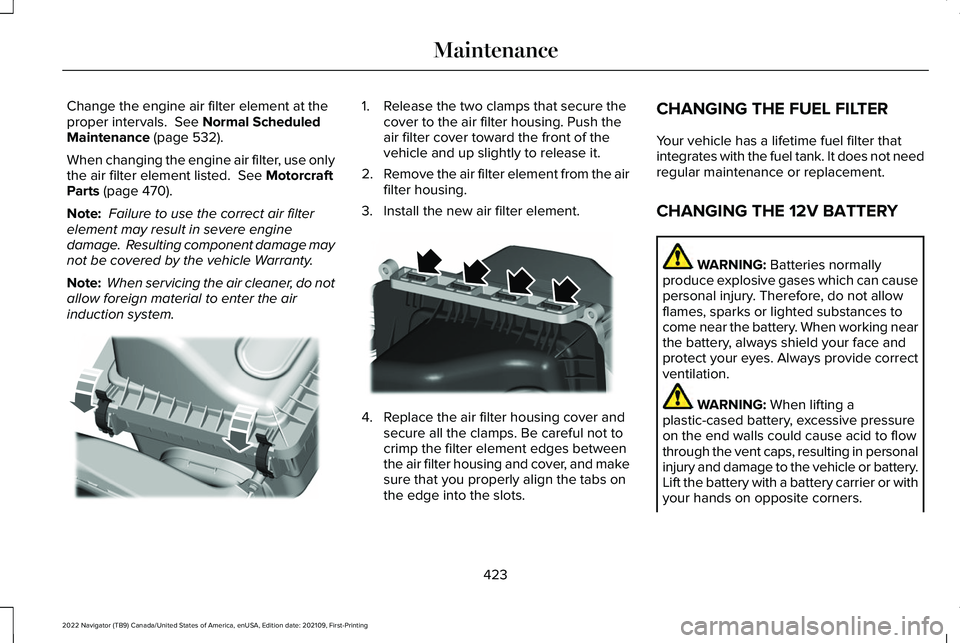
induction system. 1. Release the two clamps that secure the
cover to the air filter housing. Push the
air filter cover toward the front of the
vehicle and up slightly to release it.
2. Remove the air filter element from the air
filter housing.
3. Install the new air filter element. 4. Replace the air filter housing cover and
secure all the clamps. Be careful not to
crimp the filter element edges between
the air filter housing and cover, and make
sure that you properly align the tabs on
the edge into the slots. CHANGING THE FUEL FILTER
Your vehicle has a lifetime fuel filter that
integrates with the fuel tank. It does not need
regular maintenance or replacement.
CHANGING THE 12V BATTERY
WARNING:
Batteries normally
produce explosive gases which can cause
personal injury. Therefore, do not allow
flames, sparks or lighted substances to
come near the battery. When working near
the battery, always shield your face and
protect your eyes. Always provide correct
ventilation. WARNING:
When lifting a
plastic-cased battery, excessive pressure
on the end walls could cause acid to flow
through the vent caps, resulting in personal
injury and damage to the vehicle or battery.
Lift the battery with a battery carrier or with
your hands on opposite corners.
423
2022 Navigator (TB9) Canada/United States of America, enUSA, Edition date: 202109, First-Printing MaintenanceE248801 E248800
Page 430 of 646
Remove and Reinstall the Battery
Install a battery approved for use by our
specifications. See Capacities and
Specifications (page 469).
To disconnect or remove the battery, do the
following:
1. Apply the parking brake and switch the ignition off.
2. Switch all electrical equipment off, for example lights and radio.
3. Wait a minimum of two minutes before disconnecting the battery.
Note: The engine management system has
a power hold function and remains powered
for a period of time after you switch the
ignition off. This is to allow the system to
store diagnostic and adaptive tables.
Disconnecting the battery without waiting
can cause damage not covered by the
vehicle warranty.
4. Disconnect the negative battery cable terminal.
5. Disconnect the positive battery cable terminal. 6. Remove the battery securing clamp.
7. Remove the battery.
8.
To install, reverse the removal procedure.
Note: Before reconnecting the battery, make
sure the ignition remains switched off.
Note: Make sure to fully tighten the battery
cables.
If you disconnect or replace the vehicle
battery, you must reset the following
features:
• Window bounce-back.
See Opening and
Closing the Windows (page 133).
• Clock Settings.
• Pre-set radio stations.
Battery Disposal Make sure that you dispose of old
batteries in an environmentally
friendly way. Seek advice from
your local authority about recycling old
batteries. ADJUSTING THE HEADLAMPS
Vertical Aim Adjustment
The headlamps on your vehicle are properly
aimed at the assembly plant. If your vehicle
has been in an accident, contact an
authorized dealer to check and realign your
headlamps.
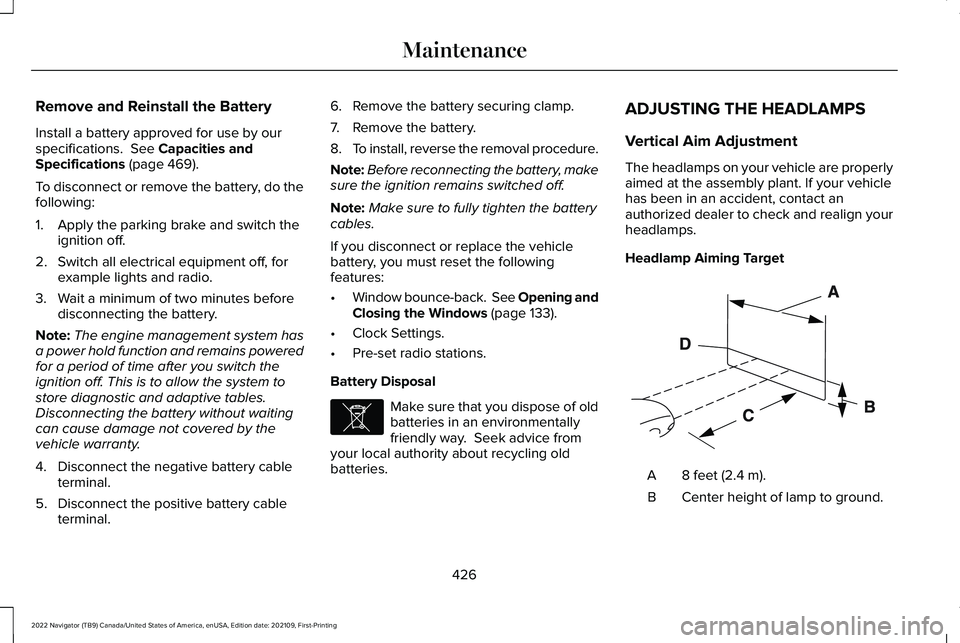
Headlamp Aiming Target
8 feet (2.4 m).
A
Center height of lamp to ground.
B
426
2022 Navigator (TB9) Canada/United States of America, enUSA, Edition date: 202109, First-Printing MaintenanceE107998 E142592
Page 467 of 646
Tire Change Procedure
WARNING: Only use replacement
tires and wheels that are the same size,
load index, speed rating and type (such as
P-metric versus LT-metric or all-season
versus all-terrain) as those originally
provided by Ford. The recommended tire
and wheel size may be found on either the
Safety Compliance Certification Label
(affixed to either the door hinge pillar,
door-latch post, or the door edge that
meets the door-latch post, next to the
driver's seating position), or the Tire Label
which is located on the B-Pillar or edge of
the driver's door. If this information is not
found on these labels, then you should
contact your authorized dealer as soon as
possible. Use of any tire or wheel not
recommended by Ford can affect the
safety and performance of your vehicle,
which could result in an increased risk of
loss of vehicle control, vehicle rollover,
personal injury and death. WARNING:
To help prevent your
vehicle from moving when changing a
wheel, shift the transmission into park (P),
set the parking brake and use an
appropriate block or wheel chock to
secure the wheel diagonally opposite to
the wheel being changed. For example,
when changing the front left wheel, place
an appropriate block or wheel chock on
the right rear wheel. WARNING: Do not attempt to change
a tire on the side of the vehicle close to
moving traffic. Pull far enough off the road
to avoid the danger of being hit when
operating the jack or changing the wheel. WARNING:
Only use the jack
provided as original equipment with your
vehicle. WARNING:
Switch off the running
boards before jacking or placing any object
under your vehicle. Never place your hand
between the extended running board and
your vehicle. A moving running board may
cause injury. WARNING: Only use the spare wheel
carrier to stow wheels provided with your
vehicle. WARNING:
Ensure screwthread is
adequately lubricated before use. WARNING:
Switch the ignition off
and apply the park brake fully before lifting
vehicle. WARNING:
Use only the specified
jacking points. If you use other locations,
you could damage the body, steering,
suspension, engine, braking system or the
fuel lines.
463
2022 Navigator (TB9) Canada/United States of America, enUSA, Edition date: 202109, First-Printing Changing a Road Wheel