ECU LINCOLN NAVIGATOR 2022 User Guide
[x] Cancel search | Manufacturer: LINCOLN, Model Year: 2022, Model line: NAVIGATOR, Model: LINCOLN NAVIGATOR 2022Pages: 646, PDF Size: 7.29 MB
Page 79 of 646
Dispose of old batteries in an
environmentally friendly way. Seek
advice from your local authority
about recycling old batteries.
Note: Do not wipe off any grease on the
battery terminals or on the back surface of
the circuit board.
Note: Replacing the battery does not erase
the programmed key from your vehicle. The
remote control should operate normally.
REPLACING A LOST KEY OR
REMOTE CONTROL
You can purchase replacement keys or
remote controls from an authorized dealer.
Authorized dealers can program remote
controls for your vehicle. Note:
Your vehicle keys came with a
security label that provides important key
cut information. Keep the label in a safe
place for future reference.
PROGRAMMING THE REMOTE
CONTROL
Note: You can program a maximum of four
remote controls to your vehicle. Note:
If your programmed remote controls
are lost or stolen and you do not have an
extra coded remote, you need to have your
vehicle towed to an authorized dealer. Store
an extra programmed remote away from
your vehicle in a safe place to help prevent
any inconvenience. Contact an authorized
dealer to purchase additional spare or
replacement remotes.
You must have two previously programmed
remote controls inside your vehicle and the
new unprogrammed remote controls readily
accessible. Contact an authorized dealer to
have the spare remote control programmed
if two previously programmed remotes are
not available. Make sure that your vehicle
is off before beginning this procedure. Make
sure that you close all the doors before
beginning and that they remain closed
throughout the procedure. Perform all steps
within 30 seconds of starting the sequence.
Stop and wait for at least one minute before
starting again if you perform any steps out
of sequence.
Read and understand the entire procedure
before you begin.
75
2022 Navigator (TB9) Canada/United States of America, enUSA, Edition date: 202109, First-Printing Keys and Remote ControlsE107998 E151795
Page 108 of 646
3. Carefully push the window down and
press firmly to latch securely.
Note: Be careful when opening or closing
the liftgate window in a garage or other
enclosed area to avoid damaging the glass. Note:
Do not hang anything, for example a
bike rack, from the glass or liftgate. This
could damage the liftgate and its
components.
Note: Do not leave the liftgate window open
while driving. This could damage the liftgate
window and its components. LIFTGATE – TROUBLESHOOTING
LIFTGATE – WARNING LAMPS Illuminates when the liftgate is not
completely closed.
LIFTGATE – INFORMATION MESSAGES Action
Message
The liftgate is not completely closed. Close the liftgate.
Liftgate Ajar
104
2022 Navigator (TB9) Canada/United States of America, enUSA, Edition date: 202109, First-Printing LiftgateE162453
Page 110 of 646
PASSIVE ANTI-THEFT SYSTEM
WHAT IS THE PASSIVE ANTI-THEFT
SYSTEM
The passive anti-theft system prevents
someone from starting the vehicle with an
incorrectly coded key.
Note:
Do not leave a duplicate coded key
in your vehicle. Always take the keys and
lock all the doors when leaving your vehicle.
HOW DOES THE PASSIVE ANTI-THEFT
SYSTEM WORK
The passive anti-theft system arms when you
switch the ignition off.
It disarms when the ignition is switched on
with a correctly coded key.
Note: The system is not compatible with
non-Ford aftermarket remote start systems.
Note: Do not leave a duplicate coded key
in your vehicle. Always take the keys and
lock all doors when leaving your vehicle. ANTI-THEFT ALARM SYSTEM
WHAT IS THE ANTI-THEFT ALARM
SYSTEM
The Anti-Theft Alarm System warns you of
an unauthorized entry to your vehicle.
HOW DOES THE ANTI-THEFT ALARM
SYSTEM WORK
When armed, the anti-theft alarm is triggered
in any of the following ways:
•
If someone opens a door, the tailgate or
the hood without a correctly coded key
or remote control.
• If you turn the power on without a
correctly coded key.
• If the interior sensors detect movement
inside your vehicle.
• If the inclination sensors detect an
attempt to raise your vehicle. •
If someone disconnects the vehicle
battery or the battery backup alarm.
• If someone disconnects the trailer. See
Connecting a Trailer (page 345).
Any further attempts to carry out one of the
above, sounds the alarm again.
If the anti-theft alarm is triggered, the alarm
horn sounds for 30 seconds and the turn
signals flash for five minutes.
WHAT IS THE PERIMETER ALARM
The perimeter alarm is designed to detect
unauthorized access to your vehicle.
WHAT ARE THE INTERIOR SENSORS
The interior sensors are designed to detect
any movement inside your vehicle.
The interior sensors are in the overhead
console.
Note: Do not cover the interior sensors.
106
2022 Navigator (TB9) Canada/United States of America, enUSA, Edition date: 202109, First-Printing Security
Page 111 of 646
WHAT ARE THE INCLINATION
SENSORS
The inclination sensor is designed to detect
an attempt to raise your vehicle, for example
to remove a wheel or to tow it away.
ARMING THE ANTI-THEFT ALARM
SYSTEM
The alarm is ready to arm when your vehicle
is switched off.
Lock your vehicle with your remote control
to arm the alarm.
DISARMING THE ANTI-THEFT ALARM
SYSTEM
Disarm the alarm by performing any of the
following actions:
•
Unlock the doors or luggage
compartment with the remote control.
• Switch your vehicle on or start your
vehicle. ANTI-THEFT ALARM SYSTEM
SETTINGS
WHAT ARE THE ALARM SECURITY
LEVELS
You can select two levels of alarm security,
all sensors and perimeter sensing.
All Sensors
All sensors is the standard setting.
In all sensors, all equipped sensors are on
when you arm the alarm.
Note:
Do not arm the alarm with all sensors
if passengers, animals or other moving
objects are inside your vehicle.
Perimeter Sensing
In perimeter sensing, the interior sensors are
off when you arm the alarm.
All the other equipped sensors activate when
you arm the alarm in this mode. SETTING THE ALARM SECURITY
LEVEL
1. Press Settings on the touchscreen.
2. Press
Vehicle Settings.
3. Press
Alarm System.
4. Press
Motion Sensors.
5. Press a setting.
WHAT IS ASK ON EXIT
You can choose which level of security you
require after you switch the ignition off.
Note: If you do not choose a setting, the
system defaults to all sensors.
SWITCHING ASK ON EXIT ON AND
OFF
1. Press
Settings on the touchscreen.
2. Press
Vehicle Settings.
3. Press
Alarm System.
4. Switch
Ask on Exit on or off.
107
2022 Navigator (TB9) Canada/United States of America, enUSA, Edition date: 202109, First-Printing Security
Page 112 of 646
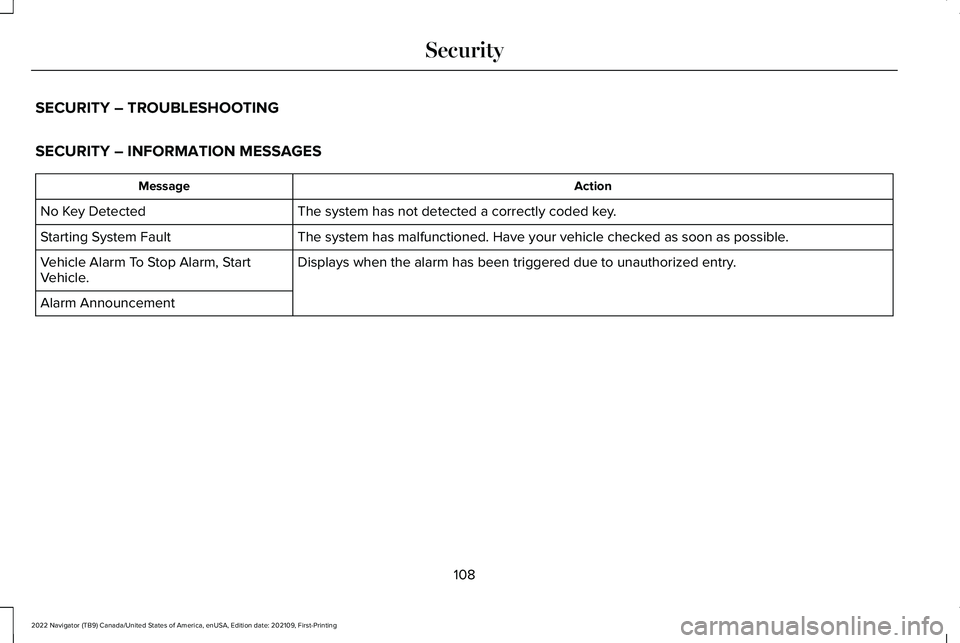
SECURITY – TROUBLESHOOTING
SECURITY – INFORMATION MESSAGES
Action
Message
The system has not detected a correctly coded key.
No Key Detected
The system has malfunctioned. Have your vehicle checked as soon as possible.
Starting System Fault
Displays when the alarm has been triggered due to unauthorized entry.
Vehicle Alarm To Stop Alarm, Start
Vehicle.
Alarm Announcement
108
2022 Navigator (TB9) Canada/United States of America, enUSA, Edition date: 202109, First-Printing Security
Page 113 of 646
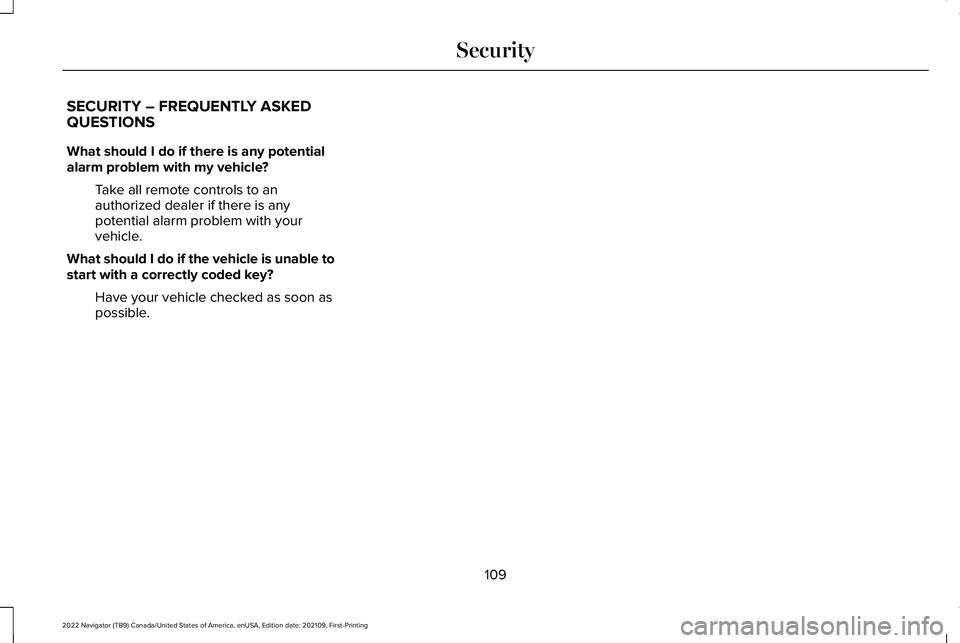
SECURITY – FREQUENTLY ASKED
QUESTIONS
What should I do if there is any potential
alarm problem with my vehicle?
Take all remote controls to an
authorized dealer if there is any
potential alarm problem with your
vehicle.
What should I do if the vehicle is unable to
start with a correctly coded key? Have your vehicle checked as soon as
possible.
109
2022 Navigator (TB9) Canada/United States of America, enUSA, Edition date: 202109, First-Printing Security
Page 159 of 646
WHAT IS REMOTE START
The system allows you to remotely start your
vehicle and to adjust the interior temperature
according to the settings that you chose.
REMOTE START PRECAUTIONS
WARNING: Do not start the engine
in a closed garage or in other enclosed
areas. Exhaust fumes are toxic. Always
open the garage door before you start the
engine. Failure to follow this instruction
could result in personal injury or death.
REMOTE START LIMITATIONS
Remote start does not work under the
following conditions:
• The alarm horn is sounding.
• The hood is open.
• The transmission is not in park (P). •
The ignition is on.
• The battery voltage is below the
minimum operating voltage.
Note: Do not use remote start if your fuel
level is low.
Note: To use remote start with Lincoln Way
or Phone as a Key, enable the modem.
See
Connecting the Vehicle to a Wi-Fi Network
(page
482).
ENABLING REMOTE START
1. Using the instrument cluster display controls on the steering wheel, select
Settings
.
2. Select
Vehicle.
3. Select
Remote Start.
4. Switch
System on.
Note: To use remote start, make sure that
the modem is enabled.
See Enabling and
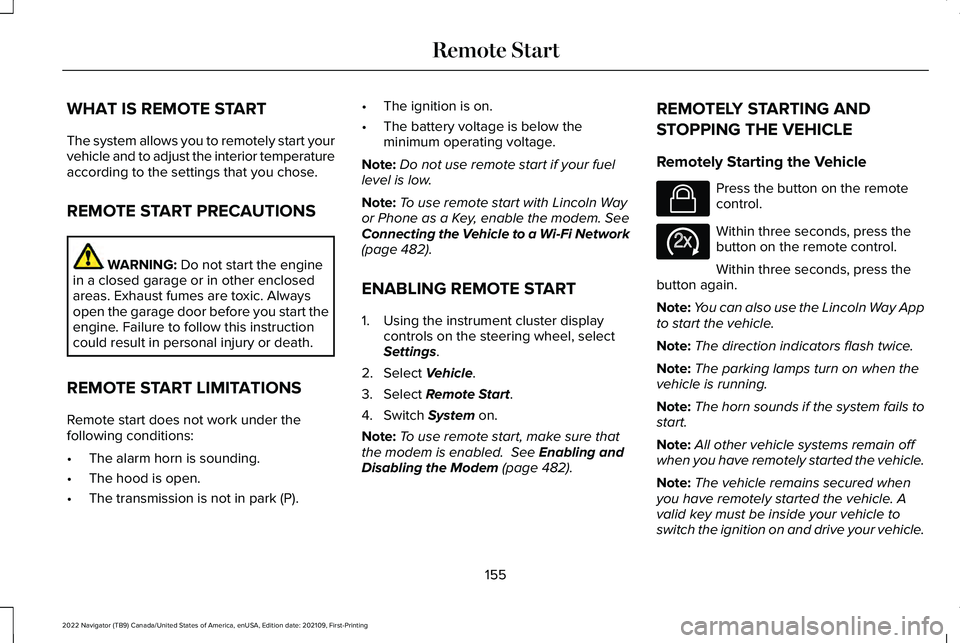
Disabling the Modem (page 482). REMOTELY STARTING AND
STOPPING THE VEHICLE
Remotely Starting the Vehicle Press the button on the remote
control.
Within three seconds, press the
button on the remote control.
Within three seconds, press the
button again.
Note: You can also use the Lincoln Way App
to start the vehicle.
Note: The direction indicators flash twice.
Note: The parking lamps turn on when the
vehicle is running.
Note: The horn sounds if the system fails to
start.
Note: All other vehicle systems remain off
when you have remotely started the vehicle.
Note: The vehicle remains secured when
you have remotely started the vehicle. A
valid key must be inside your vehicle to
switch the ignition on and drive your vehicle.
155
2022 Navigator (TB9) Canada/United States of America, enUSA, Edition date: 202109, First-Printing Remote StartE138623 E138625
Page 191 of 646
WHAT IS THE GARAGE DOOR
OPENER
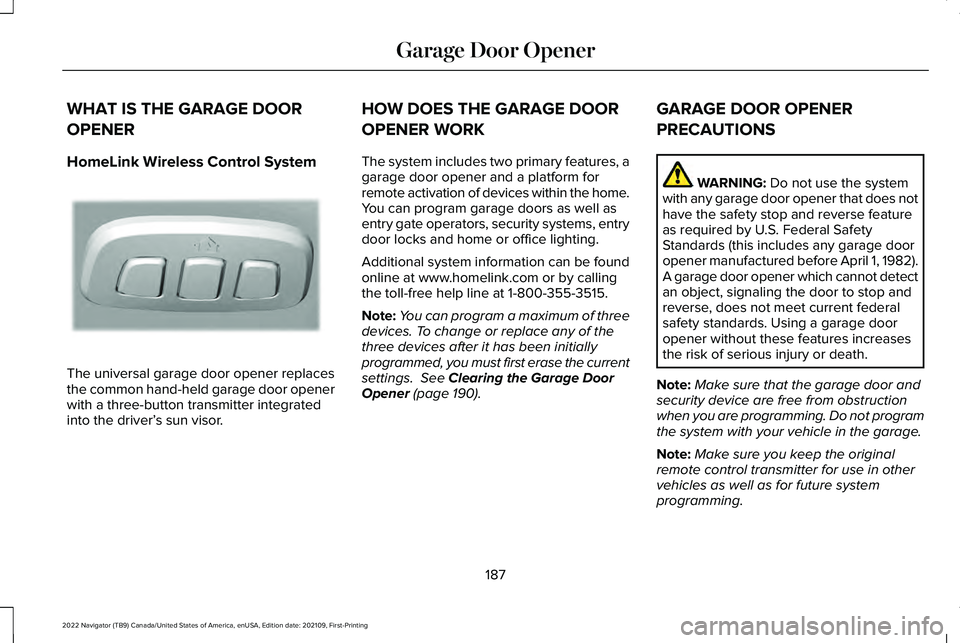
HomeLink Wireless Control System
The universal garage door opener replaces
the common hand-held garage door opener
with a three-button transmitter integrated
into the driver’
s sun visor. HOW DOES THE GARAGE DOOR
OPENER WORK
The system includes two primary features, a
garage door opener and a platform for
remote activation of devices within the home.
You can program garage doors as well as
entry gate operators, security systems, entry
door locks and home or office lighting.
Additional system information can be found
online at www.homelink.com or by calling
the toll-free help line at 1-800-355-3515.
Note:
You can program a maximum of three
devices. To change or replace any of the
three devices after it has been initially
programmed, you must first erase the current
settings. See Clearing the Garage Door
Opener (page 190). GARAGE DOOR OPENER
PRECAUTIONS WARNING:
Do not use the system
with any garage door opener that does not
have the safety stop and reverse feature
as required by U.S. Federal Safety
Standards (this includes any garage door
opener manufactured before April 1, 1982).
A garage door opener which cannot detect
an object, signaling the door to stop and
reverse, does not meet current federal
safety standards. Using a garage door
opener without these features increases
the risk of serious injury or death.
Note: Make sure that the garage door and
security device are free from obstruction
when you are programming. Do not program
the system with your vehicle in the garage.
Note: Make sure you keep the original
remote control transmitter for use in other
vehicles as well as for future system
programming.
187
2022 Navigator (TB9) Canada/United States of America, enUSA, Edition date: 202109, First-Printing Garage Door OpenerE188211
Page 192 of 646
Note:
We recommend that upon the sale or
lease termination of your vehicle, you erase
the programmed function buttons for security
reasons. See Clearing the Garage Door
Opener (page 190).
GARAGE DOOR OPENER
LIMITATIONS
Canadian radio-frequency laws require
transmitter signals to time-out (or quit) after
several seconds – which may not be long
enough for HomeLink to pick up the signal.
U.S. gate operators time-out in the same
manner.
Note: If programming a garage door opener
or gate operator, it is advised to unplug the
device during the “cycling” process to
prevent possible overheating. PROGRAMMING THE GARAGE
DOOR OPENER TO YOUR HAND-
HELD TRANSMITTER
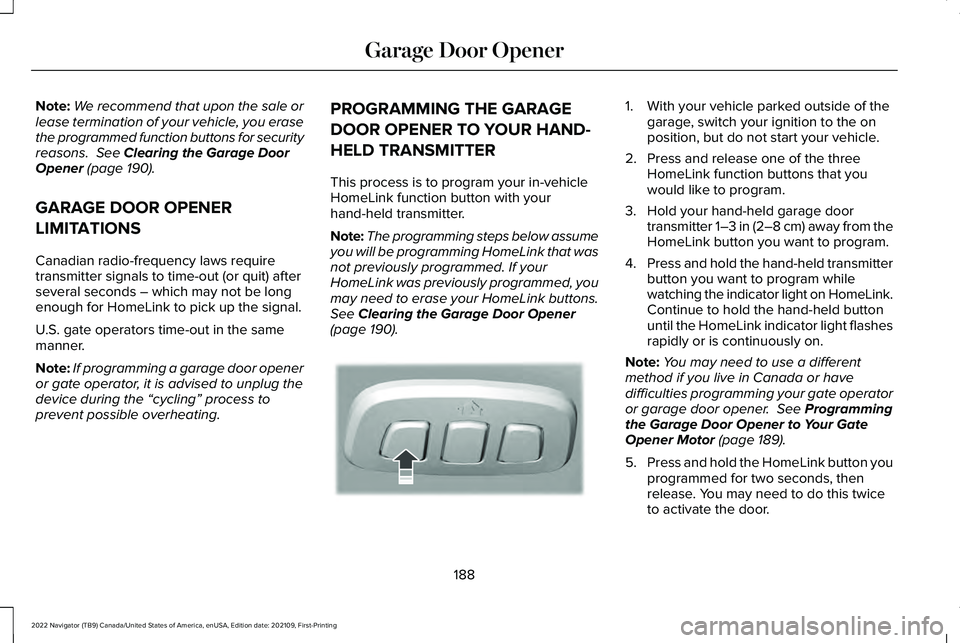
This process is to program your in-vehicle
HomeLink function button with your
hand-held transmitter.
Note:
The programming steps below assume
you will be programming HomeLink that was
not previously programmed. If your
HomeLink was previously programmed, you
may need to erase your HomeLink buttons.
See
Clearing the Garage Door Opener
(page 190). 1. With your vehicle parked outside of the
garage, switch your ignition to the on
position, but do not start your vehicle.
2. Press and release one of the three HomeLink function buttons that you
would like to program.
3. Hold your hand-held garage door transmitter 1–3 in (2–8 cm) away from the
HomeLink button you want to program.
4. Press and hold the hand-held transmitter
button you want to program while
watching the indicator light on HomeLink.
Continue to hold the hand-held button
until the HomeLink indicator light flashes
rapidly or is continuously on.
Note: You may need to use a different
method if you live in Canada or have
difficulties programming your gate operator
or garage door opener.
See Programming
the Garage Door Opener to Your Gate
Opener Motor
(page 189).
5. Press and hold the HomeLink button you
programmed for two seconds, then
release. You may need to do this twice
to activate the door.
188
2022 Navigator (TB9) Canada/United States of America, enUSA, Edition date: 202109, First-Printing Garage Door OpenerE188212
Page 228 of 646
WARNING: Do not become
overconfident in the ability of four-wheel
drive vehicles. Although a four-wheel drive
vehicle may accelerate better than a
two-wheel drive vehicle in low traction
situations, it won't stop any faster than
two-wheel drive vehicles. Always drive at
a safe speed.
Truck and utility vehicles can differ from
some other vehicles. Your vehicle could be
higher to allow it to travel over rough terrain
without getting stuck or damaging
underbody components. The differences that
make your vehicle so versatile also make it
handle differently than an ordinary passenger
car. Always maintain steering wheel control,
especially in rough terrain. Since sudden
changes in terrain can result in abrupt
steering wheel motion, make sure you grip
the steering wheel from the outside. Do not
grip the spokes. Drive cautiously to avoid
vehicle damage from concealed objects such as rocks and stumps. Drive slower in strong
crosswinds which can affect the normal
steering characteristics of your vehicle. Be
extremely careful when driving on pavement
made slippery by loose sand, water, gravel,
snow or ice.
Note:
Do not use four-wheel drive high or
four-wheel drive low mode on dry, hard
surfaced roads. Doing so can produce
excessive noise, increase tire wear and can
damage drive components.
FOUR-WHEEL DRIVE LIMITATIONS
Operating Four-Wheel Drive with a
Spare or Mismatched Tires
(If Equipped)
On four-wheel drive vehicles, the size of the
spare tire can affect the four-wheel drive
system. If there is a significant difference
between the size of the spare tire and the
remaining tires, you could have limited
four-wheel drive functionality. When driving
with the full-size dissimilar spare wheel and
tire assembly, we recommend that you do
not: •
Exceed
50 mph (80 km/h) with a
four-wheel drive mode turned on.
• Use a four-wheel drive mode on dry
pavement.
Driving with the full-size dissimilar spare
wheel and tire assembly can limit four-wheel
drive functionality. You can experience the
following:
• Additional noise from the transfer case
or other drive components.
Use of a dissimilar spare wheel and tire
assembly can lead to impairment of the
following:
• Comfort and noise.
• Winter weather driving capability.
• Wet driving capability.
• Four-wheel drive capability.
Note: Your vehicle could have a front air
dam that can become damaged, due to
reduced ground clearance, when taking your
vehicle off-road. You can remove this air
dam by removing the eight bolts that secure
it.
224
2022 Navigator (TB9) Canada/United States of America, enUSA, Edition date: 202109, First-Printing Four-Wheel Drive
(If Equipped)