cruise control LINCOLN NAVIGATOR 2022 Owners Manual
[x] Cancel search | Manufacturer: LINCOLN, Model Year: 2022, Model line: NAVIGATOR, Model: LINCOLN NAVIGATOR 2022Pages: 646, PDF Size: 7.29 MB
Page 13 of 646
Switching Parking Aid On and Off
..........256
Rear Parking Aid ..........................................
256
Front Parking Aid .........................................
257
Side Parking Aid ..........................................
258
Parking Aid Indicators ................................
259
Parking Aids – Troubleshooting ..............
259
360 Degree Camera
What Is the 360 Degree Camera .............
261
How Does the 360 Degree Camera Work .......................................................................
261
360 Degree Camera Precautions ............
261
360 Degree Camera Limitations ............
262
Locating the 360 Degree Cameras .......
262
360 Degree Camera Guide Lines ..........
262
360 Degree Camera Settings ..................
263
Active Park Assist
What Is Active Park Assist ........................
265
How Does Active Park Assist Work .......
265
Active Park Assist Precautions ................
265
Switching Active Park Assist On and Off ......................................................................
265 Entering a Parallel Parking Space
..........
266
Entering a Perpendicular Parking Space ......................................................................
266
Exiting a Parking Space .............................
267
Active Park Assist – Troubleshooting ......................................................................
267
Adaptive Cruise Control
How Does Adaptive Cruise Control With Stop and Go Work ..................................
270
Adaptive Cruise Control Precautions .....
270
Adaptive Cruise Control Limitations ........
271
Switching Adaptive Cruise Control On and Off ...............................................................
273
Adaptive Cruise Control Automatic Cancellation ..............................................
274
Setting the Adaptive Cruise Control Speed ......................................................................
274
Setting the Adaptive Cruise Control Gap ......................................................................
275
Canceling the Set Speed ..........................
276
Resuming the Set Speed ..........................
276
Overriding the Set Speed .........................
278
Adaptive Cruise Control Indicators ........
278Switching From Adaptive Cruise Control
to Cruise Control .....................................
278
Lane Centering ............................................
279
Intelligent Adaptive Cruise Control .........
281
Adaptive Cruise Control – Troubleshooting ......................................................................
283
ActiveGlide ™
What Is ActiveGlide ™..................................
286
How Does ActiveGlide ™ Work.................
286
ActiveGlide ™ Precautions ..........................
286
ActiveGlide ™ Requirements ......................
287
ActiveGlide ™ Limitations ............................
288
ActiveGlide ™ Settings.................................
288
Switching ActiveGlide ™ On and Off........
288
ActiveGlide ™ Alerts.....................................
289
ActiveGlide ™ Automatic Cancellation .....
289
ActiveGlide ™ Indicators .............................
290
ActiveGlide ™ – Troubleshooting ...............
291
Drive Mode Control
What Is Drive Mode Control .....................
293
How Does Drive Mode Control Work .....
293
9
2022 Navigator (TB9) Canada/United States of America, enUSA, Edition date: 202109, First-Printing Table of Contents
Page 25 of 646
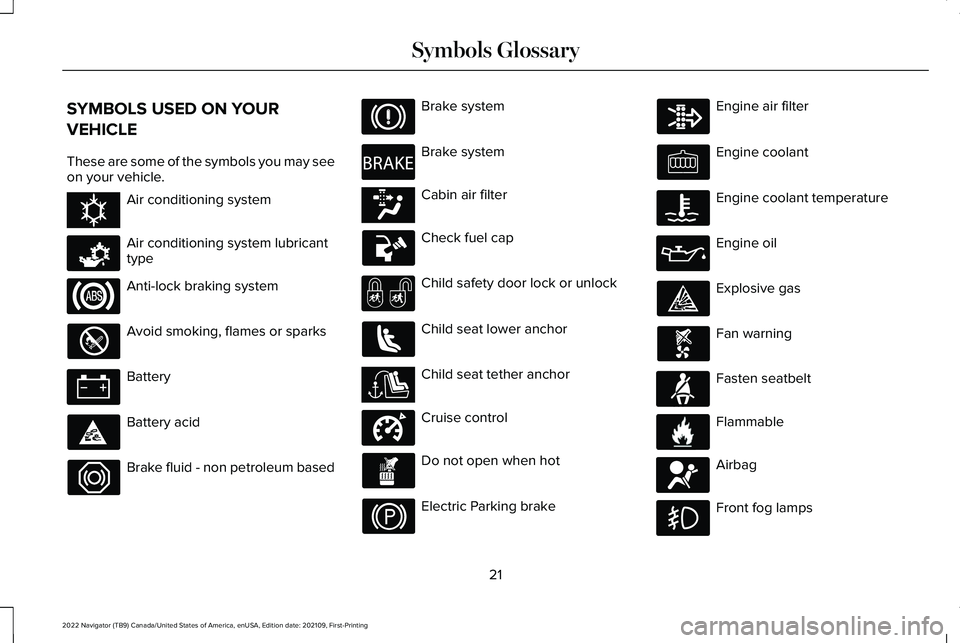
SYMBOLS USED ON YOUR
VEHICLE
These are some of the symbols you may see
on your vehicle.
Air conditioning system
Air conditioning system lubricant
type
Anti-lock braking system
Avoid smoking, flames or sparks
Battery
Battery acid
Brake fluid - non petroleum based Brake system
Brake system
Cabin air filter
Check fuel cap
Child safety door lock or unlock
Child seat lower anchor
Child seat tether anchor
Cruise control
Do not open when hot
Electric Parking brake Engine air filter
Engine coolant
Engine coolant temperature
Engine oil
Explosive gas
Fan warning
Fasten seatbelt
Flammable
Airbag
Front fog lamps
21
2022 Navigator (TB9) Canada/United States of America, enUSA, Edition date: 202109, First-Printing Symbols GlossaryE162384 E231157 E270480 E139223 E141128 E332905 E71880 E231160 E67017
Page 30 of 646
EVENT DATA
This vehicle is equipped with an event data
recorder. The main purpose of an event data
recorder is to record, in certain crash or near
crash-like situations, such as an airbag
deployment or hitting a road obstacle; this
data will assist in understanding how a
vehicle
’s systems performed. The event data
recorder is designed to record data related
to vehicle dynamics and safety systems for
a short period of time, typically 30 seconds
or less.
The event data recorder in this vehicle is
designed to record such data as:
• How various systems in your vehicle
were operating.
• Whether or not the driver and passenger
seatbelts were buckled/fastened.
• How far (if at all) the driver was
depressing the accelerator and/or the
brake pedal.
• How fast the vehicle was traveling.
• Where the driver was positioning the
steering wheel. This data can help provide a better
understanding of the circumstances in which
crashes and injuries occur.
Note:
Event data recorder data is recorded
by your vehicle only if a non-trivial crash
situation occurs; no data is recorded by the
event data recorder under normal driving
conditions and no personal data or
information (for example name, gender, age,
and crash location) is recorded. However,
parties, such as law enforcement, could
combine the event data recorder data with
the type of personally identifying data
routinely acquired during a crash
investigation.
To read data recorded by an event data
recorder, special equipment is required, and
access to the vehicle or the event data
recorder is needed. In addition to the vehicle
manufacturer, other parties, such as law
enforcement, that have such special
equipment, can read the information if they
have access to the vehicle or the event data
recorder. BlueCruise Data (If Equipped)
If BlueCruise is active in certain crash or near
crash-like situations, such as an airbag
deployment or hitting a road obstacle, the
system may record driver attentiveness,
based on the direction of eyes and duration,
and photographs of the driver seat area.
Note: No data is recorded under normal
driving conditions.
SETTINGS DATA
Your vehicle has electronic control units that
have the ability to store data based on your
personalized settings. The data is stored
locally in the vehicle or on devices that you
connect to it, for example, a USB drive or
digital music player. You can delete some of
this data and also choose whether to share
it through the services to which you
subscribe.
See Center Display Precautions
(page 501).
26
2022 Navigator (TB9) Canada/United States of America, enUSA, Edition date: 202109, First-Printing Data Privacy
Page 34 of 646
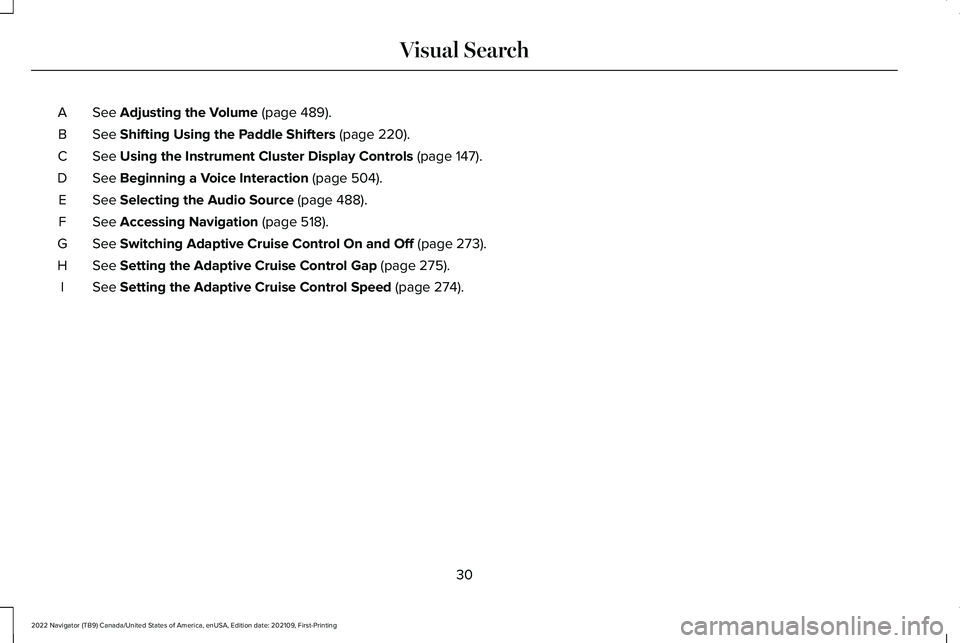
See Adjusting the Volume (page 489).
A
See
Shifting Using the Paddle Shifters (page 220).
B
See
Using the Instrument Cluster Display Controls (page 147).
C
See
Beginning a Voice Interaction (page 504).
D
See
Selecting the Audio Source (page 488).
E
See
Accessing Navigation (page 518).
F
See
Switching Adaptive Cruise Control On and Off (page 273).
G
See
Setting the Adaptive Cruise Control Gap (page 275).
H
See
Setting the Adaptive Cruise Control Speed (page 274).
I
30
2022 Navigator (TB9) Canada/United States of America, enUSA, Edition date: 202109, First-Printing Visual Search
Page 149 of 646
Malfunction Indicator Lamp
It illuminates when the ignition is
on and the engine is off, this is
normal operation. If it illuminates
when the engine is on this indicates that the
emission control system requires service. If
it flashes, have your vehicle checked
immediately. See Starting and Stopping the
Engine – Warning Lamps (page 205). See
Emission Law (page 608).
Oil Pressure It illuminates when the engine oil
pressure is low.
Powertrain Fault It illuminates when the powertrain
requires service. Have your
vehicle checked as soon as
possible. WHAT ARE THE INSTRUMENT
CLUSTER INDICATORS
Indicators notify you of various features that
are active on your vehicle.
INSTRUMENT CLUSTER
INDICATORS
Adaptive Cruise Control
See
Adaptive Cruise Control
(page 270).
Airbag See
Airbags (page 61).
Auto Hold See
Auto Hold (page 244).Automatic High Beam See
Automatic High Beam
Control (page 123).
Auto Start-Stop See
Auto-Start-Stop (page 207).
Blind Spot Information System See
Blind Spot Information
System (page 311).
BlueCruise See
ActiveGlide
™ (page 286).
Cruise Control
(If Equipped) See
Adaptive Cruise Control
(page 270).
145
2022 Navigator (TB9) Canada/United States of America, enUSA, Edition date: 202109, First-Printing Instrument Cluster E144524 E67017 E323448 E323449 E146361 E151262 E297977 E71340
Page 156 of 646
Head-Up Display (HUD)
Follow onscreen directions to confirm or modify your settings.
Brightness
Follow onscreen directions to confirm or
modify your settings.
Vertical Position
HUD Adjustments
Image Rotation
Turns the distance to empty, time and temperature on and off.
HUD Content
Select Your Setting
Cruise and Lane Control
Note: When you save a memory preset position, your current HUD settings are al\
so saved to that memory preset position. See What Is the
Memory Function (page 185).
152
2022 Navigator (TB9) Canada/United States of America, enUSA, Edition date: 202109, First-Printing Head Up Display
(If Equipped)
Page 157 of 646
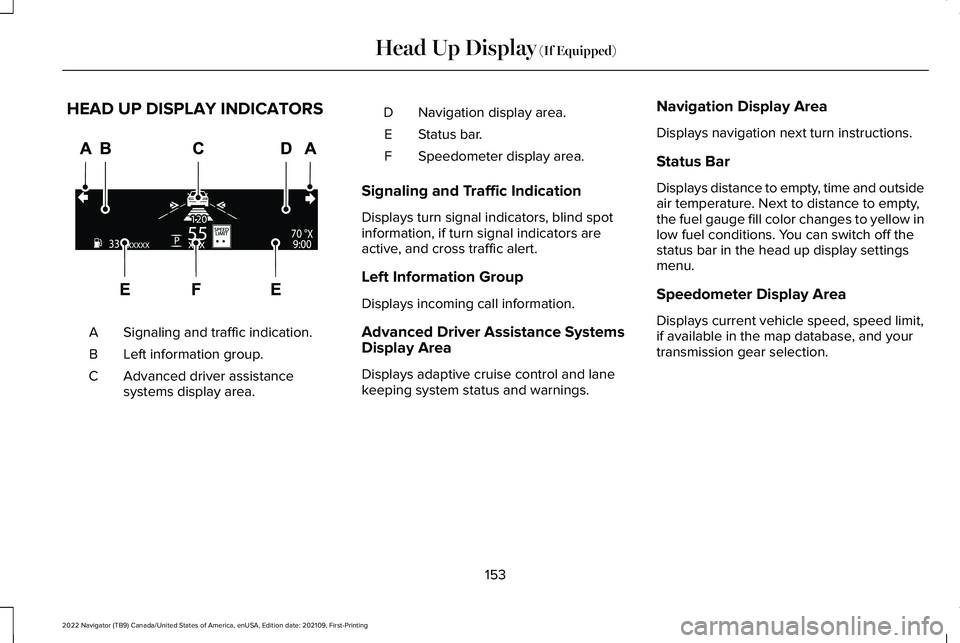
HEAD UP DISPLAY INDICATORS
Signaling and traffic indication.
A
Left information group.
B
Advanced driver assistance
systems display area.
C Navigation display area.
D
Status bar.
E
Speedometer display area.
F
Signaling and Traffic Indication
Displays turn signal indicators, blind spot
information, if turn signal indicators are
active, and cross traffic alert.
Left Information Group
Displays incoming call information.
Advanced Driver Assistance Systems
Display Area
Displays adaptive cruise control and lane
keeping system status and warnings. Navigation Display Area
Displays navigation next turn instructions.
Status Bar
Displays distance to empty, time and outside
air temperature. Next to distance to empty,
the fuel gauge fill color changes to yellow in
low fuel conditions. You can switch off the
status bar in the head up display settings
menu.
Speedometer Display Area
Displays current vehicle speed, speed limit,
if available in the map database, and your
transmission gear selection.
153
2022 Navigator (TB9) Canada/United States of America, enUSA, Edition date: 202109, First-Printing Head Up Display (If Equipped)E355334
Page 256 of 646
HILL DESCENT CONTROL
INDICATOR Illuminates when you switch hill
descent control on.
HILL DESCENT CONTROL – TROUBLESHOOTING
HILL DESCENT CONTROL – INFORMATION MESSAGES Action
Message
Your vehicle speed requirement for off-road mode entry has not been met.
For Hill Descent Reduce Speed XX MPH/km/h or Less
You need to select a transmission gear for hill descent mode.
For Hill Descent Select Gear
Hill descent control mode is deactivated and you must resume control.
Hill Descent Driver Resume Control
A hill descent system fault is present.
Hill Descent Control Fault
The hill descent system is cooling due to overuse.
Hill Descent Control Off System Cooling
The hill descent system cannot activate while Cruise Control is actively\
controllingspeed.
Hill Descent Control not available with Cruise Control
Active
252
2022 Navigator (TB9) Canada/United States of America, enUSA, Edition date: 202109, First-Printing Hill Descent Control (If Equipped)E163171
Page 274 of 646
HOW DOES ADAPTIVE CRUISE
CONTROL WITH STOP AND GO
WORK
Adaptive cruise control with stop and go
uses radar and camera sensors to maintain
a set gap between your vehicle and the
vehicle in front of you while following it to a
complete stop. Stop and go can also be set
to follow a vehicle directly in front of you and
adjust the set speed, while you are at a
complete stop.
ADAPTIVE CRUISE CONTROL
PRECAUTIONS
WARNING: You are responsible for
controlling your vehicle at all times. The
system is designed to be an aid and does
not relieve you of your responsibility to
drive with due care and attention. Failure
to follow this instruction could result in the
loss of control of your vehicle, personal
injury or death. WARNING:
Do not use adaptive
cruise control on winding roads, in heavy
traffic or when the road surface is slippery.
This could result in loss of vehicle control,
serious injury or death. WARNING:
Pay close attention to
changing road conditions such as entering
or leaving a highway, on roads with
intersections or roundabouts, roads
without visible lanes of travel, roads that
are unpaved, or steep slopes. Failure to
follow this instruction could result in the
loss of control of your vehicle, personal
injury or death. WARNING:
The system is not a crash
warning or avoidance system. WARNING:
Do not use the system
when towing a trailer that has aftermarket
electronic trailer brake controls. Failure to
follow this instruction could result in the
loss of control of your vehicle, personal
injury or death. WARNING:
Do not use tire sizes
other than those recommended because
this can affect the normal operation of the
system. Failure to do so may result in a loss
of vehicle control, which could result in
serious injury. WARNING:
Do not use the system
with a snow plow blade installed. WARNING:
Do not use the system in
poor visibility, for example fog, heavy rain,
spray or snow.
When Following a Vehicle WARNING: When following a vehicle
that is braking, your vehicle does not
always decelerate quickly enough to avoid
a crash without driver intervention. Apply
the brakes when necessary. Failure to
follow this instruction could result in
personal injury or death.
270
2022 Navigator (TB9) Canada/United States of America, enUSA, Edition date: 202109, First-Printing Adaptive Cruise Control
Page 275 of 646
Hilly Condition Usage
Select a lower gear when the system is
active in situations such as prolonged
downhill driving on steep slopes, for example
in mountainous areas.
ADAPTIVE CRUISE CONTROL
LIMITATIONS
Sensor Limitations
WARNING: On rare occasions,
detection issues can occur due to the road
infrastructures, for example bridges,
tunnels and safety barriers. In these cases,
the system may brake late or
unexpectedly. At all times, you are
responsible for controlling your vehicle,
supervising the system and intervening, if
required. WARNING:
If the system
malfunctions, have your vehicle checked
as soon as possible. WARNING: Large contrasts in outside
lighting can limit sensor performance. WARNING:
The system only warns
of vehicles detected by the radar sensor.
In some cases there may be no warning
or a delayed warning. Apply the brakes
when necessary. Failure to follow this
instruction could result in personal injury
or death. WARNING:
The system may not
detect stationary or slow moving vehicles
below
6 mph (10 km/h). WARNING:
The system does not
detect pedestrians or objects in the road. WARNING:
The system does not
detect oncoming vehicles in the same lane. WARNING:
The system may not
operate properly if the sensor is blocked.
Keep the windshield free from obstruction. WARNING:
The sensor may
incorrectly track lane markings as other
structures or objects. This can result in a
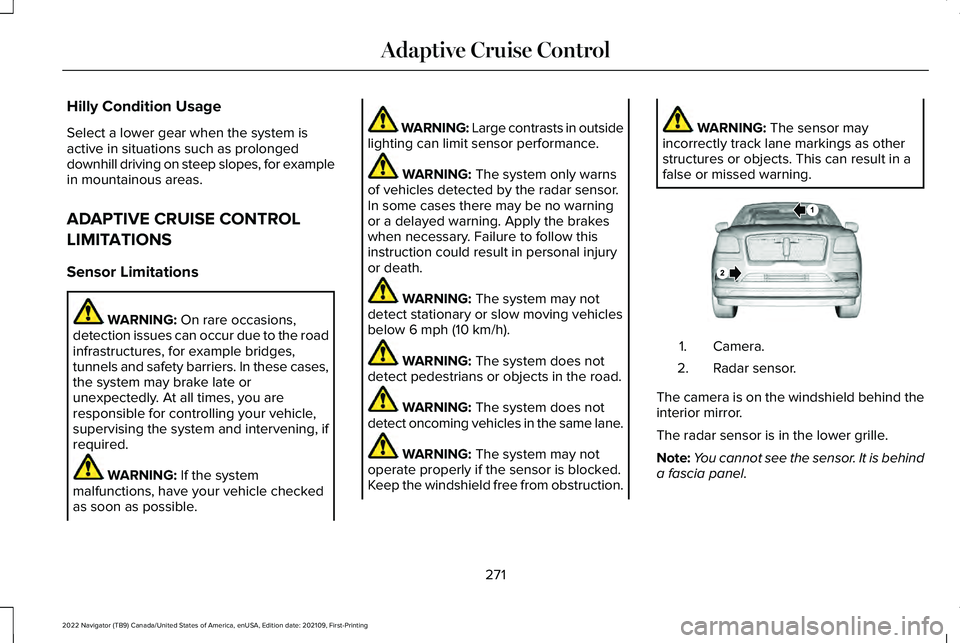
false or missed warning. Camera.
1.
Radar sensor.
2.
The camera is on the windshield behind the
interior mirror.
The radar sensor is in the lower grille.
Note: You cannot see the sensor. It is behind
a fascia panel.
271
2022 Navigator (TB9) Canada/United States of America, enUSA, Edition date: 202109, First-Printing Adaptive Cruise ControlE253503