warning light LINCOLN NAVIGATOR 2022 Owner's Guide
[x] Cancel search | Manufacturer: LINCOLN, Model Year: 2022, Model line: NAVIGATOR, Model: LINCOLN NAVIGATOR 2022Pages: 646, PDF Size: 7.29 MB
Page 275 of 646
Hilly Condition Usage
Select a lower gear when the system is
active in situations such as prolonged
downhill driving on steep slopes, for example
in mountainous areas.
ADAPTIVE CRUISE CONTROL
LIMITATIONS
Sensor Limitations
WARNING: On rare occasions,
detection issues can occur due to the road
infrastructures, for example bridges,
tunnels and safety barriers. In these cases,
the system may brake late or
unexpectedly. At all times, you are
responsible for controlling your vehicle,
supervising the system and intervening, if
required. WARNING:
If the system
malfunctions, have your vehicle checked
as soon as possible. WARNING: Large contrasts in outside
lighting can limit sensor performance. WARNING:
The system only warns
of vehicles detected by the radar sensor.
In some cases there may be no warning
or a delayed warning. Apply the brakes
when necessary. Failure to follow this
instruction could result in personal injury
or death. WARNING:
The system may not
detect stationary or slow moving vehicles
below
6 mph (10 km/h). WARNING:
The system does not
detect pedestrians or objects in the road. WARNING:
The system does not
detect oncoming vehicles in the same lane. WARNING:
The system may not
operate properly if the sensor is blocked.
Keep the windshield free from obstruction. WARNING:
The sensor may
incorrectly track lane markings as other
structures or objects. This can result in a
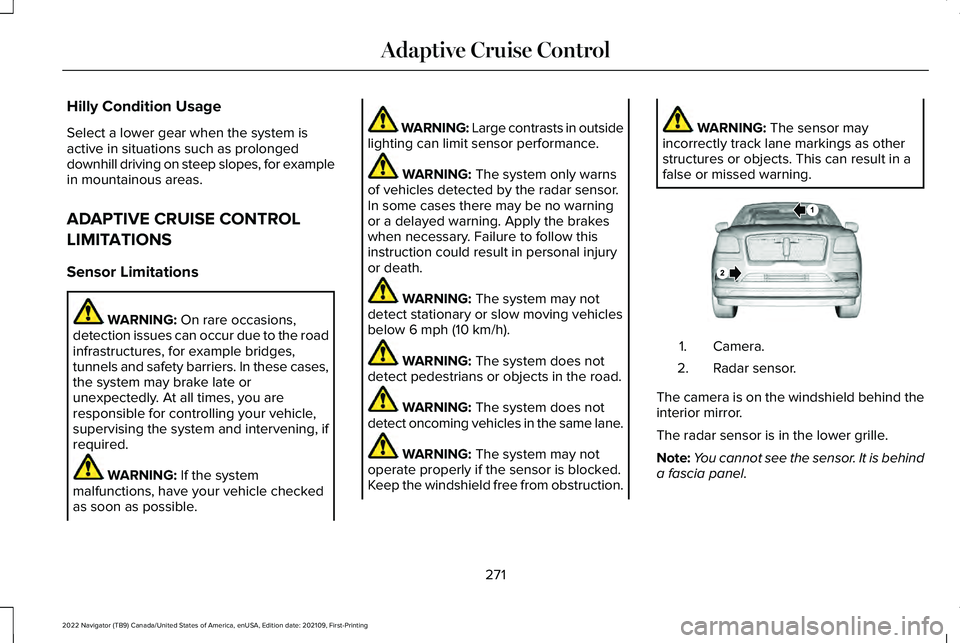
false or missed warning. Camera.
1.
Radar sensor.
2.
The camera is on the windshield behind the
interior mirror.
The radar sensor is in the lower grille.
Note: You cannot see the sensor. It is behind
a fascia panel.
271
2022 Navigator (TB9) Canada/United States of America, enUSA, Edition date: 202109, First-Printing Adaptive Cruise ControlE253503
Page 285 of 646
LANE CENTERING ALERTS
You must keep your hands on the steering
wheel at all times.
When the system is active and detects no
steering activity for a period of time, the
system alerts you to put your hands on the
steering wheel. If you do not react to the
warnings the system cancels and slows your
vehicle down to idle speeds while
maintaining steering control. See Lane
Centering Automatic Cancellation (page
281).
The system also alerts you if your vehicle
crosses lane markings without detected
steering activity.
Note: The system could detect a light grip
or touch on the steering wheel as hands-off
driving. LANE CENTERING AUTOMATIC
CANCELLATION
When an external condition cancels the
system, for example, no lane markings
available, a tone sounds and a message
appears in the instrument cluster display.
If your vehicle starts to slow down, you must
provide steering input to the wheel and press
the accelerator pedal to regain full system
performance.
Automatic cancellation can also occur if:
•
The lane becomes too wide or too
narrow.
• The system cannot detect valid lane
markings.
• Lane markings cross over one another.
Note: The system disables until the next key
cycle if your vehicle slows down due to driver
inactivity twice within a key cycle. LANE CENTERING INDICATORS Illuminates when you switch lane
centering on. The color of the
indicator changes to indicate the
system status.
Gray indicates the system is on but inactive.
Green indicates the system is active and
applying steering torque assistance input to
keep your vehicle in the center of the lane.
Amber with an audible tone and then gray
indicates a system automatic cancellation.
INTELLIGENT ADAPTIVE CRUISE
CONTROL
HOW DOES INTELLIGENT ADAPTIVE
CRUISE CONTROL WORK
Intelligent adaptive cruise control combines
speed sign recognition with adaptive cruise
control to adjust the cruise set speed to the
speed limit detected by the speed sign
recognition system. As the system detects
new speed signs, the set speed updates.
281
2022 Navigator (TB9) Canada/United States of America, enUSA, Edition date: 202109, First-Printing Adaptive Cruise ControlE297977
Page 290 of 646
WHAT IS ACTIVEGLIDE™
ActiveGlide keeps your vehicle centered in
the lane and offers a hands-free driving
mode in certain situations when using
adaptive cruise control.
HOW DOES ACTIVEGLIDE™ WORK
ActiveGlide uses cameras to monitor your
vehicle position within a lane and applies
steering support to keep your vehicle
centered in the lane.
Using the cameras and location information,
ActiveGlide allows you to remove your hands
from the steering wheel and offers a
hands-free driving mode in certain areas.
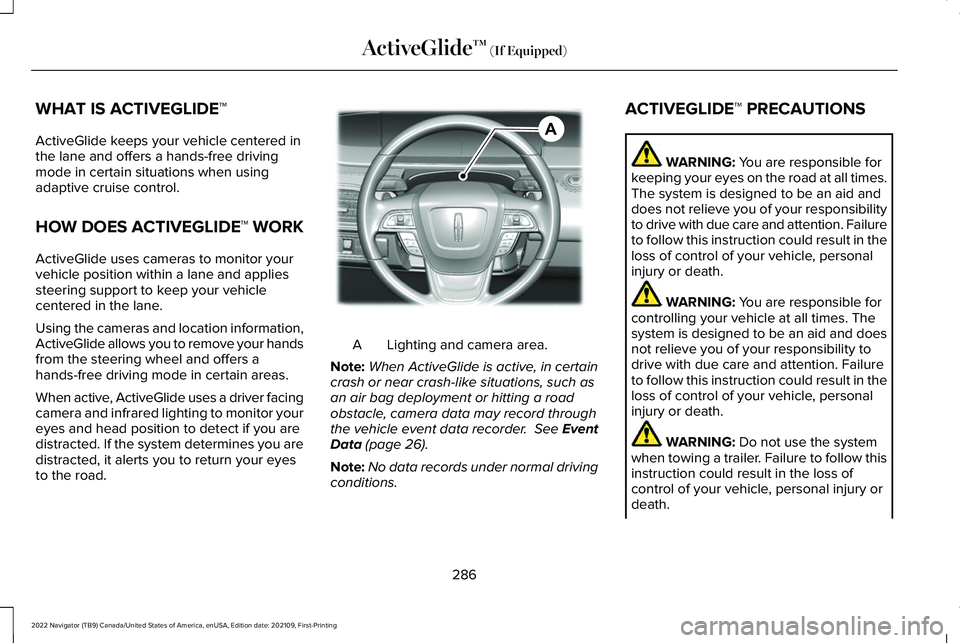
When active, ActiveGlide uses a driver facing
camera and infrared lighting to monitor your
eyes and head position to detect if you are
distracted. If the system determines you are
distracted, it alerts you to return your eyes
to the road.
Lighting and camera area.
A
Note: When ActiveGlide is active, in certain
crash or near crash-like situations, such as
an air bag deployment or hitting a road
obstacle, camera data may record through
the vehicle event data recorder. See Event
Data (page 26).
Note: No data records under normal driving
conditions. ACTIVEGLIDE™ PRECAUTIONS WARNING:
You are responsible for
keeping your eyes on the road at all times.
The system is designed to be an aid and
does not relieve you of your responsibility
to drive with due care and attention. Failure
to follow this instruction could result in the
loss of control of your vehicle, personal
injury or death. WARNING:
You are responsible for
controlling your vehicle at all times. The
system is designed to be an aid and does
not relieve you of your responsibility to
drive with due care and attention. Failure
to follow this instruction could result in the
loss of control of your vehicle, personal
injury or death. WARNING:
Do not use the system
when towing a trailer. Failure to follow this
instruction could result in the loss of
control of your vehicle, personal injury or
death.
286
2022 Navigator (TB9) Canada/United States of America, enUSA, Edition date: 202109, First-Printing ActiveGlide™
(If Equipped)AE351152
Page 291 of 646
WARNING: Obstructions to the driver
facing camera or infrared lighting could
prevent the system from properly
operating. Keep the camera and lighting
areas free from obstruction. Failure to
follow this instruction could result in the
loss of control of your vehicle, personal
injury or death. WARNING: Do not use the system if
any changes or modifications to the
steering wheel have been made. Any
changes or modifications to the steering
wheel could affect the functionality or
performance of the system. Failure to
follow this instruction could result in the
loss of control of your vehicle, personal
injury or death. WARNING: The system may not
function if the sensor is blocked. WARNING:
Pay close attention to
changing road conditions such as entering
or leaving a highway, on roads with
intersections or roundabouts, roads
without visible lanes of travel, roads that
are winding, slippery, unpaved, or steep
slopes. WARNING:
The system is not a crash
warning or avoidance system. WARNING: Large contrasts in outside
lighting can limit sensor performance. WARNING:
The system attempts to
keep your vehicle in the center of the lane
as well as maintain speed and gap control.
The system may not be able to perform
these tasks in all situations. Do not use the
system in complex or uncertain driving
conditions. Failure to follow this instruction
could result in the loss of control of your
vehicle, personal injury or death. WARNING:
Your vehicle could drift
out of the lane of travel. Always be
prepared to manually steer your vehicle.
Failure to follow this instruction could result
in the loss of control of your vehicle,
personal injury or death. WARNING:
The system will not
operate if the sensor cannot track the road
lane markings.
ACTIVEGLIDE™ REQUIREMENTS
ActiveGlide only activates when all of the
following occur:
• ActiveGlide is enabled in your information
and entertainment screen.
See
ActiveGlide ™ Settings (page 288).
• Adaptive cruise control is on.
• The system detects both lane markings.
• Your hands are on the steering wheel.
• Your eyes are on the road.
287
2022 Navigator (TB9) Canada/United States of America, enUSA, Edition date: 202109, First-Printing ActiveGlide™
(If Equipped)
Page 303 of 646
WHAT IS THE LANE KEEPING
SYSTEM
The lane keeping system alerts you by
providing temporary steering assistance or
steering wheel vibration when it detects an
unintended lane departure.
HOW DOES THE LANE KEEPING
SYSTEM WORK
The lane keeping system uses a forward
looking camera mounted on the windshield
to monitor vehicle movement within the
travel lane.
When the camera detects a drift out of the
travel lane, the lane keeping system alerts
the driver by vibrating the steering wheel, or
aids the driver by providing a small steering
input to move the vehicle back into the travel
lane.
The driver can select one of three modes:
•
Alert (If Equipped)
• Aid
• Alert + Aid
LANE KEEPING SYSTEM
PRECAUTIONS WARNING: You are responsible for
controlling your vehicle at all times. The
system is designed to be an aid and does
not relieve you of your responsibility to
drive with due care and attention. Failure
to follow this instruction could result in the
loss of control of your vehicle, personal
injury or death. WARNING:
The system will not
operate if the sensor cannot track the road
lane markings. WARNING:
The sensor may
incorrectly track lane markings as other
structures or objects. This can result in a
false or missed warning. WARNING:
In cold and severe
weather conditions the system may not
function. Rain, snow and spray can all limit
sensor performance. WARNING:
The system may not
operate properly if the sensor is blocked.
Keep the windshield free from obstruction. WARNING:
If damage occurs in the
immediate area surrounding the sensor,
have your vehicle checked as soon as
possible. WARNING:
The system may not
correctly operate if your vehicle is fitted
with a suspension kit not approved by us. WARNING: Large contrasts in outside
lighting can limit sensor performance.
299
2022 Navigator (TB9) Canada/United States of America, enUSA, Edition date: 202109, First-Printing Lane Keeping System
Page 309 of 646
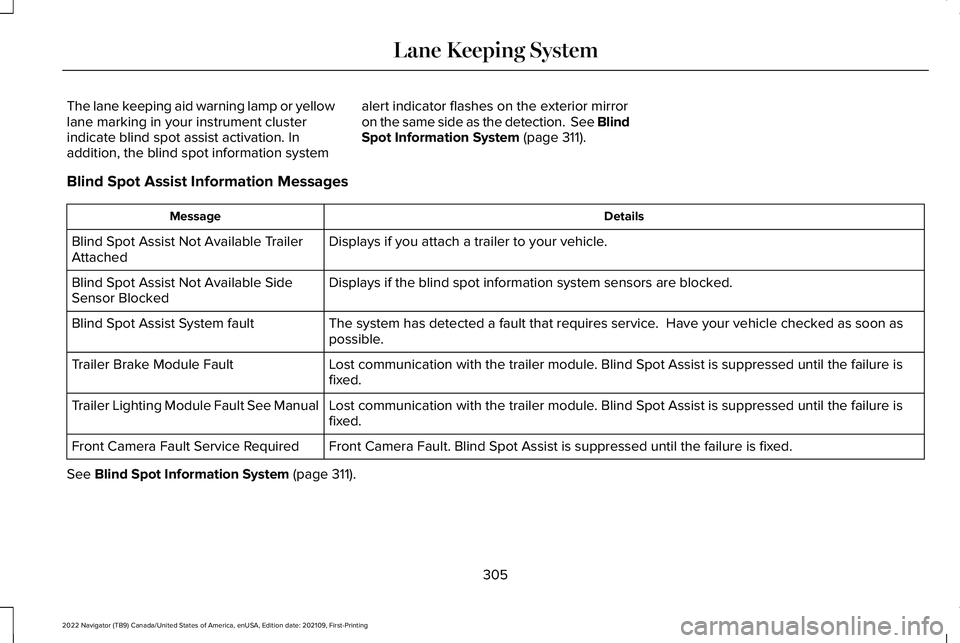
The lane keeping aid warning lamp or yellow
lane marking in your instrument cluster
indicate blind spot assist activation. In
addition, the blind spot information system
alert indicator flashes on the exterior mirror
on the same side as the detection. See Blind
Spot Information System (page 311).
Blind Spot Assist Information Messages Details
Message
Displays if you attach a trailer to your vehicle.
Blind Spot Assist Not Available Trailer
Attached
Displays if the blind spot information system sensors are blocked.
Blind Spot Assist Not Available Side
Sensor Blocked
The system has detected a fault that requires service. Have your vehicle checked as soon as
possible.
Blind Spot Assist System fault
Lost communication with the trailer module. Blind Spot Assist is suppressed until the failure is
fixed.
Trailer Brake Module Fault
Lost communication with the trailer module. Blind Spot Assist is suppressed until the failure is
fixed.
Trailer Lighting Module Fault See Manual
Front Camera Fault. Blind Spot Assist is suppressed until the failure is\
fixed.
Front Camera Fault Service Required
See
Blind Spot Information System (page 311).
305
2022 Navigator (TB9) Canada/United States of America, enUSA, Edition date: 202109, First-Printing Lane Keeping System
Page 311 of 646
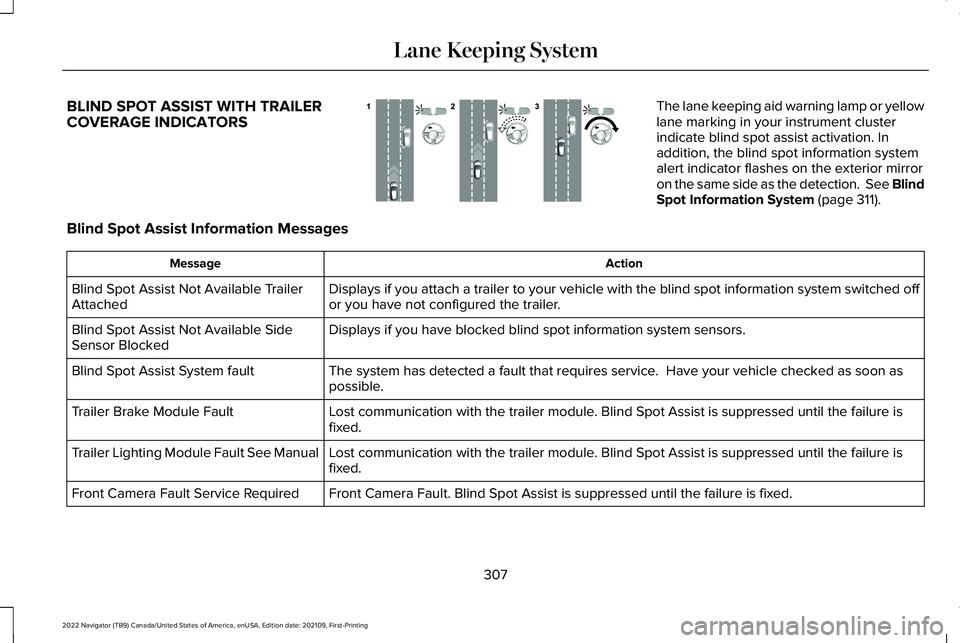
BLIND SPOT ASSIST WITH TRAILER
COVERAGE INDICATORS The lane keeping aid warning lamp or yellow
lane marking in your instrument cluster
indicate blind spot assist activation. In
addition, the blind spot information system
alert indicator flashes on the exterior mirror
on the same side as the detection. See Blind
Spot Information System (page 311).
Blind Spot Assist Information Messages Action
Message
Displays if you attach a trailer to your vehicle with the blind spot inf\
ormation system switched off
or you have not configured the trailer.
Blind Spot Assist Not Available Trailer
Attached
Displays if you have blocked blind spot information system sensors.
Blind Spot Assist Not Available Side
Sensor Blocked
The system has detected a fault that requires service. Have your vehicle checked as soon as
possible.
Blind Spot Assist System fault
Lost communication with the trailer module. Blind Spot Assist is suppressed until the failure is
fixed.
Trailer Brake Module Fault
Lost communication with the trailer module. Blind Spot Assist is suppressed until the failure is
fixed.
Trailer Lighting Module Fault See Manual
Front Camera Fault. Blind Spot Assist is suppressed until the failure is\
fixed.
Front Camera Fault Service Required
307
2022 Navigator (TB9) Canada/United States of America, enUSA, Edition date: 202109, First-Printing Lane Keeping SystemE310089
Page 313 of 646
 when I can s\
ee the lane markings on the road?
Your vehicle speed is less than 40 mph (65")
LANE KEEPING SYSTEM – FREQUENTLY ASKED QUESTIONS
Why is the feature not available (lane markings are gray) when I can s\
ee the lane markings on the road?
Your vehicle speed is less than 40 mph (65 km/h).
The sun is shining directly into the camera lens. A quick intentional lane change has occurred.
Your vehicle stays too close to the lane markings for an extended interva\
l of time. Driving at high speeds in curves.
The last alert warning or aid intervention occurred a short time ago. Ambiguous lane markings, for example, in construction zones. Rapid transition from light to dark, or from dark to light. Sudden offset in lane markings.ABS or AdvanceTrac ™ is active.
There is a camera blockage due to dirt, grime, fog, frost or water on the windshield. You are driving too close to the vehicle in front of you.
Transitioning between no lane markings to lane markings, or vice versa. There is standing water on the road.
Faint lane markings, for example, partial yellow lane markings on concrete roads.
309
2022 Navigator (TB9) Canada/United States of America, enUSA, Edition date: 202109, First-Printing Lane Keeping System
Page 318 of 646
You can set-up a trailer to work with the blind
spot information system through the
touchscreen. When setting up a trailer, a
sequence of screens appear asking for trailer
information.
1. Select type of trailer screen -
conventional, fifth wheel or gooseneck.
Note: The system only supports conventional
trailers.
2. Do you want to set up blind spot with trailer screen? If no, the system turns off.
If yes, the menu goes to the next screen.
3. Is the width less than 9 ft (2.7 m) and
length less than 33 ft (10.1 m)? If no, the
system turns off. If yes, the menu goes
to the next screen.
4. Trailer width measurement. Measure the
width at the front of the trailer. It is not
measured at the widest point of the
trailer. The maximum width at the front
of the trailer the system can support is
8.5 ft (2.6 m)
. Note:
You do not need to enter an exact
trailer width measurement. You only need
to confirm that the width of the trailer is less
than
9 ft (2.7 m).
5. Trailer length measurement. The trailer length is the distance between the trailer
hitch ball and the rear of the trailer. The
maximum length that the system can
support is
33 ft (10.1 m).
6. Enter the length of trailer. The default setting is
18 ft (5.5 m). Toggling up or
down using the menu buttons increases
or decreases the measurement by
3 ft
(1 m). Select a length that is equal to or
within 3 ft (1 m) of the actual measured
length. For example, if the actual
measure length is
25 ft (7.5 m), toggle
the length in the menu to 27 ft (8.2 m).
The system setup saves when you enter
the length of the trailer.
Note: If the trailer is a bike rack or cargo
rack with electrical lighting, enter a length
of 3 ft (1 m). Cross traffic alert remains on for
trailers with a length of
3 ft (1 m) or less. Note:
The system requires proper
measurement and measure entry to function
properly.
SELECTING A TRAILER
When you connect a trailer to your vehicle,
the trailer set up menu appears in the
touchscreen. This menu allows you to set up
a new trailer or choose from a previously set
up trailer. A warning message appears and
the system turns off if you do not choose or
add a new trailer.
Note: The warning message may not appear
until your vehicle reaches 22 mph (35 km/h).
314
2022 Navigator (TB9) Canada/United States of America, enUSA, Edition date: 202109, First-Printing Blind Spot Information System
Page 324 of 646
WHAT IS PRE-COLLISION ASSIST
Pre-collision assist detects and warns of
approaching hazards in the roadway. The
system provides multiple levels of assistance
to help avoid a collision if your vehicle is
rapidly approaching another stationary
vehicle, a vehicle traveling in the same
direction as yours, or a pedestrian or cyclist
within your driving path.
HOW DOES PRE-COLLISION
ASSIST WORK
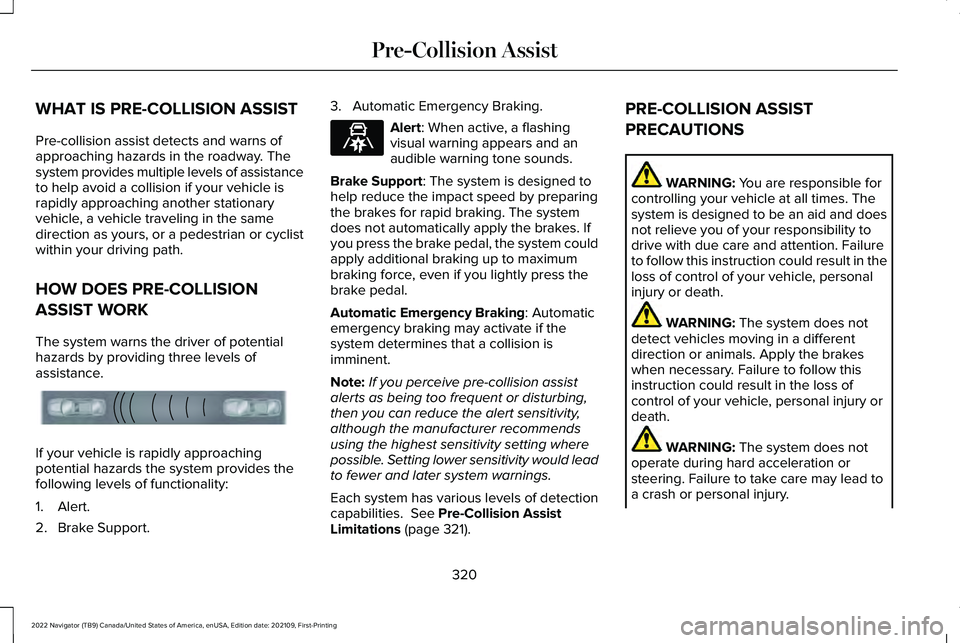
The system warns the driver of potential
hazards by providing three levels of
assistance.
If your vehicle is rapidly approaching
potential hazards the system provides the
following levels of functionality:
1. Alert.
2. Brake Support. 3. Automatic Emergency Braking. Alert: When active, a flashing
visual warning appears and an
audible warning tone sounds.
Brake Support
: The system is designed to
help reduce the impact speed by preparing
the brakes for rapid braking. The system
does not automatically apply the brakes. If
you press the brake pedal, the system could
apply additional braking up to maximum
braking force, even if you lightly press the
brake pedal.
Automatic Emergency Braking
: Automatic
emergency braking may activate if the
system determines that a collision is
imminent.
Note: If you perceive pre-collision assist
alerts as being too frequent or disturbing,
then you can reduce the alert sensitivity,
although the manufacturer recommends
using the highest sensitivity setting where
possible. Setting lower sensitivity would lead
to fewer and later system warnings.
Each system has various levels of detection
capabilities.
See Pre-Collision Assist
Limitations (page 321). PRE-COLLISION ASSIST
PRECAUTIONS WARNING:
You are responsible for
controlling your vehicle at all times. The
system is designed to be an aid and does
not relieve you of your responsibility to
drive with due care and attention. Failure
to follow this instruction could result in the
loss of control of your vehicle, personal
injury or death. WARNING:
The system does not
detect vehicles moving in a different
direction or animals. Apply the brakes
when necessary. Failure to follow this
instruction could result in the loss of
control of your vehicle, personal injury or
death. WARNING:
The system does not
operate during hard acceleration or
steering. Failure to take care may lead to
a crash or personal injury.
320
2022 Navigator (TB9) Canada/United States of America, enUSA, Edition date: 202109, First-Printing Pre-Collision AssistE156130 E329466