warning LINCOLN NAVIGATOR 2022 Service Manual
[x] Cancel search | Manufacturer: LINCOLN, Model Year: 2022, Model line: NAVIGATOR, Model: LINCOLN NAVIGATOR 2022Pages: 646, PDF Size: 7.29 MB
Page 104 of 646
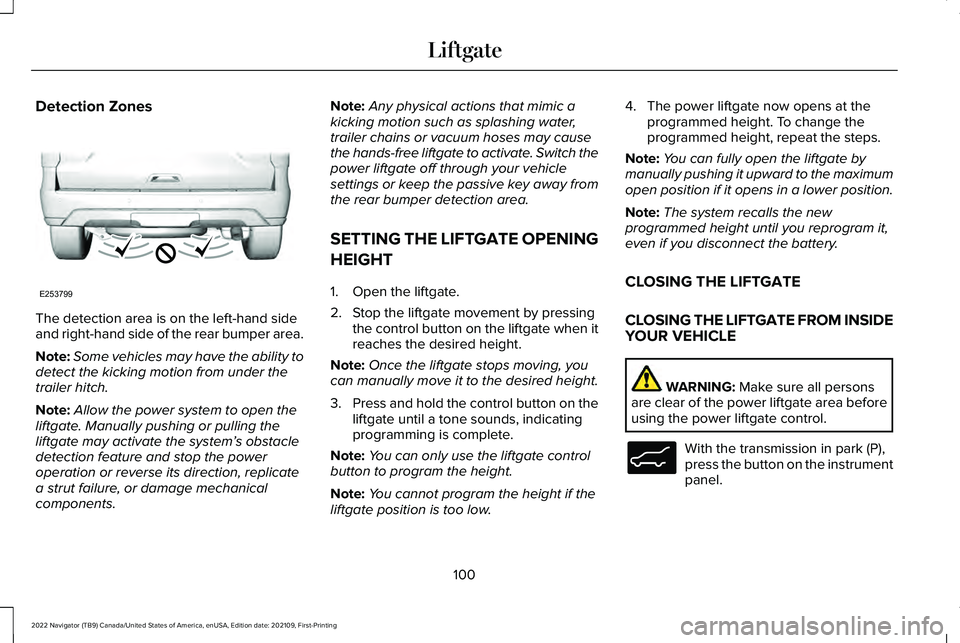
Detection Zones
The detection area is on the left-hand side
and right-hand side of the rear bumper area.
Note:
Some vehicles may have the ability to
detect the kicking motion from under the
trailer hitch.
Note: Allow the power system to open the
liftgate. Manually pushing or pulling the
liftgate may activate the system’ s obstacle
detection feature and stop the power
operation or reverse its direction, replicate
a strut failure, or damage mechanical
components. Note:
Any physical actions that mimic a
kicking motion such as splashing water,
trailer chains or vacuum hoses may cause
the hands-free liftgate to activate. Switch the
power liftgate off through your vehicle
settings or keep the passive key away from
the rear bumper detection area.
SETTING THE LIFTGATE OPENING
HEIGHT
1. Open the liftgate.
2. Stop the liftgate movement by pressing the control button on the liftgate when it
reaches the desired height.
Note: Once the liftgate stops moving, you
can manually move it to the desired height.
3. Press and hold the control button on the
liftgate until a tone sounds, indicating
programming is complete.
Note: You can only use the liftgate control
button to program the height.
Note: You cannot program the height if the
liftgate position is too low. 4. The power liftgate now opens at the
programmed height. To change the
programmed height, repeat the steps.
Note: You can fully open the liftgate by
manually pushing it upward to the maximum
open position if it opens in a lower position.
Note: The system recalls the new
programmed height until you reprogram it,
even if you disconnect the battery.
CLOSING THE LIFTGATE
CLOSING THE LIFTGATE FROM INSIDE
YOUR VEHICLE WARNING: Make sure all persons
are clear of the power liftgate area before
using the power liftgate control. With the transmission in park (P),
press the button on the instrument
panel.
100
2022 Navigator (TB9) Canada/United States of America, enUSA, Edition date: 202109, First-Printing LiftgateE253799 E138633
Page 105 of 646
Note:
Make sure that you close the liftgate
before operating or moving your vehicle,
especially in an enclosure, like a garage or
a parking structure. This could damage the
liftgate and its components.
Note: Make sure the area behind your
vehicle is free from obstruction and that
there is enough room for you to operate the
liftgate. Objects too close to your vehicle,
for example a wall, garage door or another
vehicle may come into contact with the
moving liftgate. This could damage the
liftgate and its components.
Note: Make sure that you fully close the
liftgate to prevent cargo from falling out.
CLOSING THE LIFTGATE FROM
OUTSIDE YOUR VEHICLE WARNING: Make sure all persons
are clear of the power liftgate area before
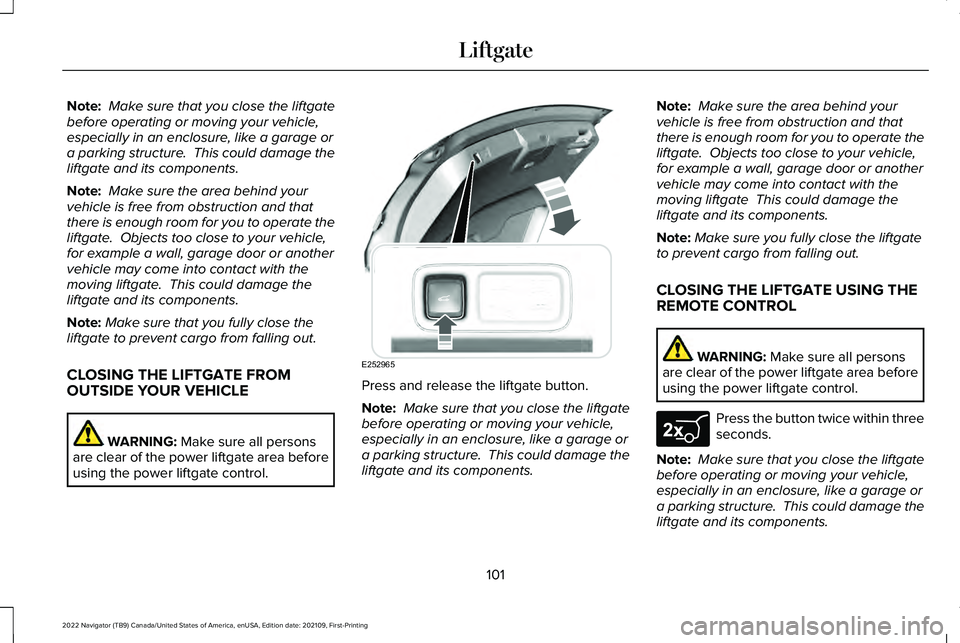
using the power liftgate control. Press and release the liftgate button.
Note:
Make sure that you close the liftgate
before operating or moving your vehicle,
especially in an enclosure, like a garage or
a parking structure. This could damage the
liftgate and its components. Note:
Make sure the area behind your
vehicle is free from obstruction and that
there is enough room for you to operate the
liftgate. Objects too close to your vehicle,
for example a wall, garage door or another
vehicle may come into contact with the
moving liftgate This could damage the
liftgate and its components.
Note: Make sure you fully close the liftgate
to prevent cargo from falling out.
CLOSING THE LIFTGATE USING THE
REMOTE CONTROL WARNING:
Make sure all persons
are clear of the power liftgate area before
using the power liftgate control. Press the button twice within three
seconds.
Note: Make sure that you close the liftgate
before operating or moving your vehicle,
especially in an enclosure, like a garage or
a parking structure. This could damage the
liftgate and its components.
101
2022 Navigator (TB9) Canada/United States of America, enUSA, Edition date: 202109, First-Printing LiftgateE252965 E267940
Page 108 of 646
3. Carefully push the window down and
press firmly to latch securely.
Note: Be careful when opening or closing
the liftgate window in a garage or other
enclosed area to avoid damaging the glass. Note:
Do not hang anything, for example a
bike rack, from the glass or liftgate. This
could damage the liftgate and its
components.
Note: Do not leave the liftgate window open
while driving. This could damage the liftgate
window and its components. LIFTGATE – TROUBLESHOOTING
LIFTGATE – WARNING LAMPS Illuminates when the liftgate is not
completely closed.
LIFTGATE – INFORMATION MESSAGES Action
Message
The liftgate is not completely closed. Close the liftgate.
Liftgate Ajar
104
2022 Navigator (TB9) Canada/United States of America, enUSA, Edition date: 202109, First-Printing LiftgateE162453
Page 114 of 646
POWER RUNNING BOARD
PRECAUTIONS
WARNING: In extreme climates,
excessive ice buildup may occur, causing
the running boards not to deploy. Make
sure that the running boards have
deployed, and have finished moving before
attempting to step on them. The running
boards will resume normal function once
the blockage is cleared. WARNING:
Switch off the running
boards before jacking or placing any object
under your vehicle. Never place your hand
between the extended running board and
your vehicle. A moving running board may
cause injury.
Do not use the running boards, front and rear
hinge assemblies, running board motors, or
the running board underbody mounts to lift
your vehicle when jacking. Use proper
jacking points.
The running boards could move slower in
cold temperatures. POWER RUNNING BOARD
SETTINGS
1. Press
Features on the touchscreen.
2. Press
Running Boards.
3. Press a setting.
Running Boards (Modes)
Off
The power running boards remain stowed,
regardless of door position.
Auto
The power running boards deploy when you
approach your vehicle with a remote control,
unlock the door or open the door.
The power running boards stow:
• After a few seconds when you close the
doors.
• If you unlock the door but do not open
it.
• If you have switched Approach detection
on and do not open a door before the
Auto Timer
setting expires. Note:
When you select this mode, an option
displays that allows you to select how long
the running boards stay deployed without
opening the door.
Out
The power running boards remain deployed,
regardless of door position.
Approach detection
When you switch
Approach detection on
with Auto switched on, the running boards
deploy when you approach your vehicle with
a remote control.
DEPLOYING AND STOWING THE
POWER RUNNING BOARDS
The power running boards deploy when you
approach your vehicle with a remote control,
unlock the door or open the door.
110
2022 Navigator (TB9) Canada/United States of America, enUSA, Edition date: 202109, First-Printing Power Running Boards
Page 116 of 646
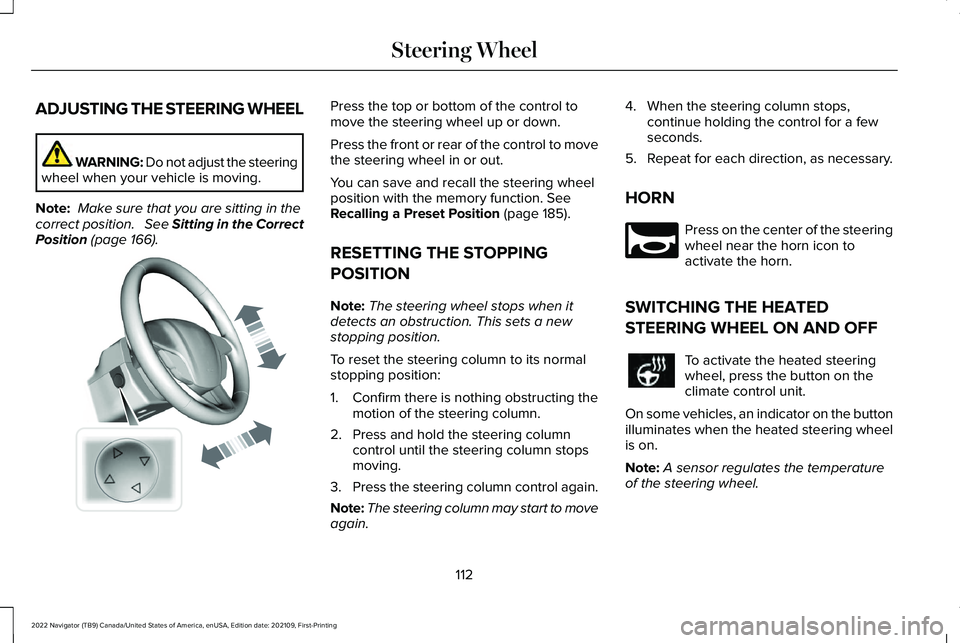
ADJUSTING THE STEERING WHEEL
WARNING: Do not adjust the steering
wheel when your vehicle is moving.
Note: Make sure that you are sitting in the
correct position. See Sitting in the Correct
Position (page 166). Press the top or bottom of the control to
move the steering wheel up or down.
Press the front or rear of the control to move
the steering wheel in or out.
You can save and recall the steering wheel
position with the memory function.
See
Recalling a Preset Position (page 185).
RESETTING THE STOPPING
POSITION
Note: The steering wheel stops when it
detects an obstruction. This sets a new
stopping position.
To reset the steering column to its normal
stopping position:
1. Confirm there is nothing obstructing the motion of the steering column.
2. Press and hold the steering column control until the steering column stops
moving.
3. Press the steering column control again.
Note: The steering column may start to move
again. 4. When the steering column stops,
continue holding the control for a few
seconds.
5. Repeat for each direction, as necessary.
HORN Press on the center of the steering
wheel near the horn icon to
activate the horn.
SWITCHING THE HEATED
STEERING WHEEL ON AND OFF To activate the heated steering
wheel, press the button on the
climate control unit.
On some vehicles, an indicator on the button
illuminates when the heated steering wheel
is on.
Note: A sensor regulates the temperature
of the steering wheel.
112
2022 Navigator (TB9) Canada/United States of America, enUSA, Edition date: 202109, First-Printing Steering WheelE261582 E270945
Page 117 of 646
ADJUSTING THE PEDALS
WARNING: Do not use the pedal
adjustment controls when the vehicle is
moving. Failure to follow this instruction
could result in personal injury or death.
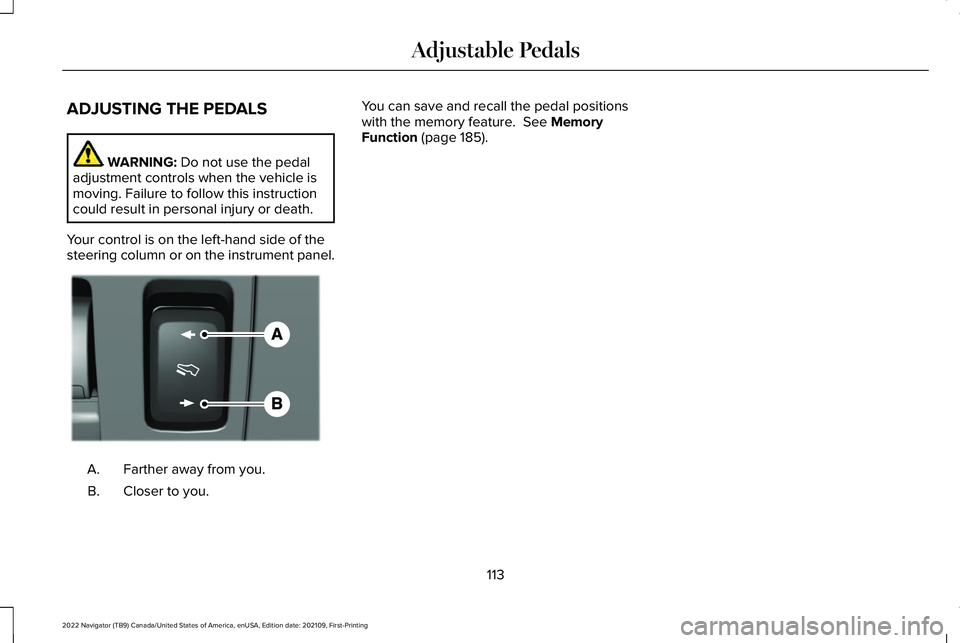
Your control is on the left-hand side of the
steering column or on the instrument panel. Farther away from you.
A.
Closer to you.
B. You can save and recall the pedal positions
with the memory feature.
See Memory
Function (page 185).
113
2022 Navigator (TB9) Canada/United States of America, enUSA, Edition date: 202109, First-Printing Adjustable PedalsE176213
Page 121 of 646
4. Remove the wiper blade.
Note:
Make sure that the wiper arm does
not spring back against the glass when the
wiper blade is not attached.
5. To install, reverse the removal procedure.
Note: Make sure that the wiper blade locks
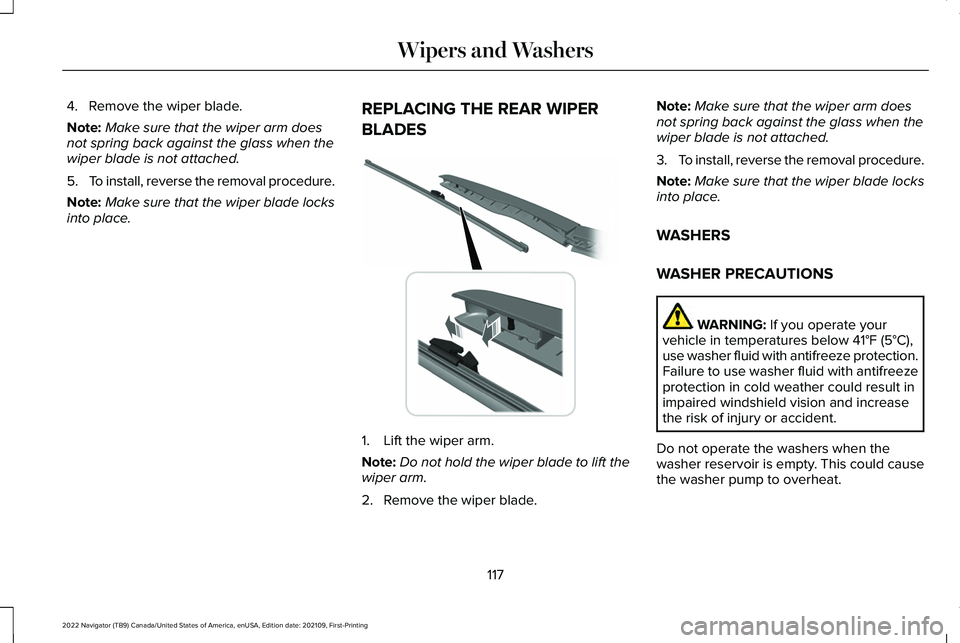
into place. REPLACING THE REAR WIPER
BLADES 1. Lift the wiper arm.
Note:
Do not hold the wiper blade to lift the
wiper arm.
2. Remove the wiper blade. Note:
Make sure that the wiper arm does
not spring back against the glass when the
wiper blade is not attached.
3. To install, reverse the removal procedure.
Note: Make sure that the wiper blade locks
into place.
WASHERS
WASHER PRECAUTIONS WARNING: If you operate your
vehicle in temperatures below 41°F (5°C),
use washer fluid with antifreeze protection.
Failure to use washer fluid with antifreeze
protection in cold weather could result in
impaired windshield vision and increase
the risk of injury or accident.
Do not operate the washers when the
washer reservoir is empty. This could cause
the washer pump to overheat.
117
2022 Navigator (TB9) Canada/United States of America, enUSA, Edition date: 202109, First-Printing Wipers and Washers E271380
Page 123 of 646
WIPERS AND WASHERS –
TROUBLESHOOTING
WIPERS AND WASHERS – WARNING
LAMPS
Illuminates when the windshield
washer fluid is low.
WIPERS AND WASHERS –
FREQUENTLY ASKED QUESTIONS
Why are there streaks and smears on the
windshield? The wiper blades could be dirty, worn
or damaged. Check the wiper blades.
See Checking the Wiper Blades (page
116). If the wiper blades are dirty, clean
them with washer fluid or water applied
with a soft sponge or cloth. If the wiper
blades are worn or damaged, install new
ones.
See Replacing the Front Wiper
Blades (page 116).
119
2022 Navigator (TB9) Canada/United States of America, enUSA, Edition date: 202109, First-Printing Wipers and WashersE132353
Page 125 of 646
Headlamp High Beam
Illuminates when you switch the
high beam headlamps on.
HEADLAMPS – TROUBLESHOOTING
HEADLAMPS – FREQUENTLY ASKED
QUESTIONS
Why is there condensation in the
headlamps? Headlamps have vents to accommodate
normal changes in air pressure.
Condensation can be a natural
by-product of this design. When moist
air enters the lamp assembly through
the vents, there is a possibility that
condensation can occur when the
temperature is cold. When normal
condensation occurs, a fine mist can
form on the interior of the lens. The fine
mist eventually clears and exits through
the vents during normal operation. How much condensation is acceptable?
The presence of a fine mist, for example
no streaks, drip marks or large droplets.
A fine mist covers less than 50% of the
lens.
How long may it take for the acceptable
condensation to be cleared? Clearing time may take as long as 48
hours under dry weather conditions.
How much condensation is unacceptable? A water puddle inside the lamp. Streaks,
drip marks or large droplets present on
the interior of the lens.
What should I do if unacceptable
condensation is present? Have your vehicle checked as soon as
possible.
Why do my headlamps turn off when I have
them switched on when I switch my vehicle
off ? The battery saver turns the headlamps
off after a short period of time after you
switch your vehicle off. AUTOLAMPS
WHAT ARE AUTOLAMPS WARNING: The system does not
relieve you of your responsibility to drive
with due care and attention. You may need
to override the system if it does not turn
the headlamps on in low visibility
conditions, for example daytime fog.
Autolamps turn the headlamps on in low light
situations or when the windshield wipers
operate.
AUTOLAMP SETTINGS
1. Press
Settings on the touchscreen.
2. Press
Vehicle Settings.
3. Press
Lighting.
4. Press
Autolamp Delay.
5. Press a setting.
121
2022 Navigator (TB9) Canada/United States of America, enUSA, Edition date: 202109, First-Printing Exterior Lighting
Page 126 of 646
EXTERIOR LAMPS
SWITCHING THE TURN SIGNAL
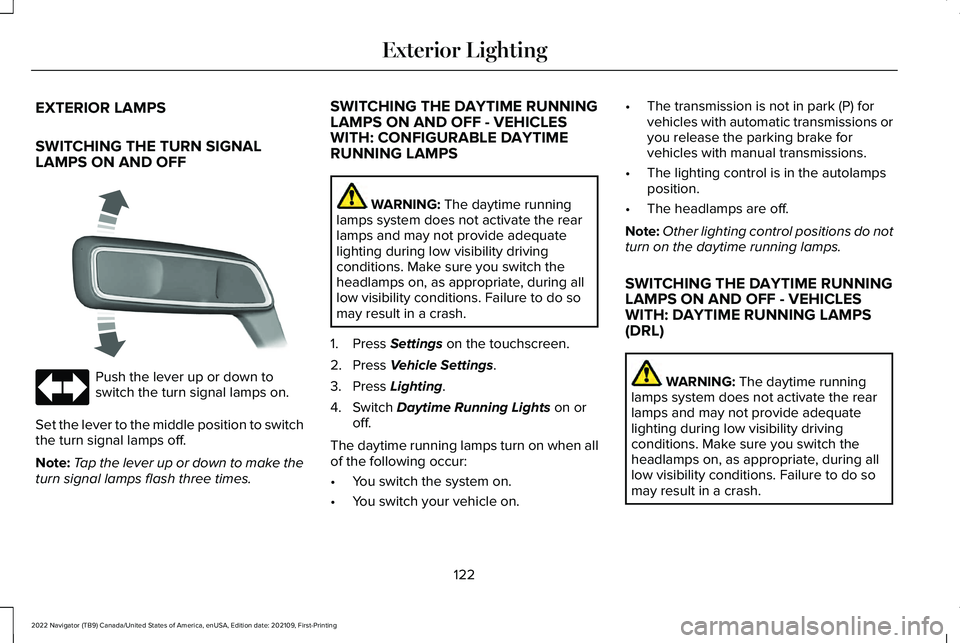
LAMPS ON AND OFF
Push the lever up or down to
switch the turn signal lamps on.
Set the lever to the middle position to switch
the turn signal lamps off.
Note: Tap the lever up or down to make the
turn signal lamps flash three times. SWITCHING THE DAYTIME RUNNING
LAMPS ON AND OFF - VEHICLES
WITH: CONFIGURABLE DAYTIME
RUNNING LAMPS WARNING: The daytime running
lamps system does not activate the rear
lamps and may not provide adequate
lighting during low visibility driving
conditions. Make sure you switch the
headlamps on, as appropriate, during all
low visibility conditions. Failure to do so
may result in a crash.
1. Press
Settings on the touchscreen.
2. Press
Vehicle Settings.
3. Press
Lighting.
4. Switch
Daytime Running Lights on or
off.
The daytime running lamps turn on when all
of the following occur:
• You switch the system on.
• You switch your vehicle on. •
The transmission is not in park (P) for
vehicles with automatic transmissions or
you release the parking brake for
vehicles with manual transmissions.
• The lighting control is in the autolamps
position.
• The headlamps are off.
Note: Other lighting control positions do not
turn on the daytime running lamps.
SWITCHING THE DAYTIME RUNNING
LAMPS ON AND OFF - VEHICLES
WITH: DAYTIME RUNNING LAMPS
(DRL) WARNING:
The daytime running
lamps system does not activate the rear
lamps and may not provide adequate
lighting during low visibility driving
conditions. Make sure you switch the
headlamps on, as appropriate, during all
low visibility conditions. Failure to do so
may result in a crash.
122
2022 Navigator (TB9) Canada/United States of America, enUSA, Edition date: 202109, First-Printing Exterior Lighting E273180