warning LINCOLN NAVIGATOR 2023 Owners Manual
[x] Cancel search | Manufacturer: LINCOLN, Model Year: 2023, Model line: NAVIGATOR, Model: LINCOLN NAVIGATOR 2023Pages: 660, PDF Size: 14.04 MB
Page 230 of 660
Note:Your vehicle could have side stepsthat can become damaged, due to reducedground clearance, when taking your vehicleoff-road. Remove side steps before drivingyour vehicle off-road.
SELECTING A FOUR-WHEEL DRIVE
MODE
To select a specific four-wheel drive modeplease select one of the desired drivemodes. For additional information. SeeSelecting a Drive Mode (page 295).
Note:When shifting to and from four-wheeldrive, a message appears in the instrumentcluster display indicating that the system isin the process of making a shift.
Note:Do not perform this operation if therear wheels are slipping or while applyingthe accelerator pedal.
If the system detects a fault, a warningmessage appears in the instrument clusterdisplay. See Four-Wheel Drive –Information Messages (page 228).
Note:Do not use DEEP CONDITIONS orSLOW CLIMB on dry, hard surfaced roads.Doing so produces excessive noise,increases tire wear and may damage drivecomponents. The 4X4 system in thesemodes is only intended for consistentlyslippery or loose surfaces.
Shifting to or from Slow Climb (4L)
To select or exit SLOW CLIMB (4L):
1.Bring your vehicle to a speed of 3 mph(5 km/h) or less.
2.Place the transmission in neutral (N).
3.Select SLOW CLIMB on the drive modeswitch.
A message appears in the instrument clusterdisplay indicating a four-wheel drive shift isin progress. If any of the above shiftconditions are not present, the shift will notoccur and a message appears in theinstrument cluster display guiding youthrough the proper shifting procedures. Ifthere is a transfer case tooth blockage, amessage appears in the instrument cluster
display. To alleviate this condition, place thetransmission in a forward gear, move yourvehicle forward approximately 4.9 ft (1.5 m),and shift the transmission back to neutral (N)to allow the transfer case to complete therange shift.
Note:You could hear some noise as thesystem shifts or engages which is normal. Ifthe system detects a fault, a warningmessage appears in the instrument clusterdisplay. See Four-Wheel Drive –Information Messages (page 228).
FOUR-WHEEL DRIVE MODES
TWO-WHEEL DRIVE HIGH
2H turns on when you select NORMAL orCONSERVE. Two-wheel drive high is forgeneral on-road driving. Power is sent to therear wheels only.
Note:Two-wheel drive high can turn on oroff based on Drive Mode selection See DriveMode Control (page 294).
226
2023 Navigator (TB9) Canada/United States of America, enUSA, Edition date: 202207, DOMFour-Wheel Drive (If Equipped)
Page 231 of 660
FOUR-WHEEL DRIVE AUTO
4A turns on when you select EXCITE,NORMAL 4x4 AUTO or SLIPPERY.Four-wheel drive auto provides electronicallycontrolled four-wheel drive power to boththe front and rear wheels, as required, forincreased traction in varying on-roadconditions. The four-wheel drive auto tuningvaries based on selected Drive Mode. SeeSelecting a Drive Mode (page 295).
Note:Four-wheel drive auto can turn on oroff automatically based on Drive Modeselection. See Selecting a Drive Mode (page295).
FOUR-WHEEL DRIVE HIGH
4H turns on when you select DEEPCONDITIONS. Four-wheel drive highprovides electronically locked four-wheeldrive power to both the front and rear wheelsfor use in off-road or winter conditions suchas deep snow, sand or mud. This mode isnot for use on dry pavement.
Note:Four-wheel drive high can turn on oroff automatically based on Drive Modeselection. See Selecting a Drive Mode (page295).
FOUR-WHEEL DRIVE LOW
This mode turns on when you select SLOWCLIMB. It provides electronically lockedfour-wheel drive power to both the front andrear wheels for use on low traction surfaces,and does so with additional gearing forincreased torque multiplication. This modeis only for off-road conditions, such as deepsand, steep slopes, or pulling heavy objects.
Note:Four-wheel drive low can turn on oroff automatically based on drive modeselection. See Selecting a Drive Mode (page295).
FOUR-WHEEL DRIVE INDICATORS
Two-wheel Drive High
Momentarily illuminates whentwo-wheel drive high is selected.
Four-wheel Drive Auto
Continuously illuminates whenfour-wheel drive auto is selected.
Four-wheel Drive High
Continuously illuminates whenfour-wheel drive high is selected.
Four-wheel Drive Low (If Equipped)
Continuously illuminates whenfour-wheel drive low is selected.
FOUR-WHEEL DRIVE –
TROUBLESHOOTING
FOUR-WHEEL DRIVE – WARNINGLAMPS
Illuminates when a four-wheeldrive or power train fault ispresent.
227
2023 Navigator (TB9) Canada/United States of America, enUSA, Edition date: 202207, DOMFour-Wheel Drive (If Equipped)E181778 E181781 E181779 E181780
Page 232 of 660
Note:When a system fault is present, thesystem can typically remain in whichevermode was selected prior to the faultcondition occurring. It does not default totwo-wheel drive in all circumstances. Whenthis warning is displayed, have your vehicleserviced by an authorized dealer.
FOUR-WHEEL DRIVE – INFORMATION MESSAGES
ActionMessage
A four-wheel drive system fault is present. Have your vehicle checkedas soon as possible.Check 4x4
The four-wheel drive system is making a shift.4x4 Shift in Progress
Displays when you attempt to switch to four-wheel drive low modeand you do not shift the transmission to neutral (N).For 4x4 LOW Shift to N
Displays when you attempt to switch to four-wheel drive low modeand your vehicle's speed is greater than 3 mph (5 km/h).For 4x4 LOW Slow to 3 MPH
For 4x4 LOW Slow to 5 km/h
Displays when you attempt to switch from four-wheel drive low modeand you do not shift the transmission to neutral (N).To Exit 4x4 LOW Shift to N
Displays when you attempt to switch from four-wheel drive low modeand your vehicle's speed is greater than 3 mph (5 km/h).To Exit 4x4 LOW Slow to 3 MPH
To Exit 4x4 LOW Slow to 5 km/h
228
2023 Navigator (TB9) Canada/United States of America, enUSA, Edition date: 202207, DOMFour-Wheel Drive (If Equipped)
Page 234 of 660
WHAT IS THE ELECTRONIC
LIMITED-SLIP DIFFERENTIAL
The electronic limited-slip differential systemdirects torque across the axle, enabling thevehicle to drive over terrain and roadconditions that a conventional axle cannot.The system is active at all times and requiresno input from the driver.
Note:If your vehicle is not at optimaloperating conditions or a system fault ispresent, a warning may display in theinstrument cluster. Depending on thewarning, you may need to service yourvehicle.
Operating the Electronic Limited-SlipDifferential with a Spare or MismatchedTires
If your vehicle has an electronic limited-slipdifferential, do not use a spare tire of adifferent size than the tire provided. If youhave a spare tire installed, a message mayappear indicating the system has disabledautomatically or reduced function to preventsystem overheat and damage. Werecommend you reinstall the repaired orreplaced spare tire as soon as possible.When you replace the spare tire, the systemresumes normal operation on the next keycycle.
Trailer Towing
The electronic limited-slip differentialenhances vehicle stability during trailer towoperation. During high demand traileringevents, such as steep slopes, high speedsor with a spare tire, the system may providea warning in the instrument cluster andreduce function or enter a temporarilydisabled state. To resume normal function,stop the vehicle in a safe location and allowthe unit to adequately cool. Once the systemreaches normal operating temperatures,system function restores and the electroniclimited-slip differential restored messagedisplays.
230
2023 Navigator (TB9) Canada/United States of America, enUSA, Edition date: 202207, DOMElectronic Limited-Slip Differential (If Equipped)
Page 236 of 660
BRAKE PRECAUTIONS
Wet brakes result in reduced brakingefficiency. Gently press the brake pedal afew times when leaving a car wash or drivingfrom standing water to dry the brakes.
Note:Depending on applicable laws andregulations in the country where your vehiclewas originally built, the stoplamps could flashduring heavy braking. The hazard warningflashers could also turn on when your vehiclecomes to a stop.
ANTI-LOCK BRAKING SYSTEM
ANTI-LOCK BRAKING SYSTEMLIMITATIONS
The anti-lock braking system does noteliminate the risk of crash when:
•You drive too closely to the vehicle infront of you.
•Your vehicle is hydroplaning.
•You take corners too fast.
•The road surface is poor.
Note: If the system activates, the brakepedal could pulse and travel further. Maintain pressure on the brake pedal.
BRAKE OVER ACCELERATOR
In the event the accelerator pedal becomesstuck or entrapped, apply steady and firmpressure to the brake pedal to slow thevehicle and reduce engine power. If youexperience this condition, apply the brakesand bring your vehicle to a safe stop. Movethe transmission to park (P), switch theengine off and apply the parking brake.Inspect the accelerator pedal for anyinterference. If none are found and thecondition persists, have your vehicle towedto the nearest authorized dealer.
LOCATING THE BRAKE FLUID
RESERVOIR
See Under Hood Overview (page 415).
CHECKING THE BRAKE FLUID
WARNING: Do not use any fluid otherthan the recommended brake fluid as thiswill reduce brake efficiency. Use ofincorrect fluid could result in the loss ofvehicle control, serious personal injury ordeath.
WARNING: Only use brake fluid froma sealed container. Contamination with dirt,water, petroleum products or othermaterials may result in brake systemdamage or failure. Failure to adhere to thiswarning could result in the loss of vehiclecontrol, serious personal injury or death.
WARNING: Do not allow the fluid totouch your skin or eyes. If this happens,rinse the affected areas immediately withplenty of water and contact your physician.
WARNING: The brake system couldbe affected if the brake fluid level is belowthe MIN mark or above the MAX mark onthe brake fluid reservoir.
232
2023 Navigator (TB9) Canada/United States of America, enUSA, Edition date: 202207, DOMBrakes
Page 237 of 660
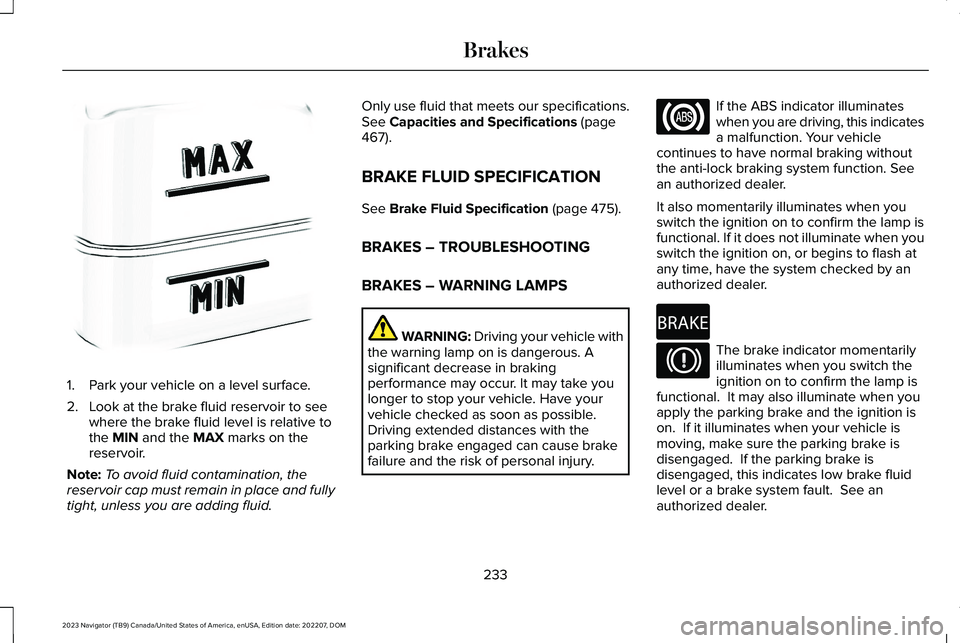
1.Park your vehicle on a level surface.
2.Look at the brake fluid reservoir to seewhere the brake fluid level is relative tothe MIN and the MAX marks on thereservoir.
Note:To avoid fluid contamination, thereservoir cap must remain in place and fullytight, unless you are adding fluid.
Only use fluid that meets our specifications.See Capacities and Specifications (page467).
BRAKE FLUID SPECIFICATION
See Brake Fluid Specification (page 475).
BRAKES – TROUBLESHOOTING
BRAKES – WARNING LAMPS
WARNING: Driving your vehicle withthe warning lamp on is dangerous. Asignificant decrease in brakingperformance may occur. It may take youlonger to stop your vehicle. Have yourvehicle checked as soon as possible.Driving extended distances with theparking brake engaged can cause brakefailure and the risk of personal injury.
If the ABS indicator illuminateswhen you are driving, this indicatesa malfunction. Your vehiclecontinues to have normal braking withoutthe anti-lock braking system function. Seean authorized dealer.
It also momentarily illuminates when youswitch the ignition on to confirm the lamp isfunctional. If it does not illuminate when youswitch the ignition on, or begins to flash atany time, have the system checked by anauthorized dealer.
The brake indicator momentarilyilluminates when you switch theignition on to confirm the lamp isfunctional. It may also illuminate when youapply the parking brake and the ignition ison. If it illuminates when your vehicle ismoving, make sure the parking brake isdisengaged. If the parking brake isdisengaged, this indicates low brake fluidlevel or a brake system fault. See anauthorized dealer.
233
2023 Navigator (TB9) Canada/United States of America, enUSA, Edition date: 202207, DOMBrakesE170684 E67020 E270480 E67024
Page 239 of 660
WHAT IS THE ELECTRIC PARKING
BRAKE
The electric parking brake is used to holdyour vehicle on slopes and flat roads.
APPLYING THE ELECTRIC
PARKING BRAKE
WARNING: Always fully apply theparking brake. Failure to follow thisinstruction could result in personal injuryor death.
WARNING: If you drive extendeddistances with the parking brake applied,you could cause damage to the brakesystem.
The electric parking brake switchis on the center console.
Pull the switch up to apply the electricparking brake. The red warning lamp flashes,then steadily illuminates when the parkingbrake is applied.
Note:You can apply the electric parkingbrake when the ignition is off.
Note:The electric parking brake could applywhen park (P) is selected. See Park (P) (page220).
APPLYING THE ELECTRIC
PARKING BRAKE IN AN
EMERGENCY
You can use the electric parking brake toslow or stop your vehicle in an emergency.
Pull the switch up and hold it.
The red warning lamp illuminates, a tonesounds and the stoplamps turn on when youuse the electric parking brake in anemergency.
The electric parking brake continues to slowyour vehicle down unless you release theswitch.
Note:Do not apply the electric parking brakewhen your vehicle is moving, except in anemergency. If you repeatedly use the electricparking brake to slow or stop your vehicle,you could cause damage to the brakesystem.
MANUALLY RELEASING THE
ELECTRIC PARKING BRAKE
1.Switch the ignition on.
2.Press and hold the brake pedal.
3.Push the switch down.
The red warning lamp turns off.
Pulling Away on a Hill When Towing aTrailer
1.Press and hold the brake pedal.
2.Pull the switch upward and hold it.
3.Shift into gear.
4.Press the accelerator pedal until enginehas developed sufficient torque toprevent your vehicle from rolling downthe hill.
235
2023 Navigator (TB9) Canada/United States of America, enUSA, Edition date: 202207, DOMElectric Parking BrakeE267156
Page 240 of 660
5.Release the switch and pull away in anormal manner.
AUTOMATICALLY RELEASING THE
ELECTRIC PARKING BRAKE
1.Close the driver door.
2.Shift into gear.
3.Press the accelerator pedal and pull awayin a normal manner.
ELECTRIC PARKING BRAKE
AUDIBLE WARNING
Sounds when the parking brake is on andyour vehicle is moving. If the warning tonecontinues after you have released theparking brake, this indicates a malfunction.Have your vehicle checked as soon aspossible.
RELEASING THE ELECTRIC
PARKING BRAKE IF THE VEHICLE
BATTERY HAS RUN OUT OF
CHARGE
WARNING: The electric parkingbrake does not operate if the vehiclebattery has run out of charge.
Connect a booster battery to the vehiclebattery to release the electric parking brakeif the vehicle battery has run out of charge.See Jump Starting the Vehicle (page 391).
ELECTRIC PARKING BRAKE –
TROUBLESHOOTING
ELECTRIC PARKING BRAKE –WARNING LAMPS
Brake System
It illuminates red when you applythe parking brake and your vehicleis on. If the lamp flashes when theparking brake has been released,this indicates the parking brakesystem requires service. Have your vehiclechecked as soon as possible.
Note:Lamps may vary depending on region.
Electric Parking Brake
When the lamp illuminates yellow,it indicates a malfunction in theelectric parking brake. Have yourvehicle checked as soon as possible.
Note:Lamps may vary depending on region.
236
2023 Navigator (TB9) Canada/United States of America, enUSA, Edition date: 202207, DOMElectric Parking BrakeE270480 E67024 E67024 E146190
Page 242 of 660
WHAT IS REVERSE BRAKING
ASSIST
Lincoln Reverse Brake Assist
The system uses sensors on the rear of yourvehicle to detect a possible collision andapplies the brakes to either reduce thedamage from impact, or to assist in avoidingthe collision.
HOW DOES REVERSE BRAKING
ASSIST WORK
Reverse braking assist functions when inreverse (R) and traveling at a speed of1–7 mph (2–12 km/h).
If the system detects an obstacle behind yourvehicle, it provides a warning through therear parking aid or cross traffic alert system.
REVERSE BRAKING ASSIST
PRECAUTIONS
WARNING: You are responsible forcontrolling your vehicle at all times. Thesystem is designed to be an aid and doesnot relieve you of your responsibility todrive with due care and attention. Failureto follow this instruction could result in theloss of control of your vehicle, personalinjury or death.
WARNING: To help avoid personalinjury, always use caution when in reverse(R) and when using the sensing system.
WARNING: The system may notoperate properly during severe weatherconditions, for example snow, ice, heavyrain and spray. Always drive with due careand attention. Failure to take care mayresult in a crash.
WARNING: Traffic control systems,fluorescent lamps, inclement weather, airbrakes, external motors and fans mayaffect the correct operation of the sensingsystem. This may cause reducedperformance or false alerts.
WARNING: Some situations andobjects prevent hazard detection. Forexample low or direct sunlight, inclementweather, unconventional vehicle types, andpedestrians. Apply the brakes whennecessary. Failure to follow this instructioncould result in the loss of control of yourvehicle, personal injury or death.
WARNING: Do not use the systemwith accessories that extend beyond thefront or rear of your vehicle, for example atrailer hitch or bike rack. The system is notable to make corrections for the additionallength of the accessories.
238
2023 Navigator (TB9) Canada/United States of America, enUSA, Edition date: 202207, DOMReverse Braking Assist (If Equipped)
Page 243 of 660

The system only applies the brakes for ashort period of time when an event occurs.Act as soon as you notice the brakes applyto remain in control of the vehicle. If you donot intervene the vehicle may start to moveagain.
Note:Certain add-on devices around thebumper or fascia may create false alerts. Forexample, large trailer hitches, bicycle orsurfboard racks, license plate brackets,bumper covers or any other device that mayblock the normal detection zone of thesystem. Remove the add-on device toprevent false alerts.
Note:The system does not react to small ormoving objects, particularly those close tothe ground.
Note:The system does not operate duringhard acceleration or steering.
Note:If your vehicle sustains damage to thebumper or fascia leaving it misaligned orbent, it could alter the sensing zone causinginaccurate measurement of obstacles orfalse alerts.
Note:Vehicle loading and suspensionchanges can impact the angle of the sensorsand may change the normal detection zoneof the system resulting in inaccuratemeasurement of obstacles or false alerts.
Note:When you connect a trailer, the systemmay detect the trailer and provide an alert,or the system turns off. If the system doesnot turn off, manually switch the system offafter you connect the trailer.
Note:You may experience reduced systemperformance on road surfaces that limitdeceleration. For example, roads with ice,loose gravel, mud or sand.
SWITCHING REVERSE BRAKING
ASSIST ON AND OFF
1.Press Features on the touchscreen.
2.Press Driver Assistance.
3.Switch Reverse Brake Assist on or off.
Note:The system is unavailable when therear parking aid, cross traffic alert or tractioncontrol is off.
Note:If your vehicle is not equipped withcross traffic alert the reverse braking assistrelies on input from the rear parking aid andrear camera sensors.
Note:The default setting is on in someregions.
OVERRIDING REVERSE BRAKING
ASSIST
There could be instances when unexpectedor unwanted braking occurs. Firmly pressingthe accelerator pedal or switching the featureoff overrides the system.
REVERSE BRAKING ASSIST
INDICATORS
If the system determines that a collision withan obstacle may occur, full braking mayapply.
A message and warning indicatorappear when the system appliesthe brakes.
239
2023 Navigator (TB9) Canada/United States of America, enUSA, Edition date: 202207, DOMReverse Braking Assist (If Equipped)E293490