warning LINCOLN NAVIGATOR 2023 Owners Manual
[x] Cancel search | Manufacturer: LINCOLN, Model Year: 2023, Model line: NAVIGATOR, Model: LINCOLN NAVIGATOR 2023Pages: 660, PDF Size: 14.04 MB
Page 286 of 660
LANE CENTERING INDICATORS
Illuminates when you switch lanecentering on. The color of theindicator changes to indicate thesystem status.
Gray status indicates the system is on but instandby mode.
Green status indicates the system is enabledand applying steering assistance to keep thevehicle in the center of the lane.
Amber status with an audible tone, that thenchanges to gray status, indicates a systemautomatic cancellation.
INTELLIGENT ADAPTIVE CRUISE
CONTROL
HOW DOES INTELLIGENT ADAPTIVECRUISE CONTROL WORK
Lincoln Co-Pilot 360 and 360+
Intelligent adaptive cruise control combinesspeed sign recognition with adaptive cruisecontrol to adjust the cruise set speed to thespeed limit detected by the speed signrecognition system. As the system detectsnew speed signs, the set speed updates.
There are limitations that affect the accuracyof the speed sign recognition system and itsability to determine the current speed limit.The intelligent adaptive cruise control systemand its ability to determine the current speedlimit shares these limitations. See SpeedSign Recognition (page 332).
Note:The adaptive cruise control gap settingoperates normally.
INTELLIGENT ADAPTIVE CRUISECONTROL PRECAUTIONS
WARNING: You are responsible forcontrolling your vehicle at all times. Thesystem is designed to be an aid and doesnot relieve you of your responsibility todrive with due care and attention. Failureto follow this instruction could result in theloss of control of your vehicle, personalinjury or death.
INTELLIGENT ADAPTIVE CRUISECONTROL REQUIREMENTS
Traffic sign recognition must be enabled forintelligent adaptive cruise control to beactive.
INTELLIGENT ADAPTIVE CRUISECONTROL LIMITATIONS
The speed limit information provided by thenavigation map data could be inaccurate orout of date.
282
2023 Navigator (TB9) Canada/United States of America, enUSA, Edition date: 202207, DOMAdaptive Cruise ControlE297977
Page 287 of 660
The system may not detect and read speedlimit signs with conditional information, forexample, when a sign is flashing, duringspecific time ranges, or when children arepresent.
Note:The system does not set the vehiclespeed to speed limits shown with asupplementary traffic sign.
Under certain conditions, the system maynot adjust the vehicle speed until after yourvehicle passes the speed limit.
SWITCHING INTELLIGENT MODE ONAND OFF
1.Press Features on the touchscreen.
2.Press Driver Assistance.
3.Press Cruise Control.
4.Press Speed Sign Recognition.
ADJUSTING THE SET SPEEDTOLERANCE
1.Press Features on the touchscreen.
2.Press Driver Assistance.
3.Press Cruise Control.
4.Press Adaptive Cruise Control.
5.Press Speed Sign Recognition.
6.Press Tolerance.
7.Use + and - to set the tolerance.
Note:You cannot set the tolerance morethan 20 mph (30 km/h) above or below therecognized speed.
INTELLIGENT ADAPTIVE CRUISECONTROL ALERTS
If you increase the set speed beyond thespeed limit or speed limit plus a positivetolerance value, the set speed indicatorflashes.
The warning does not occur if:
•You override the set speed using theaccelerator pedal.
•The vehicle speed exceeds the set speeddue to being on a downhill slope.
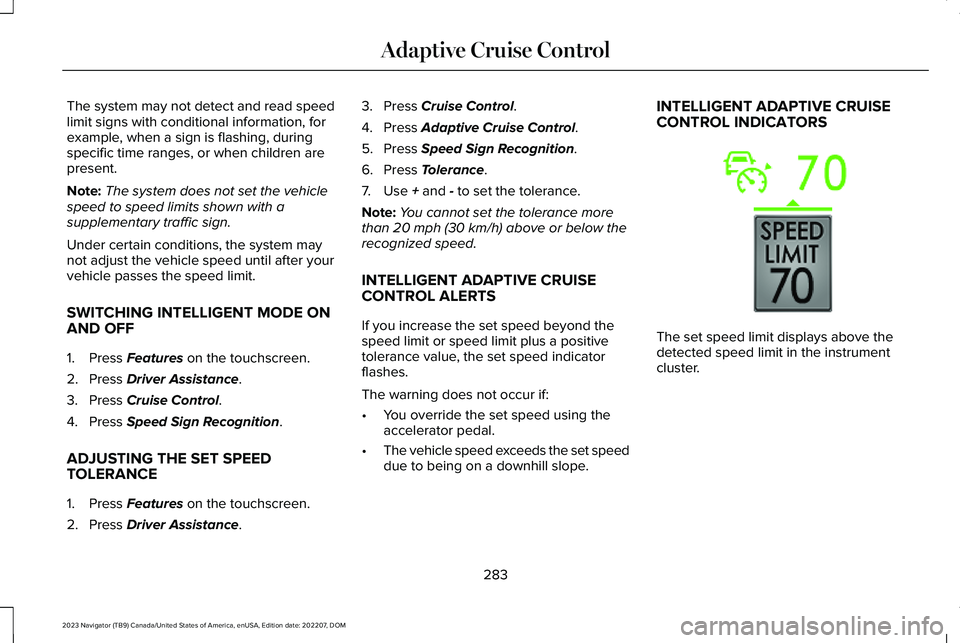
INTELLIGENT ADAPTIVE CRUISECONTROL INDICATORS
The set speed limit displays above thedetected speed limit in the instrumentcluster.
283
2023 Navigator (TB9) Canada/United States of America, enUSA, Edition date: 202207, DOMAdaptive Cruise ControlE353883
Page 289 of 660
ADAPTIVE CRUISE CONTROL –INFORMATION MESSAGES - VEHICLESWITH: STOP AND GO
Note:Depending on your vehicle optionsand instrument cluster type, not all messagesdisplay or are available.
Note:The system could abbreviate orshorten certain messages depending uponwhich cluster type you have.
ActionMessage
A malfunction is preventing the adaptive cruise from engaging.Adaptive Cruise Malfunction
Front Sensor Not AlignedContact an authorized dealer to have the radar checked for proper coverage and operation.
Conditions exist preventing the system from being available.Adaptive Cruise Not Available
You have a blocked radar because of poor radar visibility due to inclement weather or ice, mud,or water in front of the radar. You can typically clean the sensor to resolve this.Adaptive Cruise Not Available SensorBlocked See ManualDue to the nature of radar technology, it is possible to get a blockage warning with no actualblock. This happens, for example, when driving in sparse rural or desert environments. A falseblocked condition either self clears, or clears after you restart your vehicle.
You have selected normal cruise control. The system does not brake or react to traffic.Normal Cruise Active Adaptive Braking Off
Displays when the adaptive cruise control is going to cancel and you must take control.Adaptive Cruise - Driver Resume Control
Displays when the vehicle speed is too slow to activate the adaptive cruise control and there isno lead vehicle in range.Adaptive Cruise Speed Too Low toActivate
285
2023 Navigator (TB9) Canada/United States of America, enUSA, Edition date: 202207, DOMAdaptive Cruise Control
Page 291 of 660
Appropriate position, camera can see theface.
For the most optimal experience from thedriver facing camera:
•Make sure to not wear any facialcoverings.
•Raise the seating position and/or lowerthe steering column so your face is seenby the driver facing camera.
•Avoid leaning the seat back so the driverfacing camera can see your face.
•Avoid using infrared blocking sunglasses.
•Make sure your hands, arms or otherobjects are not blocking the driver facingcamera.
Note:When ActiveGlide is active, in certaincrash or near crash-like situations, such asan air bag deployment or hitting a roadobstacle, camera data may record throughthe vehicle event data recorder. See EventData (page 26).
Note:No data records under normal drivingconditions.
ACTIVEGLIDE™ PRECAUTIONS
WARNING: You are responsible forkeeping your eyes on the road at all times.The system is designed to be an aid anddoes not relieve you of your responsibilityto drive with due care and attention. Failureto follow this instruction could result in theloss of control of your vehicle, personalinjury or death.
WARNING: You are responsible forcontrolling your vehicle at all times. Thesystem is designed to be an aid and doesnot relieve you of your responsibility todrive with due care and attention. Failureto follow this instruction could result in theloss of control of your vehicle, personalinjury or death.
WARNING: Do not use the systemwhen towing a trailer. Failure to follow thisinstruction could result in the loss ofcontrol of your vehicle, personal injury ordeath.
WARNING: Obstructions to the driverfacing camera or infrared lighting couldprevent the system from properlyoperating. Keep the camera and lightingareas free from obstruction. Failure tofollow this instruction could result in theloss of control of your vehicle, personalinjury or death.
WARNING: Do not use the system ifany changes or modifications to thesteering wheel have been made. Anychanges or modifications to the steeringwheel could affect the functionality orperformance of the system. Failure tofollow this instruction could result in theloss of control of your vehicle, personalinjury or death.
WARNING: The system may notfunction if the sensor is blocked.
287
2023 Navigator (TB9) Canada/United States of America, enUSA, Edition date: 202207, DOMActiveGlide™ (If Equipped)
Page 292 of 660
WARNING: Pay close attention tochanging road conditions such as enteringor leaving a highway, on roads withintersections or roundabouts, roadswithout visible lanes of travel, roads thatare winding, slippery, unpaved, or steepslopes.
WARNING: The system is not a crashwarning or avoidance system.
WARNING: Large contrasts in outsidelighting can limit sensor performance.
WARNING: The system attempts tokeep your vehicle in the center of the laneas well as maintain speed and gap control.The system may not be able to performthese tasks in all situations. Do not use thesystem in complex or uncertain drivingconditions. Failure to follow this instructioncould result in the loss of control of yourvehicle, personal injury or death.
WARNING: Your vehicle could driftout of the lane of travel. Always beprepared to manually steer your vehicle.Failure to follow this instruction could resultin the loss of control of your vehicle,personal injury or death.
WARNING: The system will notoperate if the sensor cannot track the roadlane markings.
ACTIVEGLIDE™ REQUIREMENTS
ActiveGlide only activates when all of thefollowing occur:
•ActiveGlide is enabled in yourtouchscreen. See ActiveGlide™ Settings(page 289).
•Adaptive cruise control is on.
•The system detects both lane markings.
•Your hands are on the steering wheel.
•Your eyes are on the road.
Note:The system must meet certain locationrequirements for the hands-free mode ofActiveGlide to work.
Note:The system may require softwareupdates for hands-free mode. See VehicleSystem Reset (page 523).
ACTIVEGLIDE™ LIMITATIONS
Any of the following conditions could resultin ActiveGlide not operating correctly:
•You do not have your vehicle centeredin the lane.
•The lane is too narrow or too wide.
•The system does not detect at least onelane marking or when lanes merge orsplit.
•You have limited steering input.
•Using the system in areas underconstruction.
•If you make any aftermarket modificationsto the steering system.
•When using a spare tire.
288
2023 Navigator (TB9) Canada/United States of America, enUSA, Edition date: 202207, DOMActiveGlide™ (If Equipped)
Page 294 of 660
ACTIVEGLIDE™ ALERTS
When ActiveGlide is providing hands-ondriving or transitioning to hands-on drivingfrom hands-free driving and detects nosteering activity for a certain period of time,the system alerts you with a message in theinstrument cluster to put your hands on thesteering wheel. After the first alert, thesystem alerts you with a message in theinstrument cluster and an audible warning.
When ActiveGlide is providing hands-on orhands-free driving and detects you are notlooking at the road for a certain period oftime, the system alerts you to return youreyes to the road. Depending on where youare looking, the alert can be a message inthe instrument cluster and an audiblewarning.
If you do not react to the warnings,ActiveGlide cancels, quickly activates andreleases the brakes, and slows your vehicledown to low speeds while maintainingsteering control.
If your vehicle slows down and you resumecontrol, a message appears to prompt youto press the accelerator pedal to allow thesystem to resume.
Note:If the system detects repeatedinactivity, it disables until the next key cycle.
ACTIVEGLIDE™ AUTOMATIC
CANCELLATION
When an external condition cancelsActiveGlide, for example, no lane markingsavailable, a tone sounds and a messageappears in the instrument cluster.
If your vehicle starts to slow down,you must take control of steeringand press and release the buttonto reactivate ActiveGlide.
System cancellation can also occur if:
•The lane becomes too narrow.
•The system cannot detect valid lanemarkings.
•Lane markings cross.
•Your eyes are not on the road or yourhands are not the steering wheel.
If you have your hands on the steering wheeland your eyes are on the road when thefeature is active and a cancellation occurs,the system sounds a tone and displays acancelled graphic in the instrument cluster.
If you are not paying attention to the road oryour hands are not on the steering wheeland a cancellation occurs, the systemdisplays a message and a tone sounds untilyou resume control. If you do not resumecontrol in time, ActiveGlide quickly activatesand releases the brakes, and slows yourvehicle down to low speeds whilemaintaining steering control. If your vehicleslows down and you resume control, amessage appears to prompt you to press theaccelerator pedal to allow the system toresume.
Note:The system disables until the next keycycle if it detects repeated inactivity.
290
2023 Navigator (TB9) Canada/United States of America, enUSA, Edition date: 202207, DOMActiveGlide™ (If Equipped)E308130
Page 302 of 660
Note:: Do not use this mode when drivingon pavement or packed snow. This couldcause driveline bind up and damage thesystem depending on the four-wheel drivemode selection. See Four-Wheel Drive(page 224).
DRIVE MODE CONTROL –
TROUBLESHOOTING
DRIVE MODE CONTROL – WARNINGLAMPS
Some drive modes reduce tractionand stability control performanceand the indicator illuminates in theinstrument cluster.
DRIVE MODE CONTROL – INFORMATION MESSAGES
ActionMessage
You have selected a four-wheel drive mode that is not available inthe current drive mode. Select an available four-wheel drive mode.Selected 4x4 Mode Not Available in Current Drive Mode
298
2023 Navigator (TB9) Canada/United States of America, enUSA, Edition date: 202207, DOMDrive Mode ControlE130458
Page 304 of 660
WHAT IS THE LANE KEEPING
SYSTEM
Lincoln Co-Pilot 360 and 360+
The lane keeping system alerts you byproviding temporary steering assistance orsteering wheel vibration when it detects anunintended lane departure.
HOW DOES THE LANE KEEPING
SYSTEM WORK
The lane keeping system uses a forwardlooking camera mounted on the windshieldto monitor vehicle movement within thetravel lane.
When the camera detects a drift out of thetravel lane, the lane keeping system alertsthe driver by vibrating the steering wheel, oraids the driver by providing a small steeringinput to move the vehicle back into the travellane.
The driver can select one of three modes:
•Alert (If Equipped)
•Aid
•Alert + Aid
LANE KEEPING SYSTEM
PRECAUTIONS
WARNING: You are responsible forcontrolling your vehicle at all times. Thesystem is designed to be an aid and doesnot relieve you of your responsibility todrive with due care and attention. Failureto follow this instruction could result in theloss of control of your vehicle, personalinjury or death.
WARNING: The system will notoperate if the sensor cannot track the roadlane markings.
WARNING: The sensor mayincorrectly track lane markings as otherstructures or objects. This can result in afalse or missed warning.
WARNING: In cold and severeweather conditions the system may notfunction. Rain, snow and spray can all limitsensor performance.
WARNING: The system may notoperate properly if the sensor is blocked.Keep the windshield free from obstruction.
WARNING: If damage occurs in theimmediate area surrounding the sensor,have your vehicle checked as soon aspossible.
WARNING: The system may notcorrectly operate if your vehicle is fittedwith a suspension kit not approved by us.
WARNING: Large contrasts in outsidelighting can limit sensor performance.
300
2023 Navigator (TB9) Canada/United States of America, enUSA, Edition date: 202207, DOMLane Keeping System
Page 307 of 660
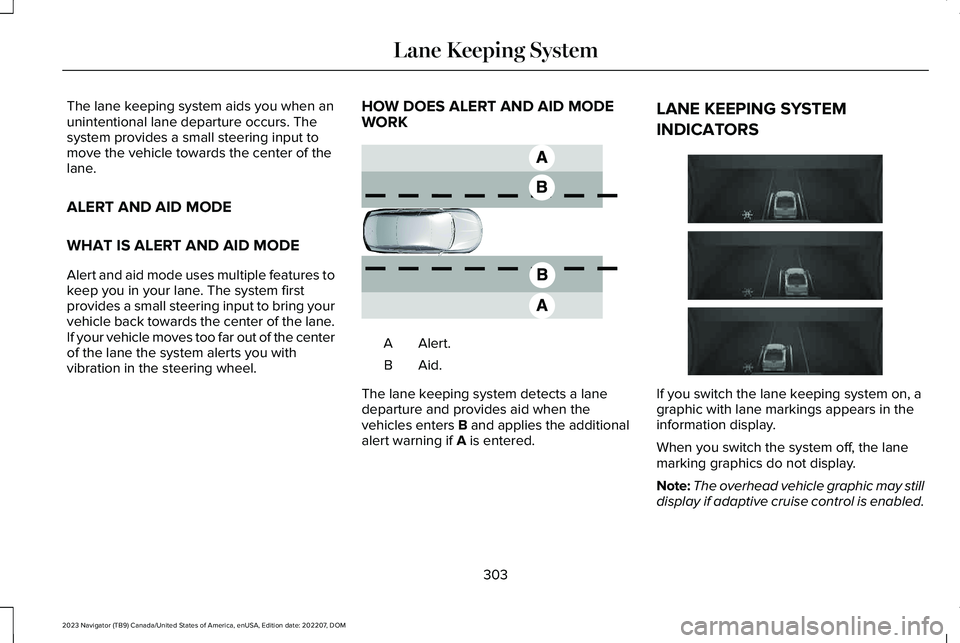
The lane keeping system aids you when anunintentional lane departure occurs. Thesystem provides a small steering input tomove the vehicle towards the center of thelane.
ALERT AND AID MODE
WHAT IS ALERT AND AID MODE
Alert and aid mode uses multiple features tokeep you in your lane. The system firstprovides a small steering input to bring yourvehicle back towards the center of the lane.If your vehicle moves too far out of the centerof the lane the system alerts you withvibration in the steering wheel.
HOW DOES ALERT AND AID MODEWORK
Alert.A
Aid.B
The lane keeping system detects a lanedeparture and provides aid when thevehicles enters B and applies the additionalalert warning if A is entered.
LANE KEEPING SYSTEM
INDICATORS
If you switch the lane keeping system on, agraphic with lane markings appears in theinformation display.
When you switch the system off, the lanemarking graphics do not display.
Note:The overhead vehicle graphic may stilldisplay if adaptive cruise control is enabled.
303
2023 Navigator (TB9) Canada/United States of America, enUSA, Edition date: 202207, DOMLane Keeping SystemE165517 E335296
Page 308 of 660
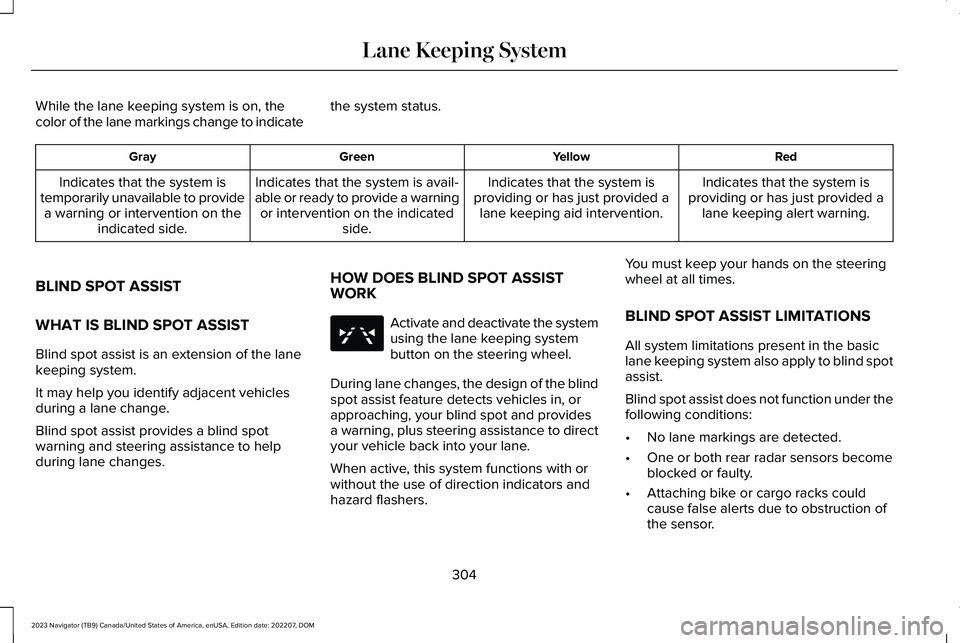
While the lane keeping system is on, thecolor of the lane markings change to indicatethe system status.
RedYellowGreenGray
Indicates that the system isproviding or has just provided alane keeping alert warning.
Indicates that the system isproviding or has just provided alane keeping aid intervention.
Indicates that the system is avail-able or ready to provide a warningor intervention on the indicatedside.
Indicates that the system istemporarily unavailable to providea warning or intervention on theindicated side.
BLIND SPOT ASSIST
WHAT IS BLIND SPOT ASSIST
Blind spot assist is an extension of the lanekeeping system.
It may help you identify adjacent vehiclesduring a lane change.
Blind spot assist provides a blind spotwarning and steering assistance to helpduring lane changes.
HOW DOES BLIND SPOT ASSISTWORK
Activate and deactivate the systemusing the lane keeping systembutton on the steering wheel.
During lane changes, the design of the blindspot assist feature detects vehicles in, orapproaching, your blind spot and providesa warning, plus steering assistance to directyour vehicle back into your lane.
When active, this system functions with orwithout the use of direction indicators andhazard flashers.
You must keep your hands on the steeringwheel at all times.
BLIND SPOT ASSIST LIMITATIONS
All system limitations present in the basiclane keeping system also apply to blind spotassist.
Blind spot assist does not function under thefollowing conditions:
•No lane markings are detected.
•One or both rear radar sensors becomeblocked or faulty.
•Attaching bike or cargo racks couldcause false alerts due to obstruction ofthe sensor.
304
2023 Navigator (TB9) Canada/United States of America, enUSA, Edition date: 202207, DOMLane Keeping SystemE334922