warning LINCOLN NAVIGATOR 2023 Repair Manual
[x] Cancel search | Manufacturer: LINCOLN, Model Year: 2023, Model line: NAVIGATOR, Model: LINCOLN NAVIGATOR 2023Pages: 660, PDF Size: 14.04 MB
Page 149 of 660
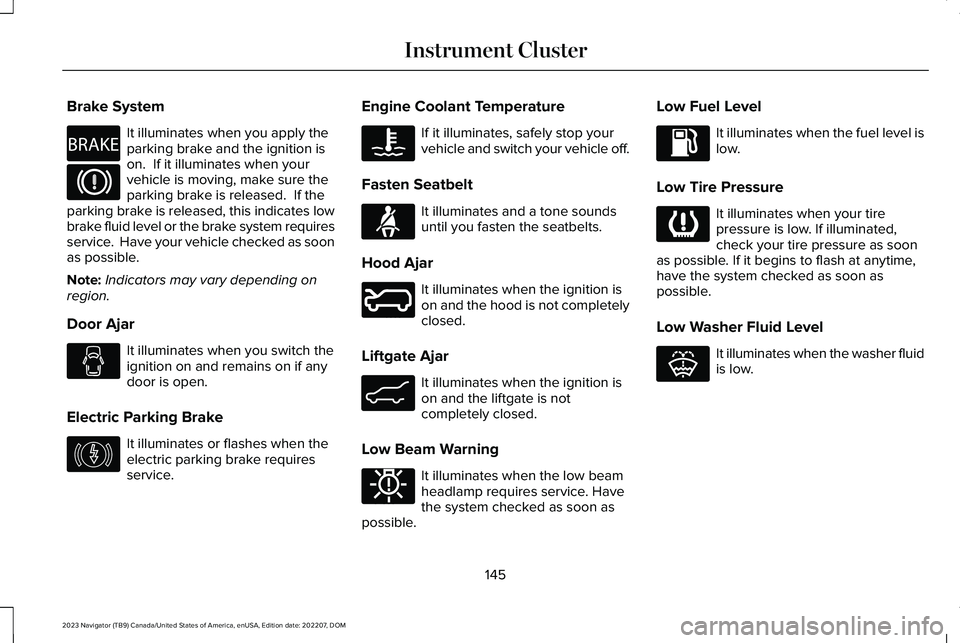
Brake System
It illuminates when you apply theparking brake and the ignition ison. If it illuminates when yourvehicle is moving, make sure theparking brake is released. If theparking brake is released, this indicates lowbrake fluid level or the brake system requiresservice. Have your vehicle checked as soonas possible.
Note:Indicators may vary depending onregion.
Door Ajar
It illuminates when you switch theignition on and remains on if anydoor is open.
Electric Parking Brake
It illuminates or flashes when theelectric parking brake requiresservice.
Engine Coolant Temperature
If it illuminates, safely stop yourvehicle and switch your vehicle off.
Fasten Seatbelt
It illuminates and a tone soundsuntil you fasten the seatbelts.
Hood Ajar
It illuminates when the ignition ison and the hood is not completelyclosed.
Liftgate Ajar
It illuminates when the ignition ison and the liftgate is notcompletely closed.
Low Beam Warning
It illuminates when the low beamheadlamp requires service. Havethe system checked as soon aspossible.
Low Fuel Level
It illuminates when the fuel level islow.
Low Tire Pressure
It illuminates when your tirepressure is low. If illuminated,check your tire pressure as soonas possible. If it begins to flash at anytime,have the system checked as soon aspossible.
Low Washer Fluid Level
It illuminates when the washer fluidis low.
145
2023 Navigator (TB9) Canada/United States of America, enUSA, Edition date: 202207, DOMInstrument ClusterE270480 E67024 E146190 E103308 E71880 E246598 E162453 E181350 E139232 E132353
Page 150 of 660
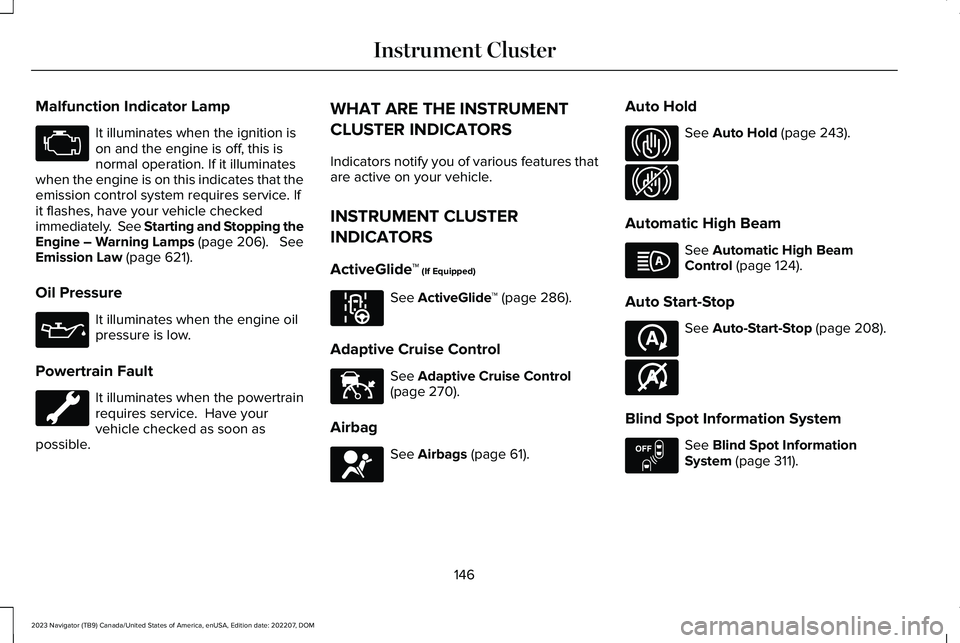
Malfunction Indicator Lamp
It illuminates when the ignition ison and the engine is off, this isnormal operation. If it illuminateswhen the engine is on this indicates that theemission control system requires service. Ifit flashes, have your vehicle checkedimmediately. See Starting and Stopping theEngine – Warning Lamps (page 206). SeeEmission Law (page 621).
Oil Pressure
It illuminates when the engine oilpressure is low.
Powertrain Fault
It illuminates when the powertrainrequires service. Have yourvehicle checked as soon aspossible.
WHAT ARE THE INSTRUMENT
CLUSTER INDICATORS
Indicators notify you of various features thatare active on your vehicle.
INSTRUMENT CLUSTER
INDICATORS
ActiveGlide™ (If Equipped)
See ActiveGlide™ (page 286).
Adaptive Cruise Control
See Adaptive Cruise Control(page 270).
Airbag
See Airbags (page 61).
Auto Hold
See Auto Hold (page 243).
Automatic High Beam
See Automatic High BeamControl (page 124).
Auto Start-Stop
See Auto-Start-Stop (page 208).
Blind Spot Information System
See Blind Spot InformationSystem (page 311).
146
2023 Navigator (TB9) Canada/United States of America, enUSA, Edition date: 202207, DOMInstrument ClusterE67028 E67022 E297977 E144524 E67017 E323448 E323449 E146105 E121377 E146361 E151262
Page 152 of 660
USING THE INSTRUMENT
CLUSTER DISPLAY CONTROLS
WARNING: Driving while distractedcan result in loss of vehicle control, crashand injury. We strongly recommend thatyou use extreme caution when using anydevice that may take your focus off theroad. Your primary responsibility is the safeoperation of your vehicle. We recommendagainst the use of any hand-held devicewhile driving and encourage the use ofvoice-operated systems when possible.Make sure you are aware of all applicablelocal laws that may affect the use ofelectronic devices while driving.
Note:Some options could appear slightlydifferent or not at all if the items are optional.
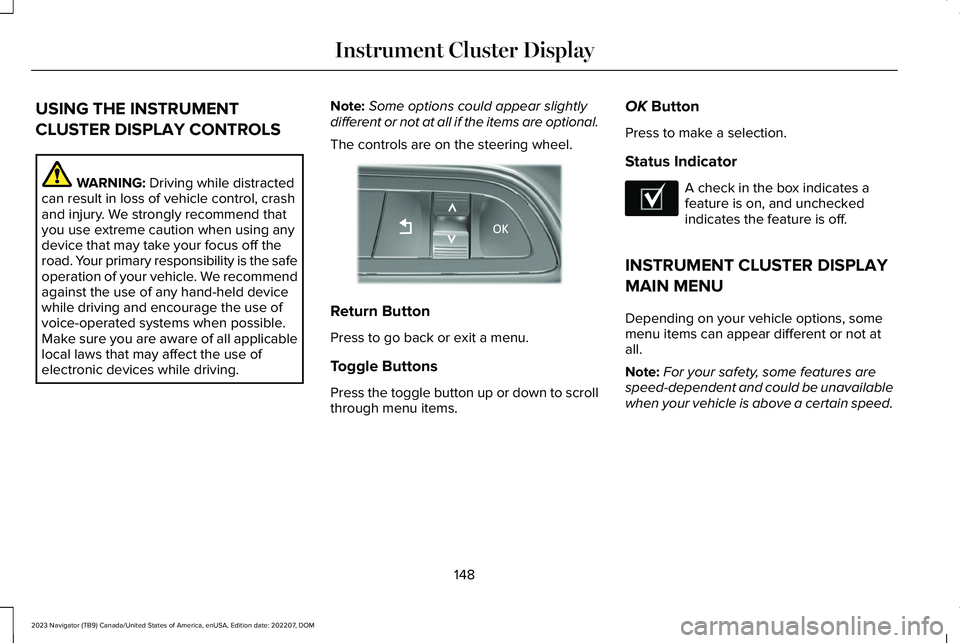
The controls are on the steering wheel.
Return Button
Press to go back or exit a menu.
Toggle Buttons
Press the toggle button up or down to scrollthrough menu items.
OK Button
Press to make a selection.
Status Indicator
A check in the box indicates afeature is on, and uncheckedindicates the feature is off.
INSTRUMENT CLUSTER DISPLAY
MAIN MENU
Depending on your vehicle options, somemenu items can appear different or not atall.
Note:For your safety, some features arespeed-dependent and could be unavailablewhen your vehicle is above a certain speed.
148
2023 Navigator (TB9) Canada/United States of America, enUSA, Edition date: 202207, DOMInstrument Cluster DisplayE357886 E204495
Page 158 of 660
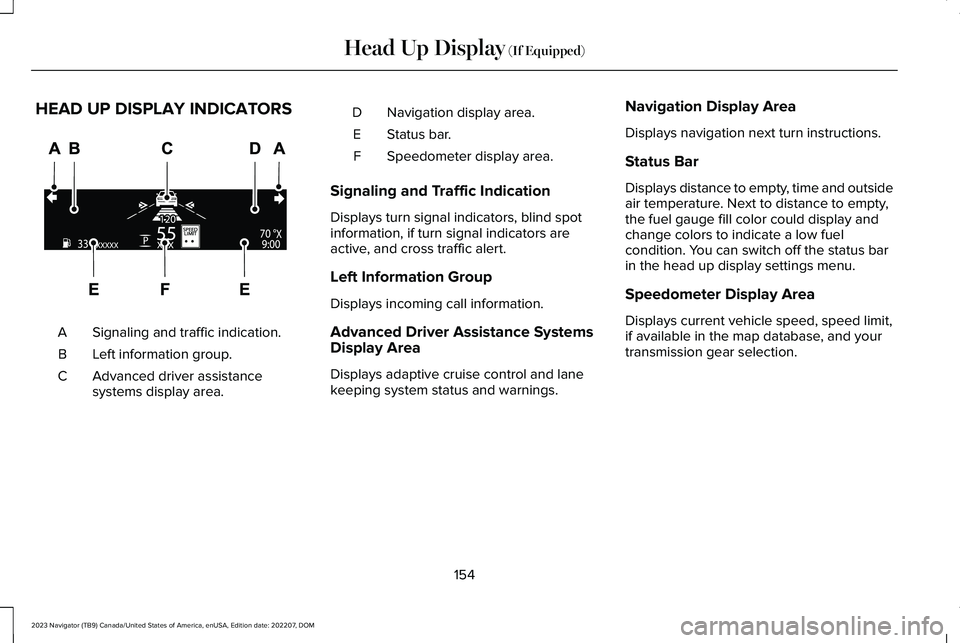
HEAD UP DISPLAY INDICATORS
Signaling and traffic indication.A
Left information group.B
Advanced driver assistancesystems display area.C
Navigation display area.D
Status bar.E
Speedometer display area.F
Signaling and Traffic Indication
Displays turn signal indicators, blind spotinformation, if turn signal indicators areactive, and cross traffic alert.
Left Information Group
Displays incoming call information.
Advanced Driver Assistance SystemsDisplay Area
Displays adaptive cruise control and lanekeeping system status and warnings.
Navigation Display Area
Displays navigation next turn instructions.
Status Bar
Displays distance to empty, time and outsideair temperature. Next to distance to empty,the fuel gauge fill color could display andchange colors to indicate a low fuelcondition. You can switch off the status barin the head up display settings menu.
Speedometer Display Area
Displays current vehicle speed, speed limit,if available in the map database, and yourtransmission gear selection.
154
2023 Navigator (TB9) Canada/United States of America, enUSA, Edition date: 202207, DOMHead Up Display (If Equipped)E355334
Page 160 of 660
WHAT IS REMOTE START
The system allows you to remotely start yourvehicle and to adjust the interior temperatureaccording to the settings that you chose.
REMOTE START PRECAUTIONS
WARNING: Do not start the enginein a closed garage or in other enclosedareas. Exhaust fumes are toxic. Alwaysopen the garage door before you start theengine. Failure to follow this instructioncould result in personal injury or death.
REMOTE START LIMITATIONS
Remote start does not work under thefollowing conditions:
•The alarm horn is sounding.
•The hood is open.
•The transmission is not in park (P).
•The ignition is on.
•The battery voltage is below theminimum operating voltage.
Note:Do not use remote start if your fuellevel is low.
Note:To use remote start with Lincoln Wayor Phone as a Key, enable the modem. SeeConnecting Lincoln Way to the Modem(page 481).
ENABLING REMOTE START
1.Press Settings on the touchscreen.
2.Press Vehicle Settings.
3.Press Remote Start Setup.
4.Switch Remote Start on or off.
Note:To remote start with Lincoln Way,make sure that the modem is enabled. SeeConnecting Lincoln Way to the Modem(page 481).
REMOTELY STARTING AND
STOPPING THE VEHICLE
Remotely Starting the Vehicle
Press the button on the remotecontrol.
Within three seconds, press thebutton on the remote control.
Within three seconds, press thebutton again.
Note:You can also use the Lincoln Way appto start the vehicle.
Note:The turn signals flash twice.
Note:The parking lamps turn on when thevehicle is running.
Note:The horn sounds if the system fails tostart.
Note:All other vehicle systems remain offwhen you have remotely started the vehicle.
156
2023 Navigator (TB9) Canada/United States of America, enUSA, Edition date: 202207, DOMRemote StartE138623 E138625
Page 171 of 660
FRONT SEAT PRECAUTIONS
WARNING: Sitting improperly, out ofposition or with the seatback reclined toofar can take weight off the seat cushionand affect the decision of the passengersensing system, resulting in serious injuryor death in the event of a crash. Always situpright against your seat back, with yourfeet on the floor.
WARNING: Do not recline the seatbackrest too far as this can cause theoccupant to slide under the seatbelt,resulting in personal injury in the event ofa crash.
WARNING: Do not place objectshigher than the top of the seat backrest.Failure to follow this instruction could resultin personal injury or death in the event ofa sudden stop or crash.
WARNING: Do not adjust the driverseat or seat backrest when your vehicle ismoving. This may result in sudden seatmovement, causing the loss of control ofyour vehicle.
SITTING IN THE CORRECT
POSITION
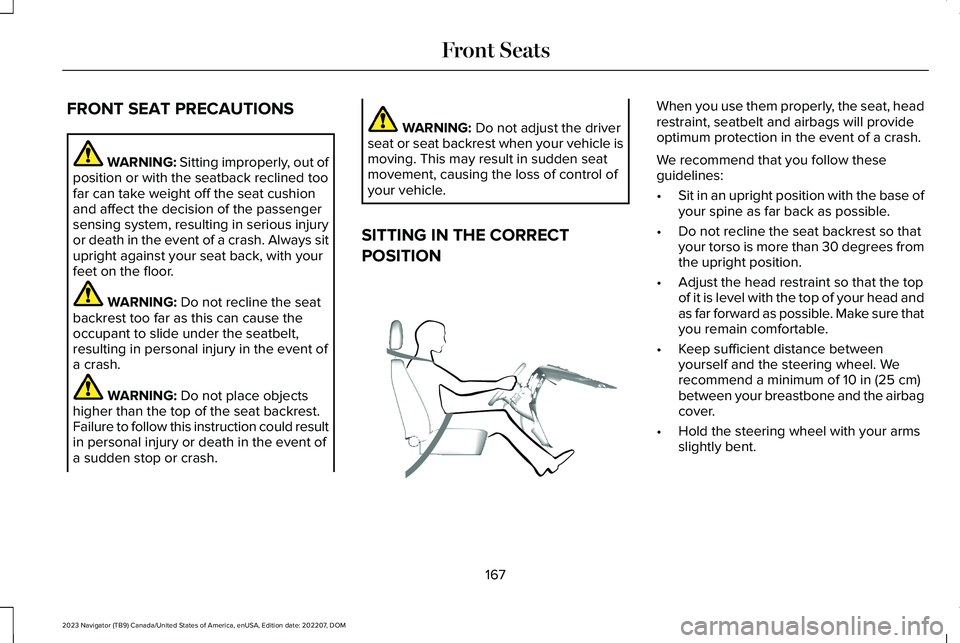
When you use them properly, the seat, headrestraint, seatbelt and airbags will provideoptimum protection in the event of a crash.
We recommend that you follow theseguidelines:
•Sit in an upright position with the base ofyour spine as far back as possible.
•Do not recline the seat backrest so thatyour torso is more than 30 degrees fromthe upright position.
•Adjust the head restraint so that the topof it is level with the top of your head andas far forward as possible. Make sure thatyou remain comfortable.
•Keep sufficient distance betweenyourself and the steering wheel. Werecommend a minimum of 10 in (25 cm)between your breastbone and the airbagcover.
•Hold the steering wheel with your armsslightly bent.
167
2023 Navigator (TB9) Canada/United States of America, enUSA, Edition date: 202207, DOMFront SeatsE68595
Page 172 of 660
•Bend your legs slightly so that you canpress the pedals fully.
•Position the shoulder strap of the seatbeltover the center of your shoulder andposition the lap strap tightly across yourhips.
Make sure that your driving position iscomfortable and that you can maintain fullcontrol of your vehicle.
POWER SEATS
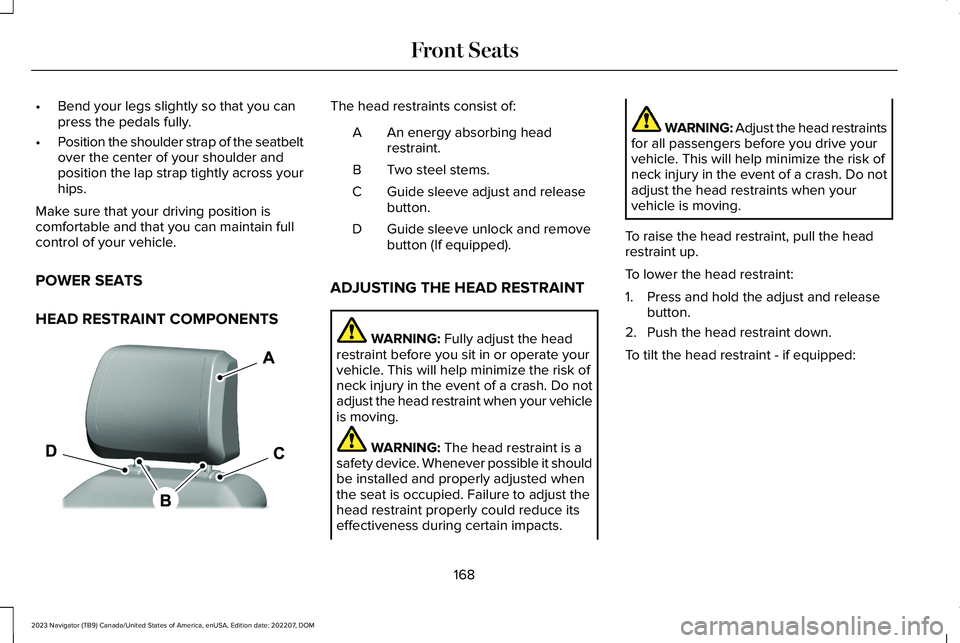
HEAD RESTRAINT COMPONENTS
The head restraints consist of:
An energy absorbing headrestraint.A
Two steel stems.B
Guide sleeve adjust and releasebutton.C
Guide sleeve unlock and removebutton (If equipped).D
ADJUSTING THE HEAD RESTRAINT
WARNING: Fully adjust the headrestraint before you sit in or operate yourvehicle. This will help minimize the risk ofneck injury in the event of a crash. Do notadjust the head restraint when your vehicleis moving.
WARNING: The head restraint is asafety device. Whenever possible it shouldbe installed and properly adjusted whenthe seat is occupied. Failure to adjust thehead restraint properly could reduce itseffectiveness during certain impacts.
WARNING: Adjust the head restraintsfor all passengers before you drive yourvehicle. This will help minimize the risk ofneck injury in the event of a crash. Do notadjust the head restraints when yourvehicle is moving.
To raise the head restraint, pull the headrestraint up.
To lower the head restraint:
1.Press and hold the adjust and releasebutton.
2.Push the head restraint down.
To tilt the head restraint - if equipped:
168
2023 Navigator (TB9) Canada/United States of America, enUSA, Edition date: 202207, DOMFront SeatsE327921
Page 175 of 660
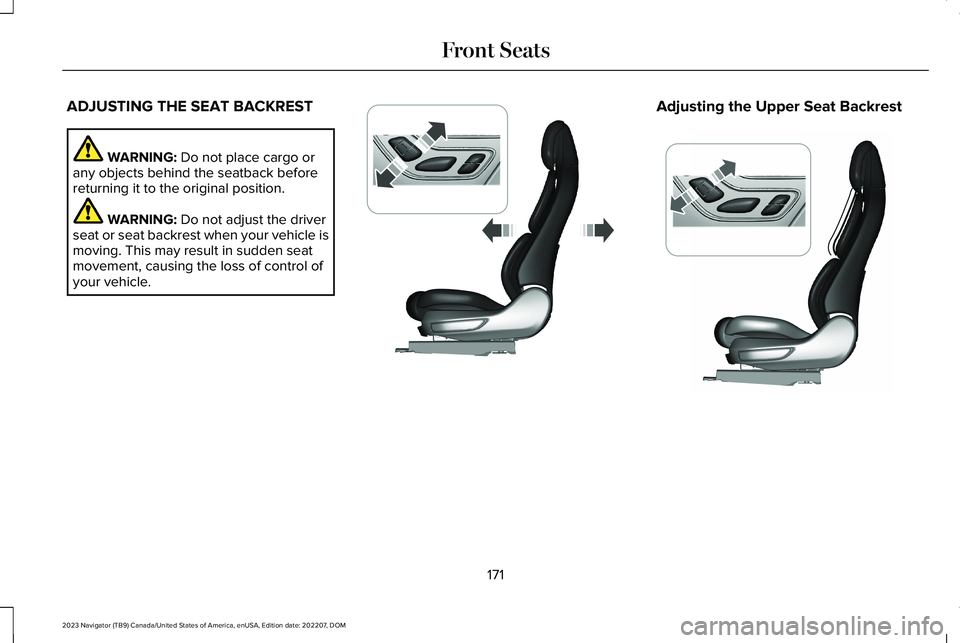
ADJUSTING THE SEAT BACKREST
WARNING: Do not place cargo orany objects behind the seatback beforereturning it to the original position.
WARNING: Do not adjust the driverseat or seat backrest when your vehicle ismoving. This may result in sudden seatmovement, causing the loss of control ofyour vehicle.
Adjusting the Upper Seat Backrest
171
2023 Navigator (TB9) Canada/United States of America, enUSA, Edition date: 202207, DOMFront SeatsE348865 E348864
Page 177 of 660
You can also adjust this feature through thetouchscreen.
HEATED SEATS
HEATED SEAT PRECAUTIONS
WARNING: Use caution when usingthe heated seat if you are unable to feelpain to your skin because of advancedage, chronic illness, diabetes, spinal cordinjury, medication, alcohol use, exhaustionor other physical conditions. The heatedseat could cause burns even at lowtemperatures, especially if used for longperiods of time. Failure to follow thisinstruction could result in personal injury.
WARNING: Do not poke sharpobjects into the seat cushion or seatbackrest. This could damage the heatedseat element and cause it to overheat.Failure to follow this instruction could resultin personal injury.
WARNING: Do not place anything onthe seat that blocks the heat, for examplea seat cover or a cushion. This could causethe seat to overheat. Failure to follow thisinstruction could result in personal injury.
Do not:
•Place heavy objects on the seat.
•Operate the heated seat if water or anyother liquid spills on the seat. Allow theseat to dry.
SWITCHING THE HEATED SEATS ONAND OFF
The vehicle must be running to use thisfeature.
Press the heated seat symbol to cyclethrough the various heat settings and off.More indicator lights indicate warmersettings.
Note:The heated seats may remain on afteryou remote start your vehicle, based on yourremote start settings. The heated seats mayalso turn on when you start your vehicle ifthey were on when you switched yourvehicle off.
Automatic Climate Controlled Seats (If
Equipped)
When you switch the auto setting on, theclimate controlled seats switch between theheated seats and ventilated seats to matchyour climate control setting.
173
2023 Navigator (TB9) Canada/United States of America, enUSA, Edition date: 202207, DOMFront SeatsE146322
Page 181 of 660
ADJUSTING THE SEAT BACKREST
WARNING: Reclining the seatbackcan cause an occupant to slide under theseat's seatbelt, resulting in severe personalinjuries in the event of a crash.
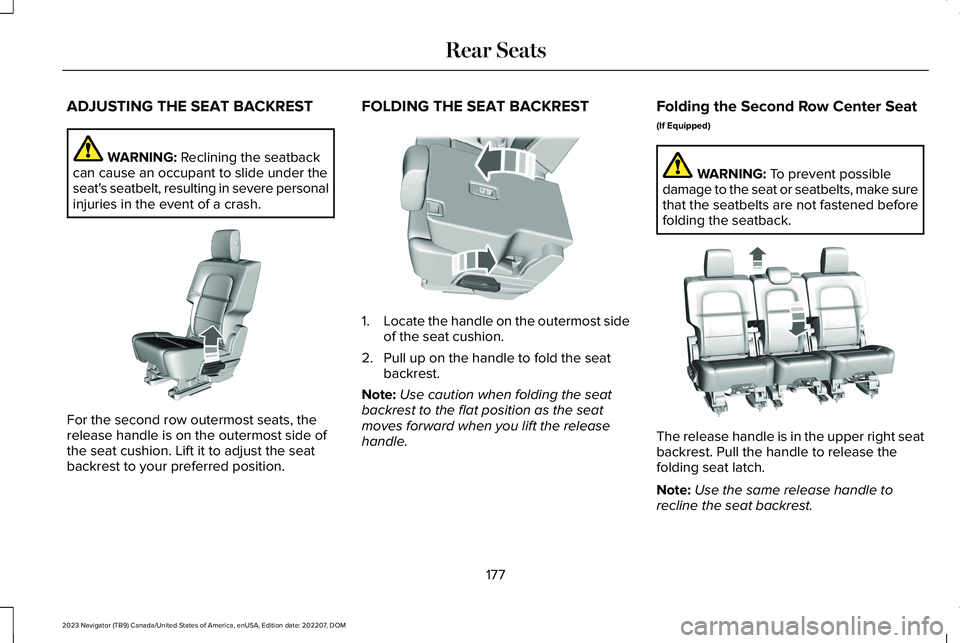
For the second row outermost seats, therelease handle is on the outermost side ofthe seat cushion. Lift it to adjust the seatbackrest to your preferred position.
FOLDING THE SEAT BACKREST
1.Locate the handle on the outermost sideof the seat cushion.
2.Pull up on the handle to fold the seatbackrest.
Note:Use caution when folding the seatbackrest to the flat position as the seatmoves forward when you lift the releasehandle.
Folding the Second Row Center Seat
(If Equipped)
WARNING: To prevent possibledamage to the seat or seatbelts, make surethat the seatbelts are not fastened beforefolding the seatback.
The release handle is in the upper right seatbackrest. Pull the handle to release thefolding seat latch.
Note:Use the same release handle torecline the seat backrest.
177
2023 Navigator (TB9) Canada/United States of America, enUSA, Edition date: 202207, DOMRear SeatsE247681 E246710 E247331