driver LINCOLN NAVIGATOR 2023 User Guide
[x] Cancel search | Manufacturer: LINCOLN, Model Year: 2023, Model line: NAVIGATOR, Model: LINCOLN NAVIGATOR 2023Pages: 660, PDF Size: 14.04 MB
Page 65 of 660
HOW DO THE FRONT AIRBAGS
WORK
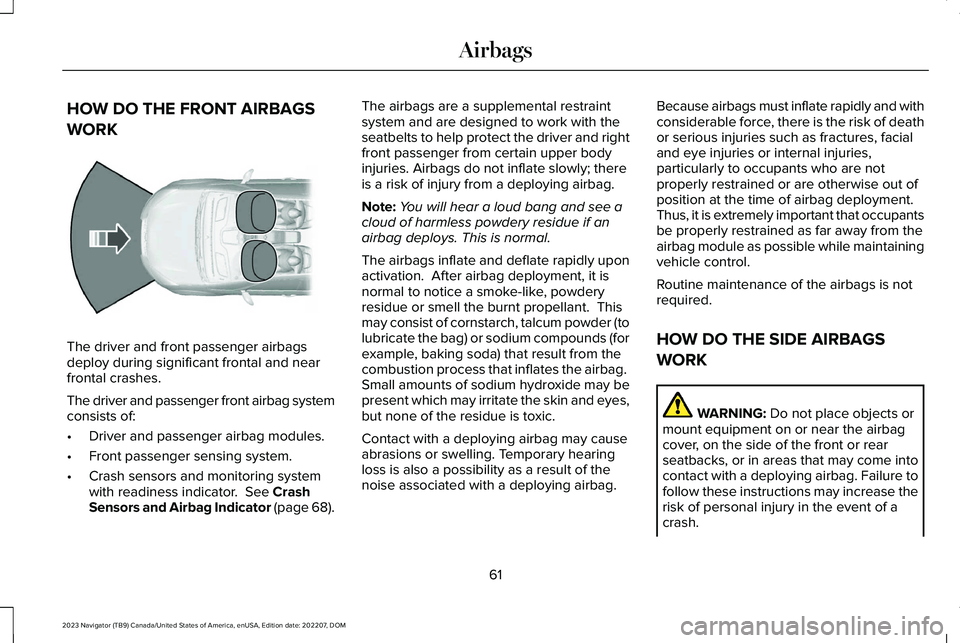
The driver and front passenger airbagsdeploy during significant frontal and nearfrontal crashes.
The driver and passenger front airbag systemconsists of:
•Driver and passenger airbag modules.
•Front passenger sensing system.
•Crash sensors and monitoring systemwith readiness indicator. See CrashSensors and Airbag Indicator (page 68).
The airbags are a supplemental restraintsystem and are designed to work with theseatbelts to help protect the driver and rightfront passenger from certain upper bodyinjuries. Airbags do not inflate slowly; thereis a risk of injury from a deploying airbag.
Note:You will hear a loud bang and see acloud of harmless powdery residue if anairbag deploys. This is normal.
The airbags inflate and deflate rapidly uponactivation. After airbag deployment, it isnormal to notice a smoke-like, powderyresidue or smell the burnt propellant. Thismay consist of cornstarch, talcum powder (tolubricate the bag) or sodium compounds (forexample, baking soda) that result from thecombustion process that inflates the airbag. Small amounts of sodium hydroxide may bepresent which may irritate the skin and eyes,but none of the residue is toxic.
Contact with a deploying airbag may causeabrasions or swelling. Temporary hearingloss is also a possibility as a result of thenoise associated with a deploying airbag.
Because airbags must inflate rapidly and withconsiderable force, there is the risk of deathor serious injuries such as fractures, facialand eye injuries or internal injuries,particularly to occupants who are notproperly restrained or are otherwise out ofposition at the time of airbag deployment.Thus, it is extremely important that occupantsbe properly restrained as far away from theairbag module as possible while maintainingvehicle control.
Routine maintenance of the airbags is notrequired.
HOW DO THE SIDE AIRBAGS
WORK
WARNING: Do not place objects ormount equipment on or near the airbagcover, on the side of the front or rearseatbacks, or in areas that may come intocontact with a deploying airbag. Failure tofollow these instructions may increase therisk of personal injury in the event of acrash.
61
2023 Navigator (TB9) Canada/United States of America, enUSA, Edition date: 202207, DOMAirbagsE151127
Page 66 of 660
WARNING: Accessory seat coversnot released by Ford Motor Companycould prevent the deployment of theairbags and increase the risk of injuries ina crash.
WARNING: Do not lean your headon the door. The side airbag could injureyou as it deploys from the side of theseatback.
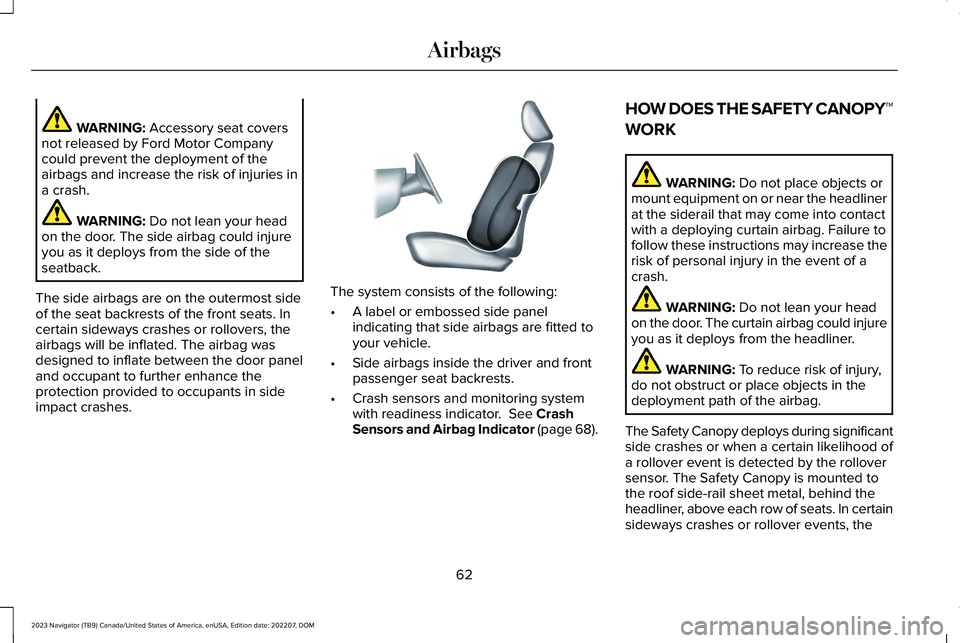
The side airbags are on the outermost sideof the seat backrests of the front seats. Incertain sideways crashes or rollovers, theairbags will be inflated. The airbag wasdesigned to inflate between the door paneland occupant to further enhance theprotection provided to occupants in sideimpact crashes.
The system consists of the following:
•A label or embossed side panelindicating that side airbags are fitted toyour vehicle.
•Side airbags inside the driver and frontpassenger seat backrests.
•Crash sensors and monitoring systemwith readiness indicator. See CrashSensors and Airbag Indicator (page 68).
HOW DOES THE SAFETY CANOPY™
WORK
WARNING: Do not place objects ormount equipment on or near the headlinerat the siderail that may come into contactwith a deploying curtain airbag. Failure tofollow these instructions may increase therisk of personal injury in the event of acrash.
WARNING: Do not lean your headon the door. The curtain airbag could injureyou as it deploys from the headliner.
WARNING: To reduce risk of injury,do not obstruct or place objects in thedeployment path of the airbag.
The Safety Canopy deploys during significantside crashes or when a certain likelihood ofa rollover event is detected by the rolloversensor. The Safety Canopy is mounted tothe roof side-rail sheet metal, behind theheadliner, above each row of seats. In certainsideways crashes or rollover events, the
62
2023 Navigator (TB9) Canada/United States of America, enUSA, Edition date: 202207, DOMAirbagsE152533
Page 67 of 660
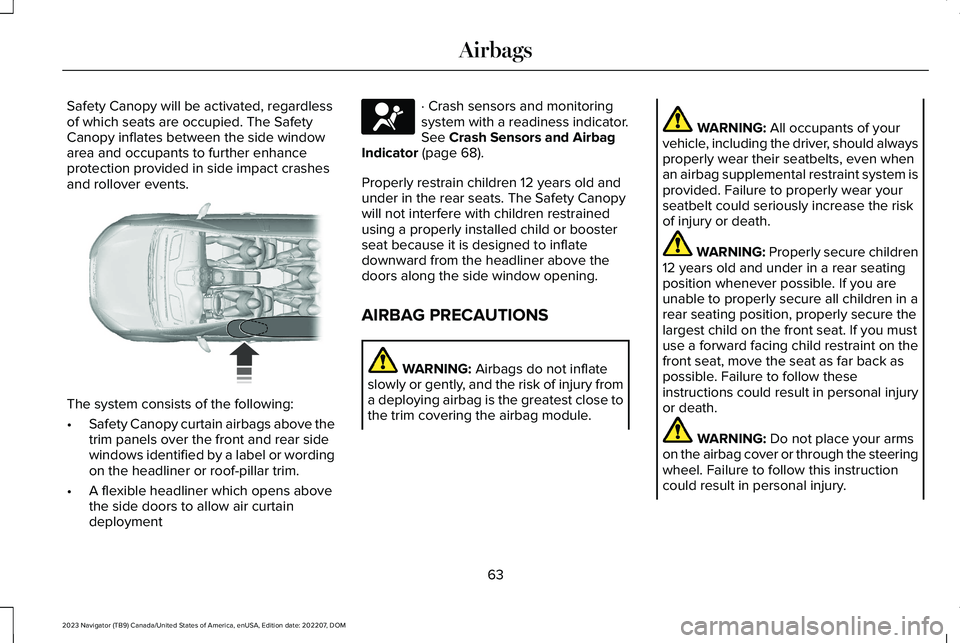
Safety Canopy will be activated, regardlessof which seats are occupied. The SafetyCanopy inflates between the side windowarea and occupants to further enhanceprotection provided in side impact crashesand rollover events.
The system consists of the following:
•Safety Canopy curtain airbags above thetrim panels over the front and rear sidewindows identified by a label or wordingon the headliner or roof-pillar trim.
•A flexible headliner which opens abovethe side doors to allow air curtaindeployment
· Crash sensors and monitoringsystem with a readiness indicator.See Crash Sensors and AirbagIndicator (page 68).
Properly restrain children 12 years old andunder in the rear seats. The Safety Canopywill not interfere with children restrainedusing a properly installed child or boosterseat because it is designed to inflatedownward from the headliner above thedoors along the side window opening.
AIRBAG PRECAUTIONS
WARNING: Airbags do not inflateslowly or gently, and the risk of injury froma deploying airbag is the greatest close tothe trim covering the airbag module.
WARNING: All occupants of yourvehicle, including the driver, should alwaysproperly wear their seatbelts, even whenan airbag supplemental restraint system isprovided. Failure to properly wear yourseatbelt could seriously increase the riskof injury or death.
WARNING: Properly secure children12 years old and under in a rear seatingposition whenever possible. If you areunable to properly secure all children in arear seating position, properly secure thelargest child on the front seat. If you mustuse a forward facing child restraint on thefront seat, move the seat as far back aspossible. Failure to follow theseinstructions could result in personal injuryor death.
WARNING: Do not place your armson the airbag cover or through the steeringwheel. Failure to follow this instructioncould result in personal injury.
63
2023 Navigator (TB9) Canada/United States of America, enUSA, Edition date: 202207, DOMAirbags E75004 E67017
Page 68 of 660
WARNING: Keep the areas in frontof the airbags free from obstruction. Donot affix anything to or over the airbagcovers. Objects could become projectilesduring airbag deployment. Failure to followthis instruction could result in personalinjury or death.
WARNING: To reduce risk of injury,do not obstruct or place objects in thedeployment path of the airbag.
WARNING: Do not place a rearwardfacing child restraint in front of an activeairbag. Failure to follow this instructioncould result in personal injury or death.
WARNING: Do not attempt to service,repair, or modify the supplementaryrestraint system or associated components.Failure to follow this instruction could resultin personal injury or death.
WARNING: Several airbag systemcomponents get hot after inflation. Toreduce the risk of injury, do not touch themafter inflation.
WARNING: If a supplementaryrestraint system component has deployed,it will not function again. Have the systemand associated components inspected assoon as possible. Failure to follow thisinstruction could result in personal injuryor death.
PROPERLY ADJUSTING THE
DRIVER AND FRONT PASSENGER
SEATS
WARNING: National Highway TrafficSafety Administration (NHTSA)recommends a minimum distance of atleast 10 in (25 cm) between an occupant'schest and the driver airbag module.
To properly position yourself away from theairbag:
•Move your seat to the rear as far as youcan while still reaching the pedalscomfortably.
•Recline the seat slightly one or twodegrees from the upright position.
After all occupants have adjusted their seatsand put on seatbelts, it is very important thatthey continue to sit properly. Properly seatedoccupants sit upright, lean against the seatbackrest, and center themselves on the seatcushion, with their feet comfortably extendedon the floor. Sitting improperly can increasethe chance of injury in a crash event. Forexample, if an occupant slouches, lies down,turns sideways, sits forward, leans forwardor sideways, or puts one or both feet up, thechance of injury during a crash greatlyincreases.
64
2023 Navigator (TB9) Canada/United States of America, enUSA, Edition date: 202207, DOMAirbags
Page 72 of 660
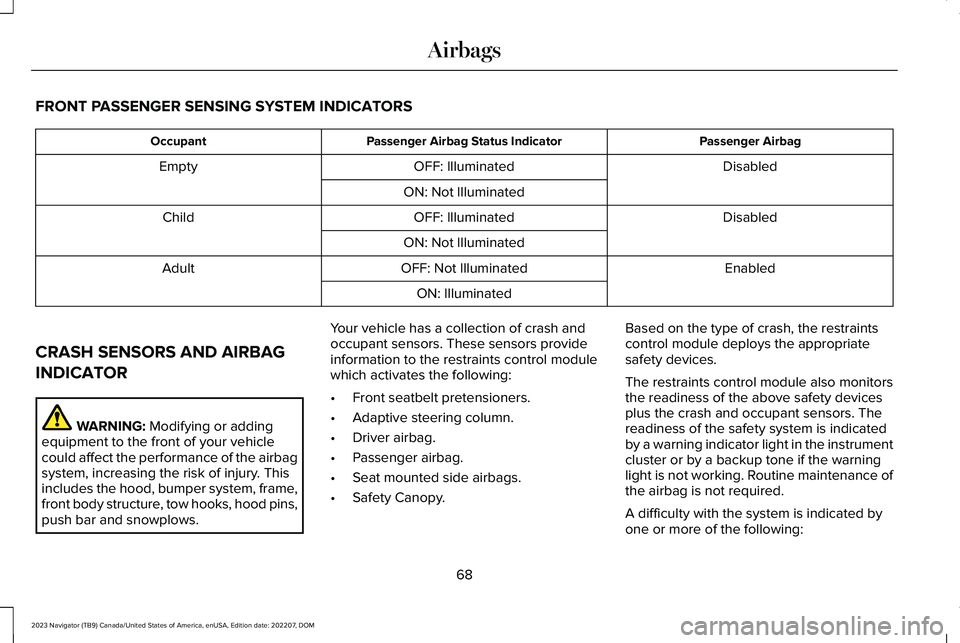
FRONT PASSENGER SENSING SYSTEM INDICATORS
Passenger AirbagPassenger Airbag Status IndicatorOccupant
DisabledOFF: IlluminatedEmpty
ON: Not Illuminated
DisabledOFF: IlluminatedChild
ON: Not Illuminated
EnabledOFF: Not IlluminatedAdult
ON: Illuminated
CRASH SENSORS AND AIRBAG
INDICATOR
WARNING: Modifying or addingequipment to the front of your vehiclecould affect the performance of the airbagsystem, increasing the risk of injury. Thisincludes the hood, bumper system, frame,front body structure, tow hooks, hood pins,push bar and snowplows.
Your vehicle has a collection of crash andoccupant sensors. These sensors provideinformation to the restraints control modulewhich activates the following:
•Front seatbelt pretensioners.
•Adaptive steering column.
•Driver airbag.
•Passenger airbag.
•Seat mounted side airbags.
•Safety Canopy.
Based on the type of crash, the restraintscontrol module deploys the appropriatesafety devices.
The restraints control module also monitorsthe readiness of the above safety devicesplus the crash and occupant sensors. Thereadiness of the safety system is indicatedby a warning indicator light in the instrumentcluster or by a backup tone if the warninglight is not working. Routine maintenance ofthe airbag is not required.
A difficulty with the system is indicated byone or more of the following:
68
2023 Navigator (TB9) Canada/United States of America, enUSA, Edition date: 202207, DOMAirbags
Page 78 of 660
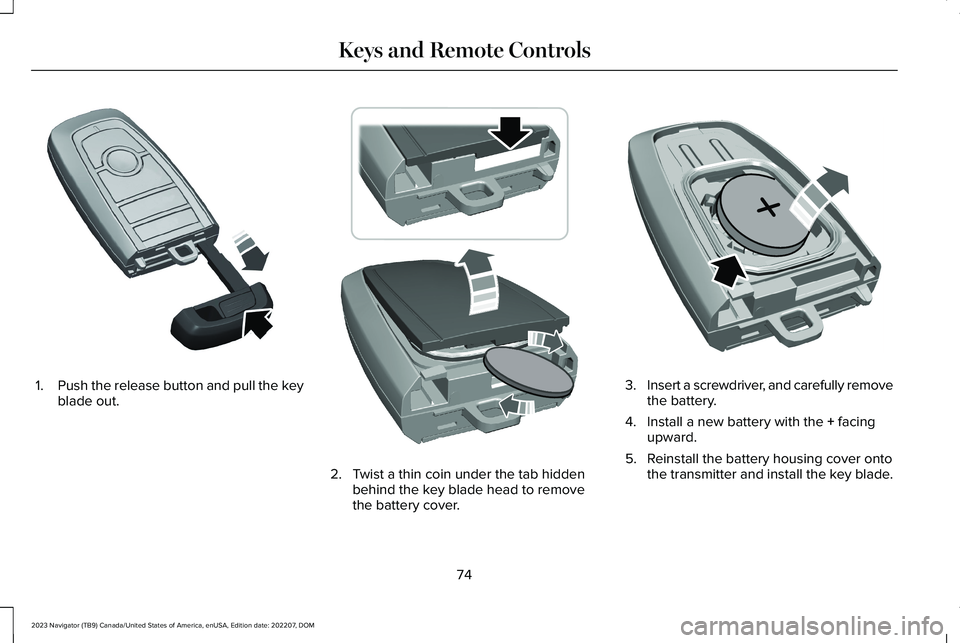
1.Push the release button and pull the keyblade out.
2.Twist a thin coin under the tab hiddenbehind the key blade head to removethe battery cover.
3.Insert a screwdriver, and carefully removethe battery.
4.Install a new battery with the + facingupward.
5.Reinstall the battery housing cover ontothe transmitter and install the key blade.
74
2023 Navigator (TB9) Canada/United States of America, enUSA, Edition date: 202207, DOMKeys and Remote ControlsE322866 E303824 E218402
Page 86 of 660
WHAT IS MYKEY
MyKey allows you to program keys withrestricted driving modes to promote gooddriving habits.
You can program the restrictions to all keysexcept one. Any keys that you did notprogram are administrator keys or adminkeys.
Note:Every MyKey receives the samerestrictions and settings. You cannotprogram them individually.
MYKEY SETTINGS
NON-CONFIGURABLE MYKEYSETTINGS
Seatbelt Reminder or Belt-Minder™
MyKey mutes the audio system until the frontseat passengers buckle the front seat belts.
Note:If your vehicle includes an AM/FMradio or a very basic audio system, the radiomay not mute.
Satellite Radio (If Equipped)
Some satellite radio channels have restrictedaccess to adult radio content.
Early Low Fuel
The low fuel level warning lamp turns onearlier.
Driving and Parking Aids
You cannot configure settings for parkingaids, blind spot information system, and crosstraffic alert. These systems turn on when thevehicle turns on, and you cannot switch themoff with a MyKey.
You cannot configure settings forpre-collision assist and lane keeping. Thesesystems turn on when the vehicle turns on.
A new destination in the navigation systemcan only be set using voice commands whenusing a MyKey, and with your vehicle moving.
Note:MyKey drivers may be able to switchthe lane keeping assist off, but this featureturns back on automatically with every newkey cycle.
CONFIGURABLE MYKEY SETTINGS
You can configure the following settings aftercreating a MyKey. See Creating a MyKey(page 83).
Speed Limit
WARNING: Do not set MyKeymaximum speed limit to a limit that willprevent the driver from maintaining a safespeed considering posted speed limits andprevailing road conditions. The driver isalways responsible to drive in accordancewith local laws and prevailing conditions.Failure to do so could result in accident orinjury.
You can set a speed limit for your vehicle.Warning messages appear on thetouchscreen and a tone sounds if yourvehicle reaches the set speed. You cannotoverride the set speed when using a MyKey.
82
2023 Navigator (TB9) Canada/United States of America, enUSA, Edition date: 202207, DOMMyKey™
Page 87 of 660
Speed Minder
You can set a speed reminder for yourvehicle. Warning messages appear on thetouchscreen and a tone sounds if yourvehicle exceeds the set speed.
Audio System Volume Limit
The audio system maximum volume reduces.A message appears on the touchscreen ifyou attempt to exceed the volume limit.Automatic volume control turns off.
911 Assist
If you set 911 assist to always on, you cannotswitch it off with a MyKey.
Do Not Disturb
If you set do not disturb to always on, youcannot switch it off with a MyKey.
Note:If a phone is connected using AppleCarPlay or Android Auto while driving witha MyKey, the driver can receive phone callsand text messages even if the do not disturbrestriction is on. And if the vehicle comeswith satellite radio, there is no restriction onthe adult content.
Traction and Stability Control
If you set traction control or stability controlto always on, you cannot switch it off with aMyKey.
CREATING A MYKEY
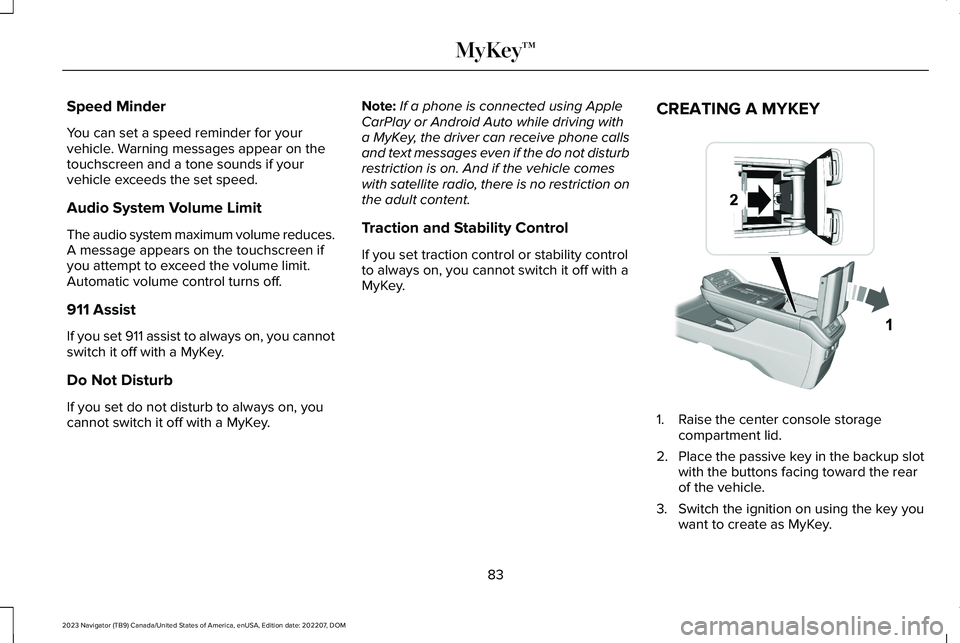
1.Raise the center console storagecompartment lid.
2.Place the passive key in the backup slotwith the buttons facing toward the rearof the vehicle.
3.Switch the ignition on using the key youwant to create as MyKey.
83
2023 Navigator (TB9) Canada/United States of America, enUSA, Edition date: 202207, DOMMyKey™ E376555
Page 88 of 660
4.Press Settings on the touchscreen.
5.Press Vehicle Settings.
6.Press MyKey.
7.Press Create MyKey or Create MyKeyMobile Device.
8.Press Yes.
9.Switch the ignition off.
Note:You successfully created a MyKey. Werecommend that you label this key so youcan distinguish it from the admin keys.
Note:You can use both a passive key anda mobile device as a MyKey. You must havea second passive key and create it as aMyKey.
Note:The programmed restrictions applywhen you switch the vehicle off, open andclose the driver door and restart your vehiclewith the passive key or mobile device.
PROGRAMMING A MYKEY
You can program any remote control tobecome a restricted MyKey, but you mustleave one unmodified as an admin key.
1.Switch the vehicle on using an admin key.
2.Press Settings on the touchscreen.
3.Press Vehicle Settings.
4.Press MyKey.
5.Select and configure the settings.
CLEARING ALL MYKEYS
When you clear all MyKeys, you remove allrestrictions and return all MyKeys to theiroriginal admin key status.
1.Switch the vehicle on using an admin key.
2.Press Settings on the touchscreen.
3.Press Vehicle Settings.
4.Press MyKey.
5.Press Clear All MyKeys.
6.Press Yes.
CHECKING MYKEY SYSTEM
STATUS
You can find information about the distancetraveled using a MyKey, and the number ofadmin keys and MyKeys created for yourvehicle.
1.Switch the vehicle on.
2.Press Settings on the touchscreen.
3.Press Vehicle Settings.
4.Press MyKey.
5.Press MyKey Information.
USING MYKEY WITH REMOTE
START SYSTEMS
MyKey is not compatible with unapproved,aftermarket remote start systems. If youchoose to install a remote start system, seean authorized dealer for an approved remotestart system.
84
2023 Navigator (TB9) Canada/United States of America, enUSA, Edition date: 202207, DOMMyKey™
Page 92 of 660
AUTOUNLOCK
WHAT IS AUTOUNLOCK
Autounlock is an unlocking feature thatunlocks the vehicle doors when your vehiclecomes to a stop.
AUTOUNLOCK REQUIREMENTS
Autounlock unlocks all the doors after all ofthe following occur.
1.All the doors are closed and your vehicleis moving at a speed greater than 12 mph(20 km/h).
2.Your vehicle comes to a stop.
3.You open the driver door within 10minutes of switching the ignition off or tothe accessory position.
Note:If you open the driver door after 10minutes, Autounlock does not unlock allother doors.
SWITCHING AUTOUNLOCK ON ANDOFF
1.Press Settings on the touchscreen.
2.Press Vehicle Settings.
3.Switch Autounlock on or off.
AUTOLOCK
WHAT IS AUTOLOCK
Autolock is a locking feature that locks yourvehicle doors when you start driving.
AUTOLOCK REQUIREMENTS
Autolock locks all the doors when all of thefollowing occur:
•All doors are closed.
•The ignition is on.
•Your vehicle reaches a speed greaterthan 12 mph (20 km/h).
MISLOCK
WHAT IS MISLOCK
Mislock is a locking feature that warns youif your vehicle has not locked.
MISLOCK LIMITATIONS
When you press the lock button once, theturn signals do not flash if:
•Any door or the tailgate is open.
•The hood is open.
If you switch mislock off, the horn does notsound if you press the lock button on theremote control when a door is open.
SWITCHING MISLOCK ON AND OFF
1.Press Settings on the touchscreen.
2.Press Vehicle Settings.
3.Switch Mislock Chirp on or off.
88
2023 Navigator (TB9) Canada/United States of America, enUSA, Edition date: 202207, DOMDoors and Locks