driver LINCOLN NAVIGATOR 2023 Owner's Guide
[x] Cancel search | Manufacturer: LINCOLN, Model Year: 2023, Model line: NAVIGATOR, Model: LINCOLN NAVIGATOR 2023Pages: 660, PDF Size: 14.04 MB
Page 171 of 660
FRONT SEAT PRECAUTIONS
WARNING: Sitting improperly, out ofposition or with the seatback reclined toofar can take weight off the seat cushionand affect the decision of the passengersensing system, resulting in serious injuryor death in the event of a crash. Always situpright against your seat back, with yourfeet on the floor.
WARNING: Do not recline the seatbackrest too far as this can cause theoccupant to slide under the seatbelt,resulting in personal injury in the event ofa crash.
WARNING: Do not place objectshigher than the top of the seat backrest.Failure to follow this instruction could resultin personal injury or death in the event ofa sudden stop or crash.
WARNING: Do not adjust the driverseat or seat backrest when your vehicle ismoving. This may result in sudden seatmovement, causing the loss of control ofyour vehicle.
SITTING IN THE CORRECT
POSITION
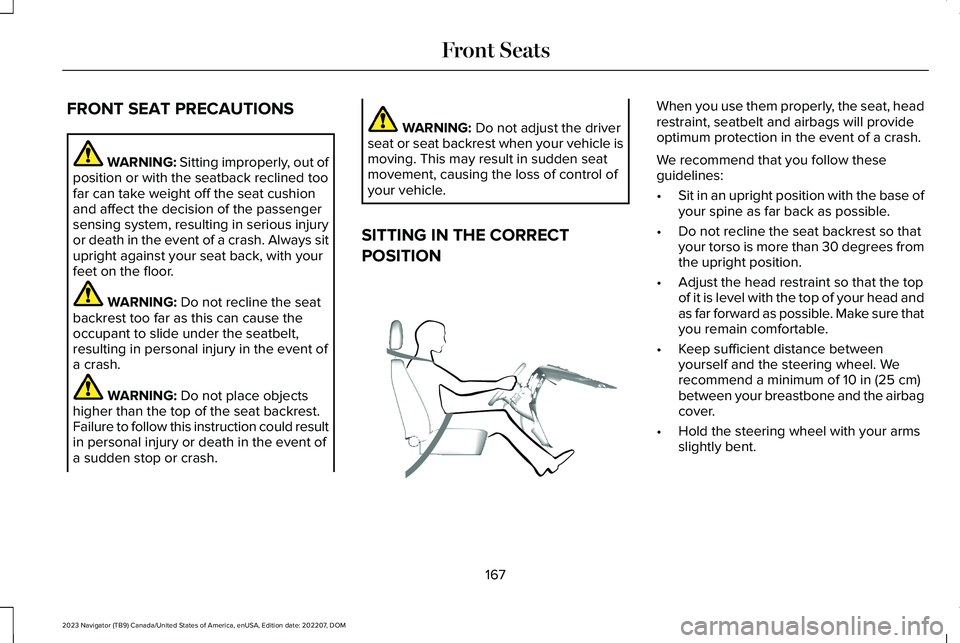
When you use them properly, the seat, headrestraint, seatbelt and airbags will provideoptimum protection in the event of a crash.
We recommend that you follow theseguidelines:
•Sit in an upright position with the base ofyour spine as far back as possible.
•Do not recline the seat backrest so thatyour torso is more than 30 degrees fromthe upright position.
•Adjust the head restraint so that the topof it is level with the top of your head andas far forward as possible. Make sure thatyou remain comfortable.
•Keep sufficient distance betweenyourself and the steering wheel. Werecommend a minimum of 10 in (25 cm)between your breastbone and the airbagcover.
•Hold the steering wheel with your armsslightly bent.
167
2023 Navigator (TB9) Canada/United States of America, enUSA, Edition date: 202207, DOMFront SeatsE68595
Page 175 of 660
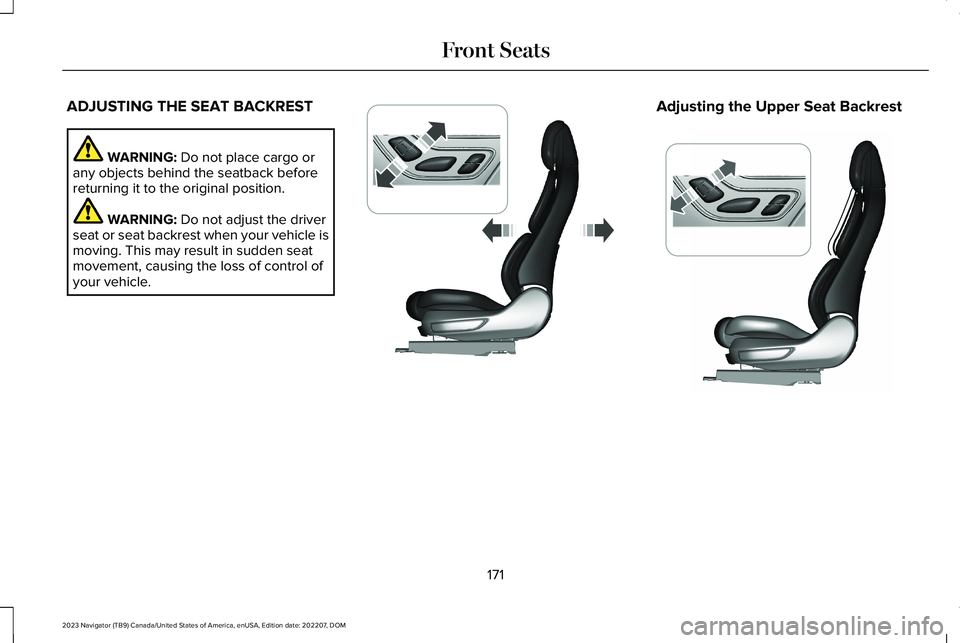
ADJUSTING THE SEAT BACKREST
WARNING: Do not place cargo orany objects behind the seatback beforereturning it to the original position.
WARNING: Do not adjust the driverseat or seat backrest when your vehicle ismoving. This may result in sudden seatmovement, causing the loss of control ofyour vehicle.
Adjusting the Upper Seat Backrest
171
2023 Navigator (TB9) Canada/United States of America, enUSA, Edition date: 202207, DOMFront SeatsE348865 E348864
Page 190 of 660
WHAT IS THE MEMORY FUNCTION
The driver seat memory function recalls theposition of these features:
•Driver seat.
•Power mirrors.
•Power steering column.
•Power adjustable foot pedals.
The passenger seat memory function recallsthe position of the passenger seat.
MEMORY FUNCTION
PRECAUTIONS
WARNING: Before activating thememory seat, make sure that the areaimmediately surrounding the seat is clearof obstructions and that all occupants areclear of moving parts.
WARNING: Do not use the memoryfunction when your vehicle is moving.
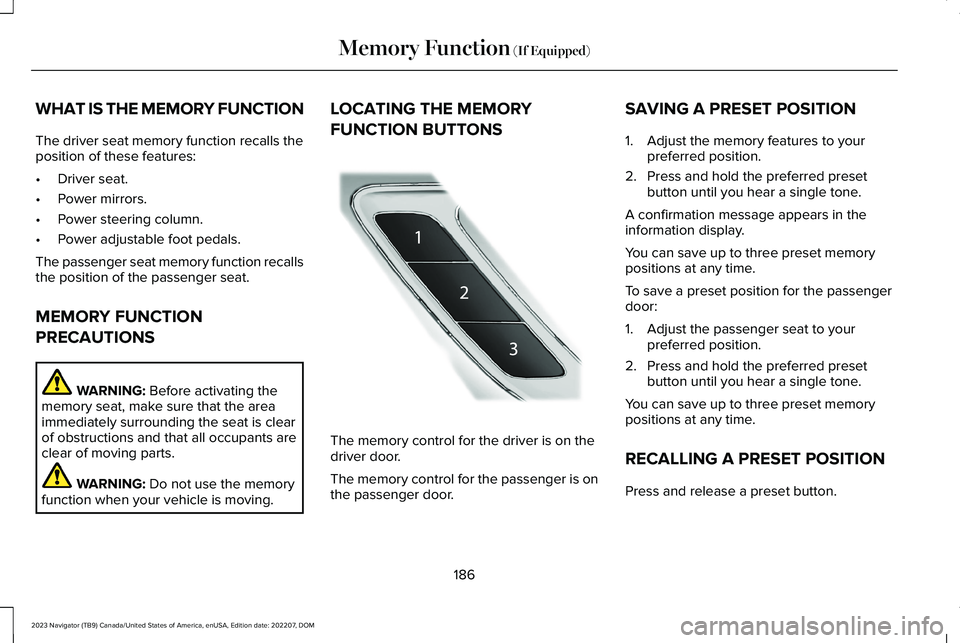
LOCATING THE MEMORY
FUNCTION BUTTONS
The memory control for the driver is on thedriver door.
The memory control for the passenger is onthe passenger door.
SAVING A PRESET POSITION
1.Adjust the memory features to yourpreferred position.
2.Press and hold the preferred presetbutton until you hear a single tone.
A confirmation message appears in theinformation display.
You can save up to three preset memorypositions at any time.
To save a preset position for the passengerdoor:
1.Adjust the passenger seat to yourpreferred position.
2.Press and hold the preferred presetbutton until you hear a single tone.
You can save up to three preset memorypositions at any time.
RECALLING A PRESET POSITION
Press and release a preset button.
186
2023 Navigator (TB9) Canada/United States of America, enUSA, Edition date: 202207, DOMMemory Function (If Equipped)E222235
Page 191 of 660
Note:You can recall a preset memoryposition when the ignition is off, or when youplace the transmission in park (P) or neutral(N) if the ignition is on and the vehicle is notmoving.
Note:Pressing any of the preset buttons orany memory feature control during a memoryrecall cancels the operation.
You can also recall a preset memory positionby:
•Pressing the unlock button on yourremote control if you linked it to a presetposition.
•Unlocking the intelligent driver doorhandle if a linked remote control ispresent.
•Recalling a personal profile in your SYNCmenu.
Using a linked remote control to recall yourmemory position when the ignition is offmoves the seat and steering column to theeasy entry position.
To recall a preset position on the passengerdoor, press and release the preset button.The passenger seat features move to theposition stored for that preset. You can recalla passenger seat preset memory at any time.
Linking a Preset Position to Your
Remote Control or Passive Key
See Linking or Unlinking a Personal Profileto a Remote Control (page 516).
187
2023 Navigator (TB9) Canada/United States of America, enUSA, Edition date: 202207, DOMMemory Function (If Equipped)
Page 192 of 660
GARAGE DOOR OPENER
INTRODUCTION
HomeLink Wireless Control System
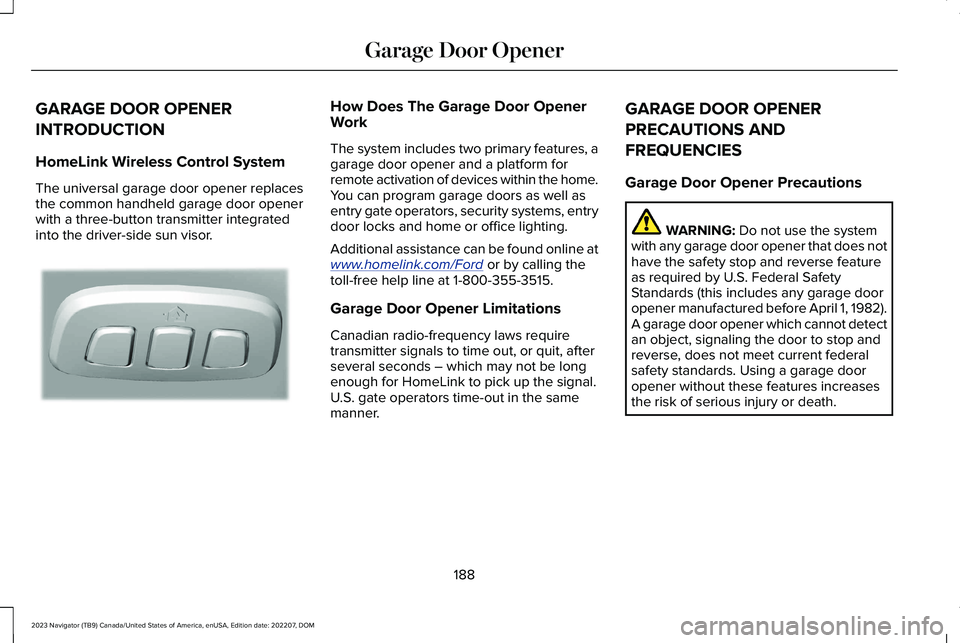
The universal garage door opener replacesthe common handheld garage door openerwith a three-button transmitter integratedinto the driver-side sun visor.
How Does The Garage Door OpenerWork
The system includes two primary features, agarage door opener and a platform forremote activation of devices within the home.You can program garage doors as well asentry gate operators, security systems, entrydoor locks and home or office lighting.
Additional assistance can be found online atwww.homelink.com/Ford or by calling thetoll-free help line at 1-800-355-3515.
Garage Door Opener Limitations
Canadian radio-frequency laws requiretransmitter signals to time out, or quit, afterseveral seconds – which may not be longenough for HomeLink to pick up the signal.U.S. gate operators time-out in the samemanner.
GARAGE DOOR OPENER
PRECAUTIONS AND
FREQUENCIES
Garage Door Opener Precautions
WARNING: Do not use the systemwith any garage door opener that does nothave the safety stop and reverse featureas required by U.S. Federal SafetyStandards (this includes any garage dooropener manufactured before April 1, 1982).A garage door opener which cannot detectan object, signaling the door to stop andreverse, does not meet current federalsafety standards. Using a garage dooropener without these features increasesthe risk of serious injury or death.
188
2023 Navigator (TB9) Canada/United States of America, enUSA, Edition date: 202207, DOMGarage Door OpenerE188211
Page 214 of 660
AUTO-START-STOP – FREQUENTLYASKED QUESTIONS
Why does the engine not always stopwhen I expect it to?
The system is designed to work in a way thatcomplements other vehicle systems, allowingthem to operate at optimum performance.
The system does not stop the engine if:
•The driver door is open.
•Your vehicle is at high altitude.
•The heated windshield is on.
•The engine is warming up.
•The outside temperature is too low ortoo high.
•The battery charge is low.
•The battery temperature is outside theoptimal operating range.
•The engine is required to run to maintaininterior climate and reduce fogging.
Why does the engine sometimesrestart when I do not expect it to?
The system is designed to work in a way thatcomplements other vehicle systems, allowingthem to operate at optimum performance.
The system restarts the engine if:
•You switch the heated windshield on.
•You switch maximum defrost on.
•Your vehicle starts to roll downhill inneutral.
•The engine is required to run to maintainadequate brake system assistance.
•The engine is required to run to maintaininterior climate and reduce fogging.
Can I permanently switch the systemoff?
No. The system plays an important role inreducing the fuel consumption and the CO2emissions.
Will the frequent engine starts causeparts to wear out?
Your vehicle has an enhanced battery andstarter motor that are designed for theincreased number of engine starts.
210
2023 Navigator (TB9) Canada/United States of America, enUSA, Edition date: 202207, DOMAuto-Start-Stop (If Equipped)
Page 227 of 660
AUTOMATIC RETURN TO PARK (P)
WHAT IS AUTOMATIC RETURN TOPARK (P)
Your vehicle shifts into park (P) if you attemptto exit your vehicle without the transmissionin park (P).
HOW DOES AUTOMATIC RETURN TOPARK (P) WORK
Your vehicle shifts into park (P) when yourvehicle is stationary and any of the followingoccur:
•You switch the vehicle off.
•You open the driver door with yourseatbelt unlatched.
•You unlatch the driver seatbelt when thedriver door is open.
Note:Do not use automatic return to park(P) when your vehicle is moving, except inan emergency. See Starting and Stoppingthe Engine (page 201).
AUTOMATIC RETURN TO PARK (P)LIMITATIONS
Automatic return to park (P) may not work ifthe door ajar sensor or seatbelt sensor aremalfunctioning.
See an authorized dealer if any of thefollowing occur:
•Seatbelt indicator illuminates or tonesounds with the seatbelt fastened.
•Door ajar indicator does not illuminatewith the driver door open.
•Door ajar indicator illuminates with thedriver door closed.
•Transmission not in park messageappears with the driver door closed, afteryou shift out of park (P).
AUTOMATIC TRANSMISSION
AUDIBLE WARNINGS
Transmission Not In Park (P) AudibleWarning
Sounds if you open the driver door beforeshifting into park (P).
Park Selection Audible Warning
Sounds when you shift into park (P).
223
2023 Navigator (TB9) Canada/United States of America, enUSA, Edition date: 202207, DOMAutomatic Transmission
Page 228 of 660
HOW DOES FOUR-WHEEL DRIVE
WORK
Using the 1-Speed Automatic Four-Wheel Drive System
The 1-speed automatic four-wheel drivesystem utilizes an electronically controlledon-demand 1-speed transfer case. Thissystem monitors various vehicle sensoryinputs to provide an increased level ofperformance. This system offers the drivertwo-wheel drive high, four-wheel drive autoand four-wheel drive high as available modesof operation via the selectable drive modeswitch. When four-wheel drive auto isselected, the system continuously variespower to the front wheels for optimumperformance for all on-road conditions. Whenfour-wheel drive high is selected, the systemprovides power to the front and rear wheelsfor use in off-road or slippery conditions suchas deep snow, sand or mud. There is furtherinformation on driving in unique drivingconditions. See Driving Hints (page 384).
Using the 2-Speed Automatic Four-Wheel Drive System (If Equipped)
The 2-speed automatic four-wheel drivesystem utilizes an electronically controlledon-demand 2-speed transfer case. Thissystem monitors various vehicle sensoryinputs to provide an increased level ofperformance. This system offers the drivertwo-wheel drive high, four-wheel drive auto,four-wheel drive high, and four-wheel drivelow as available modes of operation. Whenfour-wheel drive auto is selected, the systemcontinuously varies power to the front wheelsfor optimum performance for all on-roadconditions. When either four-wheel drive highor four-wheel drive low are selected with theappropriate drive modes , the four-wheeldrive system provides electronically lockedpower to the front and rear wheels for usein off-road or slippery conditions such asdeep snow, sand or mud. Selecting slowclimb also provides additional gearing forincreased torque multiplication for conditionslike deep sand, snow, steep slopes, or pulling
heavy objects. See Slow Climb (page 297).Additionally, the system is capable ofrecreational flat towing by putting thetransfer case into neutral (N). SeeRecreationally Towing Your Vehicle (page397).
There is further information on driving inunique driving conditions. See Driving Hints(page 384).
FOUR-WHEEL DRIVE
PRECAUTIONS
WARNING: Vehicles with a highercenter of gravity (utility and four-wheeldrive vehicles) handle differently thanvehicles with a lower center of gravity(passenger cars). Avoid sharp turns,excessive speed and abrupt steering inthese vehicles. Failure to drive cautiouslyincreases the risk of losing control of yourvehicle, vehicle rollover, personal injuryand death.
224
2023 Navigator (TB9) Canada/United States of America, enUSA, Edition date: 202207, DOMFour-Wheel Drive (If Equipped)
Page 234 of 660
WHAT IS THE ELECTRONIC
LIMITED-SLIP DIFFERENTIAL
The electronic limited-slip differential systemdirects torque across the axle, enabling thevehicle to drive over terrain and roadconditions that a conventional axle cannot.The system is active at all times and requiresno input from the driver.
Note:If your vehicle is not at optimaloperating conditions or a system fault ispresent, a warning may display in theinstrument cluster. Depending on thewarning, you may need to service yourvehicle.
Operating the Electronic Limited-SlipDifferential with a Spare or MismatchedTires
If your vehicle has an electronic limited-slipdifferential, do not use a spare tire of adifferent size than the tire provided. If youhave a spare tire installed, a message mayappear indicating the system has disabledautomatically or reduced function to preventsystem overheat and damage. Werecommend you reinstall the repaired orreplaced spare tire as soon as possible.When you replace the spare tire, the systemresumes normal operation on the next keycycle.
Trailer Towing
The electronic limited-slip differentialenhances vehicle stability during trailer towoperation. During high demand traileringevents, such as steep slopes, high speedsor with a spare tire, the system may providea warning in the instrument cluster andreduce function or enter a temporarilydisabled state. To resume normal function,stop the vehicle in a safe location and allowthe unit to adequately cool. Once the systemreaches normal operating temperatures,system function restores and the electroniclimited-slip differential restored messagedisplays.
230
2023 Navigator (TB9) Canada/United States of America, enUSA, Edition date: 202207, DOMElectronic Limited-Slip Differential (If Equipped)
Page 240 of 660
5.Release the switch and pull away in anormal manner.
AUTOMATICALLY RELEASING THE
ELECTRIC PARKING BRAKE
1.Close the driver door.
2.Shift into gear.
3.Press the accelerator pedal and pull awayin a normal manner.
ELECTRIC PARKING BRAKE
AUDIBLE WARNING
Sounds when the parking brake is on andyour vehicle is moving. If the warning tonecontinues after you have released theparking brake, this indicates a malfunction.Have your vehicle checked as soon aspossible.
RELEASING THE ELECTRIC
PARKING BRAKE IF THE VEHICLE
BATTERY HAS RUN OUT OF
CHARGE
WARNING: The electric parkingbrake does not operate if the vehiclebattery has run out of charge.
Connect a booster battery to the vehiclebattery to release the electric parking brakeif the vehicle battery has run out of charge.See Jump Starting the Vehicle (page 391).
ELECTRIC PARKING BRAKE –
TROUBLESHOOTING
ELECTRIC PARKING BRAKE –WARNING LAMPS
Brake System
It illuminates red when you applythe parking brake and your vehicleis on. If the lamp flashes when theparking brake has been released,this indicates the parking brakesystem requires service. Have your vehiclechecked as soon as possible.
Note:Lamps may vary depending on region.
Electric Parking Brake
When the lamp illuminates yellow,it indicates a malfunction in theelectric parking brake. Have yourvehicle checked as soon as possible.
Note:Lamps may vary depending on region.
236
2023 Navigator (TB9) Canada/United States of America, enUSA, Edition date: 202207, DOMElectric Parking BrakeE270480 E67024 E67024 E146190