steering LINCOLN NAVIGATOR 2023 User Guide
[x] Cancel search | Manufacturer: LINCOLN, Model Year: 2023, Model line: NAVIGATOR, Model: LINCOLN NAVIGATOR 2023Pages: 660, PDF Size: 14.04 MB
Page 67 of 660
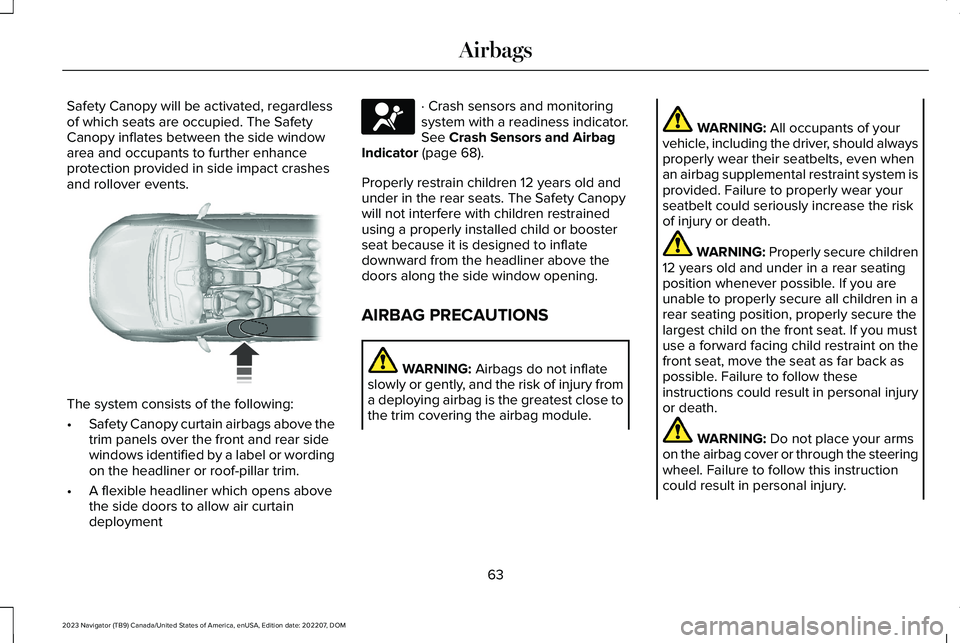
Safety Canopy will be activated, regardlessof which seats are occupied. The SafetyCanopy inflates between the side windowarea and occupants to further enhanceprotection provided in side impact crashesand rollover events.
The system consists of the following:
•Safety Canopy curtain airbags above thetrim panels over the front and rear sidewindows identified by a label or wordingon the headliner or roof-pillar trim.
•A flexible headliner which opens abovethe side doors to allow air curtaindeployment
· Crash sensors and monitoringsystem with a readiness indicator.See Crash Sensors and AirbagIndicator (page 68).
Properly restrain children 12 years old andunder in the rear seats. The Safety Canopywill not interfere with children restrainedusing a properly installed child or boosterseat because it is designed to inflatedownward from the headliner above thedoors along the side window opening.
AIRBAG PRECAUTIONS
WARNING: Airbags do not inflateslowly or gently, and the risk of injury froma deploying airbag is the greatest close tothe trim covering the airbag module.
WARNING: All occupants of yourvehicle, including the driver, should alwaysproperly wear their seatbelts, even whenan airbag supplemental restraint system isprovided. Failure to properly wear yourseatbelt could seriously increase the riskof injury or death.
WARNING: Properly secure children12 years old and under in a rear seatingposition whenever possible. If you areunable to properly secure all children in arear seating position, properly secure thelargest child on the front seat. If you mustuse a forward facing child restraint on thefront seat, move the seat as far back aspossible. Failure to follow theseinstructions could result in personal injuryor death.
WARNING: Do not place your armson the airbag cover or through the steeringwheel. Failure to follow this instructioncould result in personal injury.
63
2023 Navigator (TB9) Canada/United States of America, enUSA, Edition date: 202207, DOMAirbags E75004 E67017
Page 72 of 660
FRONT PASSENGER SENSING SYSTEM INDICATORS
Passenger AirbagPassenger Airbag Status IndicatorOccupant
DisabledOFF: IlluminatedEmpty
ON: Not Illuminated
DisabledOFF: IlluminatedChild
ON: Not Illuminated
EnabledOFF: Not IlluminatedAdult
ON: Illuminated
CRASH SENSORS AND AIRBAG
INDICATOR
WARNING: Modifying or addingequipment to the front of your vehiclecould affect the performance of the airbagsystem, increasing the risk of injury. Thisincludes the hood, bumper system, frame,front body structure, tow hooks, hood pins,push bar and snowplows.
Your vehicle has a collection of crash andoccupant sensors. These sensors provideinformation to the restraints control modulewhich activates the following:
•Front seatbelt pretensioners.
•Adaptive steering column.
•Driver airbag.
•Passenger airbag.
•Seat mounted side airbags.
•Safety Canopy.
Based on the type of crash, the restraintscontrol module deploys the appropriatesafety devices.
The restraints control module also monitorsthe readiness of the above safety devicesplus the crash and occupant sensors. Thereadiness of the safety system is indicatedby a warning indicator light in the instrumentcluster or by a backup tone if the warninglight is not working. Routine maintenance ofthe airbag is not required.
A difficulty with the system is indicated byone or more of the following:
68
2023 Navigator (TB9) Canada/United States of America, enUSA, Edition date: 202207, DOMAirbags
Page 74 of 660
WHAT IS 911 ASSIST
911 Assist is a SYNC system feature that cancall for help.
For more information, visitwww.owner.ford.com.
HOW DOES 911 ASSIST WORK
If a crash deploys an airbag, excluding kneeairbags and rear inflatable seatbelts, oractivates the fuel pump shut-off, your vehiclemay be able to contact emergency servicesby dialing 911 through a paired andconnected Bluetooth® enabled phone.
Not all crashes deploy an airbag or activatethe fuel pump shut-off. If a connected cellphone sustains damage or loses itsconnection to SYNC during a crash, SYNCsearches for and tries to connect to apreviously paired cell phone. SYNC thenattempts to call the emergency services.
Before making the call:
•SYNC provides about 10 seconds tocancel the call. If you fail to cancel thecall, SYNC attempts to dial 911.
•SYNC says the following, or a similarmessage: SYNC will attempt to call 911,to cancel the call, press Cancel on yourscreen or press and hold the phonebutton on your steering wheel.
If you do not cancel the call and SYNC makesa successful call a pre-recorded messageplays for the 911 operator. The occupants inyour vehicle are able to talk with theoperator. Be prepared to provide your name,phone number and location immediatelybecause not all 911 systems are capable ofreceiving this information electronically.
During an emergency call the systemtransmits vehicle data to the emergencyservice.
EMERGENCY CALL
REQUIREMENTS
WARNING: Do not wait for 911 Assistto make an emergency call if you can doit yourself. Dial emergency servicesimmediately to avoid delayed responsetime which could increase the risk ofserious injury or death after a crash. If youdo not hear 911 Assist within five secondsof the crash, the system or phone may bedamaged or non-functional.
WARNING: Always place your phonein a secure location in your vehicle so itdoes not become a projectile or getdamaged in a crash. Failure to do so maycause serious injury to someone ordamage the phone which could prevent911 Assist from working properly.
WARNING: Unless the 911 Assistsetting is set on before a crash, the systemwill not dial for help which could delayresponse time, potentially increasing therisk of serious injury or death after a crash.
70
2023 Navigator (TB9) Canada/United States of America, enUSA, Edition date: 202207, DOM911 Assist
Page 101 of 660
HOW DOES EASY ENTRY AND
EXIT WORK
Easy entry and exit moves the driver seatrearward up to 2 in (5 cm) and the steeringcolumn up when you switch the ignition off.The driver seat and steering column returnto their previous positions when you switchthe ignition on.
Note:Depending on your vehicle, the columnmay move up and in.
SWITCHING EASY ENTRY AND
EXIT ON AND OFF
1.Press Settings on the touchscreen.
2.Press Vehicle.
3.Select Easy Entry/Exit.
If you press any adjustment or memorybutton when in easy exit mode, the systemcancels the operation.
97
2023 Navigator (TB9) Canada/United States of America, enUSA, Edition date: 202207, DOMEasy Entry and Exit
Page 116 of 660
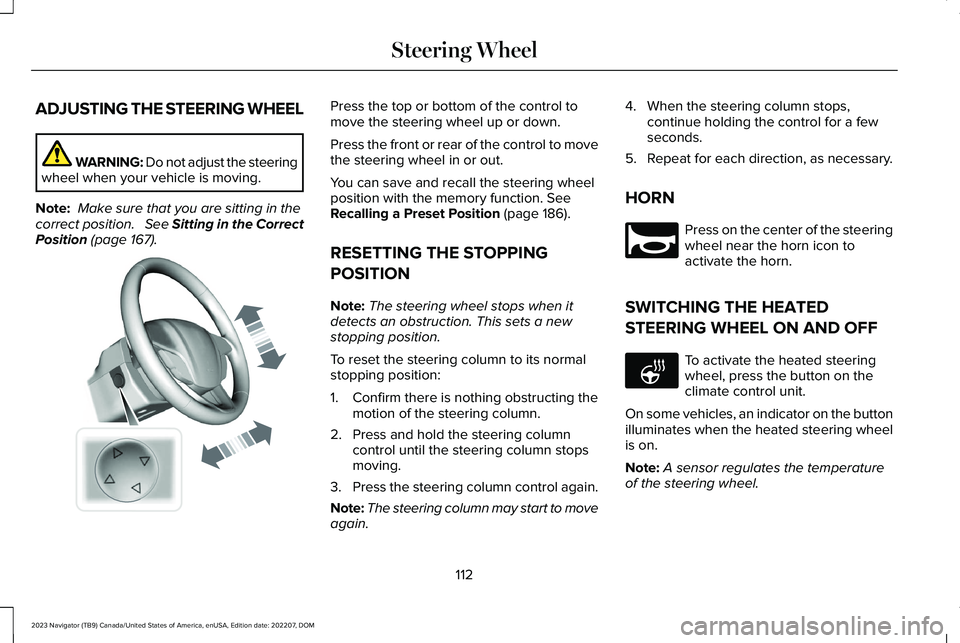
ADJUSTING THE STEERING WHEEL
WARNING: Do not adjust the steeringwheel when your vehicle is moving.
Note: Make sure that you are sitting in thecorrect position. See Sitting in the CorrectPosition (page 167).
Press the top or bottom of the control tomove the steering wheel up or down.
Press the front or rear of the control to movethe steering wheel in or out.
You can save and recall the steering wheelposition with the memory function. SeeRecalling a Preset Position (page 186).
RESETTING THE STOPPING
POSITION
Note:The steering wheel stops when itdetects an obstruction. This sets a newstopping position.
To reset the steering column to its normalstopping position:
1.Confirm there is nothing obstructing themotion of the steering column.
2.Press and hold the steering columncontrol until the steering column stopsmoving.
3.Press the steering column control again.
Note:The steering column may start to moveagain.
4.When the steering column stops,continue holding the control for a fewseconds.
5.Repeat for each direction, as necessary.
HORN
Press on the center of the steeringwheel near the horn icon toactivate the horn.
SWITCHING THE HEATED
STEERING WHEEL ON AND OFF
To activate the heated steeringwheel, press the button on theclimate control unit.
On some vehicles, an indicator on the buttonilluminates when the heated steering wheelis on.
Note:A sensor regulates the temperatureof the steering wheel.
112
2023 Navigator (TB9) Canada/United States of America, enUSA, Edition date: 202207, DOMSteering WheelE261582 E270945 E256621
Page 117 of 660
ADJUSTING THE PEDALS
WARNING: Do not use the pedaladjustment controls when the vehicle ismoving. Failure to follow this instructioncould result in personal injury or death.
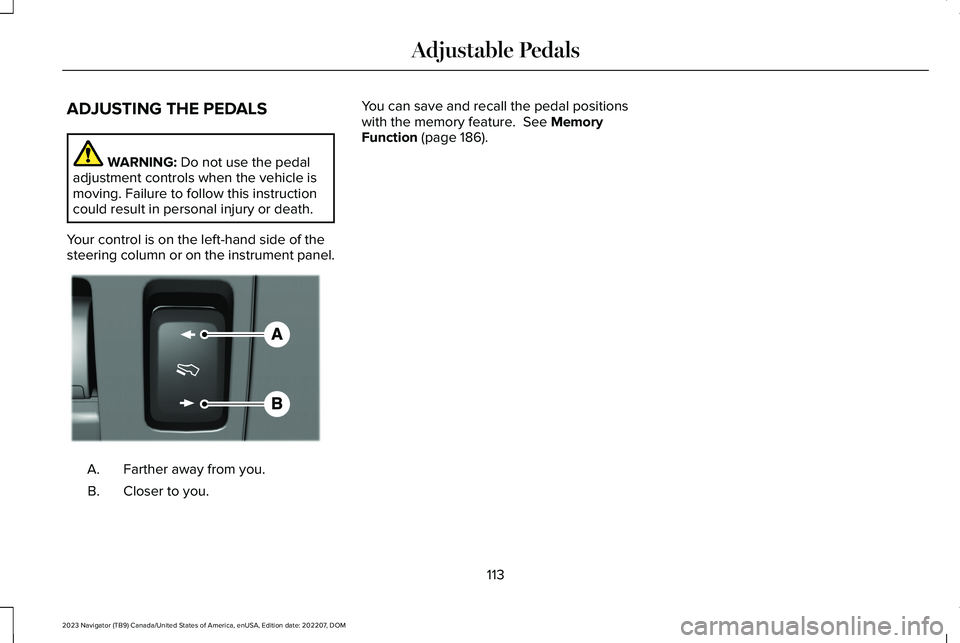
Your control is on the left-hand side of thesteering column or on the instrument panel.
Farther away from you.A.
Closer to you.B.
You can save and recall the pedal positionswith the memory feature. See MemoryFunction (page 186).
113
2023 Navigator (TB9) Canada/United States of America, enUSA, Edition date: 202207, DOMAdjustable PedalsE176213
Page 134 of 660
GLARE FREE LIGHTING – TROUBLESHOOTING (IF EQUIPPED)
GLARE FREE LIGHTING – INFORMATION MESSAGES
DescriptionMessage
The camera has reduced visibility. Clean the windshield. If the message continues to appear,have your vehicle checked as soon as possible.Front Camera Low Visibility Clean Screen
The camera has malfunctioned. Wait a short period of time for the camera to cool down. If themessage continues to appear, have your vehicle checked as soon as possible.Front Camera Temporarily Not Available
The camera has malfunctioned. Have your vehicle checked as soon as possible.Front Camera Malfunction ServiceRequired
ADAPTIVE FRONT LIGHTING
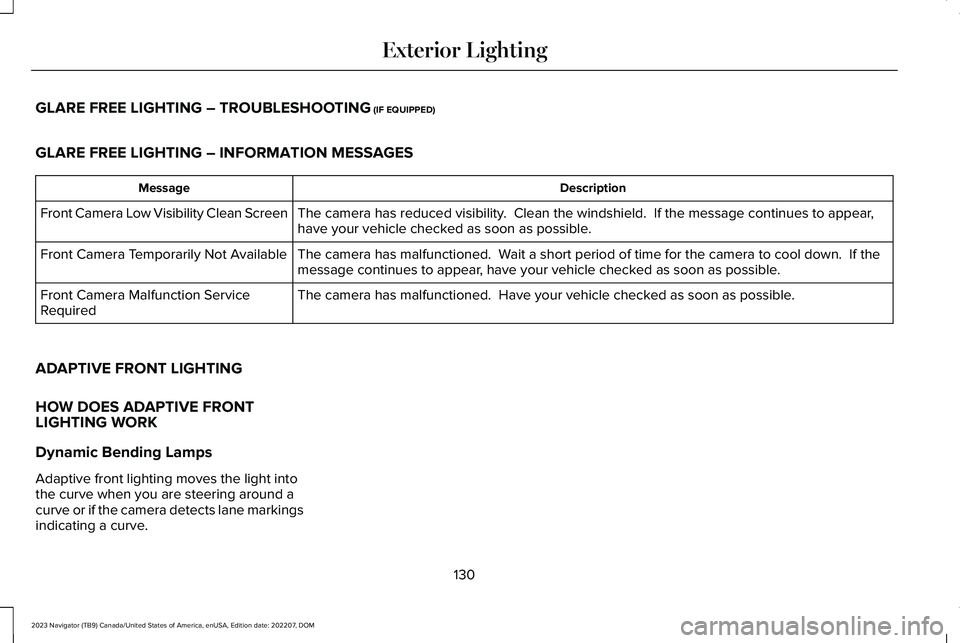
HOW DOES ADAPTIVE FRONTLIGHTING WORK
Dynamic Bending Lamps
Adaptive front lighting moves the light intothe curve when you are steering around acurve or if the camera detects lane markingsindicating a curve.
130
2023 Navigator (TB9) Canada/United States of America, enUSA, Edition date: 202207, DOMExterior Lighting
Page 135 of 660
Without adaptive front lighting.A
With adaptive front lighting.B
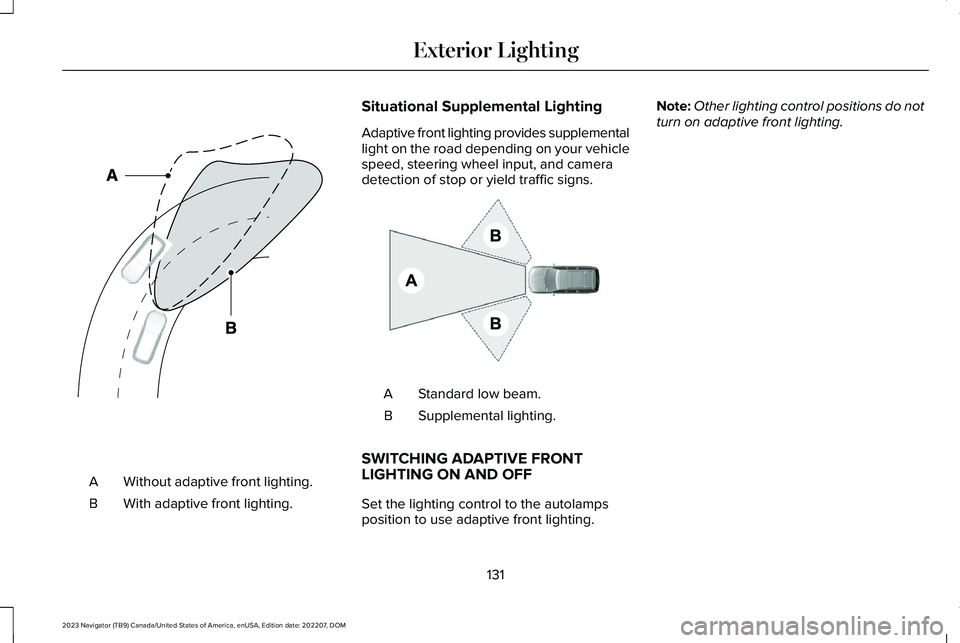
Situational Supplemental Lighting
Adaptive front lighting provides supplementallight on the road depending on your vehiclespeed, steering wheel input, and cameradetection of stop or yield traffic signs.
Standard low beam.A
Supplemental lighting.B
SWITCHING ADAPTIVE FRONTLIGHTING ON AND OFF
Set the lighting control to the autolampsposition to use adaptive front lighting.
Note:Other lighting control positions do notturn on adaptive front lighting.
131
2023 Navigator (TB9) Canada/United States of America, enUSA, Edition date: 202207, DOMExterior LightingE161714 E275680
Page 139 of 660
USING GLOBAL OPENING (If Equipped)
1.Press and release the unlock button onthe remote control.
2.Press and hold the unlock button on theremote control.
3.Release the button when the windowsstart to open.
Press the lock or the unlock button on theremote control to stop global opening.
Note:You can use global opening for a shortperiod of time when you unlock your vehicleusing the remote control.
SWITCHING GLOBAL OPENING ONAND OFF (If Equipped)
1.Using the information display controls onthe steering wheel, select Settings.
2.Select Vehicle.
3.Select Windows.
4.Switch Remote Open on or off.
WINDOW BOUNCE-BACK
WHAT IS WINDOW BOUNCE-BACK
The window stops and reverses if it detectsan obstruction when closing.
OVERRIDING WINDOW BOUNCE-BACK
WARNING: If you overridebounce-back, the window does not reverseif it detects an obstacle. Take care whenclosing the windows to avoid personalinjury or damage to your vehicle.
1.Close the window until it reaches thepoint of resistance and let it reverse.
2.Lift and hold the window control switchwithin two seconds to overridebounce-back and close the window. Bounce-back is now disabled and youcan close the window manually.
Note:The window goes past the point ofresistance and you can fully close it.
Note:If the window does not close, haveyour vehicle checked as soon as possible.
LOCKING THE REAR WINDOW
CONTROLS
Press the window control switchto lock or unlock the rear windowcontrols. It illuminates when youlock the rear window controls.
135
2023 Navigator (TB9) Canada/United States of America, enUSA, Edition date: 202207, DOMWindows
Page 152 of 660
USING THE INSTRUMENT
CLUSTER DISPLAY CONTROLS
WARNING: Driving while distractedcan result in loss of vehicle control, crashand injury. We strongly recommend thatyou use extreme caution when using anydevice that may take your focus off theroad. Your primary responsibility is the safeoperation of your vehicle. We recommendagainst the use of any hand-held devicewhile driving and encourage the use ofvoice-operated systems when possible.Make sure you are aware of all applicablelocal laws that may affect the use ofelectronic devices while driving.
Note:Some options could appear slightlydifferent or not at all if the items are optional.
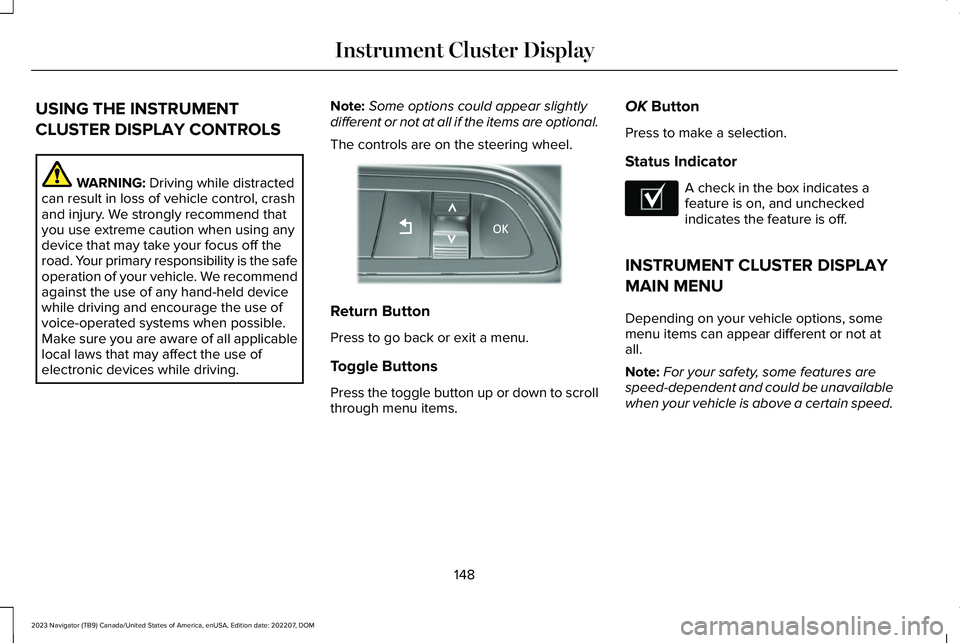
The controls are on the steering wheel.
Return Button
Press to go back or exit a menu.
Toggle Buttons
Press the toggle button up or down to scrollthrough menu items.
OK Button
Press to make a selection.
Status Indicator
A check in the box indicates afeature is on, and uncheckedindicates the feature is off.
INSTRUMENT CLUSTER DISPLAY
MAIN MENU
Depending on your vehicle options, somemenu items can appear different or not atall.
Note:For your safety, some features arespeed-dependent and could be unavailablewhen your vehicle is above a certain speed.
148
2023 Navigator (TB9) Canada/United States of America, enUSA, Edition date: 202207, DOMInstrument Cluster DisplayE357886 E204495