steering LINCOLN NAVIGATOR 2023 Owner's Manual
[x] Cancel search | Manufacturer: LINCOLN, Model Year: 2023, Model line: NAVIGATOR, Model: LINCOLN NAVIGATOR 2023Pages: 660, PDF Size: 14.04 MB
Page 156 of 660
WHAT IS THE HEAD UP DISPLAY
The system displays information on a displayscreen in your field of vision, allowing you tokeep your eyes on the road. You can selectwhich information the system displays.
SWITCHING THE HEAD UP
DISPLAY ON AND OFF
Use the instrument cluster controls on thesteering wheel to navigate to the head updisplay menu.
ActionMenu Item
Press the OK button.HUD
Press the OK button.HUD On
Note:The system remembers the last settingwhen you start the engine.
HEAD UP DISPLAY SETTINGS
You can control the system's options throughthe instrument cluster display by using theHUD, OK and arrow buttons on your steeringwheel. See Using the Instrument ClusterDisplay Controls (page 148).
You can adjust the display according to yourheight to make viewing the content easier.You can also adjust what content displaysand the brightness of the content. Thesystem's options appear in the instrumentcluster while the updates happen in the headup display.
Note:If HUD On is unchecked, other optionsof the system are hidden.
Note:The head up display menuautomatically closes after a certain periodof inactivity.
Note:The head up display image brightnessautomatically adjusts to the brightness ofthe ambient environment. You have theability to adjust the brightness furtheraccording to your preference.
Note:In some instances, sunlight can causesome reflections in and around the head updisplay image.
152
2023 Navigator (TB9) Canada/United States of America, enUSA, Edition date: 202207, DOMHead Up Display (If Equipped)
Page 159 of 660
HEAD UP DISPLAY – TROUBLESHOOTING
HEAD UP DISPLAY – INFORMATION MESSAGES
ActionMessage
The system is malfunctioning or something is obstructing the display.Make sure that the head up display is free from obstruction. If themessage continues to appear, have your vehicle checked as soon aspossible.
Head up Display (HUD) System Fault See Manual
Press the button on the steering wheel. The head up display menuappears in the instrument cluster display. Make sure the blue frameis fully visible. Do not manually move the screen. This can causedamage not covered by your vehicle's warranty.
Head up Display (HUD) Use the Information Central Menu
155
2023 Navigator (TB9) Canada/United States of America, enUSA, Edition date: 202207, DOMHead Up Display (If Equipped)
Page 162 of 660
Note:If you switch the auto mode on, thesystem attempts to heat or cool the interiorto 72°F (22°C). When you switch the vehicleon, the climate control system returns to thelast used settings.
Note:If you switch the last settings on, thesystem remembers the last used settings.
Heated Seat Settings (If Equipped)
1.Press Settings on the touchscreen.
2.Press Vehicle Settings.
3.Press Remote Start Setup.
4.Press Seats.
5.Press Auto or Off.
Note:If you switch the heated seat settingson, the heated seats turn on during coldweather.
Note:You cannot adjust the heated seatsettings when you remotely start yourvehicle.
Heated Steering Wheel Settings (If
Equipped)
1.Press Settings on the touchscreen.
2.Press Vehicle Settings.
3.Press Remote Start Setup.
4.Press Seats and Steering Wheel.
5.Press Auto or Off.
Note:If you switch the heated steering wheelsettings on, the heated steering wheel turnson during cold weather.
Note:You cannot adjust the heated steeringwheel settings when you remotely start yourvehicle.
Remote Start Duration
1.Press Settings on the touchscreen.
2.Press Vehicle Settings.
3.Press Remote Start Setup.
4.Press Duration.
5.Press the duration you prefer.
158
2023 Navigator (TB9) Canada/United States of America, enUSA, Edition date: 202207, DOMRemote Start
Page 171 of 660
FRONT SEAT PRECAUTIONS
WARNING: Sitting improperly, out ofposition or with the seatback reclined toofar can take weight off the seat cushionand affect the decision of the passengersensing system, resulting in serious injuryor death in the event of a crash. Always situpright against your seat back, with yourfeet on the floor.
WARNING: Do not recline the seatbackrest too far as this can cause theoccupant to slide under the seatbelt,resulting in personal injury in the event ofa crash.
WARNING: Do not place objectshigher than the top of the seat backrest.Failure to follow this instruction could resultin personal injury or death in the event ofa sudden stop or crash.
WARNING: Do not adjust the driverseat or seat backrest when your vehicle ismoving. This may result in sudden seatmovement, causing the loss of control ofyour vehicle.
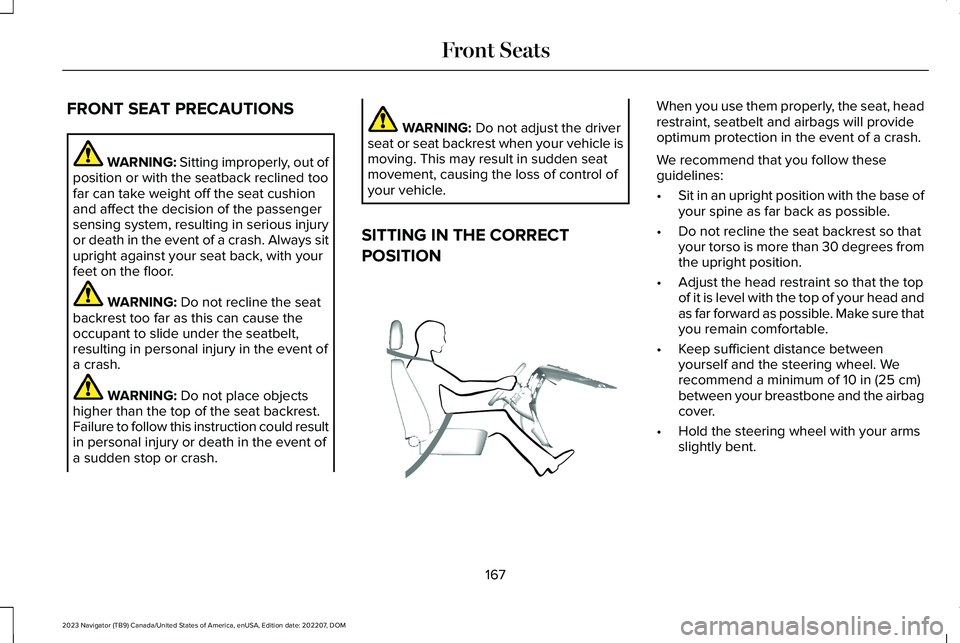
SITTING IN THE CORRECT
POSITION
When you use them properly, the seat, headrestraint, seatbelt and airbags will provideoptimum protection in the event of a crash.
We recommend that you follow theseguidelines:
•Sit in an upright position with the base ofyour spine as far back as possible.
•Do not recline the seat backrest so thatyour torso is more than 30 degrees fromthe upright position.
•Adjust the head restraint so that the topof it is level with the top of your head andas far forward as possible. Make sure thatyou remain comfortable.
•Keep sufficient distance betweenyourself and the steering wheel. Werecommend a minimum of 10 in (25 cm)between your breastbone and the airbagcover.
•Hold the steering wheel with your armsslightly bent.
167
2023 Navigator (TB9) Canada/United States of America, enUSA, Edition date: 202207, DOMFront SeatsE68595
Page 190 of 660
WHAT IS THE MEMORY FUNCTION
The driver seat memory function recalls theposition of these features:
•Driver seat.
•Power mirrors.
•Power steering column.
•Power adjustable foot pedals.
The passenger seat memory function recallsthe position of the passenger seat.
MEMORY FUNCTION
PRECAUTIONS
WARNING: Before activating thememory seat, make sure that the areaimmediately surrounding the seat is clearof obstructions and that all occupants areclear of moving parts.
WARNING: Do not use the memoryfunction when your vehicle is moving.
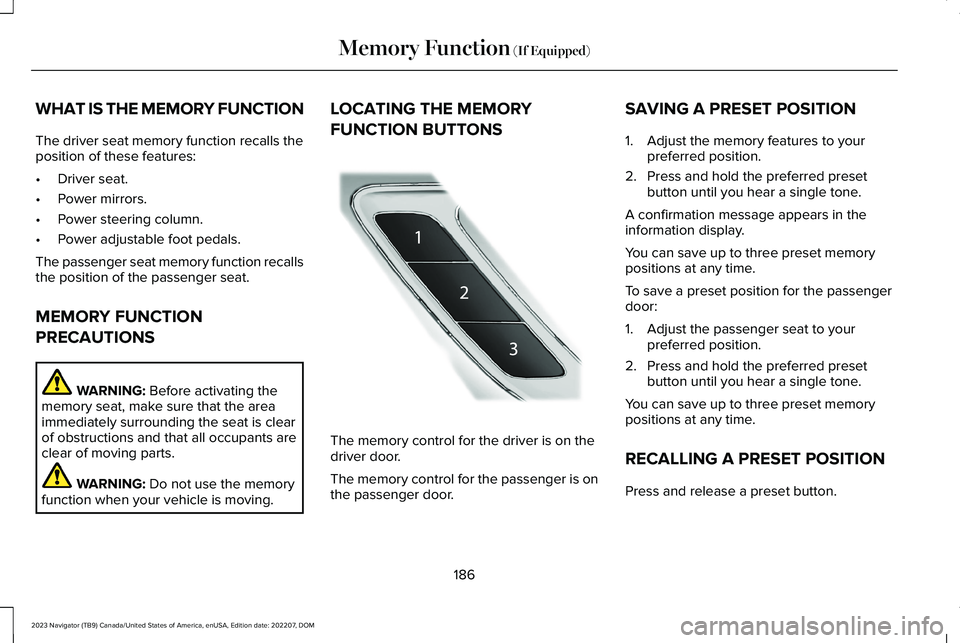
LOCATING THE MEMORY
FUNCTION BUTTONS
The memory control for the driver is on thedriver door.
The memory control for the passenger is onthe passenger door.
SAVING A PRESET POSITION
1.Adjust the memory features to yourpreferred position.
2.Press and hold the preferred presetbutton until you hear a single tone.
A confirmation message appears in theinformation display.
You can save up to three preset memorypositions at any time.
To save a preset position for the passengerdoor:
1.Adjust the passenger seat to yourpreferred position.
2.Press and hold the preferred presetbutton until you hear a single tone.
You can save up to three preset memorypositions at any time.
RECALLING A PRESET POSITION
Press and release a preset button.
186
2023 Navigator (TB9) Canada/United States of America, enUSA, Edition date: 202207, DOMMemory Function (If Equipped)E222235
Page 191 of 660
Note:You can recall a preset memoryposition when the ignition is off, or when youplace the transmission in park (P) or neutral(N) if the ignition is on and the vehicle is notmoving.
Note:Pressing any of the preset buttons orany memory feature control during a memoryrecall cancels the operation.
You can also recall a preset memory positionby:
•Pressing the unlock button on yourremote control if you linked it to a presetposition.
•Unlocking the intelligent driver doorhandle if a linked remote control ispresent.
•Recalling a personal profile in your SYNCmenu.
Using a linked remote control to recall yourmemory position when the ignition is offmoves the seat and steering column to theeasy entry position.
To recall a preset position on the passengerdoor, press and release the preset button.The passenger seat features move to theposition stored for that preset. You can recalla passenger seat preset memory at any time.
Linking a Preset Position to Your
Remote Control or Passive Key
See Linking or Unlinking a Personal Profileto a Remote Control (page 516).
187
2023 Navigator (TB9) Canada/United States of America, enUSA, Edition date: 202207, DOMMemory Function (If Equipped)
Page 208 of 660
Note:The engine block heater is mosteffective when outdoor temperatures arebelow 0°F (-18°C).
USING THE ENGINE BLOCK HEATER
Make sure the receptacle terminals are cleanand dry prior to use. Clean them with a drycloth if necessary.
The heater uses 0.4 to 1.0 kilowatt-hours ofenergy per hour of use. The system does nothave a thermostat. It achieves maximumtemperature after approximately three hoursof operation. Using the engine block heaterlonger than three hours does not improvesystem performance and unnecessarily useselectricity.
STOPPING THE ENGINE
STOPPING THE ENGINE WHEN YOURVEHICLE IS STATIONARY
1.Shift into park (P).
2.Apply the parking brake.
3.Wait until the engine reaches idle speed.
4.Press the push button ignition switch.
STOPPING THE ENGINE WHEN YOURVEHICLE IS MOVING
WARNING: Switching off the enginewhen your vehicle is still moving results ina significant decrease in brakingassistance. Higher effort is required toapply the brakes and to stop your vehicle.A significant decrease in steeringassistance could also occur. The steeringdoes not lock, but higher effort could berequired to steer your vehicle. When youswitch the ignition off, some electricalcircuits, for example airbags, also turn off.If you unintentionally switch the ignitionoff, shift into neutral (N) and restart theengine.
1.Press and hold the push button ignitionswitch until the engine stops, or press itthree times within two seconds.
2.Shift into neutral and use the brakes tobring your vehicle to a safe stop.
3.Shift into park (P).
4.Apply the parking brake.
AUTOMATIC ENGINE STOP
WHAT IS AUTOMATIC ENGINE STOP
Automatic engine stop is a feature thatswitches the engine off if it has been idlingfor an extended period to help you save fuel.
204
2023 Navigator (TB9) Canada/United States of America, enUSA, Edition date: 202207, DOMStarting and Stopping the EngineE357998 E357998
Page 228 of 660
HOW DOES FOUR-WHEEL DRIVE
WORK
Using the 1-Speed Automatic Four-Wheel Drive System
The 1-speed automatic four-wheel drivesystem utilizes an electronically controlledon-demand 1-speed transfer case. Thissystem monitors various vehicle sensoryinputs to provide an increased level ofperformance. This system offers the drivertwo-wheel drive high, four-wheel drive autoand four-wheel drive high as available modesof operation via the selectable drive modeswitch. When four-wheel drive auto isselected, the system continuously variespower to the front wheels for optimumperformance for all on-road conditions. Whenfour-wheel drive high is selected, the systemprovides power to the front and rear wheelsfor use in off-road or slippery conditions suchas deep snow, sand or mud. There is furtherinformation on driving in unique drivingconditions. See Driving Hints (page 384).
Using the 2-Speed Automatic Four-Wheel Drive System (If Equipped)
The 2-speed automatic four-wheel drivesystem utilizes an electronically controlledon-demand 2-speed transfer case. Thissystem monitors various vehicle sensoryinputs to provide an increased level ofperformance. This system offers the drivertwo-wheel drive high, four-wheel drive auto,four-wheel drive high, and four-wheel drivelow as available modes of operation. Whenfour-wheel drive auto is selected, the systemcontinuously varies power to the front wheelsfor optimum performance for all on-roadconditions. When either four-wheel drive highor four-wheel drive low are selected with theappropriate drive modes , the four-wheeldrive system provides electronically lockedpower to the front and rear wheels for usein off-road or slippery conditions such asdeep snow, sand or mud. Selecting slowclimb also provides additional gearing forincreased torque multiplication for conditionslike deep sand, snow, steep slopes, or pulling
heavy objects. See Slow Climb (page 297).Additionally, the system is capable ofrecreational flat towing by putting thetransfer case into neutral (N). SeeRecreationally Towing Your Vehicle (page397).
There is further information on driving inunique driving conditions. See Driving Hints(page 384).
FOUR-WHEEL DRIVE
PRECAUTIONS
WARNING: Vehicles with a highercenter of gravity (utility and four-wheeldrive vehicles) handle differently thanvehicles with a lower center of gravity(passenger cars). Avoid sharp turns,excessive speed and abrupt steering inthese vehicles. Failure to drive cautiouslyincreases the risk of losing control of yourvehicle, vehicle rollover, personal injuryand death.
224
2023 Navigator (TB9) Canada/United States of America, enUSA, Edition date: 202207, DOMFour-Wheel Drive (If Equipped)
Page 229 of 660
WARNING: Do not becomeoverconfident in the ability of four-wheeldrive vehicles. Although a four-wheel drivevehicle may accelerate better than atwo-wheel drive vehicle in low tractionsituations, it won't stop any faster thantwo-wheel drive vehicles. Always drive ata safe speed.
Truck and utility vehicles can differ fromsome other vehicles. Your vehicle could behigher to allow it to travel over rough terrainwithout getting stuck or damagingunderbody components. The differences thatmake your vehicle so versatile also make ithandle differently than an ordinary passengercar. Always maintain steering wheel control,especially in rough terrain. Since suddenchanges in terrain can result in abruptsteering wheel motion, make sure you gripthe steering wheel from the outside. Do notgrip the spokes. Drive cautiously to avoidvehicle damage from concealed objects such
as rocks and stumps. Drive slower in strongcrosswinds which can affect the normalsteering characteristics of your vehicle. Beextremely careful when driving on pavementmade slippery by loose sand, water, gravel,snow or ice.
Note:Do not use four-wheel drive high orfour-wheel drive low mode on dry, hardsurfaced roads. Doing so can produceexcessive noise, increase tire wear and candamage drive components.
FOUR-WHEEL DRIVE LIMITATIONS
Operating Four-Wheel Drive with aSpare or Mismatched Tires (If Equipped)
On four-wheel drive vehicles, the size of thespare tire can affect the four-wheel drivesystem. If there is a significant differencebetween the size of the spare tire and theremaining tires, you could have limitedfour-wheel drive functionality. When drivingwith the full-size dissimilar spare wheel andtire assembly, we recommend that you donot:
•Exceed 50 mph (80 km/h) with afour-wheel drive mode turned on.
•Use a four-wheel drive mode on drypavement.
Driving with the full-size dissimilar sparewheel and tire assembly can limit four-wheeldrive functionality. You can experience thefollowing:
•Additional noise from the transfer caseor other drive components.
Use of a dissimilar spare wheel and tireassembly can lead to impairment of thefollowing:
•Comfort and noise.
•Winter weather driving capability.
•Wet driving capability.
•Four-wheel drive capability.
Note:Your vehicle could have a front airdam that can become damaged, due toreduced ground clearance, when taking yourvehicle off-road. You can remove this airdam by removing the eight bolts that secureit.
225
2023 Navigator (TB9) Canada/United States of America, enUSA, Edition date: 202207, DOMFour-Wheel Drive (If Equipped)
Page 243 of 660

The system only applies the brakes for ashort period of time when an event occurs.Act as soon as you notice the brakes applyto remain in control of the vehicle. If you donot intervene the vehicle may start to moveagain.
Note:Certain add-on devices around thebumper or fascia may create false alerts. Forexample, large trailer hitches, bicycle orsurfboard racks, license plate brackets,bumper covers or any other device that mayblock the normal detection zone of thesystem. Remove the add-on device toprevent false alerts.
Note:The system does not react to small ormoving objects, particularly those close tothe ground.
Note:The system does not operate duringhard acceleration or steering.
Note:If your vehicle sustains damage to thebumper or fascia leaving it misaligned orbent, it could alter the sensing zone causinginaccurate measurement of obstacles orfalse alerts.
Note:Vehicle loading and suspensionchanges can impact the angle of the sensorsand may change the normal detection zoneof the system resulting in inaccuratemeasurement of obstacles or false alerts.
Note:When you connect a trailer, the systemmay detect the trailer and provide an alert,or the system turns off. If the system doesnot turn off, manually switch the system offafter you connect the trailer.
Note:You may experience reduced systemperformance on road surfaces that limitdeceleration. For example, roads with ice,loose gravel, mud or sand.
SWITCHING REVERSE BRAKING
ASSIST ON AND OFF
1.Press Features on the touchscreen.
2.Press Driver Assistance.
3.Switch Reverse Brake Assist on or off.
Note:The system is unavailable when therear parking aid, cross traffic alert or tractioncontrol is off.
Note:If your vehicle is not equipped withcross traffic alert the reverse braking assistrelies on input from the rear parking aid andrear camera sensors.
Note:The default setting is on in someregions.
OVERRIDING REVERSE BRAKING
ASSIST
There could be instances when unexpectedor unwanted braking occurs. Firmly pressingthe accelerator pedal or switching the featureoff overrides the system.
REVERSE BRAKING ASSIST
INDICATORS
If the system determines that a collision withan obstacle may occur, full braking mayapply.
A message and warning indicatorappear when the system appliesthe brakes.
239
2023 Navigator (TB9) Canada/United States of America, enUSA, Edition date: 202207, DOMReverse Braking Assist (If Equipped)E293490