brake LINCOLN NAVIGATOR 2023 Owner's Manual
[x] Cancel search | Manufacturer: LINCOLN, Model Year: 2023, Model line: NAVIGATOR, Model: LINCOLN NAVIGATOR 2023Pages: 660, PDF Size: 14.04 MB
Page 211 of 660
STARTING AND STOPPING THEENGINE – FREQUENTLY ASKEDQUESTIONS
Why is the engine idle speed high when Iam starting the engine?
The speed at which the engine idlesimmediately after starting is optimizedto minimize vehicle emissions andmaximize cabin comfort and fueleconomy.
Why does the engine not crank?
You can only attempt to start the enginefor a limited amount of time before thestarting system temporarily disables. Ifyou exceed the starting time limit, amessage may appear and you cannotattempt to start the engine for at least15 minutes.
Why do I experience different drivingcharacteristics?
If you disconnect the battery, yourvehicle may exhibit some unusualdriving characteristics for approximately5 mi (8 km) after you reconnect it. Thisis because the engine managementsystem must realign itself with theengine. You can disregard any unusualdriving characteristics during this period.
Why can I not start the engine?
If you cannot start the engine after 3attempts, wait 10 seconds and do thefollowing:
1.Fully press the brake pedal or the clutchpedal.
Note:Make sure that the parking brake isapplied.
Note:Make sure that the transmission is inpark (P) or neutral (N).
2.Fully press the accelerator pedal andhold it there.
3.Press the push button ignition switch.
Note:The engine cranks for a short periodof time and then it stops.
4.Release the accelerator pedal.
5.Press the push button ignition switch.
Why does the system not detect a passivekey?
If the system does not detect a passivekey and you are unable to start theengine, insert the passive key into thebackup position and press the pushbutton ignition switch to start theengine. See Accessing the Passive KeyBackup Position (page 205).
207
2023 Navigator (TB9) Canada/United States of America, enUSA, Edition date: 202207, DOMStarting and Stopping the EngineE357998
Page 212 of 660
WHAT IS AUTO-START-STOP
The system is designed to help reduce fuelconsumption and CO2 emissions by stopping
the engine when it is idling, for example attraffic lights.
AUTO-START-STOP PRECAUTIONS
WARNING: Apply the parking brake,shift into park (P), switch the ignition offand remove the key before you leave yourvehicle. Failure to follow this instructioncould result in personal injury or death.
WARNING: Apply the parking brake,shift into park (P), switch the ignition offand remove the key before you open thehood or have any service or repair workcompleted. If you do not switch the ignitionoff, the engine could restart at any time.Failure to follow this instruction could resultin personal injury or death.
SWITCHING AUTO-START-STOP
ON AND OFF
The system turns on when you switch theignition on.
Press the button to switch thesystem off.
Note:OFF illuminates in the switch.
Note:Deactivating the system using thebutton lasts only one key cycle.
Press the button again to switch the systemback on.
Note: The system turns off if it detects amalfunction. If the system malfunctions,have your vehicle checked as soon aspossible.
STOPPING THE ENGINE
Stop your vehicle, keep your foot on thebrake pedal and the transmission in drive(D).
RESTARTING THE ENGINE
Release the brake pedal or press theaccelerator pedal.
A message appears in the instrument clusterdisplay if the system requires you to takeaction.
AUTO-START-STOP INDICATORS
WARNING: The system may requirethe engine to automatically restart whenthe auto-start-stop indicator illuminatesgreen or flashes amber. Failure to followthis instruction could result in personalinjury.
The Auto-Start-Stop indicatorilluminates green when the enginestops. It flashes amber and amessage appears when you need to takeaction.
208
2023 Navigator (TB9) Canada/United States of America, enUSA, Edition date: 202207, DOMAuto-Start-Stop (If Equipped)E121377 E121377
Page 213 of 660
The Auto-Start-Stop indicatorilluminates gray with astrikethrough when the system isnot available.
Note:You can display the reason why thesystem is not available in the informationdisplay.
AUTO-START-STOP –
TROUBLESHOOTING
AUTO-START-STOP – INFORMATIONMESSAGES
A message appears in the instrument clusterdisplay if the system requires you to takeaction.
ActionConditionMessage
Press the brake pedal to restart the engine.The system needs to restart the engine butrequires your confirmation.Auto StartStop Press Brake to Start Engine
Press the brake pedal or the accelerator pedalto restart the engine.The system needs to restart the engine butrequires your confirmation.Auto StartStop Press a Pedal to Start Engine
209
2023 Navigator (TB9) Canada/United States of America, enUSA, Edition date: 202207, DOMAuto-Start-Stop (If Equipped)E146361
Page 214 of 660
AUTO-START-STOP – FREQUENTLYASKED QUESTIONS
Why does the engine not always stopwhen I expect it to?
The system is designed to work in a way thatcomplements other vehicle systems, allowingthem to operate at optimum performance.
The system does not stop the engine if:
•The driver door is open.
•Your vehicle is at high altitude.
•The heated windshield is on.
•The engine is warming up.
•The outside temperature is too low ortoo high.
•The battery charge is low.
•The battery temperature is outside theoptimal operating range.
•The engine is required to run to maintaininterior climate and reduce fogging.
Why does the engine sometimesrestart when I do not expect it to?
The system is designed to work in a way thatcomplements other vehicle systems, allowingthem to operate at optimum performance.
The system restarts the engine if:
•You switch the heated windshield on.
•You switch maximum defrost on.
•Your vehicle starts to roll downhill inneutral.
•The engine is required to run to maintainadequate brake system assistance.
•The engine is required to run to maintaininterior climate and reduce fogging.
Can I permanently switch the systemoff?
No. The system plays an important role inreducing the fuel consumption and the CO2emissions.
Will the frequent engine starts causeparts to wear out?
Your vehicle has an enhanced battery andstarter motor that are designed for theincreased number of engine starts.
210
2023 Navigator (TB9) Canada/United States of America, enUSA, Edition date: 202207, DOMAuto-Start-Stop (If Equipped)
Page 221 of 660
FUEL AND REFUELING –
TROUBLESHOOTING
FUEL AND REFUELING – WARNINGLAMPS
If it illuminates when you aredriving, refuel as soon as possible.
FUEL AND REFUELING –INFORMATION MESSAGES
Refueling System Warning
If the fuel tank filler valve does not fully close,a message could appear in the instrumentcluster display.
Message
Check Fuel Fill Inlet
If the message appears, do the following:
1.Stop your vehicle as soon as it is safe todo so and switch the engine off.
2.Shift into park (P) or neutral (N).
3.Apply the parking brake.
4.Fully open the fuel filler door.
5.Check the fuel tank filler valve for anydebris that may be restricting itsmovement.
6.Remove any debris from the fuel tankfiller valve.
7.Fully insert a fuel pump nozzle or the fuelfiller funnel provided with your vehicleinto the fuel filler pipe. See Locating theFuel Filler Funnel (page 212). This actionshould dislodge any debris that may bepreventing the fuel tank filler valve fromfully closing.
8.Remove the fuel pump nozzle or fuel fillerfunnel from the fuel filler pipe.
9.Fully close the fuel filler door.
Note:The message may not immediatelyreset. If the message continues to appearand a warning lamp illuminates, have yourvehicle checked as soon as possible.
217
2023 Navigator (TB9) Canada/United States of America, enUSA, Edition date: 202207, DOMFuel and Refueling
Page 224 of 660
AUTOMATIC TRANSMISSION
PRECAUTIONS
WARNING: Apply the parking brake,shift into park (P), switch the ignition offand remove the key before you leave yourvehicle. Failure to follow this instructioncould result in personal injury or death.
WARNING: When your vehicle isstationary, keep the brake pedal fullypressed when shifting gears. Failure tofollow this instruction could result inpersonal injury, death or property damage.
WARNING: Do not apply the brakepedal and accelerator pedalsimultaneously. Applying both pedalssimultaneously for more than a fewseconds will limit engine performance,which may result in difficulty maintainingspeed in traffic and could lead to seriousinjury.
AUTOMATIC TRANSMISSION
POSITIONS
PARK (P)
WARNING: Shift into park (P) onlywhen your vehicle is stationary.
In park (P) power is not transmitted to thedriven wheels.
Note:A tone sounds if you attempt to exityour vehicle without the vehicle in park (P).
Note:Your vehicle may not shift out of park(P) if the vehicle battery has run out ofcharge.
Note:Your vehicle may not shift out of park(P) if a fuse is blown.
Note:Your vehicle may not shift out of park(P) unless the key or remote control is insideyour vehicle.
Note:The electronic parking brake couldapply when the selector is in park (P). SeeAutomatically Releasing the ElectricParking Brake (page 236).
Note:Your vehicle could shift into park (P) ifyou attempt to exit your vehicle without thevehicle in park (P). See How Does AutomaticReturn to Park (P) Work (page 223).
Note:A tone could sound when you selectpark (P).
REVERSE (R)
WARNING: Shift into reverse (R) onlywhen your vehicle is stationary.
In reverse (R) power is transmitted to thedriven wheels.
NEUTRAL (N)
WARNING: In neutral (N) your vehicleis free to roll.
In neutral (N) power is not transmitted to thedriven wheels.
220
2023 Navigator (TB9) Canada/United States of America, enUSA, Edition date: 202207, DOMAutomatic Transmission
Page 225 of 660
DRIVE (D)
In drive (D) power is transmitted to the drivenwheels.
SHIFTING YOUR VEHICLE INTO
GEAR
The transmission selector is on the centerstack.
1.Press and hold the brake pedal.
2.Press a button to select a position.
Note:The position illuminates on thetransmission selector.
AUTOMATIC TRANSMISSION
POSITION INDICATORS
The instrument cluster displays the currentposition.
Note:The position could illuminate on thetransmission selector.
MANUALLY SHIFTING GEARS
SHIFTING USING THE PADDLESHIFTERS
The instrument cluster displays the currentgear. The current gear flashes when yourvehicle cannot shift into the requested gear.Your vehicle will not shift if the requestedgear raises or lowers the engine speedbeyond the limit.
Your vehicle could shift when you fully pressthe accelerator or brake pedal.
Note:Prolonged driving with high enginespeed could cause vehicle damage notcovered by the vehicle warranty.
Note:Drive modes could affect when thevehicle shifts into the requested gear.
Manually Shifting Gears in Drive (D)
Use this feature to temporarily change gear.
Note:We recommend using this feature forengine braking or driving on hilly ormountainous roads.
•Pull any paddle to switch the feature on.
•Pull the right (+) paddle to upshift.
221
2023 Navigator (TB9) Canada/United States of America, enUSA, Edition date: 202207, DOMAutomatic TransmissionE247220 E358682 E144821
Page 226 of 660
•Pull the left (-) paddle to downshift.
•Hold the + paddle for a few seconds toswitch the feature off.
Note:The feature switches off after a shortperiod of time if neither paddle is pulled.
TEMPORARY NEUTRAL MODE
WHAT IS TEMPORARY NEUTRALMODE
This mode keeps your vehicle in neutral (N),for a limited time, when you exit your vehicleor switch your vehicle off.
Note:Do not tow your vehicle in this mode.
HOW DOES TEMPORARY NEUTRALMODE WORK
Use this mode to keep your vehicle in neutral(N) when you exit your vehicle or switch yourvehicle off. For example, if you exit yourvehicle before an automatic car wash.
Note:You do not need to use this mode atan automatic car wash if you stay in yourvehicle with power on.
Note:Do not tow your vehicle in this mode.
Note:Automatic return to park (P) is delayedwhen your vehicle is in this mode. See WhatIs Automatic Return to Park (P) (page 223).
TEMPORARY NEUTRAL MODELIMITATIONS
Your vehicle could shift to park (P) after 30minutes, or when the vehicle battery chargelevel is low. Prolonged use of this mode cancause the 12 V battery to run out of charge.
Do not tow your vehicle in this mode. Failureto follow these instructions could result invehicle damage not covered by the vehiclewarranty.
ENTERING TEMPORARY NEUTRALMODE
1.Power your vehicle on.
2.Bring your vehicle to a complete stop.
3.Press and hold the brake pedal.
4.Shift into neutral (N).
Note:An instructional message appears.
5.Press the neutral (N) button.
Note:A confirmation message appearswhen your vehicle enters the mode.
6.Release the brake pedal.
Note:Your vehicle is free to roll.
7.Switch your vehicle off.
Note:Do not tow your vehicle in this mode.
Note:The neutral (N) indicator on thetransmission selector may flash in this mode.
EXITING TEMPORARY NEUTRALMODE
1.Press the brake pedal.
2.Shift into park (P), or power your vehicleon and shift into drive (D) or reverse (R).
222
2023 Navigator (TB9) Canada/United States of America, enUSA, Edition date: 202207, DOMAutomatic Transmission
Page 236 of 660
BRAKE PRECAUTIONS
Wet brakes result in reduced brakingefficiency. Gently press the brake pedal afew times when leaving a car wash or drivingfrom standing water to dry the brakes.
Note:Depending on applicable laws andregulations in the country where your vehiclewas originally built, the stoplamps could flashduring heavy braking. The hazard warningflashers could also turn on when your vehiclecomes to a stop.
ANTI-LOCK BRAKING SYSTEM
ANTI-LOCK BRAKING SYSTEMLIMITATIONS
The anti-lock braking system does noteliminate the risk of crash when:
•You drive too closely to the vehicle infront of you.
•Your vehicle is hydroplaning.
•You take corners too fast.
•The road surface is poor.
Note: If the system activates, the brakepedal could pulse and travel further. Maintain pressure on the brake pedal.
BRAKE OVER ACCELERATOR
In the event the accelerator pedal becomesstuck or entrapped, apply steady and firmpressure to the brake pedal to slow thevehicle and reduce engine power. If youexperience this condition, apply the brakesand bring your vehicle to a safe stop. Movethe transmission to park (P), switch theengine off and apply the parking brake.Inspect the accelerator pedal for anyinterference. If none are found and thecondition persists, have your vehicle towedto the nearest authorized dealer.
LOCATING THE BRAKE FLUID
RESERVOIR
See Under Hood Overview (page 415).
CHECKING THE BRAKE FLUID
WARNING: Do not use any fluid otherthan the recommended brake fluid as thiswill reduce brake efficiency. Use ofincorrect fluid could result in the loss ofvehicle control, serious personal injury ordeath.
WARNING: Only use brake fluid froma sealed container. Contamination with dirt,water, petroleum products or othermaterials may result in brake systemdamage or failure. Failure to adhere to thiswarning could result in the loss of vehiclecontrol, serious personal injury or death.
WARNING: Do not allow the fluid totouch your skin or eyes. If this happens,rinse the affected areas immediately withplenty of water and contact your physician.
WARNING: The brake system couldbe affected if the brake fluid level is belowthe MIN mark or above the MAX mark onthe brake fluid reservoir.
232
2023 Navigator (TB9) Canada/United States of America, enUSA, Edition date: 202207, DOMBrakes
Page 237 of 660
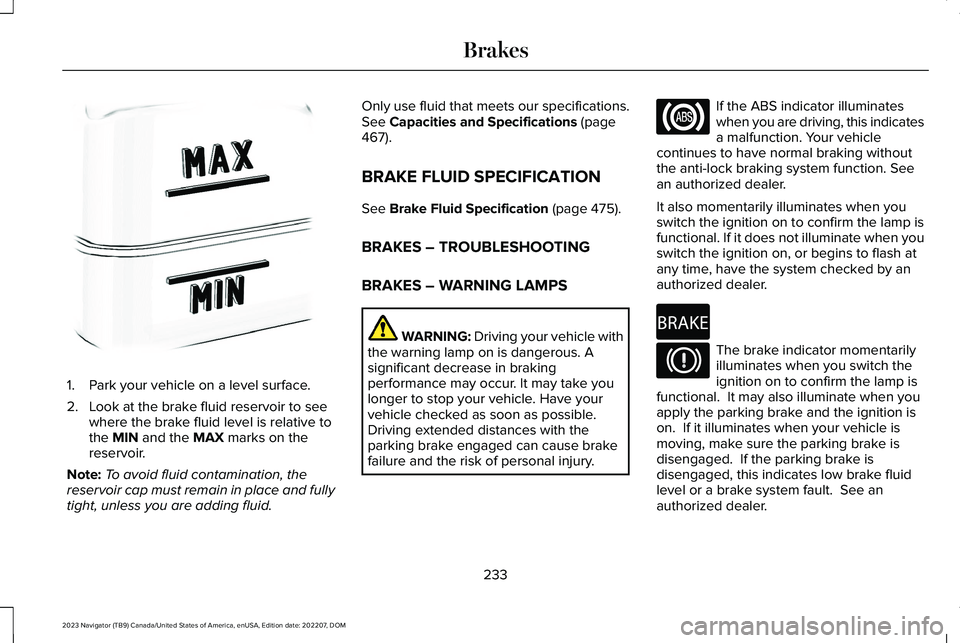
1.Park your vehicle on a level surface.
2.Look at the brake fluid reservoir to seewhere the brake fluid level is relative tothe MIN and the MAX marks on thereservoir.
Note:To avoid fluid contamination, thereservoir cap must remain in place and fullytight, unless you are adding fluid.
Only use fluid that meets our specifications.See Capacities and Specifications (page467).
BRAKE FLUID SPECIFICATION
See Brake Fluid Specification (page 475).
BRAKES – TROUBLESHOOTING
BRAKES – WARNING LAMPS
WARNING: Driving your vehicle withthe warning lamp on is dangerous. Asignificant decrease in brakingperformance may occur. It may take youlonger to stop your vehicle. Have yourvehicle checked as soon as possible.Driving extended distances with theparking brake engaged can cause brakefailure and the risk of personal injury.
If the ABS indicator illuminateswhen you are driving, this indicatesa malfunction. Your vehiclecontinues to have normal braking withoutthe anti-lock braking system function. Seean authorized dealer.
It also momentarily illuminates when youswitch the ignition on to confirm the lamp isfunctional. If it does not illuminate when youswitch the ignition on, or begins to flash atany time, have the system checked by anauthorized dealer.
The brake indicator momentarilyilluminates when you switch theignition on to confirm the lamp isfunctional. It may also illuminate when youapply the parking brake and the ignition ison. If it illuminates when your vehicle ismoving, make sure the parking brake isdisengaged. If the parking brake isdisengaged, this indicates low brake fluidlevel or a brake system fault. See anauthorized dealer.
233
2023 Navigator (TB9) Canada/United States of America, enUSA, Edition date: 202207, DOMBrakesE170684 E67020 E270480 E67024