change wheel LINCOLN NAVIGATOR 2023 Owner's Manual
[x] Cancel search | Manufacturer: LINCOLN, Model Year: 2023, Model line: NAVIGATOR, Model: LINCOLN NAVIGATOR 2023Pages: 660, PDF Size: 14.04 MB
Page 376 of 660
TRAILER BACKUP ASSISTANCE –FREQUENTLY ASKED QUESTIONS
Why does the trailer not reverse straight?
Verify the sticker is correctly applied.Other factors such as the hitchconnection, road camber, road slopeand trailer suspension could influencehow straight the system can reverse thetrailer when the control knob is notturned. You can compensate for thetrailer drifting to the right or left byslowly turning the knob until the traileris following your desired path andholding the knob in that position. Checkthat the correct trailer is selected in thetouchscreen. Verify the sticker iscorrectly applied and check that thedrawbar and the trailer dimensions arewithin the allowed range. If the trailerconsistently does not reverse straight,delete the trailer from the system andrepeat the setup process to calibratethe trailer.
What does it mean if the system remainson one message for an extended timeduring calibration?
The camera could need to be cleaned,the sticker could be blocked, thedrawbar could be outside the allowedrange of 9–18 in (23–46 cm) or youcould need to move to a different areato change the lighting and background.Verify the sticker is in the properlocation. See Applying the TrailerReversing Aid Sticker (page 364). Youcan move to a different area or changethe direction you are driving or set upthe system at a different time of day.Some trailers are not compatible withthe sticker and camera system.
What does it mean if the system pausesduring calibration?
There could be steering input or trailermovement during the straight driveportion of the calibration process.
What does it mean if the system displayshold steering steady during turn?
Part of the calibration process for thesticker setup requires a steady turn. Ifyou are continually moving the steeringwheel during the turn, this delays thecalibration process. To enable thecalibration process, hold the steeringwheel at the same position whenturning.
What does it mean if the system displaysthat it is not available?
There could be a sub-system that thesystem uses that is not correctlyoperating or there could be a batteryvoltage issue. If the system continuesto display it is not available, visit yourauthorized dealer to have your vehiclechecked.
372
2023 Navigator (TB9) Canada/United States of America, enUSA, Edition date: 202207, DOMTrailer Backup Assistance (If Equipped)
Page 378 of 660
What does it mean if the trailer is at itsmaximum angle or the system deactivatedby trailer angle?
You are at the maximum controllabletrailer angle for the system. Place yourvehicle in drive (D) and pull forward toget the truck and trailer back to anin-line position. If this messageconsistently displays, this could indicatethe sticker is incorrectly applied, thetrailer needs to be recalibrated or thedrawbar or the trailer dimensions areoutside of the supported range. Thesystem is designed to work withdrawbars that have a license plate tohitch ball center measurement of 9–18 in(23–46 cm) when installed. The systemis designed to work with trailers thathave a hitch point to center of the axleor axles measurement of 6–33 ft(1.85–10.05 m). Do not attempt to usedrawbars or trailers that have a lengthoutside of this range as the systemperformance degrades and could causeimproper system function. Check thatthe correct trailer is selected on the
touchscreen. Verify the sticker iscorrectly applied and check that thedrawbar and the trailer dimensions arewithin the allowed range. Then, deletethe trailer from the system and repeatthe setup process to calibrate the trailer.
What does it mean when the system tellsyou to take control of the steering wheel?
The system is no longer steering thevehicle and you must take over steering.There are four reasons the system coulddisplay this message. The first reasonthe system could display this messageis that you have touched the steeringwheel when the system is steering. Thesecond reason the system could displaythis message is that you have exceededthe maximum speed for the feature. Thethird reason the system could displaythis message is that the trailer is notdetected. The final reason the systemcould display this message is that aninternal condition for system operationis not met that requires your vehicle toreturn to manual control of the steering.
What does it mean if the system does notdetect a trailer?
The system requires a clear view of thesticker placed on the trailer. You mustkeep the camera lens and sticker cleanfor the system to correctly operate. Ifthe system cannot initially detect thetrailer, it could be necessary for you tochange the lighting conditions bymoving your vehicle and trailer orwaiting until the conditions change. SeeApplying the Trailer Reversing AidSticker (page 364). Some trailers are notcompatible with the sticker and camerasystem.
Note:The system is designed to be usedwith the same trailer connection every timeyou choose the trailer from the touchscreen.When using a different drawbar or a differentpinhole on drawbars with more than one,connecting the drawbar to your vehicleaffects the trailer position and you may needto repeat the trailer setup and calibrationprocess.
374
2023 Navigator (TB9) Canada/United States of America, enUSA, Edition date: 202207, DOMTrailer Backup Assistance (If Equipped)
Page 386 of 660
TRAILER REVERSE GUIDANCE –FREQUENTLY ASKED QUESTIONS
What does it mean if the system remainson one message for an extended timeduring calibration?
The camera could need to be cleaned,the sticker could be blocked, thedrawbar could be outside the allowedrange of 9–18 in (23–46 cm) or youcould need to move to a different areato change the lighting and background.Verify the sticker is in the properlocation. See Applying the TrailerReverse Aid Sticker (page 376). You canmove to a different area or change thedirection you are driving or setup thesystem at a different time of day. Sometrailers are not compatible with thesticker and camera system.
What does it mean if the system pausesduring calibration?
There could be steering input or trailermovement during the straight driveportion of the calibration process.
What does it mean if the system displayshold steering steady during turn?
Part of the calibration process for thesticker setup requires a steady turn. Ifyou are continually moving the steeringwheel during the turn, this delays thecalibration process. To enable thecalibration process, hold the steeringwheel at the same position whenturning.
What does it mean if the system displaysthat it is not available?
There could be a sub-system that thesystem uses that is not correctlyoperating or there could be a batteryvoltage issue. If the system continuesto display it is not available, visit yourauthorized dealer to have your vehiclechecked.
What does it mean if the system displaysthat driving is required to initialize steering?
The steering system needs to learninternal parameters to fully turn on thefeature. Drive your vehicle straightforward above 25 mph (40 km/h) forapproximately 5 minutes. This could alsooccur when your vehicle is new, thereis a battery voltage issue or if thesteering system has been serviced.
What does it mean if the system does notdetect a trailer?
The system requires a clear view of thesticker placed on the trailer. You mustkeep the camera lens and sticker cleanfor the system to correctly operate. Ifthe system cannot initially detect thetrailer, it could be necessary for you tochange the lighting conditions bymoving your vehicle and trailer orwaiting until the conditions change. SeeApplying the Trailer Reverse AidSticker (page 376). Some trailers are notcompatible with the sticker and camerasystem.
382
2023 Navigator (TB9) Canada/United States of America, enUSA, Edition date: 202207, DOMTrailer Reverse Guidance (If Equipped)
Page 389 of 660
DRIVING IN SPECIAL CONDITIONS
DRIVING THROUGH MUD AND WATER
Mud
Be cautious of sudden changes in vehiclespeed or direction when you are driving inmud. Even all-wheel drive and four-wheeldrive vehicles can lose traction in mud. Ifyour vehicle slides, steer in the direction ofthe slide until you regain control of yourvehicle. After driving through mud, clean offresidue stuck to rotating driveshafts and tires.Excess residue can cause an imbalance thatcould damage drive components.
Note:If your vehicle gets stuck in mud, itcould be rocked out by shifting betweenforward and reverse gears, stoppingbetween shifts in a steady pattern. Presslightly on the accelerator in each gear.
Note:Do not rock your vehicle if the engineis not at normal operating temperature, asdamage to the transmission could occur.
Note:Do not rock your vehicle for more thana minute, as damage to the transmissionand tires could occur or the engine couldoverheat.
Water
If you must drive though deep water, driveslowly. The water could limit traction or brakecapability. See Driving Through ShallowWater (page 386).
When driving though water, determine thedepth and avoid water higher than the centerof the wheel.
Once through water, always try the brakes.Wet brakes do not stop your vehicle asquickly as dry brakes. Apply light pressureto the brake pedal while slowly moving thevehicle to dry the brakes.
Note:Driving through deep water couldcause damage to the transmission. If thefront or rear axle is submerged in water,have the axle lubricant and power transferunit lubricant checked and changed ifnecessary.
DRIVING ON HILLY OR SLOPINGTERRAIN
WARNING: Extreme care should beused when steering the vehicle in reversedown a slope so as not to cause thevehicle to swerve out of control.
Although natural obstacles could make itnecessary to travel diagonally up or down ahill or steep incline, you should try to drivestraight up or straight down.
Note:Avoid turning on steep slopes or hills.A danger lies in losing traction, slippingsideways and possible vehicle roll over.Whenever driving on a hill, determinebeforehand the route you can use. Do notdrive over the crest of a hill without seeingwhat conditions are on the other side. Donot drive in reverse over a hill without theaid of an observer.
385
2023 Navigator (TB9) Canada/United States of America, enUSA, Edition date: 202207, DOMDriving Hints
Page 422 of 660
2.Remove the engine oil filler cap.
3.Add engine oil that meets ourspecifications. See Capacities andSpecifications (page 467).
4.Reinstall the engine oil filler cap. Turn itclockwise until you feel a strongresistance.
Note: Do not add oil further than themaximum mark. Oil levels above themaximum mark may cause engine damage.
Note:Immediately soak up any oil spillagewith an absorbent cloth.
RESETTING THE INTELLIGENT OIL LIFEMONITOR
Depending on your cluster, there are twopaths to reset the engine oil changereminder.
Path 1
1.Press the Menu button on the steeringwheel to enter the information displaymain menu.
2.Select Settings.
3.Select Vehicle Maintenance.
4.Select Oil Life.
5.Press and hold the OK button until thesystem reset confirmation appears.
Path 2
1.Press the Menu button on the steeringwheel to enter the information displaymain menu.
2.Select Truck Info.
3.Select Engine Information.
4.Press and hold the OK button until thesystem reset confirmation appears.
ENGINE OIL CAPACITY ANDSPECIFICATION
For filling information, please refer to theCapacities and Specifications section of yourowner's manual. See Engine Oil Capacityand Specification (page 469).
CHECKING THE COOLANT
When the engine is cold, check theconcentration and level of the coolant at theintervals listed in the scheduled maintenanceinformation. See Scheduled Maintenance(page 529).
Note:Make sure that the coolant level isbetween the minimum and maximum markson the coolant reservoir.
Note: Coolant expands when it is hot. Thelevel may extend beyond the MAX mark.
If the coolant level is at or below theminimum mark, add prediluted coolantimmediately.
Maintain coolant concentration within 48%to 50%, which equates to a freeze pointbetween -29°F (-34°C) and -35°F (-37°C).Coolant concentration should be checkedusing a refractometer. We do not recommendthe use of hydrometers or coolant test stripsfor measuring coolant concentration.
418
2023 Navigator (TB9) Canada/United States of America, enUSA, Edition date: 202207, DOMMaintenance
Page 439 of 660
PREPARING YOUR VEHICLE FOR
STORAGE
If you plan on storing your vehicle for 30days or more, the following maintenancerecommendations ensures your vehicle staysin good operating condition.
Under various conditions, long-term storagemay lead to degraded engine performanceor failure unless you use specific precautionsto preserve your vehicle.
General
•Store all vehicles in a dry, ventilatedplace.
•If vehicles are stored outside, theyrequire regular maintenance to protectagainst rust and weather damage.
•Make sure all linkages, cables, levers andpins under your vehicle are covered withgrease to prevent rust.
•Move vehicles at least 25 ft (7.5 m) every15 days to lubricate working parts andprevent corrosion.
•Fill the fuel tank with high-quality fueluntil the first automatic shutoff of the fuelpump nozzle.
Engine
•Change the engine oil and filter prior tostorage because used engine oil containscontaminants which may cause enginedamage.
•Start the engine every 15 days for aminimum of 15 minutes. Run at fast idlewith the climate controls set to defrostuntil the engine reaches normaloperating temperature.
•With your foot on the brake, shift throughall the gears while the engine is running.
Body
•Wash your vehicle thoroughly to removedirt, grease, oil, tar or mud from exteriorsurfaces, rear wheel housings and theunderside of front fenders.
•Periodically wash your vehicle if it isstored in exposed locations.
•Touch-up exposed or primed metal toprevent rust.
•Cover chrome and stainless steel partswith a thick coat of auto wax to preventdiscoloration. Rewax as necessary whenyou wash your vehicle.
•Lubricate all hood, door and luggagecompartment hinges and latches with alight grade oil.
•Cover interior trim to prevent fading.
•Keep all rubber parts free from oil andsolvents.
435
2023 Navigator (TB9) Canada/United States of America, enUSA, Edition date: 202207, DOMStoring Your Vehicle
Page 440 of 660
12 Volt Battery
•When storing your vehicle for greaterthan 30 days the state of charge shouldbe approximately 50%. Additionally, werecommend disconnecting the 12vbattery which will reduce system loadson the battery.
•Check and recharge as necessary. Keepconnections clean.
Note:It is necessary to reset memoryfeatures if you disconnect the battery cables.
Brakes
Make sure the brakes and parking brakerelease fully.
Note:If you intend on parking your vehiclefor an extended period after cleaning thewheels with a wheel cleaner, drive yourvehicle for a few minutes before doing so toreduce the risk of increased corrosion of thebrake discs, brake pads and linings.
Tires
Maintain recommended air pressure.
Note:If you intend on parking your vehiclefor an extended period after cleaning thewheels with a wheel cleaner, drive yourvehicle for a few minutes before doing so.This reduces the risk of corrosion of thebrake discs, brake pads and linings.
REMOVING YOUR VEHICLE FROM
STORAGE
When your vehicle is ready to come out ofstorage, do the following:
•We recommend that you change theengine oil before you use your vehicleagain.
•Wash your vehicle to remove any dirt orgrease film build-up on window surfaces.
•Check windshield wipers for anydeterioration.
•Check the underhood for any foreignmaterials such as mice or squirrel nests.
•Check the exhaust for any foreignmaterials.
•Check tire pressures and set tire inflationper the Tire Label.
•Check brake pedal operation. Corrodedbrake rotors could cause brake noise.Drive your vehicle and gently apply andrelease the brakes repeatedly over a10-minute drive to reduce the corrosionfrom the brakes.
•Check fluid levels (including coolant, oiland gas) to make sure there are no leaks,and fluids are at recommended levels.
•If you remove the battery, clean thebattery cable ends and check fordamage.
Contact an authorized dealer if you have anyconcerns or issues.
436
2023 Navigator (TB9) Canada/United States of America, enUSA, Edition date: 202207, DOMStoring Your Vehicle
Page 443 of 660
A. P: Indicates a tire, designated by theTire and Rim Association, that may beused for service on cars, sport utilityvehicles, minivans and light trucks. Note:If your tire size does not begin with aletter this may mean it is designated byeither the European Tire and RimTechnical Organization or the Japan TireManufacturing Association.
B. 215: Indicates the nominal width ofthe tire in millimeters from sidewall edgeto sidewall edge. In general, the largerthe number, the wider the tire.
C. 65: Indicates the aspect ratio whichgives the tire's ratio of height to width.
D. R: Indicates a radial type tire.
E. 15: Indicates the wheel or rim
diameter in inches. If you change yourwheel size, you will have to purchasenew tires to match the new wheeldiameter.
F. 95: Indicates the tire's load index. Itis an index that relates to how muchweight a tire can carry. You may find thisinformation in your owner’s manual. Ifnot, contact a local tire dealer.
Note:You may not find this informationon all tires because it is not required byfederal law.
G. H: Indicates the tire's speed rating.The speed rating denotes the speed atwhich a tire is designed to be driven forextended periods of time under astandard condition of load and inflationpressure. The tires on your vehicle mayoperate at different conditions for loadand inflation pressure. These speedratings may need to be adjusted for thedifference in conditions. The ratings
range from 81 mph (130 km/h) to186 mph (299 km/h). These ratings arelisted in the following chart.
Note:You may not find this informationon all tires because it is not required byfederal law.
Speed ratingLetter rating
81 mph (130 km/h)M
87 mph (140 km/h)N
99 mph (159 km/h)Q
106 mph (171 km/h)R
112 mph (180 km/h)S
118 mph (190 km/h)T
124 mph (200 km/h)U
130 mph (210 km/h)H
149 mph (240 km/h)V
439
2023 Navigator (TB9) Canada/United States of America, enUSA, Edition date: 202207, DOMWheel and Tire Information
Page 446 of 660
B. Load Range and Load InflationLimits: Indicates the tire's load-carryingcapabilities and its inflation limits.
C. Maximum Load Dual lb (kg) at psi(kPa) cold: Indicates the maximum loadand tire pressure when the tire is usedas a dual, defined as four tires on therear axle (a total of six or more tires onthe vehicle).
D. Maximum Load Single lb (kg) at psi(kPa) cold: Indicates the maximum loadand tire pressure when the tire is usedas a single, defined as two tires (total)on the rear axle.
Information on T Type Tires
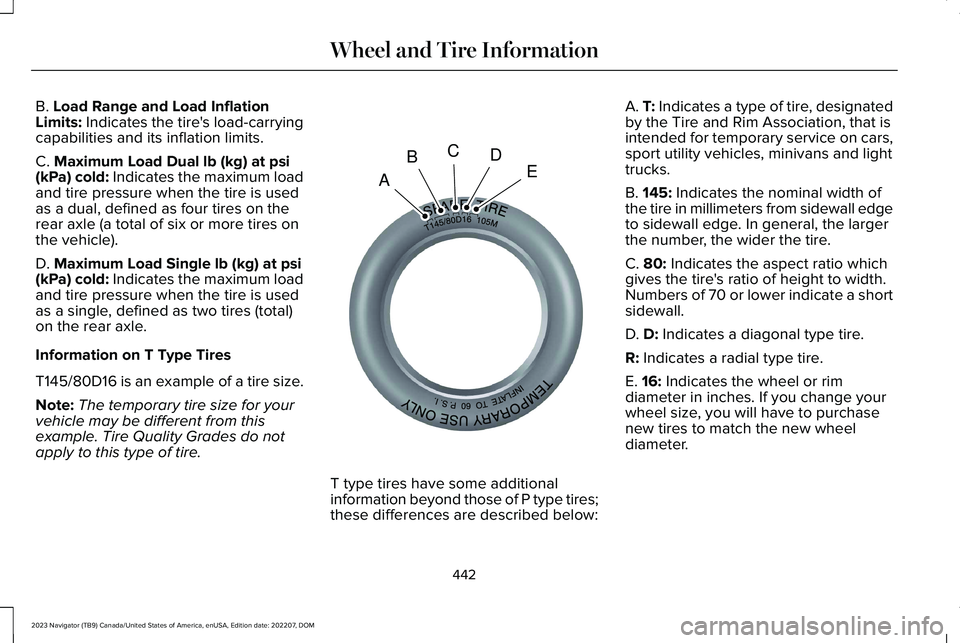
T145/80D16 is an example of a tire size.
Note:The temporary tire size for yourvehicle may be different from thisexample. Tire Quality Grades do notapply to this type of tire.
T type tires have some additionalinformation beyond those of P type tires;these differences are described below:
A. T: Indicates a type of tire, designatedby the Tire and Rim Association, that isintended for temporary service on cars,sport utility vehicles, minivans and lighttrucks.
B. 145: Indicates the nominal width ofthe tire in millimeters from sidewall edgeto sidewall edge. In general, the largerthe number, the wider the tire.
C. 80: Indicates the aspect ratio whichgives the tire's ratio of height to width.Numbers of 70 or lower indicate a shortsidewall.
D. D: Indicates a diagonal type tire.
R: Indicates a radial type tire.
E. 16: Indicates the wheel or rimdiameter in inches. If you change your
wheel size, you will have to purchasenew tires to match the new wheeldiameter.
442
2023 Navigator (TB9) Canada/United States of America, enUSA, Edition date: 202207, DOMWheel and Tire InformationABCDEE142545
Page 458 of 660
Your vehicle has also been equipped with aTPMS malfunction indicator to indicate whenthe system is not operating properly. TheTPMS malfunction indicator is combined withthe low tire pressure telltale. When thesystem detects a malfunction, the telltale willflash for approximately one minute and thenremain continuously illuminated. Thissequence will continue upon subsequentvehicle start-ups as long as the malfunctionexists.
When the malfunction indicator is illuminated,the system may not be able to detect orsignal low tire pressure as intended. TPMSmalfunctions may occur for a variety ofreasons, including the installation ofreplacement or alternate tires or wheels onthe vehicle that prevent the TPMS fromfunctioning properly. Always check the TPMSmalfunction telltale after replacing one ormore tires or wheels on your vehicle toensure that the replacement or alternate tiresand wheels allow the TPMS to continue tofunction properly.
WARNING: Changes or modificationsnot expressively approved by the partyresponsible for compliance could void theuser's authority to operate the equipment.The term "IC:" before the radio certificationnumber only signifies that Industry Canadatechnical specifications were met.
This device complies with Part 15 of the FCCRules and with License exempt RSSStandards of Industry Canada. Operation issubject to the following two conditions:
1.This device may not cause harmfulinterference, and
2.This device must accept any interferencereceived, including interference that maycause undesired operation.
TIRE PRESSURE MONITORING
SYSTEM PRECAUTIONS
WARNING: The tire pressuremonitoring system is not a substitute formanually checking tire pressures. Youshould periodically check tire pressuresusing a pressure gauge. Failure to correctlymaintain tire pressures could increase therisk of tire failure, loss of control, vehiclerollover and personal injury.
WARNING: Do not use the tirepressure displayed in the informationdisplay as a tire pressure gauge. Failure tofollow this instruction could result inpersonal injury or death.
Note:The use of tire sealants can damagethe tire pressure monitoring system.
Note:If the tire pressure monitor sensorbecomes damaged it may not function.
454
2023 Navigator (TB9) Canada/United States of America, enUSA, Edition date: 202207, DOMTire Pressure Monitoring System