steering wheel LINCOLN NAVIGATOR 2023 Owner's Manual
[x] Cancel search | Manufacturer: LINCOLN, Model Year: 2023, Model line: NAVIGATOR, Model: LINCOLN NAVIGATOR 2023Pages: 660, PDF Size: 14.04 MB
Page 255 of 660
SETTING THE HILL DESCENT
SPEED
To increase or decrease the descent speed,press the accelerator or brake pedal, or use
the SET + and SET - buttons on the steeringwheel. Once you reach the preferred speedremove your feet from the pedals.
HILL DESCENT CONTROL
INDICATOR
Illuminates when you switch hilldescent control on.
HILL DESCENT CONTROL – TROUBLESHOOTING
HILL DESCENT CONTROL – INFORMATION MESSAGES
ActionMessage
Your vehicle speed requirement for off-road mode entry has not been met.For Hill Descent Reduce Speed XX MPH/km/h or Less
You need to select a transmission gear for hill descent mode.For Hill Descent Select Gear
Hill descent control mode is deactivated and you must resume control.Hill Descent Driver Resume Control
A hill descent system fault is present.Hill Descent Control Fault
The hill descent system is cooling due to overuse.Hill Descent Control Off System Cooling
The hill descent system cannot activate while Cruise Control is actively controllingspeed.Hill Descent Control not available with Cruise ControlActive
251
2023 Navigator (TB9) Canada/United States of America, enUSA, Edition date: 202207, DOMHill Descent Control (If Equipped)E163171
Page 262 of 660
FRONT PARKING AID AUDIBLEWARNINGS
A warning tone sounds when there is anobject within 28 in (70 cm) from the frontbumper. As your vehicle moves closer to anobject, the rate of the tone increases.
The warning tone continuously sounds whenan object is 12 in (30 cm) or less from thefront bumper.
Note:If the detected object is 12 in (30 cm)or less from your vehicle, visual indicationremains on.
SIDE PARKING AID
WHAT IS THE SIDE PARKING AID
The front and rear outermost parking aidsensors map objects that are near to thesides of your vehicle.
SIDE PARKING AID LIMITATIONS
The sensor coverage is up to 24 in (60 cm)from the sides of your vehicle.
The side parking aid may not function if:
•Your vehicle remains stationary for overtwo minutes.
•The anti-lock brake system activates.
•The traction control system activates.
•Your vehicle is in park (P).
•The steering wheel angle information isnot available. You must drive at least492 ft (150 m) above 19 mph (30 km/h) toreset the steering wheel angleinformation.
Note:If you switch traction control off, theside sensing system also turns off.
To reinitialize the system, drive the length ofyour vehicle.
The side parking aid does not detect anobject that is moving toward the side of yourvehicle, for example another vehicle movingat a low speed, if it does not pass a front orrear parking aid sensor.
If the transmission is in reverse (R), the sidesensing system provides audible warnings.When your vehicle is moving slowly,obstacles are detected within 24 in (60 cm)and are inside the driving path of yourvehicle. If your vehicle remains stationary fora few seconds, the audible warning turns off.Visual indication is always present in reverse(R).
If your vehicle is in neutral (N), the sidesensing system provides visual indicationonly when your vehicle is moving slowly andthere is a front or rear parking aid obstacledetected, and the side obstacle is within24 in (60 cm) from the side of your vehicle.If your vehicle remains stationary for a fewseconds, the visual indication turns off.
If the transmission is in drive (D) or any otherforward gear, the side sensing systemprovides audible and visual warnings. Whenyour vehicle is moving slowly, obstacles aredetected within 24 in (60 cm) and are insidethe driving path of your vehicle. If yourvehicle remains stationary for a few seconds,the visual indication and audible warningturns off.
258
2023 Navigator (TB9) Canada/United States of America, enUSA, Edition date: 202207, DOMParking Aids
Page 267 of 660
Fixed guide line: Yellow zone.D
Fixed guide line: Red zone.E
Rear bumper.F
Active guide lines only show with fixed guidelines. Turn the steering wheel to point theguide lines toward an intended path. If thesteering wheel position changes whenreversing, your vehicle could deviate fromthe intended path.
The fixed and active guide lines fade in andout depending on the steering wheelposition. The active guide lines do notdisplay when the steering wheel position isstraight.
Objects in the red zone are closest to yourvehicle and objects in the green zone arefarther away. Objects get closer to yourvehicle as they move from the green zoneto the yellow or red zones. Use the side viewmirrors and rear view mirror to get bettercoverage on both sides and rear of yourvehicle.
Keep Out Zone
The keep out zone is represented by theyellow dotted lines running parallel to yourvehicle.
360 DEGREE CAMERA SETTINGS
SWITCHING THE 360 DEGREECAMERA ON AND OFF
The 360 degree camera systembutton is on the instrument paneland allows you to toggle the frontcamera on or off. The front and rear camerashave multiple screens which consist of:
•Normal view.
•Normal view with 360.
•Split view.
Note:The rear view camera activates whenyou switch into reverse (R). Additional viewsare then accessible on the touchscreen.
When in park (P), neutral (N) or drive (D), onlythe front images display when you press thebutton. When in reverse (R), only the rearimages display when you press the button.
Note:The 360 degree camera system turnsoff when your vehicle is in motion at lowspeed, except when in reverse (R).
263
2023 Navigator (TB9) Canada/United States of America, enUSA, Edition date: 202207, DOM360 Degree CameraE310341 E332186
Page 270 of 660
ENTERING A PARALLEL PARKING
SPACE
1.Press the parking aid button.
Note:The system detects other vehicles andcurbs to find a parking space.
2.Press the active park assist icon on thetouchscreen.
3.Use the turn signal lever to search for aparking space on the driver or passengerside of your vehicle.
Note:If you do not use the turn signal lever,the system searches for a parking space onthe passenger side of your vehicle.
4.Drive your vehicle approximately 3 ft (1 m)away from and parallel to the otherparked vehicles when searching for aparking space.
Note:A tone sounds and a messageappears in the information andentertainment display when active parkassist finds a suitable parking space.
5.Press and hold the brake pedal.
6.Release the steering wheel and shift intoneutral (N).
7.Press and hold the parking aid button.
8.Release the brake pedal to allow yourvehicle to park.
Note:You can slow down your vehicle atany time by pressing the brake pedal.
Note:When parallel parking betweenobjects, the system parks closer to the objectin front of your vehicle to allow easier accessto the luggage compartment.
Note:When parking is complete, yourvehicle shifts into park (P).
ENTERING A PERPENDICULAR
PARKING SPACE
1.Press the parking aid button.
Note:Active park assist does not recognizeparking space lines and centers your vehiclebetween objects.
2.Press the active park assist icon on thetouchscreen.
3.Select perpendicular parking.
4.Use the turn signal lever to search for aparking space on the driver or passengerside of your vehicle.
Note:If you do not use the turn signal lever,the system searches for a parking space onthe passenger side of your vehicle.
5.Drive your vehicle approximately 3 ft (1 m)away from and perpendicular to the otherparked vehicles when searching for aparking space.
Note:A tone sounds and a messageappears in the information andentertainment display when active parkassist finds a parking space.
6.Press and hold the brake pedal.
7.Release the steering wheel and shift intoneutral (N).
8.Press and hold the parking aid button.
9.Release the brake pedal to allow thevehicle to park.
Note:Active park assist backs your vehicleinto parking spaces.
266
2023 Navigator (TB9) Canada/United States of America, enUSA, Edition date: 202207, DOMActive Park Assist
Page 271 of 660
Note:Active park assist aligns the front endof your vehicle with the lane side of theobject next to it.
Note:When the system detects only oneobject, it allows enough distance to openthe door on either side.
Note:You can slow down your vehicle atany time by pressing the brake pedal.
Note:When parking is complete, yourvehicle shifts into park (P).
EXITING A PARKING SPACE
Active park assist only assists leaving parallelparking spaces.
1.Press the parking aid button.
2.Press the active park assist icon on thetouchscreen.
3.Select parallel park exit.
4.Use the turn signal to choose thedirection to exit the parking space.
5.Press and hold the brake pedal.
6.Release the steering wheel and shift intoneutral (N).
7.Release the parking brake.
8.Press and hold the parking aid button.
9.Release the brake pedal to allow yourvehicle to move.
Note:After active park assist drives yourvehicle to a position where you can exit theparking space in a forward movement, amessage appears instructing you to take fullcontrol of your vehicle.
10.Take control of your vehicle.
Note:You can slow down your vehicle atany time by pressing the brake pedal.
ACTIVE PARK ASSIST –
TROUBLESHOOTING
ACTIVE PARK ASSIST – INFORMATIONMESSAGES
ActionMessage
The system requiresservice. Have yourvehicle checked assoon as possible.
Active Park Fault
ACTIVE PARK ASSIST – FREQUENTLYASKED QUESTIONS
Why does active park assist not operatecorrectly?
The system is unable to detect a vehicle,curb or object to park next to or inbetween. The system needs boundaryobjects to operate correctly.
Why does active park assist not search fora parking space?
You have switched traction control off.
267
2023 Navigator (TB9) Canada/United States of America, enUSA, Edition date: 202207, DOMActive Park Assist
Page 277 of 660
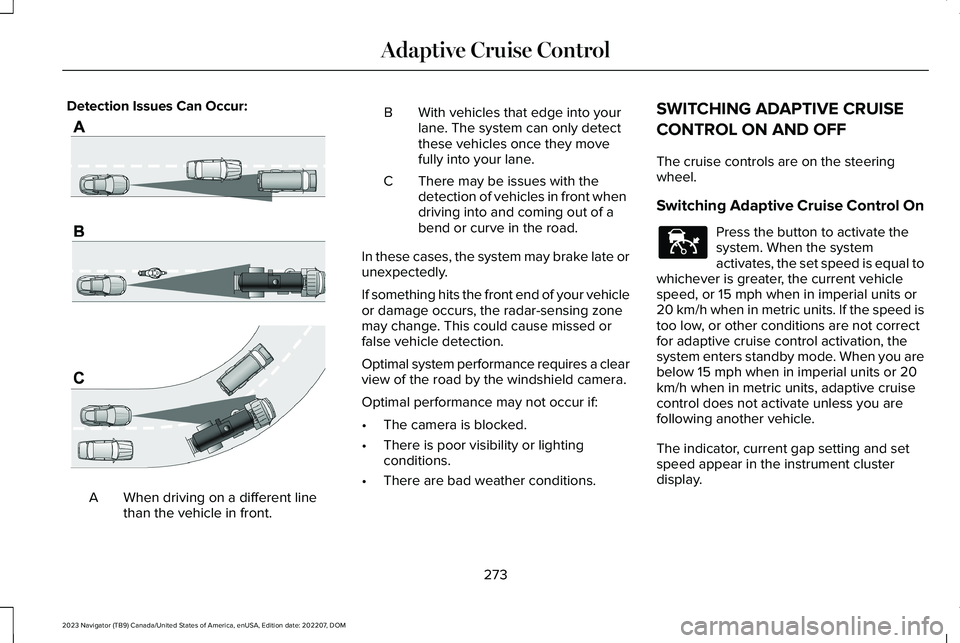
Detection Issues Can Occur:
When driving on a different linethan the vehicle in front.A
BWith vehicles that edge into yourlane. The system can only detectthese vehicles once they movefully into your lane.
There may be issues with thedetection of vehicles in front whendriving into and coming out of abend or curve in the road.
C
In these cases, the system may brake late orunexpectedly.
If something hits the front end of your vehicleor damage occurs, the radar-sensing zonemay change. This could cause missed orfalse vehicle detection.
Optimal system performance requires a clearview of the road by the windshield camera.
Optimal performance may not occur if:
•The camera is blocked.
•There is poor visibility or lightingconditions.
•There are bad weather conditions.
SWITCHING ADAPTIVE CRUISE
CONTROL ON AND OFF
The cruise controls are on the steeringwheel.
Switching Adaptive Cruise Control On
Press the button to activate thesystem. When the systemactivates, the set speed is equal towhichever is greater, the current vehiclespeed, or 15 mph when in imperial units or20 km/h when in metric units. If the speed istoo low, or other conditions are not correctfor adaptive cruise control activation, thesystem enters standby mode. When you arebelow 15 mph when in imperial units or 20km/h when in metric units, adaptive cruisecontrol does not activate unless you arefollowing another vehicle.
The indicator, current gap setting and setspeed appear in the instrument clusterdisplay.
273
2023 Navigator (TB9) Canada/United States of America, enUSA, Edition date: 202207, DOMAdaptive Cruise ControlE71621 E144529
Page 283 of 660
1.Press Features on the touchscreen.
2.Press Driver Assistance.
3.Press Cruise Control.
4.Press Normal Cruise Control.
The cruise control indicatorreplaces the adaptive cruisecontrol indicator if you selectnormal cruise control. The gap setting doesnot display, and the system does not respondto lead vehicles. Automatic braking remainsactive to maintain set speed. The systemremembers the last setting when you startyour vehicle.
LANE CENTERING
HOW DOES LANE CENTERING WORK
Adaptive cruise control with lane centeringuses the vehicle's front radar sensor andfront windshield camera sensor, togetherwith the steering sensor to operate.
Using these sensors, the system appliescontinuous steering assistance towardsdriving in the middle of the lane you chooseon highway roads.
Note:The gap setting for adaptive cruisecontrol with lane centering, operates in thesame way as normal adaptive cruise control.
LANE CENTERING PRECAUTIONS
WARNING: Do not use the systemwhen towing a trailer. Failure to follow thisinstruction could result in the loss ofcontrol of your vehicle, personal injury ordeath.
WARNING: Do not use the system ifany changes or modifications to thesteering wheel have been made. Anychanges or modifications to the steeringwheel could affect the functionality orperformance of the system. Failure tofollow this instruction could result in theloss of control of your vehicle, personalinjury or death.
Adaptive cruise control precautions apply tolane centering unless stated otherwise orcontradicted by a lane centering precaution.See Adaptive Cruise Control Precautions(page 270).
LANE CENTERING REQUIREMENTS
You must keep your hands on the steeringwheel at all times.
Lane centering only activates when all of thefollowing occur:
•Adaptive cruise control with lanecentering is enabled in your informationand entertainment screen. See Switchingthe Lane Keeping System On and Off(page 301).
•You have adaptive cruise control withstop and go enabled and set.
•The steering sensor detects your handson the steering wheel.
•The system detects both lane markingswhen driving on a straight road.
•Your vehicle is initially centered in thelane between two visible line markings.
279
2023 Navigator (TB9) Canada/United States of America, enUSA, Edition date: 202207, DOMAdaptive Cruise ControlE332905
Page 284 of 660
Note:If the system does not detect validlane line markings, the system will remain instandby until valid line markings areavailable.
LANE CENTERING LIMITATIONS
Adaptive cruise control limitations apply tolane centering unless stated otherwise orcontradicted by a lane centering limitation.See Adaptive Cruise Control Limitations(page 271).
Lane centering may not correctly operate inany of the following conditions:
•The lane width is too narrow or wide.
•The curve in the road is too small.
•The system does not detect the minimumrequired lane markings or when lanesmerge or split.
•When the required steering effort tomaintain lane center exceeds the lanecentering system limit.
•When driving in areas that are underconstruction or when road work is inprogress.
•If the front windshield camera and/or thefront radar are blocked.
•When using a spare tire.
•Inclement weather conditions including,but not limited to, high wind, heavy rain,and fog.
•Driving into direct sunlight.
•When modification to the steering systemhas been made, including alterations tothe steering wheel.
•When towing a trailer.
See Lane Centering Precautions (page 279).
Note:The system steering assistance islimited and may not have sufficient effort forall driving situations and/or conditions, suchas driving through tight curves or drivingthrough curves at high speeds.
Note:In exceptional conditions, the systemmay deviate from the lane center.
SWITCHING LANE CENTERING ONAND OFF
Keep your hands on the steering wheel atall times.
The controls are on the steering wheel.
Press the button.
The indicator appears in the instrumentcluster display. When the system is on, thecolor of the indicator changes to indicate thesystem status.
You can override the system at any time bysteering your vehicle.
Note:The correct requirements must be metbefore you can switch the system on. SeeLane Centering Requirements (page 279).
Enabling and Disabling Lane Centering
1.Press Features on the touchscreen.
2.Press Driver Assistance.
3.Press Cruise Control.
4.Press Lane Centering Assist.
LANE CENTERING ALERTS
You must keep your hands on the steeringwheel at all times.
280
2023 Navigator (TB9) Canada/United States of America, enUSA, Edition date: 202207, DOMAdaptive Cruise ControlE308131
Page 285 of 660
When the system is active and detects nosteering activity for a period of time, thesystem alerts you to put your hands on thesteering wheel. If you do not reactappropriately to the warnings the adaptivecruise control with lane centering systemcancels and slows your vehicle down to idlespeeds while maintaining steering control.See Lane Centering Automatic Cancellation(page 281).
The system also alerts you if your vehiclecrosses lane line markings without detectedsteering activity.
Note:The system could detect a light gripor light touch on the steering wheel ashands-off driving.
LANE CENTERING AUTOMATICCANCELLATION
When an external condition cancels thesystem, and your hands are on the steeringwheel, a tone sounds and a messageappears in the instrument cluster display.
When an external condition cancels thesystem, and your hands are not on thesteering wheel, the system immediatelyalerts you to take control of the vehicle. Ifthis alert is ignored, the system slows thevehicle while maintaining steering assistancewhen lane markings are available. When nolane markings are available, the vehiclecomes to a stop.
If your vehicle starts to slow downafter system cancellation, you musttake full control of the vehicle. Tore-enable adaptive cruise control with lanecentering after cancellation, press andrelease the resume button.
Automatic cancellation can also occur if:
•The lane becomes too wide or narrow.
•The system cannot detect valid lanemarkings.
•Lane markings cross over one another.
•The curve of the road is too sharp.
Note:If your vehicle slows down due to yourinactivity twice within a key cycle, the systemdisables. To reset the system, when thevehicle is stationary, return the gear selectorto park (P) and turn the vehicle off. Then,restart the vehicle with your foot on thebrake pedal.
LANE CENTERING MANUALCANCELLATION
When you perform the following actions,adaptive cruise control with lane centeringwill cancel:
•The brake pedal is pressed.
•Adaptive cruise control button isswitched off on the steering wheel.
The lane centering system is momentarilysuppressed when either of the followingactions are performed:
•Turn signal indicator is latched or tapped.
•You steer the vehicle out of lane.
281
2023 Navigator (TB9) Canada/United States of America, enUSA, Edition date: 202207, DOMAdaptive Cruise ControlE308130
Page 288 of 660
ADAPTIVE CRUISE CONTROL –
TROUBLESHOOTING
ADAPTIVE CRUISE CONTROL –INFORMATION MESSAGES - VEHICLESWITH: LANE CENTERING
Note:Depending on your vehicle optionsand instrument cluster type, not all messagesdisplay or are available.
Note:The system could abbreviate orshorten certain messages depending uponwhich cluster type you have.
ActionMessage
Return your hands to the steering wheel and provide steering input to cancel the message.Keep Hands on Steering Wheel
To reset the feature when the vehicle is stationary, return the gear selector to park and turn thevehicle off. Restart the vehicle with your foot on the brake pedal.Lane Centering Assist Not Available
You must immediately take full control of the vehicle.Resume Control
Resume adaptive cruise control with lane centering by applying foot pressure on the acceleratorpedal. You can also resume the feature by pressing the resume button on the steering wheel.Press Accelerator Pedal to Resume
284
2023 Navigator (TB9) Canada/United States of America, enUSA, Edition date: 202207, DOMAdaptive Cruise Control