steering wheel LINCOLN NAVIGATOR 2023 Workshop Manual
[x] Cancel search | Manufacturer: LINCOLN, Model Year: 2023, Model line: NAVIGATOR, Model: LINCOLN NAVIGATOR 2023Pages: 660, PDF Size: 14.04 MB
Page 355 of 660
Your vehicle may have a temporary orconventional spare tire. A temporary sparetire is different in diameter or width,tread-type, or is from a different manufacturerthan the road tires on your vehicle. Consultinformation on the tire label or SafetyCompliance label for limitations when using.
When towing a trailer:
•Obey country specific regulations fortowing a trailer.
•Do not drive faster than 70 mph(113 km/h) during the first 500 mi(800 km).
•Do not make full-throttle starts.
•Check your hitch, electrical connectionsand trailer wheel lug nuts thoroughly afteryou have traveled 50 mi (80 km).
•When stopped in congested or heavytraffic during hot weather, place thetransmission in park (P) to aid engine andtransmission cooling and to help A/Cperformance.
•Turn off the speed control with heavyloads or in hilly terrain. The speed controlmay turn off when you are towing onlong, steep slopes.
•Shift to a lower gear when driving downa long or steep hill. Do not continuouslyapply the brakes, as they may overheatand become less effective.
•If your transmission has Grade Assist orTow/Haul, use this feature when towing.This provides engine braking and helpseliminate excessive transmission shiftingfor optimum fuel economy andtransmission cooling.
•Your vehicle has AdvanceTrac with rollstability control. When towing a trailer,additional loads could cause theAdvanceTrac system to engage duringcornering maneuvers. Reduce corneringspeeds to make sure that you canmaintain control of the vehicle and trailerif the AdvanceTrac system engages.
•Allow more distance for stopping with atrailer attached. Anticipate stops andgradually brake.
•Avoid parking on a slope. However, ifyou must park on a slope, turn thesteering wheel to point your vehicle tiresaway from traffic flow, set the parkingbrake, place the transmission in park (P)and place wheel chocks in front and backof the trailer wheels.
Note:Chocks are not included with yourvehicle.
LAUNCHING OR RETRIEVING A
BOAT OR PERSONAL
WATERCRAFT
When backing down a ramp during boatlaunching or retrieval:
•Do not allow the static water level to riseabove the bottom edge of the rearbumper.
•Do not allow waves to break higher than6 in (15 cm) above the bottom edge ofthe rear bumper.
351
2023 Navigator (TB9) Canada/United States of America, enUSA, Edition date: 202207, DOMTowing a Trailer
Page 369 of 660
CALIBRATING THE SYSTEM
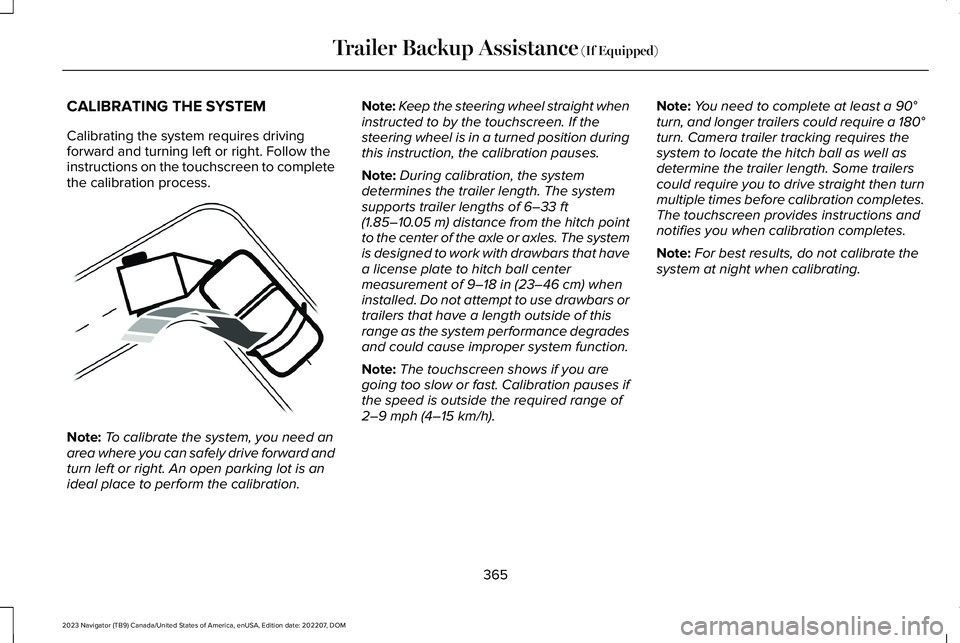
Calibrating the system requires drivingforward and turning left or right. Follow theinstructions on the touchscreen to completethe calibration process.
Note:To calibrate the system, you need anarea where you can safely drive forward andturn left or right. An open parking lot is anideal place to perform the calibration.
Note:Keep the steering wheel straight wheninstructed to by the touchscreen. If thesteering wheel is in a turned position duringthis instruction, the calibration pauses.
Note:During calibration, the systemdetermines the trailer length. The systemsupports trailer lengths of 6–33 ft(1.85–10.05 m) distance from the hitch pointto the center of the axle or axles. The systemis designed to work with drawbars that havea license plate to hitch ball centermeasurement of 9–18 in (23–46 cm) wheninstalled. Do not attempt to use drawbars ortrailers that have a length outside of thisrange as the system performance degradesand could cause improper system function.
Note:The touchscreen shows if you aregoing too slow or fast. Calibration pauses ifthe speed is outside the required range of2–9 mph (4–15 km/h).
Note:You need to complete at least a 90°turn, and longer trailers could require a 180°turn. Camera trailer tracking requires thesystem to locate the hitch ball as well asdetermine the trailer length. Some trailerscould require you to drive straight then turnmultiple times before calibration completes.The touchscreen provides instructions andnotifies you when calibration completes.
Note:For best results, do not calibrate thesystem at night when calibrating.
365
2023 Navigator (TB9) Canada/United States of America, enUSA, Edition date: 202207, DOMTrailer Backup Assistance (If Equipped)E352329
Page 370 of 660
SWITCHING TRAILER BACKUP
ASSISTANCE ON AND OFF
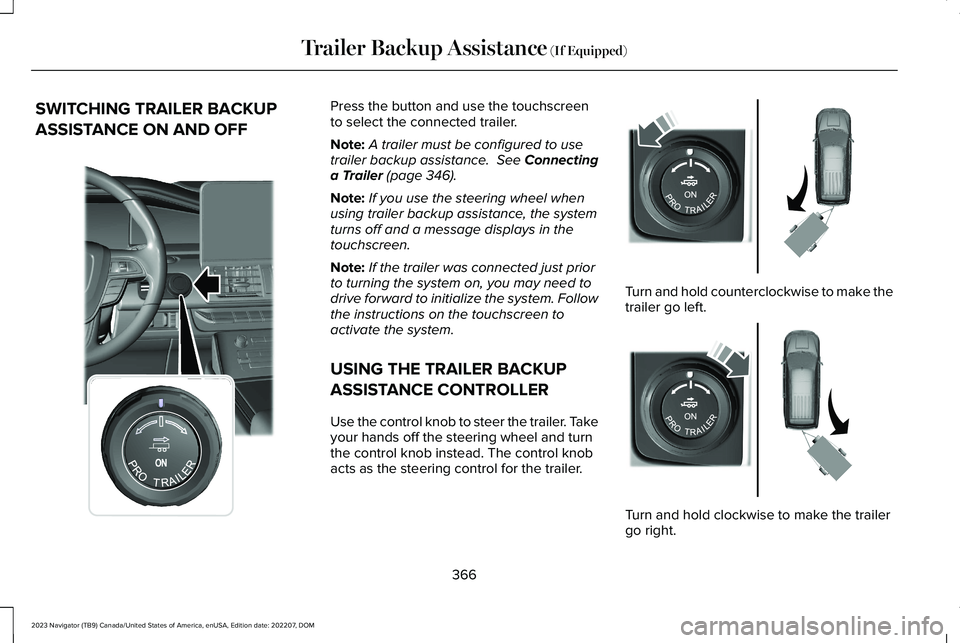
Press the button and use the touchscreento select the connected trailer.
Note:A trailer must be configured to usetrailer backup assistance. See Connectinga Trailer (page 346).
Note:If you use the steering wheel whenusing trailer backup assistance, the systemturns off and a message displays in thetouchscreen.
Note:If the trailer was connected just priorto turning the system on, you may need todrive forward to initialize the system. Followthe instructions on the touchscreen toactivate the system.
USING THE TRAILER BACKUP
ASSISTANCE CONTROLLER
Use the control knob to steer the trailer. Takeyour hands off the steering wheel and turnthe control knob instead. The control knobacts as the steering control for the trailer.
Turn and hold counterclockwise to make thetrailer go left.
Turn and hold clockwise to make the trailergo right.
366
2023 Navigator (TB9) Canada/United States of America, enUSA, Edition date: 202207, DOMTrailer Backup Assistance (If Equipped)E356842 E349262 E349263
Page 374 of 660
DescriptionMessage
Displays when you exceed the maximum controllable trailer angle forthe system. Place your vehicle in drive (D) and pull forward to get yourvehicle and trailer back to an in-line position, then activate the systemby selecting the connected trailer and following the instructions onthe touchscreen.If this message consistently displays, you may need to repeat thetrailer setup and calibration. Delete the trailer from the system andrepeat the setup and calibration process.
Stop now. Deactivated by trailer angle.
Displays when the system can no longer steer the vehicle and youmust take over steering.Pro Trailer Backup Assist™ Stop Now Take Control of Steering Wheel
These messages display when the system does not detect the trailer.Make sure the rear camera is clean, and the sticker is clearly visiblein the camera image. You can also move the trailer forward or back-ward to change the trailer position and lighting conditionsIf these messages continue to display, visit your authorized dealer tohave your vehicle checked.
Pro Trailer Backup Assist™ Trailer Not Detected. Shift to Park PressKnob to Exit
Pro Trailer Backup Assist™ Trailer Not Detected. Refer to Owner'sManual. Press Knob to Exit
370
2023 Navigator (TB9) Canada/United States of America, enUSA, Edition date: 202207, DOMTrailer Backup Assistance (If Equipped)
Page 376 of 660
TRAILER BACKUP ASSISTANCE –FREQUENTLY ASKED QUESTIONS
Why does the trailer not reverse straight?
Verify the sticker is correctly applied.Other factors such as the hitchconnection, road camber, road slopeand trailer suspension could influencehow straight the system can reverse thetrailer when the control knob is notturned. You can compensate for thetrailer drifting to the right or left byslowly turning the knob until the traileris following your desired path andholding the knob in that position. Checkthat the correct trailer is selected in thetouchscreen. Verify the sticker iscorrectly applied and check that thedrawbar and the trailer dimensions arewithin the allowed range. If the trailerconsistently does not reverse straight,delete the trailer from the system andrepeat the setup process to calibratethe trailer.
What does it mean if the system remainson one message for an extended timeduring calibration?
The camera could need to be cleaned,the sticker could be blocked, thedrawbar could be outside the allowedrange of 9–18 in (23–46 cm) or youcould need to move to a different areato change the lighting and background.Verify the sticker is in the properlocation. See Applying the TrailerReversing Aid Sticker (page 364). Youcan move to a different area or changethe direction you are driving or set upthe system at a different time of day.Some trailers are not compatible withthe sticker and camera system.
What does it mean if the system pausesduring calibration?
There could be steering input or trailermovement during the straight driveportion of the calibration process.
What does it mean if the system displayshold steering steady during turn?
Part of the calibration process for thesticker setup requires a steady turn. Ifyou are continually moving the steeringwheel during the turn, this delays thecalibration process. To enable thecalibration process, hold the steeringwheel at the same position whenturning.
What does it mean if the system displaysthat it is not available?
There could be a sub-system that thesystem uses that is not correctlyoperating or there could be a batteryvoltage issue. If the system continuesto display it is not available, visit yourauthorized dealer to have your vehiclechecked.
372
2023 Navigator (TB9) Canada/United States of America, enUSA, Edition date: 202207, DOMTrailer Backup Assistance (If Equipped)
Page 378 of 660
What does it mean if the trailer is at itsmaximum angle or the system deactivatedby trailer angle?
You are at the maximum controllabletrailer angle for the system. Place yourvehicle in drive (D) and pull forward toget the truck and trailer back to anin-line position. If this messageconsistently displays, this could indicatethe sticker is incorrectly applied, thetrailer needs to be recalibrated or thedrawbar or the trailer dimensions areoutside of the supported range. Thesystem is designed to work withdrawbars that have a license plate tohitch ball center measurement of 9–18 in(23–46 cm) when installed. The systemis designed to work with trailers thathave a hitch point to center of the axleor axles measurement of 6–33 ft(1.85–10.05 m). Do not attempt to usedrawbars or trailers that have a lengthoutside of this range as the systemperformance degrades and could causeimproper system function. Check thatthe correct trailer is selected on the
touchscreen. Verify the sticker iscorrectly applied and check that thedrawbar and the trailer dimensions arewithin the allowed range. Then, deletethe trailer from the system and repeatthe setup process to calibrate the trailer.
What does it mean when the system tellsyou to take control of the steering wheel?
The system is no longer steering thevehicle and you must take over steering.There are four reasons the system coulddisplay this message. The first reasonthe system could display this messageis that you have touched the steeringwheel when the system is steering. Thesecond reason the system could displaythis message is that you have exceededthe maximum speed for the feature. Thethird reason the system could displaythis message is that the trailer is notdetected. The final reason the systemcould display this message is that aninternal condition for system operationis not met that requires your vehicle toreturn to manual control of the steering.
What does it mean if the system does notdetect a trailer?
The system requires a clear view of thesticker placed on the trailer. You mustkeep the camera lens and sticker cleanfor the system to correctly operate. Ifthe system cannot initially detect thetrailer, it could be necessary for you tochange the lighting conditions bymoving your vehicle and trailer orwaiting until the conditions change. SeeApplying the Trailer Reversing AidSticker (page 364). Some trailers are notcompatible with the sticker and camerasystem.
Note:The system is designed to be usedwith the same trailer connection every timeyou choose the trailer from the touchscreen.When using a different drawbar or a differentpinhole on drawbars with more than one,connecting the drawbar to your vehicleaffects the trailer position and you may needto repeat the trailer setup and calibrationprocess.
374
2023 Navigator (TB9) Canada/United States of America, enUSA, Edition date: 202207, DOMTrailer Backup Assistance (If Equipped)
Page 381 of 660
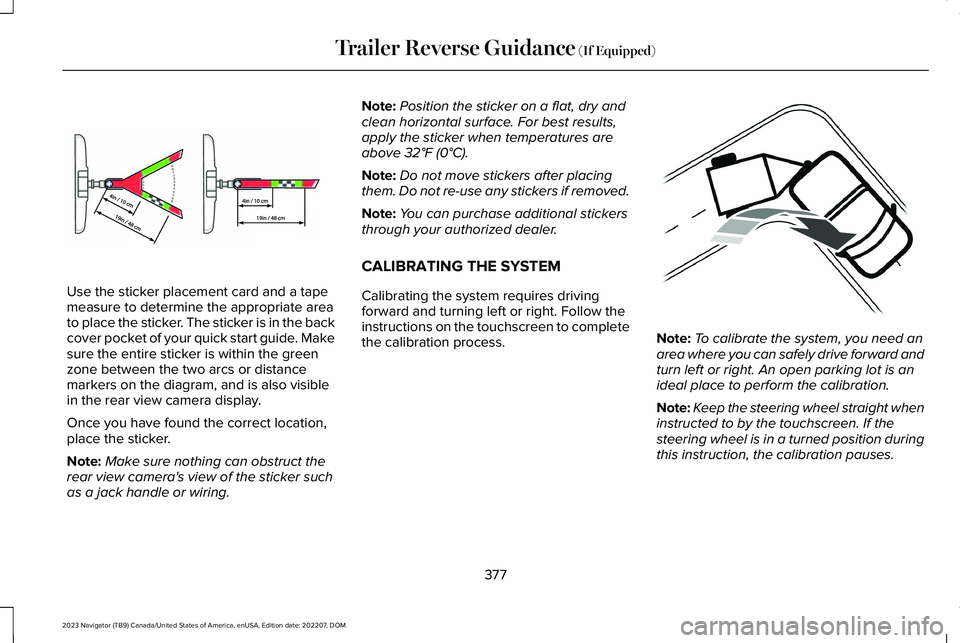
Use the sticker placement card and a tapemeasure to determine the appropriate areato place the sticker. The sticker is in the backcover pocket of your quick start guide. Makesure the entire sticker is within the greenzone between the two arcs or distancemarkers on the diagram, and is also visiblein the rear view camera display.
Once you have found the correct location,place the sticker.
Note:Make sure nothing can obstruct therear view camera's view of the sticker suchas a jack handle or wiring.
Note:Position the sticker on a flat, dry andclean horizontal surface. For best results,apply the sticker when temperatures areabove 32°F (0°C).
Note:Do not move stickers after placingthem. Do not re-use any stickers if removed.
Note:You can purchase additional stickersthrough your authorized dealer.
CALIBRATING THE SYSTEM
Calibrating the system requires drivingforward and turning left or right. Follow theinstructions on the touchscreen to completethe calibration process.Note:To calibrate the system, you need anarea where you can safely drive forward andturn left or right. An open parking lot is anideal place to perform the calibration.
Note:Keep the steering wheel straight wheninstructed to by the touchscreen. If thesteering wheel is in a turned position duringthis instruction, the calibration pauses.
377
2023 Navigator (TB9) Canada/United States of America, enUSA, Edition date: 202207, DOMTrailer Reverse Guidance (If Equipped)E333148 E352329
Page 382 of 660
Note:During calibration, the systemdetermines the trailer length. The systemsupports trailer lengths of 6–33 ft(1.85–10.05 m) distance from the hitch pointto the center of the axle or axles. The systemis designed to work with drawbars that havea license plate to hitch ball centermeasurement of 9–18 in (23–46 cm) wheninstalled. Do not attempt to use drawbars ortrailers that have a length outside of thisrange as the system performance degradesand could cause improper system function.
Note:The touchscreen shows if you aregoing too slow or fast. Calibration pauses ifthe speed is outside the required range of2–9 mph (4–15 km/h).
Note:You need to complete at least a 90°turn, and longer trailers could require a 180°turn. Camera trailer tracking requires thesystem to locate the hitch ball as well asdetermine the trailer length. Some trailerscould require you to drive straight then turnmultiple times before calibration completes.The touchscreen provides instructions andnotifies you when calibration completes.
Note:For best results, do not calibrate thesystem at night.
SWITCHING TRAILER REVERSE
GUIDANCE ON AND OFF
Shift into reverse (R), press the rear camerabutton to expand the menu, press the trailericon and use the touchscreen to select theconnected trailer.
Note:If the trailer was connected just priorto turning the system on, you may need todrive forward to initialize the system. Followthe instructions on the touchscreen toactivate the system.
USING TRAILER REVERSE
GUIDANCE VIEWS
Up to three camera views could be availablewhen using trailer reverse guidance. Use theview that helps you the most when reversingyour vehicle and trailer.
360° camera view. Shows a 360°view on the right-hand side of thetouchscreen with a rear cameraview on the left-hand side of thetouchscreen.
Rear view camera view. Showsyour trailer hitch or what is directlybehind your vehicle.
Trailer reverse guidance view.Shows you a view of the sides ofyour vehicle and the trailer. In automode, this view moves as the trailer movesso that you do not have to adjust the cameraas you turn. Left and right arrows let you seeother camera views.
Straight backup mode. Showswhich way to turn your steeringwheel to keep the trailer straight.Use this view when you want to keep yourtrailer completely in line with your vehicle.
Note: It may be helpful to shift your vehicleinto drive (D), pull forward and straighten outthe vehicle and trailer before engagingstraight backup mode.
378
2023 Navigator (TB9) Canada/United States of America, enUSA, Edition date: 202207, DOMTrailer Reverse Guidance (If Equipped)E310996 E310967 E310965 E224484
Page 383 of 660
This takes you back to the 360°camera system and out of thetrailer reverse guidance feature.
Auto. Press to return to auto view.
Note:Auto mode is the default setting.
Hitch Angle Graphic
The hitch angle graphic shows a smallrepresentation of your vehicle and trailer withvisual feedback to help you monitor thetrailer. The graphic shows two differentcolored lines for the trailer hitch angle. Ablack line shows you where your trailer is inrelation to your vehicle. The white linerepresents the amount the trailer can turnbased on steering wheel position.
The graphic shows a yellow and red zonefor the hitch angle to warn you of a highangle condition that could require you to pullforward to reduce the hitch angle. The anglelimits for each zone vary based on the trailerlength.
The yellow zone indicates you areapproaching the maximum controllable trailerangle for the system. When the trailer entersthis zone, it is more difficult to reduce thetrailer turn when backing up. It may benecessary to put your vehicle back into drive(D) and pull forward to get your vehicle andtrailer back to an in-line position.
The red zone indicates you have exceededthe maximum controllable trailer angle forthe system. Immediately stop reversing. Putyour vehicle into drive (D) and pull forwarduntil the trailer is no longer in the red zone.
379
2023 Navigator (TB9) Canada/United States of America, enUSA, Edition date: 202207, DOMTrailer Reverse Guidance (If Equipped)E224486 E315644
Page 386 of 660
TRAILER REVERSE GUIDANCE –FREQUENTLY ASKED QUESTIONS
What does it mean if the system remainson one message for an extended timeduring calibration?
The camera could need to be cleaned,the sticker could be blocked, thedrawbar could be outside the allowedrange of 9–18 in (23–46 cm) or youcould need to move to a different areato change the lighting and background.Verify the sticker is in the properlocation. See Applying the TrailerReverse Aid Sticker (page 376). You canmove to a different area or change thedirection you are driving or setup thesystem at a different time of day. Sometrailers are not compatible with thesticker and camera system.
What does it mean if the system pausesduring calibration?
There could be steering input or trailermovement during the straight driveportion of the calibration process.
What does it mean if the system displayshold steering steady during turn?
Part of the calibration process for thesticker setup requires a steady turn. Ifyou are continually moving the steeringwheel during the turn, this delays thecalibration process. To enable thecalibration process, hold the steeringwheel at the same position whenturning.
What does it mean if the system displaysthat it is not available?
There could be a sub-system that thesystem uses that is not correctlyoperating or there could be a batteryvoltage issue. If the system continuesto display it is not available, visit yourauthorized dealer to have your vehiclechecked.
What does it mean if the system displaysthat driving is required to initialize steering?
The steering system needs to learninternal parameters to fully turn on thefeature. Drive your vehicle straightforward above 25 mph (40 km/h) forapproximately 5 minutes. This could alsooccur when your vehicle is new, thereis a battery voltage issue or if thesteering system has been serviced.
What does it mean if the system does notdetect a trailer?
The system requires a clear view of thesticker placed on the trailer. You mustkeep the camera lens and sticker cleanfor the system to correctly operate. Ifthe system cannot initially detect thetrailer, it could be necessary for you tochange the lighting conditions bymoving your vehicle and trailer orwaiting until the conditions change. SeeApplying the Trailer Reverse AidSticker (page 376). Some trailers are notcompatible with the sticker and camerasystem.
382
2023 Navigator (TB9) Canada/United States of America, enUSA, Edition date: 202207, DOMTrailer Reverse Guidance (If Equipped)