steering wheel LINCOLN NAVIGATOR 2023 User Guide
[x] Cancel search | Manufacturer: LINCOLN, Model Year: 2023, Model line: NAVIGATOR, Model: LINCOLN NAVIGATOR 2023Pages: 660, PDF Size: 14.04 MB
Page 139 of 660
USING GLOBAL OPENING (If Equipped)
1.Press and release the unlock button onthe remote control.
2.Press and hold the unlock button on theremote control.
3.Release the button when the windowsstart to open.
Press the lock or the unlock button on theremote control to stop global opening.
Note:You can use global opening for a shortperiod of time when you unlock your vehicleusing the remote control.
SWITCHING GLOBAL OPENING ONAND OFF (If Equipped)
1.Using the information display controls onthe steering wheel, select Settings.
2.Select Vehicle.
3.Select Windows.
4.Switch Remote Open on or off.
WINDOW BOUNCE-BACK
WHAT IS WINDOW BOUNCE-BACK
The window stops and reverses if it detectsan obstruction when closing.
OVERRIDING WINDOW BOUNCE-BACK
WARNING: If you overridebounce-back, the window does not reverseif it detects an obstacle. Take care whenclosing the windows to avoid personalinjury or damage to your vehicle.
1.Close the window until it reaches thepoint of resistance and let it reverse.
2.Lift and hold the window control switchwithin two seconds to overridebounce-back and close the window. Bounce-back is now disabled and youcan close the window manually.
Note:The window goes past the point ofresistance and you can fully close it.
Note:If the window does not close, haveyour vehicle checked as soon as possible.
LOCKING THE REAR WINDOW
CONTROLS
Press the window control switchto lock or unlock the rear windowcontrols. It illuminates when youlock the rear window controls.
135
2023 Navigator (TB9) Canada/United States of America, enUSA, Edition date: 202207, DOMWindows
Page 152 of 660
USING THE INSTRUMENT
CLUSTER DISPLAY CONTROLS
WARNING: Driving while distractedcan result in loss of vehicle control, crashand injury. We strongly recommend thatyou use extreme caution when using anydevice that may take your focus off theroad. Your primary responsibility is the safeoperation of your vehicle. We recommendagainst the use of any hand-held devicewhile driving and encourage the use ofvoice-operated systems when possible.Make sure you are aware of all applicablelocal laws that may affect the use ofelectronic devices while driving.
Note:Some options could appear slightlydifferent or not at all if the items are optional.
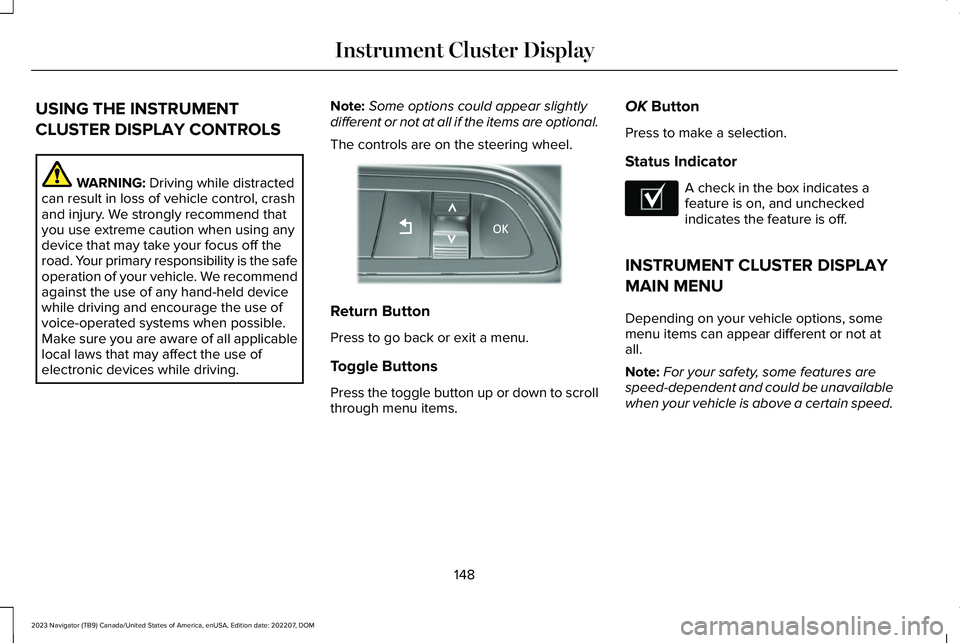
The controls are on the steering wheel.
Return Button
Press to go back or exit a menu.
Toggle Buttons
Press the toggle button up or down to scrollthrough menu items.
OK Button
Press to make a selection.
Status Indicator
A check in the box indicates afeature is on, and uncheckedindicates the feature is off.
INSTRUMENT CLUSTER DISPLAY
MAIN MENU
Depending on your vehicle options, somemenu items can appear different or not atall.
Note:For your safety, some features arespeed-dependent and could be unavailablewhen your vehicle is above a certain speed.
148
2023 Navigator (TB9) Canada/United States of America, enUSA, Edition date: 202207, DOMInstrument Cluster DisplayE357886 E204495
Page 156 of 660
WHAT IS THE HEAD UP DISPLAY
The system displays information on a displayscreen in your field of vision, allowing you tokeep your eyes on the road. You can selectwhich information the system displays.
SWITCHING THE HEAD UP
DISPLAY ON AND OFF
Use the instrument cluster controls on thesteering wheel to navigate to the head updisplay menu.
ActionMenu Item
Press the OK button.HUD
Press the OK button.HUD On
Note:The system remembers the last settingwhen you start the engine.
HEAD UP DISPLAY SETTINGS
You can control the system's options throughthe instrument cluster display by using theHUD, OK and arrow buttons on your steeringwheel. See Using the Instrument ClusterDisplay Controls (page 148).
You can adjust the display according to yourheight to make viewing the content easier.You can also adjust what content displaysand the brightness of the content. Thesystem's options appear in the instrumentcluster while the updates happen in the headup display.
Note:If HUD On is unchecked, other optionsof the system are hidden.
Note:The head up display menuautomatically closes after a certain periodof inactivity.
Note:The head up display image brightnessautomatically adjusts to the brightness ofthe ambient environment. You have theability to adjust the brightness furtheraccording to your preference.
Note:In some instances, sunlight can causesome reflections in and around the head updisplay image.
152
2023 Navigator (TB9) Canada/United States of America, enUSA, Edition date: 202207, DOMHead Up Display (If Equipped)
Page 159 of 660
HEAD UP DISPLAY – TROUBLESHOOTING
HEAD UP DISPLAY – INFORMATION MESSAGES
ActionMessage
The system is malfunctioning or something is obstructing the display.Make sure that the head up display is free from obstruction. If themessage continues to appear, have your vehicle checked as soon aspossible.
Head up Display (HUD) System Fault See Manual
Press the button on the steering wheel. The head up display menuappears in the instrument cluster display. Make sure the blue frameis fully visible. Do not manually move the screen. This can causedamage not covered by your vehicle's warranty.
Head up Display (HUD) Use the Information Central Menu
155
2023 Navigator (TB9) Canada/United States of America, enUSA, Edition date: 202207, DOMHead Up Display (If Equipped)
Page 162 of 660
Note:If you switch the auto mode on, thesystem attempts to heat or cool the interiorto 72°F (22°C). When you switch the vehicleon, the climate control system returns to thelast used settings.
Note:If you switch the last settings on, thesystem remembers the last used settings.
Heated Seat Settings (If Equipped)
1.Press Settings on the touchscreen.
2.Press Vehicle Settings.
3.Press Remote Start Setup.
4.Press Seats.
5.Press Auto or Off.
Note:If you switch the heated seat settingson, the heated seats turn on during coldweather.
Note:You cannot adjust the heated seatsettings when you remotely start yourvehicle.
Heated Steering Wheel Settings (If
Equipped)
1.Press Settings on the touchscreen.
2.Press Vehicle Settings.
3.Press Remote Start Setup.
4.Press Seats and Steering Wheel.
5.Press Auto or Off.
Note:If you switch the heated steering wheelsettings on, the heated steering wheel turnson during cold weather.
Note:You cannot adjust the heated steeringwheel settings when you remotely start yourvehicle.
Remote Start Duration
1.Press Settings on the touchscreen.
2.Press Vehicle Settings.
3.Press Remote Start Setup.
4.Press Duration.
5.Press the duration you prefer.
158
2023 Navigator (TB9) Canada/United States of America, enUSA, Edition date: 202207, DOMRemote Start
Page 171 of 660
FRONT SEAT PRECAUTIONS
WARNING: Sitting improperly, out ofposition or with the seatback reclined toofar can take weight off the seat cushionand affect the decision of the passengersensing system, resulting in serious injuryor death in the event of a crash. Always situpright against your seat back, with yourfeet on the floor.
WARNING: Do not recline the seatbackrest too far as this can cause theoccupant to slide under the seatbelt,resulting in personal injury in the event ofa crash.
WARNING: Do not place objectshigher than the top of the seat backrest.Failure to follow this instruction could resultin personal injury or death in the event ofa sudden stop or crash.
WARNING: Do not adjust the driverseat or seat backrest when your vehicle ismoving. This may result in sudden seatmovement, causing the loss of control ofyour vehicle.
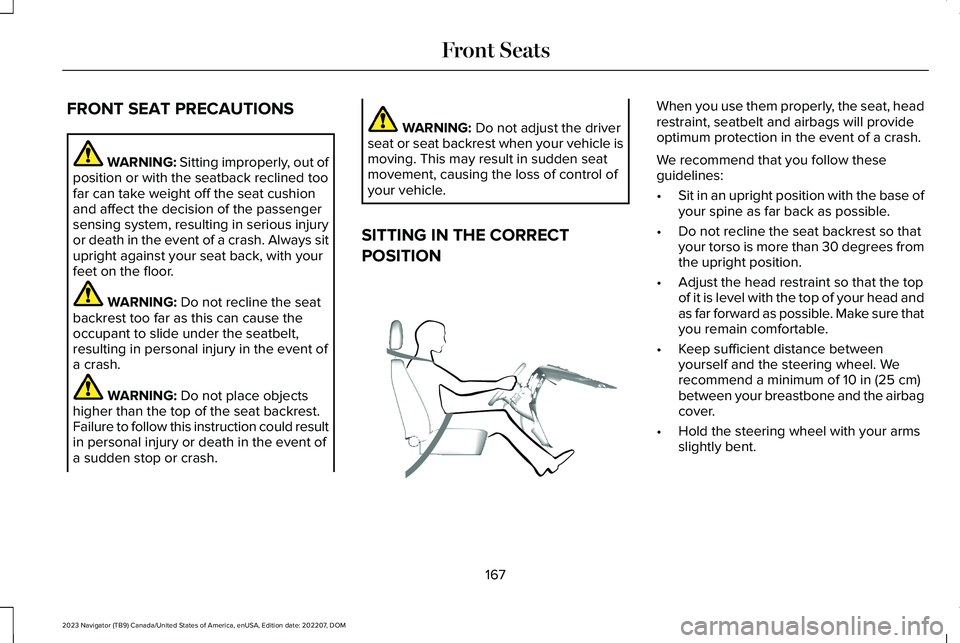
SITTING IN THE CORRECT
POSITION
When you use them properly, the seat, headrestraint, seatbelt and airbags will provideoptimum protection in the event of a crash.
We recommend that you follow theseguidelines:
•Sit in an upright position with the base ofyour spine as far back as possible.
•Do not recline the seat backrest so thatyour torso is more than 30 degrees fromthe upright position.
•Adjust the head restraint so that the topof it is level with the top of your head andas far forward as possible. Make sure thatyou remain comfortable.
•Keep sufficient distance betweenyourself and the steering wheel. Werecommend a minimum of 10 in (25 cm)between your breastbone and the airbagcover.
•Hold the steering wheel with your armsslightly bent.
167
2023 Navigator (TB9) Canada/United States of America, enUSA, Edition date: 202207, DOMFront SeatsE68595
Page 228 of 660
HOW DOES FOUR-WHEEL DRIVE
WORK
Using the 1-Speed Automatic Four-Wheel Drive System
The 1-speed automatic four-wheel drivesystem utilizes an electronically controlledon-demand 1-speed transfer case. Thissystem monitors various vehicle sensoryinputs to provide an increased level ofperformance. This system offers the drivertwo-wheel drive high, four-wheel drive autoand four-wheel drive high as available modesof operation via the selectable drive modeswitch. When four-wheel drive auto isselected, the system continuously variespower to the front wheels for optimumperformance for all on-road conditions. Whenfour-wheel drive high is selected, the systemprovides power to the front and rear wheelsfor use in off-road or slippery conditions suchas deep snow, sand or mud. There is furtherinformation on driving in unique drivingconditions. See Driving Hints (page 384).
Using the 2-Speed Automatic Four-Wheel Drive System (If Equipped)
The 2-speed automatic four-wheel drivesystem utilizes an electronically controlledon-demand 2-speed transfer case. Thissystem monitors various vehicle sensoryinputs to provide an increased level ofperformance. This system offers the drivertwo-wheel drive high, four-wheel drive auto,four-wheel drive high, and four-wheel drivelow as available modes of operation. Whenfour-wheel drive auto is selected, the systemcontinuously varies power to the front wheelsfor optimum performance for all on-roadconditions. When either four-wheel drive highor four-wheel drive low are selected with theappropriate drive modes , the four-wheeldrive system provides electronically lockedpower to the front and rear wheels for usein off-road or slippery conditions such asdeep snow, sand or mud. Selecting slowclimb also provides additional gearing forincreased torque multiplication for conditionslike deep sand, snow, steep slopes, or pulling
heavy objects. See Slow Climb (page 297).Additionally, the system is capable ofrecreational flat towing by putting thetransfer case into neutral (N). SeeRecreationally Towing Your Vehicle (page397).
There is further information on driving inunique driving conditions. See Driving Hints(page 384).
FOUR-WHEEL DRIVE
PRECAUTIONS
WARNING: Vehicles with a highercenter of gravity (utility and four-wheeldrive vehicles) handle differently thanvehicles with a lower center of gravity(passenger cars). Avoid sharp turns,excessive speed and abrupt steering inthese vehicles. Failure to drive cautiouslyincreases the risk of losing control of yourvehicle, vehicle rollover, personal injuryand death.
224
2023 Navigator (TB9) Canada/United States of America, enUSA, Edition date: 202207, DOMFour-Wheel Drive (If Equipped)
Page 229 of 660
WARNING: Do not becomeoverconfident in the ability of four-wheeldrive vehicles. Although a four-wheel drivevehicle may accelerate better than atwo-wheel drive vehicle in low tractionsituations, it won't stop any faster thantwo-wheel drive vehicles. Always drive ata safe speed.
Truck and utility vehicles can differ fromsome other vehicles. Your vehicle could behigher to allow it to travel over rough terrainwithout getting stuck or damagingunderbody components. The differences thatmake your vehicle so versatile also make ithandle differently than an ordinary passengercar. Always maintain steering wheel control,especially in rough terrain. Since suddenchanges in terrain can result in abruptsteering wheel motion, make sure you gripthe steering wheel from the outside. Do notgrip the spokes. Drive cautiously to avoidvehicle damage from concealed objects such
as rocks and stumps. Drive slower in strongcrosswinds which can affect the normalsteering characteristics of your vehicle. Beextremely careful when driving on pavementmade slippery by loose sand, water, gravel,snow or ice.
Note:Do not use four-wheel drive high orfour-wheel drive low mode on dry, hardsurfaced roads. Doing so can produceexcessive noise, increase tire wear and candamage drive components.
FOUR-WHEEL DRIVE LIMITATIONS
Operating Four-Wheel Drive with aSpare or Mismatched Tires (If Equipped)
On four-wheel drive vehicles, the size of thespare tire can affect the four-wheel drivesystem. If there is a significant differencebetween the size of the spare tire and theremaining tires, you could have limitedfour-wheel drive functionality. When drivingwith the full-size dissimilar spare wheel andtire assembly, we recommend that you donot:
•Exceed 50 mph (80 km/h) with afour-wheel drive mode turned on.
•Use a four-wheel drive mode on drypavement.
Driving with the full-size dissimilar sparewheel and tire assembly can limit four-wheeldrive functionality. You can experience thefollowing:
•Additional noise from the transfer caseor other drive components.
Use of a dissimilar spare wheel and tireassembly can lead to impairment of thefollowing:
•Comfort and noise.
•Winter weather driving capability.
•Wet driving capability.
•Four-wheel drive capability.
Note:Your vehicle could have a front airdam that can become damaged, due toreduced ground clearance, when taking yourvehicle off-road. You can remove this airdam by removing the eight bolts that secureit.
225
2023 Navigator (TB9) Canada/United States of America, enUSA, Edition date: 202207, DOMFour-Wheel Drive (If Equipped)
Page 249 of 660
WHAT IS TRACTION CONTROL
The traction control system helps to avoiddrive wheel spin and loss of traction.
HOW DOES TRACTION CONTROL
WORK
If your wheels begin to spin, the loss oftraction can compromise steering controland stability of the vehicle. The tractioncontrol system applies the brakes toindividual wheels and when needed, reducesengine power at the same time to increasetraction.
SWITCHING TRACTION CONTROL
ON AND OFF
WARNING: Operating your vehiclewith the traction control disabled couldlead to an increased risk of loss of vehiclecontrol, vehicle rollover, personal injuryand death.
The system turns traction control and stabilitycontrol on each time you power on yourvehicle.
1.Press Features on the touchscreen.
2.Press Driver Assistance.
3.Switch Traction Control on or off.
Note:When you switch traction control off,a message and an illuminated icon appearon the information display.
Turn the system back on to return to normaloperation.
If your vehicle is stuck in mud or snow,switching traction control off may bebeneficial as this allows the wheels to spin.
Note:When you switch traction control off,stability control remains fully active.
Your vehicle could have MyKey restrictionsregarding this feature. See ConfigurableMyKey Settings (page 82).
TRACTION CONTROL INDICATOR
Stability and Traction Control Indicator
If the indicator does not illuminatewhen you switch the ignition on,or remains on when the engine isrunning, this indicates a malfunction. Haveyour vehicle checked by an authorizeddealer as soon as possible.
The traction control off indicatorilluminates when you switch thetraction control system off, or whenan alternative stability control mode isselected that requires the traction control offdepending on the drive mode selected.
245
2023 Navigator (TB9) Canada/United States of America, enUSA, Edition date: 202207, DOMTraction ControlE138639 E130458
Page 251 of 660
HOW DOES STABILITY CONTROL
WORK
WARNING: Vehicle modificationsinvolving braking system, aftermarket roofracks, suspension, steering system, tireconstruction and wheel and tire size maychange the handling characteristics of yourvehicle and may adversely affect theperformance of the electronic stabilitycontrol system. In addition, installing anystereo speakers may interfere with andadversely affect the electronic stabilitycontrol system. Reducing the effectivenessof the electronic stability control systemcould lead to an increased risk of loss ofvehicle control, vehicle rollover, personalinjury and death.
WARNING: Remember that evenadvanced technology cannot defy the lawsof physics. It's always possible to losecontrol of a vehicle due to inappropriatedriver input for the conditions. Aggressivedriving on any road condition can causeyou to lose control of your vehicle
increasing the risk of personal injury orproperty damage. Activation of theelectronic stability control system is anindication that at least some of the tireshave exceeded their ability to grip theroad; this could reduce the operator'sability to control the vehicle potentiallyresulting in a loss of vehicle control, vehiclerollover, personal injury and death.
WARNING: You are responsible forcontrolling your vehicle at all times. Thesystem is designed to be an aid and doesnot relieve you of your responsibility todrive with due care and attention. Failureto follow this instruction could result in theloss of control of your vehicle, personalinjury or death.
If a driving condition activates either thestability control or traction control you mayexperience the following conditions:
•The stability and traction control lightflashes.
•Your vehicle slows down.
•Reduced engine power.
The stability control system has severalfeatures built into it to help you maintaincontrol of your vehicle:
Electronic Stability Control
Electronic stability control enhances yourvehicle’s ability to prevent skids or lateralslides by applying brakes to one or more ofthe wheels individually and, if necessary,reducing engine power.
Roll Stability Control
Roll stability control enhances your vehicle’sability to prevent rollovers by detecting yourvehicle’s roll motion and the rate at which itchanges by applying the brakes to one ormore wheels individually.
Curve Control
Curve control enhances your vehicle’s abilityto follow the road when cornering severelyor avoiding objects in the roadway. Curvecontrol operates by reducing engine powerand, if necessary, applying brakes to one ormore of the wheels individually.
247
2023 Navigator (TB9) Canada/United States of America, enUSA, Edition date: 202207, DOMStability Control