towing LINCOLN NAVIGATOR 2023 Owner's Guide
[x] Cancel search | Manufacturer: LINCOLN, Model Year: 2023, Model line: NAVIGATOR, Model: LINCOLN NAVIGATOR 2023Pages: 660, PDF Size: 14.04 MB
Page 366 of 660
WHAT IS TRAILER BACKUP
ASSISTANCE
Trailer backup assistance utilizes the controlknob on the instrument panel to help yousteer a trailer. Turn the control knob in thedirection you want the trailer to go and thesystem steers the vehicle.
HOW DOES TRAILER BACKUP
ASSISTANCE WORK
Trailer backup assistance uses a sticker todetect the trailer angle relative to the towingvehicle and provides instructions, graphicsand camera views on the touchscreen.
TRAILER BACKUP ASSISTANCE
PRECAUTIONS
WARNING: Driving while distractedcan result in loss of vehicle control, crashand injury. We strongly recommend thatyou use extreme caution when using anydevice that may take your focus off theroad. Your primary responsibility is the safeoperation of your vehicle. We recommendagainst the use of any hand-held devicewhile driving and encourage the use ofvoice-operated systems when possible.Make sure you are aware of all applicablelocal laws that may affect the use ofelectronic devices while driving.
WARNING: This system is an extradriving aid. It does not replace yourattention and judgment, or the need toapply the brakes. This system does NOTautomatically brake your vehicle. If you failto press the brake pedal when necessary,you may collide with another vehicle.
Note:The system is not a substitute for safedriving practices. Always be aware of yourvehicle and trailer combination, and thesurrounding environment.
Note:The system does not detect or preventyour vehicle or trailer from making contactwith obstacles in the surroundingenvironment.
Note:The front end of your vehicle swingsout when changing the direction of thetrailer.
Note:In certain conditions, the trailer couldturn faster or the trailer angle could increasemore than anticipated. Always monitor theclearance between the trailer and vehicleand the surroundings.
362
2023 Navigator (TB9) Canada/United States of America, enUSA, Edition date: 202207, DOMTrailer Backup Assistance (If Equipped)
Page 372 of 660
The red zone indicates you have exceededthe maximum controllable trailer angle forthe system. Immediately stop reversing. Putyour vehicle into drive (D) and pull forwarduntil the trailer is no longer in the red zone.
Setting the Trailer Angle Limit
1.Press Features on the touchscreen.
2.Press Towing.
3.Press Manage trailers.
4.Press the saved trailer you want tochange.
5.Press Pro Trailer Backup Assist.
6.Press Trailer Angle Limit.
7.Press a setting.
Normal Control Angle
Default setting. This provides a balanced limitthat returns from a turn to straight backingwith minimal change to the trailer direction.
Max Control Angle
Increases the trailer angle limit close to themaximum controllable angle to allow sharperturns but also causes more change in thetrailer direction when straightening out froma turn.
368
2023 Navigator (TB9) Canada/United States of America, enUSA, Edition date: 202207, DOMTrailer Backup Assistance (If Equipped)
Page 379 of 660
WHAT IS TRAILER REVERSE
GUIDANCE
Trailer reverse guidance provides views andgraphics on the touchscreen to help yousteer your vehicle when you backup a trailer.
HOW DOES TRAILER REVERSE
GUIDANCE WORK
Trailer reverse guidance uses a sticker todetect the trailer angle relative to the towingvehicle and provides instructions, graphicsand camera views on the touchscreen.
TRAILER REVERSE GUIDANCE
PRECAUTIONS
WARNING: Driving while distractedcan result in loss of vehicle control, crashand injury. We strongly recommend thatyou use extreme caution when using anydevice that may take your focus off theroad. Your primary responsibility is the safe
operation of your vehicle. We recommendagainst the use of any hand-held devicewhile driving and encourage the use ofvoice-operated systems when possible.Make sure you are aware of all applicablelocal laws that may affect the use ofelectronic devices while driving.
WARNING: This system is an extradriving aid. It does not replace yourattention and judgment, or the need toapply the brakes. This system does NOTautomatically brake your vehicle. If you failto press the brake pedal when necessary,you may collide with another vehicle.
Note:The system is not a substitute for safedriving practices. Always be aware of yourvehicle and trailer combination, and thesurrounding environment.
Note:The system does not detect or preventyour vehicle or trailer from making contactwith obstacles in the surroundingenvironment.
Note:The front end of your vehicle swingsout when changing the direction of thetrailer.
Note:In certain conditions, the trailer couldturn faster or the trailer angle could increasemore than anticipated. Always monitor theclearance between the trailer and vehicleand the surroundings.
SETTING UP TRAILER REVERSE
GUIDANCE FOR A CONVENTIONAL
TRAILER
CONFIGURING THE TRAILER
You must configure a trailer in the system touse trailer reverse guidance. This is aone-time setup process and the trailerinformation is saved in the system for thenext time you use that trailer.
The system only works with conventionaltrailers. It does not work with other typesincluding fifth-wheel and gooseneck trailers.The following illustration shows examples ofconventional trailers on the left-hand side.
375
2023 Navigator (TB9) Canada/United States of America, enUSA, Edition date: 202207, DOMTrailer Reverse Guidance (If Equipped)
Page 393 of 660
ROADSIDE ASSISTANCE
Vehicles Sold in the United States:Getting Roadside Assistance
If you have a vehicle concern, Lincoln offersa complimentary roadside assistanceprogram. This program is separate from theNew Vehicle Limited Warranty.
The service is available:
•Throughout the life of the vehicle fororiginal owners.
•For six years or 70,000 mi (110,000 km),whichever comes first, for subsequentowners.
Roadside Assistance covers:
•A flat tire change with a good spare. Forvehicles with an unusable tire inflationkit, we provide towing service.
•Battery jump start.
•Lock-out assistance - key replacementcost is the client's responsibility.
•Fuel delivery — independent servicecontractors, if not prohibited by state,local or municipal law shall deliver up to2 gal (8 L) of gasoline fuel to a disabledvehicle. Roadside Assistance limits fueldelivery service to two no-chargeoccurrences within a 12-month period.
•Winch out — available within 100 ft (30 m)of a paved or county maintained road,no recoveries.
•Towing — independent servicecontractors, if not prohibited by state,local or municipal law shall tow Lincolneligible vehicles to the client's selling orpreferred dealer within 100 mi (160 km)of the disablement location or to thenearest Lincoln dealer. If a client requestsa tow to a selling or preferred dealer thatis more than 100 mi (160 km) from thedisablement location, the client isresponsible for any mileage costs inexcess of 100 mi (160 km).
•Roadside Assistance includes up to $200for a towed trailer if the disabled eligiblevehicle requires service at the nearestauthorized dealer. If the towing vehicleis operational but the trailer is not, thenthe trailer does not qualify for anyroadside services.
Vehicles Sold in the United States:Using Roadside Assistance
United States clients who require roadsideassistance, call 1-800-521-4140 or contactRoadside Assistance using the Lincoln Waymobile app.
389
2023 Navigator (TB9) Canada/United States of America, enUSA, Edition date: 202207, DOMCrash and Breakdown Information
Page 394 of 660
If you need to arrange roadside assistanceon your own, Lincoln reimburses areasonable amount for towing to the nearestLincoln dealership within 100 mi (160 km). Toobtain reimbursement information, UnitedStates clients, call 1-800-521-4140. Clientsneed to submit their original receipts.
Vehicles Sold in Canada: GettingRoadside Assistance
If you have a vehicle concern, Lincoln offersa complimentary roadside assistanceprogram. This program is eligible withinCanada or the continental United States.
The service is available 24 hours a day,seven days a week.
This program is separate from the NewVehicle Limited Warranty, beginning fromthe original warranty start date and lasts thelife of the vehicle for the original owner.Subsequent owners receive coverage thatis concurrent with the 6 years or 70,000 mi(110,000 km), whichever occurs first,powertrain warranty coverage period.
Note:Canadian roadside coverage andbenefits may differ from the U.S. coverage.
For complete program coverage details,review your warranty guide, contact yourdealer, call us in Canada at 1-844-665-2007,or visit our website atwww.lincolncanada.com.
If you purchased your vehicle in Canada andrequire roadside assistance, please call1-844-665-2007 or contact RoadsideAssistance using the Lincoln Way mobileapp.
Note:For quick reference, complete theroadside assistance identification card foundin the glove compartment of your vehicleand place it in your wallet.
SWITCHING THE HAZARD
FLASHERS ON AND OFF
The hazard flasher button is on theinstrument panel. Press the buttonto switch the hazard flashers on ifyour vehicle is creating a safety hazard forother road users.
When you switch the hazard flashers on, allfront and rear direction indicators flash.
Note:The hazard flashers operate when theignition is in any position, or if the key is notin the ignition. The battery loses charge andcould have insufficient power to restart yourvehicle.
Press the button again to switch them off.
JUMP STARTING THE VEHICLE
JUMP STARTING PRECAUTIONS
WARNING: Batteries normallyproduce explosive gases which can causepersonal injury. Therefore, do not allowflames, sparks or lighted substances tocome near the battery. When working nearthe battery, always shield your face andprotect your eyes. Always provide correctventilation.
390
2023 Navigator (TB9) Canada/United States of America, enUSA, Edition date: 202207, DOMCrash and Breakdown InformationE75790
Page 398 of 660
RECOVERY TOWING (IF EQUIPPED)
ACCESSING THE FRONT TOWINGPOINT
WARNING: Using recovery hooks isdangerous and should only be done by aperson familiar with proper vehiclerecovery safety practices. Improper use ofrecovery hooks may cause hook failure orseparation from the vehicle and couldresult in serious injury or death.
WARNING: Slowly remove the slackfrom the recovery strap prior to pulling.Failure to do so can introduce significantlyhigher loads which can cause the recoveryhooks to break off, or the recovery strapto fail which can cause serious injury ordeath.
WARNING: Never link two strapstogether with a clevis pin. These heavymetal objects could become projectiles ifthe strap breaks and can cause seriousinjury or death.
WARNING: Switch the ignition offbefore removing the recovery hook. Failureto do so could result in personal injury.
WARNING: The recovery hook canbecome hot. Let the recovery hook cooldown before removing it. Failure to do socould result in personal injury.
Your vehicle has frame-mounted frontrecovery hooks.
Note:Do not apply a load to the recoveryhooks that is greater than the gross vehicleweight rating of your vehicle.
Before using recovery hooks:
•Make sure all attaching points are secureand capable of withstanding the appliedload.
•Do not use chains, cables or tow strapswith metal hook ends.
•Only use recovery straps that have aminimum breaking strength two to threetimes the gross vehicle weight of thestuck vehicle.
•Make sure the recovery strap is in goodcondition and free of visible cuts, tearsor damage.
•Use a damper device such as a tarp,heavy blanket or piece of carpet, andplace it over the recovery strap to helpabsorb the energy in the event the strapbreaks.
•Make sure the stuck vehicle is not loadedheavier than its gross vehicle weightrating specified on the certification label.
394
2023 Navigator (TB9) Canada/United States of America, enUSA, Edition date: 202207, DOMCrash and Breakdown Information
Page 399 of 660
•Align the tow vehicle and stuck vehiclein a straight line, within 10 degrees.
•Keep bystanders to the sides of thevehicle, at a distance of at least twice thelength of the recovery strap. This helpsavoid injury from the hazard of a recoveryhook or strap breaking, or a vehiclelurching into their path.
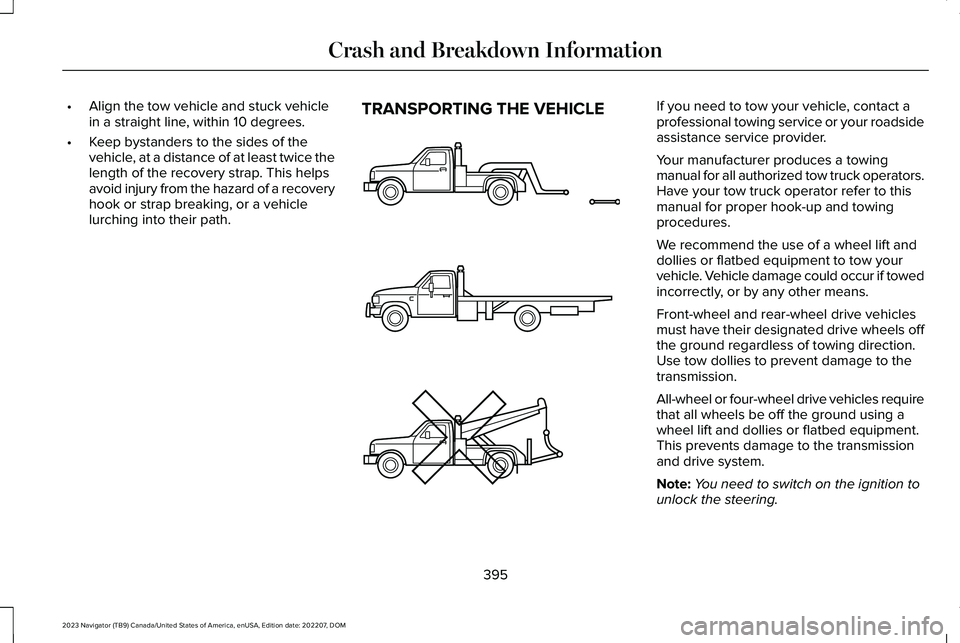
TRANSPORTING THE VEHICLEIf you need to tow your vehicle, contact aprofessional towing service or your roadsideassistance service provider.
Your manufacturer produces a towingmanual for all authorized tow truck operators.Have your tow truck operator refer to thismanual for proper hook-up and towingprocedures.
We recommend the use of a wheel lift anddollies or flatbed equipment to tow yourvehicle. Vehicle damage could occur if towedincorrectly, or by any other means.
Front-wheel and rear-wheel drive vehiclesmust have their designated drive wheels offthe ground regardless of towing direction.Use tow dollies to prevent damage to thetransmission.
All-wheel or four-wheel drive vehicles requirethat all wheels be off the ground using awheel lift and dollies or flatbed equipment.This prevents damage to the transmissionand drive system.
Note:You need to switch on the ignition tounlock the steering.
395
2023 Navigator (TB9) Canada/United States of America, enUSA, Edition date: 202207, DOMCrash and Breakdown InformationE143886
Page 400 of 660
Note:Make sure you check the steeringcolumn before towing. It could lock if thebattery is dead.
396
2023 Navigator (TB9) Canada/United States of America, enUSA, Edition date: 202207, DOMCrash and Breakdown Information
Page 401 of 660
TOWING YOUR VEHICLE
PRECAUTIONS
Use the following guidelines when towingyour vehicle. Failure to follow this instructioncould result in vehicle damage not coveredby the vehicle warranty.
Note:Make sure you properly secure yourvehicle to the tow vehicle.
Note:If you are unsure of the vehicle’sconfiguration, contact an authorized dealer.
RECREATIONALLY TOWING YOUR
VEHICLE - 4X4
WARNING: Do not disconnect thebattery when recreationally towing yourvehicle. This prevents the transfer casefrom shifting properly and could cause thevehicle to roll, even if the transmission isin park (P).
WARNING: Placing the transfer casein its neutral position could cause yourvehicle to freely roll. Make sure you pressand hold the brake pedal and the vehicleis in a secure, safe position when you placethe transfer case in its neutral position.
Follow these guidelines if you have a needfor recreational towing. An example ofrecreational towing would be towing yourvehicle behind a motorhome. Theseguidelines are to make sure that you do notdamage the transmission.
You can only tow your vehicle with all wheelson the ground by placing the transfer casein its neutral position and engaging therecreational tow feature. Perform thefollowing steps after positioning your vehiclebehind the tow vehicle and properly securingthem together.
Note:Put your climate control system inrecirculated air mode to prevent exhaustfumes from entering your vehicle.
Note:Failure to put the transfer case in itsneutral position can damage vehiclecomponents.
Note: You can check the towing status atany time by opening the driver door orturning the ignition to the accessory or onposition. Neutral Tow Enabled LeaveTransmission in Neutral appears in theinstrument cluster display to confirm you canrecreationally tow your vehicle.
Note:If your vehicle has an anti-theft alarm,make sure you switch perimeter sensing onwhen towing. See Setting the AlarmSecurity Level (page 107).
Switching Neutral Tow On
1.Start your vehicle.
2.Make sure your vehicle is in NORMALmode. See Selecting a Drive Mode(page 295).
3.Place your vehicle in temporary neutralmode. See Entering Temporary NeutralMode (page 222).
397
2023 Navigator (TB9) Canada/United States of America, enUSA, Edition date: 202207, DOMTowing Your Vehicle
Page 402 of 660
4.Switch your vehicle off by pressing thepush button ignition switch once. Amessage appears in the instrumentcluster display.
5.Switch your vehicle to accessory modeby pressing the push button ignitionswitch once without pressing the brakepedal.
6.Press and hold the brake pedal.
7.Using the instrument cluster controls onthe steering wheel, select Settings.
8.Select Neutral Tow.
9.Press and hold the OK button until aconfirmation message appears in theinformation display.
Note: If completed successfully, theinformation display shows Neutral TowEnabled Leave Transmission in Neutral. This indicates that your vehicle is safe to towwith all wheels on the ground.
Note:If you do not see a confirmationmessage in the instrument cluster display,you must perform the procedure again fromthe beginning.
Note:You may hear noise as the transfercase shifts into its neutral position. This isnormal.
10.Release the brake pedal.
11.Leave the transmission in neutral (N)and switch your vehicle off by pressingthe push button ignition switch oncewithout pressing the brake pedal.
Switching Neutral Tow Off
1.With your vehicle properly secured to thetow vehicle, press and hold the brakepedal and start the engine.
2.Switch your vehicle off by pressing thepush button ignition switch once andrelease the brake pedal.
3.Place your vehicle in accessory mode bypressing the push button ignition switchonce without pressing the brake pedal.
4.Press and hold the brake pedal.
5.Shift into park (P).
6.Release the brake pedal.
Note:If completed successfully, theinstrument cluster displays 2H and NeutralTow Disabled.
Note:You must perform the switchingneutral tow on and switching neutral tow offprocedures again from the beginning if theindicator light and message do not display.
Note:You may hear a noise as the transfercase shifts out of its neutral position. This isnormal.
7.Apply the parking brake, then disconnectyour vehicle from the tow vehicle.
8.Release the parking brake, start theengine, and shift into drive (D) to makesure the transfer case is out of the neutraltow position.
9.If the transfer case does not successfullyshift out of its neutral position, set theparking brake. Have your vehiclechecked as soon as possible.
Resolving the Shift Delayed Drive ForwardMessage
1.Press and hold the brake pedal.
2.Start your vehicle.
398
2023 Navigator (TB9) Canada/United States of America, enUSA, Edition date: 202207, DOMTowing Your Vehicle