warning LINCOLN NAVIGATOR 2023 Owner's Guide
[x] Cancel search | Manufacturer: LINCOLN, Model Year: 2023, Model line: NAVIGATOR, Model: LINCOLN NAVIGATOR 2023Pages: 660, PDF Size: 14.04 MB
Page 69 of 660
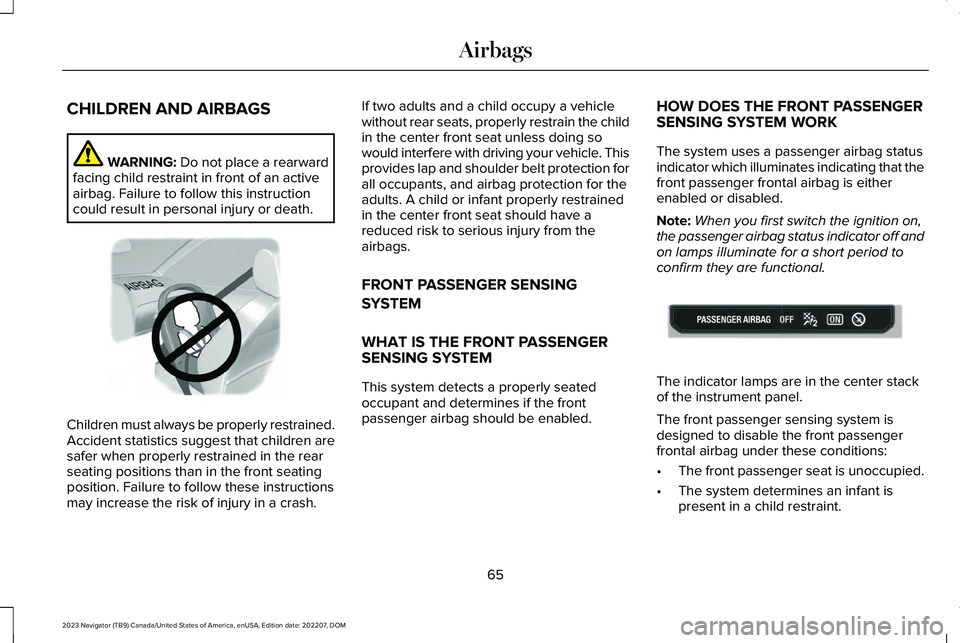
CHILDREN AND AIRBAGS
WARNING: Do not place a rearwardfacing child restraint in front of an activeairbag. Failure to follow this instructioncould result in personal injury or death.
Children must always be properly restrained.Accident statistics suggest that children aresafer when properly restrained in the rearseating positions than in the front seatingposition. Failure to follow these instructionsmay increase the risk of injury in a crash.
If two adults and a child occupy a vehiclewithout rear seats, properly restrain the childin the center front seat unless doing sowould interfere with driving your vehicle. Thisprovides lap and shoulder belt protection forall occupants, and airbag protection for theadults. A child or infant properly restrainedin the center front seat should have areduced risk to serious injury from theairbags.
FRONT PASSENGER SENSING
SYSTEM
WHAT IS THE FRONT PASSENGERSENSING SYSTEM
This system detects a properly seatedoccupant and determines if the frontpassenger airbag should be enabled.
HOW DOES THE FRONT PASSENGERSENSING SYSTEM WORK
The system uses a passenger airbag statusindicator which illuminates indicating that thefront passenger frontal airbag is eitherenabled or disabled.
Note:When you first switch the ignition on,the passenger airbag status indicator off andon lamps illuminate for a short period toconfirm they are functional.
The indicator lamps are in the center stackof the instrument panel.
The front passenger sensing system isdesigned to disable the front passengerfrontal airbag under these conditions:
•The front passenger seat is unoccupied.
•The system determines an infant ispresent in a child restraint.
65
2023 Navigator (TB9) Canada/United States of America, enUSA, Edition date: 202207, DOMAirbagsE142846 E181984
Page 71 of 660
•Other passengers pushing or pulling onthe seat.
•Rear passenger feet and knees restingor pushing on the seat.
The listed conditions could cause the weightof a properly seated occupant to beincorrectly interpreted by the front passengersensing system. The person in the frontpassenger seat could appear heavier orlighter due to the conditions listed.
Make sure the front passengersensing system is operatingproperly. See Crash Sensors andAirbag Indicator (page 68).
If the airbag readiness light is on, do thefollowing:
•Pull your vehicle over.
•Switch your vehicle off.
•Check for any objects lodged underneaththe front passenger seat or cargointerfering with the seat.
•Remove the obstruction if found.
•Restart your vehicle.
•Wait at least two minutes and verify thatthe airbag readiness light in theinstrument cluster is no longerilluminated.
•If the airbag readiness light in theinstrument cluster remains illuminated,there may be a problem due to the frontpassenger sensing system.
Do not attempt to repair or service thesystem. Take your vehicle in for serviceimmediately.
If it is necessary to modify an advanced frontairbag system to accommodate a personwith disabilities, contact your CustomerRelationship Center. See Contacting Us(page 17).
FRONT PASSENGER SENSINGSYSTEM PRECAUTIONS
WARNING: Sitting improperly, out ofposition or with the seatback reclined toofar can take weight off the seat cushionand affect the decision of the passengersensing system, resulting in serious injuryor death in the event of a crash. Always situpright against your seat back, with yourfeet on the floor.
WARNING: Any alteration ormodification to the front passenger seatmay affect the performance of the frontpassenger sensing system. This couldseriously increase the risk of injury ordeath.
67
2023 Navigator (TB9) Canada/United States of America, enUSA, Edition date: 202207, DOMAirbagsE67017
Page 72 of 660
FRONT PASSENGER SENSING SYSTEM INDICATORS
Passenger AirbagPassenger Airbag Status IndicatorOccupant
DisabledOFF: IlluminatedEmpty
ON: Not Illuminated
DisabledOFF: IlluminatedChild
ON: Not Illuminated
EnabledOFF: Not IlluminatedAdult
ON: Illuminated
CRASH SENSORS AND AIRBAG
INDICATOR
WARNING: Modifying or addingequipment to the front of your vehiclecould affect the performance of the airbagsystem, increasing the risk of injury. Thisincludes the hood, bumper system, frame,front body structure, tow hooks, hood pins,push bar and snowplows.
Your vehicle has a collection of crash andoccupant sensors. These sensors provideinformation to the restraints control modulewhich activates the following:
•Front seatbelt pretensioners.
•Adaptive steering column.
•Driver airbag.
•Passenger airbag.
•Seat mounted side airbags.
•Safety Canopy.
Based on the type of crash, the restraintscontrol module deploys the appropriatesafety devices.
The restraints control module also monitorsthe readiness of the above safety devicesplus the crash and occupant sensors. Thereadiness of the safety system is indicatedby a warning indicator light in the instrumentcluster or by a backup tone if the warninglight is not working. Routine maintenance ofthe airbag is not required.
A difficulty with the system is indicated byone or more of the following:
68
2023 Navigator (TB9) Canada/United States of America, enUSA, Edition date: 202207, DOMAirbags
Page 74 of 660
WHAT IS 911 ASSIST
911 Assist is a SYNC system feature that cancall for help.
For more information, visitwww.owner.ford.com.
HOW DOES 911 ASSIST WORK
If a crash deploys an airbag, excluding kneeairbags and rear inflatable seatbelts, oractivates the fuel pump shut-off, your vehiclemay be able to contact emergency servicesby dialing 911 through a paired andconnected Bluetooth® enabled phone.
Not all crashes deploy an airbag or activatethe fuel pump shut-off. If a connected cellphone sustains damage or loses itsconnection to SYNC during a crash, SYNCsearches for and tries to connect to apreviously paired cell phone. SYNC thenattempts to call the emergency services.
Before making the call:
•SYNC provides about 10 seconds tocancel the call. If you fail to cancel thecall, SYNC attempts to dial 911.
•SYNC says the following, or a similarmessage: SYNC will attempt to call 911,to cancel the call, press Cancel on yourscreen or press and hold the phonebutton on your steering wheel.
If you do not cancel the call and SYNC makesa successful call a pre-recorded messageplays for the 911 operator. The occupants inyour vehicle are able to talk with theoperator. Be prepared to provide your name,phone number and location immediatelybecause not all 911 systems are capable ofreceiving this information electronically.
During an emergency call the systemtransmits vehicle data to the emergencyservice.
EMERGENCY CALL
REQUIREMENTS
WARNING: Do not wait for 911 Assistto make an emergency call if you can doit yourself. Dial emergency servicesimmediately to avoid delayed responsetime which could increase the risk ofserious injury or death after a crash. If youdo not hear 911 Assist within five secondsof the crash, the system or phone may bedamaged or non-functional.
WARNING: Always place your phonein a secure location in your vehicle so itdoes not become a projectile or getdamaged in a crash. Failure to do so maycause serious injury to someone ordamage the phone which could prevent911 Assist from working properly.
WARNING: Unless the 911 Assistsetting is set on before a crash, the systemwill not dial for help which could delayresponse time, potentially increasing therisk of serious injury or death after a crash.
70
2023 Navigator (TB9) Canada/United States of America, enUSA, Edition date: 202207, DOM911 Assist
Page 76 of 660
REMOTE CONTROL LIMITATIONS
WARNING: Changes or modificationsnot expressively approved by the partyresponsible for compliance could void theuser's authority to operate the equipment.The term "IC:" before the radio certificationnumber only signifies that Industry Canadatechnical specifications were met.
This device complies with Part 15 of the FCCRules and with Industry Canadalicense-exempt RSS standard(s). Operationis subject to the following two conditions: (1)This device may not cause harmfulinterference, and (2) This device must acceptany interference received, includinginterference that may cause undesiredoperation.
Make sure a valid remote control is within3 ft (1 m) from the front door handles and rearof vehicle.
The system may not function if:
•The remote control remains stationaryfor about a minute.
•The vehicle battery has no charge.
•The remote control battery has nocharge.
•There is interference causing issues withthe remote control frequencies.
•The remote control is too close to metalobjects or electronic devices, for examplekeys or a cell phone.
USING THE REMOTE CONTROL
Use your remote control to access variousvehicle systems.
Note:The buttons on your remote may varydepending on the vehicle region or options.
Unlock
Press the button to unlock alldoors. See Unlocking andLocking the Doors Using theRemote Control (page 87).
Lock
Press the button to lock all doors.See Unlocking and Locking theDoors Using the Remote Control(page 87).
Remote Start (If Equipped)
Press the button to remote start.See Remotely Starting andStopping the Vehicle (page 156).
Liftgate (If Equipped)
Press the button to open or closethe liftgate.
Panic Alarm (If Equipped)
Press the button to sound thepanic alarm. See Sounding thePanic Alarm (page 73).
72
2023 Navigator (TB9) Canada/United States of America, enUSA, Edition date: 202207, DOMKeys and Remote ControlsE138629 E138623 E138625 E267940 E138624
Page 77 of 660
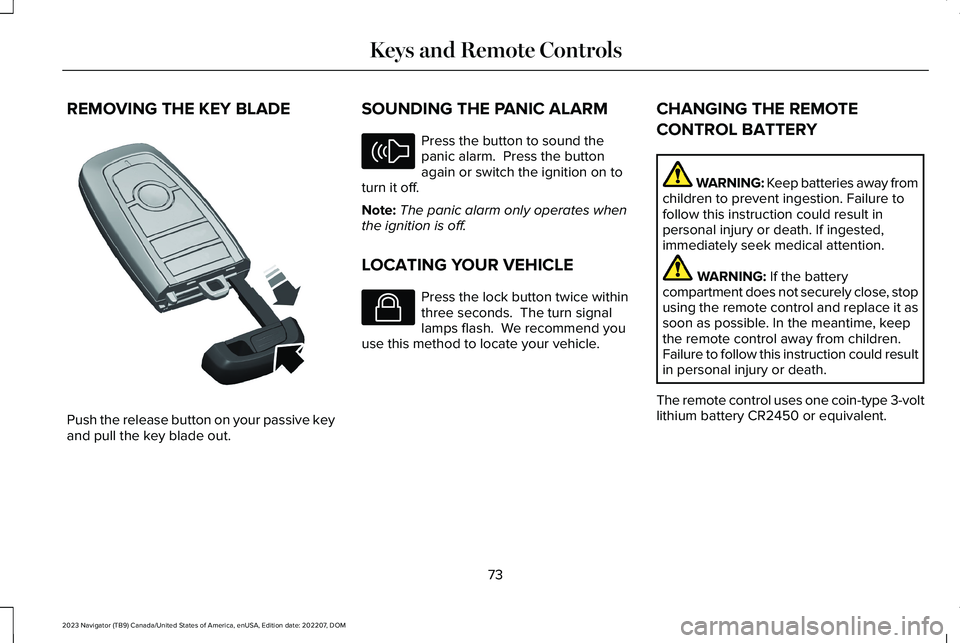
REMOVING THE KEY BLADE
Push the release button on your passive keyand pull the key blade out.
SOUNDING THE PANIC ALARM
Press the button to sound thepanic alarm. Press the buttonagain or switch the ignition on toturn it off.
Note:The panic alarm only operates whenthe ignition is off.
LOCATING YOUR VEHICLE
Press the lock button twice withinthree seconds. The turn signallamps flash. We recommend youuse this method to locate your vehicle.
CHANGING THE REMOTE
CONTROL BATTERY
WARNING: Keep batteries away fromchildren to prevent ingestion. Failure tofollow this instruction could result inpersonal injury or death. If ingested,immediately seek medical attention.
WARNING: If the batterycompartment does not securely close, stopusing the remote control and replace it assoon as possible. In the meantime, keepthe remote control away from children.Failure to follow this instruction could resultin personal injury or death.
The remote control uses one coin-type 3-voltlithium battery CR2450 or equivalent.
73
2023 Navigator (TB9) Canada/United States of America, enUSA, Edition date: 202207, DOMKeys and Remote ControlsE322866 E138624 E138623
Page 86 of 660
WHAT IS MYKEY
MyKey allows you to program keys withrestricted driving modes to promote gooddriving habits.
You can program the restrictions to all keysexcept one. Any keys that you did notprogram are administrator keys or adminkeys.
Note:Every MyKey receives the samerestrictions and settings. You cannotprogram them individually.
MYKEY SETTINGS
NON-CONFIGURABLE MYKEYSETTINGS
Seatbelt Reminder or Belt-Minder™
MyKey mutes the audio system until the frontseat passengers buckle the front seat belts.
Note:If your vehicle includes an AM/FMradio or a very basic audio system, the radiomay not mute.
Satellite Radio (If Equipped)
Some satellite radio channels have restrictedaccess to adult radio content.
Early Low Fuel
The low fuel level warning lamp turns onearlier.
Driving and Parking Aids
You cannot configure settings for parkingaids, blind spot information system, and crosstraffic alert. These systems turn on when thevehicle turns on, and you cannot switch themoff with a MyKey.
You cannot configure settings forpre-collision assist and lane keeping. Thesesystems turn on when the vehicle turns on.
A new destination in the navigation systemcan only be set using voice commands whenusing a MyKey, and with your vehicle moving.
Note:MyKey drivers may be able to switchthe lane keeping assist off, but this featureturns back on automatically with every newkey cycle.
CONFIGURABLE MYKEY SETTINGS
You can configure the following settings aftercreating a MyKey. See Creating a MyKey(page 83).
Speed Limit
WARNING: Do not set MyKeymaximum speed limit to a limit that willprevent the driver from maintaining a safespeed considering posted speed limits andprevailing road conditions. The driver isalways responsible to drive in accordancewith local laws and prevailing conditions.Failure to do so could result in accident orinjury.
You can set a speed limit for your vehicle.Warning messages appear on thetouchscreen and a tone sounds if yourvehicle reaches the set speed. You cannotoverride the set speed when using a MyKey.
82
2023 Navigator (TB9) Canada/United States of America, enUSA, Edition date: 202207, DOMMyKey™
Page 87 of 660
Speed Minder
You can set a speed reminder for yourvehicle. Warning messages appear on thetouchscreen and a tone sounds if yourvehicle exceeds the set speed.
Audio System Volume Limit
The audio system maximum volume reduces.A message appears on the touchscreen ifyou attempt to exceed the volume limit.Automatic volume control turns off.
911 Assist
If you set 911 assist to always on, you cannotswitch it off with a MyKey.
Do Not Disturb
If you set do not disturb to always on, youcannot switch it off with a MyKey.
Note:If a phone is connected using AppleCarPlay or Android Auto while driving witha MyKey, the driver can receive phone callsand text messages even if the do not disturbrestriction is on. And if the vehicle comeswith satellite radio, there is no restriction onthe adult content.
Traction and Stability Control
If you set traction control or stability controlto always on, you cannot switch it off with aMyKey.
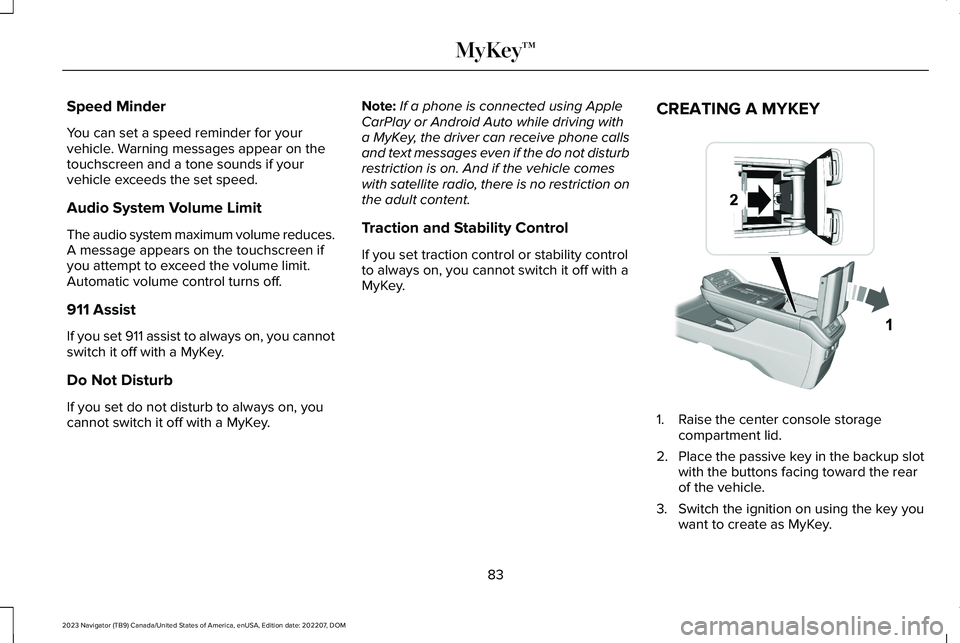
CREATING A MYKEY
1.Raise the center console storagecompartment lid.
2.Place the passive key in the backup slotwith the buttons facing toward the rearof the vehicle.
3.Switch the ignition on using the key youwant to create as MyKey.
83
2023 Navigator (TB9) Canada/United States of America, enUSA, Edition date: 202207, DOMMyKey™ E376555
Page 93 of 660
DOORS AND LOCKS AUDIBLE
WARNINGS
Door Ajar Audible Warning
Sounds when a door is not fully closed andyour vehicle is moving.
DOORS AND LOCKS –
TROUBLESHOOTING
DOORS AND LOCKS – WARNINGLAMPS
Door Ajar Warning Lamp
Illuminates when you switch theignition on and remains on if anydoor or the hood is open.
DOORS AND LOCKS – INFORMATION MESSAGES
ActionMessage
Displays if a door is open. Fully close the door.Driver Door Ajar
Passenger Door Ajar
Rear Left Door Ajar
Rear Right Door Ajar
Displays if a hood is open. Fully close the hood.Hood Ajar
89
2023 Navigator (TB9) Canada/United States of America, enUSA, Edition date: 202207, DOMDoors and LocksE249859
Page 102 of 660
LIFTGATE PRECAUTIONS
WARNING: It is extremely dangerousto ride in a cargo area, inside or outside ofa vehicle. In a crash, people riding in theseareas are more likely to be seriouslyinjured or killed. Do not allow people toride in any area of your vehicle that is notequipped with seats and seatbelts. Makesure everyone in your vehicle is in a seatand properly using a seatbelt. Failure tofollow this warning could result in seriouspersonal injury or death.
WARNING: Make sure that you fullyclose the liftgate to prevent exhaust fumesfrom entering your vehicle. If you areunable to fully close the liftgate, open theair vents or the windows to allow fresh airto enter your vehicle. Failure to follow thisinstruction could result in personal injuryor death.
WARNING: Keep keys out of reachof children. Do not allow children tooperate or play near an open or movingpower liftgate. You should supervise theoperation of the power liftgate at all times.
OPENING THE LIFTGATE
OPENING THE LIFTGATE FROM INSIDEYOUR VEHICLE
With the transmission in park (P),press the button on the instrumentpanel.
Note:Be careful when opening or closingthe liftgate in a garage or other enclosedarea to avoid damaging the liftgate.
Note: Do not hang anything, for example abike rack, from the glass or liftgate. Thiscould damage the liftgate and itscomponents.
Note: Do not leave the liftgate open whiledriving. This could damage the liftgate andits components.
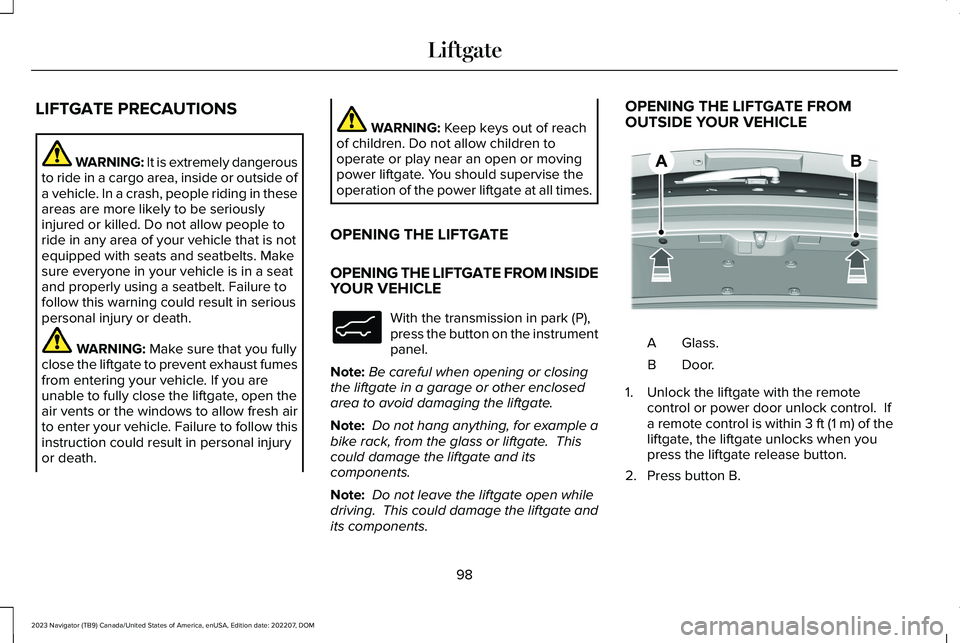
OPENING THE LIFTGATE FROMOUTSIDE YOUR VEHICLE
Glass.A
Door.B
1.Unlock the liftgate with the remotecontrol or power door unlock control. Ifa remote control is within 3 ft (1 m) of theliftgate, the liftgate unlocks when youpress the liftgate release button.
2.Press button B.
98
2023 Navigator (TB9) Canada/United States of America, enUSA, Edition date: 202207, DOMLiftgateE138633 E349965